

Choosing between Sendible and Hootsuite comes down to how you manage content, collaboration, reporting, and day-to-day social media tasks.
In this comparison, we’ll look at Sendible vs Hootsuite across content creation, scheduling, analytics, engagement, integrations, pricing, customer support, and team features.
That way, you can see which social media management tool better fits your social media strategy, whether you manage your own brand, several client accounts, or a larger content operation.
We’ll also include SocialBee as an alternative and show where its features differ from both platforms.
We’re SocialBee LABS SRL, part of WebPros. We use the information you provide to share relevant content & updates, as outlined in our Privacy Policy. You can opt out anytime.
Short Summary
- Sendible is a good fit for small and medium-sized businesses that want straightforward tools for creating, scheduling, and managing social media content. It also suits agencies that need customizable reports for client management.
- Hootsuite is better suited to larger teams that need bulk scheduling, detailed analytics, and a broader range of integrations.
- SocialBee is another option for teams that want AI-assisted content creation, content categories, and evergreen posting. It also offers migration services to make switching from another social media management tool easier.
Sendible vs Hootsuite: Side-by-Side Comparison Table
Features | Sendible | Hootsuite | SocialBee |
| Social Media Profiles | |||
| Post On | X (Twitter), YouTube, Instagram, LinkedIn, Facebook, Google Business Profile | X (Twitter), Facebook, LinkedIn, Instagram, Pinterest, YouTube, TikTok | Facebook, X (Twitter), Instagram, Threads, LinkedIn, Pinterest, Google Business Profiles, TikTok, YouTube, Bluesky |
| Import Content | |||
| CSV Upload | ✅ | ✅ | ✅ |
| RSS Feeds | ✅ | ✅ | ✅ |
| Social Media Management | |||
| AI Social Media Assistant | ❌ | ❌ | ✅ |
| AI Content Generation | ❌ | ✅ | ✅ |
| Content Scheduling | ✅ | ✅ | ✅ |
| Bulk Scheduling | ✅ | ✅ | ✅ |
| Content Publishing | ✅ | ✅ | ✅ |
| Evergreen Posting | ✅ | ❌ | ✅ |
| List View | ✅ | ✅ | ✅ |
| Social Media Calendar | ✅ | ✅ | ✅ |
| Social Media Inbox | ✅ | ✅ | ✅ |
| Content Categories | ✅ | ❌ | ✅ |
| Hashtag Collections | ❌ | ❌ | ✅ |
| Hashtag Generator | ❌ | ✅ | ✅ |
| Team Collaboration | |||
| Client Workspaces | ✅ | ✅ | ✅ |
| Content Approval | ✅ | ✅ | ✅ |
| Analytics | |||
| Social Media Analytics | ✅ | ✅ | ✅ |
| Analytics On Schedule Set Up | ❌ | ❌ | ✅ |
| Content Category Analytics | ✅ | ❌ | ✅ |
| Export PDF Reports | ✅ | ✅ | ✅ |
| Integrations | |||
| Canva Integration | ✅ | ✅ | ✅ |
| Unsplash Integration | ❌ | ❌ | ✅ |
| GIPHY Integration | ✅ | ✅ | ✅ |
| Multiple Shortlink Tools | ❌ | ❌ | ✅ |
| Pocket Integration | ❌ | ✅ | ✅ |
| QUUU Content Curation | ❌ | ✅ | ✅ |
| Customer Support | |||
| Help Documentation | ✅ | ✅ | ✅ |
| Email Support | ✅ | ✅ | ✅ |
| Chat Support | ✅ | ✅ | ✅ |
| Support Calls | ✅ | ✅ | ✅ |
| UTM Customization | |||
| Category-Based UTM Settings | ✅ | ❌ | ✅ |
| Custom URL and Tracking | ✅ | ✅ | ✅ |
| Additional Tools | |||
| Mobile App | ✅ | ✅ | ✅ |
| Chrome Extension | ✅ | ❌ | ❌ |
| Additional Services | |||
| Concierge Services | ❌ | ❌ | ✅ |
| Migration / Onboarding | ❌ | ❌ | ✅ |
| Pricing Plans | |||
Monthly Plans | ✅ | ✅ | ✅ |
| Yearly Plans | ✅ | ❌ | ✅ |
Check out how independent sources compare and review:
Sendible vs Hootsuite: How to Choose the Best Social Media Management Platform
In the realm of social media management tools, finding the one that perfectly complements your marketing efforts is essential. However, it may be challenging to determine the criteria that should guide your decision.
These are the features you need in social media management software:
- Supported social media platforms
- Content creation features
- Social media planning and scheduling
- Social media analytics
- Social inbox and engagement tools
- Team collaboration features
- User experience and ease of use
- Integrations
- Pricing
- Customer support
1. Supported Social Media Platforms
Platform support matters because a social media management tool needs to cover the channels your brand or clients actually use.
Here’s how Sendible and Hootsuite compare:
Social Platform | Sendible | Hootsuite |
Yes | Yes | |
| X (formerly Twitter) | Yes | Yes |
Yes | Yes | |
Yes | Yes | |
| TikTok | Yes | Yes |
Yes | Yes | |
| Google Business Profile | Yes | No |
| YouTube | Yes | Yes |
Both Sendible and Hootsuite support major social networks such as Facebook, Instagram, LinkedIn, TikTok, Pinterest, YouTube, and X.
The main difference here is Google Business Profile. Sendible supports it, while Hootsuite does not.
So, if Google Business Profile is part of your social media presence, that difference may matter when choosing between the two platforms.
2. Content Creation Features
Sendible and Hootsuite take different approaches to social media content creation.
Sendible gives you more native editing options. You can customize posts with different fonts, colors, and layouts, while the built-in image editor lets you prepare visuals without opening a separate design tool.
It also supports direct video uploads and basic video editing, so you can make simple adjustments before publishing.
Hootsuite, on the other hand, puts more emphasis on content curation.
You can discover and share content from different online sources, while its Canva integration helps with visual creation. Hootsuite also includes a media library for storing images and videos.
However, because Hootsuite does not offer native video editing, you may still need an external tool for creating video content.
So, Sendible is more useful if you want more creation tools built directly into the platform, while Hootsuite may suit teams that rely more on curation and external design tools.
3. Social Media Planning and Scheduling
Sendible and Hootsuite both support social media planning and scheduling, but they approach it differently.
Sendible focuses on a simpler, more visual planning experience. Its calendar gives you a clear view of upcoming posts, which makes it easier to see how your content is distributed across the week or month.
You can also:
- Customize posts for each social media platform
- Use the Queue feature to build a recurring content pipeline
- Publish queued posts automatically based on a set schedule
Hootsuite, meanwhile, is better suited to handling larger publishing volumes and multiple social media accounts.
Its bulk scheduling tools can save time when you need to prepare many posts at once. In addition, automated scheduling can recommend posting times based on performance data.
Hootsuite’s calendar is more functional than visual, but it gives you more detailed control over when and where content is published.
So, Sendible may work better if you prefer a simpler planning experience, while Hootsuite is more useful when you need to manage a higher volume of scheduled content across several accounts.
4. Social Media Analytics
Both Sendible and Hootsuite include social media analytics, but they emphasize different types of reporting.
Sendible gives you more detailed performance data at the post, campaign, and audience level.
That makes it useful when you want to compare specific pieces of content, track campaign results, or look for patterns across audience segments.
Hootsuite, meanwhile, gives you a broader view of overall social media performance.
You can track engagement metrics such as likes, comments, and shares, while also reviewing audience demographics like age, gender, and location.
So, Sendible may be more useful for detailed content and campaign analysis, while Hootsuite is better suited to teams that want a wider performance overview across their social media activity.
5. Social Inbox and Engagement Tools
Both Sendible and Hootsuite offer a unified social inbox for managing comments, messages, and mentions across multiple social media accounts.
Sendible also brings in interactions from Google Business Profile and TikTok, which gives you broader coverage in the same inbox.
Its layout is designed to make conversations easy to scan, so you can quickly see what needs a reply and prioritize urgent messages.
Hootsuite offers similar inbox functionality by bringing incoming social interactions into one dashboard.
That means both tools can reduce the need to check each platform separately, but Sendible covers a few additional channels within its inbox.
6. Team Collaboration Features
Sendible and Hootsuite both support team collaboration, but they are designed for different levels of complexity.
Sendible works well for small and medium-sized teams that need clear task ownership and simple review processes.
Its collaboration features include:
- Task assignments
- Approval workflows
- Custom user roles and permissions
This makes it easier to divide responsibilities and review content before it goes live.
Hootsuite, meanwhile, offers more detailed permission settings, task management features, and team-level controls.
As a result, it may be more useful for larger organizations managing more users, accounts, and approval steps.
7. User Experience and Ease of Use
Sendible has a cleaner, more straightforward interface, which can make it easier to learn and navigate.
That makes it a good fit for smaller teams, beginners, or anyone who prefers a simpler social media management setup.
Hootsuite, meanwhile, includes a wider range of features and settings.
That added depth can be useful for more complex social media operations, but it also means the platform may take longer to learn.
So, Sendible is likely to feel more approachable at first, while Hootsuite may suit teams that are comfortable with a more feature-heavy interface.
8. Integrations
Sendible and Hootsuite both connect with third-party tools, but Hootsuite offers a much larger integration ecosystem.
Sendible supports more than 100 integrations, including:
- Canva for creating social media graphics
- Google Analytics for tracking social media ROI
- CRM tools for lead generation and customer management
These integrations cover many of the tools marketers already use for content creation, reporting, and customer relationships.
Hootsuite, meanwhile, integrates with more than 350 third-party tools.
Its integrations include:
- Adobe Stock and Google Drive for media and file management
- Zendesk for teams using social media for customer service
- Shopify for e-commerce businesses that want to connect social media activity with sales
So, Sendible covers many common marketing needs, while Hootsuite gives larger teams more options for connecting social media management with the rest of their tech stack.
9. Pricing
Sendible has a lower starting price than Hootsuite, although the right plan will depend on the number of users, accounts, and features you need.
Here’s how their monthly pricing compares:
Sendible Prices | Hootsuite Prices |
|
|
Both platforms may also charge extra for certain add-ons, such as additional storage or custom branding.
So, compare more than the monthly price alone. Check which features, users, and social accounts are included in each plan before choosing.
If available, you can also use the free trials to see which platform feels easier to use for your day-to-day social media management.
10. Customer Support
Sendible puts more emphasis on direct support and onboarding.
That can be useful if you want help learning the platform or getting your accounts set up, especially when you are switching from another social media management tool.
Hootsuite, on the other hand, offers a large collection of tutorials, guides, and community resources for users who prefer self-service support.
However, 24/7 support is limited to its Enterprise plan. So, the better fit depends partly on whether you prefer direct assistance or are comfortable finding answers through documentation and other support resources.
When to Choose Sendible
Sendible may be a better fit if you want a simpler social media management platform with strong content creation and client reporting features.
Choose Sendible if you:
- Want more built-in content creation tools: Its post formatting options and image editor give you more ways to prepare content inside the platform.
- Prefer a simpler interface: Sendible is easier to navigate, which can make onboarding faster for smaller teams or new users.
- Need custom client reports: Agencies and freelancers can create branded reports to share with clients.
- Work with a small or medium-sized team: Its collaboration tools include task assignments, approval workflows, and customizable user roles.
- Value direct support: Sendible puts more emphasis on onboarding and hands-on assistance.
- Have a smaller budget: Its entry-level plans cost less than Hootsuite’s.
When to Choose Hootsuite
Hootsuite may make more sense if you manage a larger social media operation and need more advanced scheduling, integrations, and team controls.
Choose Hootsuite if you:
- Manage multiple social media accounts: Hootsuite is built to handle publishing and monitoring across several accounts.
- Need broader analytics: Its reporting tools give larger teams more ways to track social media performance.
- Schedule content at scale: Bulk scheduling is useful when you manage large campaigns or plan content for several clients.
- Work with a larger team: More detailed roles, permissions, and task management features can help coordinate complex social media operations.
- Prefer self-service support: Hootsuite offers tutorials, webinars, guides, and a large knowledge base.
- Have a larger budget: Its higher-priced plans are designed around teams that need more advanced features and account management.
What Is a Good Sendible and Hootsuite Alternative?
If neither Hootsuite nor Sendible fits your needs, SocialBee is another social media management platform worth considering.
It offers content creation, scheduling, analytics, engagement, and collaboration features for entrepreneurs, creators, businesses, and agencies.
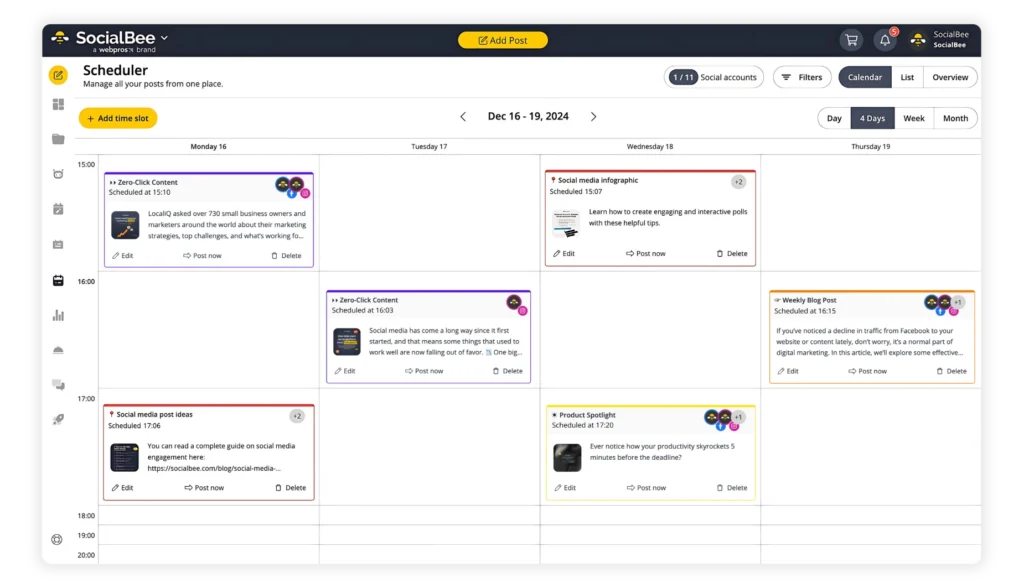
Manage all your favorite social accounts with ease from one place with SocialBee.
Start your 14-day free trial today!
Because SocialBee approaches some parts of social media management differently, it also includes features you won’t find in the same form in Sendible or Hootsuite.
These include:
- AI assistant
- AI content generation
- Hashtag collections
- Evergreen posting
- Migration services
- Content categories
- Affordable pricing
1. AI Assistant
SocialBee’s Copilot helps you build a social media strategy based on information about your business.
Instead of starting with a blank content calendar, you can use Copilot to generate recommendations for:
- The social networks to focus on
- Your content categories
- A posting schedule
- Ready-to-edit social media posts
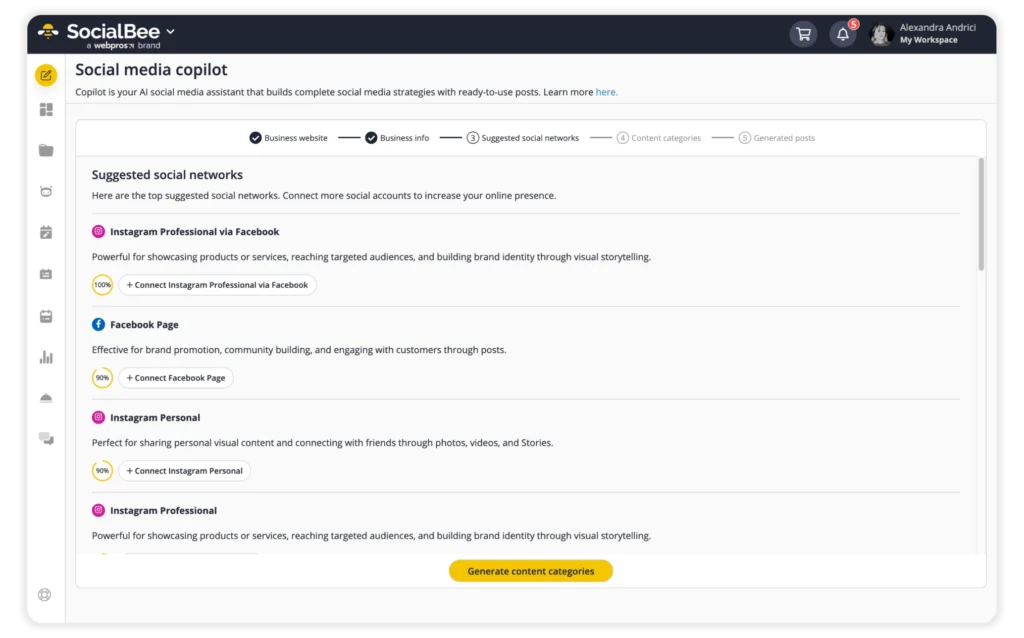
Generate AI-crafted social media strategies with our Social Media Copilot!
As a result, the AI assistant can support the planning stage as well as day-to-day content creation.
2. AI Content Generation
Once you know what you want to post, SocialBee’s AI Post Generator can help turn those ideas into content.
It includes more than 1,000 prompts and lets you generate captions based on the platform, tone of voice, and other preferences.
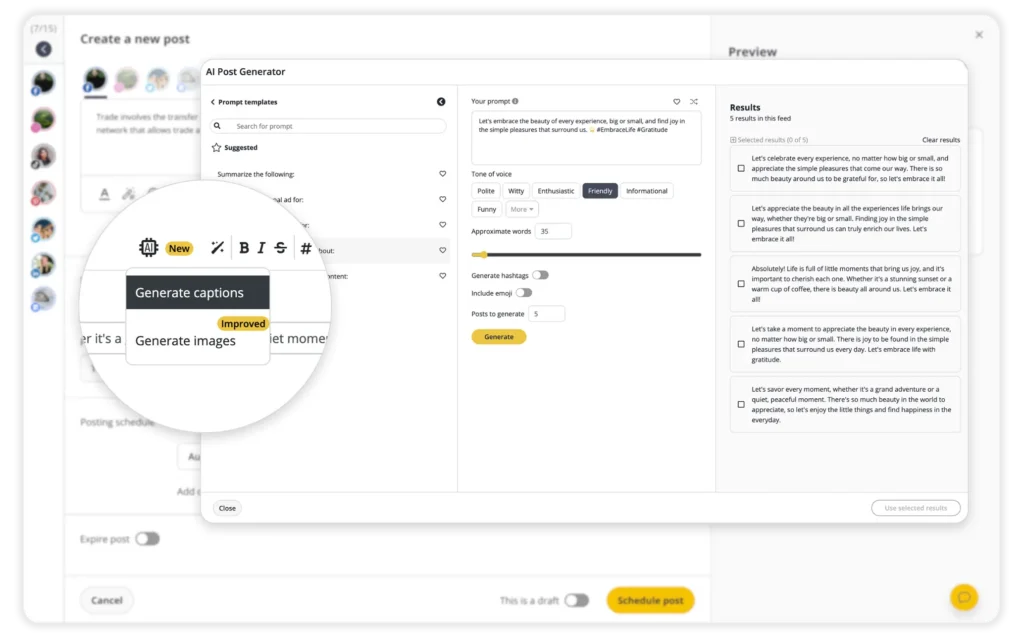
Create posts from scratch in only seconds with SocialBee’s AI Post Generator.
Start your 14-day free trial now!
You can also generate images from text prompts. So, if you need both copy and visuals, you can create more of the post without moving between several tools.
3. Hashtag Collections
SocialBee also lets you save hashtags into reusable collections.
For example, you might create separate groups for product posts, educational content, events, or specific campaigns.
Then, when you create a relevant post, you can insert the collection instead of searching for the same hashtags again.
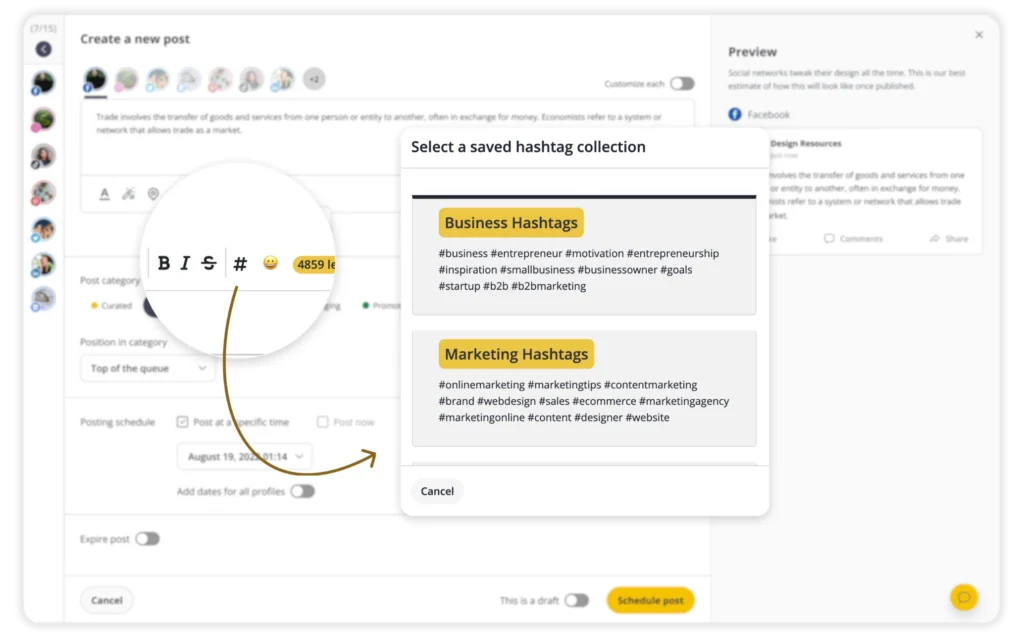
Create hashtag collections for your next posts with SocialBee.
Start your 14-day free trial now!
This feature is not available in the same way in Sendible or Hootsuite.
4. Migration Services
Switching social media management platforms can take extra work when you already have scheduled posts and account settings in place.
SocialBee’s migration service can help transfer your existing content when you move to the platform.
That way, you do not have to rebuild everything manually before you can start using your new account.
Hootsuite and Sendible do not offer the same type of migration service.
5. Evergreen Posting
Not every social media post needs to disappear from your schedule after it is published once.
With SocialBee, you can mark evergreen content for reuse and automatically return it to your posting queue later.
For instance, this can work well for blog articles, educational tips, guides, and other posts that remain useful over time.
As a result, you can continue getting value from relevant content without manually rescheduling every post.
Hootsuite does not offer the same evergreen posting feature.
6. Content Categories
SocialBee’s content categories help you organize posts by topic, format, campaign, or purpose.
For example, you could create separate categories for:
- Educational content
- Promotions
- Blog posts
- Customer stories
- Industry news
You can also organize categories around your content pillars.
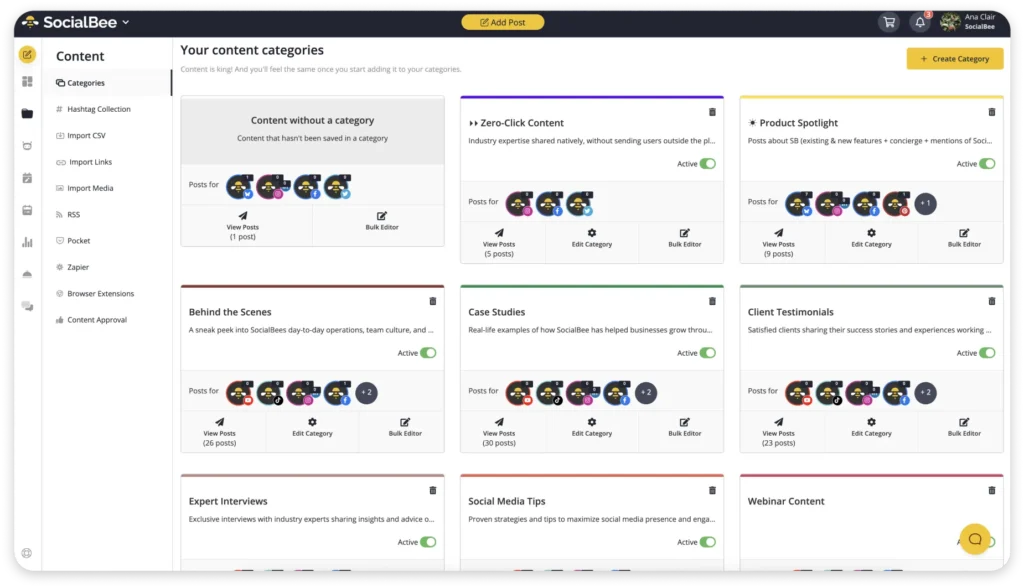
Customize your own content categories with SocialBee.
Start your 14-day free trial now!
Once your categories are set up, it becomes easier to see whether your schedule contains a balanced mix of content instead of too many similar posts in a row.
7. Affordable Pricing
Price is another difference to consider when comparing SocialBee, Hootsuite, and Sendible.
SocialBee starts at $29 per month and includes tools for creating, organizing, scheduling, and managing social media content.
Here’s how the three platforms compare on price:
SocialBee | Hootsuite | Sendible |
|---|---|---|
Bootstrap: $29/month Accelerate: $49 /month Pro: $99 /month | Free 30-day trial Professional: $99/month Team: $249/month Enterprise: Custom | Free 14-day trial Lite: $29 /month Essential: $99/month Business: $199/month Enterprise: Custom |
However, the monthly price alone does not tell you which platform offers the best value for your team.
Compare the features, account limits, and collaboration options included in each plan so you can see what you would actually be paying for.
SocialBee vs Sendible & Hootsuite: Side-by-Side Comparison Table
Features | Sendible | Hootsuite | SocialBee |
| Social Media Profiles | |||
| Post On | X (Twitter), YouTube, Instagram, LinkedIn, Facebook, Google Business Profile | X (Twitter), Facebook, LinkedIn, Instagram, Pinterest, YouTube, TikTok | Facebook, X (Twitter), Instagram, Threads, LinkedIn, Pinterest, Google Business Profiles, TikTok, YouTube, Bluesky |
| Import Content | |||
| CSV Upload | ✅ | ✅ | ✅ |
| RSS Feeds | ✅ | ✅ | ✅ |
| Social Media Management | |||
| AI Social Media Assistant | ❌ | ❌ | ✅ |
| AI Content Generation | ❌ | ✅ | ✅ |
| Content Scheduling | ✅ | ✅ | ✅ |
| Bulk Scheduling | ✅ | ✅ | ✅ |
| Content Publishing | ✅ | ✅ | ✅ |
| Evergreen Posting | ✅ | ❌ | ✅ |
| List View | ✅ | ✅ | ✅ |
| Social Media Calendar | ✅ | ✅ | ✅ |
| Social Media Inbox | ✅ | ✅ | ✅ |
| Content Categories | ✅ | ❌ | ✅ |
| Hashtag Collections | ❌ | ❌ | ✅ |
| Hashtag Generator | ❌ | ✅ | ✅ |
| Team Collaboration | |||
| Client Workspaces | ✅ | ✅ | ✅ |
| Content Approval | ✅ | ✅ | ✅ |
| Analytics | |||
| Social Media Analytics | ✅ | ✅ | ✅ |
| Analytics On Schedule Set Up | ❌ | ❌ | ✅ |
| Content Category Analytics | ✅ | ❌ | ✅ |
| Export PDF Reports | ✅ | ✅ | ✅ |
| Integrations | |||
| Canva Integration | ✅ | ✅ | ✅ |
| Unsplash Integration | ❌ | ❌ | ✅ |
| GIPHY Integration | ✅ | ✅ | ✅ |
| Multiple Shortlink Tools | ❌ | ❌ | ✅ |
| Pocket Integration | ❌ | ✅ | ❌ |
| QUUU Content Curation | ❌ | ✅ | ✅ |
| Customer Support | |||
| Help Documentation | ✅ | ✅ | ✅ |
| Email Support | ✅ | ✅ | ✅ |
| Chat Support | ✅ | ✅ | ✅ |
| Support Calls | ✅ | ✅ | ✅ |
| UTM Customization | |||
| Category Based UTM Settings | ✅ | ❌ | ✅ |
| Custom URL and Tracking | ✅ | ✅ | ✅ |
| Additional Tools | |||
| Mobile App | ✅ | ✅ | ✅ |
| Chrome Extension | ✅ | ❌ | ❌ |
| Additional Services | |||
| Concierge Services | ❌ | ❌ | ✅ |
| Migration / Onboarding | ❌ | ❌ | ✅ |
| Pricing Plans | |||
| Monthly Plans | ✅ | ✅ | ✅ |
| Yearly Plans | ✅ | ❌ | ✅ |

Switch to SocialBee to Simplify Your Social Media Planning
If you decide to switch platforms, SocialBee’s migration service can help reduce the amount of manual setup involved.
The service can transfer profile content such as posting schedules, RSS feeds, and shortlink provider settings.
Once the migration is complete, you’ll also receive an email report showing what was transferred.
Frequently Asked Questions
1. What Is the Difference Between Sendible and Hootsuite?
Sendible is generally simpler to use and is well suited to small and medium-sized businesses or agencies that need content creation, scheduling, collaboration, and customizable client reports.
Hootsuite, meanwhile, offers more advanced scheduling, analytics, integrations, and team controls. That makes it more suitable for larger teams managing more accounts and higher publishing volumes.
2. Which Is Better for Small Businesses: Sendible or Hootsuite?
Sendible may be the more practical option for many small businesses because it has a lower starting price and a simpler interface.
However, your choice should also depend on how many accounts you manage, which platforms you use, what you need to measure, and whether other people need to review or approve content.
3. Is Hootsuite Free and Is It Worth Paying For?
Hootsuite discontinued its free plan on March 31, 2023, but new users can still try the platform through a free trial.
Whether a paid plan is worth it depends on the features you actually need. If you manage several accounts and rely on bulk scheduling, advanced analytics, integrations, and team features, the higher price may make sense.
On the other hand, if your social media setup is relatively simple, you may end up paying for features you rarely use.
Choose the Right Social Media Management Platform for Your Needs
The right choice depends on how complex your social media management needs are.
Sendible may suit you better if you want a simpler platform, a lower starting price, and useful features for content creation and client reporting.
Hootsuite, on the other hand, may make more sense if you manage a larger volume of accounts and content and need more advanced analytics, integrations, and team controls.
If neither option feels like the right fit, SocialBee is worth considering. It combines AI-assisted content creation, content categories, evergreen posting, scheduling, analytics, and engagement tools in one platform.
Ultimately, compare the features you will actually use, the number of accounts and team members you need to manage, and how much you are willing to spend.
Start your 14-day SocialBee trial to see how it fits your social media management needs.