

























- 4.7/5
Your all-in-one social media management tool
Plan, create, and schedule a month of social media posts in under an hour.
14-day free trial. No credit card required.
Create more. Publish everywhere. Reach further.
- Integrated with Canva
- 8 hours saved every week
- Official partner of leading platforms
Stop juggling social media in multiple tabs
Manage multiple social networks in less time with one social media manager app that keeps everything organized.
Create
Schedule
Analyze
Engage
Meet your AI social media assistant, Copilot
Simplify social media management with AI-powered planning, content creation, and post customization.
Get a personalized, AI-powered social media strategy tailored to your business and goals. Copilot recommends the right social media platforms, organizes your content categories, builds a posting schedule, and generates ready-to-edit posts to help you stay consistent and reach your audience.
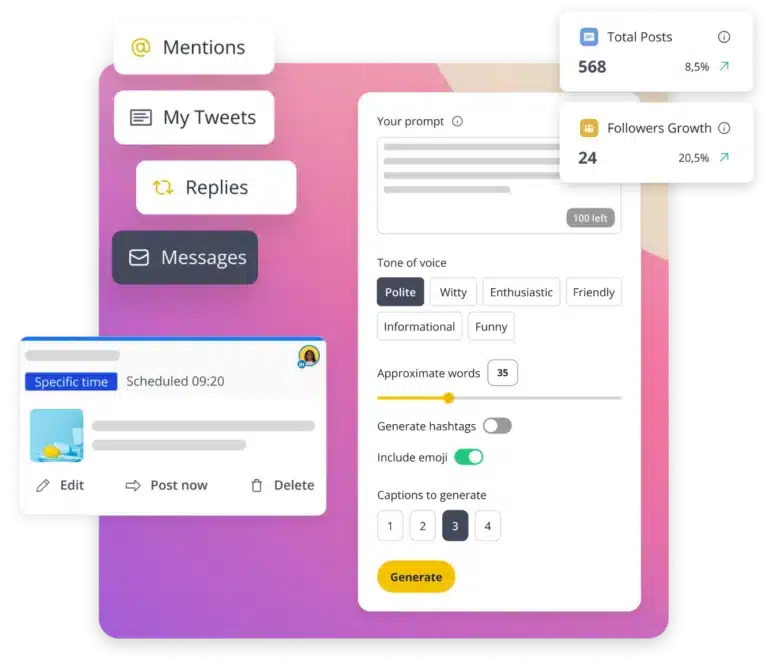
Turn simple prompts into engaging content with our AI social media manager. Generate captions, images, hashtags, and fresh post ideas in seconds. Overcome writer’s block, save time on content creation, and keep your social media content calendar full with posts tailored to your brand.
Transform one idea into platform-ready content in seconds. Copilot adapts your captions, tone of voice, and formatting to fit each social media platform and its audience, all in one click. Save time, stay on-brand, and make every post feel right at home on every social media channel.
A top-rated social media tool on G2!
Social media management leader (United Kingdom)
Social media management leader (Small Business)
Social media management high performer (Mid-Market)
Leader in the social media management category
Flexible plans for teams of all sizes
A social media management platform with powerful social media scheduling. Fair pricing. No commitment.
Try SocialBee free for 14 days, no credit card required.
$24.20
- Connect 5 social media channels
- 1 user/ workspace | 1 workspace
- 10 content categories
- and more...
$40.80
- Connect 10 social media channels
- 1 user/ workspace | 1 workspace
- 50 content categories
- and more...
$82.50
- Connect 25 social media channels
- 3 users/ workspace | 5 workspaces
- Unlimited content categories
- and more...
$29.00
- Connect 5 social media channels
- 1 user/ workspace | 1 workspace
- 10 content categories
- and more...
$49.00
- Connect 10 social media channels
- 1 user/ workspace | 1 workspace
- 50 content categories
- and more...
$99.00
- Connect 25 social media channels
- 3 users/ workspace | 5 workspaces
- Unlimited content categories
- and more...
Find the right SocialBee plan for you
Compare SocialBee plans, features, and pricing to find the right social media management platform for your needs and budget.
Get started with confidence
Have questions about SocialBee? Book a free call with our team to explore your options, get personalized answers, and choose the right plan for your social media needs.
Built for every team, big or small
Grow your brand with social media management built for solopreneurs
Plan your content, publish it across multiple social platforms, and stay consistent without letting social media take over your day.
- Schedule social media posts across all your channels.
- Publish Reels, Stories, Shorts, and other content types.
- Create eye-catching posts with built-in design and media tools.
- Recycle your content to maintain a consistent posting schedule.
- Organize posts into content categories for easier planning.
Everything your small business needs for social media management
Promote your business, reach your target audience, and manage your social media presence with one social media management app.
- Generate engaging social media posts with AI.
- Plan your content calendar and bulk-schedule posts.
- Manage social media comments and messages from one inbox.
- Measure results with clear social media analytics and reports.
- Automate repetitive social media tasks to save more time.
Simplified social media management for your agency and your clients
Use one social media manager platform to manage multiple clients, collaborate with your team, and keep social media accounts organized.
- Take care of multiple clients, brands, and social media accounts.
- Keep client content and assets organized in dedicated workspaces.
- Collaborate with your team to plan your social media campaigns.
- Simplify client approval workflows before posts get posted.
- Create and share professional, client-branded PDF analytics reports.
The proof is in our customers' results
No way I would consider using other social media scheduling apps, because SocialBee provides everything I need.
Managing Director at The Buddy Effect
13.10%
Founder of
Peppercorn
146.57%
Social Media Manager at Martal Group
12,858 impressions
Top content: 1,057 likes & 233 shares.
Social media features you’ll wonder how you lived without
AI hashtag generator
Generate relevant hashtags for your social media posts with AI. Save your favorite hashtags in collections so you can reuse them and simplify your content workflow.
Visual social media planner
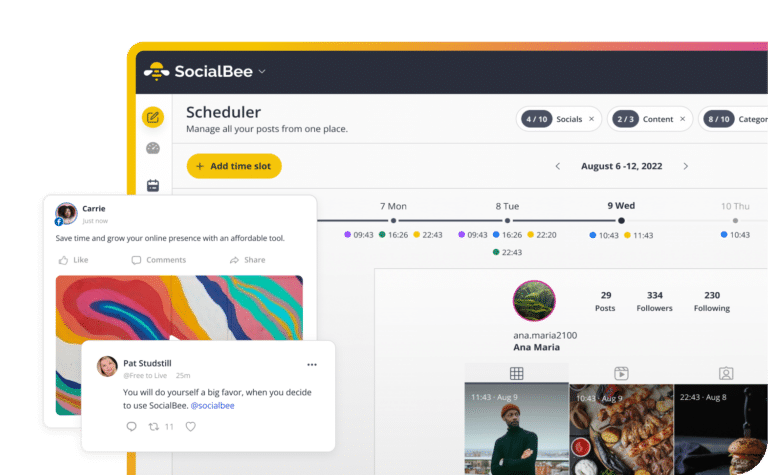
Plan and preview your scheduled posts in calendar, feed, grid, or list views. See how your content looks across social accounts and make changes before publishing.
Best time to post
Find the best times to post on social media with personalized recommendations based on your performance. Reach your audience when they’re likely to engage.
Bulk post editor
Manage your social media calendar by editing, rescheduling, or deleting several posts at once. Keep your content organized without updating every post individually.
First comment scheduling
Schedule your first comment alongside your social media posts to share links, extra details, and hashtags while keeping captions clean, readable, and engaging.
Social media team collaboration
Keep brands organized in dedicated workspaces. Leave feedback on posts, tag teammates, and gather feedback to make social media collaboration smoother.
4x faster than posting manually on socials
You've got questions, we've got answers!
If you’re wondering what is SocialBee, it’s an all-in-one social media management tool that helps you create, schedule, publish, analyze, and handle your conversations from a single dashboard.
Whether you’re a creator, small business, marketer, or agency, the SocialBee tool helps you save time, stay consistent with your content, and cut repetitive manual tasks like logging in and switching between tabs.
If you’re looking for a SocialBee review, the best way to see if it’s the right fit for your needs is to start a free trial and explore the platform yourself.
SocialBee is a social media management tool used by all kinds of clients, from solo creators to agencies and larger organizations.
Social media management for business:
Our clients include freelancers, small businesses, and service providers like coaches, doctors, lawyers, realtors, restaurants, hotels, and creators. SocialBee helps by letting them plan posts in advance and schedule them, so they don’t have to publish manually every day or rely on last-minute posting.
Social media management for agencies:
Our agency clients and social media managers handle multiple brands at the same time, which can quickly become confusing when everything is managed manually.
SocialBee solves this by separating each client into its own workspace, so accounts, content, and planning stay clearly divided while still being managed from one dashboard.
Teams can approve content before it goes live, leave feedback directly on posts, and generate performance reports that can be exported as PDFs and shared with clients, making it easier to keep everyone aligned and informed.
Social media for organizations and institutions:
We also work with schools, universities, nonprofits, churches, government institutions, and similar organizations where several people are involved in content creation and approvals.
SocialBee helps keep everything moving by giving teams a shared place to plan and organize posts, so content doesn’t get stuck or delayed between steps.
Across all of these clients, SocialBee works as a social media management software that reduces the need to switch between tools and keeps everything in one place. That’s also why our users consider it the best social media management tool; it’s simple, affordable, structured, and easy to scale.
SocialBee has six plans, so you can pick the one that matches the number of social media accounts, brands, and team members you manage.
No matter which plan you choose, you’ll be able to schedule and publish content to Facebook, Instagram, X (Twitter), LinkedIn, Pinterest, TikTok, YouTube, Threads, Bluesky, and Google Business Profile. Every plan also includes AI-powered content creation, a social inbox, analytics, content organization tools, and collaboration features.
- Bootstrap ($29/month): A great starting point for solopreneurs and small businesses. Connect up to 5 social profiles and get access to all the essentials for planning, creating, and publishing content. Analytics data is available for up to 3 months. Features like CSV imports, the hashtag organizer, bulk editing, post approvals, internal notes, and branded report exports are not included.
- Accelerate ($49/month): A good fit for growing businesses that need more advanced tools. Connect up to 10 social profiles and get access to advanced analytics, CSV imports, bulk editing, the hashtag organizer, and post approvals. Analytics data is available for up to 2 years. Internal notes and branded report exports are not included.
- Pro ($99/month): Built for social media managers, teams, and agencies. Manage up to 25 social profiles, work across 5 workspaces, invite up to 3 users, and access every SocialBee feature, including branded report exports and internal notes.
- Pro50 ($179/month): Designed for agencies and teams managing more clients. Includes all features, plus support for up to 50 social profiles, 10 workspaces, and 5 users.
- Pro100 ($329/month): Ideal for larger teams managing multiple brands. Includes all features, up to 100 social profiles, 20 workspaces, and 5 users.
- Pro150 ($449/month): Made for agencies and organizations managing social media at a larger scale. Includes all features, up to 150 social profiles, 30 workspaces, and 5 users.
Yes, you can choose between monthly or annual billing on all SocialBee plans. If you go with annual billing, you save 16% compared to paying monthly.
Here’s how much you save by purchasing yearly SocialBee plans:
- Bootstrap ($29/month)
- Monthly: $29 × 12 = $348/year
- Annual (−16%): $292.32/year
- You save: $55.68
- Accelerate ($49/month)
- Monthly: $49 × 12 = $588/year
- Annual (−16%): $493.92/year
- You save: $94.08
- Pro ($99/month)
- Monthly: $99 × 12 = $1,188/year
- Annual (−16%): $997.92/year
- You save: $190.08
- Pro50 ($179/month)
- Monthly: $179 × 12 = $2,148/year
- Annual (−16%): $1,804.32/year
- You save: $343.68
- Pro100 ($329/month)
- Monthly: $329 × 12 = $3,948/year
- Annual (−16%): $3,316.32/year
- You save: $631.68
- Pro150 ($449/month)
- Monthly: $449 × 12 = $5,388/year
- Annual (−16%): $4,525.92/year
- You save: $862.08
So in short, annual billing means you pay for 10 months instead of 12, and get the same plan with a lower total cost.
Yes, SocialBee offers a few ways to explore the platform before or while you get started.
You can try a 14-day free trial of the Pro plan, which gives you access to most of SocialBee’s key features so you can see how everything works in practice.
If you prefer a guided experience, you can also book a live demo. This is a video call with our customer support team, where they walk you through SocialBee and answer your questions.
There’s also an interactive demo on our website, plus a recorded full walkthrough on YouTube, along with short tutorials that explain specific features step by step.
SocialBee integrates with Facebook, Instagram, X (Twitter), LinkedIn, Pinterest, TikTok, YouTube, Threads, Bluesky, and Google Business Profile. It is one of the few platforms to manage social media accounts from one place, so you don’t have to jump between apps.
Once connected, SocialBee brings as much functionality as each platform’s API allows. This includes scheduling and publishing content, analytics, and engagement tools where supported. Because each social network has different API limitations, the exact features available vary from platform to platform.
Yes, SocialBee automatically publishes your content based on the schedule you set in advance.
Once you create a post and assign it a time slot (or a content category with a schedule), SocialBee will take care of posting it at the right time across your connected social media accounts. You don’t need to manually publish each post.
You can also review, edit, or remove scheduled content anytime before it goes live, so you stay in full control while still saving time on day-to-day posting.
Yes, SocialBee includes a visual Scheduler that helps you plan and organize your social media content in one place.
You can switch between different views depending on how you like to work:
- Calendar view: See your scheduled posts by day, week, or month and get a clear overview of what’s coming up.
- List view: View upcoming posts in a simple list format for the next week.
- Grid view (Instagram only): Preview how your Instagram feed will look, including posts and Reels (up to 30 days ahead).
- Overview tab: Set up a recurring weekly posting schedule for your content categories.
You can also add specific time slots for posts or content categories, and easily adjust or remove them whenever your schedule changes. If something isn’t posted as expected, you can also check why directly inside the Scheduler using the failed posts and status views.
Overall, the Scheduler gives you a flexible way to plan, organize, and keep track of your content across all your social media profiles.
Yes, SocialBee offers multiple AI content creation features: the AI Post Generator and Copilot.
The AI Post Generator is built into the post editor and lets you create captions and visuals from a simple prompt. You describe what you want, and it generates captions, post variations, hashtag ideas, tone adjustments, and AI images. You can also customize content for different platforms and create multiple versions of the same post automatically with AI.
Copilot works more like an AI social media manager. You can add your website URL or answer a few questions, and it builds a content strategy based on that information, including what to post, how to structure your content, and ready-to-edit post ideas.
Together, these features make SocialBee an AI social media management tool that helps you go from idea to finished post, without starting from scratch each time.
Yes, SocialBee is built for managing multiple brands or clients from a single account.
You can use workspaces to keep each brand or client completely separate, including their connected social profiles, content, and scheduling.
Each workspace also keeps things separated for analytics and inbox activity, so you can track performance and manage conversations per brand or client without everything being merged together.
Depending on your plan, you can create multiple workspaces and assign team members to each one, making it especially useful for agencies and teams managing several clients at once.
Yes, SocialBee lets teams work together on content before anything gets published.
It’s built as a social media collaboration tool, so you can bring teammates or clients into the same workspace, work on posts together, and keep everything in one place instead of switching between emails or messages.
With SocialBee team collaboration, everyone involved can see what’s being worked on, add feedback, and make edits when needed, so it’s easier to stay aligned on content.
Before a post goes live, it can go through a simple social media approval workflow, where teammates or clients review it, suggest changes, and approve it directly in the platform, so nothing gets published without a final check.
SocialBee integrates with Facebook, Instagram, X (Twitter), LinkedIn, Pinterest, TikTok, YouTube, Threads, Bluesky, and Google Business Profile.
However, inbox and analytics features are not available in the same way for every platform. What you can access depends on what each social network supports.
Inbox (engagement):
- Facebook Pages: Comments, mentions, DMs
- Instagram Business: Comments, mentions, DMs
- Threads: Comments, mentions
- LinkedIn Company Pages: Comments, mentions
- YouTube: Comments
- X (Twitter): Comments, mentions
Analytics:
- Facebook: Page analytics, post analytics, category metrics, post type metrics, post history, daily engagement map, and competitor analysis.
- Instagram Business: Audience demographics, page analytics, post analytics, category metrics, post type metrics, post history, and daily engagement map.
- X (Twitter): Page analytics, post analytics, category metrics, post type metrics, and post history.
- LinkedIn Company: Audience country and industry, page analytics, post analytics, category metrics, post type metrics, post history, and daily engagement map.
- Pinterest: Page analytics, post analytics, category metrics, post type metrics, post history, and daily engagement map.
- Google Business Profile: Page analytics, post analytics, and account activity.
- YouTube: Demographic distribution by country, page analytics, post analytics, category metrics, post type metrics, post history, and daily engagement map.
- TikTok: Page analytics, post analytics, category metrics, post type metrics, post history, and daily engagement map.
- Threads: Page analytics, post analytics, category metrics, post type metrics, post history, and daily engagement map.
Not all platforms support both inbox and analytics features equally; functionality varies depending on the social network.
A “social profile” in SocialBee is each individual account you connect from a social network. For example, one Facebook Page, one Instagram account, one LinkedIn Page, or one TikTok account each count as a separate social profile.
Yes, you can mix and match networks freely. Your plan limits the total number of social profiles, but you can choose any combination of supported platforms, such as Facebook, Instagram, X (Twitter), LinkedIn, Pinterest, TikTok, YouTube, Threads, Bluesky, or Google Business Profile. You’re not locked into a specific network mix, so you can build your setup based on your actual needs.
Level up your social media efforts with exclusive resources delivered straight to your inbox
We’re SocialBee LABS SRL, part of WebPros. We use the information you provide to share relevant content and product updates, as outlined in our Privacy Policy. You can opt out anytime.


