


Guest Author
You open your content calendar… and it’s either empty or full of posts that don’t really go together.
One day you’re sharing something insightful. Next, you’re posting just to stay active. A few days later, you skip entirely because nothing feels “right” enough.
You’re showing up, but it doesn’t feel like a strategy.
It feels like guessing.
And over time, that shows. Your feed looks inconsistent, your message gets blurry, and people don’t really know what to expect from you.
That’s the actual problem content pillars solve.
Instead of posting whatever comes to mind, you build your content strategy around a few core themes that reflect your brand, your audience, and what you actually want to be known for. It gives your content creation process some direction, helps you stay consistent across platforms, and makes creating content feel way less scattered.
In this guide, I’ll walk you through how to create content pillars that actually work, and how to use them to keep your content consistent, relevant, and easier to manage.

We’re SocialBee LABS SRL, part of WebPros. We use the information you provide to share relevant content & updates, as outlined in our Privacy Policy. You can opt out anytime.
Short Summary:
- Content pillars bring structure to your social media strategy by organizing your content around a few key themes, so you’re not posting randomly or second-guessing every post
- Start by listing content ideas based on your audience’s pain points, your expertise, and your existing content, so you’re working with real, proven topics instead of guessing
- Group those ideas into 4–5 clear pillars that define what you want to be known for and keep your messaging consistent across platforms
- Turn those pillars into action by choosing the right formats for each platform and building a simple weekly posting rhythm that’s easy to follow
- Batch-create your content to save time, stay consistent, and avoid starting from scratch every day
- Use SocialBee to organize your pillars into categories, customize posts per platform, and schedule everything in advance so your system runs smoothly
- Track performance regularly, look for patterns across your posts, and adjust your strategy based on what actually works
What are content pillars and why do they matter?
Content pillars are the main themes your content is built around.
Instead of posting whatever comes to mind, you choose a few core topics that reflect what you stand for, what you’re trying to achieve, and what your audience actually cares about. These become your pillars, and they guide your entire content process.
Think of them as a filter.
Every piece you create should tie back to one of these. If it doesn’t, it’s probably not helping your direction or making sure your messaging remains consistent.
This is also why content pillars important isn’t just a nice idea. It’s what keeps your work focused instead of scattered.
To make this more concrete, a B2B SaaS company selling project management software might have something like:
Pillar 1: Productivity & efficiency hacks
Very practical. Think short tips, workflows, and simple frameworks. This type of social content plays a key role in audience engagement because it’s easy to save and come back to.
Pillar 2: Behind-the-scenes product development
This is where you show how things are built. It helps you build trust because people see the thinking behind decisions, not just the end result.
Pillar 3: The future of remote work
More opinion-led. This is where you share a broad overview of trends and ideas. It helps you reach a wider audience, especially when topics connect to bigger shifts.
Pillar 4: Customer success & case studies
This is your proof. Real results, real outcomes. It’s one of the fastest ways to build trust again and again, especially when people are deciding whether to try what you offer.
Just a few examples to ground it.
Your pillars shouldn’t only come from what you want to talk about. This is where search behavior comes in.
You can look at what people are searching for, what shows up in search rankings, and what topics help you rank higher over time. Even if you’re mostly focused on social, this data is useful.
It’s not about turning everything into SEO content, but understanding how your topics connect to things people already care about. That’s where technical seo and content overlap in a practical way.
The best pillars sit somewhere in the middle. What you know, and what people are actively looking for.
That’s how you create content that actually works across both social and search.
Without pillars, things get messy fast.
You end up posting random social media updates, your message shifts depending on the day, and your audience doesn’t really know what to expect.
With them, everything gets easier.
You can set a consistent publishing schedule, plan ahead, and make sure your content fits into a bigger social strategy instead of reacting in the moment.
It also helps you think long-term.
Instead of chasing new ones all the time, you can go deeper into your main content themes, reuse ideas, and keep things fresh without starting from scratch.
You can turn one idea into a blog post, a few email newsletters, and several posts across platforms. That’s a powerful way to get more out of less work.
Over time, this becomes a big part of how your presence grows.
Your content reaches a wider audience, your visibility improves, and your work starts to support stronger search rankings without you constantly pushing for it.
And when you stick to it, your brand grows in a way that feels steady, not forced.
How I use content pillars to organize my social media strategy
This is the part where content pillars stop being a “nice idea” and actually turn into a system.
Having content pillars is great. But if you don’t actually use them in your day-to-day content creation process, they just sit there.
This is the simple system I use to turn social media content pillars into a working content strategy. It keeps everything aligned with my brand goals, helps me create relevant content, and makes sure I’m not overthinking every post.
Here’s how to use content pillars for social media:
- List topics that connect your audience, expertise, and goals
- Group topics into 4–5 pillars
- Define post formats for each content pillar and social media platform
- Build flexibility into your content system
- Plan weekly pillar rotation and timing
- Batch-create and schedule posts
- Track performance and improve
Step 1: List topics that connect your audience, expertise, and goals
Start by getting everything out of your head.
No structure yet. No “does this fit my strategy?” Just write. This step is less about planning and more about clearing space so you can later build something that actually reflects your brand’s core themes and overarching themes.
Think about:
- What people come to you for
- What you talk about without thinking
- What your audience keeps struggling with
If you’re a fitness coach, your list might look like:
- Struggling to stay consistent with workouts
- Not seeing results despite training
- What to eat before and after workouts
- Feeling overwhelmed by fitness advice online
- Building a routine that actually sticks
- Gym anxiety and where to start
- Balancing fitness with a busy schedule
- Motivation vs discipline
It doesn’t need to be perfect. It just needs to reflect real problems people are dealing with. That’s where most valuable content starts.
You can also look at your existing posts, check what people search for, or just notice what keeps coming up in conversations. This part gives you early valuable insights into what your audience actually cares about, not what you think they care about.
A good way to do this is to look outside your own content.
Check what people in your space are posting. Look at comments, saves, and what keeps coming up. Pay attention to user generated content too, not just polished posts. That’s usually where the most honest feedback is.
Over time, you’ll start spotting patterns. Certain topics will repeat, certain questions will come up again and again. That’s a sign those areas could become strong pillar focuses later on.
If you’re a life coach, look at what life coaches on Instagram are already posting and what gets engagement. You’ll quickly spot patterns in what people care about, which makes it much easier to come up with your own topics.
This step is simple, but it matters more than people think. It’s not just a way to brainstorm ideas. It’s how you make sure your content is grounded in reality before you start building anything structured around it, whether that’s a full plan, a topic cluster model, or something more SEO-driven that helps you drive organic traffic over time.
Step 2: Group topics into 4-5 pillars
Take your messy list and start grouping ideas by what they actually do. Not what they sound like, but the role they play.
This is where your content strategy starts to feel real.
You’re basically turning random thoughts into a few clear content pillars you can use across your social media channels.
If you’re running an e-commerce brand, it could look like this:
1/ The guide
This is your practical stuff. Tutorials, product breakdowns, simple how to guides, and the occasional educational posts that actually help someone use what you sell.
2/ The factory floor
Behind-the-scenes content. How things are made, what your day looks like, who’s involved. This is where your brand values and core values come through naturally.
3/ The hype
Proof that your product works. Think customer success stories, real customer stories, and other success stories. This is also where user generated content lives. Reviews, tagged photos, unboxings. If you’re encouraging user generated content, this pillar basically feeds itself.
4/ The vibe
This is more lifestyle. It connects to things like pop culture, routines, or the world your audience is in. It’s not always about selling, but it helps build a loyal audience over time with more engaging content.
These are your pillars for social media. They should work across different social media platforms, whether it’s your social media page or other social media accounts.
If you’re a wellness brand or a health and wellness brand, your topics might change a bit, but the idea stays the same. You’re grouping content into clear buckets that make sense.
Keep it to 4 or 5. More than that and it gets messy. Less than that and you’ll start repeating yourself.
When you develop content pillars, everything gets easier. You’re not guessing anymore. You have a structured approach that helps you streamline content creation and avoid posting the same thing in slightly different ways.
It also helps with brand consistency and keeping a consistent brand voice, especially if you’re posting often or working with others.
From there, everything connects. Your social media content strategy supports your social media presence, which helps with audience growth and eventually brand recognition.
And the nice part is, one idea doesn’t stay one idea. You can turn it into a blog post, cut it into short form content, or repurpose it into short video clips with high quality images.
If you zoom out, this also fits into a simple topic cluster model. Your main ideas connect through cluster content links, and over time, that structure helps you build something that works beyond just social.
You can even use tools like Google Analytics or other analytics tools to see what’s landing and get some basic brand insights.
At the end of the day, this isn’t just about organizing posts. It’s about making sure you’re not creating random content. You’re building around clear strategic themes, speaking to real audience personas, and creating something that actually supports your overall strategy.
AI Alternative: Use Copilot to generate your social media strategy in minutes
If you’d rather skip the blank page, SocialBee Copilot can build your strategy for you. Just plug in your website link and let it go to work. It automatically scans your site to pull your business name, services, tone of voice, and target audience.
If you don’t have a website, you can just have a quick chat with the tool to fill in those details manually. You can always hover over the info and click the pencil icon to tweak things. The more context you give it, the better your results will be.
Once it has the data, Copilot builds a personalized strategy that includes:
- Platform suggestions: The best social networks for your specific audience.
- Content categories: Themes and pillars that organize your topics.
- Ready-to-use posts: Drafts with captions and images tailored to your brand.
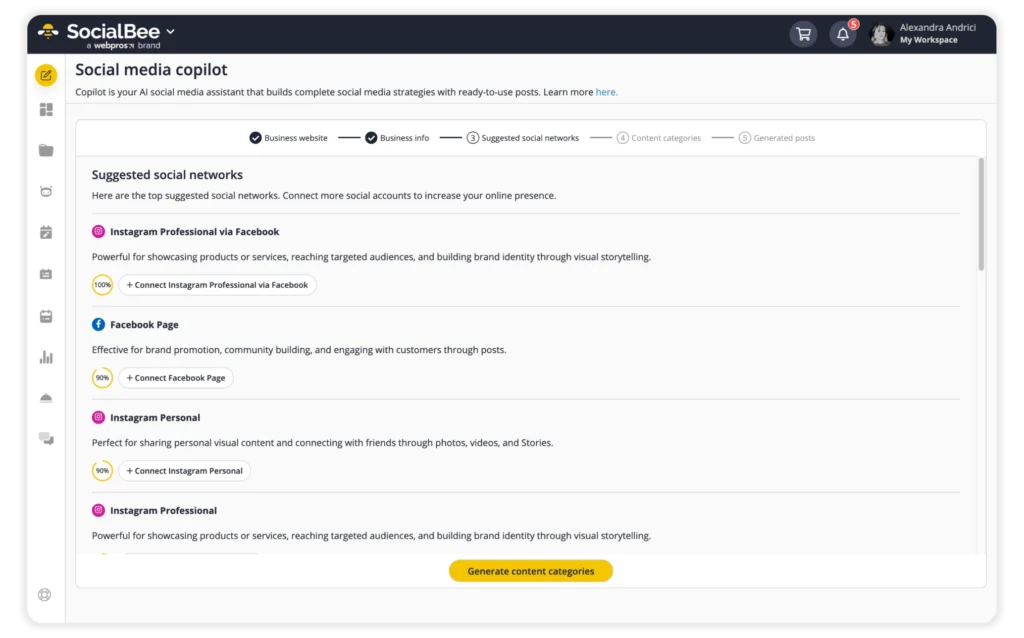
It’s the fastest way to stop overthinking the structure. Instead of spending hours mapping out themes, you get a solid base that you can tweak and build on immediately. Just make sure to review the details carefully, as the output is only as good as the context you provide.
Step 3: Define post formats for each content pillar and social media platform
To keep your content from becoming a repetitive loop, stop thinking of pillars as fixed topics. Treat them as data sources for different platform-specific assets.
If you have 5 pillars but only use 2 formats, your audience will tune out fast. The fix is to map your formats to how people actually use each app.
An Education post on Instagram is for quick visual swipes. On LinkedIn, that same pillar should be a professional utility or a mini whitepaper.
By picking two distinct formats for each platform, you create a matrix that prevents fatigue. Because a swipe feels different than a long read, the content stays fresh even if the core message is the same.
For educational pillars, use a high-retention carousel structure. Start with a hook on slide 1 that calls out a specific pain point. Use slide 2 to explain the cost of the problem and build tension. From slides 3 to 6, give one discrete technical step per slide with minimal text and clear visual cues.
Finish with a recap on slide 7 and a direct command on slide 8, like “Save this guide.” This approach ensures you are deploying assets optimized for platform behavior.
When using a Reel for insights on Instagram and a deep-dive text post on LinkedIn, you can rotate your pillars indefinitely without the feed feeling predictable.
Step 4: Build flexibility into your content system
This is the step most people skip, and then their whole content strategy falls apart after a few weeks.
Pillars should be your compass, not a cage. If you’re too rigid, your content starts to feel robotic.
To keep your system agile and avoid common bottlenecks, use these actionable tactics:
- Aim to have 80% of your content strictly aligned with your pillars to maintain brand authority. Reserve the remaining 20% for “wildcard” content: spontaneous thoughts, trending memes, or industry news that doesn’t quite fit a category but is too relevant to ignore.
- Don’t schedule every single hour of every day. Leave at least one “Open Slot” per week specifically for time-sensitive content. If a new trend pops up on Tuesday or you need to quickly cover an event in real-time, you have a pre-designated spot to drop it in on Thursday without shuffling your entire monthly plan.
- When you have a great idea that doesn’t fit your current weekly rotation, don’t force it in or throw it away. Add it to an Idea Parking Lot (a simple list in Notion or Trello). This prevents idea burnout and gives you a library to pull from when you’re feeling uninspired.
- If a pillar feels “dry,” change the medium rather than the message. If your “Industry Insights” pillar is feeling stale as a text post, try turning that same insight into a quick 60-second video or an infographic. This reduces content fatigue for both you and your audience.
- At the end of every month, look at your lowest-performing posts. If a specific pillar is consistently underperforming, don’t be afraid to swap it out. Your strategy should be a living document that evolves based on what your audience actually clicks on.
Step 5: Plan weekly pillar rotation and timing
Now your content pillars turn into an actual calendar.
Instead of deciding what to post every day, assign each day to one of your main themes. It removes a lot of friction from your content marketing process and helps you stay consistent without overthinking it.
What I usually do is keep it simple:
- 3–4 posting days per week
- Each day tied to one of your core pillars
For example:
- Monday → education (how-tos, tips, light mental health reminders if relevant)
- Wednesday → industry insights or quick explainer videos
- Friday → behind the scenes or personal stories
This way, you’re consistently covering your main topics and creating relevant content that aligns with your business goals, without repeating yourself.
It also makes it easier to build out a stronger blog post strategy later, since each theme can expand into deeper pieces supported by internal links or even a full pillar page if you want to scale things.
When it comes to timing, consistency across social media matters more than trying to game the algorithm. Good content will always outperform random posting, especially when it’s tied back to your foundational themes and built with your audience in mind.
- If you’re just starting out: Use general industry best practices for each platform as your baseline.
- If you have performance data: Always let your own analytics lead the way.
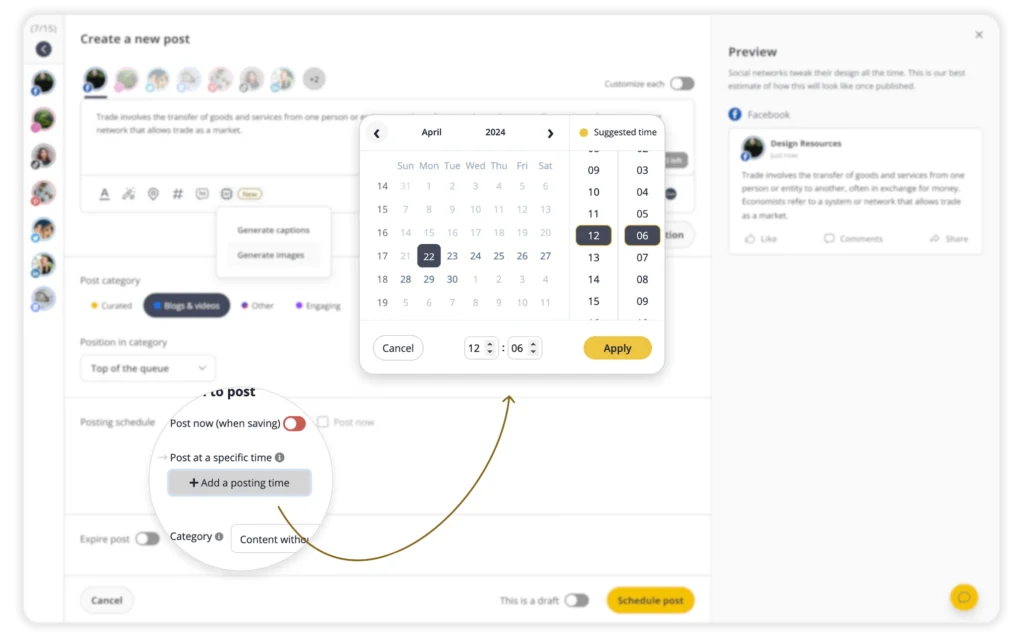
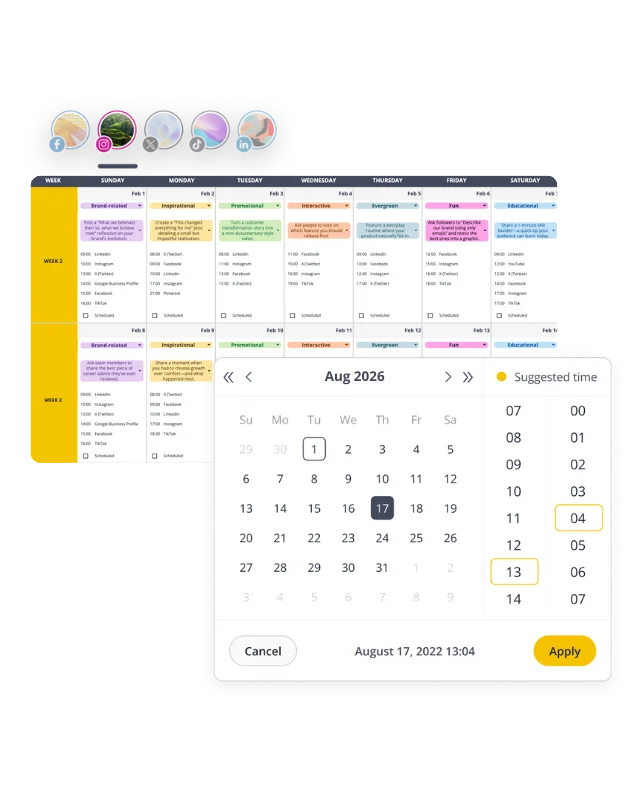
Since I use SocialBee, I follow the best posting times it suggests for my specific profiles. These recommendations aren’t just generic estimates; they are based on how my content has actually performed and when my audience is most active. Basing your schedule on real, personal data takes the guesswork out of the equation.
Step 6: Batch-create and schedule posts
Batch-creating content doesn’t mean writing 20 random captions and hoping for the best. It means turning your content pillars into a clear production flow.
I usually start by choosing one pillar for the batch. For example, if the pillar is education, I’ll pick one specific topic inside it, like “how to build a content calendar.” Then I break that topic into smaller post ideas: one how-to post, one carousel, one short video, one quick tip, and one common mistake post.
Before writing anything, I decide the format for each idea. Some ideas work better as a carousel because they need steps. Some work better as a short video because they need personality or explanation. Some are simple enough for a text post.
Then I create the captions first. I don’t polish them one by one. I draft all the hooks, then all the main points, then all the CTAs. This makes the process faster because I’m not constantly switching between strategy, writing, and editing.
After that, I move to visuals. For carousels, I outline the slides before designing them. For image posts, I decide what the visual needs to communicate before opening Canva. For videos, I write a loose script or bullet points, then record a few clips in one session.
A simple batching structure could look like this:
- Choose one pillar
- Pick 1–2 topics under that pillar
- Turn each topic into 3–5 post ideas
- Choose the best format for each post
- Draft captions
- Create or collect visuals
- Record videos
- Customize per platform
- Schedule everything in SocialBee
This is where SocialBee helps because you can keep the whole system organized by category. I assign each post to the right content category, like education, industry insights, behind the scenes, or product tips. That way, every post has a place in the weekly rotation.
When a post is going across multiple platforms, I don’t copy-paste it everywhere. I use the same core idea, but I adjust the delivery.
For LinkedIn, I usually add more context and make the caption feel more like a thought or mini-story. For Instagram, I make the caption shorter and lead with a stronger visual or carousel hook. For TikTok or Reels, I turn the idea into a quick talking point, text overlay, or short script. Same idea, different packaging.
In SocialBee, I customize the post for each platform before scheduling it. I’ll tweak the caption length, hashtags, image size, video format, CTA, and sometimes even the first line. This keeps the post native to the platform instead of feeling copied.
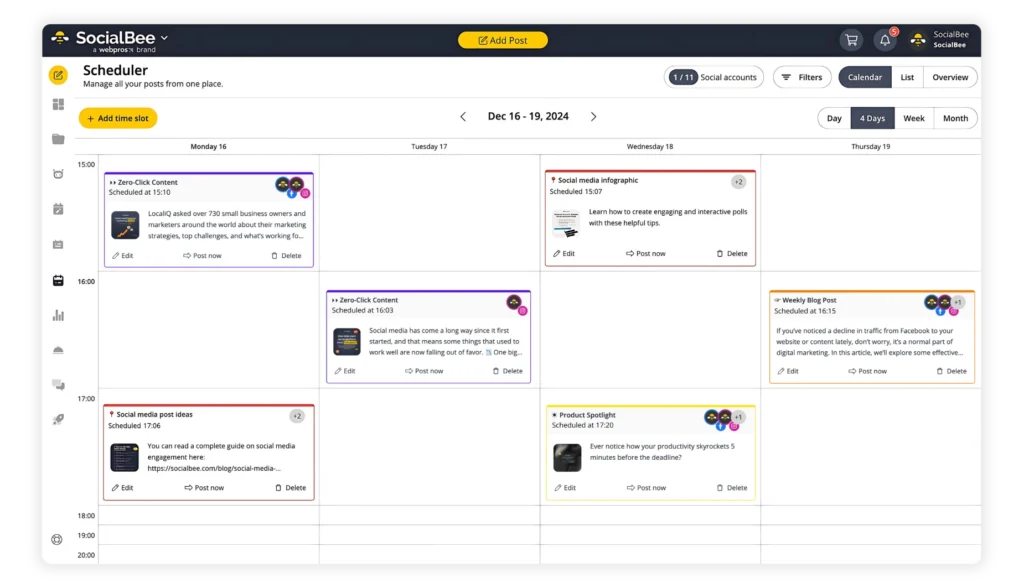
Once the posts are ready, I add each social media post to the right SocialBee category and let the schedule do its job. This is where your content pillars come in. For example, educational content goes out on Mondays, insights on Wednesdays, and behind-the-scenes or personal stories on Fridays.
The point is to stop deciding what to post every day. You sit down once, create a batch of content, turn each blog post into a few variations, and schedule everything ahead. It becomes a system instead of a daily task.
If you’re wondering how many content pillars you need, 3 to 5 is usually enough. The key is to choose pillars that match your business goals and your brand’s expertise, so you can stay relevant without stretching yourself thin.
Try to stay at least one week ahead. That buffer helps you maintain focus and avoid last-minute posting.
Step 7: Track performance and improve
I check SocialBee twice a week.
One quick mid-week check, one proper weekly review. That’s enough to stay on top of things without overthinking.
The mid-week check is just a scan. I look at what’s picking up traction and what’s clearly not. No big decisions here. Keep this to 5–10 minutes so you don’t start reacting too fast.
The weekly review is where I actually look at patterns. Not one post, but a group of them. That’s where things start to make sense.
You’ll notice pretty quickly what works, but only if you focus on the right signals.
Saves matter most. That’s your “this was useful” metric. If people save your post, it means it’s worth coming back to. These are your strongest pieces of content.
Shares show what spreads. If people send your content to others, it’s reaching beyond your audience.
Comments mean you sparked something. Either curiosity or disagreement. Both are good signs that people are engaging.
Views only tell you the hook worked, not the content itself. If you see high views but low saves, it usually means the post didn’t deliver on the promise.
Clicks matter more if you’re focused on digital marketing outcomes like traffic or conversions.
After a few weeks, it becomes obvious which topics are doing the heavy lifting and which ones aren’t landing.

Look at your last 5–10 posts together. What do they have in common? That’s your direction going forward.
SocialBee already helps here. It shows your best-performing categories, posts, and formats, so you don’t have to track everything manually.
Start with categories. Which pillar performs best? Then look at the posts inside it.
Once you know what works, lean into it and spend less time on what doesn’t.
Sometimes the topic is right but the format is wrong. Sometimes it’s just the hook. That’s why it’s worth testing the same idea a few times before dropping it.
If you’re using multiple channels, connect the dots instead of treating each platform separately.
How I turn this content pillar strategy into a working system with SocialBee
When people talk about content pillars, they usually stop at the strategy part. But the part that actually matters is turning those pillars into a repeatable system: first you build them, then you create content around them, then you schedule it, and finally you track what’s working.
Here’s what I do in SocialBee:
- Step 1: Define your main content pillars. Start by deciding the few themes you want to be known for. These should reflect your brand, your expertise, and the kind of audience you want to attract. The goal is to create clear buckets your content can always fall into.
- Step 2: Break each pillar into smaller topics. Once the pillars are clear, expand each one into specific angles, questions, tips, or post ideas. This makes the strategy usable because you’re no longer working with vague themes, but with actual directions.
- Step 3: Turn those pillars into categories in SocialBee. After that, set up each pillar as its own category inside SocialBee. This is what gives the strategy structure. Every post you make will have a place, which keeps your content balanced and stops you from posting randomly.
- Step 4: Choose one pillar when it’s time to create. When you sit down to make content, start with one category instead of asking yourself what to post. Pick one pillar, then choose one topic from the list you created under it.
- Step 5: Use AI or brainstorming tools to shape the angle. If the idea still feels too broad, use a tool like Copilot to help you explore possible angles. Not to write the post for you, but to help you get unstuck and quickly turn one topic into a few usable ideas.
- Step 6: Write the post draft. Once the angle is clear, write the post. If you’re batching, you can use a caption generator to speed up the first draft, then edit it properly so it sounds natural and on-brand.
- Step 7: Create the visual. After the caption is done, create the visual that goes with it. For quick educational or simple posts, you can use an image generator directly in the workflow instead of opening separate tools and slowing yourself down.
- Step 8: Add hashtags and final details. Once the post is nearly ready, add hashtags, links, CTAs, or platform-specific tweaks. This step should stay simple. You want the post polished, not overworked.
- Step 9: Assign the post to the right category. Before scheduling, place the post into the correct SocialBee category. This is what connects the post back to your original pillar strategy.
- Step 10: Schedule the post. Next, schedule the content in SocialBee. Because your categories are already set up, the platform can rotate posts in a way that keeps your content mix consistent over time.
- Step 11: Let the system run consistently. Once posts are sorted into categories and scheduled, you’re no longer creating from scratch every day. The system starts doing its job, and your pillars stay active without constant manual planning.
- Step 12: Track performance by pillar. After publishing, review how posts perform. Look at which pillars get the most engagement, reach, clicks, saves, or replies. This helps you understand not just which individual posts worked, but which types of content are pulling their weight.
- Step 13: Adjust your content based on results. Use that performance data to refine the system. If one pillar consistently performs well, create more content around it. If another one falls flat, test better angles, stronger hooks, or a different format.
- Step 14: Repeat the cycle. Once you’ve reviewed performance, go back into creation with better insight. That’s what turns content pillars from a nice idea into a working system.
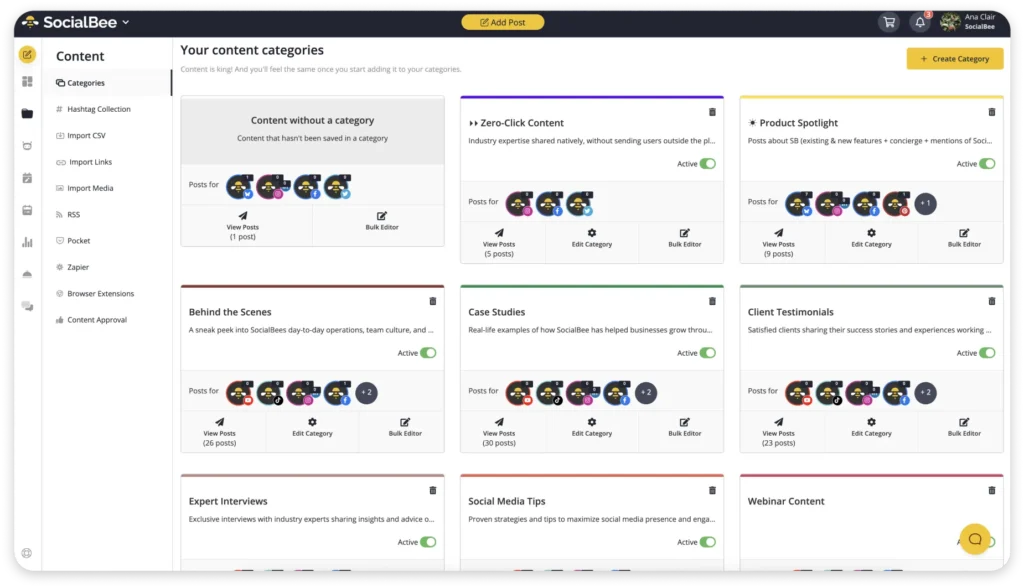
So in practice, the order is: build the pillars, expand them into topics, turn them into categories, create content from those categories, schedule it, and then track which pillars actually perform best.
Frequently asked questions
Should content pillars be the same across all platforms?
Yes, the pillars stay the same. Those are your core themes and what you want to be known for.
What changes is how you execute them.
The same pillar might turn into:
- A carousel on Instagram
- A short post on LinkedIn
- A longer breakdown in email
So you’re not changing the what, you’re adapting the format and depth to fit the platform.
How often should I update or change my content pillars?
Not that often.
Your pillars are based on your brand’s identity, your brand messaging, and what your audience cares about. Those things don’t change every week, so your pillars shouldn’t either.
Give it at least 1–2 months. That’s the first step. Post consistently, look at what’s working, and pay attention to what content types keep your audience engaged.
You’ll start seeing patterns across different channels, whether it’s social, email marketing, or even how things perform in search engines. A bit of keyword research and checking search volume can also give you a clearer picture of what people are actually looking for.
What usually changes isn’t the pillars themselves. It’s what you do with them.
You test new ideas, adjust topics, and dive deeper into what’s working. That’s how you keep your content fresh without constantly starting over.
If something feels off, it’s rarely the structure. It’s how you’re crafting content inside it.
Over time, this helps you show up more in search results, build authority, and stay aligned with your brand’s priorities. It also keeps everyone on the same page, especially if you’re working with others.
That’s really the point. Content pillars help you stay focused while still giving you room to evolve.
Can I use the same content across multiple pillars?
Yes, and you should. Good content doesn’t live in one box.
One format can hit multiple pillars, it just depends on the angle. Take a carousel, for example. You might start by teaching something practical, then explain how you approach it, add a quick personal insight, and finish with a result or stat. That’s education, expertise, personal brand, and authority in one post.
The same applies to a story post. The story itself covers the personal angle, the takeaway becomes educational, and the way you handled it shows your expertise.
How do you track content performance across channels?
Start by looking at each channel separately, but don’t stop there.
On social media, track saves, shares, comments, and reach to understand what people find useful, engaging, or worth spreading. In email marketing, use tools like email tracking to see open rates, click rates, and which topics actually get people to take action.
Then connect the dots.
If a topic performs well on multiple channels, that’s a strong signal. For example, if something gets a lot of saves on social and high clicks in email, it’s not a coincidence. It means the topic resonates, regardless of format.
From there, reuse what works.
Once you know what topics perform, you can turn them into email content using an email template creator, repurpose them into different social formats, and direct people back to your social channels or website.
The goal isn’t to track everything in isolation. It’s to spot patterns across channels and use them to guide what you create next.
How do I keep my content from becoming repetitive?
Change the angle, not the topic.
Most people think they need new ideas all the time. They don’t. They just need to approach the same idea differently.
That’s where content pillars help. When you have clear pillars for social media, you’re not guessing what to post. You’re just exploring each topic in different ways.
For example, inside an educational content pillar, one post can be quick tips, another can be a breakdown, and another can be simple actionable advice based on a real situation.
Then you switch pillars.
You might share success stories, show results, or talk about what actually worked for potential customers. Same space, different angle.
This is what a solid content strategy looks like in practice. You’re not jumping between random ideas. You’re building around a few clear ones.
It also helps to mix formats. One idea can become a post, a video, or something tied to influencer marketing. That alone makes things feel less repetitive.
If you want to go a bit deeper, think in terms of a simple hub and spoke model. One main topic, multiple subtopics around it. You’re expanding, not repeating.
Also, don’t ignore social media trends, but don’t rely on them either. They’re there to support your content, not replace it.
At the end of the day, your content should still reflect what your brand stands for. That’s how you keep things consistent without sounding the same all the time.
When this works, your content pillars for social naturally lead to more relevant and engaging content, without falling into the trap of repetitive content.
Content pillars turn mess into a system
At some point, posting randomly just stops working. If it ever did.
You either burn out, run out of ideas, or everything you share starts feeling disconnected. That’s usually the moment you realize you don’t need more posts. You need a better system.
That’s what content pillars give you: a clear structure that helps you stay consistent, create better work, and actually enjoy the process again.
Once you set them up, everything gets easier. You know what to post, your message stays consistent, and you stop second-guessing every piece you create.
And if you want to make this whole process even smoother, tools like SocialBee help you turn your pillars into something you can actually stick to.
Set up your categories, plan ahead, let it rotate, and focus on creating.
If you’ve been feeling stuck or scattered, this is a good place to start.
Start your 14-day free trial and see what it looks like when everything runs on a system.

About the author: A seasoned writer and storyteller, Sara does her best to share her experience with the world and help brands and entrepreneurs find their voice. She loves the learning curve that comes with writing, so she gladly takes on new topics that will expand her own knowledge and expertise. The only thing Sara steers clear of? Anything resembling a comfort zone in life, as well as writing.