


At some point, creating content started feeling like a full-time game of catch-up. One post turned into Instagram posts, LinkedIn posts, Reels, blog content, emails, and a growing pile of half-finished ideas. Every day started with the same question: “What am I posting today?”
That’s why I started batch creating content. Instead of making one post at a time, I set aside a few hours to plan ahead and create a week’s worth of content in one sitting. Not perfectly. Not an entire month ahead. Just enough to stop scrambling every single day.
In this article, I’ll break down what social media content batching actually is, how I personally approach the batching process, and the workflow that helps me create content consistently without spending my entire week thinking about social media.

We’re SocialBee LABS SRL, part of WebPros. We use the information you provide to share relevant content & updates, as outlined in our Privacy Policy. You can opt out anytime.
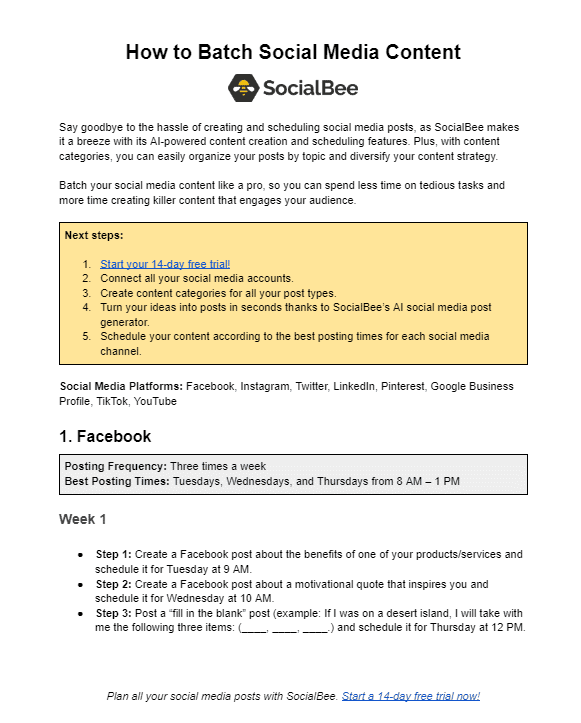
Short summary
- Create content in batches instead of making one post every day. Setting aside a few hours to create a week’s worth of content is usually more sustainable than reactive daily posting.
- Organize your content into categories like teaching, personal, opinions, and promotion so your social media content doesn’t become repetitive.
- Batch similar tasks together during batch days. Write captions together, record all video content in one sitting, and design visuals separately to avoid constantly switching focus.
- Don’t copy-paste the exact same post across every platform. Adjust formats, captions, hooks, and visuals so the content feels native to LinkedIn, Instagram, TikTok, or other social media platforms.
- Use analytics to guide your next batch. Instead of constantly chasing new ideas, review what already performs well and create more of that content inside SocialBee.
What is social media content batching?
Social media content batching is when you create content in groups instead of doing everything day by day. So instead of waking up every morning wondering what to post, you sit down for a few hours and create multiple social media posts, videos, captions, or even blog content in one sitting.
For example, you might spend one afternoon writing a week’s worth of LinkedIn posts, recording a few Reels, and planning content ideas for Instagram or TikTok. Then later, you schedule everything into your content calendar instead of scrambling to create something last-minute every day.
The main reason people batch create content is simple: it makes the content creation process feel less overwhelming. It gives you more breathing room, helps you stay focused, and makes it easier to post consistently across different social media platforms without social media taking over your entire life.
Content batching vs daily posting: what actually works better?
Batching works better for most people.
Daily posting sounds good in theory, but in reality, it usually turns into reactive content creation. You wake up, try to come up with content ideas on the spot, rush a post out, and then repeat the same thing tomorrow. It’s hard to stay focused when your entire content creation process depends on constant inspiration.
That doesn’t mean daily posting is bad. Some content creators genuinely work better that way, especially if their content is heavily based on trends, behind-the-scenes moments, or things happening in real time. But for most businesses, creators, and people managing multiple social media platforms, daily creation gets exhausting fast.
Content batching works better because it separates planning from execution. Instead of context-switching all week, you create content in batches, organize it into your content calendar, and give yourself breathing room. It’s easier to stay consistent, easier to create high-quality content, and way less stressful.
The biggest misconception is that batching makes content feel robotic. In reality, good batch content creation usually gives you more flexibility because you’re no longer scrambling to post something every day.
You already have a foundation, which means you can spend more time reacting to trends, sharing personal stories, or creating spontaneous content when inspiration strikes.
How I do content batching (step-by-step)
My content batching process isn’t that complicated. I’m not creating an entire month of perfectly polished content or following some strict “perfect system.” I just try to make the content creation process easier, more organized, and less reactive.
The biggest thing that changed for me was separating planning, creating, organizing, and scheduling instead of trying to do everything at once. Once I started batching content this way, posting consistently across different social media platforms became way less stressful.
Here’s what my workflow usually looks like:
- One-time setup
- Day 1: Planning & content ideas
- Day 2–3: Content creation
- Day 4: Review, collaboration, and scheduling
- Monthly: Performance review & optimization
0. One-time setup
Before I batch-create anything, I need structure for my content. Otherwise, I end up posting the same type of thing over and over again without realizing it.
A lot of people naturally fall into posting only educational content. Tips, advice, “how to” posts, quick explanations. Useful content, but after a while, everything starts sounding the same.
That’s why I organize my content into categories inside SocialBee before planning the week. I don’t use categories just to stay organized. I use them to decide what I should actually talk about.
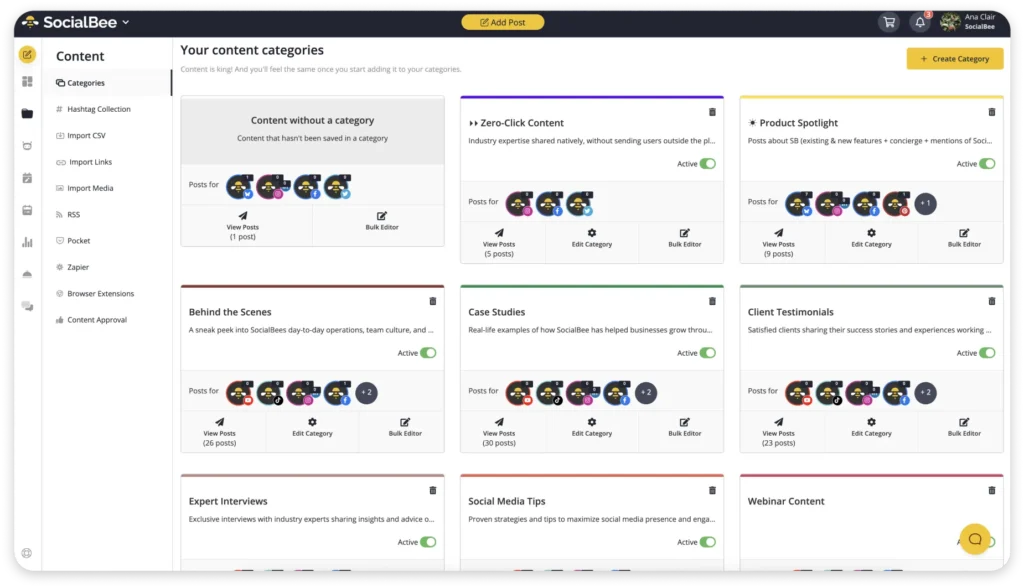
My categories are simple:
- Teaching
- Opinions
- Personal
- Promotion
Each category has a different role. Teaching content helps people learn something useful. Opinion content helps you stand out and gives people something to remember. Personal content builds trust because people follow humans, not content machines. Then promotional content supports the business side without making the feed feel salesy all the time.
Most people treat a content category like one type of post. Educational content becomes endless “tips and tricks” posts. Personal content becomes random life updates. Promotional content becomes repetitive selling.
After a while, everything starts blending together. So I think of them more like topic buckets with different directions inside them.
So one topic can become:
- A practical tip
- A mistake people make
- An opinion
- A breakdown
- A personal story
- A quick behind-the-scenes post
For example, if I’m talking about content planning, I could turn that into:
- 3 ways to plan content faster
- Why most content plans fail
- The biggest mistake people make when batching content
- A quick Reel showing my actual workflow
The core topic stays the same, but the angle changes. Then I think about platform fit.
Once I started thinking this way, content creation became much easier.
Before, I’d sit down and think: “What should I post today?”. Now I think: “Which category needs content?”
That small shift removes a lot of mental clutter.
The second thing I set up is posting frequency.
I don’t manually schedule one post at a time anymore because it gets exhausting fast, especially when creating content for multiple platforms every week.
Inside SocialBee, I set posting frequency per category.
For example:
- Educational posts → 3x/week
- Personal posts → 2x/week
- Promotional posts → 1x/week
Then I simply add content into those categories and let the schedule balance itself.
Without this setup, it’s really easy to accidentally post similar things back-to-back. The feed starts feeling random.
With categories and posting frequency already set up, the content naturally spreads out better throughout the week. Personal stories break up heavier educational posts, opinion content keeps things interesting, and promotional posts don’t feel forced because they aren’t constantly repeated.
This is something I usually set up once, then adjust occasionally when my strategy changes.
Right now, I usually post:
- 4–5 times per week on LinkedIn
- 4–5 times per week on Instagram
- 4–7 short-form videos for TikTok and Reels
Overall, that’s around 12–17 pieces of content every week across different platforms.
That sounds like a lot, but having categories and posting frequency already organized makes the workload feel much lighter before the actual batch creation even starts.
1. Weekly workflow (execution)
Once the setup is done, the actual weekly workflow becomes much simpler. I’m not starting from zero every week or randomly trying to figure out what to post on the spot.
I also don’t try to do everything in one sitting anymore. That used to be the fastest way to get overwhelmed. Writing, designing, recording videos, editing, scheduling, answering messages, switching between platforms all day. It completely breaks your focus.
Now I split the content creation process into different stages across the week. One day is for planning and organizing content ideas. Another is for creating. Another is for reviews, approvals, and scheduling.
The biggest difference is that every task has its own space.
When I’m planning, I’m only planning. When I’m writing, I’m only writing. When I’m recording video content, I batch all of it together instead of constantly switching between tasks.
Day 1 — Planning (1–2h, high focus)
The first day is always planning. I don’t touch Canva yet, I don’t record videos, and I don’t start scheduling content. This is just the thinking part of the process.
Honestly, this is probably the most important part of my entire batching workflow because a good planning session makes the rest of the week much easier. A bad one usually turns into forcing content later.
I usually start by opening my content categories and looking at what’s missing. Then I use SocialBee’s AI features to help me explore different angles for topics I’m already planning to cover.
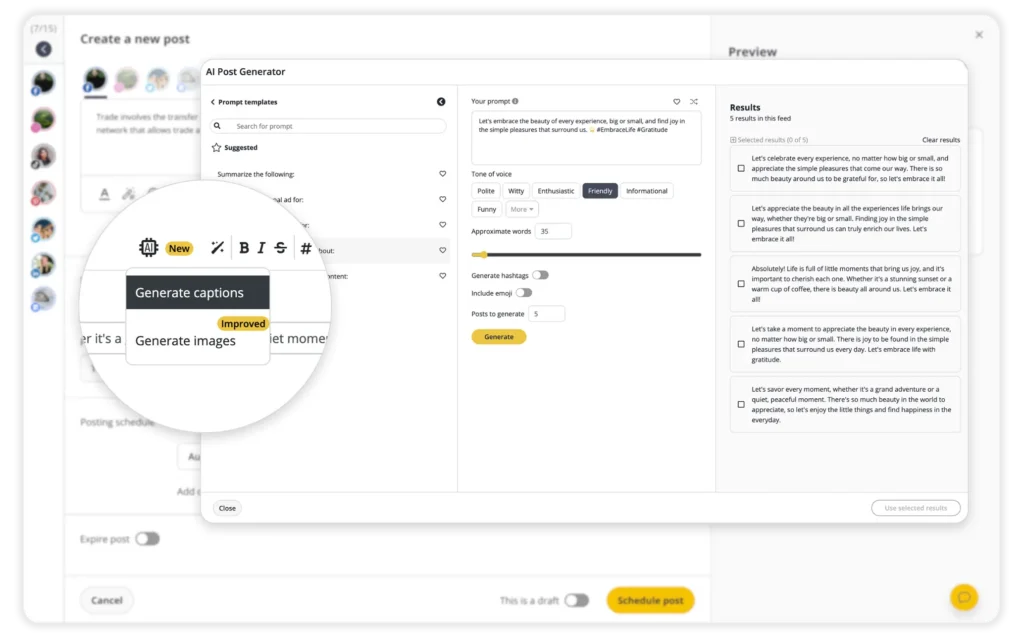
For example, I might know I want to talk about content strategy but need fresh ways to approach it. Instead of repeating the same message, I can use AI to uncover new hooks, formats, and perspectives that make the topic feel fresh again.
For example, maybe I already know I want to talk about content strategy. The problem usually isn’t the topic itself. The problem is that there are only so many times you can say the exact same thing before your content starts feeling repetitive.
That’s why I spend a lot of time thinking about angles.
A structured opinion usually works well on LinkedIn. A simple step-by-step idea might become an Instagram carousel. A short explanation or quick frustration point can easily turn into a TikTok or Reel.
I’m not trying to completely reinvent the content for every platform. I’m just making sure the format makes sense for where it’s being posted.
I also mix formats on purpose because repetition doesn’t only come from topics. Sometimes it comes from posting the exact same type of content over and over again.
If every post is a text post, people get bored.
If every post is a carousel, same thing.
If everything is video content, eventually it all starts looking identical too.
So during planning, I try to create a natural mix between:
- Text posts
- Carousels
- Short-form videos
- Single-image posts
- Stories
- Polls and interactive posts
One thing I constantly check is whether the posts feel too similar next to each other. If they do, I usually change the format or rewrite the angle before moving on.
That made content batching much easier for me because I stopped feeling like I constantly needed brand new ideas every week.
Most of the time, I don’t need more topics, but better variation.
One mistake I used to make was sitting down every Monday and trying to come up with content from scratch.
Now I collect ideas throughout the week instead.
Whenever I see an interesting discussion, a common question from a client, a trend in my industry, or a post that makes me think “I have a different opinion on this,” I save it somewhere.
Sometimes it’s a screenshot. Sometimes it’s a note in my phone. Sometimes it’s a LinkedIn post I want to respond to later.
By the time I sit down for my planning session, I’m usually not staring at a blank page. I already have a list of potential topics to work with.
I also look at:
- Questions people ask in comments and DMs
- Industry news and trends
- Conversations happening in my niche
- Common client challenges
- High-performing posts I’ve created before
- Competitor content that sparks a different perspective
Another source I use is long-form content.
If I’ve written a blog post, hosted a webinar, recorded a podcast, or created a YouTube video, I rarely use it only once. One piece of long-form content can often turn into multiple social media posts, videos, carousels, and discussion topics.
That means I’m not constantly hunting for new ideas. I’m often repurposing and expanding ideas I already know are valuable.
By the end of Day 1, I usually have somewhere between 10 and 20 rough content ideas, then narrow them down into around 8 to 12 posts that I actually want to create that week.
Day 2-3 — Creation (6–10h, deep work)
Once the planning is done, the next two days are focused on execution. This is where rough ideas become actual content.
One thing that made the biggest difference for me is realizing I don’t need to create every post from scratch. A lot of people think content creation means constantly reinventing the wheel, but most strong social media content follows repeatable patterns.
The goal during these two days isn’t perfection. It’s creating high-quality content efficiently while staying focused and avoiding unnecessary context switching.
1. Create the copy before anything else
I always start with writing because words shape everything else.
For captions, text posts, and video scripts, I rely on simple frameworks that I’ve used hundreds of times before. Sometimes it’s:
- Hook → Explanation → Takeaway
- Problem → Cause → Solution
- Mistake → Why it Happens → How to Fix It
These structures work whether I’m creating LinkedIn posts, Instagram captions, email content, or blog articles.
Instead of trying to make every post completely unique, I focus on communicating the idea clearly. The structure simply helps me get there faster.
2. Build on existing visual assets
Once the copy is ready, I move on to visuals.
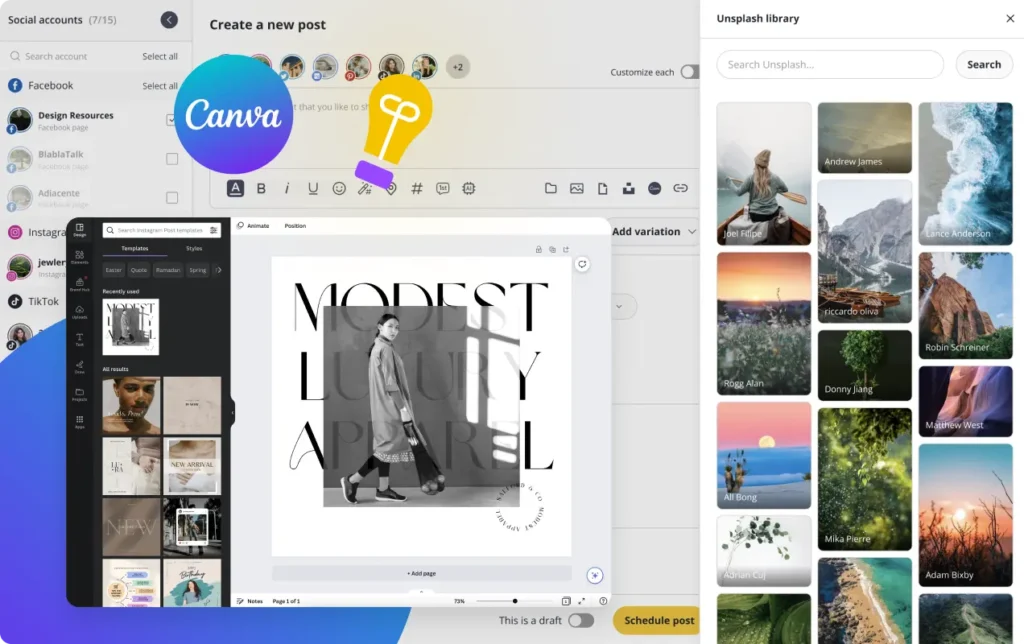
I use Canva templates that already match my brand, so the fonts, colors, layouts, and overall style are already set up before I start creating.
During batch days, I’m mostly duplicating templates, changing text, replacing images, and making small layout adjustments instead of designing everything from scratch.
This saves a huge amount of time.
Because of the Canva integration inside SocialBee, I can also pull designs directly into my posts without constantly downloading files or switching between tools.
3. Batch similar tasks together
Another thing that changed the way I work is batching by task instead of batching by post.
Most people fully complete one post at a time. They write the caption, design the graphic, edit the video, upload it, schedule it, and then move on to the next one.
That workflow completely kills my focus.
Instead, I group similar tasks together:
- Writing session: captions, hooks, text posts, and rough video scripts
- Recording session: Reels, TikToks, voiceovers, and video content
- Design session: carousels, graphics, Pinterest pins, and visuals
- Admin session: organizing drafts and preparing content for scheduling
This keeps my brain in one mode instead of constantly switching between completely different types of work.
4. Adapt content for different platforms
I don’t believe in copy-pasting the exact same post everywhere.
At the same time, I don’t create completely different content for every platform because that would take far too long.
Instead, I make small adjustments so the content feels native to each platform.
Usually that means:
- Adjusting image sizes
- Cleaning up formatting
- Shortening captions
- Tweaking hooks
- Adding or removing hashtags
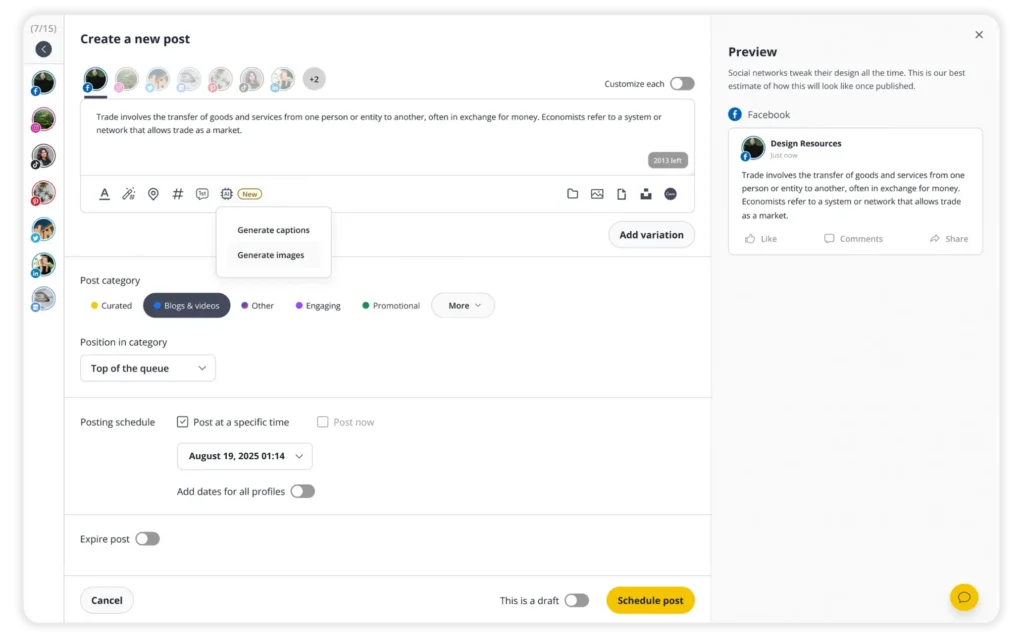
Inside SocialBee, I usually create one main post first and then customize platform-specific versions from there.
That way, I’m adapting existing content rather than recreating everything from scratch.
5. Separate creative work from administrative work
The last thing that really helped me was separating creative work from administrative work.
Writing, recording videos, brainstorming ideas, and creating content require focus and energy.
Formatting captions, uploading drafts, organizing content, and preparing posts for scheduling don’t.
So I try to do the harder creative work earlier in the day when my brain feels fresh and leave the lighter tasks for later.
That small shift made content batching feel much less draining because I stopped forcing creativity when I was already mentally tired.
By the end of Day 2 and 3, most of my content is created, organized, and sitting in draft form ready for scheduling. Having a week’s worth of content prepared creates a huge amount of breathing room compared to scrambling to create something new every day.
Day 4 — Review, Collaboration & Scheduling (30–60 min)
By Day 4, most of the hard work is already done. The content is written, the visuals are ready, the video content is edited, and everything is sitting in drafts.
Part 1: Final Review & Scheduling
Before anything goes live, I do one final review of the entire week. I’m mostly checking:
- Does the week feel balanced?
- Are the posts too repetitive?
- Is there too much promotional content?
- Are the formats mixed properly?
- Do the captions still sound natural?
Sometimes I move things around a little. Maybe there’s too much video content back-to-back. Maybe two Instagram posts feel too similar. Maybe a personal story fits better later in the week.
Once everything looks right, I schedule the content inside SocialBee. Seeing the full calendar laid out makes it much easier to spot gaps, overlaps, or content that feels out of place.
Part 2: Collaboration & Approvals
If I’m working with clients or team members, scheduling doesn’t mean the content is locked forever. It’s simply easier to review content when the entire week is already organized.
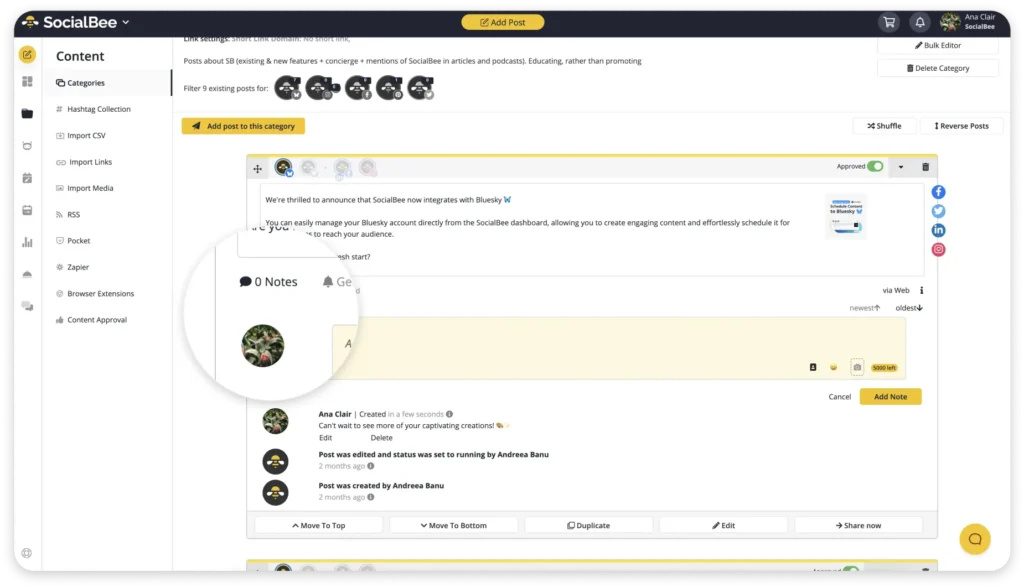
This is where SocialBee’s collaboration features help. Instead of sending drafts back and forth through email, Slack, or multiple Google Docs, stakeholders can review scheduled content, leave comments, request edits, and approve posts directly inside the platform.
I also prefer batching approvals. One review session is much easier than constantly interrupting content creation to discuss individual posts. It keeps feedback organized and helps everyone stay focused on the bigger picture.
That way, even if changes are needed, I’m adjusting a structured content plan instead of scrambling to build one from scratch.
2. Monthly workflow (optimization)
At the end of the month, I spend some time looking at what actually worked instead of immediately jumping into new ideas.
This part is important because content batching gets much easier when you stop treating every week like a completely fresh start.
After publishing content for a few weeks, patterns start becoming obvious.
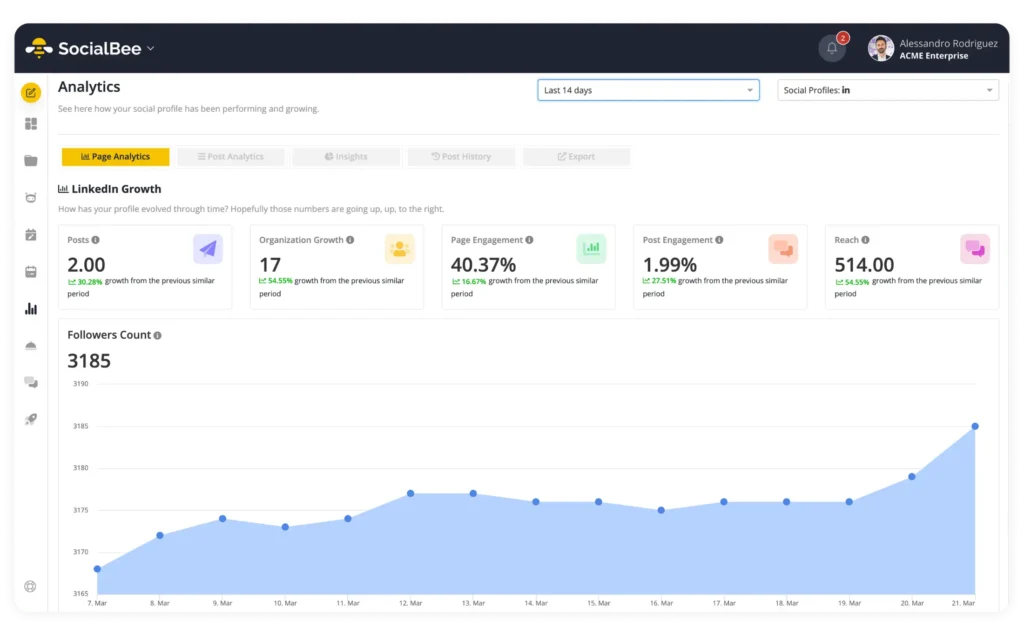
Inside SocialBee analytics, I usually check:
- Which topics got the most engagement
- Which formats performed best
- Which posts got the most saves, comments, or shares
- Which content did people actually spend time on
I’m not looking for one viral post.
Most of the time, viral posts don’t tell you much anyway because sometimes they perform for random reasons. What matters more is consistency. If a certain format, topic, or style performs well multiple times, I treat that as a signal.
One simple rule I follow:
If something works more than once, I batch more of it.
So if opinion-based LinkedIn posts keep performing well, I’ll create more. If short-form video content starts outperforming static Instagram posts, I’ll shift more energy there. If one blog topic brings in strong engagement or potential customers, I’ll expand on it with more content.
I also pay attention to easy wins.
Sometimes, a quick post created in 10 minutes performs better than something I spent hours polishing. Those posts become important because they usually show what feels natural to the audience instead of being overproduced.
This part of the batching process helps me avoid wasting time creating content nobody really cares about.
It also makes planning much faster because I’m no longer staring at a blank page trying to invent completely new content pillars every week.
Most of the time, the answer is already in the analytics:
- Review what worked
- Identify patterns
- Batch similar content
- Repeat
That’s really the long game with content creation.
Not constantly reinventing yourself every week, but learning what connects with your audience and getting better at creating more of it over time.
Common content batching mistakes to avoid
Content batching can make the entire content creation process feel lighter and more organized, but only if the workflow is actually sustainable. A lot of people try batch creating once, overwhelm themselves, then decide it “doesn’t work.”
Most of the time, the problem isn’t content batching itself. It’s the way the process is set up.
Here are the biggest mistakes I see people make when batching social media content:
- Batching too much at once
- Editing while creating
- Making the workflow too strict
- Not leaving buffer time
- Switching between tasks too often
Batching too much at once
A lot of people start batch creating and immediately try to plan an entire month of content in one sitting. It sounds efficient, but it usually leads to burnout or content that already feels outdated two weeks later.
I’ve found that batching one week ahead works much better. It gives you structure without making your content feel too rigid.
Editing while creating
This slows the content creation process down more than people realize.
You start writing one post, then keep rewriting the hook, changing captions, tweaking visuals, fixing formatting, and suddenly one post takes an hour.
When I batch content, I try to separate creating from editing. First, I get the ideas out. Then I clean things up later.
Making the workflow too strict
Content batching should create breathing room, not make your week feel overplanned.
Social media changes fast. New ideas come up. Personal stories happen. Sometimes the best-performing post is something completely unplanned.
A good batching process leaves room for flexibility.
Not leaving buffer time
Every batch week looks easy until something takes longer than expected.
Maybe video content needs revisions. Maybe client work gets delayed. Maybe you simply don’t feel creative that day.
If your schedule is packed too tightly, one delay can throw off the entire workflow.
Switching between tasks too often
This is one of the biggest productivity killers during batch days.
Writing one post, then editing a Reel, then answering emails, then designing Instagram posts completely breaks focus. The content creation process becomes much more time-consuming when your brain constantly switches modes.
That’s why I batch similar tasks together:
- Writing captions together
- Recording video content together
- Designing visuals together
- Organizing and scheduling together
Staying in one mode for longer makes creating content feel much lighter.
Frequently asked questions
How far ahead should I batch content?
One week ahead is usually enough.
That gives you breathing room without making your content feel outdated or too rigid. Social media platforms move fast, and if you batch an entire month ahead, it becomes harder to react to trends, new ideas, or things happening in your business or life. I like having a week’s worth of content ready, plus a few extra posts as backup.
How many posts should I batch at once?
Start with 5–10 posts.
That’s usually enough to make your week easier without turning batch content creation into an exhausting full-day marathon. A lot of people try to create too much at once and burn out halfway through. It’s better to consistently batch a manageable amount of high-quality content than force yourself to create 30 social media posts in one sitting.
How long does content batching actually take?
Usually a few hours spread across the week.
For me, content planning and generating content ideas takes around 1–2 hours, then the actual content creation process depends on the format. Writing social media posts is faster. Video content, blog posts, and long-form content obviously take longer. But even when batching takes half a day, it still saves more time than constantly switching between creating, editing, posting, and scrambling for content every single day.
What if I run out of content ideas during a batching session?
It happens more often than people admit.
When I feel stuck, I stop trying to come up with completely new ideas and look at what’s already around me. Client questions, comments, conversations in my niche, industry updates, and even older posts can all become new content.
One of the easiest ways to create social media content consistently is to stop treating every post like it needs to be a groundbreaking idea. Most topics can be approached from different angles. A tip can become an opinion, a personal story, a how-to post, or even a short video.
The goal isn’t to constantly find new ideas. It’s to find new ways to talk about topics your target audience already cares about.
Do I need different content for every social media platform?
Not necessarily.
Creating multiple pieces of content for every platform from scratch would take far too much time. Instead, I usually start with one piece of content and adapt it for different social media channels.
For example, one blog post might become a LinkedIn post, a carousel for Instagram, a few social media captions, and one or two short videos. The core idea stays the same, but the format changes.
This approach makes batch content creation much more manageable, helps with saving time, and allows you to stay active across multiple social media platforms without turning content creation into a full-time job.
What if content batching feels overwhelming?
Then you’re probably trying to do too much.
A lot of people discover content batching and immediately try to plan a month’s worth of content, record multiple videos, write social posts, design visuals, schedule posts, and tackle email marketing all in the same week.
No wonder it feels exhausting.
Start small. Pick a few content pillars, collect some content ideas, and focus on creating enough content for an entire week. That’s more than enough to see the benefits.
You also don’t need to do everything yourself. Create templates for recurring posts, use a marketing calendar to keep track of what you’re publishing, and use the right tools to handle the repetitive stuff. That leaves more room for the creative process and helps reduce stress when you’re feeling overwhelmed.
I find it helps to batch one type of content at a time. Write your written content first, then work on visual content, then record video content. If you’re creating for a YouTube channel or experimenting with new platforms, the same rule applies. Stay focused on one task instead of jumping between ten different things.
The goal of successful batch content creation isn’t to create all the things at once. It’s to give yourself some breathing room, improve your overall productivity, and make creating quality content feel a little less chaotic.
What if I never seem to have enough content ideas?
Start keeping a running list.
Every time you get a question from a client, spot a trend, or think of something while writing a blog post, save it. Don’t trust yourself to remember later.
When it comes time for a focused session, you’ll already have post ideas waiting for you.
That’s what makes the actual process easier. Instead of trying to come up with everything in one go, you’re simply turning existing ideas into content. One idea can often become a blog post, two videos, or several smaller pieces of content.
It’s a simple habit, but it helps you stay ahead and spend less time staring at a blank page.
Content batching is the smarter way to stay consistent
One of the biggest reasons content batching actually works for me long-term is because of SocialBee.
Instead of jumping between docs, Canva tabs, spreadsheets, scheduling tools, and random notes apps, everything lives in one place. I can organize content categories, batch create posts, customize content for different social media platforms, schedule everything for the week, and review performance later without turning the process into another full-time job.
That structure makes a huge difference when you’re trying to stay consistent.
Content batching isn’t about creating more content. It’s about creating content in a way that feels sustainable.
Instead of waking up every day wondering what to post, you already have a plan. Your ideas, formats, captions, and content calendar are already organized, which makes the entire content creation process feel much less stressful.
That’s why content batching became such a game-changer for me. Not because it made social media easier, but because it gave me breathing room. I stopped scrambling for last-minute ideas and stopped spending my entire week thinking about content.
You don’t need to batch an entire month ahead or build the perfect workflow. You just need a system that helps you stay consistent without burning out.
If you want to simplify your own batching process, you can start your 14-day free trial of SocialBee and manage your content, scheduling, approvals, and analytics in one place.