


Social media cross-posting is one of the most practical ways to manage content across multiple social media platforms without doubling your workload. I’ve seen brands get strong results from it, but I’ve also seen it hurt engagement when the same content is pushed everywhere without adjustments.
At its core, cross-posting means sharing the same piece of content across different platforms. The problem is that each social channel has its own format, audience, and expectations. When you ignore that, your posts start to feel repetitive, and your audience interaction drops.
Most businesses today manage multiple social media accounts. Based on SocialBee’s analysis of 9,332,840 posts, the average brand runs 4.5 social media accounts, and 61% of active users handle at least three at once. That’s where a solid cross-posting strategy becomes essential if you want to maintain consistent messaging without burning out your social media team.
In this guide, I’ll show you how to cross-post effectively, when to adapt your content for different audiences, and how to manage posting across multiple platforms without losing quality or brand consistency.

How can I post to all my social media at once?
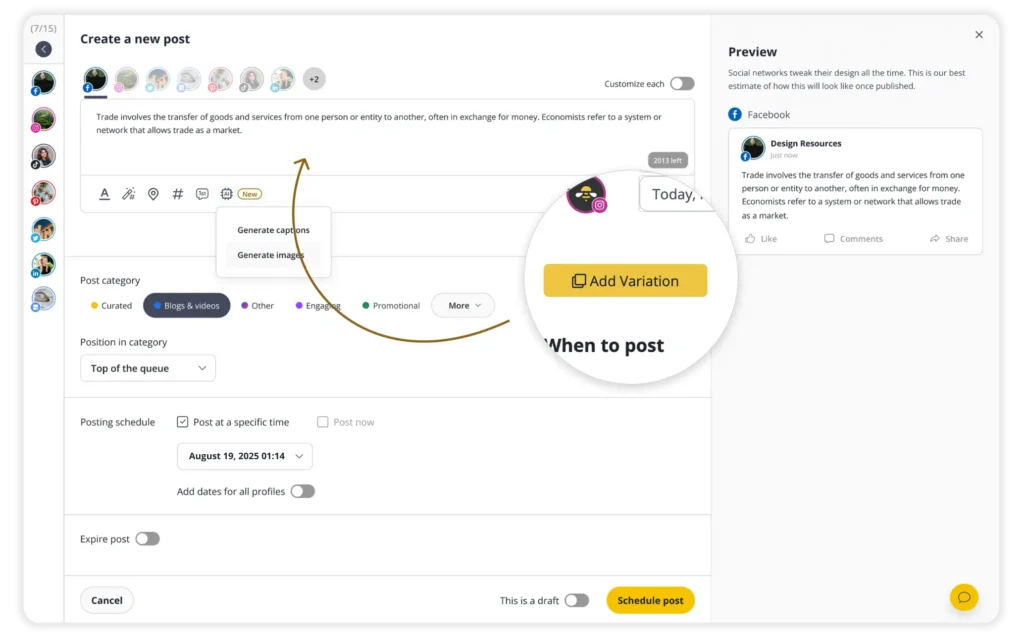
I post to all my social media at once in SocialBee by creating one base post, selecting different social media platforms, and then adjusting each version before publishing.
Here’s exactly how I do it on the social media management platform:
- I click “Create post” in SocialBee to open the editor.
- I write the main version of the post or use the AI tools to generate a starting point.
- I add my media, whether that’s an image, video, or something I designed in Canva.
- I select all the social media accounts I want to publish to from the left side.
- I turn on “Customize each” so I can edit the post for every platform.
- I go through each version and adjust the caption, hashtags, links, and formatting so it fits that specific platform.
- I resize or tweak the visuals if needed, so they look right on each channel.
- I add any extra details, like alt text or a first comment to encourage community engagement, depending on what the platform supports.
- I choose whether to publish right away or schedule the post for later, usually based on when my audience is most active.
- I review everything one last time, then click “Create post,” and SocialBee publishes it across all my selected platforms.
Use these five rules to cross-post without hurting performance
The same idea can work across different platforms, but not in the same form. People scroll differently, expect different formats, and respond to different types of content. If your post doesn’t match that, it gets ignored.
When cross-posting on social media, I follow five simple rules:
- Adapt the format to each platform
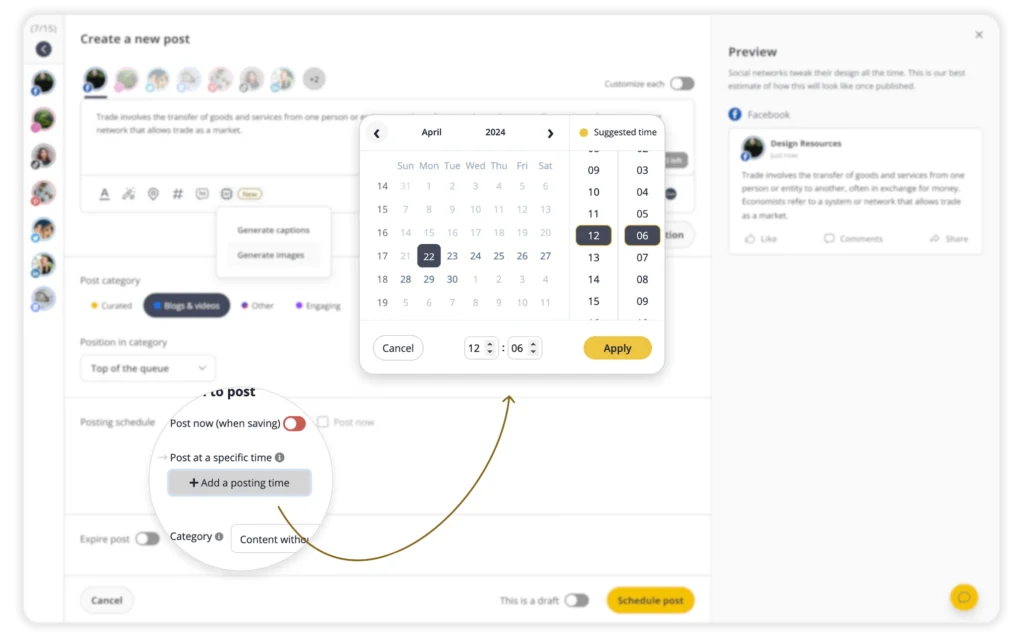
- Post at the right time
- Track what works
- Don’t overdo it
- Match content to intent
1. Adapt the format for each platform
Copy-pasting the same post everywhere feels efficient, but it rarely performs well.
In my experience, the issue isn’t the idea, but how that idea is presented. Each platform has its own expectations, and small mismatches can hurt performance quickly.
Posts optimized for each platform get around 20% higher engagement compared to generic cross-posted content. That gap usually comes from small adjustments, not complete rewrites.
For example, links work well on LinkedIn but are useless in an Instagram caption. Hashtags make sense on Instagram and X, but often feel out of place on Facebook. A short-form video might perform well on TikTok, while the same idea could work better as a carousel or text post elsewhere.
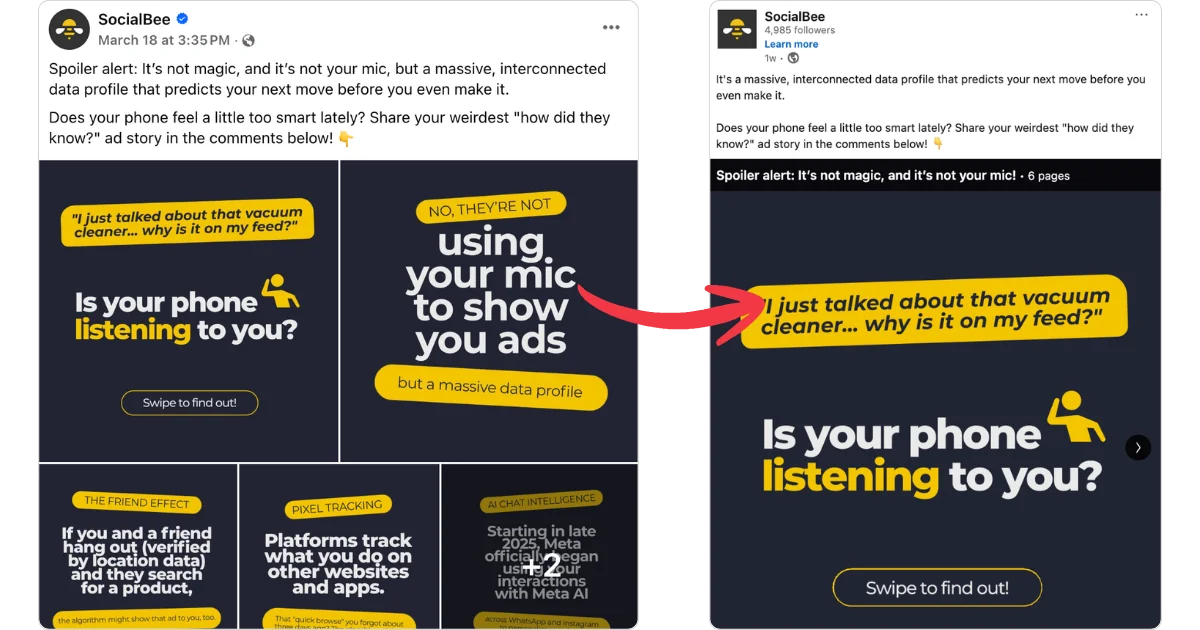
Look at the example below. What was originally a simple caption with images was turned into a LinkedIn carousel, making it swipeable and more interactive than just uploading images. However, since Facebook doesn’t support carousels in the same way, this format wouldn’t work there.
“Matching is all the algorithms are designed to do… your only job is helping the algorithm match your stuff with the right viewer,” says Kane Kallaway, founder of Wavy Labs.
The goal is simple: keep the message, adjust the delivery.
Use this quick checklist before you publish:
- Is the format right (text, carousel, short-form video, long-form video)?
- Are your visuals sized correctly for that platform?
- Is the link placed where people can actually use it?
- Are hashtags helping or just adding noise?
- Did you rewrite the opening line to match how people scroll there?
- Are you using platform-specific features (carousels, threads, reels)?
- Does the caption length fit the platform?
- Did you remove leftovers from other versions (like irrelevant CTAs)?
- Did you add accessibility elements where supported?
2. Post at the right time for each platform
Posting everywhere at the same time is convenient, but it rarely matches how people actually use different platforms.
LinkedIn is often checked during work hours. Instagram and TikTok tend to get more attention in the evening. When you post at the same time across all platforms, you’ll likely miss peak activity on at least some of them.
At the beginning, use common sense. Think about when your audience is most likely to scroll. During work hours, after work, or on weekends.
Once you have enough performance analytics, switch from guessing to observing the best times to post:
- Look at when your posts get the most reach and clicks
- Identify patterns by platform
- Adjust your posting schedule based on what actually performs

4. Balance cross-posted content with platform-specific posts
Cross-posting is useful, but doing it too often can make your content feel repetitive.
If someone follows you on multiple platforms, they shouldn’t feel like they’re seeing the exact same week of content repeated everywhere.
As a rule of thumb, I don’t reuse most of my content. I focus on cross-posting the ideas that translate well across platforms and leave room for platform-specific posts. There’s no fixed rule, but a good benchmark for social media managers is having 30–50% of your content come from repurposed assets.
5. Match content to intent, not just format
Adapting format isn’t enough if the content doesn’t match why people are on that platform.
Each platform has a different intent:
- LinkedIn: learn, gain insights, build authority
- Instagram: see visuals, explore brands, reinforce identity
- TikTok: get entertained or learn something quickly
- Facebook: stay updated, interact, and engage in discussions
Some content naturally fits multiple platforms. Other content doesn’t.
Microsoft does a great job at knowing what to post, focusing on announcements, educational content, and job opportunities on LinkedIn, while using TikTok mostly for trends, memes, funny and relatable videos, and content meant to entertain.

Before you cross-post, I always ask: Does this type of content belong here?
For example, a detailed educational post might work well on LinkedIn but feel out of place on TikTok. A quick, entertaining video might do the opposite.
When you align your content with both the format and the intent, your posts feel natural instead of forced. That’s what makes cross-posting actually work.
Pros and cons of cross-posting on social media
Cross-posting can make managing multiple social media platforms much more efficient, but it only works well when you understand the trade-offs.
Pros of cross-posting
- You can reach a broader audience by sharing the same content across different platforms instead of relying on just one channel.
- It helps you save time, since you’re not creating new content from scratch for every platform.
- Your brand message stays consistent, which leads to a strong brand identity across multiple channels.
- It gives you a simple way to test what works, since you can compare how the same idea performs on different platforms.
- It makes it easier to manage multiple accounts, especially when you use scheduling tools to plan and publish content in one place.
Cons of cross-posting
- Engagement can drop if you post the exact same content everywhere without adapting it.
- Your content can feel repetitive for people who follow you on multiple platforms.
- Some posts simply don’t translate well across different platforms, even with adjustments.
- You still need to spend time customizing posts, so it’s not a completely hands-off process.
- It’s easy to overlook platform-specific features that could improve performance if you focus too much on efficiency.
Bottom line: Cross-posting works best when you balance efficiency with adaptation. The more your content fits each platform, the more effective your results will be.
Frequently asked questions
1. How many social media accounts should a business have?
Most businesses should focus on 3 to 5 social media accounts, as long as they can maintain consistent posting and quality. SocialBee’s data shows brands manage an average of 4.5 accounts, but the exact number matters less than your ability to stay active and relevant. It’s better to perform well on a few platforms than to spread your efforts too thin across many.
2. What’s the difference between cross-posting and repurposing content?
Cross-posting means sharing the same core content across multiple platforms, sometimes with small adjustments. Repurposing goes further by turning one piece of content into different formats, like converting a blog post into a video, carousel, or short-form clips. Both approaches help you reuse existing content, but repurposing usually requires more effort and results in more variation.
3. Should I remove watermarks before posting videos across platforms?
Yes, in most cases, you should remove watermarks before posting videos on other platforms. Content with visible branding from another platform can feel out of place and may perform worse, especially on short-form video channels. Uploading the original version and adapting it for each platform gives you a better chance of reaching a larger audience.
4. Can cross-posting hurt engagement?
Cross-posting can hurt engagement if the content isn’t adapted to each platform. Posting the exact same version everywhere often leads to lower performance because it doesn’t match how people consume content on different platforms. When you adjust the format, messaging, and structure to fit each audience, cross-posting usually improves reach instead of hurting it.
5. Does TikTok allow cross-posting?
Yes, TikTok allows cross-posting, and there are no rules against sharing the same content on other platforms. What matters more is how your video performs on TikTok itself, based on engagement signals like watch time and interactions. While TikTok makes it easy to share videos elsewhere, it’s usually better to upload a clean version without watermarks when posting on other platforms.
Use cross-posting to get more reach without creating more content
Cross-posting works best when you treat it like distribution, not duplication. You start with one strong idea, adapt it for different platforms, and let it reach a broader audience without rebuilding everything from scratch.
The difference comes down to execution. When you adjust your content to fit each platform and pay attention to what performs, cross-posting becomes part of a sustainable social media strategy.
If you want to simplify the process, tools like SocialBee help you create, customize, schedule, and track your content across multiple social media channels from one place. Instead of juggling multiple accounts, you can manage your posting, monitor performance, and keep everything consistent without extra effort.
Start your 14-day free trial and see how a more structured cross-posting process can improve your results.