

Whether you’re posting long-form videos, Shorts, or live streams, specific questions usually comes up sooner rather than later: how to monetize YouTube videos and start earning money from your video content?
If you search any online forums, you’ll quickly see beginner YouTube creators asking the same thing.
YouTube monetization isn’t a single switch you turn on. It’s a set of monetization features that unlock over time, depending on your location, your audience size, and how people watch your content.
Some creators earn through ads, others through fan support, product links, brand deals, or a mix of all three. What works depends less on subscriber count and more on how your content fits your audience.
This guide breaks down YouTube monetization in plain terms. You’ll learn what YouTube monetization really means, the requirements you need to meet, how long approval takes, and the different monetization opportunities that allow creators to earn money on the platform, including options that work before you ever reach 1,000 subscribers.

What is YouTube monetization?
YouTube monetization is the process of earning revenue from your channel content, primarily through the YouTube Partner Program (YPP).
Once your channel meets YouTube’s eligibility requirements, you can apply for monetization. In most countries, that means reaching at least 1,000 subscribers and 4,000 hours of valid public watch time in the past 12 months.
After you apply to the YouTube Partner Program, YouTube reviews your channel manually. They look at your videos to make sure they follow monetization rules, use original content, and are safe for advertisers. This includes checks around copyright, reused content, and overall channel quality.
Once you’re approved, here are all the ways you can make money on YouTube:
- Ads on long-form videos and live streaming sessions;
- YouTube Premium payouts when Premium members watch your content;
- Fan support tools like Super Chat, Super Stickers, and Super Thanks;
- Shopping and affiliate features that let you tag products in videos and posts;
- Brand deals and sponsorships that happen outside YouTube but depend on an active channel.
You don’t need to use all of these. Most creators stick to the options that fit their format. Long-form videos typically earn revenue through ads, live streams perform well with fan support, and product-focused channels can select YouTube Shopping features to tag products for sale in their videos.
Investing time and effort into YouTube content can be a reliable way to earn. YouTube actively funds its creator ecosystem instead of treating creators as an afterthought. In 2024, it was the second-largest contributor to content creation by spend, paying out more than $32 billion to partners worldwide.
NOTE: Getting approved doesn’t mean you’re set forever. YouTube keeps an eye on monetized channels over time. If your content starts breaking the rules or relies too heavily on reused material, monetization can be paused or removed. Following YouTube’s rules keeps your channel eligible, while ignoring them can lead to immediate consequences.
YouTube monetization requirements
To get monetized, your YouTube account needs to meet a few eligibility rules. These cover content quality, audience size, recent viewing activity, and basic account setup.
How many subscribers do you need to get monetized on YouTube?
In most countries, you need 1,000 subscribers to apply for YouTube monetization.
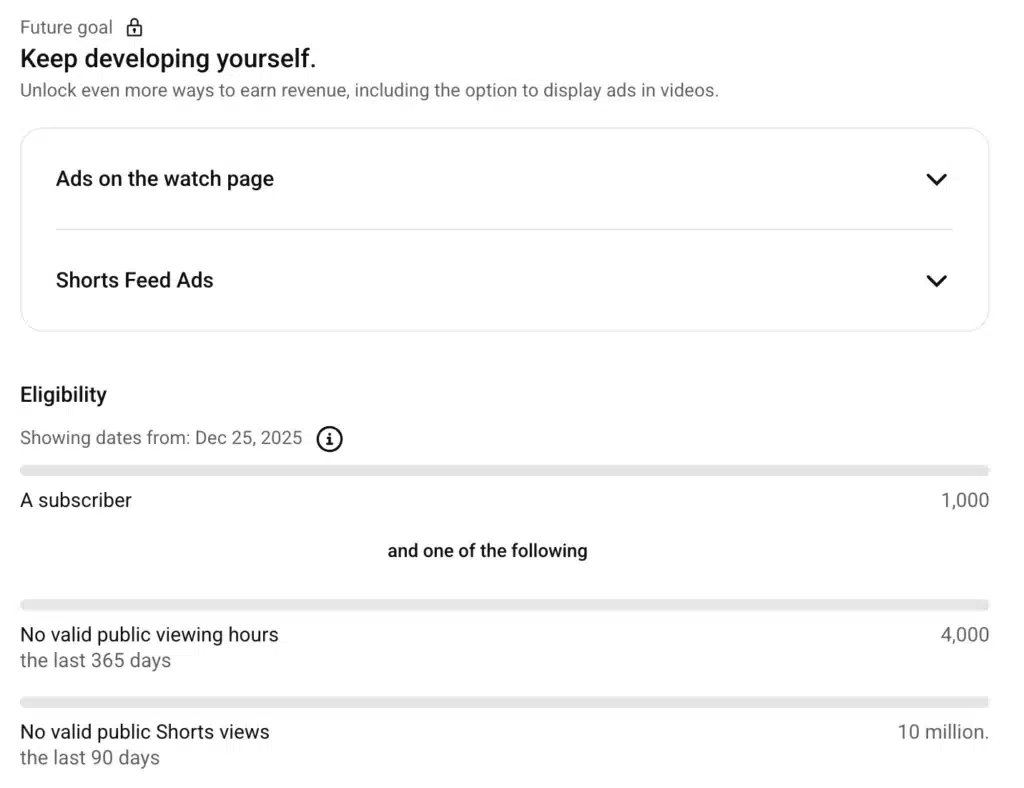
However, in some countries, YouTube lets creators start earlier at 500 subscribers, but this only unlocks limited features. To fully monetize your channel, you still need to hit higher requirements.
How many views do you need to get monetized on YouTube?
Many creators focus on views alone, but what really matters is the time viewers spend watching.
YouTube doesn’t look at your total lifetime views. It focuses on recent performance instead. To qualify, you need either 4,000 hours of watch time on long-form videos in the past 12 months or 10 million Shorts views in the last 90 days. Once you hit one of those thresholds and meet the subscriber requirement, you can apply for monetization.
All the requirements you need to meet to monetize your YouTube channel:
- Run an active channel with original content. If you mostly repost clips, compilations, or lightly edit someone else’s videos, YouTube can reject you for reused content.
- Hit the subscriber and viewing thresholds for your country. In many countries, YouTube requires 1,000 subscribers.
- Gain 4,000 public watch hours in 12 months (long-form videos), or 10 million public Shorts views in the past 90 days.
- Avoid active strikes under YouTube’s Community Guidelines and policy and copyright guidelines. YouTube takes violations seriously. Between July and September 2025, it removed 12,139,839 videos for community guideline violations.
- Verify your YouTube account by turning on two-step verification. YouTube uses it to confirm ownership and reduce abuse.
- Link an approved Google AdSense account in your own name. Set up AdSense and connect it to your channel so YouTube can pay you.
How much does YouTube pay?
YouTube doesn’t pay a fixed rate. Most creators earn a monthly estimated revenue based on ad demand, audience location, niche, and whether they create engaging content. On average, ad revenue falls between $2 and $15 per 1,000 views (RPM), but ads are usually just one income stream, not the full picture.
Take Jessica Miyuki, a surf, art, and travel creator who documents island life while building multiple creative businesses alongside YouTube.
In her first six months of monetization, she had around 7,600 subscribers. Here’s how much she earned:
“So for the grand total of those 6 months being monetized was $1,894.95, so like for 6 months it’s not much, but from starting from zero it felt really good.”
That averaged a few hundred dollars per month from AdSense alone.
But the bigger shift came a year later.
After that income video went viral and nearly tripled her subscriber count, her revenue changed dramatically. Over her first full year of monetization, here’s how much she earned:
“So, grand total… I made $6,320.1. Again, for a year, not that much, but I see potential.”
During peak months when videos surged, she made over $1,000–$1,800 in a single month from ads alone. Still, she emphasizes that AdSense is unpredictable and that sponsorships and agency representation became a major turning point in stabilizing income.
That’s the key takeaway: ad revenue can spike when a video takes off, but it fluctuates heavily by season, niche, and performance. According to YouTube’s revenue-sharing model, creators receive about 55% of ad revenue, but sustainable income usually comes from combining ads with sponsorships, affiliates, digital products, or other monetization streams.
How to get monetized on YouTube
If you’re wondering how to get monetization on YouTube, the process is straightforward once you meet the eligibility requirements. Once your channel qualifies, you can apply directly through YouTube Studio and wait for approval.
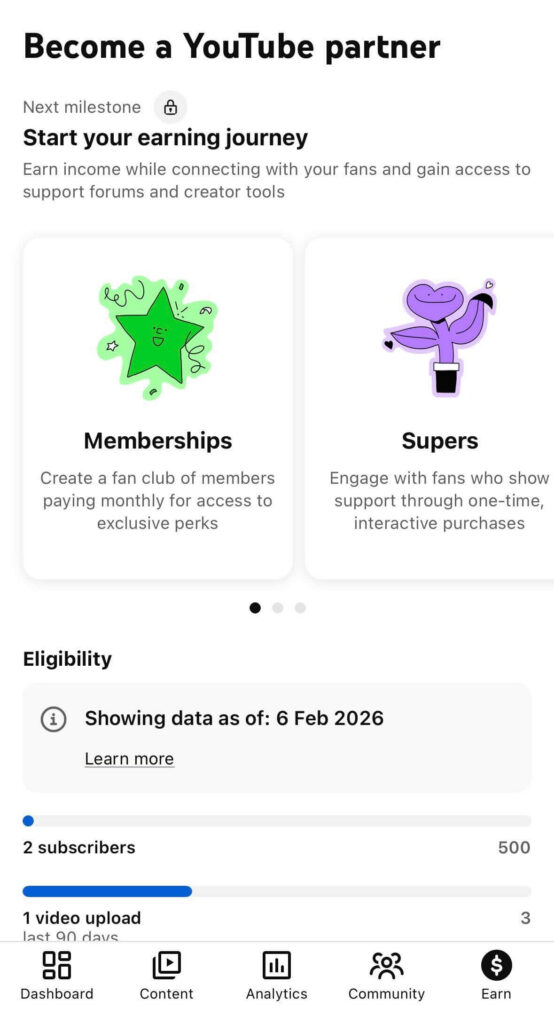
Here’s how to apply for YouTube monetization:
- Open YouTube Studio.
- Go to the “Earn” tab.
- Click “Get started” under the YouTube Partner Program.
- To enable monetization, review and accept YouTube’s monetization policies and advertiser-friendly content guidelines.
- Connect your Google AdSense account.
- Submit your channel for review.
YouTube also offers limited monetization options before full approval. Features like channel memberships, subscriptions, and Shopping can unlock at 500 subscribers, with lower watch-time requirements than ad revenue. These options let you start earning while you work toward full monetization.
How long does it take to get monetized on YouTube?
Once you apply to YPP, YouTube’s review usually takes a few days to a few weeks.
During this time, YouTube reviews your channel as a whole. It doesn’t judge a single video in isolation. The review focuses on whether you publish original content, provide consistent value to viewers, and follow community and copyright rules. Approval can take anywhere from a few days to a few weeks, depending on review volume.
How to get monetized on YouTube Shorts
YouTube Shorts use the same YouTube Partner Program, but they qualify creators based on views rather than watch hours.
To make money, you need to fulfil these YouTube Shorts monetization requirements:
- Gain at least 1,000 subscribers (or 500 subscribers in some countries for limited features);
- Generate 10 million public views in the last 90 days;
- Post original Shorts content that follows YouTube’s monetization and copyright rules.
Once you hit those requirements, the process stays the same as long-form monetization:
- Open YouTube Studio.
- Go to the “Earn” tab.
- Click “Get started” under the YouTube Partner Program.
- Accept YouTube’s monetization and advertiser-friendly content policies.
- Connect your Google AdSense account.
- Submit your channel for review.
Shorts earn money a little differently than long videos. Ads appear between videos in the Shorts feed, not on your videos directly. YouTube pools that ad revenue and shares it with eligible creators based on how many views their Shorts get compared to others.
Even before ad revenue kicks in, many creators still earn from Shorts through brand deals, affiliate links, or fan support features like Super Thanks, once those become available.
All you need to know about the YouTube Shorts monetization policies:
- You must join the YouTube Partner Program (YPP) and accept the Shorts Monetization Module. To start earning, your channel has to meet the YouTube Partner Program requirements, and you must accept the Shorts Monetization terms.
- Shorts ad revenue sharing only applies after you accept the Shorts monetization terms. Views earned before you accept the Shorts Monetization Module are not eligible for Shorts ad revenue sharing.
- YouTube Shorts monetization works through a revenue pool system. Ads that appear between videos in the Shorts Feed are pooled monthly. This system determines how YouTube Shorts pay creators.
- Revenue is distributed through the Creator Pool. After ad revenue is collected, a portion goes into the Creator Pool. Your share depends on your percentage of total eligible engaged views in your country.
- Creators keep 45% of their allocated revenue. Once your share of the Creator Pool is calculated, you receive 45% of that amount, regardless of whether you used music in your channel’s video.
- Music affects how the Creator Pool is calculated, not your final percentage. If your Short includes licensed music, part of the revenue covers music licensing costs before funds are distributed.
- Only eligible engaged views count toward earnings. Artificial views, reused content, or Shorts that don’t meet advertiser-friendly guidelines won’t generate revenue.
- Your content must follow monetization and content policies. Non-original clips, minimal video editing, or copyright issues can make a channel’s video ineligible for monetization.
- Shorts earn separately from long-form videos. Revenue from the Shorts Feed is different from ads shown on a regular YouTube channel video in the Watch Page.
- YouTube Premium revenue is also shared. In addition to ad revenue, YouTube Shorts pay creators through Premium subscription revenue, with the same 45% share applied.
- You can track performance in YouTube Analytics. Once monetization is active, you’ll see estimated daily Shorts earnings inside your dashboard.
3. Use fan funding features like Super Chat and Super Thanks
YouTube doesn’t make you wait for ads to let viewers support your work. Fan funding features exist for a simple reason: some people want to give back when a video helps them or a creator shows up consistently.
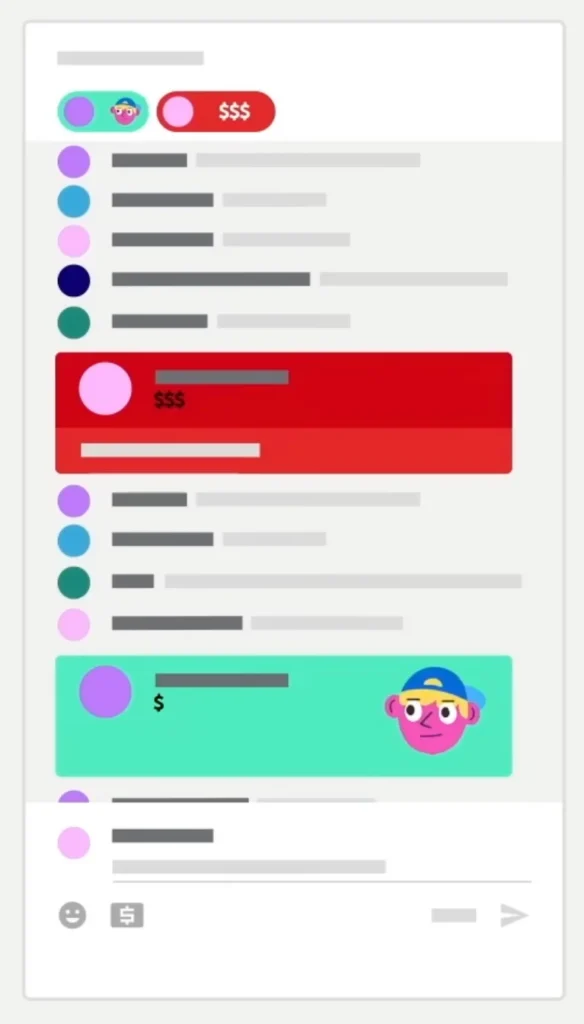
Super Chat and Super Stickers work during live streams. Viewers pay to highlight their messages so they stand out in the chat. Super Thanks does the same thing on regular videos and Shorts by letting viewers send a one-time tip with a highlighted comment.
This kind of monetization doesn’t depend on views or algorithms. It depends on trust.
Creators often underestimate how powerful this can be early on. Even a small, engaged audience will support work they find useful or entertaining. For many creators, fan funding is the first time YouTube feels real as a passive income source.
4. Earn ad revenue from Shorts
Are you ready to start earning ad revenue?
You can’t talk about YouTube monetization anymore without taking Shorts into consideration. They’re quick to produce, easy to test, and now they pay.
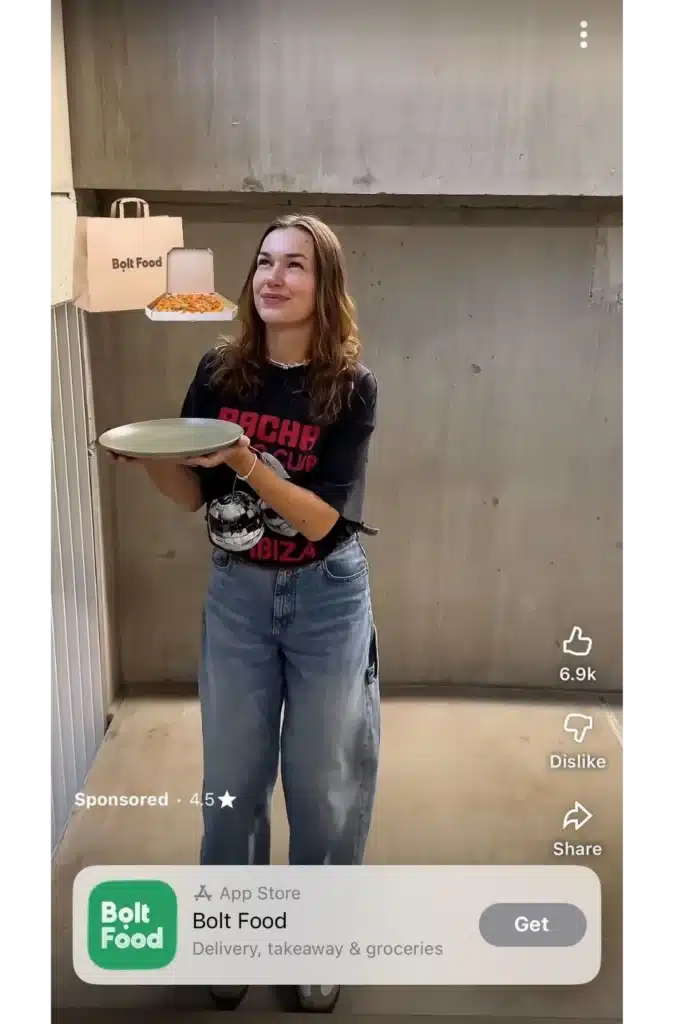
Shorts earn through ad revenue sharing in the feed, not ads inside individual videos. That means your earnings depend on how Shorts perform together, not whether one clip goes viral.
To make YouTube Shorts count and earn consistently, follow these best practices:
- Hook viewers in the first seconds, since most people decide whether to keep watching almost immediately.
- Check YouTube analytics for early drop-offs in retention because that’s where most Shorts lose momentum and stop being shown.
- Use on-screen text intentionally, so viewers can follow even without sound.
- Reuse formats that already performed well.
- Keep your videos short (15-30 seconds) and clear, because videos that get watched all the way through tend to be shown more.
5. Offer paid channel memberships
At some point, views alone stop feeling like a reliable way to earn. That’s where channel memberships start to make sense.
That “extra” doesn’t have to be complicated. Early access to videos, members-only posts, or a private live Q&A once in a while is often enough.
What makes memberships work is setting clear expectations. Promise only what you can consistently deliver, and stick to it. Channels that do well here usually keep perks simple, communicate openly, and treat members like insiders, not customers.
6. Earn money from YouTube Premium subscribers
YouTube Premium pays creators differently from ads. When someone with a Premium subscription watches your videos, you earn a share of their subscription fee based on how long they watch.
You don’t have to do anything special to turn this on. If your channel is monetized, Premium revenue is included automatically. What affects it most is watch time. The longer people stay, the more you earn.
This tends to work best for videos people actually sit through, like tutorials, explainers, or longer-form engaging content they watch in one go.
YouTube Premium works because viewers want to support their favorite creators without seeing ads.
7. Secure paid sponsorships
Despite what many people think, brands don’t only work with huge channels. They look for creators who reach the right audience. If your content is focused and people trust your recommendations, you’re already valuable.

Most sponsorships start in one of two ways. Either a brand reaches out after seeing your videos, or you contact brands directly with a short pitch that explains who watches your channel and how their product fits naturally into a video.
When a sponsorship feels like part of the content, it performs better. That’s also what brings brands back. Over time, repeat partnerships turn sponsorships from one-off deals into a steady income stream.
8. Monetize through Patreon or fan funding platforms
Patreon and similar platforms give creators another way to earn directly from their audience, alongside YouTube’s built-in monetization options.
These platforms work well when you want to share things like downloadable resources, private podcasts, or behind-the-scenes content. You decide what to offer and how often, based on what fits your audience.
These platforms are simply an alternative way for people to support your channel. Some creators use only YouTube features, others add fan funding platforms alongside them.
9. Sell merchandise and use YouTube Shopping
Selling merchandise gives viewers a way to support your channel and get something tangible in return. This can be your own products, branded items, or other products you want to feature.
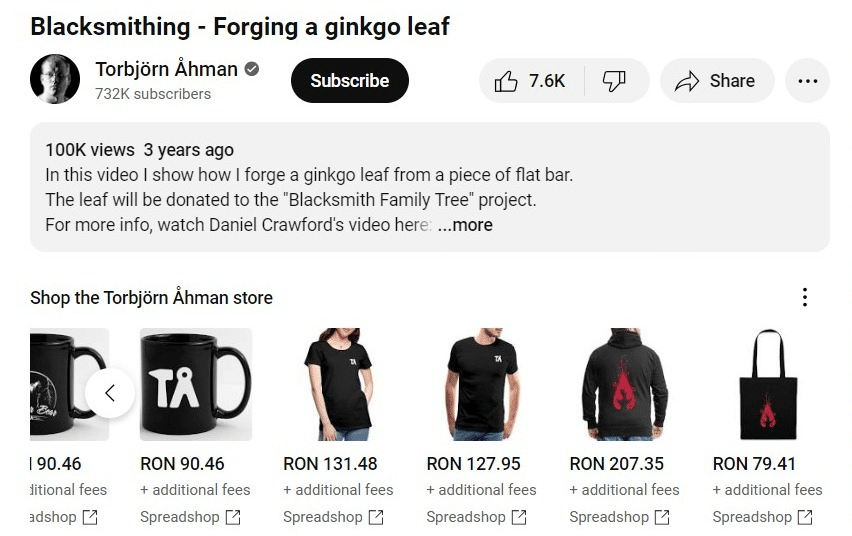
YouTube Shopping makes this easier by letting you tag products directly in videos and posts. Instead of sending people off to a separate link, products live alongside the content itself.
This works best when the product actually fits the channel. Personality-driven creators often do well with merch. Educational or niche creators tend to sell tools, resources, or products tied to what they already talk about. When the connection is obvious, viewers don’t need much convincing.
10. Use crowdfunding for specific projects
Crowdfunding works best when there’s a clear reason behind it. Instead of asking for general support, you invite viewers to help make a specific project happen.
This might be upgrading equipment, funding a new video series, or covering travel for a shoot. The clearer the goal, the easier it is for people to decide whether they want to contribute.
Crowdfunding is usually temporary, not ongoing. Creators tend to run short campaigns, explain exactly what the money will be used for, and then close them once the goal is reached. That structure keeps things focused and avoids fatigue.
When done well, crowdfunding turns viewers into participants. They’re not just watching the result; they helped make it happen.
7 tips for monetized YouTube creators
Getting approved for monetization isn’t the finish line. It’s the point where YouTube starts paying closer attention.
Once your channel is monetized, your income depends on three things: whether people keep clicking, whether they keep watching, and whether your content stays advertiser-friendly. Channels that grow revenue over time treat this as an ongoing system, not a one-time win.
Before you upload videos, review titles, thumbnails, and retention data. Creating videos with monetization in mind means structuring them for retention and advertiser safety from the start.
Follow these tips to increase YouTube ad revenue and grow your channel after monetization approval:
1. Maintain a consistent upload frequency
Once your channel is monetized, consistency matters more than how often you post. Uploading on the same days each week helps viewers know when to expect new videos and makes them more likely to come back.
Share at least one video per week to signal to YouTube that you are an active creator.
Moreover, posting at the right time helps your videos get early traction. When a video gets views and engagement soon after publishing, YouTube is more likely to keep showing it.
What works well:
- Pick specific upload days and stick to them.
- Post when your audience is usually online.
- Encourage viewers to turn on notifications so they don’t miss uploads.
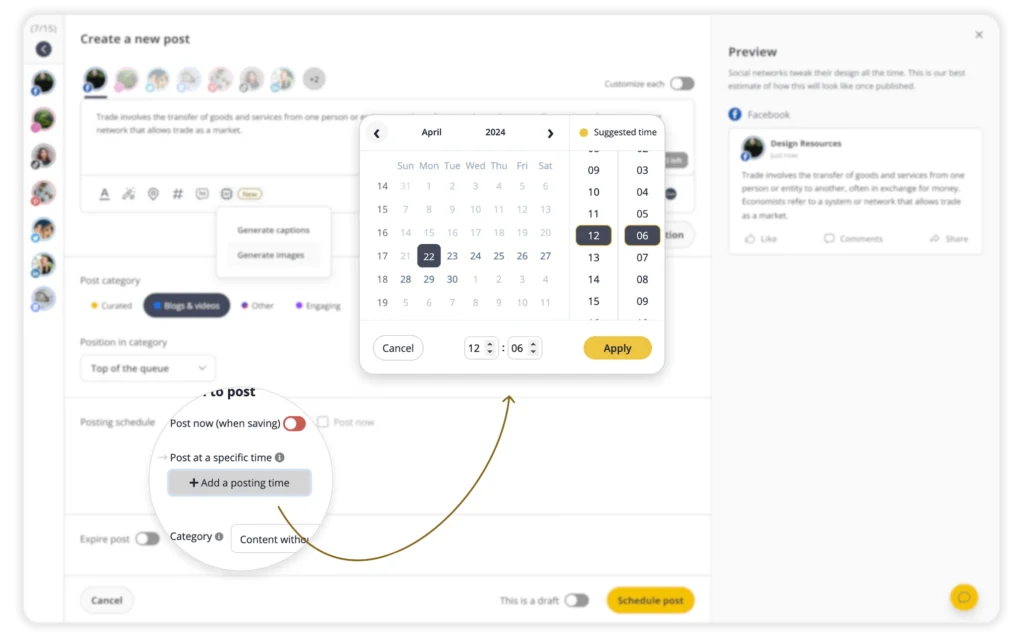
- Schedule videos ahead of time to avoid gaps when life gets busy.
2. Improve your SEO
While making videos can be creative, you need to be strategic to build a successful YouTube channel.
YouTube can’t promote video content if it doesn’t understand what it’s about. That’s where basic SEO comes in.
Before uploading a video, it helps to know what people are actually searching for. You don’t need advanced tools for this. YouTube’s search suggestions and similar videos in your niche usually give enough direction.
Pick one main topic and make everything support it. Clear titles perform better than clever ones. For example, “My favorite pasta recipe” is vague, but “Creamy garlic pasta you can make in 20 minutes” tells viewers exactly what to expect.
Use the first line of your video description to simply explain the content. A line like “This video shows how to make a quick garlic pasta with simple ingredients” gives both viewers and YouTube immediate context.
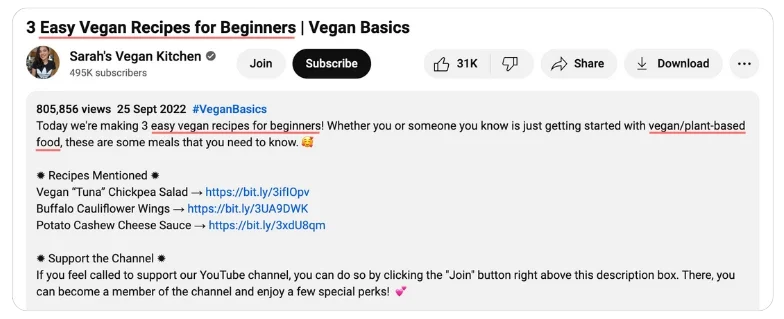
Tags and hashtags play different roles. Tags help YouTube understand what your video is about, especially for newer channels. For a cooking video, tags might include phrases like creamy garlic pasta, easy pasta recipe, or quick dinner ideas.
Hashtags are visible to viewers and help with light discovery. In this case, something like #PastaRecipe, #EasyCooking, or #WeeknightDinner is enough. When everything points to the same idea, your video is much easier to find.
3. Use end screens and cards to guide viewers
End screens and cards are built-in YouTube tools that let you link to other videos, playlists, or your channel while a video is playing or right at the end.

Cards appear in the top corner during the video and are useful for pointing viewers to something related at the moment it makes sense. End screens show up in the last 5–20 seconds and can include links to another video, a playlist, or a subscribe button.
You add both inside YouTube Studio when editing a video. It only takes a minute.
Use them to guide viewers to the next logical watch, not a random one. When people continue watching your content instead of leaving, total watch time goes up, which helps your monetized videos perform better.
4. Add video chapters
Video chapters break a video into sections so viewers can see what’s coming and jump to the part they want. You can add them manually by placing timestamps in your video description, starting with 00:00, or enable automatic chapters in YouTube Studio and let YouTube generate them for you.
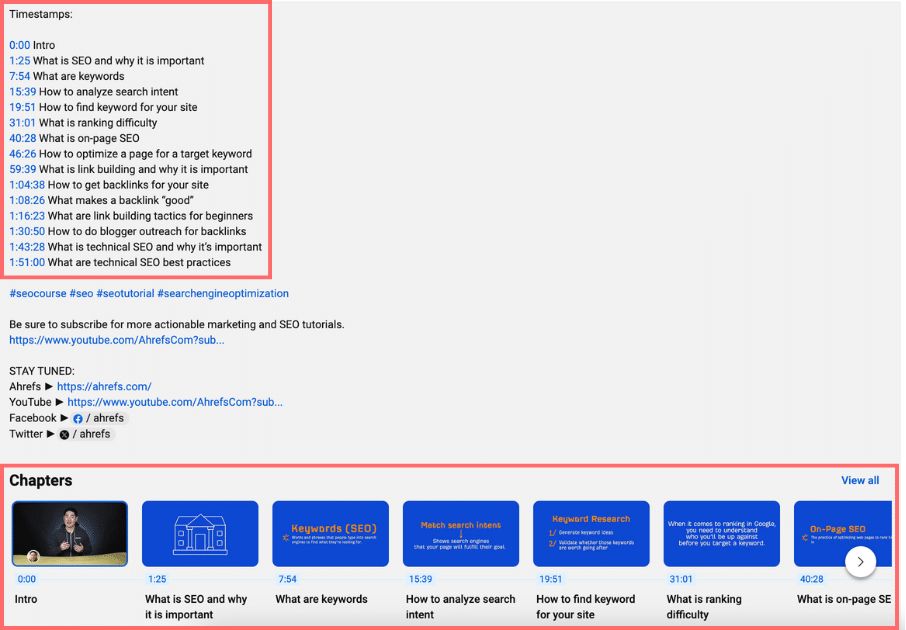
Chapters make longer videos easier to watch. When people can quickly find what they’re looking for, they’re more likely to stay instead of clicking away. That usually helps increase YouTube watch time, which matters for monetized videos.
5. Use clear, consistent thumbnails
Thumbnails decide whether someone clicks or keeps scrolling. If the value isn’t obvious in a second, the video usually gets skipped.
A few things that work well in practice:
- Show one clear focal point, like the finished dish or a key ingredient, instead of multiple elements.
- Use close-up shots so details are easy to see on small screens.
- Keep text short or skip it entirely if the image already tells the story.
- Use the same colors, framing, or layout across videos so your content is easy to recognize.
- Make sure the thumbnail supports the title instead of repeating it.

Clear thumbnails get more clicks, and more clicks give your monetized videos a better chance of being shown to new viewers.
6. Use playlists to increase watch time count
Playlists group related videos together so viewers naturally move from one video to the next. Instead of watching one video and leaving, they’re more likely to keep going.
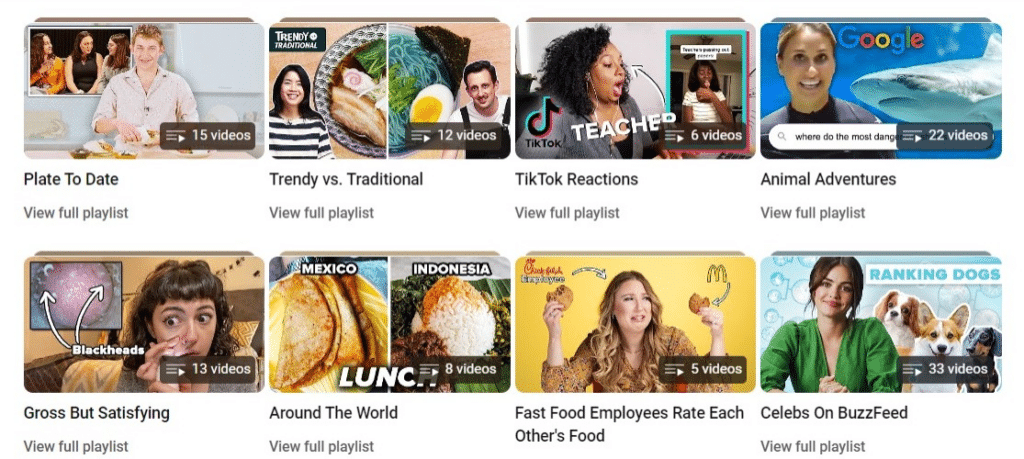
Create playlists around a clear theme, like a series of recipes, skill levels, or related topics. Order them intentionally and put your strongest video first, not the oldest one.
When viewers watch multiple videos in a row, it helps with watch time growth. That helps your channel perform better overall and supports monetized videos long after they’re published.
7. Upload videos with subtitles
Subtitles aren’t just about accessibility; they also improve retention and reach.
Many viewers watch videos without sound, especially on mobile or during work hours. Subtitles help them follow along, which often increases watch time and completion rates. From what I’ve seen in analytics, videos with accurate captions tend to perform better internationally as well.
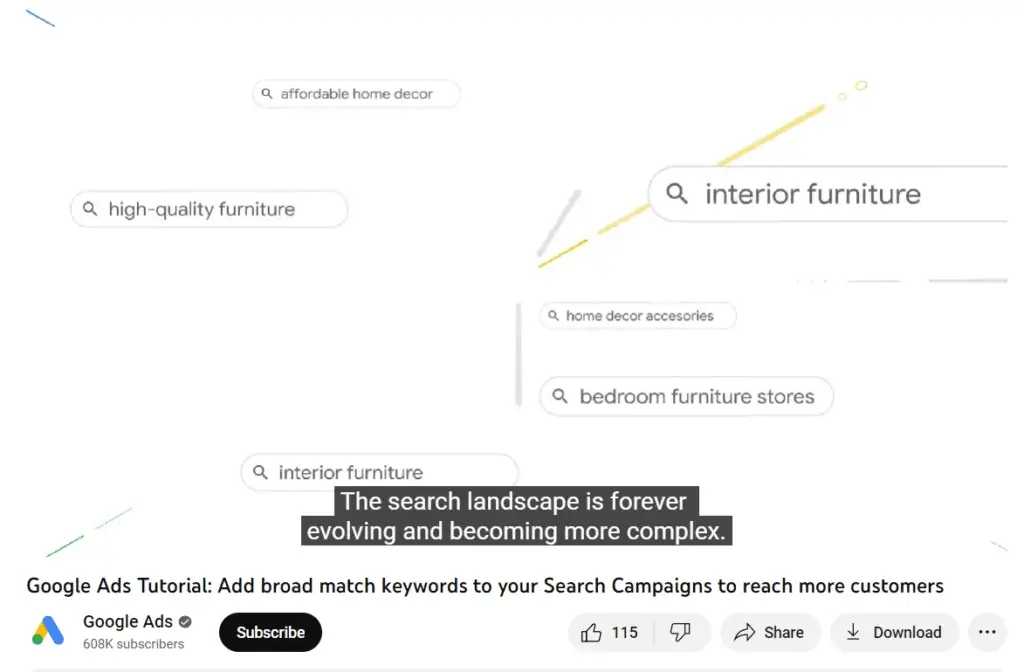
YouTube’s auto-captions are a good baseline, but reviewing and correcting them improves accuracy and professionalism.
Frequently asked questions
Why did my YouTube monetization application get rejected?
Most monetization applications are rejected because the channel fails the content review, not the subscriber or watch hour threshold.
Common reasons include reused content, heavy reliance on clips from other creators, unclear ownership of visuals/music usage, or a channel that lacks a consistent, original focus. YouTube reviews the channel as a whole, not just one particular video, and applies monetization and community guidelines strictly.
What counts as reused content?
Reused content is any video that relies heavily on material you didn’t create and haven’t meaningfully transformed. This includes compilations, clipped videos from other channels, lightly edited reactions, or low-quality content made from stock footage without original commentary or value.
Even if a video performs well, reused content can block monetization or cause a monetized channel to lose access later.
Can you monetize a YouTube channel with faceless videos?
Yes, you can monetize without appearing on camera as long as the content is original and adds clear value.
Screen recordings, voiceovers, unboxing videos, tutorials, and faceless educational videos are commonly approved. What matters is ownership, transformation, and viewer value, not whether your face is visible.
What’s a YouTube monetization checker?
A YouTube monetization checker is a tool that looks at a channel’s public numbers, like subscribers, watch hours, and Shorts views, to estimate whether it qualifies for the YouTube Partner Program. It can give you a rough idea of eligibility or potential earnings, but it can’t see strikes, copyright issues, or your actual approval details.
To check your real monetization status, you need to go into YouTube Studio, where YouTube shows whether you meet the requirements, are under review, or have monetization enabled.
Is YouTube Shorts monetization worth it?
What’s the YouTube Shorts Monetization Module?
The YouTube Shorts Monetization Module is a set of terms that creators need to accept in order to make money from Shorts.
But how much ad revenue can you earn?
Once accepted, it lets YouTube Shorts creators earn a 45% share of the Shorts ad revenue and Premium earnings. If you’re in the YouTube Partner Program, you have to agree to these terms to monetize your Shorts, and they only apply to views you get after you accept.
Monetize your YouTube channel with a clear plan
YouTube monetization works best when you keep it focused.
Start with one or two monetization paths that fit your content now, then add others as your channel grows. Ads and YouTube Premium revenue usually come first if you have a new YouTube channel. Fan funding, memberships, and shopping work better once you have steady watch time and returning viewers.
Before chasing new tactics, take one practical step: audit your last 10 videos. Look for advertiser safety issues, retention drop-offs, or weak hooks. Small fixes here often improve revenue faster than uploading more videos.
If you want to monetize your YouTube channel, focus on increasing the time viewers spend watching, improving watch time growth, and creating high-quality content consistently. The algorithm rewards retention, clarity, and value, not hacks.
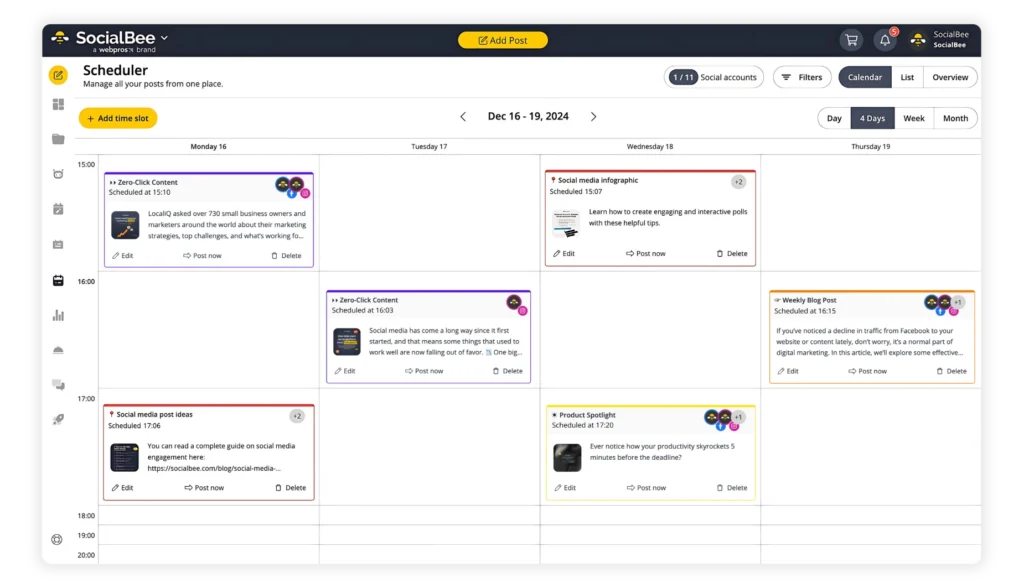
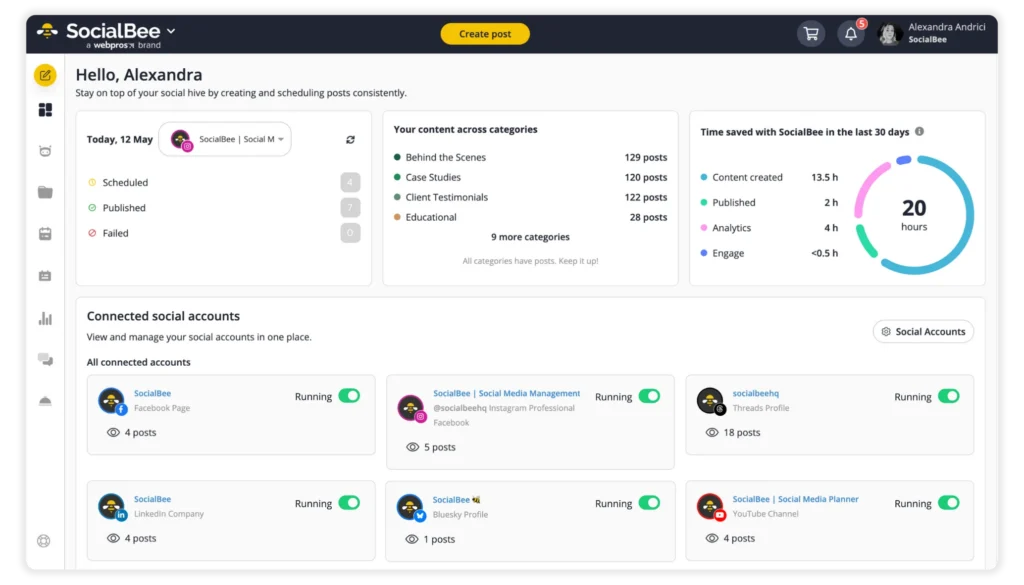
After you’re monetized, consistency is what protects your income. Planning and scheduling content in advance helps you stay visible even during busy weeks.
If you want to make that easier, SocialBee can help you batch uploads, keep a predictable schedule, and review performance trends in one place. Give it a try by starting your 14-day free trial now!