

Managing multiple social media accounts used to take up way more time than it should have. I was sharing social media posts daily, jumping between different platforms, and constantly trying to keep up with content creation.
It worked… until it didn’t.
Posting in real time made everything feel urgent. If I missed a day, my whole social media strategy felt off. And instead of focusing on better ideas or improving my social media presence, I was stuck in a loop of manual scheduling and quick fixes.
At some point, I realized the issue wasn’t consistency. It was the lack of a system.
That’s when I switched to social media bulk scheduling.
Now, instead of handling multiple posts every day, I plan and schedule content for the entire month in one go.
Here’s exactly how I do it.
We’re SocialBee LABS SRL, part of WebPros. We use the information you provide to share relevant content & updates, as outlined in our Privacy Policy. You can opt out anytime.
Short summary
- Decide the main goal for the month before creating content. Usually, that means focusing on Growth, Engagement, Conversions, or supporting a specific launch or campaign.
- Figure out exactly how much content is needed for each platform and account before planning anything. This makes the workload much easier to manage.
- Create a few simple content pillars based on what’s already happening in the business so the content feels structured instead of random.
- Brain-dump content ideas first, then organize and refine them later instead of overthinking every post from the start.
- Use AI-driven social media management tools like SocialBee to turn rough ideas or notes into quick first drafts and speed up the writing process.
- Prepare all visuals, videos, carousels, and media files before scheduling so the workflow stays organized and efficient.
- Adapt important posts for each platform instead of posting the exact same version everywhere. Small changes like formatting, hashtags, links, or CTAs help the content feel more native to each platform.
- Review the full month inside the content calendar to balance content types, avoid repetition, and make sure everything supports the overall strategy.
- Leave some space open in the calendar for trends, launches, or spontaneous content that comes up during the month.
- Track performance at the end of the month to see which content types, hooks, and formats performed best, then use those insights to improve the next month’s strategy.
Why I stopped scheduling posts daily
For a long time, I thought posting manually every day was the “right” way to manage social media.
Stay consistent. Show up daily. Keep the momentum going.
But honestly, the problem was never scheduling content.
The real problem was trying to manage content day by day instead of planning it properly.
When I was posting manually every day, I was constantly in execution mode. Writing captions last minute, switching between platforms, resizing visuals, checking formatting, adjusting posting times, and trying to make quick decisions without looking at the bigger picture.
It made content feel reactive instead of intentional.
And once you start managing multiple brands, platforms, or clients, that workflow becomes very difficult to maintain.
Something always gets rushed. A caption gets delayed. A visual gets forgotten. A campaign loses consistency.
I also noticed the quality of the content started changing. When your only focus is “I need to post something today,” content becomes more about filling gaps than actually supporting a strategy.
Instead of creating content with a purpose, I was just trying to keep up.
Ironically, it didn’t even save time.
I was still logging in every day to fix small issues, upload assets, rewrite captions, double-check formatting, and make manual edits across platforms. Those small tasks add up very quickly.
Switching away from manual daily posting helped me step back and think more of a long-term social media strategy.
Instead of planning content day by day, I started planning in weeks and months. That gave me more space to build actual campaigns, create stronger content pillars, prepare visuals in advance, and batch content properly.
It also made the entire process less stressful.
Now, scheduling content is less about “automating social media” and more about creating a workflow that’s structured, repeatable, and easier to manage consistently.
What is social media bulk scheduling (and why it works)
Social media bulk scheduling means planning and scheduling multiple posts at once instead of posting manually every day.
Instead of stopping what you’re doing daily to write and publish a post, you sit down once, prepare your content, and schedule everything ahead of time inside a social media scheduling tool like SocialBee.
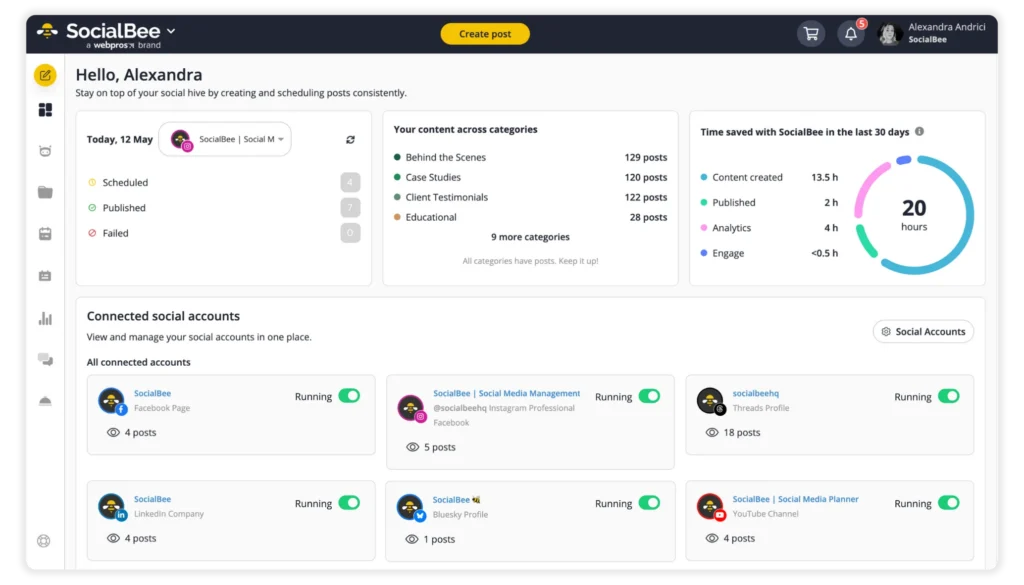
In real life, that usually looks like preparing a week or month of content in one session. You write the captions, upload the media files, organize the posting dates, and schedule everything in advance.
But the reason bulk scheduling works isn’t just because content is automated. It works because it creates a more structured way to manage content.
Some of the biggest benefits of social media scheduling are:
- Saves time by batching work
- Keeps posting consistent
- Improves content quality
- Lets you post at optimal times
- Reduces daily stress
- Frees up to focus on engagement
- Helps you plan content more strategically
1. Saves time by batching work
Instead of stopping what you’re doing every day to write and post, you spend a few focused hours preparing content for the entire week or month.
That means fewer interruptions, less context switching, and more time for deeper work.
2. Keeps posting consistent
Because the content is already scheduled, you’re less likely to miss posting days or scramble for last-minute ideas.
It removes the constant pressure of needing to “come up with something” every day.
3. Improves content quality
When you’re not rushing to post immediately, you have more time to think through captions, improve hooks, fix mistakes, and make the content clearer before it goes live.
The content usually feels more intentional and polished.
4. Lets you post at optimal times
Your content can go out when your audience is actually online, even if that’s early in the morning, during work hours, or late at night.
You don’t need to be online manually every time something gets published.
5. Reduces daily stress
One of the biggest differences is mental.
When posting is already handled for the week, it stops sitting in the back of your mind as another unfinished task you still need to do.
6. Frees you up to focus on engagement
Instead of spending time manually posting content every day, you can focus more on replying to comments, answering messages, and actually interacting with your audience.
That’s usually what builds trust and community long term.
7. Helps you plan content more strategically
When you can see all your posts together, it becomes easier to avoid repetition, balance different content types, support campaigns properly, and make sure everything connects back to a bigger goal.
You stop posting randomly and start thinking more intentionally about the overall content strategy.
What I prepare before I bulk-schedule social media content
Bulk scheduling only works if the prep is done right. Otherwise, you’re just moving the chaos into one day.
Here’s what I do before I even open a social media scheduling tool:
- I align content with what’s happening across the business.
- I figure out how much content I actually need.
- I choose simple content pillars based on what’s already happening.
- I brain-dump content ideas without overthinking.
- I use AI to turn ideas into rough drafts.
- I prepare visuals and media in advance.
1. I align content with what’s happening across the business
Before I create content, I check what’s happening across the business and marketing side first.
A lot of people jump straight into content ideas, trends, or posting consistently. But if the content isn’t connected to what the business is actually trying to achieve, it starts feeling random very quickly.
The usual content for growth, engagement, and trust is always running in the background. But I also want the content to support the bigger priorities everyone is already working on.
That could be:
- A launch the team is preparing
- A campaign marketing is running
- A product or service that needs more visibility
- A feature the company wants to push more
- A business goal like awareness, sign-ups, or conversions
Once I know the bigger focus, it becomes much easier to plan content with intention instead of just filling a calendar.
Usually, I pick one main direction for the month:
- Growth → reach, visibility, followers
- Engagement → comments, saves, conversations
- Conversions → clicks, leads, sign-ups, sales
- Campaign support → helping push a specific launch or initiative
That doesn’t mean every single post has to talk about the same thing. It just gives direction to the content strategy.
For example, if the goal is engagement, I’ll create more opinion-based posts, relatable content, questions, or discussion starters.
If the focus is conversions, I’ll include more product education, stronger CTAs, customer examples, or content that answers buying objections.
For me, this is what turns “posting consistently” into posting with a purpose.
2. I figure out how much content I actually need
Before I plan anything, I make sure I know the exact number of posts I need to deliver that month.
The baseline usually stays similar, but the total changes as soon as something shifts, like adding a new client, adding another platform, changing posting frequency, or having extra content for a campaign or launch.
So instead of assuming it’s “about the same,” I check each account separately. One client might need 28 posts a month, while another might only need 12, depending on their platforms and content plan.
This step is about seeing the real workload before you start planning, so you don’t underestimate it or realize halfway through the month that you need more content than you accounted for.
3. I choose simple content pillars based on what’s already happening
Before planning content, I usually define a few simple content pillars.
A content pillar is basically a category of content you post about consistently. It helps give structure to your content without making everything feel repetitive.
I don’t believe in creating super complicated social media strategies with 15 different categories. Most of the time, a few strong pillars are enough.
The goal of content pillars is to make content creation easier and more intentional.
Instead of asking:
“What should I post today?”
You already know the types of content you want to rotate between.
I usually build pillars around what’s already happening in the business:
- Current client work
- Ongoing projects
- Questions customers keep asking
- Topics the team talks about often
- Things I’m currently learning, testing, or improving
- Business priorities or campaigns for that month
From there, I group everything into a few broader themes.
For example, a creator or agency might have pillars like:
- Educational content
- Behind the scenes
- Industry opinions
- Client results or case studies
- Promotional content
- Personal insights or lessons
Under each pillar, there’s room for different post formats and ideas.
For example, an educational pillar could include:
- How-to posts
- Quick tips
- Common mistakes
- Step-by-step breakdowns
- Industry explanations
- Carousel posts
- Short-form videos
That’s why I like keeping pillars broad enough to give structure, but flexible enough that the content still feels creative and natural.
The pillars themselves usually stay pretty consistent month to month. What changes is the angle, topics, campaigns, or business focus behind them.
For example, the “educational” pillar might stay the same all year, but the actual topics inside it change depending on:
- launches
- client questions
- trends
- seasonal campaigns
- new offers
- platform updates
I also don’t believe every platform should use the exact same version of a pillar.
The core topic can stay the same, but the format should adapt to the platform.
For example:
- On LinkedIn, an opinion post might become a story or industry insight
- On Instagram, the same topic could turn into a carousel
- On TikTok or Reels, it might become a short talking video or trend-based format
The pillar stays consistent. The execution changes depending on how people use the platform.
For me, content pillars are less about putting content into boxes and more about creating a system that makes planning faster, easier, and less random.
It also helps balance evergreen content with more current content, so the feed stays consistent without feeling repetitive.
4. I brain-dump content ideas without overthinking
When I feel creative, I stop what I’m doing and write down as many ideas as I can without overthinking them.
Once I have that initial list, I go through trends I’ve seen and ideas I’ve saved before and add anything else that fits.
After that, I check how all of these ideas fit into my content pillars and what I actually need for the month.
If there are still gaps, I look at competitors or strong accounts in the niche to see what I can adapt, and if needed, I use AI to generate more ideas.
So it starts with getting ideas out quickly, then expanding and shaping them into something usable.
5. I use AI to turn ideas into rough drafts
Once I have the ideas and content direction, I start turning them into actual posts.
I don’t write every caption from scratch anymore. That would slow the whole process down, especially when managing multiple platforms or content calendars.
Instead, I use AI as a starting point to speed up the drafting process.
Usually, I’ll drop in a rough idea, messy notes, bullet points, a voice note transcript, a topic I want to explain or even a sentence I wrote quickly during the day.
Then I use tools like the caption generator inside SocialBee to turn that into a rough first draft.
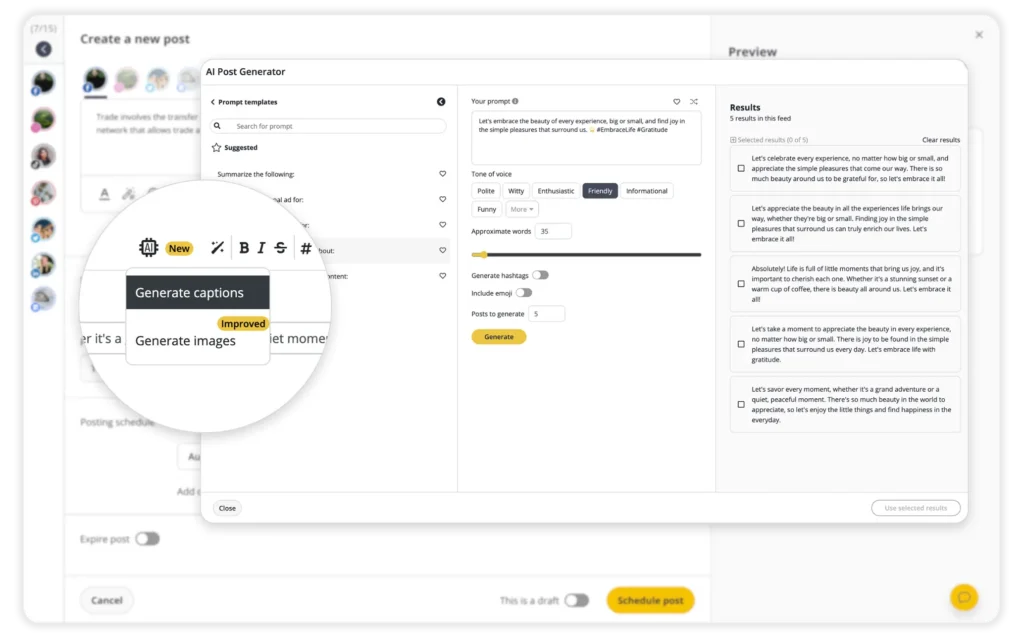
The important part is that I treat AI as a draft assistant, not the final writer.
I’m not expecting perfect content from it. I’m using it to get past the blank page faster and organize my thoughts into something usable.
A lot of posts still follow a similar flow: hook -> main point -> takeaway or CTA.
But the structure always depends on the type of post and the platform.
For example:
- A LinkedIn storytelling post will feel more personal and longer.
- An Instagram caption might be shorter and more visual.
- A carousel post needs clearer pacing slide by slide.
- A promotional post usually needs a stronger CTA.
- A thought-leadership post might focus more on opinion or industry insight.
- A TikTok script needs faster pacing and stronger first lines.
So I’m not using one exact formula for everything. I’m adapting the structure depending on the goal of the content.
At this stage, I’m also not obsessing over polishing every sentence.
The goal is speed and momentum.
I’d rather turn 15 rough ideas into usable drafts first, then go back later to refine tone, improve hooks, shorten sections, or adjust things for each platform.
This step saves a lot of time because instead of staring at an empty page every time, I’m editing and improving something that already exists.
That’s usually where AI helps the most.
6. I prepare visuals and media in advance
Before I start scheduling anything, I make sure all the media files are ready first. If the media isn’t organized properly, scheduling becomes messy very quickly.
I try to prepare everything upfront so I’m not constantly stopping during the scheduling process to search for files, remake assets, or re-upload the same things over and over again.
A lot of the visuals usually come from content the business already has. Webinars, podcasts, events, product demos, internal recordings, presentations, customer testimonials, or even behind-the-scenes clips can all be repurposed into social content.
For example, one webinar can easily turn into multiple pieces of content. A short video clip for LinkedIn, a carousel for Instagram, a few educational posts, quote graphics, or even email content later on.
I also use templates quite a lot, especially for recurring formats like carousels, branded graphics, or promotional posts. Not because I want every post to look identical, but because templates make the process faster and help keep the brand visually consistent.
Usually, I’ll adjust the hook, layout, colors, screenshots, or titles depending on the campaign or platform.
If I’m managing multiple brands or client accounts, I keep everything clearly organized inside folders or media libraries so I don’t accidentally upload the wrong assets.
The structure itself is usually very simple. One folder per brand, then split by campaign, platform, or post type. Nothing complicated. Just easy to navigate when scheduling content in bulk.
If I’m using bulk scheduling or CSV uploads, I’ll also prepare:
- Media links
- File names
- Matching captions
The goal is simple: once I start scheduling, I don’t want to leave the tool every five minutes looking for assets.
It makes the entire workflow faster, cleaner, and much less chaotic.
How I bulk-schedule one month of social media posts in one day
At this point, everything is ready. Ideas, drafts, visuals.
Now I open SocialBee and start the actual scheduling process. This is where everything comes together and turns into a structured content calendar.
Here are the steps I take to bulk-schedule posts for multiple channels in one day:
- I add all my posts into categories.
- I create platform-specific versions of each post.
- I review the full month using the calendar.
- I intentionally leave space for flexible content.
- I track results and use them to improve next month.
1. I add all my posts into categories
The first thing I do is load all my drafts into SocialBee.
I don’t start scheduling yet.
Instead, I go through each post and assign it to a category. These categories are my content pillars, set up in the platform so I can use them when scheduling.
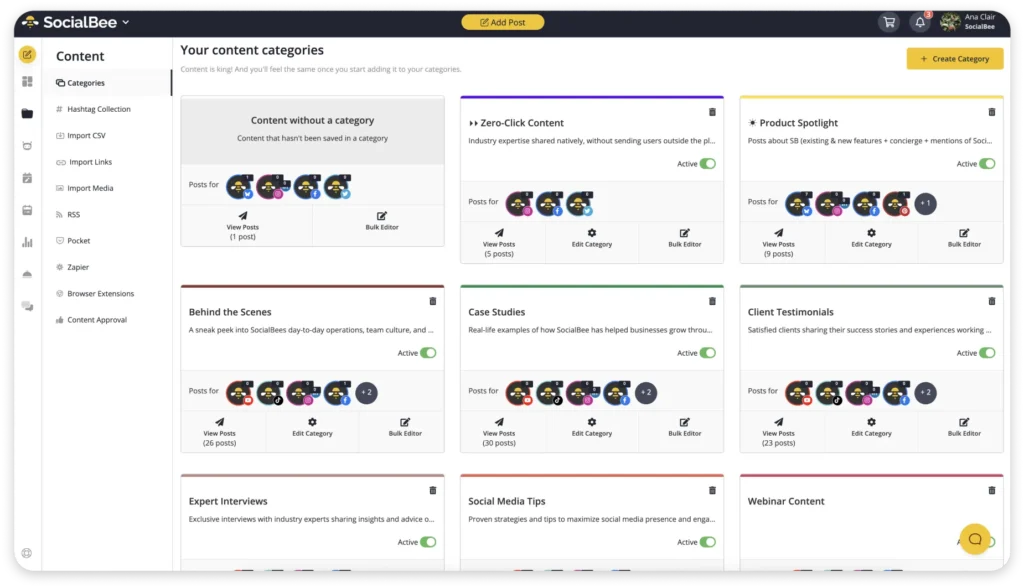
This step is what turns a list of ideas into something structured.
Inside SocialBee, categories act as the backbone of the content calendar. So instead of dealing with random social media posts, I’m organizing them by type before they go live.
For example, I might have categories like educational, promotional, quotes, or behind-the-scenes.
Every post gets assigned to one of these.
This makes bulk scheduling much easier, especially when you’re managing multiple social media accounts, multiple brands, or client accounts. You’re not guessing what to post next; you’re working with a system.
It also helps later when you start scheduling across multiple platforms. You can quickly balance your content, avoid repetition, and make sure your social media presence isn’t too focused on just one type of post.
At this stage, I’m not thinking about posting times. I’m just organizing posts so the rest of the process is faster.
2. I create platform-specific versions of each post
Once everything is categorized, I start adapting some posts for different platforms.
I don’t customize every single post. That would take too much time and usually isn’t necessary.
Most of the time, I only adjust posts that:
- Need more visibility
- Support a launch or campaign
- Are expected to perform well across multiple platforms
- Or benefit from being adapted to different content formats
The core message usually stays the same. I’m just adjusting the delivery depending on the platform.
For example, a short video clip might work both as a Reel and a TikTok. A LinkedIn post might become a shorter Instagram caption. A carousel could turn into a short-form video script.
Sometimes the changes are small:
- Adjusting image sizes
- Changing formatting or spacing
- Adding hashtags for certain platforms
- Taking out links from captions where they aren’t clickable, like Instagram
- Making use of platform-specific features, like Alt Text for Facebook images or Location Tags on Instagram
- Changing the CTA style depending on the platform
Other times, I’ll rewrite parts of the caption completely if the audience or content style is very different.
For example, LinkedIn usually allows for more context, storytelling, or industry insights, while Instagram captions often need to be shorter and more visual.
The goal isn’t to create completely different content for every platform.
It’s to make the content feel native to the platform instead of looking like a copy-paste job.
Inside SocialBee, I can create variations from the same post without rebuilding everything from scratch, which makes the process much faster when managing multiple platforms.
This step usually improves performance because each platform has different expectations, even when the content idea itself stays the same.
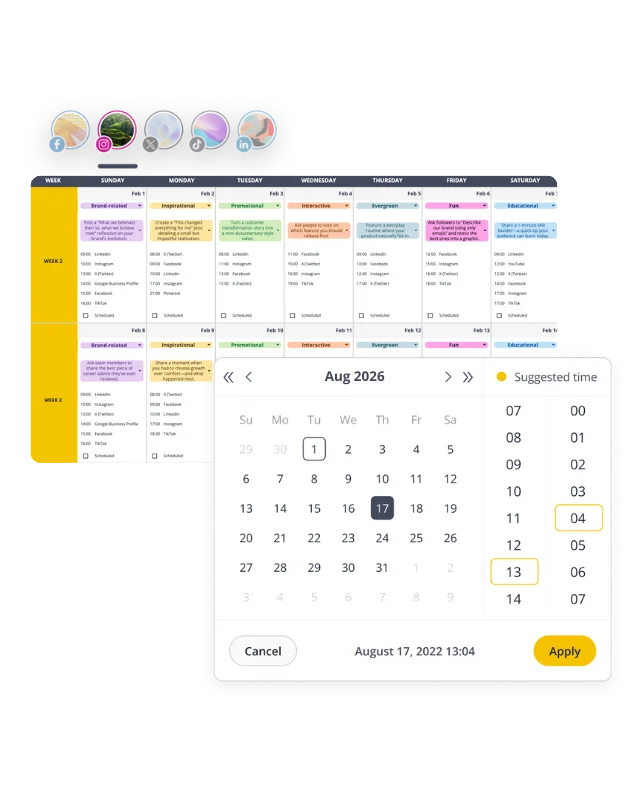
3. I review the full month using the calendar
Once all my posts are inside SocialBee, I switch to the calendar view.
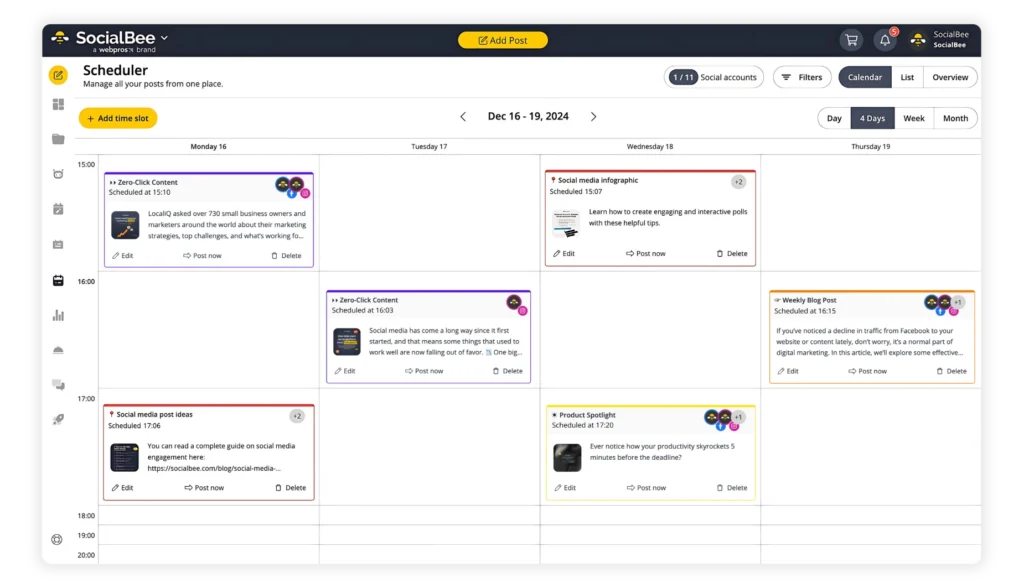
This is where I build the month.
Instead of looking at individual social media posts, I can see everything in one place. That’s what makes social media bulk scheduling actually work. You’re not guessing anymore, you’re organizing posts with a clear overview.
I start by spreading posts across the entire month.
I look at:
- Posting frequency per platform
- How content is distributed across multiple platforms
- Whether I’m consistent across all my social media accounts
Then I balance things out.
I make sure I’m not stacking the same type of content back-to-back. For example, I don’t want five educational posts in a row or only promotional content in one week. I mix formats and categories so the content feels intentional, not repetitive.
This is also where I use the calendar to:
- Spot gaps where I’m not posting enough
- Catch overlaps where too many posts are scheduled at once
- Check for repetition across multiple posts
I also use this step to align everything with my actual priorities for the month. Sometimes a post made sense when I drafted it, but doesn’t fit anymore. It’s easier to adjust now than after publishing.
If I’m managing multiple brands or client accounts, this view helps me keep everything organized without losing track of what’s going live and when.
4. I intentionally leave space for flexible content
I don’t fill my calendar completely.
Even when I plan a full month in advance, I leave part of it open on purpose. Usually around 20–30%.
That space is there for things I can’t plan ahead:
- Trends that show up during the month
- Launches or last-minute updates
- Spontaneous posts that just make sense in the moment
If everything is scheduled, you lose that flexibility.
I’ve tried it before, and it doesn’t work long-term. You either ignore what’s happening and stick to the plan, or you end up reshuffling everything. Both take more time than just leaving space from the start.
From a practical point of view, this makes things easier to manage.
If something new comes up, I don’t have to delete posts or rebuild the calendar. I just use the open slots. Inside SocialBee, I can move things around quickly or drop in a new post without affecting everything else.
It also gives me room to test things.
Not every idea needs to be part of the original plan. Sometimes the best posts come from reacting to something in real time, not something you wrote three weeks ago.
5. I track results and use them to improve next month
Once everything is live, I don’t just leave it and move on.
I go back and check what actually happened.
In the SocialBee dashboard,I review how my posts performed over the month. I’m not doing a deep dive every time, but I do look for clear patterns.
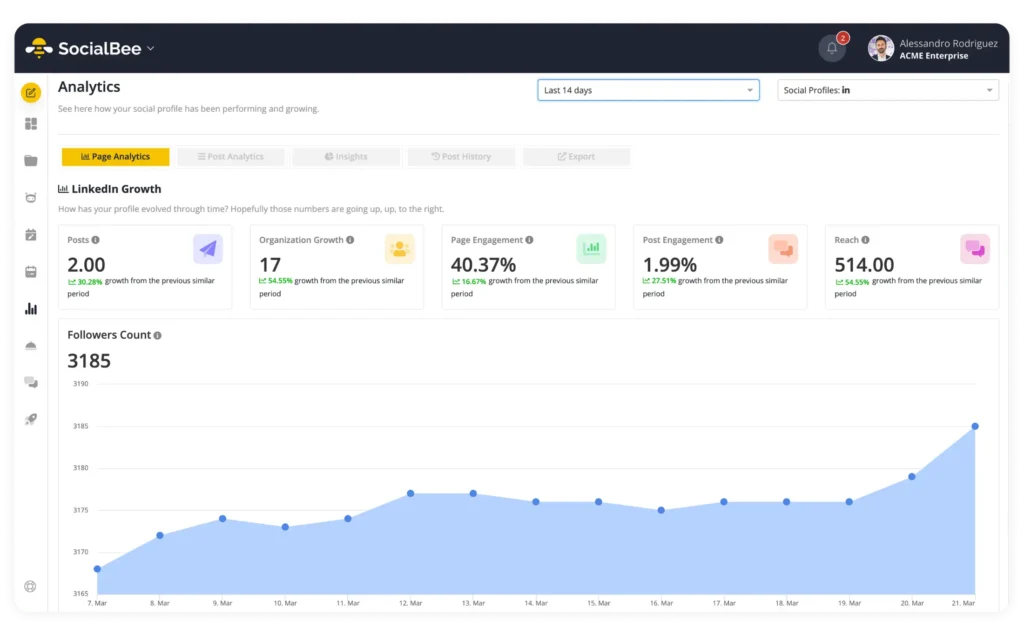
What I focus on:
- Which categories performed better than others
- What formats people engaged with more
- Which posts got ignored
Because I already organized everything into categories earlier, this part is straightforward. I can quickly see if, for example, educational posts are consistently doing better than promotional ones, or if certain types of posts just don’t land.
I also pay attention to small things:
- Which hooks worked
- Which CTAs got responses
- Which posts got saves or shares vs. just likes
If I’m working on something more performance-driven, I’ll also check Google Analytics to see if any posts led to clicks, sign-ups, or actual results.
But most of the time, I’m not overcomplicating it.
I’m just asking: what should I do more of next month, and what’s not worth repeating?
Then I adjust.
That might mean:
- Doubling down on a category that worked well
- Dropping a format that didn’t perform
- Changing how I structure certain posts
- Testing a slightly different angle on the same topic
This step is what makes the whole system improve over time.
If you skip it, you’re just repeating the same plan every month.
If you do it, even quickly, you start building a content strategy based on real results, not assumptions.
Frequently asked questions
How far in advance should you schedule social media posts?
There’s no perfect rule, but scheduling your content one month in advance is a solid baseline.
It gives you enough structure to stay consistent without locking you in for too long. You can plan your entire month, align it with your content strategy, and still leave space for trends or last-minute updates.
What is the best way to bulk-schedule social media content?
The best way is to batch everything in one focused session.
Start with your post ideas, turn them into drafts, and prepare your visuals or media files in advance. Then upload everything into a social media scheduling tool and organize your posts inside a content calendar.
If you want to speed things up, you can use features like bulk upload, CSV upload, or media links to schedule multiple posts at once. Social media scheduling tools like SocialBee also help you organize posts by category, manage multiple brands, and schedule content across multiple platforms from a single dashboard.
The key is not the tool, though. It’s having a clear system, so you’re not relying on manual scheduling every day.
Can you bulk-schedule content for multiple social media platforms at once?
Yes, and you probably should.
Most social media scheduling tools let you schedule content across multiple platforms from the same place, which makes managing multiple social media channels much easier.
That said, you shouldn’t post the exact same content everywhere.
A better approach is to create one core post and then adjust it slightly for each platform. This helps you maintain a consistent social media presence while still respecting how different platforms work.
Bulk scheduling across multiple platforms saves time, but small tweaks are what keep your content effective.
Can you bulk-schedule posts across multiple platforms at the same time?
Yes. Most social media schedulers let you schedule posts across multiple platforms from one dashboard, including Facebook, Instagram, TikTok, LinkedIn, X, Pinterest, and Google Business Profile.
Instead of manually uploading multiple social media posts every day, you can prepare content once, upload media in bulk, and publish content across different social profiles with minimal effort.
Tools like SocialBee also make bulk post scheduling easier with features like content categories, a content library, AI assistant tools and approval workflows. Some social media tools also support CSV files, Google Drive integrations, inbox management, team collaboration, and social analytics for managing multiple brands or client accounts more efficiently.
That said, the best approach usually isn’t posting the exact same version everywhere. Small adjustments to formatting, hashtags, CTAs, or visuals help improve social media performance and make the content feel more native to each social platform.
Are social media scheduling tools better than posting natively inside each platform?
For most people managing multiple platforms, yes.
Native schedulers like Meta Business Suite can work well for basic Facebook and Instagram posts, especially if you only manage one business account and don’t need advanced scheduling features.
But once you start handling multiple brands, client accounts, or larger social media campaigns, dedicated social media tools usually make the workflow much easier.
Platforms like SocialBee help you organize content, schedule and publish posts across popular platforms, and manage a large volume of social posts from one place instead of jumping between dashboards.
They also make it easier to create relevant content for different platforms. For example, one video can be adapted into Instagram posts, LinkedIn content, or short-form clips for other platforms without rebuilding everything from scratch.
Another advantage is flexibility. When priorities shift, it’s much easier to move campaigns around, add content quickly, or reschedule posts without disrupting the entire calendar.
Many scheduling tools also help improve your online presence by recommending the best time to publish posts and making it easier to stay consistent without manually logging in every day.
That said, the best tool really depends on your account type, workflow, and team size. Some people only need simple native schedulers, while others benefit from more advanced social media tools with collaboration, analytics, and campaign management features at a more reasonable price.
What should you look for in a social media bulk scheduling tool?
The best social media scheduling tools are the ones that help you stay organized without making the workflow more complicated.
At a minimum, look for scheduling features that let you schedule posts across multiple platforms, organize a posting schedule visually, and manage multiple social media posts from one place.
If you’re managing multiple brands, small teams, or client accounts, features like approval workflows, custom approval workflows, team collaboration, and the ability to assign tasks become much more important because they help keep everyone on the same page.
It’s also helpful to look at analytics features. Some tools only offer basic analytics, while others include advanced analytics, detailed reports, social listening, sentiment analysis, engagement rates, and ways to track posts or measure overall social performance.
Some platforms also include extra advanced features like AI assistant tools, content ideas, inbox management, or integrations with third-party tools and Google Business systems.
If budget matters, many platforms offer a free plan or free tools with limited features, while paid plans start at different pricing levels depending on team size, number of social profiles, and access to all the features.
Final thoughts: Bulk scheduling gives you your time back
If you’re still scheduling posts daily, you’re making things harder than they need to be.
Planning your content once a month gives you structure. You’re not constantly thinking about what to post, jumping between platforms, or fixing things last minute. You already know what’s going out, when it’s going out, and how it fits into your overall social strategy.
It also makes a big difference when you’re managing multiple accounts or working across different channels. Instead of spreading the work across the week, you handle it in one focused session and move on.
It doesn’t have to be perfect. It just has to be planned.
Block one day, go through the process, and test it for yourself. Even doing this once will show you how much time and mental energy you can save.
And if you want to keep everything in one place and make the process smoother, tools like SocialBee help you organize, schedule, and manage your content without overcomplicating it.