
Managing social media is already a handful, and the last thing anyone needs is a tool that makes it harder. MeetEdgar has built a solid reputation for keeping content running automatically and helping people stay consistent online.
Still, after spending time researching and comparing different tools, I’ve seen that MeetEdgar isn’t the right fit for everyone. Some marketers need deeper analytics, others want easier ways to collaborate, and plenty are simply looking for something that fits their budget better.
In this guide, I’ve gathered what I learned from exploring the most popular MeetEdgar alternatives. I looked at how each tool actually performs, what users say about them, and how they compare on features and pricing, so you can find the one that truly fits how you work.
Why should you keep an eye on MeetEdgar alternatives?
I’ve spent a lot of time comparing social media scheduling tools, and MeetEdgar always comes up as one of the most recognizable names. It’s built for people who want to stay consistent on social media without having to post manually every day.
From everything I’ve seen in user feedback and platform reviews, it’s especially popular with small businesses and solo marketers who need a simple way to automate their posts.
What I like about MeetEdgar is how it focuses on evergreen content. The content library, post recycling, and visual calendar make it easy to keep social feeds active for weeks at a time. It’s the kind of system that helps people save time and stay visible without burning out.
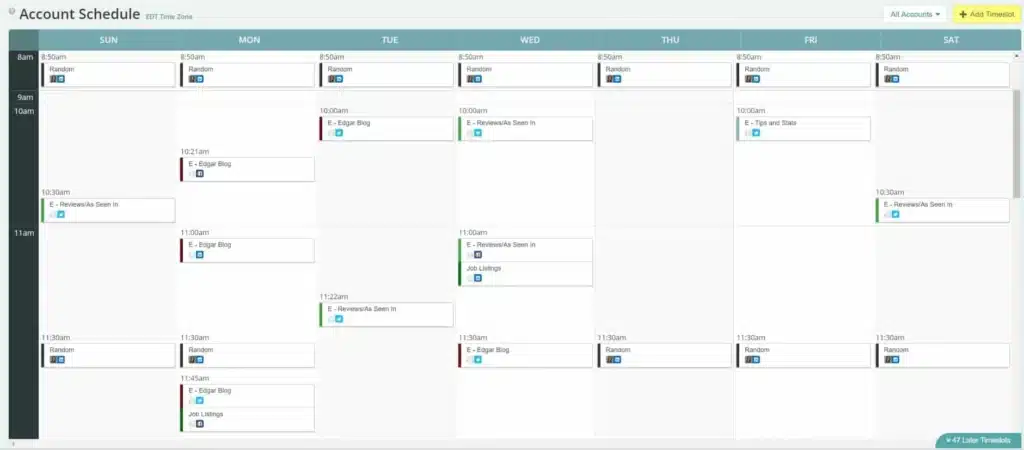
While MeetEdgar works well for simple automation, it doesn’t meet everyone’s needs. In my research, users often mention pricing, limited platform support, and fewer analytics options as key frustrations.
Features like the link shortener have also been removed over time. If your goals include deeper insights, broader integrations, or more collaboration tools, it’s worth exploring alternatives that offer a bit more flexibility.
Pros of using MeetEdgar
- Excellent customer service and strong integration support
- Strong content scheduling features for organized social management
- Easy to use with a quick learning curve
- Reliable content library for reusing and repurposing posts
- Effective content calendar to visualize campaigns
- Solid campaign optimization features to identify trends and improve posting times
- Helps track and respond to social engagement
- Provides analytics on post and campaign performance
What users say about MeetEdgar’s pros:
- “I initially thought MeetEdgar wouldn’t be useful in our current workflow, but our Customer Success, who joined us for a Google Meet call, was wonderful. They were patient, knowledgeable, and kind. That call alone made me see how MeetEdgar could fit into our processes, and the support has remained consistent ever since.” – John J., Small Business Owner, Source
- “The customer support (is) first, followed closely by the quality and reliability of the product. I’ve reached out several times and always received fast, clear answers. The tool itself does what it promises, but the support team really takes it to another level.” – Christine W., Small Business Owner, Source
- “I love that I can schedule my posts to social media in an organized way without actually being on the platform. It helps minimize distractions and keeps my brand visible. For someone managing multiple social media channels, it’s been a game-changer.” – Jess L., Small Business Owner, Source
- “Customer service and ease of receiving help make a big difference. Whenever I had questions, they were quick to respond and provided the exact information I needed. That support makes the whole tool easier to use.” – Trisha S., Small Business Owner Source
Cons of using MeetEdgar
- High pricing with limited tier options makes it less accessible
- Posting limitations for Instagram, reducing flexibility for different post types
- Occasional layout issues, such as inconsistent formatting of posts or difficulty previewing content
- Removal of the built-in link shortener, limiting content-sharing convenience
- UI challenges and limited social integrations that need workarounds
What users say about MeetEdgar’s cons:
- “Unintuitive UI, Inky Credits, and limited social integrations. While there are ways around it with Zapier or extra effort, it feels clunky compared to other tools I’ve tried.” – John J., Small Business Owner Source
- “I dislike that there used to be a link shortener included with the service and now it is not. That small feature really made a difference when sharing content.” – Jess L., Small Business Owner Source
- “Limited social integrations are still frustrating. I can work around it, but I’d prefer to see broader platform support built into the tool itself.” – John J., Small Business Owner Source
Top 5 MeetEdgar alternative tools for your social media management
After researching dozens of tools and reading hundreds of user reviews, I’ve found that many marketers want more from their scheduler: better analytics, stronger collaboration tools, or simply a lower price.
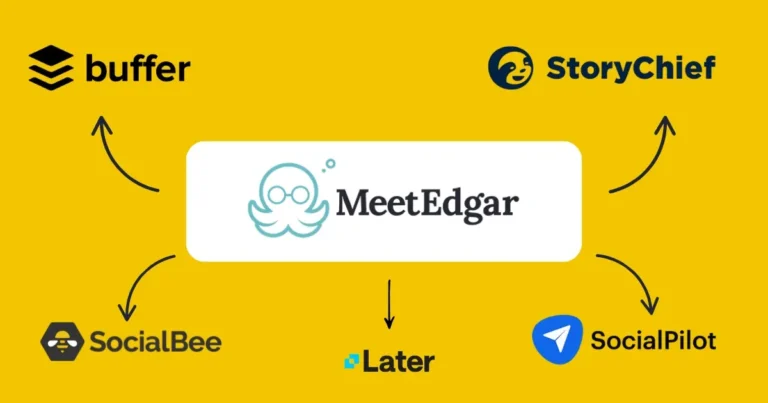
Here are the best MeetEdgar alternatives:
- SocialBee
- SocialPilot
- Later
- Buffer
- StoryChief
#1 MeetEdgar Alternative: SocialBee – Best all-in-one option with AI, analytics, and social inbox
Check out how independent sources compare and review SocialBee and MeetEdgar.
Why is SocialBee the best MeetEdgar alternative?
After using both tools, I’ve found that SocialBee offers more flexibility, better collaboration, and stronger analytics than MeetEdgar. Both make scheduling easier, but SocialBee gives me more control over how I plan, publish, and manage social content across platforms.
SocialBee vs MeetEdgar: Pricing and plans
MeetEdgar has two pricing options: $29.99 and $49.99 per month. SocialBee starts at the same price but offers six plans. That flexibility matters when your needs change. Freelancers can start small. Agencies can scale up. You pay for what you actually use, not for features you don’t need.
SocialBee vs MeetEdgar: Features and limits
SocialBee includes unlimited AI credits on all plans. MeetEdgar’s starter plan gives you only 15. The same goes for content categories: MeetEdgar offers four, while SocialBee gives you ten at the same price. That extra flexibility helps me organize content by brand, campaign, or theme without running into roadblocks.
It may sound small, but when you manage multiple clients or projects, those details save a lot of time.
SocialBee vs MeetEdgar: AI features
MeetEdgar’s AI can write captions, which is helpful, but SocialBee’s AI also enables you to generate images.
Moreover, SocialBee offers an AI assistant, Copilot, that can suggest what to post, when to post it, and where to focus based on your audience. Basically, based on a few questions about your business, it generates an entire social media strategy so you don’t have to start from scratch.
SocialBee vs MeetEdgar: Social inbox
MeetEdgar only supports replies on Facebook and Instagram. SocialBee’s unified inbox covers Facebook, Instagram, Threads, LinkedIn, X (Twitter), and YouTube.
That means I can handle all comments, mentions, and messages in one place. No switching tabs. No missed replies.
SocialBee vs MeetEdgar: Team collaboration
MeetEdgar supports multiple users, but not real collaboration. There’s no way to leave comments or approve posts within the platform.
SocialBee keeps teams aligned. You can leave notes, tag teammates, and approve or reject posts before publishing. It keeps feedback organized and eliminates guesswork.
SocialBee vs MeetEdgar: Analytics and reporting
SocialBee’s analytics give you a clear picture of what’s working and what isn’t. You can track engagement, reach, and performance across every platform and generate branded PDF reports to share with clients or teammates.
MeetEdgar offers basic insights inside the app, but doesn’t provide downloadable PDF reports. That might work fine for solo creators, but for anyone managing clients or teams, having reports you can present makes a big difference.
Who is SocialBee best for?
I find SocialBee ideal for freelancers, social media managers, agencies, and small businesses that need more than simple post recycling. It gives me AI-powered content creation, advanced scheduling, analytics, and teamwork features that make managing multiple accounts easier and more effective.
SocialBee feature overview
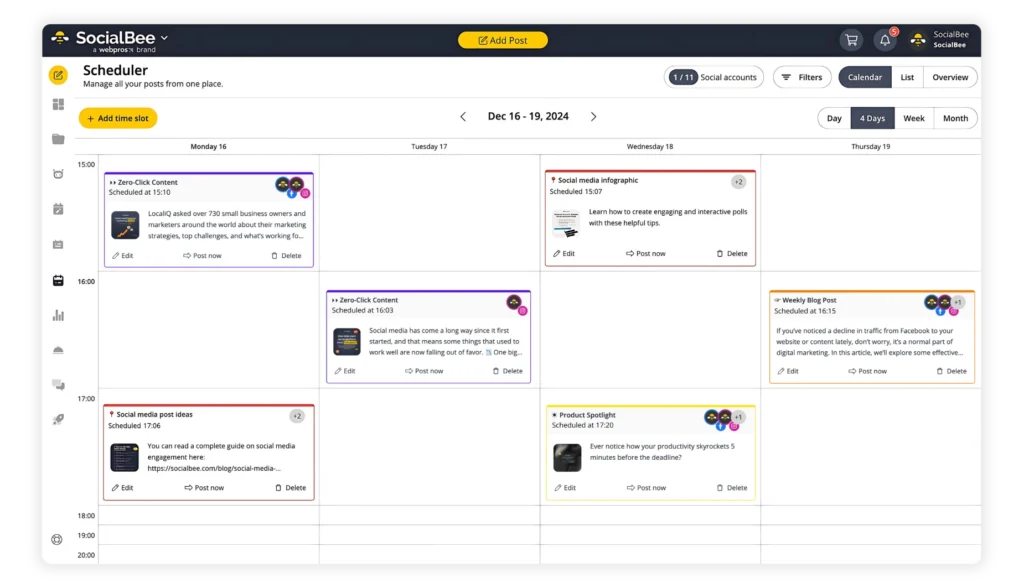
I use SocialBee every day to manage multiple accounts, and it’s become the one tool I rely on for everything, from planning content to engaging with followers. What I like most is how organized it keeps me. I can plan posts for every platform, create visuals, schedule ahead, and handle comments and messages all in one place.
The built-in AI tools help a lot when I’m short on ideas, and the collaboration features make team workflows simple and clear. I also like that I can see what’s working right away through detailed analytics and reports.
It’s the kind of platform that saves time without taking control away, which is why it’s stayed part of my daily routine.
Here are SocialBee’s key features:
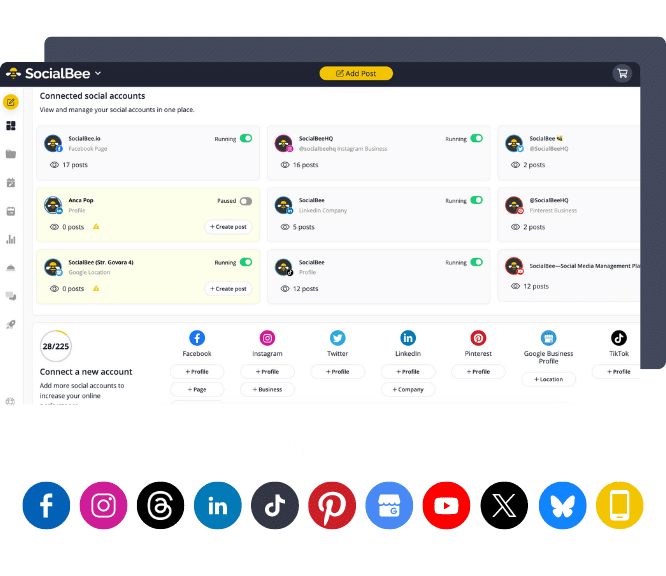
- Publish to all major social media platforms, including Facebook, Instagram, LinkedIn, X (Twitter), Pinterest, TikTok, YouTube, Threads, Bluesky, and Google Business Profile.
- Use AI to build content strategies, draft captions, and generate images.
- Tailor posts for each platform with one click, or fine-tune them manually if you prefer.
- Keep your content fresh by creating multiple variations of the same post without starting from scratch.
- Adapt your content to each platform’s requirements: trim captions to fit character limits, resize images, update hashtags, tag users, and schedule the first comment to publish along with your post.
- Let AI generate hashtags from your text or visuals, then save collections to reuse across social media campaigns.
- Polish your visuals by editing images, adding alt text, or picking custom video thumbnails.
- Tag accounts and set locations so your posts feel more relevant and engaging.
- Post at the right time with data-driven recommendations based on your past performance.
- Recycle evergreen posts automatically, while time-sensitive content expires on schedule.
- Build a unique posting schedule for each profile to keep every channel consistent.
- Speed things up with bulk editing for multiple posts at once.
- Save drafts to revisit later when inspiration strikes.
- Access Canva, Unsplash, and GIPHY directly inside SocialBee to import visuals without leaving the app.
- Streamline teamwork with notes, approvals, and clear review steps before content goes live.
- Stay organized with dedicated workspaces for each client or brand.
- Track performance with in-depth analytics and export shareable PDF reports.
- Reply to comments, messages, and mentions from every channel in one unified inbox.
- Import blog posts automatically, complete with suggested captions, images, and links to drive traffic.
- Shorten links instantly with 10+ URL integrations.
SocialBee pros
What I like most about SocialBee is how practical it feels. I can manage multiple accounts, plan content weeks ahead, and analyze performance all from one dashboard. The AI features save a significant amount of time, and the social inbox helps me stay connected with my audience without having to switch between platforms.
From what I’ve seen, other users feel the same way. Many say they appreciate how easy it is to learn, how responsive the support team is, and how much value they get for the price.
What users highlight about SocialBee’s pros:
- “Comprehensive social media management platform with all features including AI content generation, detailed analytics, and social inbox.” – Uli K., Director, Online Media, Source
- “The best part is that it saves me so much time, since I have 4 businesses that I need to make posts for, and each business has multiple accounts. It means I can do all my work in advance instead of frequently logging into each separate account.” – Ballara Receptions, Marketing Manager, Source
- “SocialBee is the easiest social media scheduling tool ever! It’s good value for money and, even if you’re technically challenged, they offer a free teaching class too! I’ve been using SocialBee for over 4 years now and don’t plan on moving.” – Rachael R., Psychic Medium & Reiki Master, Source
- “We have been using SocialBee for number of years now, and it has significantly improved our social media management process. The platform is incredibly user friendly and offers a wide range of features that make scheduling and posting content a breeze.” – Ben O., Network Manager, Source
- “If you’re a small business owner struggling with social media, SocialBee is a game-changer! I had no idea where to start with posting consistently, and hiring a social media manager just wasn’t an option. SocialBee made everything simple and manageable, and the support team went above and beyond to help me get set up and running. I never expected such hands-on assistance from a scheduling tool, but they genuinely care about their users’ success. Can’t recommend it highly enough!” – Dr. Michelle D., Small Business Owner, Source
SocialBee cons
There are a few things to keep in mind. The first setup takes time, especially if you’re connecting multiple accounts or creating your first content categories. Once it’s done, though, the workflow becomes much faster.
Some users have mentioned that RSS feed imports can fill up quickly if not managed carefully. It’s worth checking your feed settings early on to keep your content organized.
What users mention about SocialBee’s cons:
- “I wish it was easier to remove chunks of proposed content from RSS feeds that generate content at a much faster rate than I might schedule posts. Sometimes I discover that my RSS schedule fills up for this reason.” – Jason B., Marketing Systems Manager, Source
- “It takes 1-2 hours to set up but totally worth it and will save you time!” – Rachael R., Psychic Medium & Reiki Master, Source
SocialBee pricing
- Offers a 14-day free trial
- Paid plans start at $29
SocialBee vs MeetEdgar: Which one should you choose?
If you want something simple that keeps your social media running in the background, go with MeetEdgar. It’s great for solo business owners who just need to recycle evergreen posts and keep their profiles active without spending much time managing them.
If you manage several brands, work with a team, or want to understand what’s driving your results, SocialBee fits better. It gives you stronger AI features, more detailed analytics, real collaboration options, and a unified inbox for audience interactions.
#2 MeetEdgar Alternative: SocialPilot – Best budget-friendly pick for agencies
Who is SocialPilot best for?
Based on the user feedback and feature comparisons I’ve read, SocialPilot works best for freelancers, small businesses, and agencies that handle several social media accounts but don’t want to spend a fortune on software.
It’s often described as a practical tool that gets the job done. Many reviewers mention how easy it is to organize posts for different clients and keep everyone on the same page. For smaller teams that just need to plan, publish, and report content consistently, SocialPilot covers the basics very well.
SocialPilot feature overview
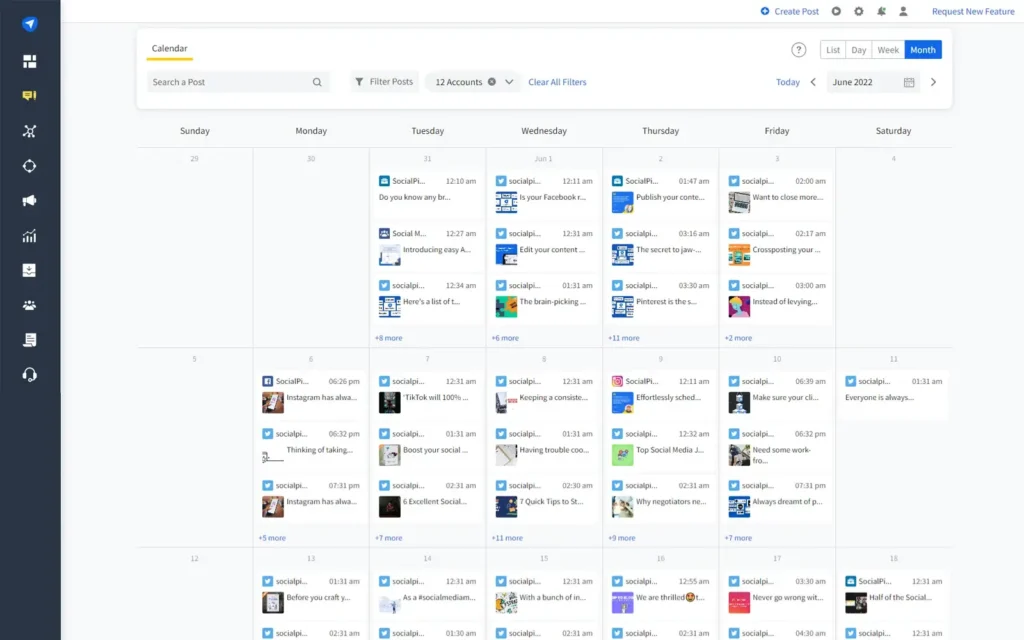
From what I’ve seen in my research, SocialPilot appeals to people who want structure and clarity in how they plan content. What stands out most is how much time it saves when managing multiple accounts. Many users talk about the bulk scheduling feature, which lets them upload and plan large batches of posts in one go. That kind of setup can make a big difference when you’re handling several clients or channels at once.
I also noticed how often the visual calendar gets mentioned. It’s a simple tool, but being able to drag and drop posts instead of constantly re-uploading them makes scheduling feel much less tedious. It’s the kind of small usability detail that adds up when you’re coordinating busy campaigns.
And then there’s reporting. The white-label dashboards and automated reports are some of the most talked-about features. Agencies like that they can brand their reports, send them to clients in minutes, and still get useful metrics on engagement and reach.
Here are the key features of SocialPilot:
- Publish and schedule posts across multiple social media platforms
- Plan hundreds of posts at once with bulk scheduling
- Organize your content with a drag-and-drop visual calendar
- Manage comments and messages through a unified social inbox
- Reuse text, hashtags, and images with a central media library
- Collaborate with your team using drafts, approvals, and role-based access
- Generate automated reports with clear insights into engagement and performance
- Offer white-label reporting tailored for social media agencies
- Integrate with tools like Canva, Slack, and Google Drive
- Manage multiple accounts on the go with the mobile app
SocialPilot pros
After reading dozens of reviews, what I found most impressive is how much time SocialPilot saves people who manage content at scale. Many describe it as simple, predictable, and easy to get up to speed with. That’s a huge plus for teams onboarding new members or clients.
Users also talk a lot about the reporting tools. I’ve seen several mentions of how quickly they can generate performance reports for clients and how professional those reports look. The overall sentiment is that SocialPilot feels efficient and dependable, even if it’s not the most modern tool out there.
Here is what users are saying about SocialPilot’s pros:
- “Able [to] create a schedule of posts in a short amount of time.” – Ken H., Creative Director, Source
- “It makes managing multiple social media accounts seamless, especially with its drag-and-drop calendar and bulk scheduling feature. I have also appreciated the detailed analytics and reporting tools, which help track performance and optimize content.” – Charles A., Software Engineer, Source
- “The onboarding was simple and our account manager was excellent.” – Christian E., Owner, Source
- “Numerous accounts, grouping of accounts, analytics, history of posts, drafts and AI assistant. I also like the support we have always received in a timely and professional manner.” – Hristo N., Sales, Source
SocialPilot cons
While SocialPilot is reliable, the biggest complaint I’ve seen is that the interface looks a bit outdated compared to newer tools. It works well but doesn’t feel as modern as platforms like Buffer or Later.
Some users have also mentioned small bugs and feature limits. Instagram support could be stronger since direct scheduling for Reels and Stories isn’t as smooth as on other tools.
Here is what users are saying about SocialPilot cons:
- “It can be a bit clunky when trying to delete content and has been a bit glitchy on X character limits, but not a big problem for me.” – Matthew G., Marketing Manager , Source
- “The user interface, although functional, can sometimes feel slightly outdated compared to more modern platforms. I’ve also noticed that the Instagram direct publishing features aren’t as advanced as competitors like Later or Buffer, especially when it comes to Reels and Stories.” – Charles A., Software Engineer, Source
- “I am not a heavy user so haven’t found much to dislike, it can be a bit clunky when trying to delete content and has been a bit glitchy on X character limits, but not a big problem for me.” – Matthew G., Marketing Manager, Source
- “Wish the calendar showed all posts for all companies on the screen.” – Ken H., Creative Director, Source
- “Can’t schedule stories but I’m sure this is being worked on.” – Ellie C., Marketing Manager, Source
SocialPilot pricing
- Offers a 14-day free trial
- Subscription plans start at $30/month
SocialPilot vs MeetEdgar: Which one should you choose?
If your main goal is to keep content running automatically with minimal setup, MeetEdgar is still a strong choice. Its evergreen content library is purpose-built for creators who want to stay active without constant oversight.
However, for freelancers, agencies, or small teams that need analytics, collaboration tools, and more control over posting schedules, SocialPilot offers a stronger overall toolkit. It’s a dependable, budget-friendly option that can easily scale with growing client work.
#3 MeetEdgar Alternative: Later – Best for visual planning
Who is Later best for?
When I looked into Later, one thing stood out immediately: it’s made for creators and small businesses that live and breathe visual content. From influencers and artists to boutique brands and photographers, Later appeals to anyone who wants their feed to look as good as it performs.
It’s especially popular among people who manage content for Instagram, TikTok, and Pinterest, where visuals are everything.
Later feature overview
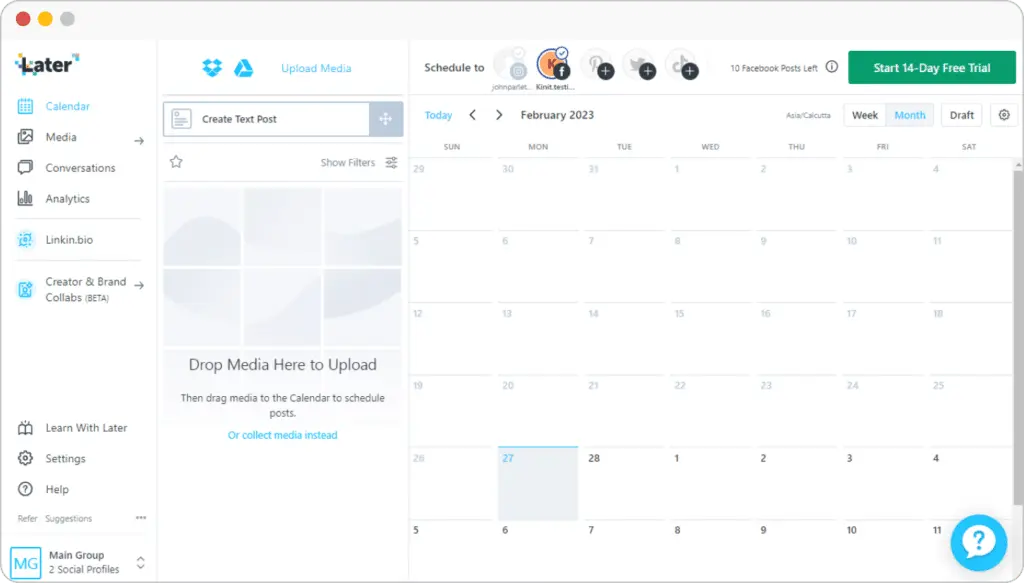
Later stands out because of how visual the whole experience is. Most users mention the drag-and-drop calendar as their favorite feature. It shows posts exactly as they’ll appear on your grid or feed, which makes planning content more creative and less guesswork.
Another thing that comes up often is how easy it is to store and reuse visuals. The built-in media library acts like a personal archive for images, videos, captions, and hashtags. I saw several reviewers mention how much they rely on it to keep brand assets organized and avoid repetitive uploads.
Later also includes smart extras like AI caption ideas, hashtag suggestions, and a Link in Bio builder, which helps turn Instagram and TikTok posts into website traffic or sales. These features give creators more control over how their social content performs without needing a separate tool for every task.
That said, there are some limits. The biggest drawback users mention is that Later supports fewer platforms than most all-in-one tools. X (Twitter), Bluesky, and Google Business Profile aren’t available, and advanced features like collaboration workflows, detailed analytics, and social listening only come with higher-tier plans.
Here are some of the key features of Later:
- Schedule posts across Instagram, Facebook, TikTok, Threads, YouTube, Pinterest, LinkedIn, and Snapchat.
- Publish Stories, Reels, Shorts, and Pins with auto-publish support for major social media platforms.
- Plan content visually with a drag-and-drop content calendar.
- Save captions, hashtags, and post ideas in a reusable media library.
- Draft and refine posts before scheduling.
- Get automatic hashtag suggestions and best-time-to-post insights.
- Store unlimited images and videos for quick content creation.
- Edit media with built-in cropping, filters, text, and trimming.
- Import Canva designs and save content with a Chrome extension.
- Collect and repost user-generated content from Instagram mentions, hashtags, and tags (on premium plans).
- Generate captions and content ideas with built-in AI tools.
- Track analytics for Instagram, TikTok, Facebook, Pinterest, Threads, and Link in Bio pages.
- Export automated reports with up to two years of performance history (on professional plans).
- Benchmark competitors and track hashtags with social listening (Scale plan).
- Use a unified social inbox to manage comments, DMs, and mentions on Instagram, Facebook, and TikTok.
- Collaborate with your team using shared calendars, notes, approval workflows, and external review links.
- Build customizable Link in Bio pages with buttons, banners, product carousels, and call-to-action links.
Later pros
After reading many user reviews, I noticed that people appreciate how simple and visual Later feels. The clean design and easy setup make it less intimidating than most scheduling tools.
The Link in Bio feature also gets a lot of praise. Many small businesses use it to turn their Instagram profiles into mini websites that link to their products or services.
It’s also affordable and beginner-friendly, while still offering enough functionality to support more experienced social media managers.
What users are saying about Later’s pros:
- “We used to pay around $20k per year for this service with another company – and I still had to create the video content and approve the copy. Using later.com has not only saved us money, but it has saved me time and frustration. I can’t recommend it highly enough!” – Mike D., Director of Sales, Source
- “I really enjoy the integration with Canva app. Makes it easy to send my content assests over to Later without having to download the assets.” – Kurrent K., Marketing Director, Source
- “The ease of use is one of the best features. You can easily schedule social media posts and make any necessary edits. We schedule all our posts in advance, and they automatically publish at the designated times. The software allows you to edit posts, schedule them, and even add filters. It’s a comprehensive solution for managing social media.” – Maria M., Small Business Owner, Source
- “Later makes social media scheduling and content planning incredibly easy. The visual calendar is intuitive and helps us clearly map out campaigns across multiple platforms. We especially like the media library feature, which allows us to organize and reuse assets, and the link in bio tool, which adds real value to our Instagram strategy.” – Bree M, Small Business Owner, Source
- “The ability to schedule posts on a calendar and visualize your feed makes Instagram scheduling a breeze. Had some decent analytics to analyze your social performance.” – Ranae V, Media Planner, Source
Later cons
Later isn’t without its downsides. The most common complaint I came across is that many of the best features are locked behind higher-tier plans. I noticed a lot of users mentioning that things like automated reports, post recycling, and more advanced analytics all require an upgrade. This can be frustrating for agencies or businesses managing multiple clients.
I also saw several reviewers talk about missing integrations. People who run online stores, for example, wish Later would integrate with Shopify or Etsy.
And while Later handles most visual posts well, Instagram Stories seem to be a weak spot. You still have to confirm Story posts through the mobile app, which breaks the flow for anyone hoping to schedule everything automatically.
What users are saying about Later’s cons:
- “When you post/or make a change, the little green block (or pink) that pops up letting you know it was scheduled covers all the other platforms. So I have to navigate to the X (or wait for it to go away) so I can click on another platform to do things. That pop-up should happen much smaller and right next to the post you just scheduled/changed.” – Fayelle E., Digital Media Manager, Source
- “While the platform is overall user-friendly, some features feel limited unless you upgrade to a higher-tier plan. The analytics are also somewhat basic compared to other tools—we’d like more detailed insights, especially around audience engagement and performance over time. Occasionally, posts fail to publish or disconnect, particularly with Instagram, which can be frustrating for time-sensitive campaigns.” – Bree M, Small Business Owner, Source
- “I sometimes feel like the location mapping is not always accurate compared to the Instagram app. Additionally, I would appreciate the ability to upload slightly bigger video files while retaining quality, as sometimes file size limitations can be an issue.” – Aquib A., Source
- “Once you get above a certain number of social accounts, it starts to become fairly pricy to add additional accounts without jumping to the next tier.” – Shawn K, Small Business Owner, Source
- “As I mainly use it for Instagram, I have found it annoying that there’s no way to schedule Instagram Stories to post automatically. In order for a story to post, you need to have the app on the phone and confirm you want it to go live. I am also not a fan of how there’s no way to customize the stories such as with stickers and tagging.” – Verified User, Small Business Owner, Source
Later pricing
- Offers a 14-day free trial
- Paid plans start at $25/month
Later vs MeetEdgar: Which one should you choose?
If you focus on visual storytelling, I’d go with Later. It’s made for creators, influencers, and small businesses that spend most of their time on platforms like Instagram, TikTok, Pinterest, and Facebook.
If automation is more important to you, MeetEdgar is the better fit. It’s built for recycling evergreen posts and keeping your social media active with minimal effort.
#4 MeetEdgar Alternative: Buffer – Best for easy post scheduling and customization
Who is Buffer best for?
Based on what I’ve found in user feedback, Buffer is one of the most approachable tools for solopreneurs and small businesses that just want to plan and publish posts without spending hours learning a new system.
Buffer feature overview
Buffer has built its reputation on simplicity. It keeps the scheduling process clean, clear, and easy to manage. I noticed in many user reviews that people appreciate how quickly they can start creating posts and queue them across platforms like Instagram, LinkedIn, and TikTok.
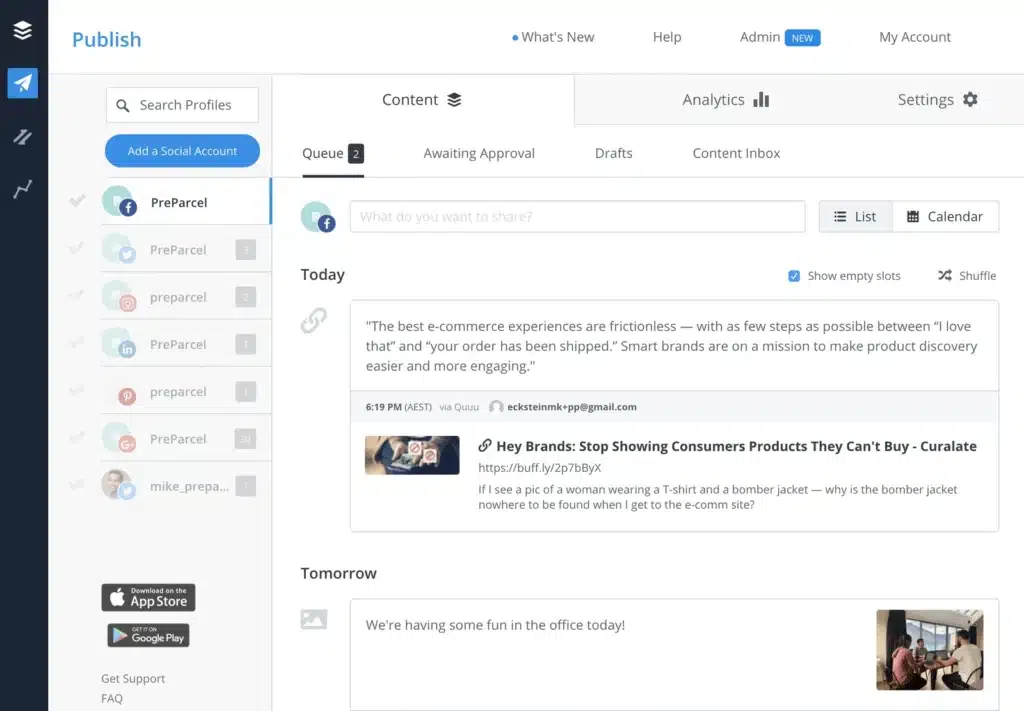
Its visual planner makes it easy to see what’s scheduled, and the ability to customize posts for each platform helps users fine-tune their messaging without copying and pasting the same text everywhere.
The platform also integrates directly with tools like Canva, Dropbox, and Google Drive, which saves time when pulling in images or videos.
Buffer also includes a few features that help with consistency, such as a hashtag manager, AI caption assistant, and a unified social inbox for managing comments and messages. Teams can share drafts, leave notes, and set approvals, a setup that reviewers say helps them stay organized without needing extra software.
However, I’ve noticed that some of Buffer’s more advanced features, like bulk scheduling and in-depth analytics, are only available in higher-tier plans. That can limit how much smaller teams can do unless they’re ready to upgrade.
Here are Buffer’s key social media features:
- Unlimited drafts and a kanban-style post planner for organizing post ideas
- Built-in hashtag manager to save and reuse hashtags
- AI assistant to refine or repurpose content
- Direct import from Canva, Dropbox, Google Drive, OneDrive, Unsplash, and Pocket
- Unlimited scheduling across multiple social media accounts with a visual content calendar
- Queue posts, duplicate, or shuffle schedules to stay flexible
- Support for publishing on X (formerly Twitter), Bluesky, Threads, and Mastodon
- First-comment scheduling for Instagram and LinkedIn
- Video cover customization for TikTok, Instagram, and Facebook
- Post-level analytics with unlimited history
- Automated reports in PDF, spreadsheet, or image formats
- Respond to Instagram and Facebook comments inside Buffer’s unified social inbox
- Prioritize important comments (negative, question-based, etc.)
- Draft management and content approval workflows for teams
- Extended integrations through Zapier, IFTTT, Feedly, WordPress, and Bitly
Buffer pros
What I like most about Buffer (and what I keep seeing in user reviews) is how straightforward it feels. It’s one of those tools that just works. You can plan content, customize each post for every platform, reuse ideas, and manage several accounts without anything getting overly complicated.
What users are saying about Buffer’s pros:
- “I love that I can customize the posts for each different platform I plan to post on. It really helps cater the message to the audience that uses different social media sites.” – Anne O., Communications Manager, Source
- “I’ve been using Buffer for 5 years, and it has helped me the way I manage my main social media profiles. In particular, the platform’s scheduling feature has simplified my life but also the simply way to repost published content. I’m able to get more done throughout the day since I can pre-schedule my social media updates in advance.” – Jose A., Marketing Assistant, Source
- “We were able to increase our brand’s visibility and social media presence by optimizing Buffer’s ability to analyze the performance of our posts. This has allowed us to change our approach and achieve higher engagement results. It is a platform that makes it easy to manage multiple social media accounts and launch campaigns across multiple platforms” – Carmen M., Data Scientist, Source
- “Buffer made it quite easy for me and the team to manage our clients’ social media profiles.” – Verified User in Marketing and Advertising, Source
- “The ability to create ads quickly is fantastic.” – Carmen M., Data Scientist, Source
Buffer cons
I’ve seen some users mention that Buffer’s free plan feels limited and that they’ve had to upgrade to access more advanced features. It’s missing bulk scheduling, the analytics are fairly basic, and the interface looks a bit dated compared to newer tools.
Managing several clients or large amounts of content can feel restrictive, and a few users have reported small glitches when posting or extra steps when editing published content.
What users are saying about Buffer’s cons:
- “It’s served us well, but if I could change one thing, it would be the interface; it’s not always the fastest and has limitations when dealing with large data sets.” – Carmen M., Data Scientist, Source
- “The dislike about this platform called Buffer is to the customer support. Once upon a time I was adding my client’s social media platforms to Buffer admin panel and I was in India and the client account was from USA. I have faced a lot of issues by linking the accounts that time till customer supported me.” – Pawan, Digital Marketing Specialist, Source
- “I wish there will be an option for bulk posting, more like you have in Canva or Blaze.ai.” – Constantin M., Consultant, Source
- “You have to pay to have more than a few platforms on it. Wish I could switch back and forth between different customer accounts.” – Amanda S., Chief of Operations, Source
- “It can be a little glitchy and often you have to go in and manually resend a post.” – StartupStage S., Founder | CEO, Source
Buffer pricing
- Offers a free plan
- Paid plans start at $6/month for each social media account you connect to it
Buffer vs MeetEdgar: Which one should you choose?
If you’re looking for a simple and affordable scheduling tool, I’d go with Buffer. It’s great for people who want a reliable content calendar, straightforward analytics, and an easy way to stay consistent across different platforms.
If your main goal is automation and content recycling, I’d lean toward MeetEdgar. It’s built to keep your posts running automatically, even when you don’t have time to create new content.
#5 MeetEdgar Alternative: StoryChief – Best for managing social + blogs + newsletters in one place
Who is StoryChief best for?
After analyzing how people actually use the tool, StoryChief seems like a great fit for marketing agencies, growing teams, and businesses that want to manage everything from social posts to blogs and newsletters in one platform.
StoryChief feature overview
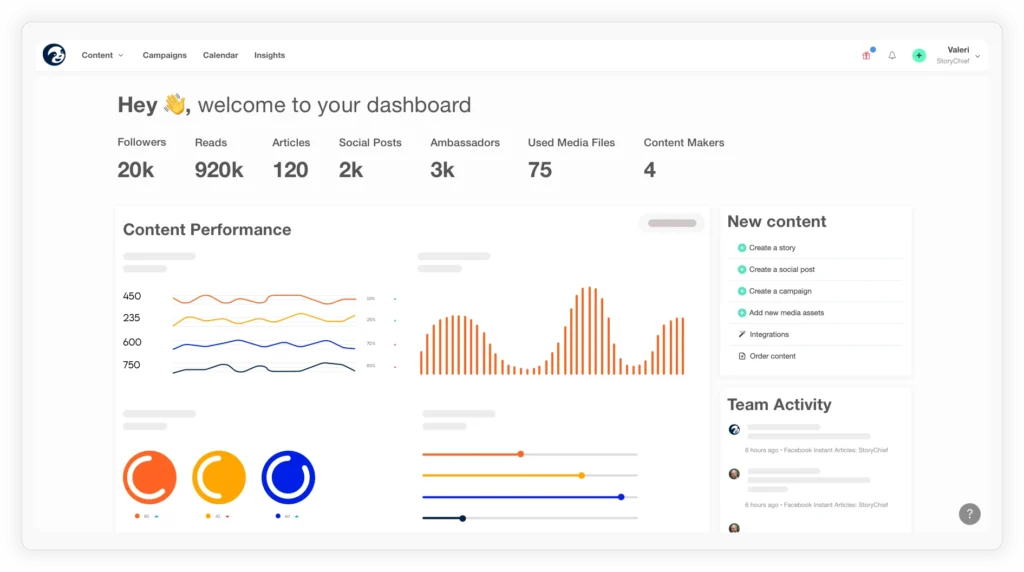
StoryChief is built to bring all your content efforts into one place. You can plan social media updates, write blog posts, and send newsletters from a single shared calendar. I like how this kind of setup gives teams a clearer picture of what’s going out and when.
A lot of users point out the SEO tools as one of StoryChief’s strongest features. You can check readability, add keywords, and see how well your article is optimized before you publish it.
The platform also includes task assignments and approvals, which make collaboration easier for agencies or content teams. Everyone can see what’s in progress and who’s responsible for what. The integrations list is impressive too, with connections to tools like Google Business Profile, WordPress, Mailchimp, and HubSpot.
The biggest trade-off is pricing. Based on reviews, smaller teams sometimes find it too advanced for what they need. It’s more of an all-in-one marketing solution than a simple scheduler, which means you pay for features you might not use if you’re focused only on social media.
Here are StoryChief’s key social media features:
- Plan blogs, newsletters, and social accounts together in a shared content calendar.
- Write and format posts with an editor that supports images, embeds, and videos.
- Use built-in SEO tips, keyword suggestions, and readability guidance.
- Assign tasks, set goals, and manage campaigns as a team.
- Publish press releases or announcements via a branded newsroom page.
- Integrate with 100+ apps such as Google Business, WordPress, Shopify, HubSpot, and Mailchimp.
- Track engagement and conversions with automated reports.
- Run content audits to clean up outdated or duplicate social media content.
- Use AI tools to refine ideas, improve writing, and generate captions for social media profiles.
StoryChief pros
What stands out to me is how much time teams save by having everything in one place. Instead of switching between a blog editor, social scheduler, and email tool, you can plan and publish from the same dashboard.
I also noticed that users really appreciate the built-in SEO tools and collaboration features. They make it easier to create stronger content and coordinate smoothly with clients or larger teams.
Here’s what users say about StoryChief’s pros:
- “Content distribution is made simple with just one click; you can write posts for each of your articles and publish them to the channels of your choice or schedule them.” – Michael S., Software Test Engineer, Source
- “It makes it easy for multiple stakeholders to review and approve content quickly and efficiently. It also makes it easy to involve colleagues from across the business.” – Verified User, Pharmaceuticals, Source
- “It is very easy to get in the flow of writing stories using this tool. StoryChief removes all the distractions other content marketing platforms and gives you a blank canvas to write your story and bring your friends to collaborate. I also like that I can do SEO on the tool itself and improve readability, distribute on multiple channels, and track the performance of the content on each channel. All of this and more in this tool.” – Ricardo C, Small Business Owner, Source
- “The ability to host your blog on their infrastructure: It enables you to focus on other things. StoryChief looks after everything SEO wise, tags etc. The editing process is also handled in StoryChief, which makes it easier to work with externals, doing the review cycles etc. AND the connection to all kinds of other platforms is a big timesaver. I personally believe this should be featured as an essential tool in “The 4 hour work week” (quote this guys!:)” – Dieder D., CEO, Source
- “I like that StoryChief provides SEO optimisation. I use Webflow as a basis for my company website and unfortunately, it doesn’t have anything like WordPress has in Yoast. StoryChief provides this missing service for me.” – Joy C., Blogger, Source
StoryChief cons
The most common complaint I came across is the price. StoryChief offers a lot of features, but not everyone needs them all. Smaller businesses often say it feels expensive if they only want to plan and publish social media content.
A few users also mention that it takes some time to learn. Because the platform combines so many tools, it can feel overwhelming at first.
Here’s what users say about StoryChief’s cons:
- “Pricing is fair for the features you get when using StoryChief. For new startups with limited funds, it could be a slight hurdle.” – Verified User, Consulting, Source
- “Analytics function remains underdeveloped, also in comparison to other competitors.” – Verified User, Online Media, Source
- “Not being able to put ‘suggestions’ but only comments makes it much slower to go back through and clean up versions. You also can’t have more than one person editing a doc at one time.” – Cassandra A., Digital Marketing and Sales Manager, Source
- “The learning curve is quite difficult for the first time. But after getting used to it, all is good!” – Verified User, Insurance, Source
- “The one thing I would like StoryChief to improve is the ability to collaborate simoultaneously. I believe that the reason the tool only allows one person to edit the story at a time is so that the person doing the edits doesn’t loose focus on the task at hand which I understand. I just want the flexibility to edit the story with multiple people like I can do on a Google Document or iCloud document if I need to.” – Ricardo C, Small Business Owner, Source
StoryChief pricing
- Offers a free plan
- Paid plans start at €29/month per user
StoryChief vs MeetEdgar: Which one should you choose?
I’d choose StoryChief if I wanted one platform to manage everything, including blogs, newsletters, and social media, from a single calendar. It’s ideal for agencies and teams that need SEO tools, approval workflows, and simple collaboration across different channels.
I’d go with MeetEdgar if my main goal were to keep accounts active without putting in extra daily effort. It’s best for small businesses that want a dependable scheduler that recycles content and keeps posts running on repeat. StoryChief includes SEO guidance and team features that MeetEdgar doesn’t, which makes it a stronger choice for agencies managing several clients.
Frequently asked questions
How much is MeetEdgar?
MeetEdgar offers two pricing plans: $29.99 per month and $49.99 per month, depending on the number of accounts and features you need.
How does MeetEdgar work?
MeetEdgar is social media tool helps you schedule and recycle social media posts. You can create content categories, add posts to a library, and the tool automatically re-shares them to keep your profiles active without constant manual posting.
What is the best MeetEdgar alternative?
From my experience, SocialBee is the best MeetEdgar alternative. It offers AI content creation, analytics, collaboration tools, and a unified inbox, starting at $29 per month.
Ready to choose the MeetEdgar alternative that best suits your social media management needs?