

Why teams choose Hootsuite in the first place: advanced analytics, social listening, and more
When I look at why teams pick Hootsuite, it usually comes down to one thing: it feels like it can handle everything.
Teams like having posting, a content calendar, messages, detailed analytics, and monitoring all in one place. You can schedule posts, reply to comments and DMs, and check performance without jumping between tools. For teams managing several accounts, that alone feels like a big win.
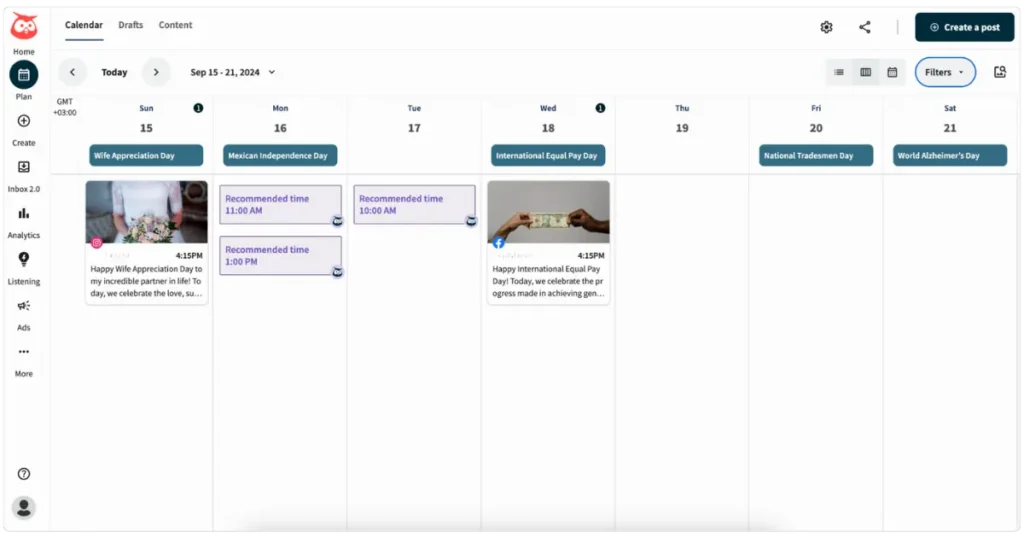
Streams come up a lot in reviews, and for good reason. They let you watch keywords, hashtags, competitors, and brand mentions in real time. If you’re the kind of team that wants to know what’s being said as it happens, not just after a report runs, this feature makes Hootsuite feel more powerful than basic schedulers.
Reporting is another major reason people stick with it. I’ve seen, and users repeatedly mention, that Hootsuite’s in-depth analytics go much deeper than native platform stats. You can track post performance, engagement trends, and audience growth across channels from one dashboard. For marketers who need to explain results to clients or leadership, this makes social media easier to justify.
OwlyGPT also gets mentioned a decent amount of times. In practice, it’s useful for speeding things up. It helps draft captions, clean up wording, or spark ideas when you’re posting often.
Bulk scheduling is another practical reason users like Hootsuite. Uploading a lot of posts at once, duplicating content, and keeping campaigns aligned across platforms make planning ahead much easier.
Add in integrations with tools like Canva, Adobe Express, and Salesforce, and it’s easy to see why Hootsuite feels like it fits well into more professional marketing setups.
Why many teams start looking for a Hootsuite alternative
That said, once the honeymoon phase wears off, a lot of teams start questioning whether Hootsuite still makes sense for them.
1. The price starts to hurt
This is by far the most common complaint. At $249 per user per month, Hootsuite gets expensive fast.
A lot of things people expect to use regularly, like deeper analytics, more competitors in reports, higher scheduling limits, or better inbox automation, are locked behind higher plans.
As soon as you add more team members, the cost stacks up quickly. For freelancers, small teams, and agencies, that price often feels hard to justify.
2. The interface can feel like too much
Hootsuite does a lot, and you feel it every time you log in. Streams, inboxes, reports, listening tools, calendars, ads…everything is right there.
Some people like that. Others feel overwhelmed. I’ve seen many users say the interface feels cluttered or confusing at first, especially if they mostly want to plan posts and move on with their day. When a tool takes effort just to find where to work, it slows everything down.
3. Features don’t always work how you expect
This is where small frustrations add up. DM automation only works on posts scheduled through Hootsuite, not on content published natively. You can’t fully control video cover images the way you can on Instagram. Scheduling Stories isn’t always available.
None of these are huge problems on their own, but when they show up every day, they get annoying.
4. Reliability issues break the flow
For a tool at this price, people expect it to just work. But reviews often mention crashes, lag, or features like AI tools or scheduling randomly not working.
Even if it doesn’t happen all the time, it’s disruptive. Social media work depends on timing, and when something fails mid-task, trust in the tool drops quickly.
5. Many teams realize they don’t need all of this
In the end, a lot of teams realize they’re paying for features they rarely use. Advanced listening, ads management, employee advocacy, and deep CRM integrations are useful for some, but overkill for others.
If your main goals are planning content, staying consistent, and reporting clearly, Hootsuite can start to feel heavy and expensive. That’s usually when teams start looking for simpler alternatives that focus on the basics and do them well.
What I like about Hootsuite
- Manages multiple social accounts from one dashboard
- Enterprise-grade analytics and reporting compared to native tools
- Streams are useful for tracking keywords, hashtags, and competitors
- Bulk scheduling makes planning faster
- Best-time-to-post suggestions are helpful
- AI tools like OwlyGPT speed up caption writing
- Integrates with over 100 tools, including Canva, Adobe Express, and Salesforce
- Good team collaboration tools once set up
What could be improved about Hootsuite
- Expensive, especially on a per-user basis
- Many useful features are locked behind higher plans
- The interface can feel cluttered and slow
- Occasional crashes and reliability issues
- Publishing limits (Stories, Reels covers, native posts)
- DM automation only works for scheduled posts
- Not well-suited for freelancers or small teams
Top 5+ Hootsuite alternatives for social media management
Managing social media looks different depending on your team size, budget, and daily priorities. Some tools focus on publishing and planning, others lean into engagement, moderation, or content creation.
This list includes five tools that cover different needs, so you can compare them based on what actually matters for your workflow, not just feature count.
Here are the Hootsuite alternatives I recommend in 2026:
- SocialBee
- NapoleonCat
- Ocoya
- SocialPilot
- RecurPost
- Planable
Let’s have a more in-depth look into each tool.
1. SocialBee as a Hootsuite alternative
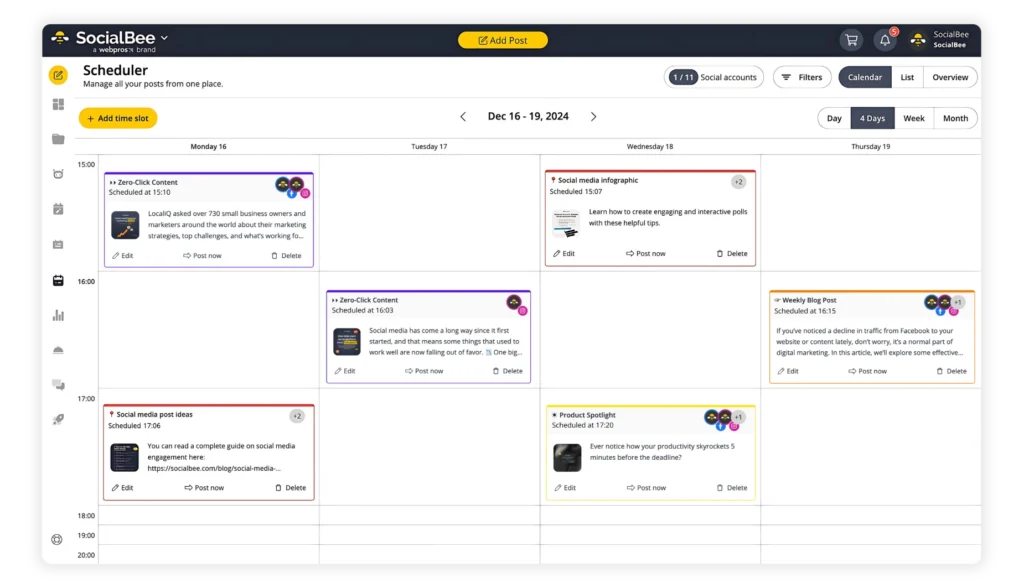
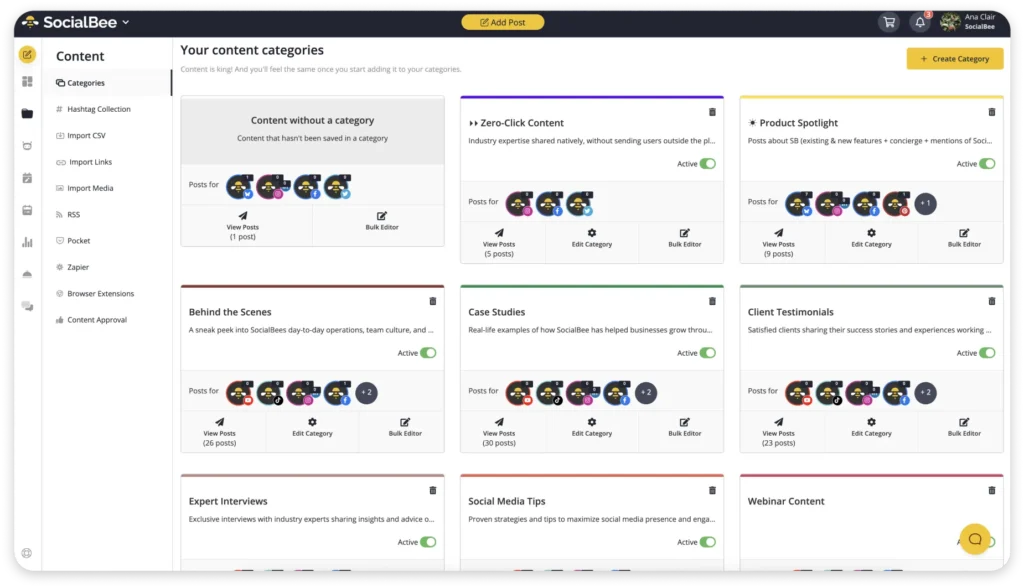
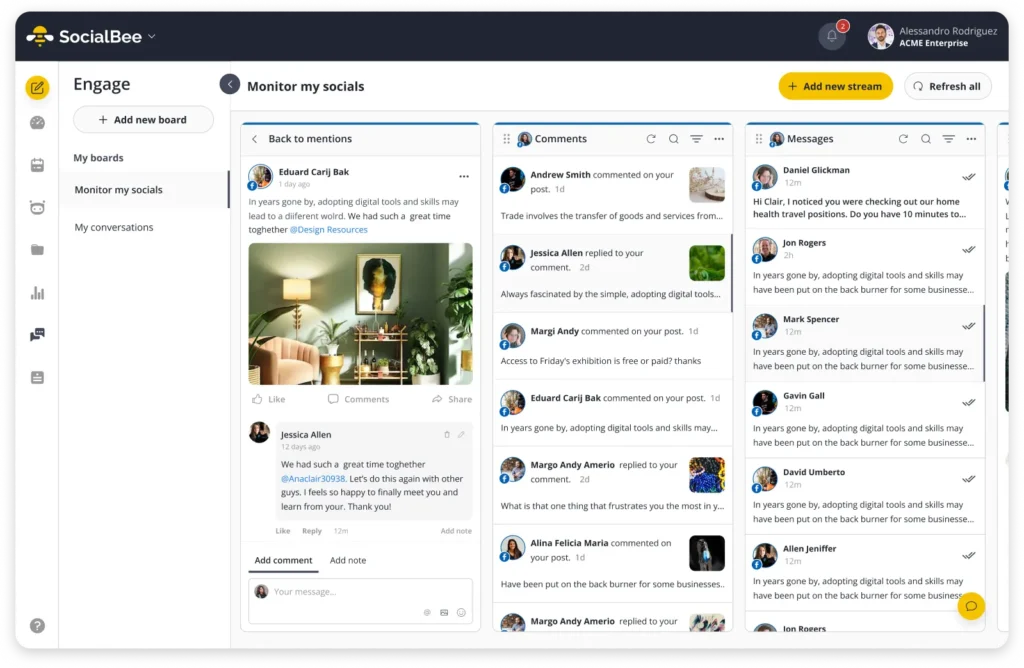
If you like what Hootsuite offers but don’t want the high price, extra complexity, or feature overload, SocialBee is usually the first alternative I recommend. It covers most of the same core needs:
- Create, schedule, and publish posts across major social media platforms
- Reply to mentions, comments, and DMs from one inbox
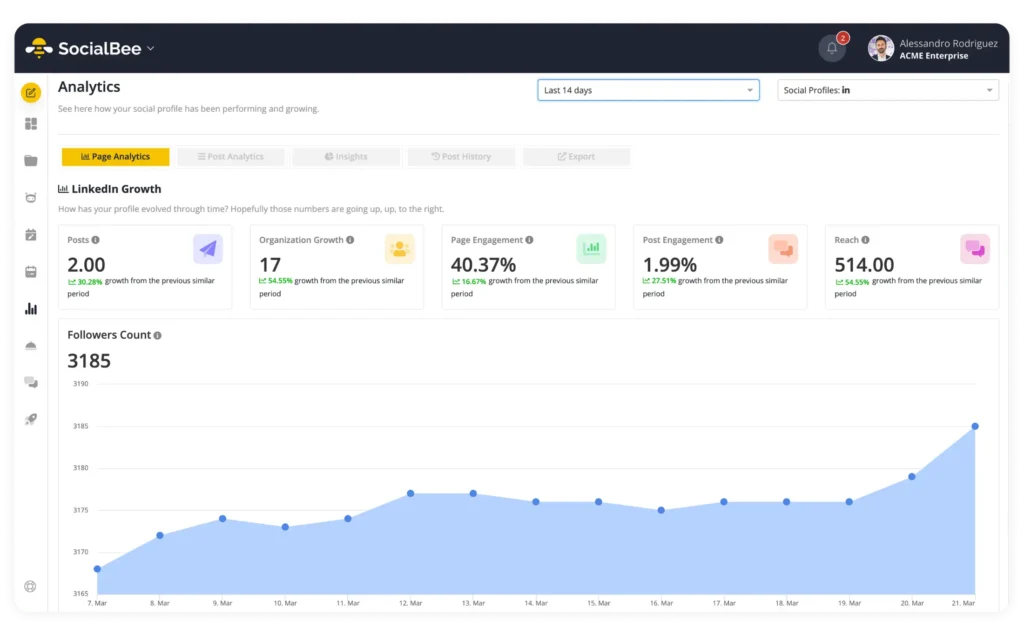
- Analyze performance and generate reports
- Generate clear, shareable reports
- Use AI features separately to help with planning, captions, images, and social media strategy

2. NapoleonCat as a Hootsuite alternative
NapoleonCat can replace Hootsuite if you need more than just a scheduling tool, but your day-to-day work revolves around community management.
Both platforms cover the basics: scheduling content, managing multiple social accounts, working with a team, and pulling reports. The difference is where each tool puts its focus.
If your team spends as much time responding and moderating as it does planning content, NapoleonCat works as a practical alternative to Hootsuite rather than a stripped-down replacement.
Where NapoleonCat feels stronger than Hootsuite
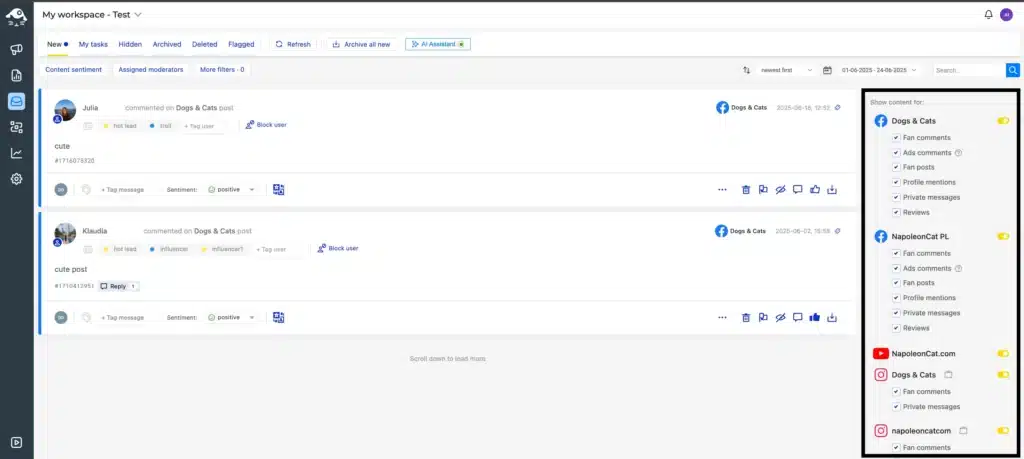
If you’re dealing with lots of comments, messages, reviews, or ad replies, NapoleonCat gives you more control. Things like auto-moderation, spam and hate speech filtering, and ad comment management are part of the everyday workflow, not features you have to hunt for or bolt on later.
The inbox also feels more practical for busy teams. You can tag conversations, label sentiment, save replies, assign messages, and quickly understand the history of a conversation. When volume goes up, that structure matters.
For teams that need to keep conversations clean, respond fast, and protect their brand in real time, NapoleonCat simply feels better suited to the job than Hootsuite.
Pricing is another key difference. Hootsuite starts at $249 per user per month, while NapoleonCat plans start at $89 per month.
Where NapoleonCat feels limited
NapoleonCat can feel limiting if your main focus is planning, publishing, and analyzing content rather than managing conversations.
While it does support scheduling, calendars, analytics, and reporting, those parts don’t feel as central or as refined as they do in Hootsuite. Content planning is more functional than flexible, and the publishing experience can feel slower or less intuitive, especially if you’re used to building and adjusting large content calendars.
Analytics are another sticking point. The data is useful for reporting and overviews, but it’s not always the tool people rely on for deep performance analysis or strategic insights. Some users also mention occasional delays, glitches, or disconnected profiles, which can be frustrating when you’re moving fast.
If your day is mostly about creating content, testing formats, and digging into performance data, Hootsuite tends to feel like the better fit.
Who is NapoleonCat best for?
NapoleonCat is best for agencies, mid-sized brands, and in-house teams that handle large volumes of comments, messages, reviews, and ad interactions.
NapoleonCat’s key features
- Plan posts weekly or monthly using a shared calendar across multiple platforms, including posts, Stories, Reels, carousels, and videos.
- Customize captions for each platform, group posts into campaigns, and manage drafts across multiple accounts with your team.
- See scheduled posts alongside content published directly on Facebook and Instagram, so it’s always clear what’s live and what’s coming next.
- Reply to comments, messages, reviews, and ad comments from a single inbox without switching tools.
- Assign conversations to teammates, add internal notes, and use saved replies to respond faster at scale.
- Set rules to automatically hide spam, remove abusive comments, reply to common questions, and flag messages by sentiment.
- Translate messages into over 100 languages and use sentiment and custom tags to prioritize conversations across organic posts and paid ads.
- Use optional AI tools to generate caption ideas and suggested replies while keeping responses on brand.
- Track page performance, Instagram Stories metrics, and competitor activity, then compare engagement trends across platforms.
- Generate branded PDF reports, schedule recurring email reports, and export analytics or inbox data for clients or internal teams.
- Collaborate with multiple team members using role-based access, Slack notifications, mobile apps, and enterprise-level security and support.
What I like about NapoleonCat
- Automatically hides spam and abusive comments
- Reduces manual work on repetitive replies
- Centralizes comments and messages in one smart inbox
- Clear assignments and internal notes for teams
- Works well for paid ad moderation
- Pricing aligns with moderation-heavy use cases
What could be improved about NapoleonCat
- Content planning tools are basic
- Basic analytics reports focus on inbox activity, not content strategy
- Interface can feel dated
- Occasional lag or syncing issues
NapoleonCat pricing
- Offers a 14-day free trial
- Paid plans start at $89 per month
3. Ocoya as a Hootsuite alternative
Ocoya works as a Hootsuite alternative mainly for people who find Hootsuite too heavy or too expensive for what they actually need. Instead of trying to cover every possible use case, Ocoya focuses on helping you create posts faster by putting AI writing, design tools, and scheduling in the same place.
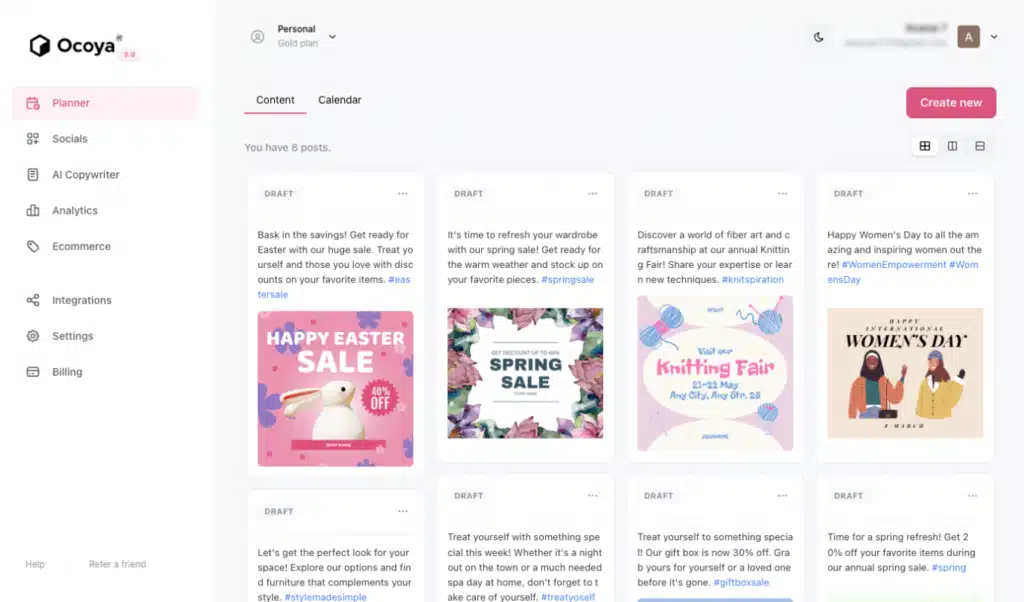
If Hootsuite feels like a full control center built for big teams and complex workflows, Ocoya feels more like a creative workspace. You can go from an idea to a finished post quickly without switching between tools for writing, visuals, and planning.
That said, Ocoya isn’t trying to replace everything Hootsuite does. It doesn’t have the same depth when it comes to reporting, social inbox management, or large team setups. Choosing Ocoya over Hootsuite usually means you’re trading advanced controls and reliability for speed and simplicity.
Where Ocoya feels stronger than Hootsuite
Ocoya feels stronger than Hootsuite when it comes to getting content made quickly. Everything around writing and designing posts is built to reduce friction. You can generate captions with AI, tweak visuals using built-in design tools, and schedule posts without jumping between different apps. For people who spend a lot of time staring at a blank screen, this alone can be a big win.
Ocoya can also feel easier to approach if you’re working solo or in a very small team. There’s less setup, fewer menus, and fewer decisions to make before you can start posting. Compared to Hootsuite’s busy interface and deep feature set, Ocoya feels lighter and more focused on day-to-day content creation rather than long-term reporting or team coordination.
Where Ocoya feels limited
Ocoya starts to feel limited once you move beyond content creation and into day-to-day management at scale. Several users mention posts failing to publish, captions getting cut off, or not having a clear way to fix or resend failed posts.
Ocoya also falls short on analytics, inbox management, and team workflows. The reporting is fairly basic, there’s no deep inbox or customer service layer, and collaboration features don’t go far enough for agencies or larger teams.
If you’re used to Hootsuite’s reporting, social inbox, and approval flows, Ocoya can feel underpowered pretty quickly.
Who is Ocoya best for?
Ocoya works best for solo creators, freelancers, and very small teams who care more about creating content quickly than managing complex social media operations. If your main challenge is writing captions, coming up with ideas, and putting together visuals without bouncing between tools, Ocoya can feel helpful and time-saving.
Ocoya key features
- Generate social media captions, ideas, hashtags, ads, and basic marketing copy using Travis AI.
- Create content in multiple languages using built-in AI tools.
- Get hashtag suggestions based on your post content.
- Create images and simple videos using a built-in visual editor.
- Use ready-made templates and a shared asset library for social posts.
- Edit visuals using a drag-and-drop design interface.
- Access built-in stock images and media assets.
- Schedule posts across multiple social media platforms from one dashboard.
- Organize and reschedule posts using a visual, drag-and-drop content calendar.
- Batch-schedule posts or automate publishing using RSS feeds.
- Get best posting time recommendations based on engagement metrics.
- Track basic engagement and post performance in an analytics dashboard.
- Manage multiple users and brands using team workspaces.
- Review and approve posts before publishing using content approval workflows.
- Control user access with role-based permissions.
- Store and organize images, videos, and past content in an asset library.
- Save drafts and reuse content blocks to speed up content creation.
- Connect social media accounts and ecommerce platforms like Shopify and WooCommerce.
- Import and edit designs through Canva integration.
- Build custom workflows and automations using API access.
What I like about Ocoya
- Speeds up content creation by combining AI writing, design tools, templates, and scheduling in one place.
- Works well for solo users and small teams with simple workflows.
- Supports multiple languages for content creation.
- Has simple team collaboration features: workspaces and approval steps.
- Offers a visual content calendar that makes planning and rescheduling posts straightforward.
- Has affordable plans.
What could be improved about Ocoya
- Deals with occasional minor interface bugs.
- Offers fairly basic analytics.
- Doesn’t have a proper social inbox.
Ocoya pricing
- Offers a 7-day free trial
- Paid plans start at $19 per month
4. SocialPilot as a Hootsuite alternative
In my opinion, SocialPilot can work as a Hootsuite alternative if what you really need is a solid way to plan, schedule, and manage social posts without dealing with a heavy, expensive platform.
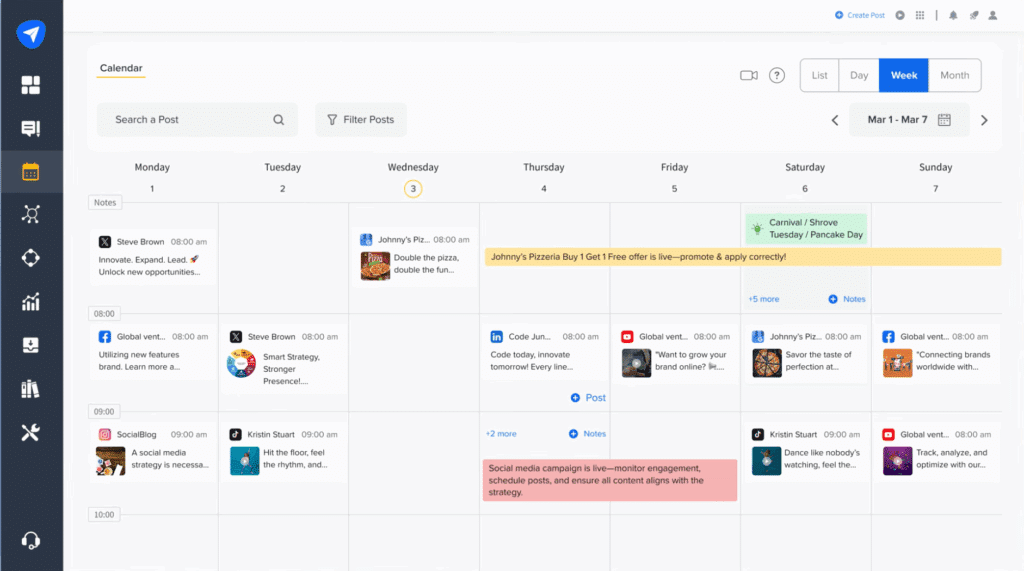
Both tools let you handle multiple social accounts in one place and schedule content ahead of time, which covers the basics most teams care about.
The difference comes down to scope. Hootsuite tries to do everything, from listening and customer support to analytics. SocialPilot sticks to the core stuff and keeps it simple. If you don’t need all the extra layers and just want posting, approvals, and reporting to be easy and affordable, SocialPilot feels like a more straightforward option.
Where SocialPilot feels stronger than Hootsuite
I noticed SocialPilot is more generous with core publishing features at a lower price. Things like bulk scheduling, repeat posts, platform-specific customization, content libraries, and approval workflows are easier to access without jumping to a high-cost plan. With Hootsuite, many of these features exist, but they’re often tied to higher tiers or extra users, which makes simple publishing workflows feel more expensive than they need to be.
SocialPilot starts at $30 per month, while Hootsuite starts at $249 per user per month. That gap alone changes who each tool realistically works for.
Speed is another advantage. SocialPilot’s features are clearly focused on getting posts planned and published with minimal friction. Reviews consistently point to faster setup, fewer clicks, and a calmer workflow. Hootsuite can do more, but that breadth often shows up as a busier interface and more time spent navigating features that not every team needs.
Where SocialPilot feels limited
SocialPilot starts to feel limited when you compare it to how far Hootsuite goes beyond publishing. Hootsuite clearly offers more depth in areas like social listening, customer support workflows, and advanced analytics, while SocialPilot stays focused on the basics.
Social listening tools represent the biggest gap. Hootsuite lets you monitor keywords, hashtags, competitors, and sentiment, and even spot trends or spikes in conversation. SocialPilot doesn’t really play in that space. If your work depends on tracking brand mentions, following conversations in real time, or reacting quickly to trends, Hootsuite feels much more capable.
Analytics is another area where SocialPilot hits a ceiling. It gives you clear performance reports and shareable PDFs, but it doesn’t go as deep as Hootsuite’s benchmarking, custom dashboards, or ROI-focused reporting. For teams that need detailed insights or client reports that tell a bigger story, SocialPilot can feel a bit surface-level.
SocialPilot also lacks the same level of customer care tools. Hootsuite’s inbox, automations, message routing, and team productivity tracking are built for handling high volumes of messages. SocialPilot’s inbox works well for replying, but it’s not designed for full customer support workflows.
Who is SocialPilot best for?
SocialPilot is best for small teams, solo users, and agencies that just want an easy, affordable way to plan and schedule posts for multiple accounts.
SocialPilot key features
- Schedule and publish content across Facebook, Instagram, TikTok, X, LinkedIn, Threads, YouTube, Pinterest, Google Business Profile, and Bluesky.
- Plan content using calendar view, smart queues, bulk social media scheduling, repeat posts, RSS feeds, and platform-specific customization.
- Create posts with AI caption credits, an image editor, Canva integration, a holiday calendar, and support for video, carousels, and GIFs.
- Get access to client management features: account grouping, internal comments, approval workflows, client access, and white-label options on higher plans.
- Track social media performance with post analytics, scheduled and emailed PDF reports, plus custom and competitor reports on advanced plans.
- Manage engagement by replying to comments, messages, and stories from a centralized social inbox.
- Connect tools via Canva, Unsplash, Google Drive, Dropbox, Slack, Zapier, a mobile app, and a browser extension.
- Secure accounts and get support with two-factor authentication, 24×5 customer support, onboarding, and account management on top tiers.
What I like about SocialPilot
- Costs significantly less than Hootsuite, making it easier to afford as you add accounts, clients, or team members.
- Feels simpler and faster to use, with less setup and fewer distractions when scheduling content.
- Makes bulk scheduling, repeat posts, and platform-specific edits easy to manage.
- Handles multi-account and client work well without forcing you into enterprise plans.
- Covers all major social platforms most teams actually use.
- Provides clear, shareable reports without requiring advanced analytics knowledge.
What could be improved about SocialPilot
- Lacks deep social listening, trend tracking, and sentiment analysis compared to Hootsuite.
- Offers more basic analytics, with fewer customization and benchmarking options.
- Social inbox works for replies but isn’t built for full customer support workflows.
- Some advanced features only unlock on higher plans.
- Not ideal for social media marketers that need enterprise-level reporting, monitoring, or customer care tools.
SocialPilot pricing
- Offers a 14-day free trial
- Paid plans start at $30/month
5. RecurPost as a Hootsuite alternative
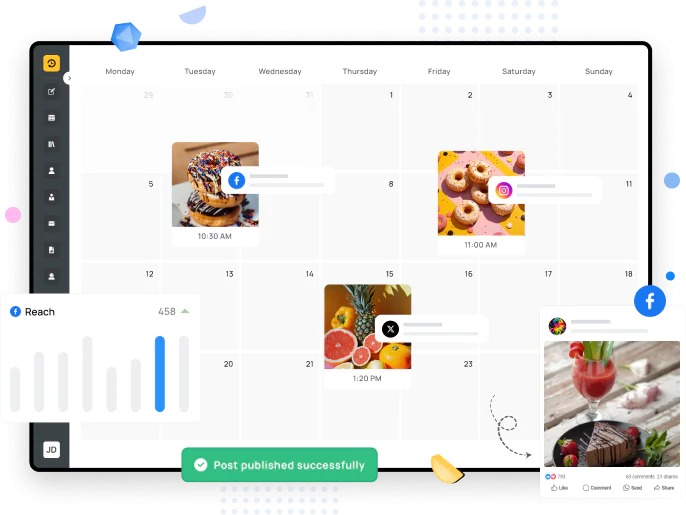
RecurPost is a good Hootsuite alternative if you want your social media to stay active without dealing with a complex, expensive tool. It covers what most people actually need, like scheduling posts, reusing evergreen content, posting at the right times, and replying to messages, but at a much lower price.
Where RecurPost feels stronger than Hootsuite
The biggest difference is how content is scheduled. Unlike Hootsuite, RecurPost is built around evergreen libraries and recurring posts. I like that you load content once, set the rules, and it keeps publishing in the background. I’ve seen quite a lot of users mention that RecurPost actually saves them time long term.
Price is another clear advantage. RecurPost starts at $9 per month and includes scheduling, bulk uploads, best-time suggestions, AI help, and a unified inbox. Hootsuite starts around $249, and many reviewers say the cost is hard to justify unless you need advanced analytics, social listening, or large team workflows. Plus, some features are only available at higher tiers.
RecurPost also feels lighter to use. Hootsuite users often mention a crowded interface, a learning curve, or too many features for simple posting. RecurPost users tend to talk about reliability instead. It does what they need and stays out of the way.
Finally, support matters more than it sounds. RecurPost reviews consistently mention fast replies from real people and quick help when something breaks or feels unclear. For small teams, that makes the tool easier to trust, even if the interface is not flashy.
Where RecurPost feels limited
From what I’ve seen, RecurPost starts to feel limited when your work moves beyond publishing and light engagement. It does not offer the depth of social listening, competitive analysis, or benchmarking that Hootsuite users rely on for strategy-heavy roles. If monitoring trends, tracking competitors, or reacting in real time is part of your daily workflow, RecurPost will feel thin.
Analytics are another clear tradeoff. RecurPost gives you solid visibility into post performance and client-ready reports, but it does not go as deep as Hootsuite’s customizable dashboards, industry benchmarks, or cross-channel performance analysis.
Team workflows are also simpler by design. RecurPost supports approvals, workspaces, and collaboration, but it is not built for large, multi-department teams with complex permissions, inbox routing, or productivity tracking. Hootsuite clearly does more here, especially at the enterprise level.
Who is RecurPost best for?
I would recommend RecurPost to solo founders, coaches, consultants, and small businesses that rely on evergreen content and consistent posting rather than trend monitoring, deep analytics, or complex team workflows.
RecurPost key features
- Schedule posts across major social platforms, including Facebook, LinkedIn, X, Instagram, TikTok, YouTube, Pinterest, Google Business Profile, Threads, and Bluesky.
- Store and recycle evergreen content using content libraries.
- Upload and schedule posts in bulk using CSV files or mass uploads.
- Plan and review content using a visual planner.
- Get AI-based recommendations for the best times to publish posts.
- Generate captions and images using built-in AI tools.
- Create and edit posts with a built-in editor and Canva integration.
- Import media directly from Google Drive.
- Manage messages, comments, and mentions from a unified social inbox.
- Automate Instagram DMs and replies using AI assistance.
- Track engagement with basic analytics and downloadable PDF reports.
- Collaborate with team members using approvals, shared calendars, and workspaces.
- Access and manage social media on the go with iOS and Android mobile apps.
What I like about RecurPost
- Offers affordable pricing that starts at $9 per month.
- Automates evergreen and recurring content without manual rescheduling.
- Includes bulk scheduling and content libraries for easy scaling.
- Provides fast, human customer support that users consistently praise.
- Feels lighter and less overwhelming than enterprise tools like Hootsuite.
What could be improved about RecurPost
- Feels less modern visually compared to other tools.
- Provides basic reporting, with fewer customization options than enterprise tools.
- Does not offer social listening, competitor tracking, or trend monitoring.
RecurPost pricing
- Offers a 14-day free trial
- Paid plans start at $9/month
6. Planable as a Hootsuite alternative
Planable is a strong Hootsuite alternative when your bottleneck is everything that happens before a post goes live: review cycles, client sign-offs, scattered feedback, and handoffs between account managers and creatives.
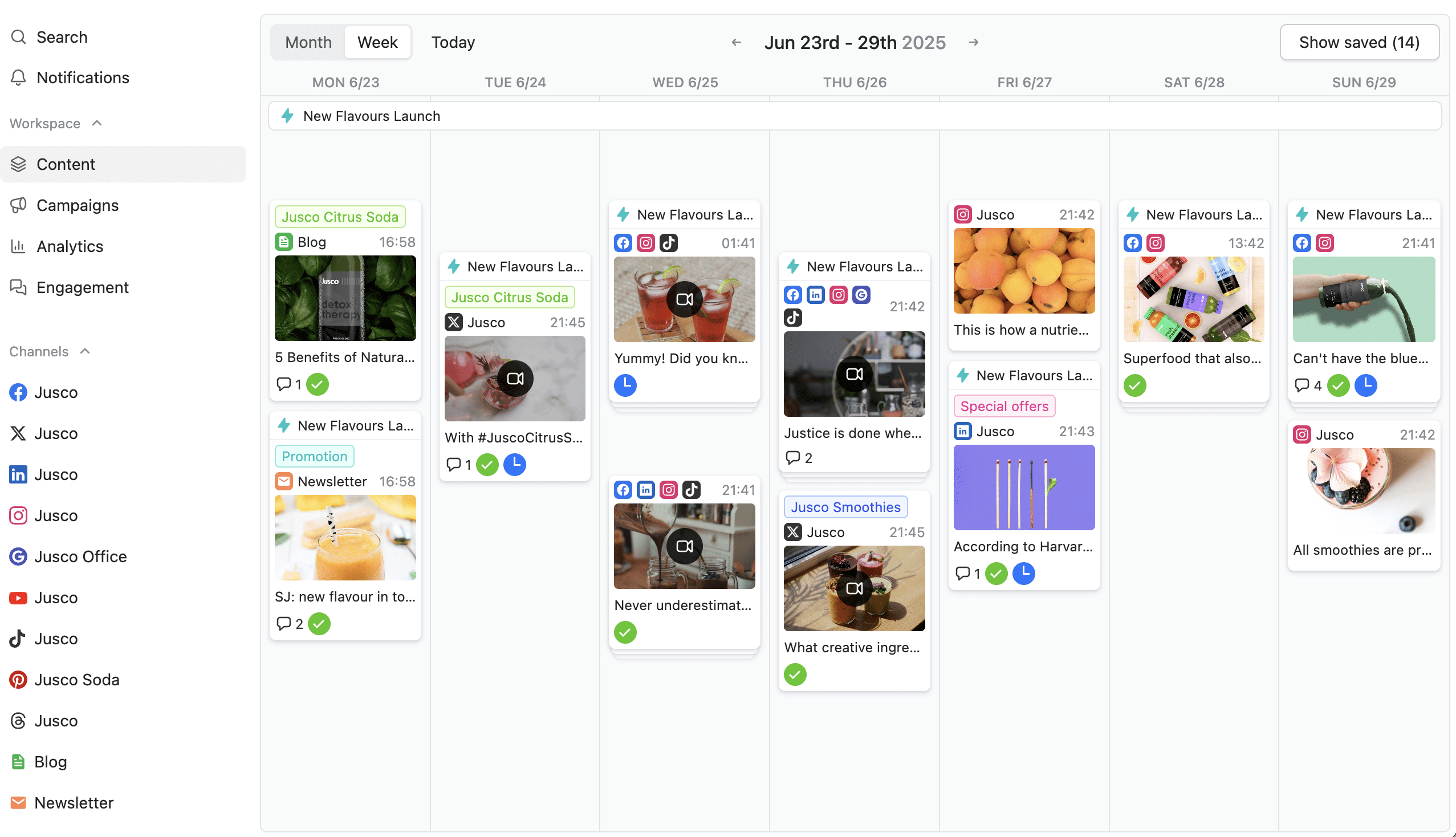
Planable covers the core social media management basics most teams expect (planning, scheduling, collaboration, and reporting). Where it differentiates is the collaboration layer: structured approvals, clearer feedback loops, and client-friendly review options that reduce chaos in multi-stakeholder workflows.
Where Planable feels stronger than Hootsuite
Planable is worth a serious look for agencies and marketing teams that manage social media on behalf of others. Here’s where it stands out. Approval workflows are designed for client work. Hootsuite supports collaboration, but Planable is built around approval as a first-class workflow.
In Planable, you can set workspace-level approval rules – none, optional, mandatory or multi-level.
Feedback is also more execution-oriented – real-time comments, annotations directly on the post, inline text suggestions and “Mark as resolved” to track what’s been addressed.
Client collaboration is more controlled to keep posts internal until they’re ready for client review, share a guest view link to a post or plan (no login required), while internal comments are never visible to clients. Planable keeps client work clean by giving each brand its own workspace with separate content and permissions, its own approval flow, workspace-specific settings and a dedicated media library.
Where Planable feels limited
Planable isn’t trying to be an enterprise command center, and that’s worth understanding before choosing it.
If your work depends on social listening (tracking brand mentions, monitoring competitors in real time, or reacting to trending conversations) Planable doesn’t have that. There’s also no CMS integration for publishing directly to websites or blogs.
Who is Planable best for?
Planable may not be the best choice if you need:
- Social listening (brand mention tracking, competitor monitoring, trend monitoring)
- CMS integrations for publishing to websites/blogs
- A basic scheduling tool as a freelancer
Planable’s key features
- Plan, schedule, and publish across major social platforms from a shared calendar
- Feed/grid/calendar/list views, including bulk actions in list view
- Pixel-perfect post previews per network
- Workspace-level approval workflows (none/optional/mandatory/multi-level)
- Real-time comments, annotations, and inline text suggestions
- Internal vs client-facing feedback separation
- Guest view link sharing (no login required)
- Dedicated workspaces per client/brand with separate permissions and media libraries
- Mock-up pages for each platform before connecting accounts
- Unified inbox for comments (Facebook, Instagram, LinkedIn, TikTok), organized by status and sentiment
- Planable AI for captions, rewrites, ideas, and comment reply drafts
- Campaign organization (labels, timelines, drag-and-drop rescheduling)
- Cross-channel analytics and client-ready reports
- Canva integration for importing visuals
- Mobile app for collaboration and approvals on the go
What I like about Planable
- Approval workflows are flexible and map well to agency scenarios
- Guest links reduce friction for client reviews
- Multiple views help different teams work their way without adding complexity
- Pixel-perfect previews reduce preventable revisions
- Separating internal and client comments prevents messy feedback loops
- Reporting is clean and shareable
- Workspaces keep multi-client work organized
What could be improved about Planable
- No social listening / brand monitoring
- No CMS integrations for website publishing
- May be more than a solo user needs if they don’t run approval workflows
Planable pricing
- Paid plans start at $33/month
- Free trial available
Frequently asked questions
Is there anything better than Hootsuite?
It depends on what you need. For large enterprises with complex monitoring and customer support workflows, Hootsuite can still be a strong option. But for many freelancers, small businesses, and growing teams, there are better alternatives.
Tools like SocialBee offer the same core features for planning, scheduling, engagement, and reporting without the high price or extra complexity, which makes them a better fit for day-to-day social media work.
Is Hootsuite a CRM system?
Hootsuite is a social media management tool. It helps you schedule posts, monitor conversations, reply to comments and messages, and track performance across social platforms. While it does include inbox and engagement features, it is not designed to manage full customer records, sales pipelines, or long-term customer relationships the way a true CRM does.
Is Hootsuite an AI tool?
Hootsuite is not an AI tool on its own, but it does include some AI features.
It’s primarily a social media management platform used for scheduling posts, managing engagement, and tracking performance. Hootsuite uses AI to support certain tasks, like suggesting captions, helping with content ideas, or recommending posting times through features like OwlyGPT.
Final thoughts: choosing the right Hootsuite alternative for your social media strategy
There’s no single “best” Hootsuite alternative, only the best fit for how you actually work.
If you need deep social listening, complex workflows, and enterprise controls, Hootsuite can still make sense. But for most freelancers, small teams, and growing brands, it often ends up being heavier and more expensive than necessary.
Hootsuite feels like more than you need? SocialBee is one of the best alternatives if you want an easier way to plan posts, manage replies, and check performance without paying enterprise prices.
If you’re curious, SocialBee offers a 14-day free trial so you can see how it improves your social media efforts.