FREE LinkedIn post mockup generator

Preview how your LinkedIn posts will look before you publish. Test copy, visuals, and formatting so you can catch mistakes, improve clarity, and share polished drafts with clients or teammates.

Ready to publish your mockup? SocialBee lets you generate captions with AI, bring in visuals from Canva or other libraries, and schedule your LinkedIn posts from one place.

What is a LinkedIn post mockup generator?

A LinkedIn post mockup generator lets you see how a post will actually look in the LinkedIn feed before you publish it. You can write your copy, add an image, tweak the profile details, and even set the number of likes, comments, and reposts to match a real post.

Why use a LinkedIn post mockup generator?

Because LinkedIn posts rarely look the way you expect once they’re live.

Line breaks shift. Long sentences get cut off. Images feel off in the feed. And once you’ve posted, your options are limited. You either live with it or delete and repost.

A LinkedIn post mockup generator helps you avoid that by letting you see the final result first. You can slow down, review the post as a reader would, and make small fixes that make a big difference.

People use it to:

  • Fine-tune formatting before it’s public and permanent
  • Share a realistic preview for approvals instead of vague explanations

How to use the LinkedIn post generator

Using the LinkedIn post generator takes just a few minutes. You fill in the same details you’d normally add on LinkedIn, and the preview updates instantly.

Here’s how to create a LinkedIn post mockup:

  • Upload a profile picture and add a name and headline
  • Write or paste your post content
  • Add a mockup image and choose the aspect ratio (square, landscape, or portrait)
  • Set the number of likes, comments, and reposts

As you make changes, you can see the post exactly as it would appear in the LinkedIn feed on the right side of the screen.

Tips for creating better LinkedIn posts

An online mockup shows you how a post looks. The real value comes from what you have to say and how you say it.

1. Focus on the first two lines

The first two lines do most of the work on LinkedIn. That’s all people see before the “see more” cutoff, especially on mobile. If those lines aren’t clear or interesting, the rest of the post doesn’t matter.

A few things that help:

  • Get to the point faster than feels comfortable. Long warm-ups usually get skipped.
  • Lead with a specific idea, outcome, or question instead of a general statement.
  • Aim for one clear idea per line so the opening feels light, not crowded.

Instead of: “I want to share some lessons I’ve learned from working with clients on their content strategy.”

Try: “One mistake I see clients make on LinkedIn all the time.”

Use the mockup to check how these lines sit in the feed. If they feel easy to read and slightly hard to ignore, you’re on the right track.

2. Give your post a clear visual structure

Small formatting choices have a big impact on how a LinkedIn post feels. Before someone reads a word, they notice spacing, emphasis, and whether the post looks easy or tiring to get through.

Use line breaks to separate ideas and keep paragraphs short.
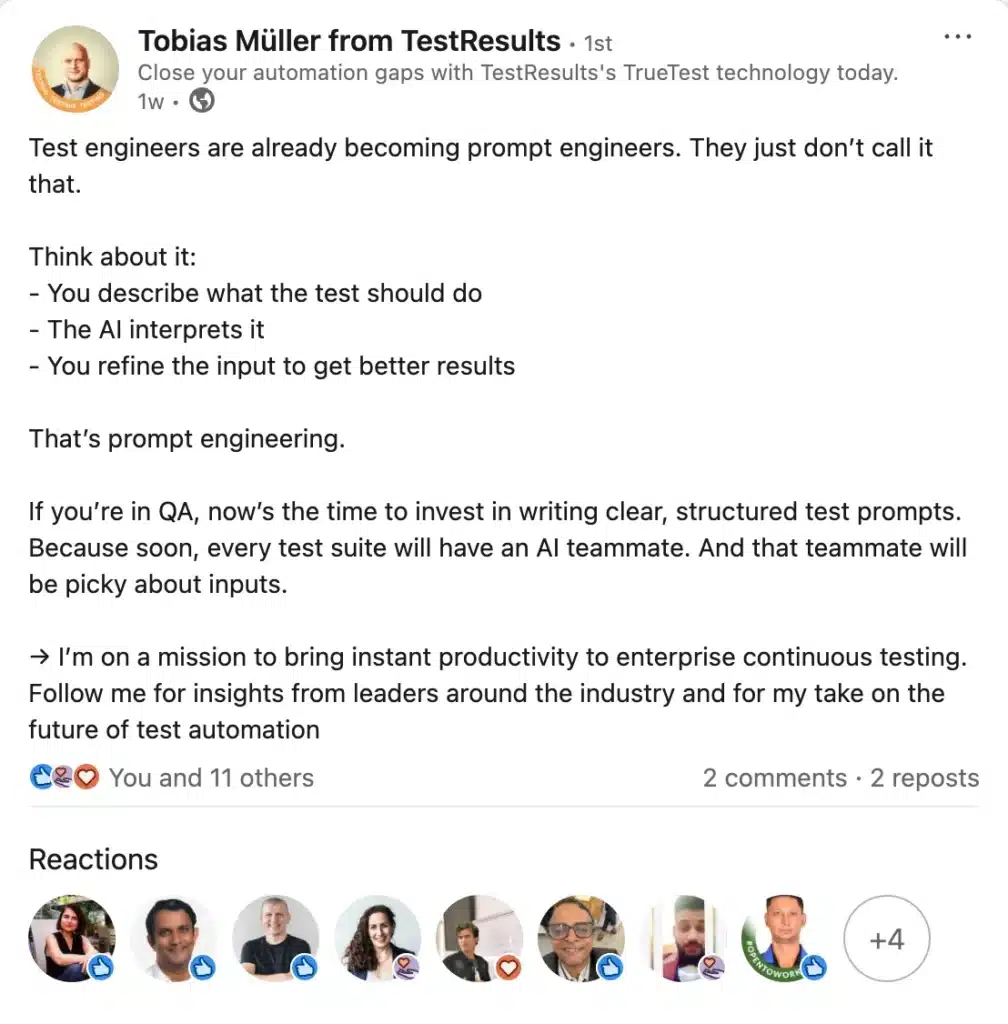
LinkedIn text post by Tobias Müller from TestResults.io discussing how test engineers are becoming prompt engineers by writing structured prompts for AI. Post includes bullet points on describing tests, AI interpreting them, and refining inputs.

Bold text can help highlight a key point or phrase, but it works best when you use it sparingly.

Bullet points are useful when you’re sharing steps or takeaways, because they create instant structure. Emojis can also help guide the eye, but one well-placed emoji is usually enough.
3. Read it as someone who doesn’t know you

When you’re close to your own content, it’s easy to fill in the gaps without realizing it. What feels obvious to you might be unclear to someone seeing your post for the first time.

Use the mockup to step back and read the post without context. Ask yourself if the point is clear in the first few lines, if anything feels confusing or overly implied, and if the post still makes sense without extra explanation in the comments.

This quick mindset shift often reveals small issues like missing context, vague references, or assumptions about what the reader already knows. Fixing those before you publish makes the post feel more intentional and easier to engage with.

4. Be intentional with images

Images shape the first impression of your post. Before anyone reads the text, the image sets expectations about what the post is about and whether it’s worth stopping for.

Use images to add context, not decoration. Simple visuals like screenshots, charts, short quotes, or a clean graphic that reinforces your main point usually work better than busy stock photos. If the image needs a long explanation to make sense, it’s probably not the right fit.

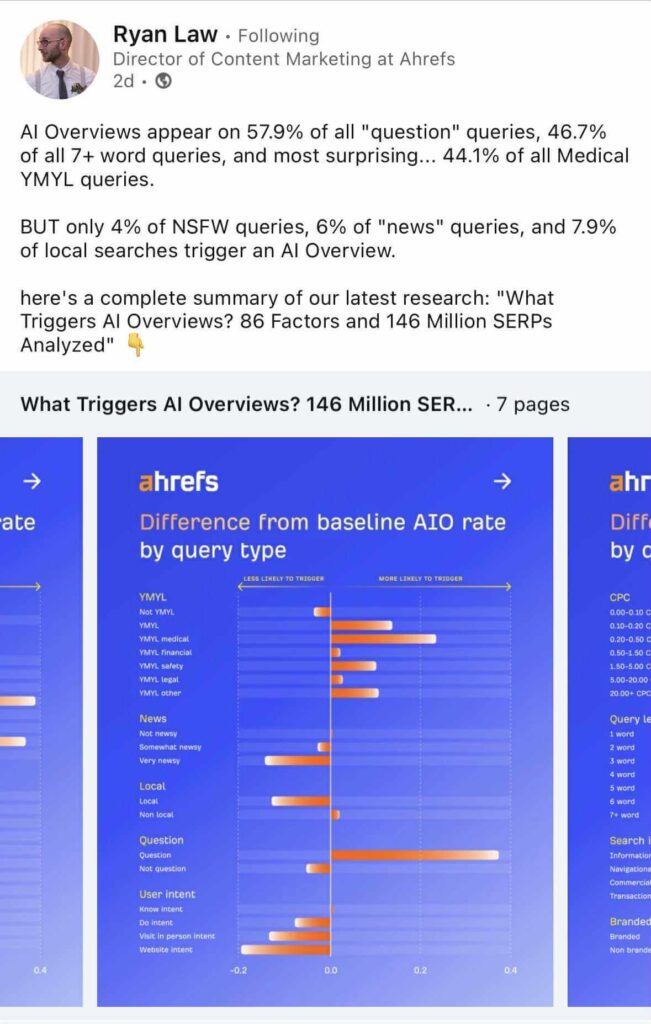
A LinkedIn carousel slide from Ryan Law’s Ahrefs post showing a blue chart titled “Difference from baseline AIO rate by query type.” The horizontal bar graph compares how different query categories—such as YMYL, news, local, questions, and user intent—are more or less likely to trigger an AI Overview.

Text on images can help when it highlights a key idea, but keep it minimal. One short line is usually enough. The post copy should still carry the message on its own. If someone skips the image, the post should still make sense.

5. Plan posts ahead and publish at the right time

A well-written post still needs the right timing. Publishing consistently and at moments when your audience is active gives your content a better chance to be seen and engaged with.

Planning posts ahead of time helps you avoid rushed decisions and last-minute posting. It also lets you step back and look at your content as a whole, not just one post at a time.

When you combine that with posting at times your audience is already scrolling, your posts feel more intentional and less random.

SocialBee studies how your past LinkedIn posts have performed and identifies when your target audience is most active. Instead of guessing the right time to publish, you get posting windows based on real behavior. 
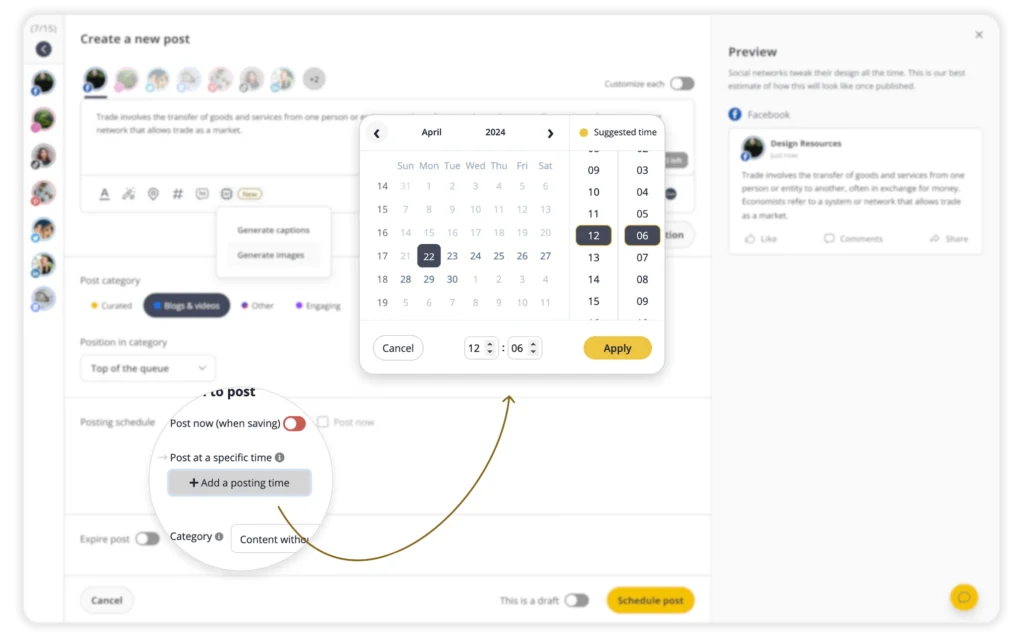
You can save drafts, group posts by category, and build your calendar in a way that supports a consistent strategy instead of scrambling to come up with ideas every day.

If you need help planning ahead, SocialBee’s AI can create LinkedIn posts from scratch, complete with captions and visuals.

And with Copilot, your AI assistant, you can build a full strategy in minutes. Just share a few details about your brand, and Copilot will recommend the best topics, post ideas, social media platforms, and publishing frequency based on your goals.

If you collaborate with teammates or manage clients, you can review, comment on, and approve content in one place. After the post goes live, SocialBee’s inbox brings all your comments and messages together so you can reply quickly and stay visible in conversations that matter.

Start your 14-day free trial and see how much easier it is to manage your LinkedIn presence from one dashboard and test more features!

Manage your social media with SocialBee: publishing, AI assistance, Canva magic, analytics, unified inbox, and more.
SocialBee supported social channel logos
14-day free trial, no credit card required

Here's what our customers have to say about us

Jobs in football
cosmopolitan logo
harper's bazaar logo
Expatica
Washington university
Lehigh university
Slow cooker club
elle logo
mark cuban companies
esquire logo
Beaufort hotel
Dublin Bus
Charles university
D-Link gray logo
Compass logo

Improve your social media content strategy

SocialBee helps you plan posts in advance, engage with your audience, collaborate seamlessly with your team, and track performance with ease.

14-day free trial, no credit card required

Level up your social media marketing with exclusive resources delivered straight to your inbox

We’re SocialBee LABS SRL, part of WebPros. We use the information you provide to share relevant content and product updates, as outlined in our Privacy Policy. You can opt out anytime.

Out of post ideas? Get our FREE social media calendar!

Access 500+ content ideas, post examples, and Canva templates.
We’re SocialBee LABS SRL, part of WebPros. We use the information you provide to share relevant content and product updates, as outlined in our Privacy Policy. You can opt out anytime.

... and turn your ideas in ready-to-share posts in seconds

Use SocialBee’s Free AI Post Generator to create content for your social media profiles.
SocialBee free AI generator