


















Generate YouTube hashtags instantly

Enter a few words about your YouTube video and get hashtag suggestions tailored to your content and audience.

Important: This tool may show inaccurate or offensive content that doesn’t reflect SocialBee’s views. You’re solely responsible for how you use it and for complying with laws and third-party rights.

Why use a YouTube hashtag generator?

Hashtags on YouTube act as topic markers. They categorize your videos, help with YouTube SEO, connect posts with similar content, and make them easier to discover. When you add hashtags to a video title or description, they become clickable links that lead to a hashtag results page.

YouTube itself explains: “they are an easy way to find videos about trending topics on YouTube.” That means hashtags are still a valuable discovery tool for audiences who search and browse by topic.

A YouTube hashtag generator makes this easier by suggesting relevant hashtags tailored to your content. Instead of wasting time on guesswork or using generic hashtags, you get options that improve your video’s chances of showing up in search, recommendations, and trending topic pages.

How the YouTube hashtag generator works

Start by entering a few keywords or short phrases that describe your video into our free tool. The generator analyzes your input and suggests optimized hashtags that are commonly used with similar content on YouTube.

The more specific your keywords, the better the results. For example, typing “beginner guitar lesson” is more effective than just “music.” Instead of broad hashtags like #songs, you’ll get targeted suggestions such as #guitartutorial or #learnacousticguitar that connect you with viewers who want that exact content.

Once you have your list, select a mix of hashtags that match your content and goals. Broader tags can help with reach, while niche hashtags bring in viewers actively searching for your topic.

How many hashtags should you use on YouTube?

Adding the right hashtags to your videos can improve discoverability, but more is not always better. YouTube allows up to 15 hashtags in a single video. If you exceed that limit, YouTube ignores all of them.

A good range is between two and three hashtags per post:

  • In the title: Use zero or one. Titles are prime SEO real estate on YouTube, so only include a hashtag if it’s highly relevant.
  • In the video description: Add two to three hashtags, ideally at the end of the text. This keeps your description clean while still signaling to YouTube what your video is about.

From hashtags to full YouTube management

Hashtags help categorize your videos and improve discoverability, but they are only one part of building a successful YouTube channel. To grow consistently, you also need to plan content, publish on time, engage with viewers, and track performance.

With SocialBee, hashtags become part of a complete social media workflow that covers YouTube and beyond.

SocialBee allows you to:

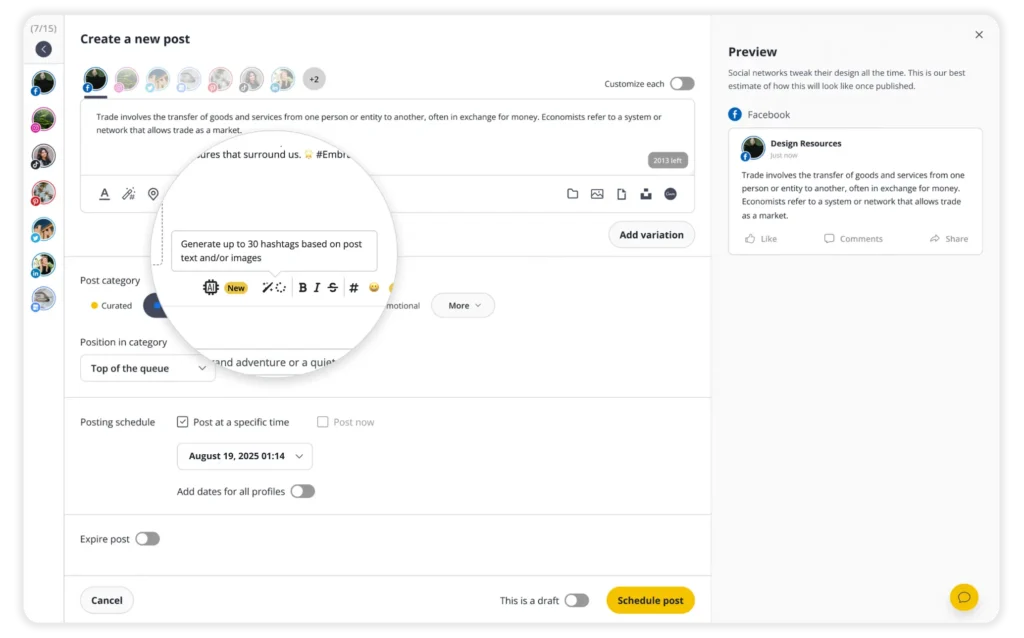
  • Generate captions, hashtags, and images with AI, perfect when you are short on time or ideas.
  • Schedule and publish content on YouTube, TikTok, Facebook, Instagram, LinkedIn, X (Twitter), Pinterest, Threads, Bluesky, and Google Business Profile.
  • Customize content for each platform manually or automatically with one-click AI.
  • Adjust posts with ease: fit captions to character limits, swap hashtags, tag users, add first comments, and more.
  • Generate hashtags from text or images, then save them into reusable collections.
  • Edit visuals in-platform: tweak images, add alt text, or set custom video thumbnails.
  • Get recommendations on the best posting times, based on your past performance.
  • Collaborate with teammates or clients by leaving notes, approving posts, and managing reviews before content goes live.
  • Organize multiple clients or brands in separate workspaces to stay on track.
  • Track performance across platforms and export detailed PDF reports.
  • Reply to all your comments from one unified inbox.

Start your 14-day free trial today and simplify the way you manage YouTube and every other social platform.

Tips to improve your hashtag marketing on YouTube

The most effective way to use hashtags on YouTube is to add two to three highly relevant ones that mirror your video’s keywords. Place them in your description, and only include one in your title if it is strongly tied to your topic. This keeps your metadata clean while helping YouTube categorize your content and improve discoverability.

Here’s how to make hashtags work harder for you:

  • Be selective. Too many hashtags look cluttered and do not help you rank in search results. Stick with two to three.
  • Use them where they count. Prioritize the description, and add a hashtag in the title only if it directly reinforces your SEO.
  • Pair hashtags with video tags. Tags cover broad keywords (for example, YouTube marketing, how to grow on YouTube), while hashtags highlight narrower, clickable topics.
  • Repeat relevant hashtags across videos and playlists. This builds stronger thematic signals across your channel, especially for music or niche communities.
Manage your social media with SocialBee: publishing, AI assistance, Canva magic, analytics, unified inbox, and more.
SocialBee supported social channel logos
14-day free trial, no credit card required

Here's what our customers have to say about us

Jobs in football
cosmopolitan logo
harper's bazaar logo
Expatica
Washington university
Lehigh university
Slow cooker club
elle logo
mark cuban companies
esquire logo
Beaufort hotel
Dublin Bus
Charles university
D-Link gray logo
Compass logo

Improve your social media content strategy

SocialBee helps you plan posts in advance across social media platforms, engage with your audience, collaborate seamlessly with your team, and track performance with ease.

14-day free trial, no credit card required

Level up your social media marketing with exclusive resources delivered straight to your inbox

We’re SocialBee LABS SRL, part of WebPros. We use the information you provide to share relevant content and product updates, as outlined in our Privacy Policy. You can opt out anytime.
SocialBee, your AI-powered social media management tool
Loved by thousands of brands, creators, and social media managers