


Sprout Social is often one of the first tools teams choose when they need structure around social media management. It’s polished, easy to onboard, and strong out of the box, which explains why it’s so widely adopted. But after using it for a while, many teams start to question whether it still makes sense for how they actually work.
As needs grow, common issues tend to surface: pricing that scales faster than value, reporting locked behind higher tiers, social listening that takes too much setup, or workflows that feel heavier than necessary. At that point, teams aren’t looking for a downgrade. They’re looking for a better fit.
In this article, I break down why teams start looking for a Sprout Social alternative and compare the best options available today. I’ll walk through where each tool works best, where it falls short, and how to choose the right platform based on your team size, workflows, and priorities.



2. Hootsuite as a Sprout Social alternative
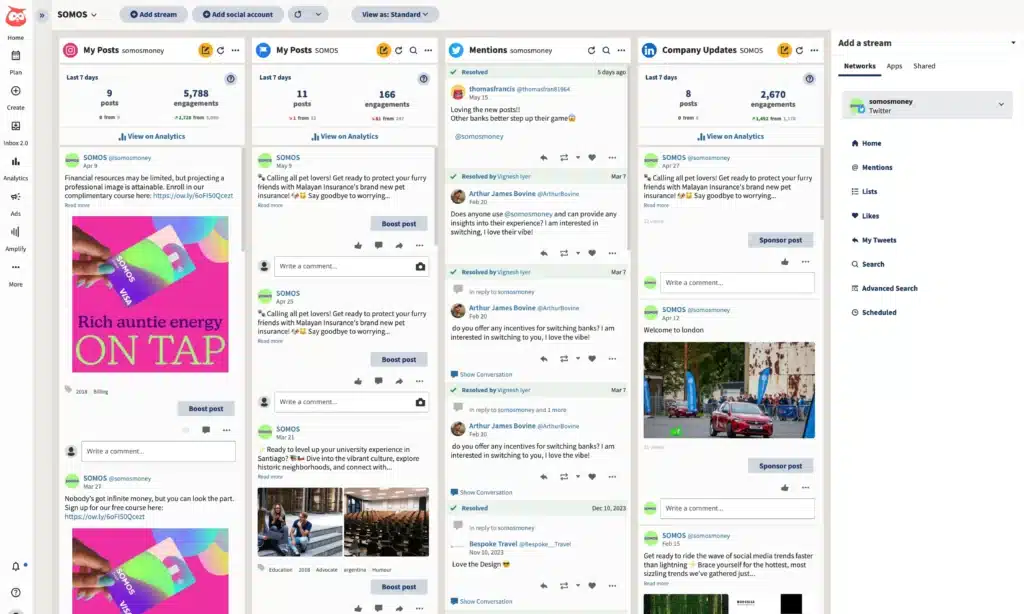
From hands-on testing and user feedback, Hootsuite works best as a Sprout Social alternative for enterprise teams running high-volume social media management, not for teams trying to simplify workflows or cut costs.
Unlike Sprout Social, Hootsuite starts to make sense only when Sprout begins to feel limiting.
If you manage dozens of accounts, run complex social media campaigns, or treat social as a support channel, the platform excels at large-scale social media publishing, bulk scheduling, and social inbox management.
Its inbox rules, approval workflows, and permissions are designed for big marketing teams, external stakeholders, and long-term planning across a shared marketing calendar or visual content calendar.
Hootsuite also offers more flexibility in performance tracking, allowing users to create custom reports, monitor key metrics, and turn analyzing social media performance into actionable insights.
Its reporting depth supports advanced social media strategy, especially when tied into tools like Google Analytics, Salesforce, or Adobe. This makes it a strong option for organizations that need detailed views of social media performance, audience behavior, and cross-channel social media efforts across major platforms.
That said, the trade-offs are real. Pricing is higher, many of the same features sit behind expensive plans, and the interface requires more effort to master. For small businesses or teams focused on lean social campaigns, the learning curve and cost often outweigh the benefits. If you’re leaving Sprout because it feels expensive or frustrating, Hootsuite is unlikely to feel like an upgrade.
Where Hootsuite feels stronger than Sprout Social
The first thing that stands out is how much Hootsuite can handle at scale. As a social media management platform, it’s built for volume.
If you’re managing multiple accounts across all the major platforms and juggling a lot of content and conversations, it gives you more room to grow than most social media management tools.
Publishing and scheduling are a clear strength. Unlimited scheduling, bulk uploads, post duplication, and smart scheduling based on best-time-to-post recommendations make it easier to run large-scale post scheduling without friction.
Many social media marketers highlight bulk scheduling as a major productivity boost, especially when working across brands, multiple social platforms, or complex campaign management setups. I agree. For teams planning weeks or months ahead, Hootsuite supports structured social media management far better than simpler tools.
Analytics and reporting are another area where Hootsuite pulls ahead, once you’re on a higher plan. Beyond basic analytics, you get access to deeper social data, competitor analysis, and customizable dashboards that offer more than surface-level metrics.
Users often point to the ability to generate deep insights, track competitor activities, and understand industry trends as a differentiator. Compared to Sprout, Hootsuite provides more raw data and more ways to interpret it, which is useful when reporting, forecasting, or defending budget decisions.
Inbox and customer care are also more advanced. Features like DM automation, message routing, tagging rules, and saved replies help teams monitor conversations, manage all the conversations in one place, and improve customer engagement at scale.
For teams handling support, moderation, or even crisis management, these engagement tools make a real difference. It’s clear Hootsuite has invested heavily in workflows that support team collaboration, accountability, and performance tracking across team members.
Finally, Hootsuite fits naturally into larger marketing ecosystems. Integrations with tools like Canva, Adobe Express, and Salesforce come up repeatedly in reviews, and for good reason.
Shared media libraries, a central content library, and built-in collaboration tools make it easier for a social media marketing team to work alongside designers, support teams, and external partners. For growing agencies or enterprise teams that need a comprehensive suite rather than a lightweight scheduler, this level of integration matters.
That said, this strength is also why Hootsuite isn’t for everyone. It’s a feature-rich tool with a higher cost, and it assumes mature workflows, bigger teams, and fewer budget constraints. For teams exploring alternatives mainly to save money or simplify, other alternatives to Sprout Social may feel like a better fit.
Where Hootsuite feels limited
Despite its depth, Hootsuite comes with some issues.
Pricing is the biggest one. At $249 per user per month for Standard and $499 for Advanced, it’s expensive, even compared to Sprout Social. Many users struggle to justify the cost, especially since advanced analytics, collaboration, and higher limits sit behind pricier plans. I felt the same. If predictable pricing is why you’re leaving Sprout, Hootsuite won’t solve that.
The interface is another hurdle. Some people like it, but I’ve seen many describe it as cluttered and slow. Managing multiple streams and high volumes of content can feel overwhelming, and simple tasks often take more clicks than expected. Compared to Sprout’s cleaner layout, Hootsuite feels functional rather than refined.
Reliability also comes up more than it should at this price point. Users mention lag, crashes, and features like AI writing, tagging, or scheduling working inconsistently.
There are also familiar platform limits. Instagram scheduling still has gaps, like limited control over Reel cover images and inconsistent Story scheduling. DM automation is useful, but only works for posts scheduled through Hootsuite, which creates extra steps if you publish natively.
Support is generally solid, especially on higher plans, but several users note that access improves mainly if you’re paying more. That reinforces the sense that Hootsuite is built for teams with larger budgets.
Who is Hootsuite best for?
Hootsuite is best for large teams and enterprise organizations that need advanced analytics, inbox automation, and deep integrations.
Hootsuite’s pros
Based on my research, Hootsuite works best when you need to manage many accounts from one place, schedule content in bulk, track conversations, and pull detailed reports, especially when those workflows need to plug into a larger marketing setup.
What users are saying about Hootsuite’s pros:
- “The Streams feature is useful for real-time monitoring of keywords, hashtags, and competitors. One of the things I love most is the depth of reporting, which provides very helpful insights for building strategy. Built-in apps like Canva, Adobe Express, and Salesforce also make Hootsuite fit easily into a professional marketing stack.” – Helen A. (source)
- “I like Hootsuite for its Owly GPT, which is quite useful. Customer support has been great, and I appreciate being able to customize performance reports.” – Meredith S. (source)
- “Hootsuite lets me manage all my social media accounts in one place. I can schedule posts, monitor comments and messages, and track performance without switching platforms.” – Diego S. (source)
- “Bulk scheduling is a really useful feature. It helps me plan everything in advance without overly complex software, use AI effectively, and keep content aligned for the same brand.” – Paula D. (source)
- “The social media analytics are strong, and the best-time-to-post suggestions are especially useful.” – Nikhil K. (source)
Hootsuite’s cons
Based on the user feedback I’ve seen, Hootsuite’s main drawbacks are high pricing, key features locked behind expensive plans, a cluttered and sometimes slow interface, and platform limits around Instagram scheduling and DM automation.
What users are saying about Hootsuite’s cons:
- “Customer support could be improved, as I was only able to reach support via chat. It would also be useful to have stronger integration with design tools like Canva to make importing graphics easier.” – Verified User, Manufacturing (source)
- “My biggest issue is that DM automation only works on posts scheduled through Hootsuite. If I create Instagram Reels natively, I can’t use DM automation without workarounds.” – Fanny S. (source)
- “I don’t like how often it crashes, or when tools like the AI text generator, tagging, and scheduling stop working.” – Cat Y. (source)
- “I wish you could select the cover image for Instagram Reels when scheduling, and also schedule Instagram and Facebook Stories through Hootsuite.” – Amanda B. (source)
- “If you’re new to the platform, the interface can feel cluttered and complicated. The high price makes it inaccessible for freelancers and small brands, and many collaboration and analytics features are locked behind higher plans.” – Helen A. (source)
- “Hootsuite can feel slow and not very intuitive, especially when managing many accounts or large volumes of content. The interface feels crowded, and useful features are locked behind more expensive plans.” – Diego S. (source)
Hootsuite pricing:
- Offers a 30-day free trial
- Paid plans start at $149/month
3. Planable as a Sprout Social alternative
Planable is a social media management tool for agencies and marketing teams that puts content approval at the center of the product. Where Sprout Social focuses on scheduling, social listening, and enterprise reporting, Planable is built around the collaboration and approval layer, the part of social media work that involves clients, stakeholders, and multi-person review cycles.
If you’re leaving Sprout because sign-off processes are fragile, feedback arrives scattered across email and Slack, or approval chains simply weren’t designed for agency client work, Planable is the alternative that addresses those problems most directly.
Where Planable feels stronger than Sprout Social
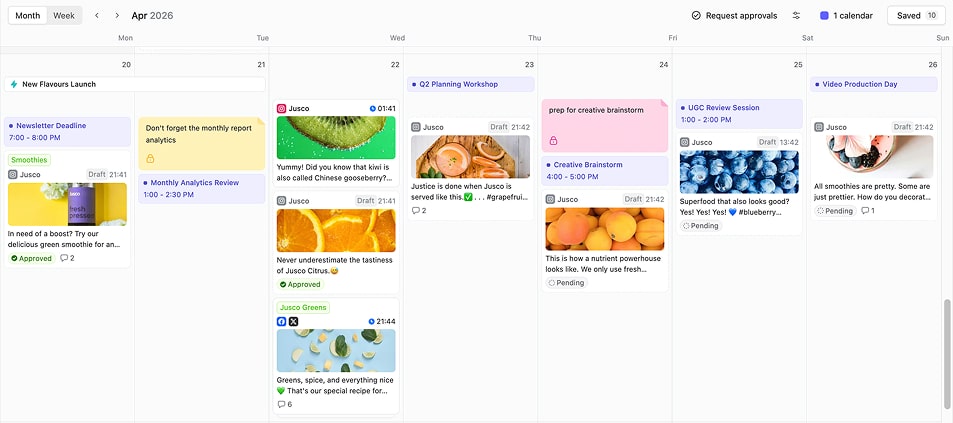
Approval workflows built for agencies with multiple clients. Planable offers four approval modes: none (publish freely), optional (approval available but not required), required (at least one approver must sign off before anything goes live), and multi-level (sequential approvals across multiple stakeholders; for example, an account manager, then a client, then a legal team).
Multi-level approval is rare in social media management tools. It’s designed for agencies where different clients have different approval requirements, or where content passes through more than one internal reviewer before reaching a client. Each Planable workspace has its own approval setting, so a low-touch client and a compliance-heavy client can coexist without either workflow being compromised.
Sprout Social offers approval workflows, but they’re largely single-step and not built around the multi-client, multi-stakeholder structure that defines agency work.
Internal posts and comments that clients never see. Planable separates team-facing content from client-facing content at the workspace level. Posts can be kept internal (visible only to the team) until they’re ready for client review. Comments work the same way: internal notes stay hidden from clients regardless of when or how often a client logs in.
This solves a specific daily problem for agencies: how to give feedback, flag issues, or debate a caption internally without that working process appearing in front of the client. There are no draft version names, no separate tools for internal communication, and no risk of a client seeing a half-finished post. Everything stays in one place, with a clean version trail.
Real-time collaboration that replaces scattered feedback channels. In Planable, feedback lives on the post itself. Team members and clients can leave threaded comments, annotate visuals, and make direct text suggestions, all attached to the specific piece of content being reviewed. Comments can be marked as resolved, which works like a task being checked off.
The practical outcome is that feedback which used to arrive across three different channels (e.g. email, Slack, a shared document) now arrives in one place, in the right order, on the right post. For agencies managing multiple client rounds at the same time, this is consistently the workflow change that saves the most time per week.
Workspace-based pricing with unlimited users. Planable charges per workspace, one workspace per client or brand, not per seat. Every plan includes unlimited users, meaning adding a client approver, a new team member, or an external stakeholder to a workspace doesn’t increase the monthly cost.
For agencies where multiple people review and approve content on each account, this makes Planable substantially more predictable to budget for than seat-based tools. The cost per client is fixed. The team size on that client is not a pricing variable.
Where Planable falls short
Planable has no social listening. There’s no keyword tracking, mention monitoring across the web, or competitive intelligence. Teams that rely on listening data as part of their social strategy will need a separate tool alongside Planable.
Analytics and Social Inbox are paid add-ons rather than included in the base plan. For agencies running both across several client workspaces, those costs add up and should be factored into any pricing comparison. The base plan also caps posts at 60 per workspace per month on Basic and 150 on Pro, a constraint for clients with high daily publishing volume.
Teams without an external approval cycle (solo creators or single-brand in-house teams with no client review process) will find the approval-first structure adds steps that a simpler scheduling tool would skip.
Who is Planable best for?
Planable is best for agencies managing multiple clients, multi-location brands, and marketing teams that need structured content approval, real-time collaboration with clients, and predictable per-client pricing, without paying more as the team grows.
Planable’s pros
What users are saying about Planable’s pros:
- “Planable solves the problem of endless back-and-forth email chains, especially when social media content needs multiple rounds of approvals and edits. It has also helped us leave Excel spreadsheets behind for managing our monthly content calendars, making the whole process much easier to keep organized.” – Tiffany P. (source)
- “I love that you can leave comments only your internal team can see, or public comments for your clients to see too. I like how Planable gives you the flexibility to choose between internal and public comments.” – Katie P. (source)
- “It’s allowed us to service a lot more clients. Planable has taken so much time and guesswork out of our Social Media content planning and scheduling, and I feel that we are still just scratching the surface.” – Jaden Q. (source)
- “The approval workflows are great. I’ve tried several other schedulers, but I came back to Planable after realizing that no one else’s approval workflow is as good.” – Danielle G. (source)
- “Planable helps me organize and plan our posts across different social platforms in one place. It gives me a clear structure, which makes it much easier to see the overall plan and stay consistent.” – Kira S. (source)
Planable’s cons
Planable’s main trade-offs are that analytics and social inbox features come at an additional cost per workspace, there is no social listening, and post limits on lower plans may not suit high-volume publishing accounts.
What users are saying about Planable’s cons:
- “I wish we didn’t have a cap on our monthly posts but we’re managing.” – Napsa A. (source)
- “The mobile app is quite buggy, especially when I need to copy paste descriptions.” – Elouise K. (source)
- “You can’t add content to the calendar without assigning a publish date, and already published content is mixed in with planned posts. This makes the calendar overview feel cluttered and makes it harder to categorize and organize content clearly.” – Anastasiya D. (source)
- “Company accounts on Twitter don’t have word limits, yet the tool still imposes a limit. That may be an issue on Twitter’s side, but overall the Twitter options here feel restrictive.” – Praespero G. (source)
- “We would love to see the ability to use a bit more AI generated graphics. We find the copywriting section relatively useful, but really, the images or creating the graphics would be very useful to have.” – Elizabeth P. (source)
Planable pricing
- Free trial: 50 posts, no time limit, no credit card required
- Basic: $33/workspace/month — 60 posts, 4 social pages, unlimited users
- Pro: $49/workspace/month — 150 posts, 10 social pages, unlimited users, multi-level approvals
- Enterprise: custom pricing — unlimited posts and pages, dedicated account manager, SSO
4. Agorapulse as a Sprout Social alternative
If you’re looking for a Sprout Social alternative, Agorapulse usually comes up for one very specific reason: teams want fewer things to worry about during the day.
I tested Agorapulse because it’s often recommended to social media managers who like Sprout’s structure but feel worn down by inbox glitches, slow support, or workflows that feel harder than they should. On paper, these social media management platforms offer similar features. In practice, they behave very differently.
Agorapulse doesn’t try to be everything. It’s more laser focused on helping teams publish content, manage replies, and stay on top of conversations across major social networks without losing track of what’s been handled and what hasn’t. That simplicity shows up in day-to-day use.
What stood out most to me is how easy it is to trust. The inbox feels calmer, the unified dashboard makes it clear what needs attention, and team collaboration is straightforward.
Collaboration features like internal notes, assignment, and clear handoffs work well for teams managing multiple client brands, not just one account. For small businesses and agencies juggling many conversations, that reliability matters more than having endless options.
Support and onboarding are another quiet strength. Agorapulse tends to deliver more consistent onboarding support, which helps teams settle in quickly without feeling overwhelmed. It’s one of the reasons many marketers move to it after getting frustrated with Sprout’s high price point, support issues, or unpredictable inbox behavior.
That said, Agorapulse isn’t built for everything. If your work depends on deep or advanced social listening features, consumer intelligence, or highly customized workflows, it can feel limited compared to other Sprout Social competitors.
It’s not the right tool for teams chasing complex automation or deep listening across news sites and keywords.
But if your priority is replying faster, missing fewer messages, keeping social media activities organized, and producing reports that don’t need extra cleanup, Agorapulse is often the right tool.
For marketers focused on clarity, reliability, and a lowercost way to manage social without constant friction, it’s a genuinely good alternative.
Where Agorapulse feels stronger than Sprout Social
The inbox is where Agorapulse immediately feels different. All comments, mentions, reviews, and messages land in one place, and it’s always clear what still needs attention.
When I open the inbox, I’m not guessing which messages are new or whether someone else already replied. I can see when a teammate is handling a message, which prevents duplicate responses and awkward follow-ups.
Replying is also faster. I can reuse common responses, group similar messages, and clear out spam or low-priority comments in batches instead of one by one. I don’t need to jump between platforms or tabs to keep things under control.
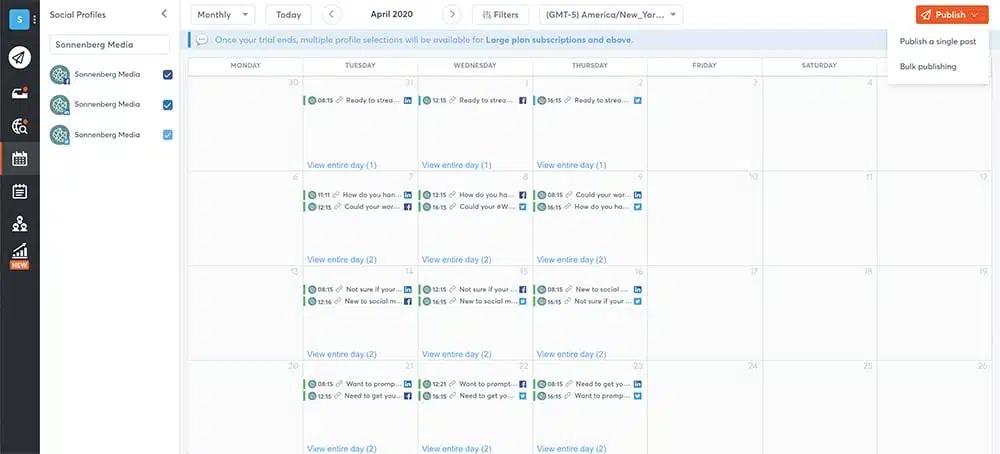
Publishing is equally straightforward. Scheduling posts across platforms doesn’t require much setup, and the content calendar is easy to scan. I can plan content in advance, adjust captions per platform, and see the full picture without hunting for options. Multiple users highlight how quick it is to get started, and I found the same; there’s very little ramp-up time.
Reporting is another area where Agorapulse feels practical. The reports focus on what teams actually need to explain performance: how posts did, how the community responded, and how the workload is distributed. I can export clean, branded reports that don’t need extra formatting before sharing with clients or stakeholders. Agencies consistently call this out as a major win, and I agree.
Support is also a strong point. Users repeatedly praise the fast and helpful responses they get from the support team.
Where Agorapulse feels limited
Agorapulse’s simplicity is also where its limits show.
If you rely heavily on social listening (tracking relevant keywords, trends, and conversations beyond your own profiles), Agorapulse won’t replace Sprout Social. Listening exists as a feature, but it’s not central, and users often mention wanting broader coverage or more flexibility.
Reporting, while clear, has a ceiling. The data is easy to understand, but if you need deep segmentation, complex comparisons, or highly customized reports, you’ll hit limitations unless you move to higher plans. Several users point this out, especially those working in data-heavy environments.
The approval process works well for straightforward setups, but when you start layering more complex workflows, it can feel rigid. Users managing large volumes of content across multiple teams mention this, and I ran into similar constraints.
There are also a few practical gaps that come up repeatedly in reviews: limited Pinterest reporting, fewer automation options than some competitors, and an occasional need to switch back to native platforms for specific publishing actions.
Who is Agorapulse best for?
Agorapulse is best for small to mid-sized teams and agencies that want a reliable, easy-to-use tool for publishing content, managing high volumes of comments and messages, and producing clean, client-ready reports without complex workflows or heavy analytics.
Agorapulse’s pros
I agree with what most users have said. Agorapulse’s biggest strengths are its calm and reliable inbox, easy scheduling, clear and client-ready reporting, and fast, helpful support that make day-to-day social media management easier and more predictable.
What users are saying about Agorapulse’s pros:
- “Agorapulse has very good customer service, and it’s an intuitive tool to use. The built-in UTM builder and link in bio make things much easier for us and our clients.” – Verified User, Marketing and Advertising (source)
- “Agorapulse makes it incredibly easy to manage multiple social media accounts in one place. The interface is clean, scheduling is intuitive, and the inbox consolidates all replies and DMs into a single dashboard. The reporting is also strong and client-ready.” – Naiquan S. (source)
- “The reporting features are a game-changer. I can customize weekly and monthly reports, consolidate metrics across platforms, and present clear data to leadership. Scheduling in advance has also transformed how I work.” – Tim B. (source)
- “I love being able to monitor and respond to multiple platforms in one place. Grouping profiles and using the queue makes everything much easier to manage.” – Lindsey C. (source)
- “I especially love the reporting. It’s great for clients and makes it look like I’ve done a huge amount of work, when Agorapulse is really doing it for me.” – Nikki C. (source)
Agorapulse’s cons
Agorapulse’s main drawbacks are limited social listening and automation, caps on advanced report customization, rigid workflows for larger teams, and a few platform gaps that still require switching back to native tools.
What users are saying about Agorapulse’s cons:
- “There’s still room to improve how incoming messages are handled, especially with more advanced AI support. I’d also like better content idea suggestions and the ability to duplicate response templates across profiles.” – Jean-Baptiste C. (source)
- “Some things could be easier to customize, like labels. I also wish there were integrations that allow links in Facebook and Instagram Stories, Pinterest reporting, batch labeling, and keyword listening in more places.” – Lindsey C. (source)
- “Although the reports are clear and easy to use, advanced metrics and deeper customization for comparative or segmented reports are more limited than in analytics-focused platforms.” – Bianka B. (source)
- “The platform can feel rigid for custom workflows, especially with high content volume. Approvals can feel clunky, there are occasional lags when switching workspaces, and I’d like more automation flexibility.” – Naiquan S. (source)
- “A bit expensive for what it does in a market with many alternatives, though solid overall.” – Justin D. (source)
- “We don’t use many of the AI creation features, and the one that would help us most — social listening — comes with an additional cost.” – Beth R. (source)
- “While I’m very satisfied overall, I wish advanced report customization were available on mid-tier plans. Right now, the most detailed reports are locked behind the highest plans.” – Verified User, Banking (source)
Agorapulse pricing
- Offers a 30-day free trial
- Paid plans start at $99
5. NapoleonCat as a Sprout Social alternative
NapoleonCat is built first and foremost for moderation. It still supports publishing, reporting, and collaboration, but the product clearly prioritizes helping teams handle large amounts of incoming interactions without treating every message as a manual task.
This is where it differs from Sprout Social. Sprout tries to balance content planning, analytics, listening, and engagement. NapoleonCat centers on moderation and customer care, then layers everything else around that goal.
If you’re leaving Sprout Social because moderation feels repetitive, ad comments pile up, or your team spends too much time answering the same questions, NapoleonCat is a strong alternative. If your work relies more on deep analytics, social listening, or detailed content planning, Sprout Social will likely remain the better fit.
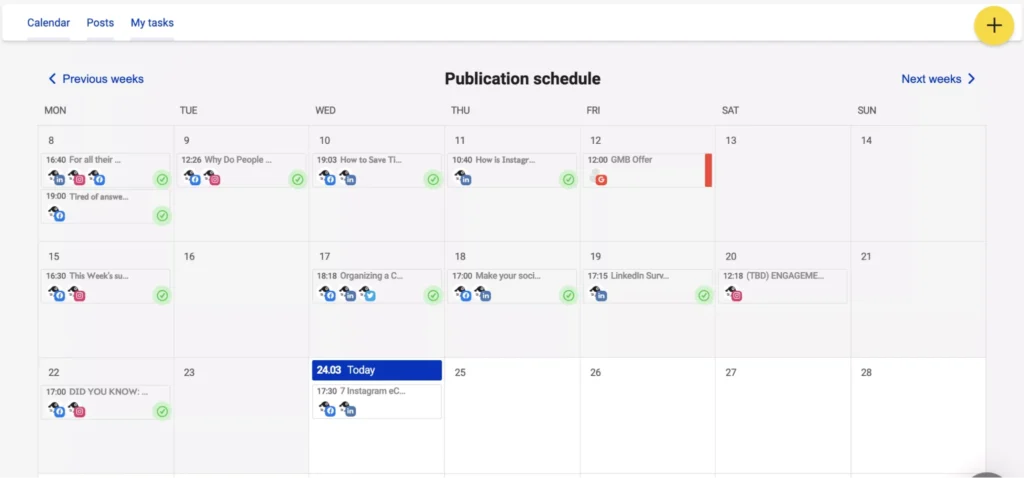
Where NapoleonCat feels stronger than Sprout Social
The biggest difference for me was how much work NapoleonCat takes off the team’s plate before anyone has to reply.
Instead of just organizing comments so I can process them faster, NapoleonCat lets me decide in advance how common situations should be handled. Repetitive questions can be answered automatically. Spam comments are hidden or deleted as soon as they appear. Harmful comments never become visible at all.
Moreover, I can reply, archive, delete, or assign a message and move on immediately.
Team collaboration works well in practice. I can see what others are handling, leave internal notes, and pass conversations along without confusion. New team members are easy to onboard, which multiple users mention as a real advantage.
Reporting is also a plus. I can see response times, moderation volume, and team activity clearly. These reports are useful for client updates and internal reviews, even if they are not designed for deep performance analysis.
The prices are more convenient. Plans are structured around usage and profile limits rather than pushing core moderation features into expensive tiers.
Where NapoleonCat feels limited
Analytics are a trade-off. NapoleonCat’s reports focus on moderation and engagement efficiency. They do not offer the same depth, segmentation, or customization that Sprout provides. Users who need advanced reporting often call this out as a limitation.
The interface is functional but shows its age in places. Some actions take more clicks than expected, and occasional delays or unclear error messages come up in reviews. These issues are not deal-breakers, but they do add friction over time.
Customization is also limited. Workflows and reports cannot be deeply tailored to unique internal processes, which can be restrictive for larger teams.
Who is NapoleonCat best for?
NapoleonCat is best for teams and agencies managing high volumes of comments and messages.
NapoleonCat’s pros
NapoleonCat’s biggest strength is how much manual work it removes, with automated moderation, a single clear inbox, and simple team workflows that make handling large volumes of comments and messages faster and far less stressful.
What users are saying about NapoleonCat’s pros:
- “Everything is organized in one place. I can move between platforms, review comments and messages, reply, archive, delete, or report users without switching accounts. It probably cuts my moderation time by at least 50 percent.” – Brian L. (source)
- “The automatic moderation is incredible, especially with AI that catches things humans might miss. It keeps improving and saves a huge amount of time.” – Kamil P. (source)
- “The social inbox saves a huge amount of time. I can manage comments, messages, and reviews from Facebook, Instagram, TikTok, Google, and more in one place. Reports are clean, detailed, and easy to customize for clients.” – Agnieszka K. (source)
- “Comment moderation is easy even when handling multiple clients. AI sentiment tagging helps with reporting, setup was simple, and support is always high quality.” – Asia R. (source)
- “NapoleonCat is intuitive and easy to use, even for beginners. Tagging content makes it easy to find specific topics, and customer support is always willing to help.” – Paulina K. (source)
NapoleonCat’s cons
NapoleonCat’s downsides are that publishing and analytics feel fairly basic, the interface can be slow or a bit dated, reports aren’t very flexible, and workflows can start to feel restrictive as teams grow or needs become more complex.
What users are saying about NapoleonCat’s cons:
- “I cannot easily see the number of comments by sentiment. I can filter them, but the count is not visible, and sentiment charts mix inbox messages with public comments.” – Raquel B. (source)
- “The interface works, but it could feel more modern and intuitive. Some parts feel outdated, and it takes time to get used to the layout, especially for new users.” – Agnieszka K. (source)
- “The platform is not very fast at times. Some actions take a while to load or update.” – Patryk (source)
- “For a large business, it would be helpful to add more team members without increasing the cost. This is a limitation only when scaling teams.” – Trista D. (source)
- “There is no real way to customize reports or visualizations, or generate them in more editable formats.” – Verified User, Marketing and Advertising (source)
NapoleonCat pricing
- Offers a 14-day free trial
- Paid plans start at $89 per month
6. HubSpot as a Sprout Social alternative
HubSpot is a Sprout Social alternative for a different reason than tools like Agorapulse or NapoleonCat. I looked at it because some teams aren’t just managing social media. They’re trying to connect social activity to leads, deals, and revenue.
Both platforms cover the basics: scheduling, engagement, and reporting. The real difference shows up after a post goes live. Sprout Social focuses on running social media well day to day. HubSpot treats social as one part of a much larger marketing and sales system.
If you’re leaving Sprout because you need to tie social posts directly to leads and revenue, HubSpot does something Sprout can’t. Social becomes part of the customer journey instead of a standalone channel.
If your priority is fast publishing, responsive engagement, and a focused social workflow, Sprout still feels easier and more dependable. It takes less setup and less ongoing effort.
HubSpot isn’t a better version of Sprout Social. It’s a more comprehensive marketing tool.
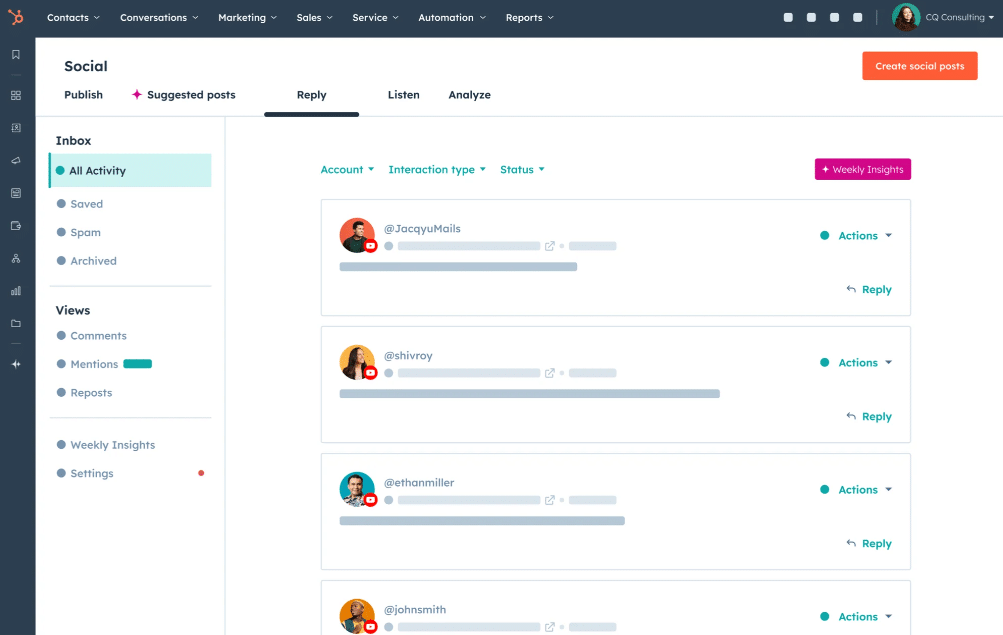
Where HubSpot feels stronger than Sprout Social
The biggest advantage HubSpot has over Sprout Social is context.
When I publish or engage on social through HubSpot, those actions are not isolated. Likes, comments, and clicks tie directly to contacts in the CRM. I can see whether a post drove visits, whether those visits became leads, and whether those leads eventually turned into customers.
Automation is another major difference. In HubSpot, social media is just one input into larger workflows. I can trigger follow-up emails, update contact properties, or move leads through campaigns based on social interactions. Several users mention that this is where HubSpot saves them the most time, because manual handoffs disappear once workflows are in place.
Now let’s talk about reporting. HubSpot does not just show engagement metrics. It shows how social contributes to sessions, leads, and revenue.
Collaboration between marketing and sales is another strength. Because social lives inside the same platform as email, landing pages, and CRM data, teams are not working in silos. Reviews consistently mention better alignment between marketing and sales, and that has been my experience as well.
Where HubSpot feels limited
HubSpot’s social media tools are not its primary product, and that shows.
Publishing works, but it is not as smooth or reliable as a dedicated social media platform. Multiple users mention scheduled posts failing, accounts needing to be reconnected, or posts requiring manual fixes. I have run into similar issues, and that can be frustrating if you rely on social scheduling to free up time.
Engagement is another trade-off. While HubSpot offers a social inbox, it does not feel as fast or as focused as Sprout Social’s. Tagging people on LinkedIn or setting up certain Instagram collaboration posts still requires jumping into native platforms, which breaks workflow.
There is also a learning curve. HubSpot is powerful, but automation and reporting take time to master, and several users mention that the interface can feel cluttered once workflows scale. This is manageable, but it is not lightweight.
Pricing is a major consideration. As your contact database grows or you need more advanced features, costs increase quickly. Many of the most valuable tools are locked behind higher tiers. This is a recurring complaint in reviews and something teams need to plan for early.
Who is HubSpot best for?
HubSpot is best for marketing and revenue teams that need social media tightly connected to CRM data, automation, and sales pipelines rather than managed as a standalone channel.
HubSpot’s pros
HubSpot Marketing Hub’s biggest strength is that it manages email, social media, ads, landing pages, and customer tracking in one place, making it easier to run campaigns and see what’s working.
What users are saying about HubSpot’s pros:
- “I find HubSpot Marketing Hub incredibly useful, particularly for social media scheduling, analysis, and email marketing.” – Paula M. (source)
- “The UI is intuitive despite the platform’s depth, and the learning resources, documentation, and onboarding are excellent. Automation workflows and lead scoring help streamline marketing operations, while native CRM integration ensures strong alignment between marketing and sales teams.” – Sumeet S. (source)
- “What I appreciate most about HubSpot Marketing Hub is the seamless integration of its features including email, social, ads, automation, and reporting, all conveniently located in one platform. This setup saves me a significant amount of time.” – Nabin P. (source)
- “Their analytics and reporting tools are very well set up, offering comprehensive dashboards to track campaign performance and ROIs.” – Arbaz K. (source)
- “I like how HubSpot Marketing Hub lets you combine intelligent data with intent signals and gives you the ability to take action. I also appreciate how it integrates with the other tools we use, like Webflow, Salesforce, and Slack.” – Candace L. (source)
- “What I like best about HubSpot Marketing Hub is how easy it is to manage and automate marketing campaigns in one place. The integration with the CRM, the reporting tools, and the ability to track the entire customer journey make it much easier to measure performance and optimize results.” – Rafael B. (source)
HubSpot’s cons
HubSpot’s main drawbacks are that key features are locked behind higher-priced plans, and the platform takes time to learn as campaigns and reports become more complex.
What users are saying about HubSpot’s cons:
- “I dislike that when scheduling social posts in HubSpot Marketing Hub, accounts often expire and need to be reconnected. Tagging people and pages on LinkedIn and setting up collaboration posts on Instagram also requires switching back to native platforms, which breaks the workflow.” – Rochelle T. (source)
- “The consistency of the social scheduler could be improved. I often have to reschedule or repost because things did not publish correctly, which defeats the purpose of planning ahead.” – Olivia O. (source)
- “Some advanced features are only available on higher tier plans, which makes the platform expensive as your needs grow. There is also a learning curve at the beginning, especially with automation and reporting.” – Thabata M. (source)
- “Pricing and feature gating are frustrating. As your database grows or you want more advanced automation, reporting, or attribution, costs increase quickly.” – Himanshu V. (source)
- “As workflows become more complex, the UI can feel cluttered, making it harder to get a clear overview of all active automations.” – Frederick S. (source)
- “The learning curve was the main issue for me. Advanced automation and reporting tools take a lot of time to master, especially for teams new to marketing automation.” – Arbaz K. (source)
HubSpot pricing
- Offers a free plan
- Paid plans start at €20/mo/seat
Choose the best Sprout Social alternative for YOU
Choosing a Sprout Social alternative comes down to what makes your day-to-day work easier. Some tools are built for large teams and complex needs. Others focus on keeping things simple and manageable.
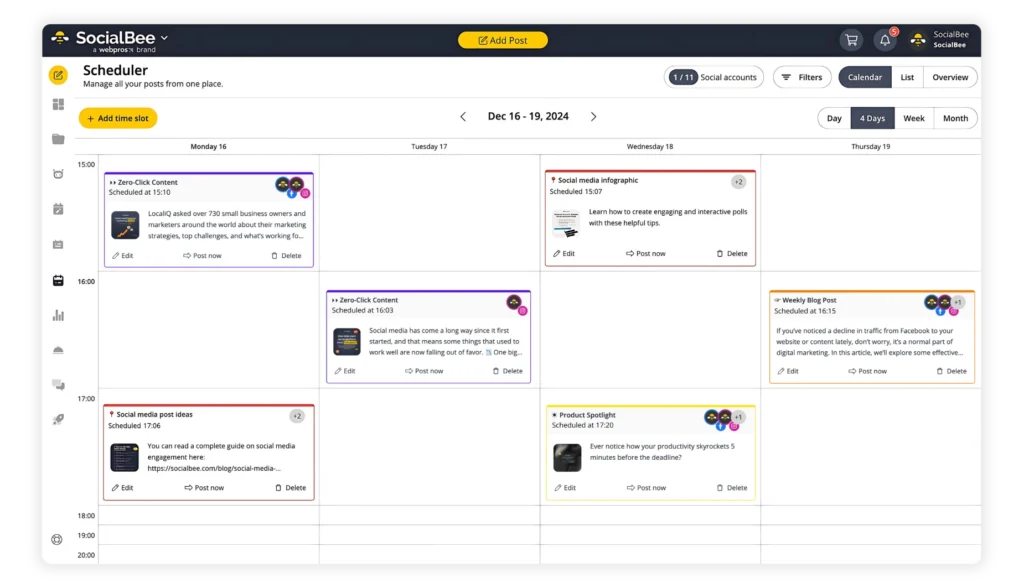
If you want to plan content faster, stay organized, reply to messages, and see what’s working without extra steps, SocialBee might be the best fit. Try SocialBee’s 14-day free trial and see if it works better for how you streamline social media management.