

Are you looking for AI tools for social media content creation? They are everywhere right now, but using them well is a different story. I wanted to see which ones actually help with creating social media posts day to day, and which ones look good in demos but slow you down once you start managing multiple social platforms for real.
So I tested seven AI tools that promise to support social media content creation, from AI writing tools to image generation, video editing tools, and AI assistants built for marketing teams.
I paid close attention to how they handle content generation, brand voice, repetitive tasks, and the parts of social media management that usually eat up the most time, especially when you are working across major social media platforms and multiple channels.
Every tool included here was reviewed based on hands-on testing, product research, and feedback from both experienced marketers and everyday users.

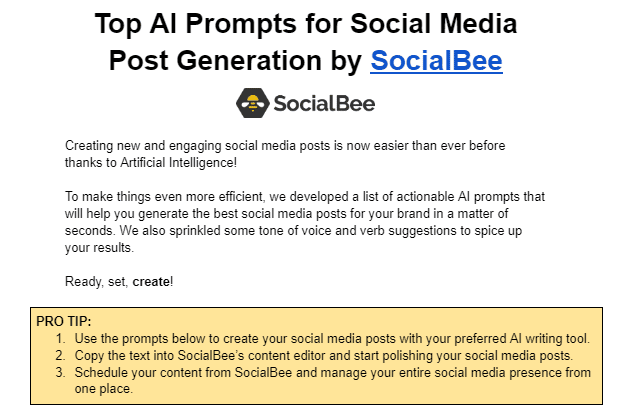
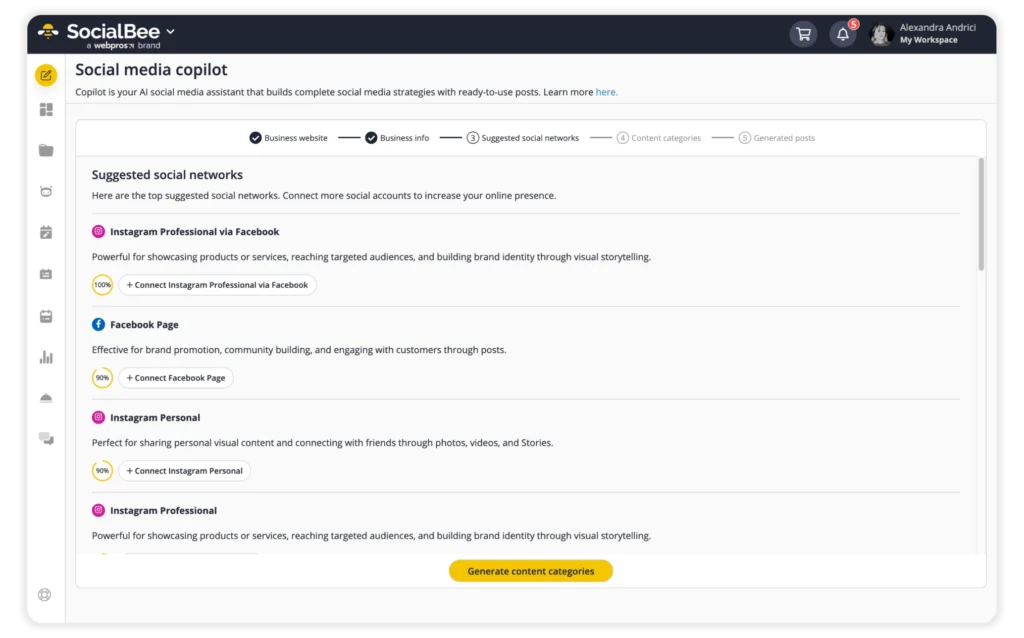
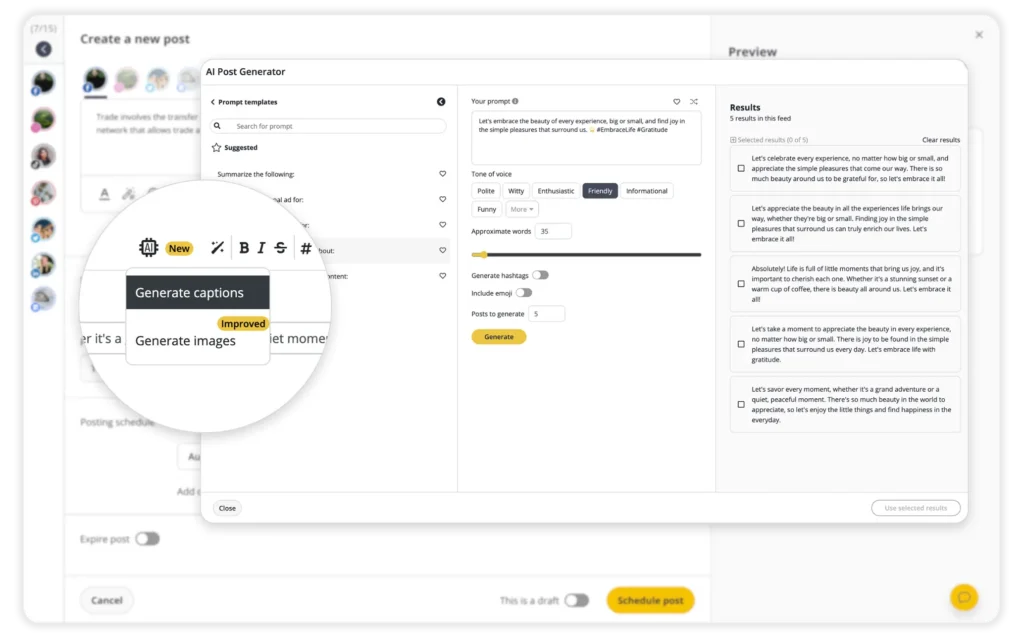
When posting across multiple platforms, the “Customize each caption” option uses AI to tailor the same idea to each channel, so posts feel native in just a few clicks without rewriting everything from scratch.
Here are SocialBee’s key features:
- Plan, schedule, publish, and manage content across major social media platforms, including Facebook, Instagram, LinkedIn, X (Twitter), Pinterest, TikTok, YouTube, Threads, Bluesky, and Google Business Profile from one dashboard
- Use AI-powered tools to generate captions, hashtags, and visual assets as a starting point
- Customize posts for each platform manually or with AI-assisted adjustments
- Create and schedule multiple versions of a single post for different social channels
- Edit post details such as captions, image sizes, hashtags, profile tags, first comments, locations, and posting options
- Create, save, and reuse hashtag collections across campaigns
- Edit visuals, add alt text for accessibility, and select custom video thumbnails
- Tag accounts and add location tags to improve post visibility
- Get best posting time recommendations based on previous performance
- Reuse evergreen content while setting expiration dates for time-sensitive posts
- Set custom posting schedules for each social media profile
- Schedule and update large batches of posts at once
- Save unfinished posts as drafts and return to them later
- Import media through built-in integrations with Canva, Unsplash, and GIPHY
- Collaborate with teammates using comments, approvals, and review workflows
- Manage multiple brands or clients in separate workspaces
- Track performance with detailed analytics and export PDF reports
- Reply to comments, mentions, and direct messages from one social inbox
- Automatically pull blog posts with pre-filled captions, images, and links
- Shorten and track links using integrations with more than ten URL shortener services
What I like about SocialBee
What stands out to me is SocialBee’s AI-based scheduling, its structured way of organizing content, and how easy it is to manage multiple social media accounts or brands from one place. In user reviews, Copilot’s AI tools, content categories, bulk scheduling, and responsive customer support come up again and again.
What users are saying about SocialBee’s pros:
- “I work with several different companies, which means I manage a large number of social profiles and SocialBee has made this so much easier. The platform is extremely organized, allowing me to categorize everything clearly and keep a complete overview without feeling overwhelmed. I also really appreciate the content approval flow. Even though I’m mostly working solo, it’s great to have a structured system where drafts, approvals, and final versions are clearly separated. It helps keep everything organized when handling multiple companies.” – Elissa V., Content Marketeer (Source)
- “AI-Powered Copilot: Generates on-brand captions, hashtags, and optimal post times—boosted my engagement by 30%.” – Dave K., Owner (Source)
- “Social Bee is a great all-in-one solution for social media management, especially for startups and agencies. I love that it offers competitive pricing while providing all the essential tools: analytics, automatic posting, AI features, and more. It streamlines the entire process of managing social media accounts, saving time and effort. The comprehensive nature of the platform, combined with its affordability, makes it a standout choice for efficiently handling social media presence.” – Tye T., CEO & Founder (Source)
- “Comprehensive social media management platform with all features including AI content generation, details analytics, and social inbox. SocialBee belongs to the top contenders in the market segment with and covers all relevant functionalities. Integration is easy. Implementation with relevant platforms straight forward. Customer support is fast and responsive. The scheduling function makes it possible to use the application as daily driver.” – Uli K., Director, Online Media (Source)
- “(in answer to what do you like most about SocialBee) Automatization of scheduling, AI features.” – Marina P., Owner / Interior Design Consultant (Source)
What I dislike about SocialBee
The platform has a lot of depth, so I as well as other users find that it can have a learning curve before you get the hang of it.
What users are saying about SocialBee’s cons:
- “None except the odd glitch, which they help with right away.” – Carey K., Co-founder (Source)
- “There is a learning curve, and because the platform is so powerful, it might seem more difficult than it is… but SocialBee support is pretty amazing.” – John C., Social Media Manager (Source)
SocialBee pricing
- Offers a 14-day free trial
- Paid plans start at $29
2. HubSpot AI Content Writer – Best AI tool for on-brand social media copy and campaigns
Who is HubSpot AI Content Writer best for?
HubSpot’s AI Content Writer is best suited for marketing teams and growing businesses that already rely on HubSpot and want to produce more written content without adding new tools or headcount.
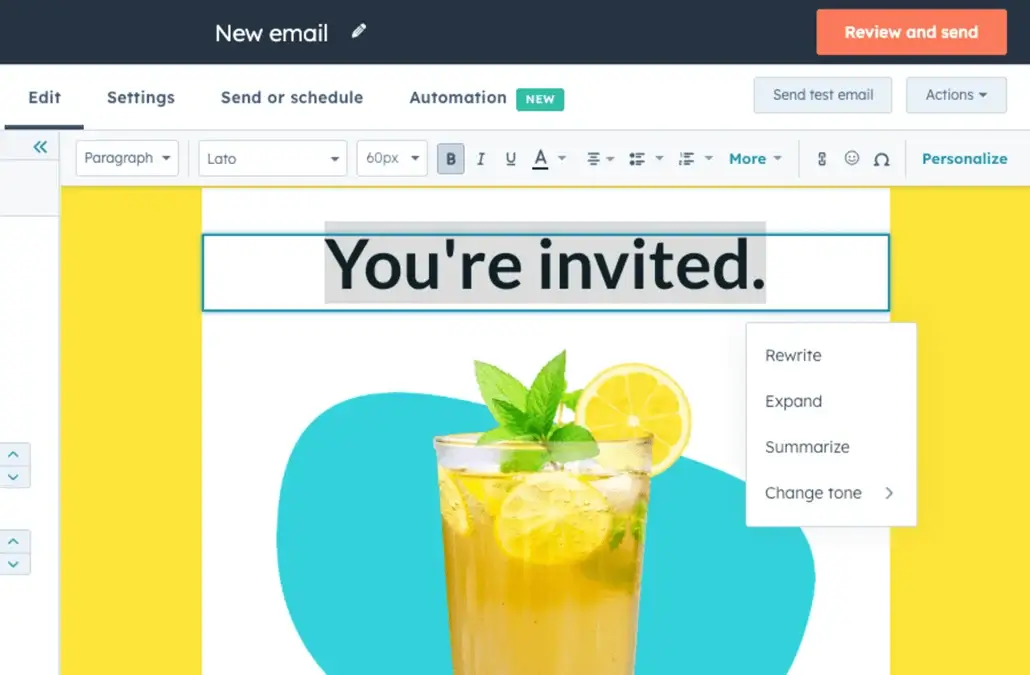
HubSpot AI Content Writer feature overview
HubSpot’s AI Content Writer works as a built-in writing assistant inside the HubSpot platform. You start by entering a prompt or topic, and the tool generates draft copy you can edit directly in the same user interface where you manage emails, social posts, blog content, or landing pages.
I tried it out mainly for outlines, first drafts, and quick rewrites rather than finished copy. Because it’s embedded across HubSpot’s marketing and content tools, anything you generate can immediately be used in campaigns, connected to CRM data, and tracked after publishing.
Here are HubSpot AI Content Writer’s key features:
- Generate written content with HubSpot’s free AI Content Writer, including social posts, blog posts, website copy, landing pages, and marketing emails, using prompt-based AI directly inside HubSpot’s marketing, sales, and content tools
- Repurpose, refine, and scale content across multiple social media channels without adding resources, helping teams adapt the same ideas for different formats and platforms
- Create and edit content in one place, reducing tool switching by combining AI content generation with publishing, tracking, and lead capture inside HubSpot’s platform and CRM
- Use AI-assisted writing to overcome writer’s block by generating outlines, first drafts, subject lines, and copy for social posts, emails, blogs, and landing pages
- Support end-to-end marketing workflows by connecting AI-generated content to campaign execution, lead tracking, and marketing-to-sales handoff through HubSpot’s Smart CRM
What I like about HubSpot AI Content Writer
What I like most about HubSpot is how its AI shows up across the platform, not just in one feature. The AI Content Writer handles drafting and repurposing copy for social posts, emails, blogs, and landing pages, while other AI tools support things like segmentation and performance analysis. Many reviews point out that having all of that in one system cuts down on manual work and makes reporting much easier.
What users are saying about HubSpot’s pros:
- “This is the best tool for keeping CRM, email, social media, ads, and landing pages all in one place. We don’t have to duct-tape different tools together, which keeps the data cleaner and makes reporting more accurate. HubSpot is also genuinely pleasant to work with thanks to its great user experience. Marketing teams can usually get up and running quickly without a lot of friction.” – Sourav D., Software Engineer (Source)
- “I find HubSpot Marketing Hub helps with connecting with customers and managing customer data effectively. I appreciate how it helps to analyze performance with ease. I like the easy-to-use system, and I find the AI tools beneficial. The platform stands out for its ease of use and tutorials that are easy to access.” – Elly R. (Source)
- “I like that it is giving me an experience of having all the functions in a single place. The AI function is easy to use. It helps me segment my customers and also the social media marketing part is useful.” – flossy f., Marketing (Source)
- “I find HubSpot Marketing Hub to be intuitive and user-friendly, which makes it very easy to use. I like that it’s constantly updated with new features and more functionality. I appreciate the AI agents and feedback tools that provide me with valuable insights about our customers, helping us make the right decisions.” – Emma T. (Source)
- “I appreciate how HubSpot Marketing Hub makes my marketing efforts more efficient. I really like having everything on one platform. I also enjoy being able to create a lot of content from one piece with the help of AI. The initial setup was quite easy.” – Sergeja P., Growth (Source)
What I dislike about HubSpot AI Content Writer
While the content writer tool itself is free, it’s most useful when used within HubSpot’s extended ecosystem and alongside some of its other Marketing Hub tools. Users have an issue with how fast the pricing climbs once you need to scale with the platform for your social media marketing efforts, and I agree.
What users are saying about HubSpot’s cons:
- “Pricing is based on the number of contacts we want to market to. If that list grows quickly, the bill can skyrocket, creating a kind of success tax where doing your job well ends up making the software more expensive.” – Sourav D., Software Engineer (Source)
- “The Pricing could be better—otherwise it is good.” – flossy f., Marketing (Source)
- “The price is really high. It would be better if it was a bit cheaper.” – Sergeja P., Growth (Source)
HubSpot AI Content Writer pricing
- The HubSpot AI Content Writer feature is free
- Paid plans for HubSpot Marketing Hub start at €15/mo/seat
3. Narrato AI Content Genie – Best AI tool for automated social media content ideas and drafts
Who is Narrato AI Content Genie best for?
Narrato AI Content Genie is best suited for small teams, marketers, and agencies that need a consistent stream of social media and blog content without spending hours on planning and ideation.
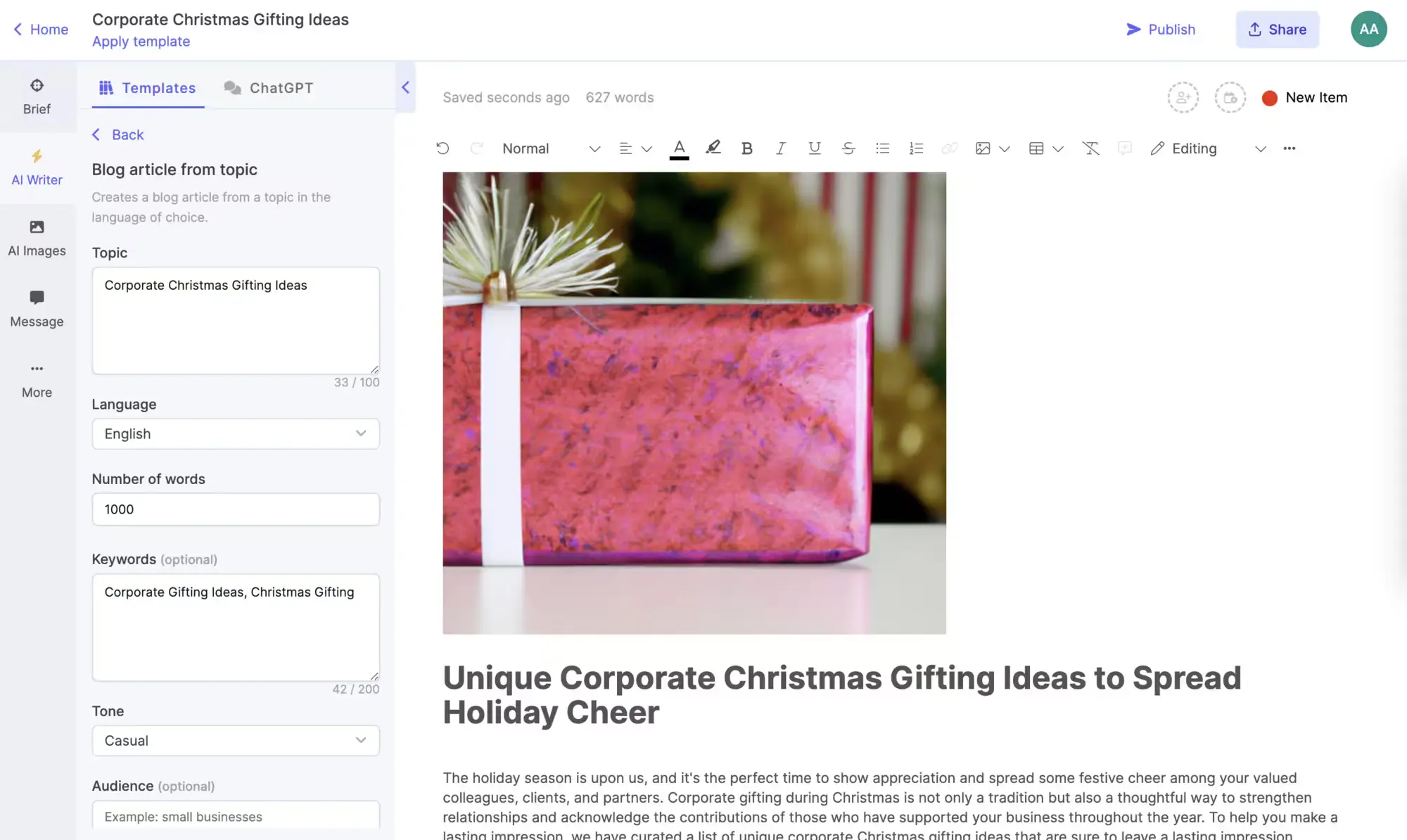
Narrato AI Content Genie feature overview
Narrato AI Content Genie is the tool I reach for when I want content to keep moving without constantly planning every post myself. It generates social and blog content on autopilot based on your site or themes, then gives you drafts you can edit before publishing.
I like that it doesn’t lock you into fully AI-generated content. You stay in control, but the busywork is handled. It works best for keeping a consistent cadence across channels. For more nuanced topics, I still step in, but for everyday content, it saves real time.
Here are Narrato AI Content Genie’s key features:
- Generate engaging social media posts and blog content on autopilot, with fresh, ready-to-publish content delivered weekly or created on demand
- Run multiple AI Content Genie projects at the same time to support different websites, brands, or content themes
- Automatically repurpose website and blog content into platform-ready social media posts for LinkedIn, Facebook, Instagram, X, and YouTube
- Create channel-optimized social posts using built-in AI generators and 15+ customizable templates for formats like memes, holiday posts, X threads, and video scripts
- Generate SEO-focused blog posts from keywords or topics, control content length, and turn weekly ideas into full blog drafts within seconds
- Add visuals to posts with AI image generation, free stock image suggestions for creating visuals, GIFs, text overlays, or uploaded custom assets
- Publish and schedule social media posts and blog content directly from Narrato using a built-in calendar and full scheduling support
- Publish blogs to WordPress via native integrations or set up custom publishing workflows through Zapier or API
- Create, edit, and customize content with or without AI, while collaborating with teammates through shared projects and co-creation workflows
What I like about Narrato AI Content Genie
After using AI Content Genie and reading user feedback, a few patterns are clear. Content Genie feels reliable and easy to work with, especially for a day-to-day blog and social media content strategy. Users often point out how well the autopilot content generation fits into their social media workflow and how features like summarization and repurposing reduce manual effort.
What users are saying about Narrato’s pros:
- “This is the only social media content scheduler that hasn’t given me any trouble. I love being able to create and schedule my posts on my favorite channels, knowing that they will actually get posted when I want them to… I especially loved their AI Content Genie, which is capable of generating social media content on autopilot.” – Maxim K., Small-Business (Source)
- “The SEO feature is fantastic, and the article generator is incredibly helpful for coming up with new ideas when writer’s block strikes. It’s intuitive and very user-friendly, even for someone new to AI.” – Janice G., Customer Service Specialist (Source)
- “Narrato is capable of creating on-brand content that can be easily adapted for various use cases. When compared to other general-purpose AI content creation tools, this makes a big difference for marketing work.” – Jerra G., Administrator (Source)
- “The AI writing suggestions save me hours of work, and I can easily change the tone to fit my audience… formal, casual, witty, sarcastic, or anything else.” – Olivia P., Freelance Writer (Source)
- “The AI summarizer helps me a lot with generating bite-sized summaries for any content in just a few minutes. It extracts the most crucial information and gives a short, succinct version with key takeaways.” – Gouri S., Mid-Market (Source)
What I dislike about Narrato AI Content Genie
I agree with other users that AI-generated content still needs human creativity and editing, especially for more complex topics.
What users are saying about Narrato’s cons:
- “The AI-generated content usually needs some adjustments, especially for complex topics. But that’s the same for all AI tools. The human input is necessary.” – Olivia P., Freelance Writer (Source)
Narrato AI Content Genie pricing
- Offers a 7-day free trial
- Paid plans start at $48/month
4. Canva’s Magic Write – Best AI-assisted writing tool for visual-first social media content
Who is Canva’s Magic Write best for?
Based on the features and user feedback, Canva Magic Write is best suited for marketers, small business owners, and creators who already use Canva and want help getting from a blank page to a usable draft faster.
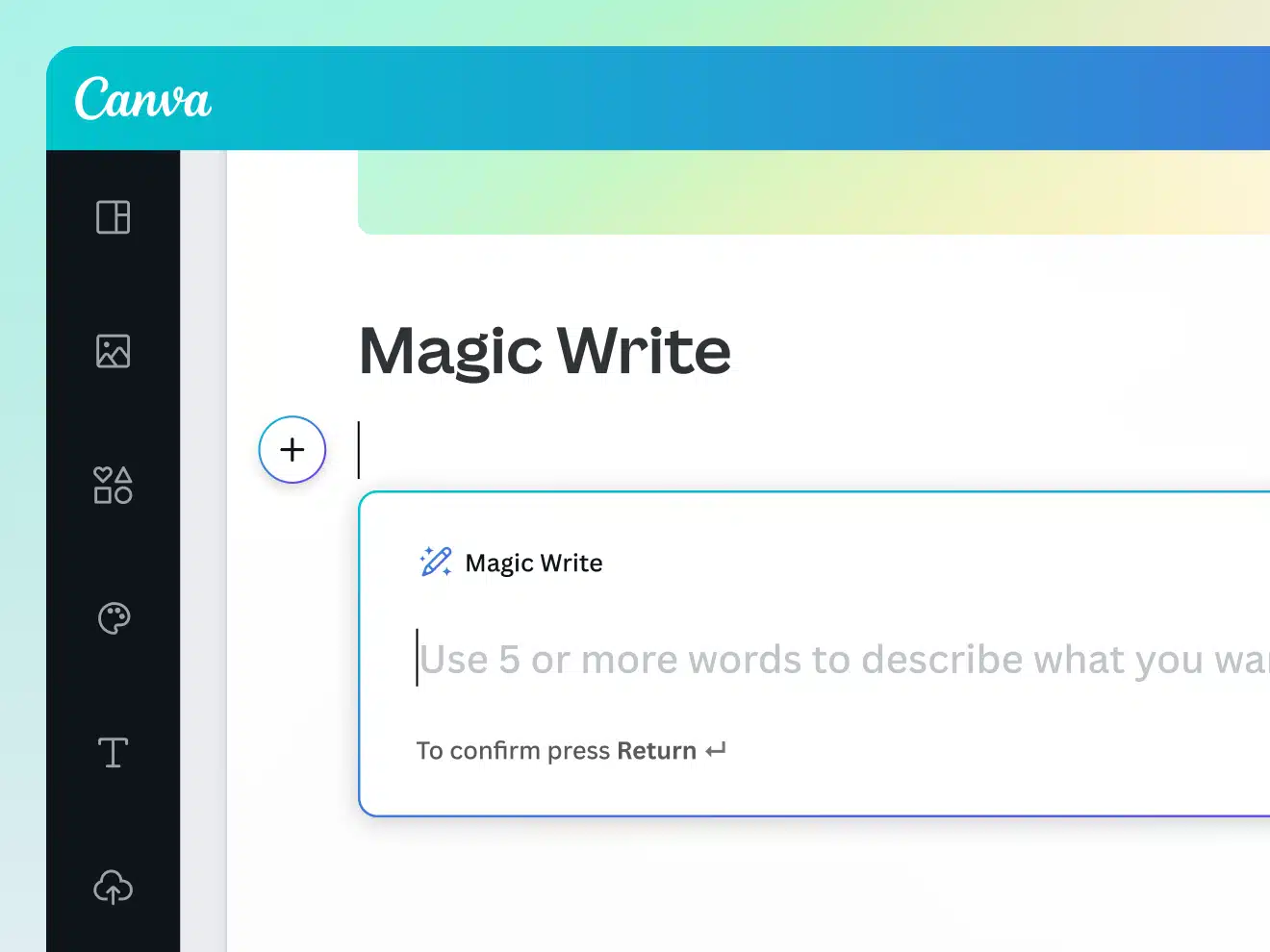
Canva’s Magic Write feature overview
Magic Write works directly inside Canva designs and Docs. You start by opening a new or existing file, then launch the Canva Assistant from the bottom corner or by typing “/”. From there, you describe what you want to write, whether that’s social media captions, a blog outline, or a short block of marketing copy. The tool generates a draft instantly inside your design.
From my experience, the output improves when prompts are specific. Once the text appears, you edit, refine, and format it like any other Canva content before publishing or sharing.
Here are Canva’s Magic Write key features:
- Generate first drafts quickly from simple prompts, including social media captions, profile bios, blog outlines, content ideas, lists, and short or long-form text
- Brainstorm and unblock ideas with AI support for topics, outlines, headlines, taglines, and creative directions
- Write, expand, rewrite, paraphrase, and summarize text directly inside Canva Docs, with tools for paragraphs, lists, and structured content
- Create both short-form content (captions, product descriptions, bios) and long-form content (blogs, emails, stories, articles) in one workflow
- Refine and revise copy in place, making it easy to tweak tone, expand sections, or clean up drafts before publishing
- Work visually by combining AI-generated text with Canva’s design tools, layouts, unique AI-generated image, and design blocks
- Collaborate in real time with team members, including comments, edits, and notifications inside shared Canva Docs
- Access Magic Write across devices (desktop, tablet, mobile) and across all Canva designs
- Use built-in safety and content safeguards designed to reduce harmful or inappropriate AI-generated content
- Get limited access for free (25 queries), with additional usage available through Canva Pro
What I like about Canva’s Magic Write
From what I’ve seen in user reviews, Magic Write is mainly valued as a way to get unstuck and move faster at the drafting stage. I agree with that takeaway. It shows up most often as a practical tool for writing social media captions, bios, and marketing copy when starting from a blank page feels slow. Users also like that Magic Write lives inside Canva, so writing and design stay connected instead of being split across tools.
What users are saying about Magic Write’s pros:
- “Magic Write generates copy tailored to specific audiences and brand voices, which I find particularly useful when I’m experiencing writer’s block or need variations of marketing messages for A/B testing.” – Luca P., CTO & Growth Marketer (Source)
- “The best part is its drag-and-drop interface, ready-made templates, and AI-powered design tools like Magic Write. It’s perfect for quickly creating social media graphics and marketing materials.” – Sumeet S., Product Manager (Source)
- “Canva’s AI feature is helpful for Magic Write, creating content without having design or writing skills. It helps give designs a professional look.” – Amit Kumar R., Operations Executive (Source)
- “Canva’s AI-powered features, including Magic Write for text in various formats and tones, make it easy to turn ideas into structured documents and polished content.” – Cindy B., CEO (Source)
- “Concepts can be generated in seconds by Magic Write, which helps me create professional-looking content without needing advanced skills.” – Vasudha P., Data Entry Executive (Source)
What I dislike about Canva’s Magic Write
What I dislike most about Magic Write focuses on its limits rather than outright problems. I see the same pattern in reviews. It works well for first drafts, but it still needs human editing, and some AI features are only available on paid plans. A few users also mention that AI-generated assets connected to Magic Studio can feel inconsistent when higher-quality output is needed.
What users are saying about Magic Write’s cons:
- “Some advanced features are restricted to the Pro plan, so I can’t use everything unless I pay for it.” – Vasudha P., Data Entry Executive (Source)
- “The AI-generated images and videos are provided in low resolution by default, which interrupts the workflow when higher quality is needed.” – Luca P., CTO & Growth Marketer (Source)
- “Some advanced customization options are limited compared to professional tools, and premium features are locked behind the Pro plan.” – Sumeet S., Product Manager (Source)
Canva’s Magic Write pricing
- Offers a free plan
- Paid plans start at $14.99/month
5. Movavi Video Editor – Best AI-assisted video creation tool for social media
Who is Movavi Video Editor best for?
Movavi Video Editor is best for creators and small teams who need to produce videos regularly but don’t know or want to learn how to use professional editing software.
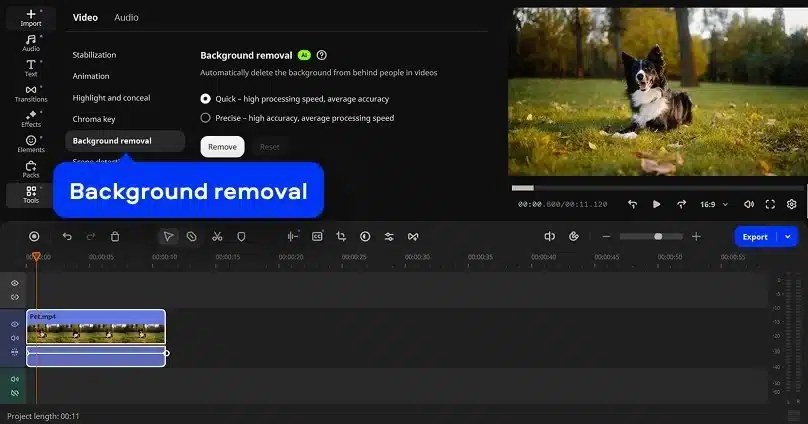
Movavi Video Editor feature overview
Movavi Video Editor is a desktop video editing tool designed for creating social and short-form videos without a steep learning curve. I tend to use it when speed matters more than fine-tuning.
The timeline is easy to work in, and the AI features feel practical, especially automatic subtitles and quick cleanup tools. Adding transitions, text, music, and effects takes minutes rather than hours, which suits everyday video work. Exports are fast, and performance holds up well on standard machines.
Here are Movavi Video Editor’s key features:
- Edit videos quickly with an intuitive timeline that supports cutting, cropping, speed changes, color correction, filters, LUTs, and stabilization
- Use one-click AI tools like automatic subtitles in multiple languages, silence removal, and noise reduction to speed up post-production
- Add visual polish with hundreds of built-in transitions, titles, animated overlays, stickers, intros, and movie-style effects
- Preview effects instantly with mouse-over previews to speed up creative decisions
- Copy effects, color settings, and audio adjustments across clips to keep visuals consistent
- Create social-ready videos such as short clips, reels, vlogs, product reviews, and promo videos using drag-and-drop tools
- Edit audio with built-in audio tools, free music and sound effects, volume control, and syncing
- Support advanced video techniques including motion tracking, chroma key, picture-in-picture, slow motion, and stabilization
- Run smoothly on modern systems with native support for ARM-based processors (including Apple Silicon)
What I like about Movavi Video Editor
After reading through user reviews, what stood out to me is how often people describe Movavi as something they can use almost immediately. That matched my impression, too. The AI features come up a lot, especially subtitles and background tools, but mostly in a practical way.
What users are saying about Movavi Video Editor’s pros:
- “I really like the AI subtitle feature in Movavi Video Editor because it provides very accurate translation. The initial setup of the software was very easy.” – Joyce L. (Source)
- “Movavi Video Editor is one of the most beginner-friendly editing programs available, making it a great option for hobbyists, students, and casual YouTubers. Its interface is clean and intuitive, so new users can jump right in without studying complex workflows.” – Marie P., Media (Source)
- “Movavi Video Editor is a surprisingly powerful software, capable of handling various video and audio editing tools, from standard industry practice ones to high end AI additions. Despite the numerous options, handling remains intuitive.” – B V., Global STP Manager (Source)
- “I like that Movavi Video Editor combines powerful features with an extremely simple interface. The AI tools, ready-made transitions, and templates make creating professional-looking videos fast and fun.” – Jacek J., Video One (Source)
- “Movavi Video Editor 2026 stands out as one of the most intuitive and enjoyable video editing tools I’ve tried. The interface is exceptionally user-friendly… The addition of new AI tools this year is a significant advantage. Features like the background remover, AI motion tracking, and automatic adjustment tools make it simple to enhance clips quickly.” – Andrew S., Accountant (Source)
What I dislike about Movavi
Where the tone shifts is when people expect Movavi to behave like a professional-grade editor during the video creation process. I saw the same limitation when I tried it. It handles everyday edits well, but deeper color grading, advanced audio control, and complex timelines aren’t its strong points. The free version also appears restrictive, which makes proper evaluation more challenging.
What users are saying about Movavi Video Editor’s cons:
- “Movavi isn’t aimed at professionals. Its color grading tools, audio controls, and advanced effects are more limited than what you’d find in high-end editors like DaVinci Resolve or Adobe Premiere Pro.” – Marie P., Media (Source)
- “The free version includes a strict, 60 seconds maximum video length export restriction.” – B V., Global STP Manager (Source)
- “Although the AI features add convenience, their accuracy isn’t always perfect… background removal can leave rough edges.” – Andrew S., Accountant (Source)
Movavi Video Editor pricing
- Offers a free version
- Paid version is 18.95€/month
6. Tagshop AI – Best AI-powered user-generated content creation for social media
Who is Tagshop AI best for?
Tagshop AI works best for performance marketers, ecommerce teams, and agencies that need to produce UGC-style video ads at scale. It’s especially useful for small teams that want to test lots of creative variations without coordinating creators, shoots, or editing workflows.
Tagshop AI feature overview
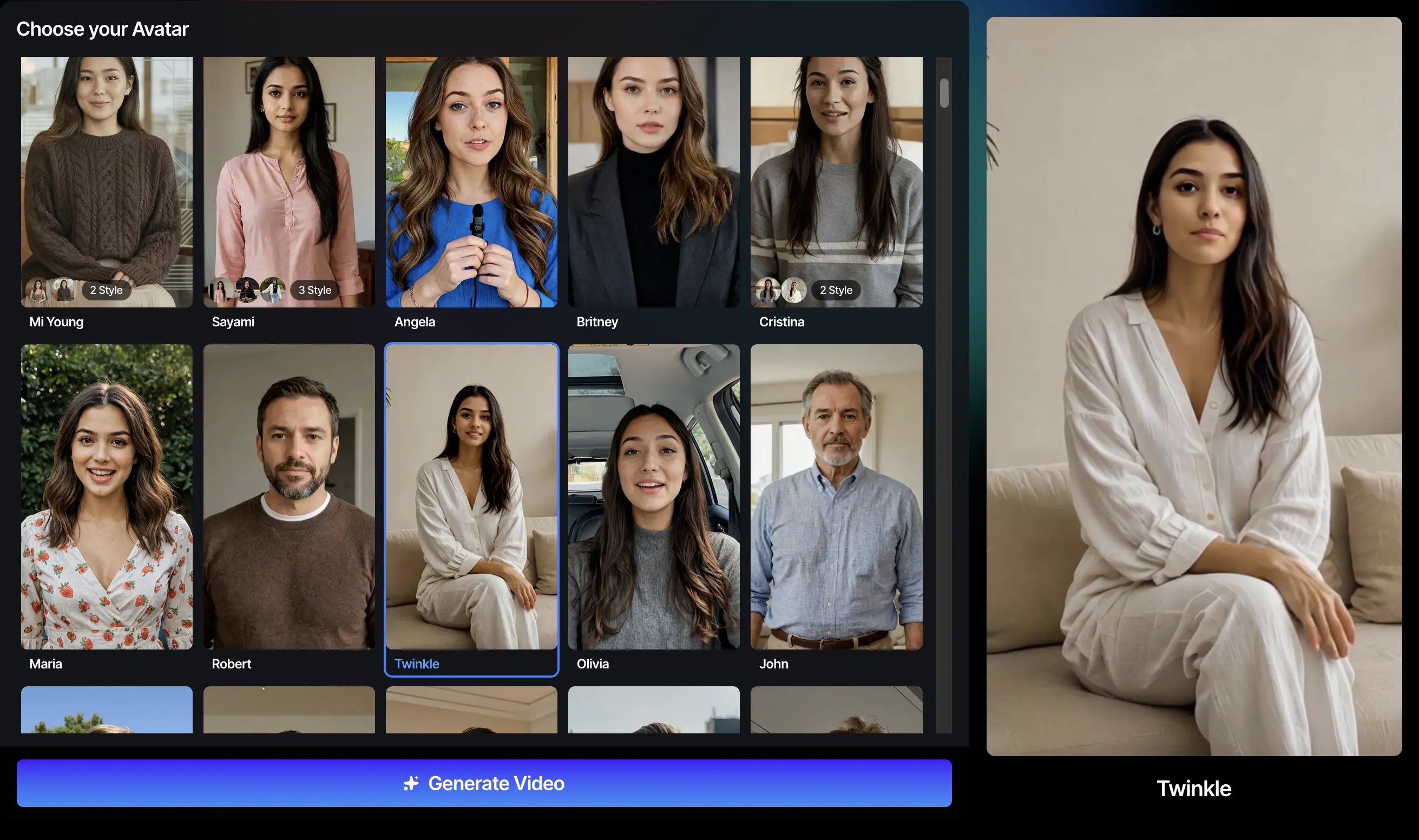
Tagshop AI’s goal is to produce UGC-style video ads fast, without relying on creators, shoots, or long turnaround times. It’s built around AI avatars and Digital Twins that can present products in a way that looks native to platforms like TikTok, Meta, and YouTube. What stands out to me is how little setup it needs. You can start from a product link or script and end up with multiple ad variations ready to test.
Here are Tagshop AI’s key features:
- Generate AI-powered UGC video ads using lifelike avatars that present, hold, wear, or demonstrate products in a creator-style format
- Turn product URLs, images, or written scripts into ready-to-publish UGC-style videos with minimal setup
- Choose from 100+ to 300+ AI avatars, or create a custom AI Twin that looks and sounds like you for branded video content
- Create AI video ads, product demos, testimonials, and style-based UGC videos optimized for Meta, TikTok, and YouTube
- Use AI voice cloning to produce videos in your own voice and localize content into 30+ languages for global campaigns
- Direct avatar gestures, emotions, accents, and delivery to make videos feel natural and human
- Generate multiple ad variations quickly to test creatives, reduce ad fatigue, and improve campaign performance
- Edit videos in a built-in editor with text overlays, captions, formatting, and quick adjustments
- Add automatic captions with customizable styles, fonts, and designs to improve accessibility and engagement
- Publish and launch video ads directly to platforms like Meta and TikTok from within Tagshop
- Track, analyze, and optimize video performance within the platform, with campaign management tools expanding over time
- Produce AI-generated product shots and visuals, then convert them into videos using multiple AI models
- Support scalable content production with flexible plans, ranging from a free tier with watermark exports to paid plans offering HD or 4K exports, faster rendering, longer videos, and higher monthly output limits
What I like about Tagshop AI
I like to use Tagshop AI for producing UGC-style video ads quickly and at scale. Speed, volume, and cost come up repeatedly, along with the ability to replace filming and creator-heavy workflows with AI-generated videos.
What users are saying about Tagshop AI’s pros:
- “A business needs speed and scalability at an affordable price, like under a dollar. As far as I know, this is the best price I have found compared to other tools. The best part about Tagshop AI is how quickly it lets us generate UGC-style video ads. The scalability is incredible. We are currently creating 6 to 7 videos daily from this tool. The budget-friendly pricing makes it very easy for a small team like ours to produce content consistently without overspending.” – Lucas M., Project Manager and Coach (Source)
- “Tagshop AI is currently helping us to produce UGC-style video ads quickly. Uploading a product link and letting the AI auto-generate scripts, avatars, and full videos saves an incredible amount of time. The realistic avatars and voice cloning feel natural, and the multilingual features make international campaigns easy for us. We are currently producing 90+ videos daily with variations for A/B testing without any filming, creators, or editing.” – Arina K., Chief Marketing Officer (Source)
- “After using Tagshop AI for the last 3 months mainly for its Digital Twin (AI Twin) feature, and it has made our product marketing much faster. The platform lets me to turn my human appearance in an AI twin. AI twin literally looks like me and acts like me. This helped our team to create multiple product demos, UGC-style videos, and social content in minutes. Our ad creative production time dropped by 60% and CTR on creative tests improved 14%. The quality is clear, the lighting looks consistent, and the output is ready for Instagram and TikTok without heavy editing.” – Hetakshi D., Managing Partner (Source)
- “We simply upload a few images, and the tool generates high-quality results that look ready for ads or social media. For a small marketing team like ours, this saves hours every week and makes content creation much easier.” – Shah A., Managing Director (Source)
- “I have literally found the tool easy to use, with no complex functionality inside it. They have their own image generation model, where you can first generate a product image or upload one, and then you can also create a video for the same product. I like this idea, pretty cool…” – Verified User, Computer Software (Source)
What I dislike about Tagshop AI
The few negative points I found mentioned in reviews focus on fine-tuning, mainly around avatar control and image quality consistency, and it’s also what I’ve found to be the biggest drawback.
What users are saying about Tagshop AI’s cons:
- “A bit more customization in gestures and expressions would make it even better.” – Lucas M., Project Manager and Coach (Source)
- “Sometimes images are not as good as I expect, maybe prompting an issue or something else, but images can be better.” – Verified User, Computer Software (Source)
Tagshop AI pricing
- Offers a free plan
- Paid plans start at $29/month
Frequently asked questions
1. What is generative AI?
Advanced generative AI is a type of artificial intelligence that creates new content by learning patterns from existing data. In social media, this means it can generate text, images, and ideas such as captions, post drafts, or visual concepts based on a short prompt, helping marketers produce content faster without starting from scratch.
2. What is the best AI for generating content?
The best AI for your content creation process really depends on where you’re getting stuck. Most tools focus on one job. Some are great at writing captions or long-form text, like ChatGPT or Jasper. Others are built for visuals or video and don’t touch the writing side at all.
SocialBee is useful when you don’t just want ideas, but need to turn those ideas into scheduled posts. Its AI helps with brainstorming and writing, then plugs straight into your content calendar and publishing workflow. That connection is what makes the output practical, not just theoretically good.
3. What part of social media content creation can be optimized with AI?
AI can optimize several stages of social media content creation, especially ideation, drafting, and repurposing. Most AI tools speed up writing captions, adapting content for different platforms, and generating images or short-form videos.
More specific use cases include using translation software to publish the same content in multiple languages, adjusting tone for different regions, creating platform-specific variations from one core message, and turning long-form content into short social posts without rewriting everything manually.
4. Which AI tools are best for beginners?
AI tools work best for beginners when they simplify the process instead of adding extra steps. Tools that guide you through what to do next are easier to use than ones that require a lot of setup.
SocialBee is a good example because it lets you generate posts and schedule them in the same place. You can create content and get it published without jumping between multiple tools or workflows.
5. How are AI chatbots used on social media?
AI chatbots help brands reply faster and stay responsive without being online 24/7. They answer common questions, respond to DMs and comments, point people to the right links or products, and pass more complex issues to a human when needed.
Improve your social media presence with the best AI tools for content creation
After testing these AI tools, I can say that the tools that actually help social media teams are the ones that reduce friction in day-to-day work, especially when drafting, organizing, and publishing content across major social platforms. AI content assistants or social media post generators can speed up ideation, but they only create value when there’s a clear system for turning drafts into scheduled posts and published content.
If your main struggle is getting posts out consistently and on time, that’s where an AI social media management tool like SocialBee makes sense. It helps you take ideas, shape them into posts, and publish across multiple social accounts from one place.
Start your 14-day free trial of SocialBee and see how it fits into your existing workflow before committing to anything long-term.