If you’re looking for an Instagram post example that you can quickly recreate for your business, you’re in the right place. The past year has shown that many brands don’t grow by posting randomly. They grow by sharing Instagram posts, Stories, Reels, and carousel posts that speak directly to a specific audience, spark comments, and encourage people to take the next step.
In my experience, most Instagram users don’t need complicated strategies. They need simple Instagram post ideas they can create in just a few minutes; ideas that fit the Instagram feed, show real behind-the-scenes content, highlight user-generated content, and help create brand loyalty over time.
In this article, I’ll walk you through proven examples across carousels, Reels, Stories, giveaways, and collabs. You’ll see what works, why it works, and how to adapt each idea to your own Instagram account so you can create engaging content that reaches more people and supports your overall social media strategy.

Instagram carousel post examples
Carousel posts are one of the easiest ways to share multiple photos, teach something step by step, or expand on educational content without overwhelming the feed. They keep Instagram users swiping, which increases engagement and signals to the algorithm that your post content is worth showing to more people.
Here is what Instagram CEO Adam Mosseri had to say about this post type:
“Why carousels often get more reach than photos? Two main reasons. One, multiple pieces of media are going to mean more interactions with your carousel posts, and more interactions is going to mean more reach on average. And two, if someone sees your carousel post but they don’t swipe, we’ll often give that carousel a second chance and automatically move to that second piece of media for the viewer.”
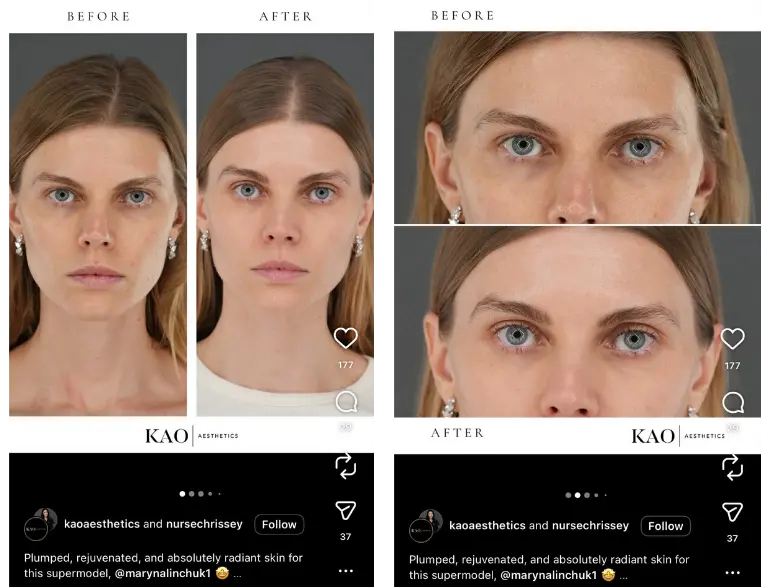
Before-and-after transformation carousel
This format works because the contrast between the first and last slide creates instant curiosity. People want to see the final reveal, which increases swiping and overall engagement. The transformation also acts as natural social proof because viewers can see a clear result instead of reading about it.
Why it works
This before-and-after carousel works because the transformation is clear at a glance. The photos are taken in the same lighting and angle, so your eye goes straight to the results without trying to figure out what changed.
Nothing feels overly edited, which makes the transformation feel real and believable. It’s also simple. No clutter, no text blocks, just a clean before and after that lets the outcome speak for itself.
How to adapt it for your own brand
- Use consistent lighting and framing so the transformation is easy to see.
- Keep the design minimal so the viewer’s attention goes straight to the results.
- Show a real example that reflects the outcomes your clients can expect.
- Add a short caption that highlights the benefit instead of listing every detail.
- Lead with clarity and let the visuals do most of the talking.
Step-by-step tutorial carousel
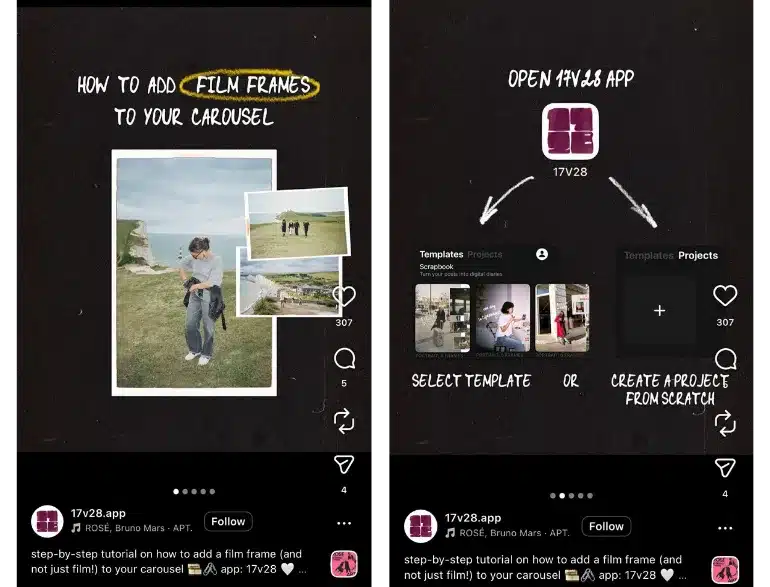
Tutorial carousels work well because they break a process into simple, digestible slides. This makes the content easy to follow and encourages saves. Users appreciate educational content that teaches them something quickly without overwhelming them.
Why it works
The example above works because it teaches one clear skill in the simplest way possible. The layout guides the viewer without needing much text, the real photo examples make the tutorial feel achievable, and the flow is easy to follow from start to finish.
Nothing feels confusing or busy. It solves a small, specific problem people actually have, which is why viewers save it and try it themselves.
How to adapt it for your own brand
- Break one small problem your audience has into a simple visual tutorial.
- Use a strong transformation (before and after, raw photo to final design, messy to polished).
- Stick to an aesthetic that fits your brand so your posts become recognizable.
- Teach one actionable skill that builds trust instead of trying to cover everything at once.
- Let the tutorial highlight your product or service without forcing it.
Tips or educational list carousel
List-style carousels help viewers learn multiple insights in a short amount of time. They tend to perform well because users share and save them. This format positions your brand as a helpful resource and brings consistent engagement from people who want quick advice.
Why it works
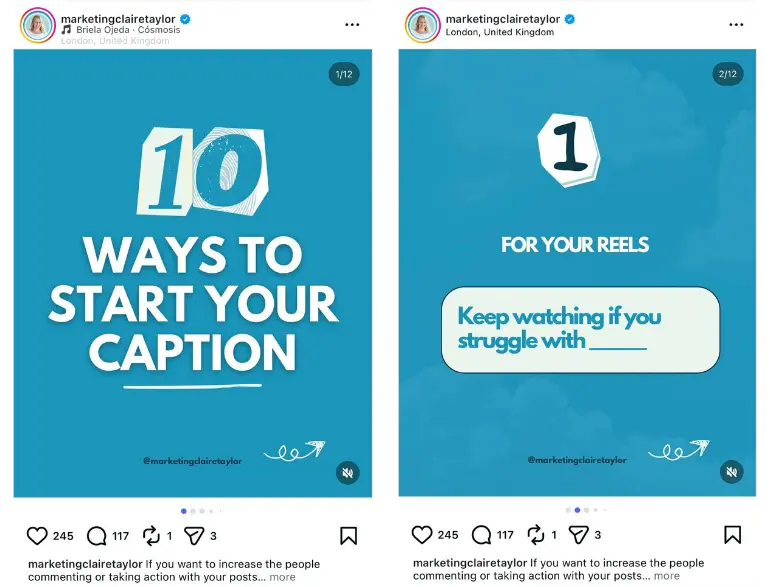
This example works because it hooks people immediately with a clear promise. The first slide tells you exactly what you’re about to learn. Each tip is delivered in a single line, so viewers can swipe quickly without feeling overwhelmed.
It’s the kind of carousel people save because it solves a common problem in a straightforward way, which naturally boosts engagement.
How to adapt it for your own brand
- Use a bold headline that highlights a concrete number or benefit.
- Choose a high contrast background color so the text stands out.
- Keep the layout simple with one central message on the first slide.
- Pick a list style topic your target audience struggles with often.
- Add a small visual cue, such as an arrow or underline, to make the slide feel more dynamic.
Instagram event post examples
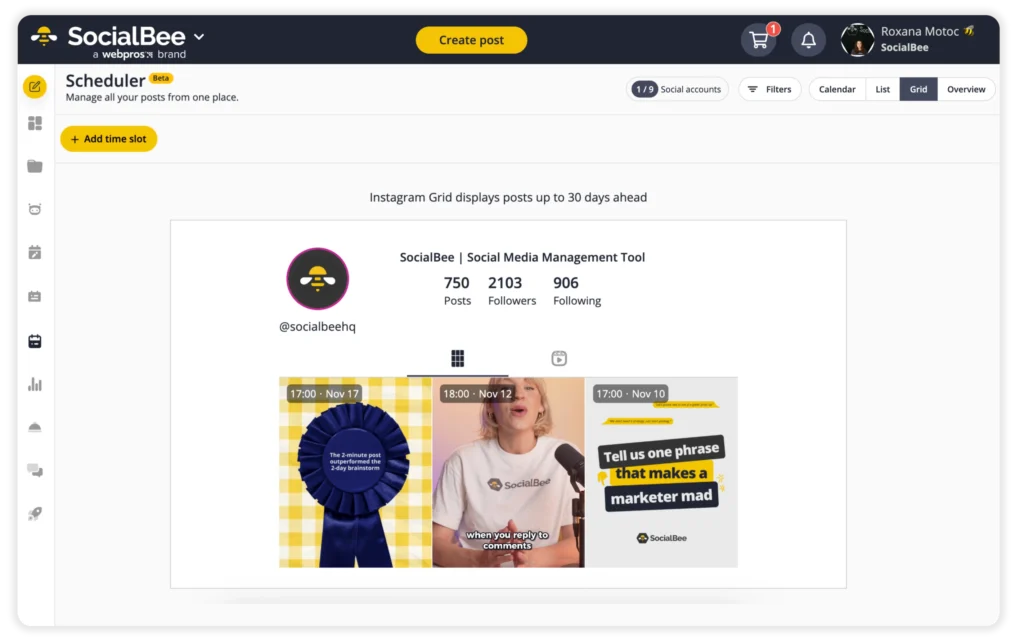
Event posts help you reach a wider audience by giving followers a clear reason to show up, register, or tune in. Whether you’re hosting an Instagram Live, launching a new product, or promoting an in-person workshop, these posts help create anticipation and encourage people to share the event with other platforms and friends, making them a great Instagram marketing tool.
They also give your Instagram page more variety by mixing announcements, sneak peek content, and community updates.
Countdown announcement post
Countdown posts work because they build anticipation. The clear timeline motivates followers to pay attention and check back for updates. Brands use this format to boost awareness before a launch, sale, or event.
Why it works
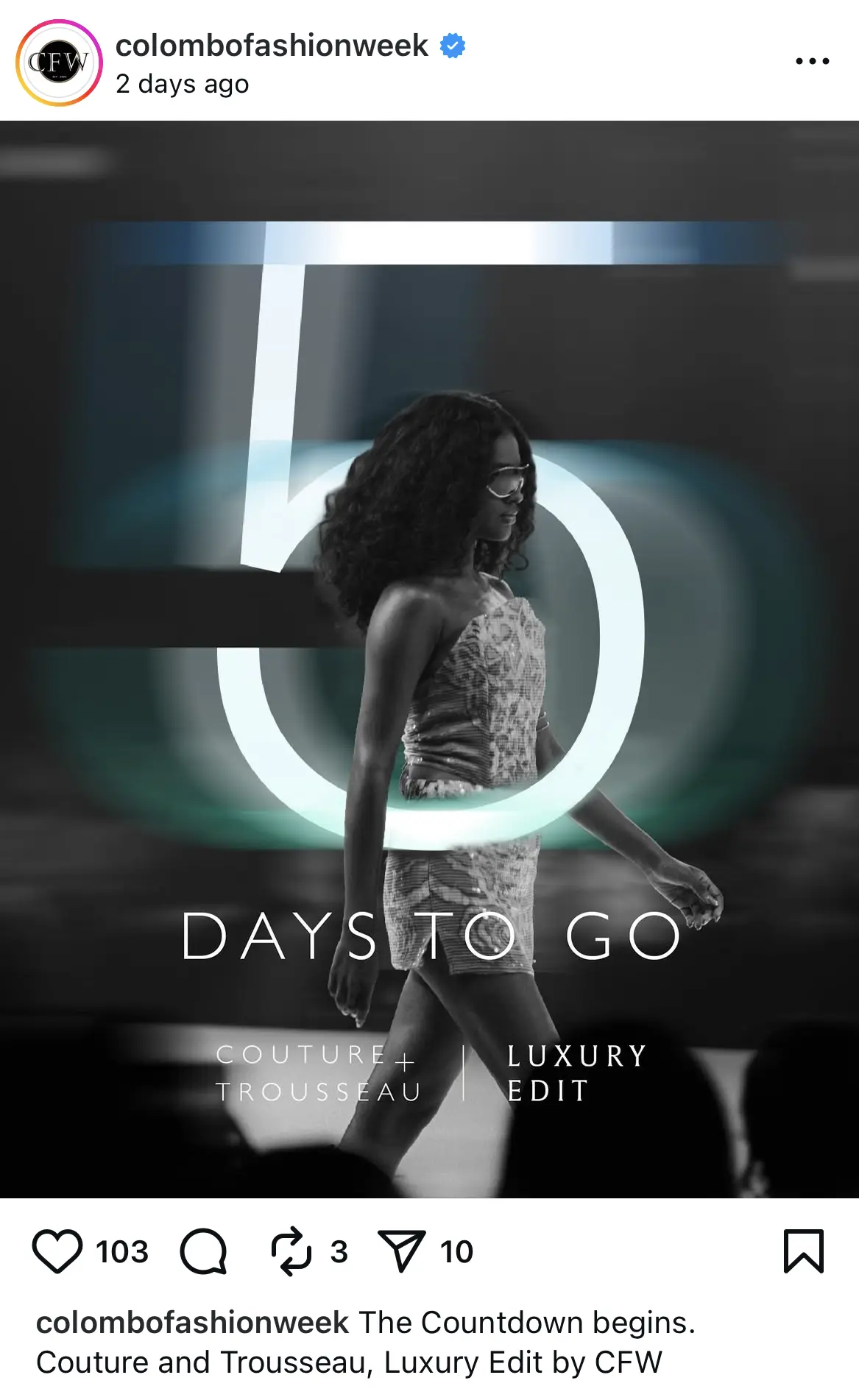
This countdown post works because the oversized number creates instant anticipation. The glowing “5” layered behind the runway model adds movement and drama, which fits the high energy of a fashion event.
The monochrome background helps the number and the model stand out clearly. Posts like this perform well because they signal that something exclusive is coming soon, which keeps followers checking back for the next update.
How to adapt it for your own brand
- Use one large number as the focal point so the countdown is clear at a glance.
- Pair the number with a striking visual that matches the tone of your event.
- Keep the background minimal so the message reads cleanly on mobile.
- Add the event name in smaller text to reinforce what the countdown refers to.
- Maintain a consistent style across all countdown posts to build recognition.
Speaker or host spotlight post
Host highlight posts work well because they show people who they’ll learn from and what kind of experience that speaker brings, which instantly makes the event feel more valuable. People connect more easily when they see who they’ll be hearing from instead of just reading dates and locations.

Why it works
In this post, you immediately see Shuang Hu’s face, her name, and her role, so you know right away why she matters. The photo feels warm and welcoming, the layout is clean, and the event details are easy to spot. It feels like a genuine introduction to a talented host, and the caption reinforces that by briefly touching on her accomplishments in a way that builds excitement without overselling.
How to adapt it for your own brand
- Feature a key speaker or guest with a strong, friendly portrait people can connect with.
- Keep the name and event details clear so viewers understand the who, what, and when at a glance.
- Add one compelling fact about the speaker to spark interest and build trust.
- Use a clean layout that makes the post feel official without being stiff.
- Focus on introducing the person and why they matter rather than pushing the event too hard.
Event highlights or recap post
Recap posts show that something meaningful happened. They help your audience feel involved, even if they missed the event. This type of content also offers social proof because it showcases real participants or real moments.
Why it works
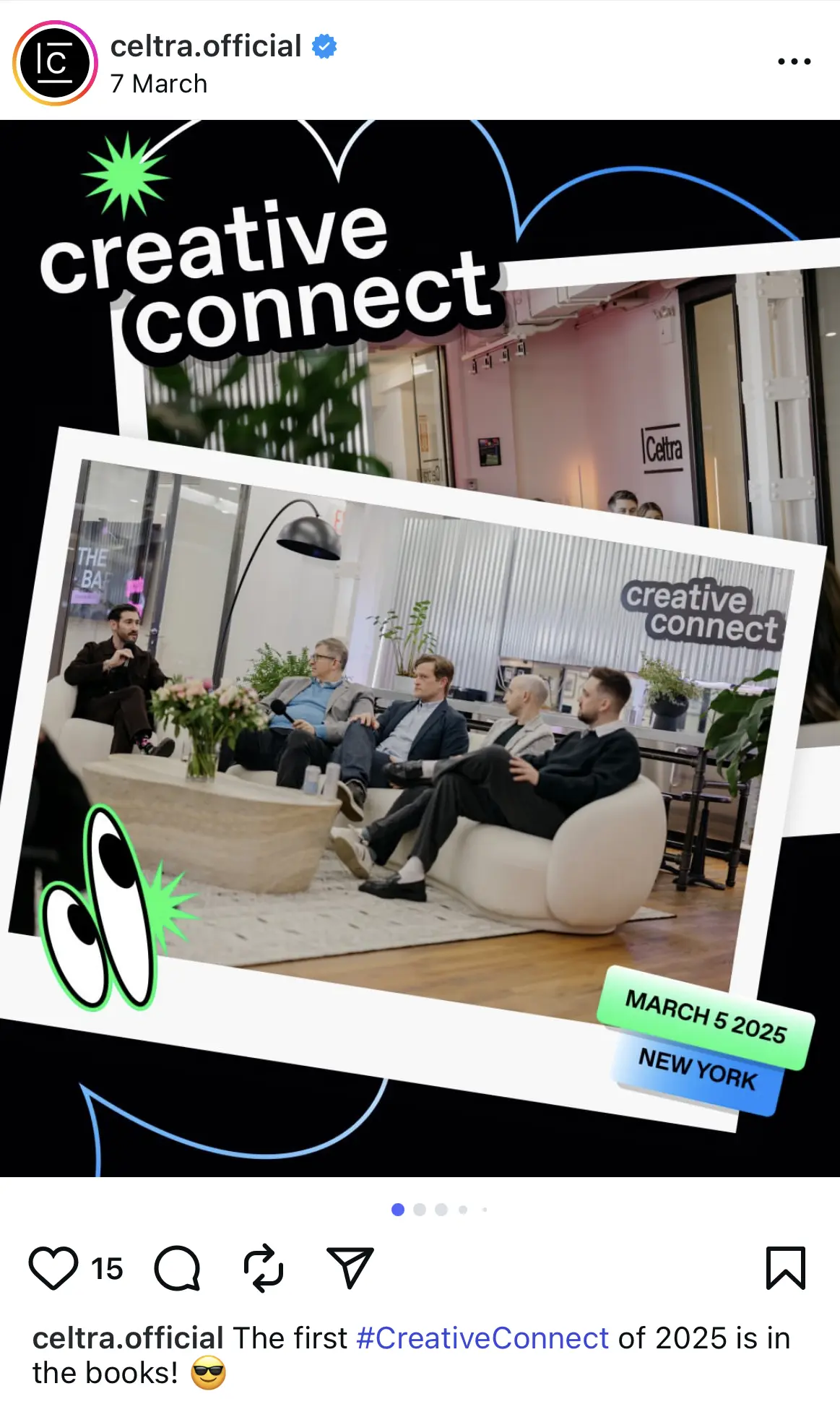
This event recap post works because it captures an authentic moment rather than a staged shot. The candid panel photo shows real speakers mid-conversation, which gives the post credibility and gives followers a sense of being in the room.
The playful graphic elements and bold text create a lively, branded look that stands out in the feed. Including the event date and location helps viewers understand the context instantly without needing to open the caption.
How to adapt it for your own brand
- Pick one strong photo that shows real people interacting, not just empty rooms or slides.
- Add the event name, date, and location somewhere clear so the viewer understands the context instantly.
- Use bold visuals or branded elements to make the post feel lively and on-brand.
- Keep the caption short and celebratory so it feels like a natural “we did it” moment.
- Save detailed recaps for Stories or the carousel and let the feed post focus on the energy.
Instagram collab post examples
Collab posts allow you to reach new audiences instantly by sharing one post across two Instagram accounts. This helps brands tap into user-generated content, feature creators, and build social proof without starting from scratch. Many brands use collabs as a simple way to gain more engagement and strengthen relationships with other brands or creators.
Brand × creator product feature
These posts work because they combine your audience with the creator’s audience. Featuring a person using or recommending your product brings authenticity and increases reach. Creators present the product in a relatable way that followers trust.

Why it works
This post works because it doesn’t feel like an ad. It feels like you’re catching Alix in a real moment that just happens to look incredible. The setting, the colors, the product, and her vibe all match, so nothing feels out of place.
It’s aspirational without trying too hard, which is exactly why her audience responds to it. You see the drink, but you also see the lifestyle around it, and that’s what makes the collab feel exciting instead of promotional.
How to adapt it for your own brand
- Photograph the creator using your product in a setting that fits their personal style.
- Incorporate subtle branded elements, such as props or packaging, into the scene.
- Choose a location or setup that reflects the feeling you want people to associate with your brand.
- Focus on capturing a moment rather than staging a perfect promo shot.
- Use the collab tag to expand reach by sharing the post across both audiences.
Brand × brand partnership announcement
Partnership posts work because they expose your brand to another company’s audience. They signal credibility and help both brands expand their reach. Followers often see these posts as exciting because collaborations feel like news.
Why it works
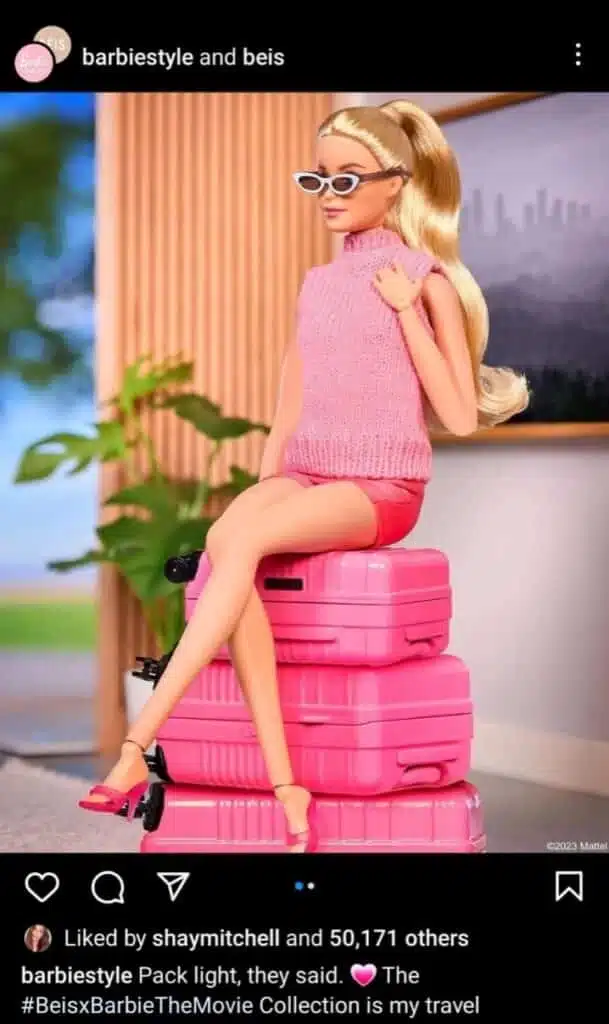
This partnership post works because it pairs two instantly recognizable aesthetics in a single visual. The bright pink Beis luggage matches Barbie’s signature color palette, which makes the collaboration feel natural and fun.
The playful styling and doll pose create a sense of nostalgia that sparks strong engagement from followers. It is visually striking, easy to understand, and perfectly aligned with both brands’ identities.
How to adapt it for your own brand
- Pick a collaborator whose aesthetic and audience already align with yours so the content feels believable.
- Build an aesthetic that reflects both brands. Think colors, props, styling, or settings you both naturally share.
- Turn the product into part of the scene rather than placing it front and center. Show how it fits into a moment.
- Use a strong theme or playful concept that your audience will instantly understand.
- Ask yourself: would someone screenshot this because it’s clever, cute, or creative? If not, refine the visual angle.
Expert takeover or co-created content
This format works because it introduces expertise, new perspectives, and fresh content. It positions your brand alongside a trusted figure, which reinforces authority. It also keeps your feed dynamic and engaging.
Why it works
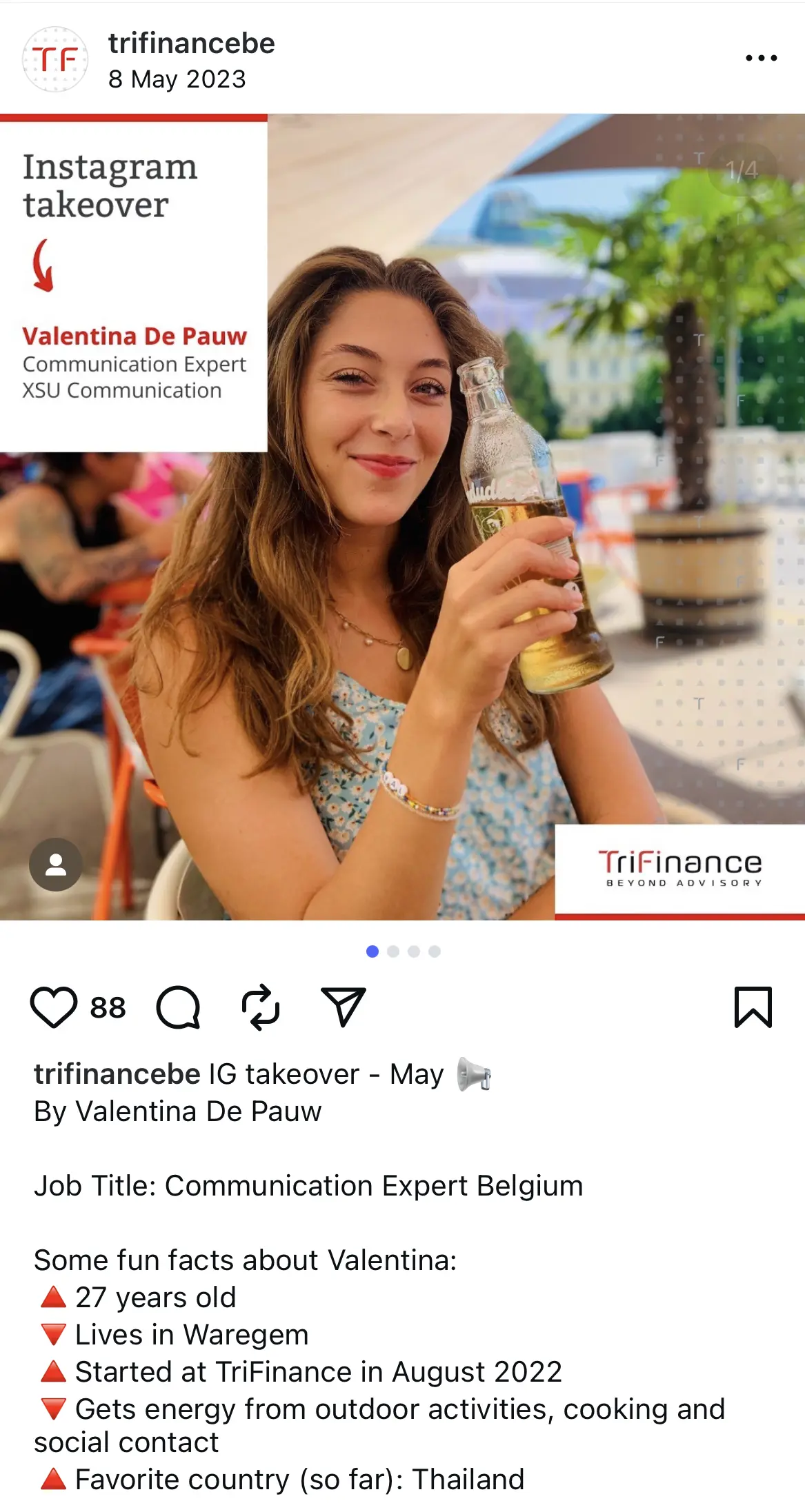
This expert takeover post works because it introduces a real team member in a warm, approachable way. The photo feels candid and relaxed, which helps followers connect with the person behind the account.
The branded frame on the left makes the announcement clear without distracting from the image. Featuring fun personal facts in the caption adds personality and builds trust, which makes the takeover more engaging.
How to adapt it for your own brand
- Use a friendly, natural photo of the person leading the takeover.
- Add a simple branded banner or label so viewers understand what the post is announcing.
- Introduce the expert with a few short details that show their personality.
- Let the featured person share content in their own tone to keep the takeover authentic.
- Highlight what followers can expect from the takeover to encourage them to watch along.
Instagram giveaway post examples
Giveaways continue to work because they encourage people to interact with your Instagram content in a direct way, like commenting, tagging friends, and sharing the post with other social media accounts. This not only boosts visibility but also brings in new audiences who may be seeing your brand for the first time.
Follow–tag–share giveaway
Giveaway posts increase engagement because they require actions like tagging, following, and sharing. These interactions boost visibility and help you reach completely new audiences. The reward creates an incentive for participation.
Why it works
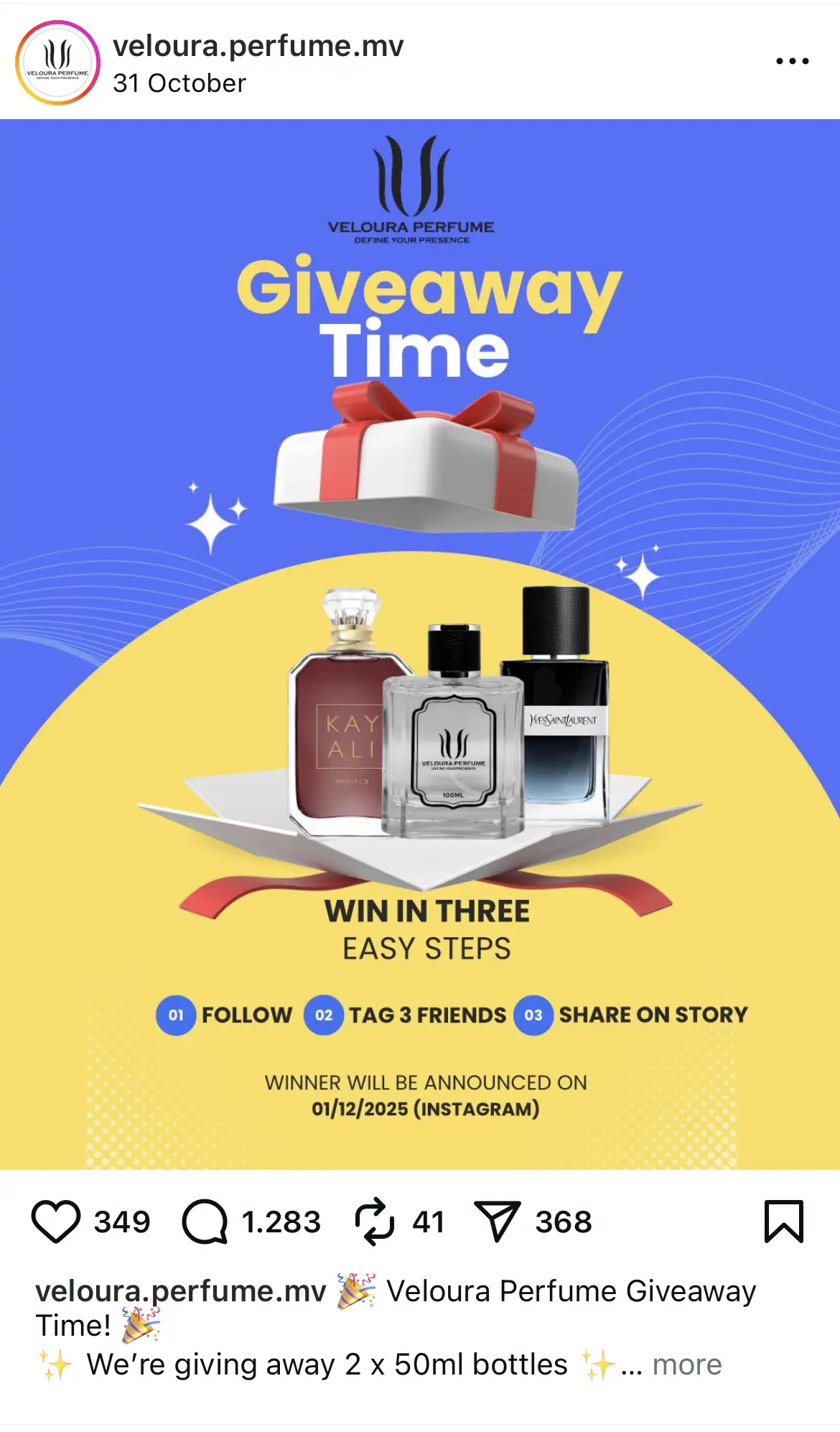
This giveaway post on Instagram works because the design is bold, colorful, and instantly communicates what the viewer can win. The large “Giveaway Time” headline makes the purpose clear without needing to read the caption.
Showing the perfume bottles upfront helps followers understand the prize immediately, which increases participation. The three-step entry instructions at the bottom are simple and easy to follow, making the barrier to entry low and engagement high.
How to adapt it for your own brand
- Use a bright background and large headline to grab attention.
- Display the prize clearly so viewers know what they are entering for.
- Keep the entry steps short and easy to understand.
- Add the announcement date to set clear expectations.
- Place your logo or branding in a small, consistent spot to build recognition.
Milestone celebration giveaway
Celebration giveaways connect a brand milestone with audience participation. This creates a sense of community and shared excitement. They work especially well because people love being part of a brand’s wins.
Why it works
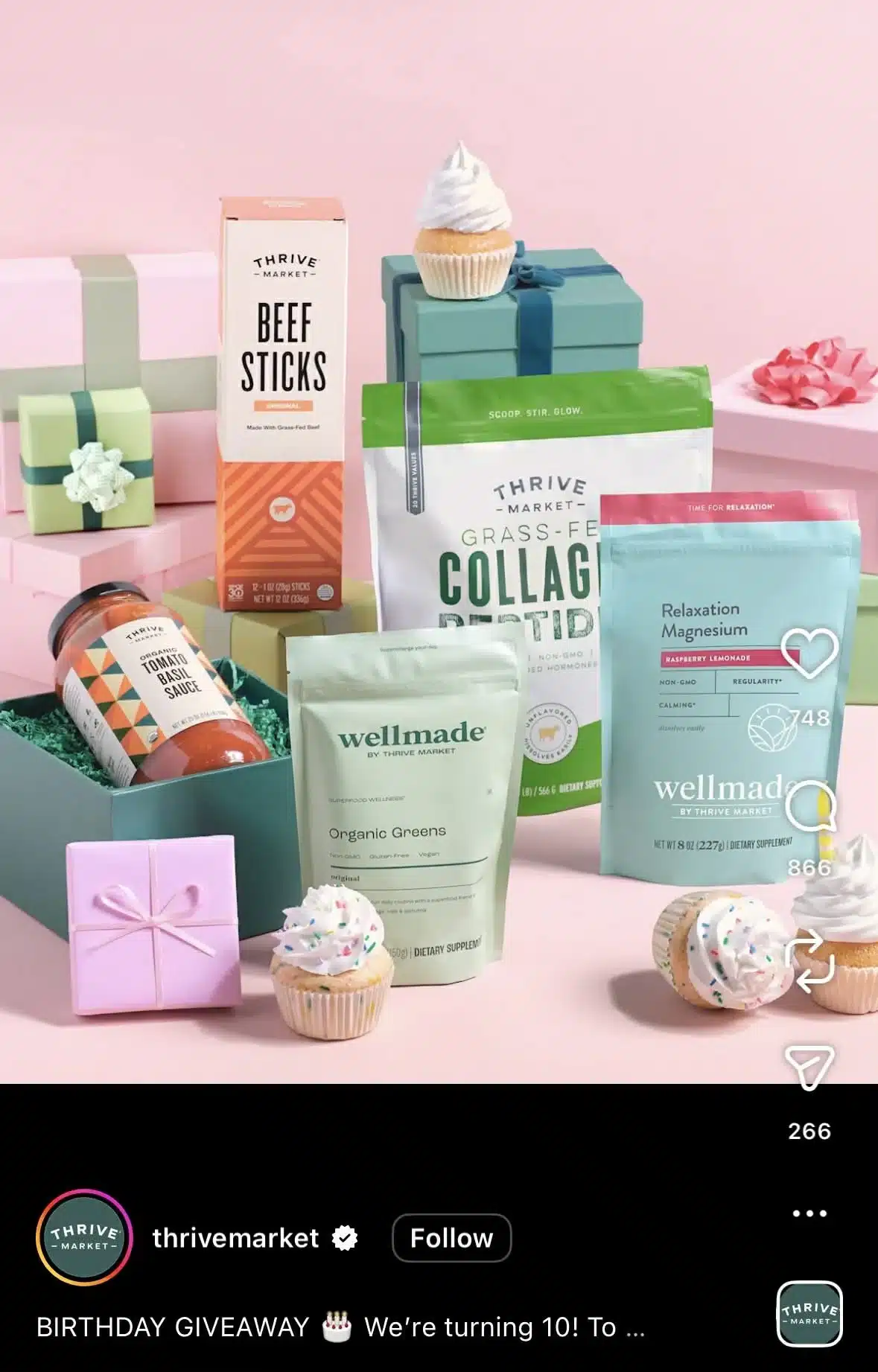
Giveaway posts like this work because they feel celebratory and instantly tell you there’s something to win. The setup is bright, clean, and fun, and the cupcake details make the anniversary theme obvious without needing a long explanation. The products are arranged in a way that makes them look like part of a gift spread, which helps viewers imagine receiving the bundle themselves.
How to adapt it for your own brand
- Use props that match the occasion so the giveaway feels tied to a real moment or milestone.
- Arrange your products like a gift set so viewers can immediately visualize what they could win.
- Keep the background clean and bright so the items pop on the feed.
- Add small themed elements, like cupcakes or ribbons, to make the visual more festive.
- Make sure the image alone explains the giveaway so the caption can focus on the entry steps.
Have followers create content and tag you (UGC contest)
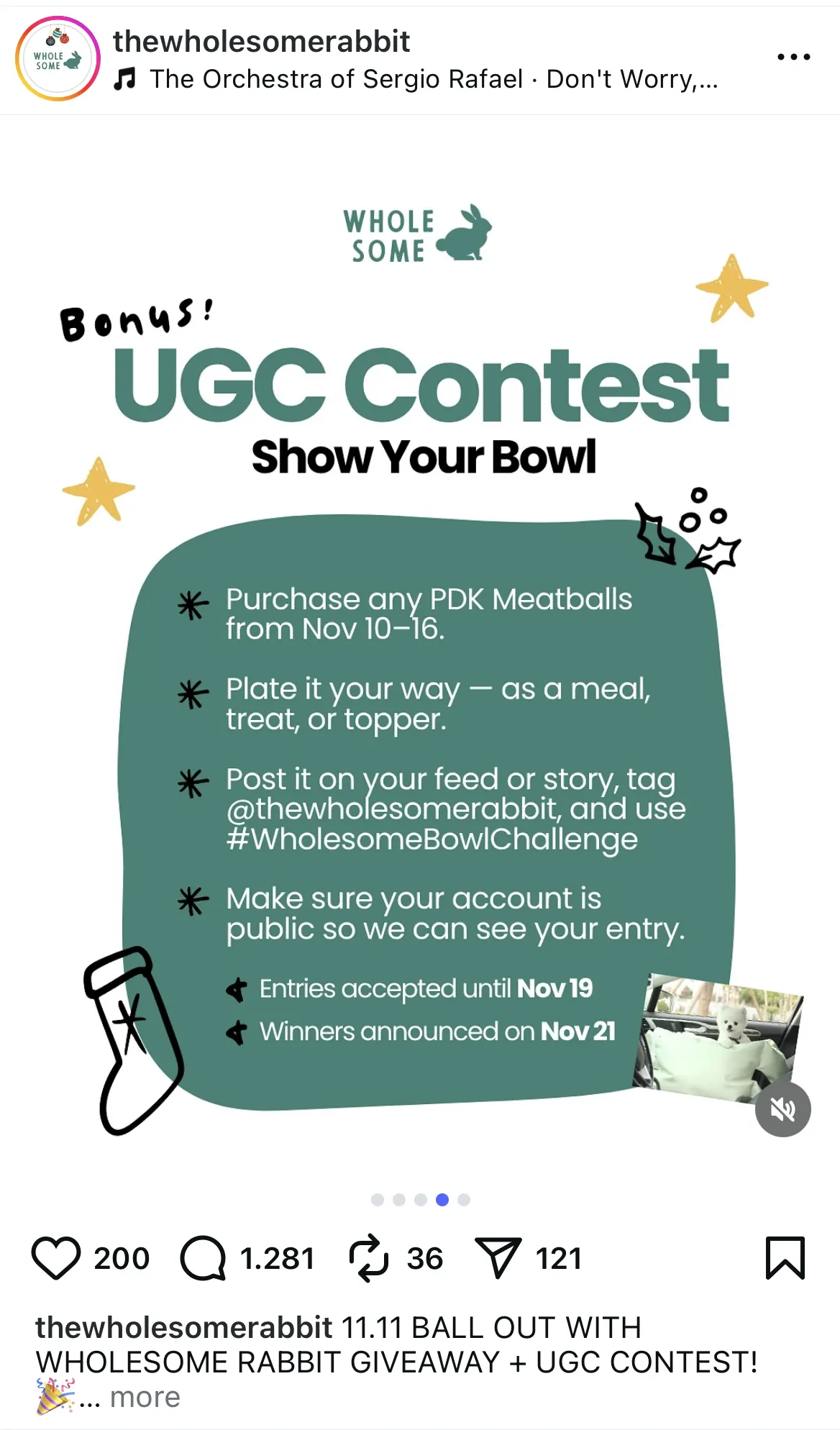
UGC contests work because they encourage followers to create content for you. This strengthens community involvement and provides a stream of authentic social media posts that you can reshare. They naturally expand your reach when participants tag your account.
Why it works
This UGC contest post works because the instructions are clear, the visuals are friendly, and the challenge itself is easy to participate in. The layout organizes each step in a readable format, which reduces confusion and encourages more entries.
Highlighting key dates in bold helps followers understand the timeline immediately. The playful design elements match the brand’s tone and make the contest feel fun rather than overly promotional.
How to adapt it for your own brand
- Break the contest rules into simple, scannable steps.
- Add a clear heading that explains what type of content followers should create.
- Highlight entry deadlines and announcement dates to set expectations.
- Add relevant hashtags that make it easy to track the content entries and increase chances of appearing in the explore page.
- Show a tiny preview of past UGC to spark participation and inspire ideas.
Instagram reel examples
Short videos are still one of the most powerful ways to reach people who don’t already follow you. Reels help you show behind-the-scenes moments, lifestyle shots, product shots, quick tutorials, and fun content that feels more personal than a static image.
For many brands, Reels are the fastest way to gain visibility on the social media platform as they often reach users far beyond your existing followers.
Instagram Reels of up to 15 seconds have an average completion rate of 72%, which surpasses longer Reels’ average of 46%, so whichever example you choose to adapt for your own accounts, make sure to keep it short to keep your audience engaged.
Quick tutorial or how-to Reel
Tutorial Reels succeed because they deliver fast, valuable lessons in a short video format. Reels are heavily promoted by Instagram, so useful content can reach far beyond your followers. People save this type of video so they can return to it later.
Why it works
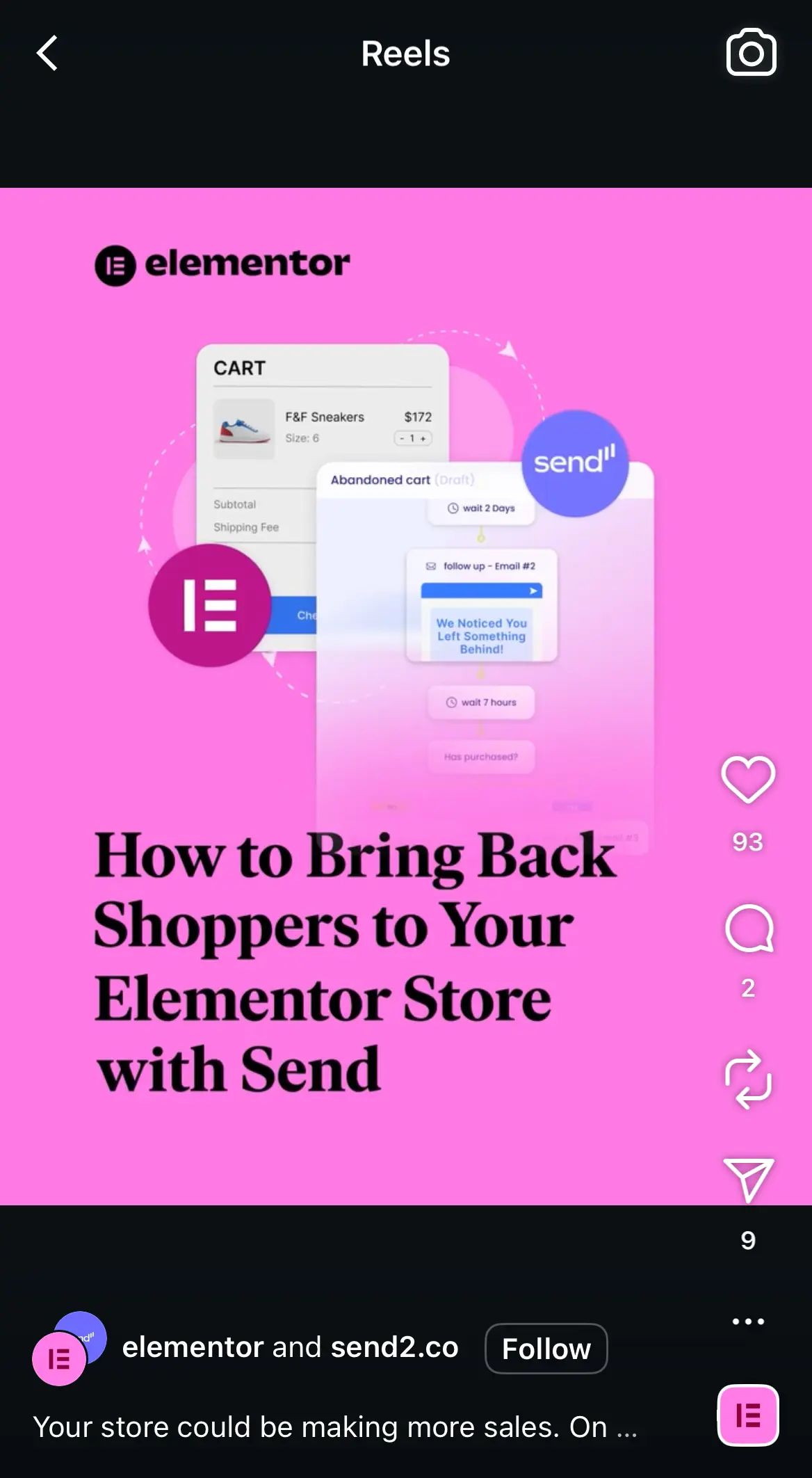
This tutorial-style Reel works because it delivers a specific promise right away. The bold headline tells viewers exactly what they will learn, which increases watch time and keeps the content focused.
The bright pink background grabs attention on the Reels feed, and the workflow graphic behind the text visually reinforces the topic while making the cover visually appealing. This combination of clarity and visual interest helps the Reel perform well with both current followers and new audiences.
Beyond this eye-catching graphic, the video features someone from Elementor describing the steps, alongside graphics to guide the user through the process. This makes the Reel easy to follow and gives it a friendly feel thanks to the presence of a real person.
Cross-promoting your Reels on other platforms (such as posting them as Shorts on your YouTube channel or as TikToks) is another great way to increase your reach across multiple social media accounts.
How to adapt it for your own brand
- Start with a clear headline that states the benefit of watching.
- Use a bold background color that helps your Reel stand out in the feed.
- Add simple graphics or screenshots that support the topic without overwhelming the frame.
- Keep the text large enough to read quickly on mobile.
- Choose a topic your audience wants help with so the Reel earns saves and shares.
Behind-the-scenes workflow Reel
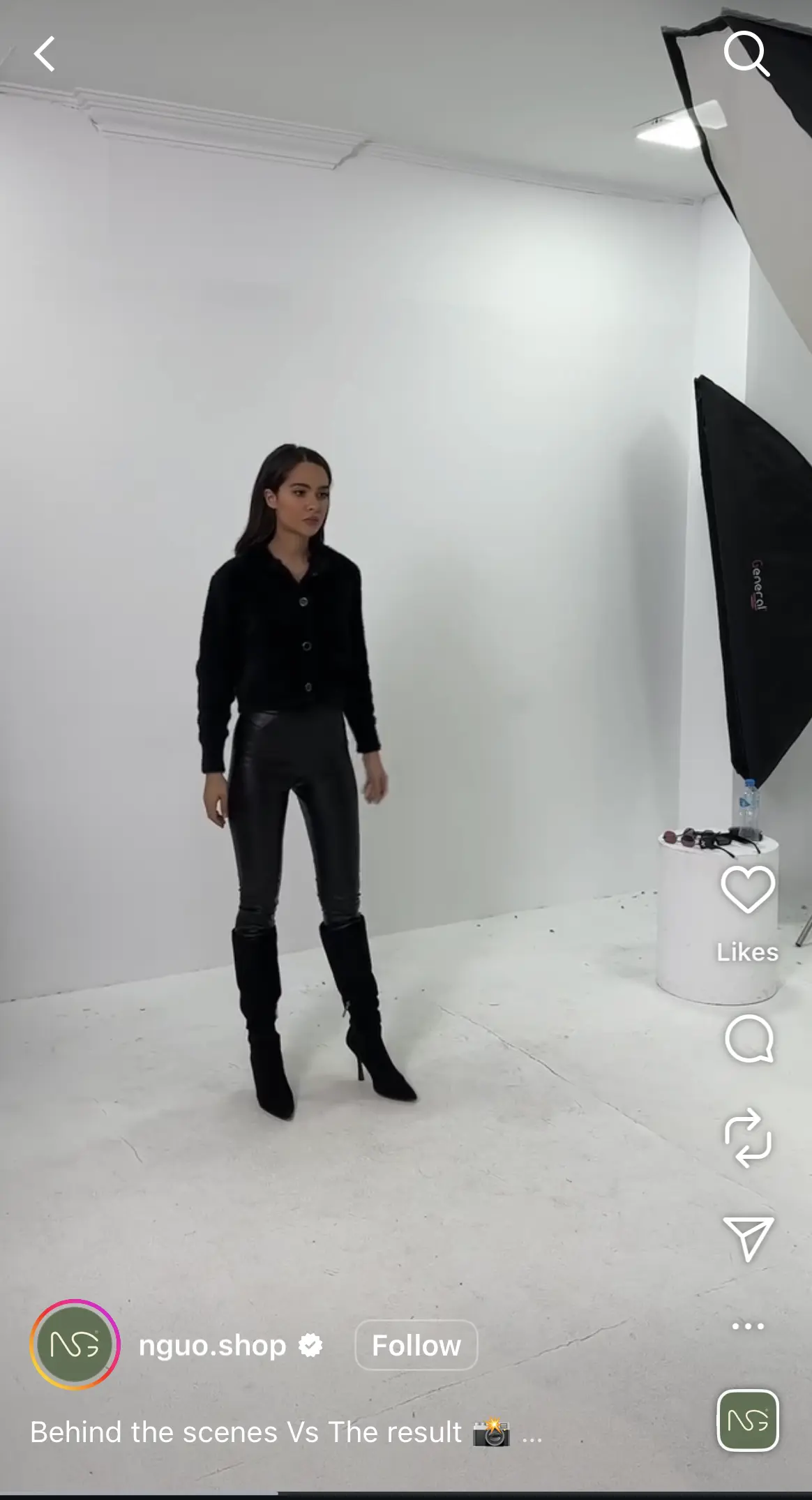
Behind-the-scenes content works because it feels honest and human. It gives viewers a look at your process, which builds trust and curiosity. This format helps brands feel more approachable and real.
Why it works
This behind-the-scenes Reel works because it shows the raw, unedited environment that followers rarely get to see. The simple studio setup, lighting gear, and model positioning make the brand feel transparent and approachable.
Viewers enjoy watching how polished product photos or campaign visuals come together, so this type of content naturally boosts watch time. It also builds trust because it highlights the real work that goes into creating the final images.
How to adapt it for your own brand
- Film short clips that show your process before the final polished result.
- Keep the setting natural so viewers feel like they are getting exclusive access.
- Capture moments that highlight your team, tools, or creative setup.
- Pair the behind the scenes footage with a reveal of the final photo or video.
- Add light text cues or a simple caption to explain what is happening in each clip.
Transformation Reel
Transformation videos stand out because they show dramatic results in motion. The reveal creates anticipation and encourages viewers to rewatch the clip. This increases the number of people who watch the full video and the overall reach.

Why it works
This transformation Reel works because it shows a product in action, so you see the before, the after, and the in-between. Viewers can clearly see texture, color, and detail, thanks to the close-up shot, making the later transformation feel more dramatic and satisfying.
The creator, pointing to specific areas, guides the viewer’s eye and builds anticipation for the reveal. This type of content performs well because it shows tangible results rather than abstract claims.
How to adapt it for your own brand
- Start your Reel with a close-up that highlights the problem or starting point.
- Use gestures or simple movements to direct attention where you want viewers to look.
- Keep the lighting bright and even to make the transformation clear.
- Add short text overlays if needed to explain what is being fixed or transformed.
- Make them shoppable posts so users can go straight to the product after witnessing its results.
Instagram story examples
Instagram Stories help you connect with your audience in a more casual way. Since they disappear after 24 hours, you can share sneak peeks, updates, and quick polls without worrying about how it impacts your Instagram feed.
Stories also help create more engagement because viewers can reply directly, send questions, and interact through stickers that encourage people to participate.
Instagram story collage example
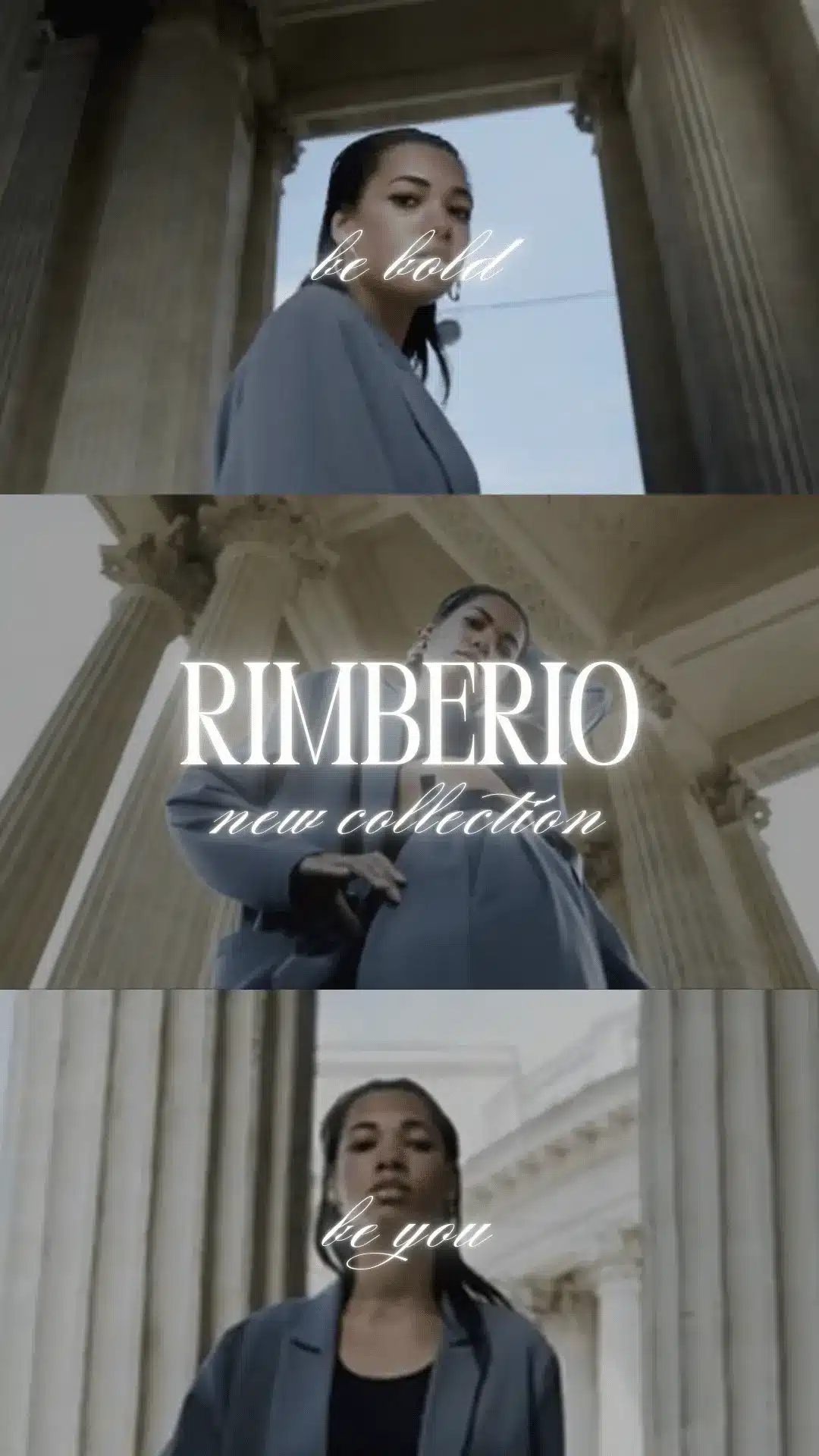
Story collages work because they present multiple angles or moments in a polished way. They capture attention quickly and help your visuals feel more cohesive. Collages often lead to more taps because they showcase variety without feeling cluttered.
Why it works
This Story collage works because it feels cinematic and cohesive. Each frame uses the same location, lighting, and color palette, which creates a strong visual identity for the collection.
The minimal text overlays, like “be bold” and “be you,” add emotion without distracting from the imagery. This type of collage keeps viewers tapping through because it feels more like a branded mini campaign than a single snapshot.
How to adapt it for your own brand
- Choose three to five clips or photos that share the same visual style or setting.
- Use short, expressive text phrases to add mood without overwhelming the imagery.
- Keep transitions simple so the collage feels smooth and intentional.
- Highlight one focal point in each frame, such as the model, product, or location.
- Save the collage to a Highlight if it represents a new collection or key brand moment.
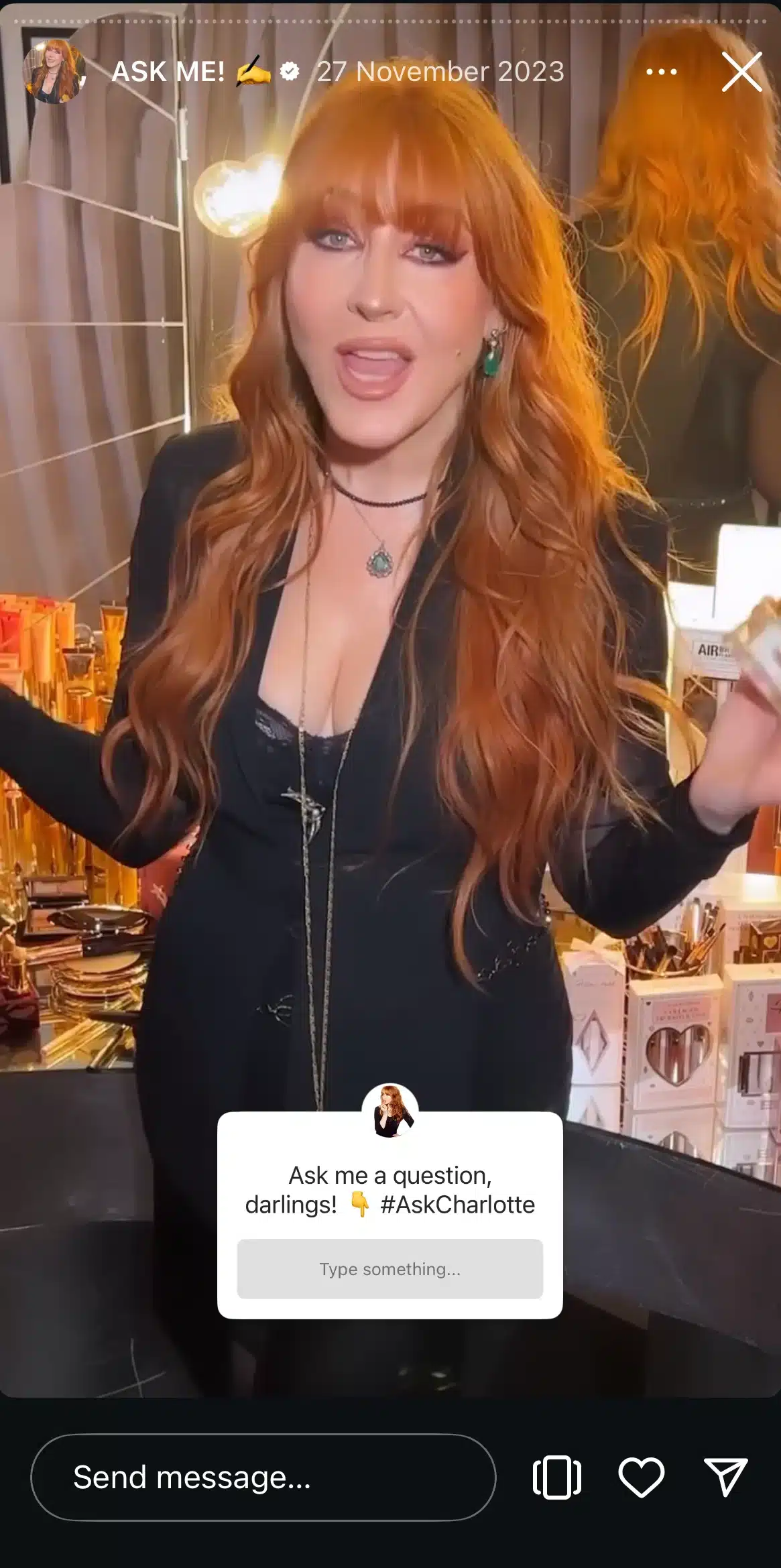
Q&A Instagram story
Q&A Stories work because they invite direct interaction. Followers get personal, tailored answers and feel more connected to the creator or brand. This format is one of the strongest ways to boost engagement within Stories.
Why it works
This Q&A Story works because it feels personal and direct. The creator, Charlotte Tilbury, speaks straight to the camera in a warm, engaging tone, which makes viewers feel invited into a real conversation about her beauty brand.
The question sticker is placed front and center, making it easy for followers to interact without thinking too hard. The background filled with product displays reinforces the brand visually while keeping the focus on the creator’s face and voice.
How to adapt it for your own brand
- Record short, face-to-camera clips to create a sense of connection.
- Place the question sticker where it is clearly visible and easy to tap.
- Keep the background relevant to your brand so the Story feels on theme.
- Use a friendly, conversational tone to encourage more submissions.
- Save the best Q&A responses to a Highlight so new followers can revisit them.
Instagram Story polls
Polls succeed because the interaction is instant and effortless. They encourage viewers to participate with a single tap. Polls also give you quick insights and make followers feel involved in your decisions.
They can also give you an important look into your brand’s services or products; for example, by having users choose between certain offerings, you can check what gets positive feedback and what could be improved for potential customers.

Why it works
This Story poll works because it uses a strong visual hook paired with a simple, curiosity-driven question. The question makes you stop and look at the bike more closely, and the two poll options make it feel fun and low-effort to answer.
The forest backdrop also gives the bike a “real use” setting, which makes the surprise factor of it being an e-bike even stronger. It’s quick, interactive, and gives the brand instant feedback without feeling salesy.
How to adapt it for your own brand
- Choose a clean, eye-catching photo of your product in a real-world setting.
- Ask a question that sparks curiosity or challenges assumptions.
- Keep poll answers short so they are easy to tap.
- Use the results to create follow-up Stories or product explanations.
- Add a small brand label or icon to reinforce recognition without cluttering the frame.
Frequently asked questions
1. Which type of Instagram posts work best for businesses?
Posts that teach, show, or demonstrate something tend to perform best. Carousels, Reels, and behind-the-scenes posts often get higher engagement because they provide value quickly. Content that features real people, product demonstrations, or customer results builds trust and encourages interaction.
2. How to write a good Instagram post?
Start with a clear hook in the first line to grab attention. Use simple language, add helpful context, and make sure your photo or video supports the message. Include a call to action, add hashtags, and keep the caption easy to scan. Posts that feel useful or personal usually perform better.
3. What is the rule of three on Instagram?
The rule of three is a simple storytelling approach that breaks your message into three parts to keep it clear and memorable. Many creators use it to structure captions, share tips, or explain a process in a way that is easy for viewers to follow. It helps keep your social media content focused and more engaging.
How to start using these Instagram post examples today
You do not need a complicated strategy to create better Instagram content. You just need a structure you can rely on and a few formats that consistently work. The examples above give you a starting point for almost any goal, whether you want to educate your audience, highlight your product, or encourage more interaction through Stories and Reels.
Start by choosing two or three post types that fit your brand and create simple variations you can reuse. Pay attention to what your audience responds to and use that insight to refine your next round of posts. A consistent content calendar makes this process easier, especially when you can see everything laid out in one place.
If you want a simpler way to manage your Instagram posts, SocialBee can help. You can plan your content, organize it by category, schedule everything in advance, and use built-in Instagram insights to see what performs best. Start your 14-day free trial today to keep your workflow organized so you can focus on creating posts that actually resonate.
Choose your next read:
- [Template] Build your Instagram content calendar
- How to make a collage on Instagram story
- How to Hide Likes on Instagram: A Quick Guide
- How to add a link to your Instagram Story: Best practices
- How to schedule a collab post on Instagram
- How to Get Verified on Instagram in 5 Simple Steps
- Best Instagram account examples from real brands & creators