
Have you ever opened a social media report and thought, “Okay… but what do I actually do with this?”
The scale doesn’t help. Social media now reaches around 5.6 billion users worldwide, which means an endless stream of social media data, engagement metrics, and post performance numbers to sort through.
Native analytics like Facebook Insights or X (Twitter) analytics are fine for the average user, but once you manage multiple platforms, track campaign performance, or report over time, you need a proper social media analytics platform.
That’s why I went through the social media analytics tools I’d actually use in 2026, looking at how well they handle reporting across platforms, highlight meaningful metrics, and support real content and strategy decisions.
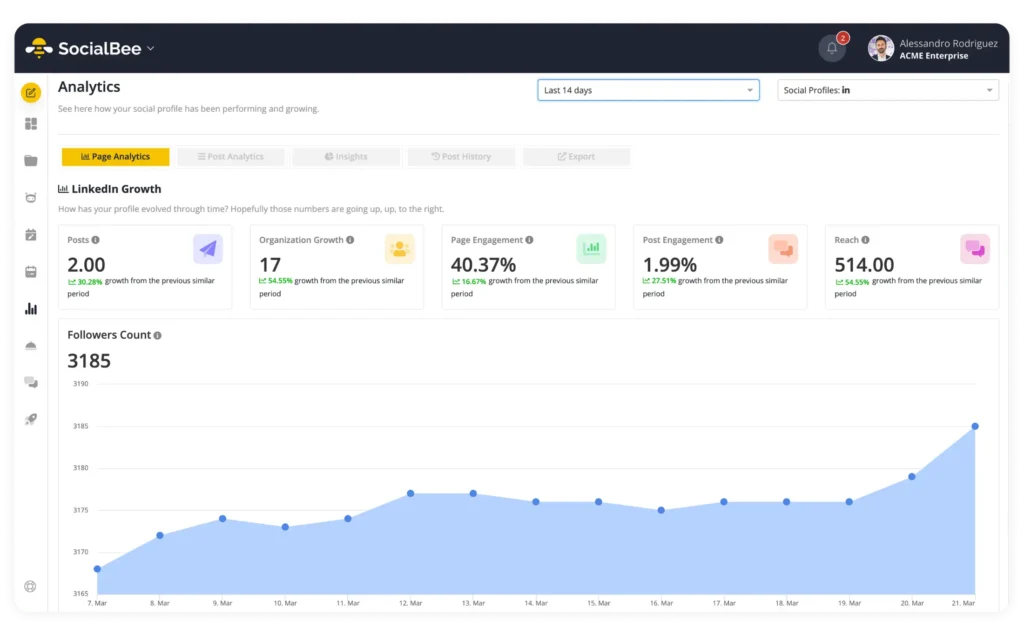
2. NapoleonCat
Who is NapoleonCat best for?
NapoleonCat is best suited for agencies and larger social media teams that deal with high volumes of comments, messages, and reviews across multiple client accounts.
It works particularly well when moderation, response time, and inbox control matter more than content planning depth.
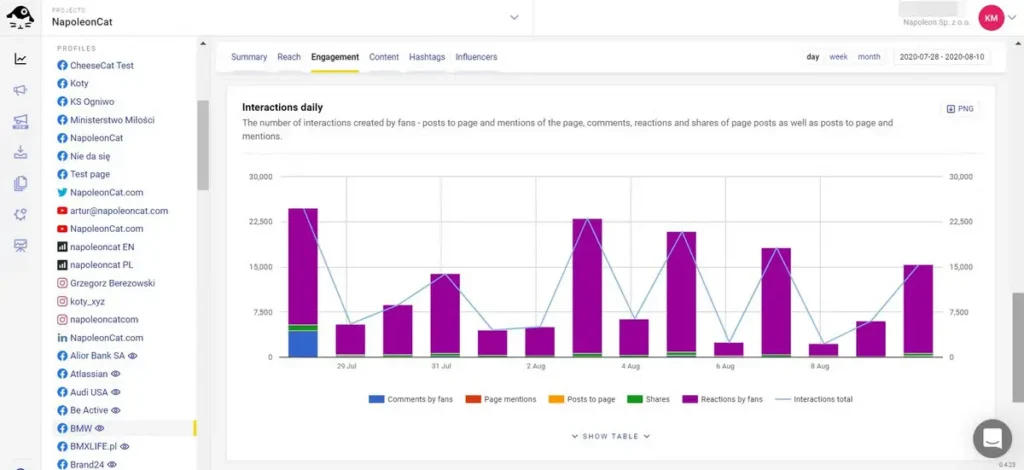
NapoleonCat feature overview
NapoleonCat is a social media management tool strongest in engagement-focused analytics, especially for teams that manage a high volume of comments and messages across platforms.
From an analytics point of view, it gives clear visibility into response times, engagement performance, and moderation efficiency. You can track how quickly teams reply, how much interaction each profile generates, and where conversations tend to spike or drop off. This is particularly useful for brands that treat social media as a customer support or community channel, not just a publishing one.
Sentiment analysis and spam detection help surface patterns in negative or repetitive comments, making it easier to spot moderation issues early rather than reacting after things escalate. Conversation history and user-level data add context to the numbers, which helps teams understand not just what is happening, but why.
NapoleonCat’s reporting focuses less on high-level growth metrics and more on engagement quality and operational performance, making it a good fit for teams that care about response efficiency, moderation workload, and ongoing audience interaction.
NapoleonCat’s key features:
- Manage comments, messages, and reviews from multiple social channels in one inbox
- Automate moderation with custom rules for hiding, deleting, or responding to comments
- Use AI to detect spam and negative sentiment
- View conversation histories and user profiles
- Plan and schedule posts using a shared content calendar
- Track performance across platforms with built-in analytics
- Create branded, scheduled reports for clients or internal teams
What I like about NapoleonCat
Most positive feedback centers on how much time the platform saves. The centralized inbox is often described as the biggest win, especially for agencies managing many client profiles at once. Moderation tools are another strong point, along with responsive and reliable customer support.
What users often mention:
- “Excellent customer service, clear analytics.” – Gosia, Content Creator (Source)
- “It translates to the preparation of professional and simple reports for clients. Plus excellent moderation. Great support, responds very quickly.” – Wojciech B., CEO (Source)
- “I really enjoy using the support. They are quick, efficient, and always give a solid, helpful response.” – Verified User, Health, Wellness and Fitness (Source)
- “The organization of everything. I have all of my SM platforms in one area, and I can go from platform to platform to go over reviews & comments without having to go to my individual SM accounts. I can do whatever action I need (reply, archive, delete, report user, whatever) and go onto the next one. Probably cuts down on the time by at least 50%.” – Brian L., Tech Consultant (Source)
- “What I like most about NapoleonCat is how it centralizes all social interactions in one unified inbox, making moderation, customer care, and team collaboration efficient.” – Raquel B., Growth Consultant (Source)
What I dislike about NapoleonCat
Most of the drawbacks show up once you’re operating at scale. Reporting flexibility and data accuracy come up fairly often, especially when clients expect precise, up-to-date numbers. Some users also mention delays or partial syncing on certain platforms.
What users say:
- “There are a few functionalities missing that are important to me, such as a daily report in a file after generating the weekly report.” – Verified User, Health, Wellness and Fitness (Source)
- “They could work harder on compatibility with LinkedIn, comments appear with a delay.” – Gosia, Content Creator (Source)
- “Disconnects profiles, does not download all data, sometimes downloads partial data.” – Wojciech B., CEO (Source)
- “Once in a while I’ll get an alert that I can’t delete a post for a reason I don’t understand. There is a lag time for deleting stuff that there isn’t when I simply archive a post, but I’m not sure this is a NapoleonCat issue.” – Brian L., Tech Consultant (Source)
- “I can’t easily identify the number of comments by sentiment in the tool. It’s possible to filter them, but the count doesn’t appear. Also, the sentiment chart merges inbox messages and public comments together.” – Raquel B., Growth Consultant (Source)
NapoleonCat pricing
- Offers a 14-day free trial
- Paid plans start at $89 per month
3. Statusbrew
Who is Statusbrew best for?
Statusbrew works best for agencies and mid-to-large teams that need consistent reporting and shared visibility into performance. It’s a good fit when multiple people are involved and when reports are part of regular client or stakeholder updates.
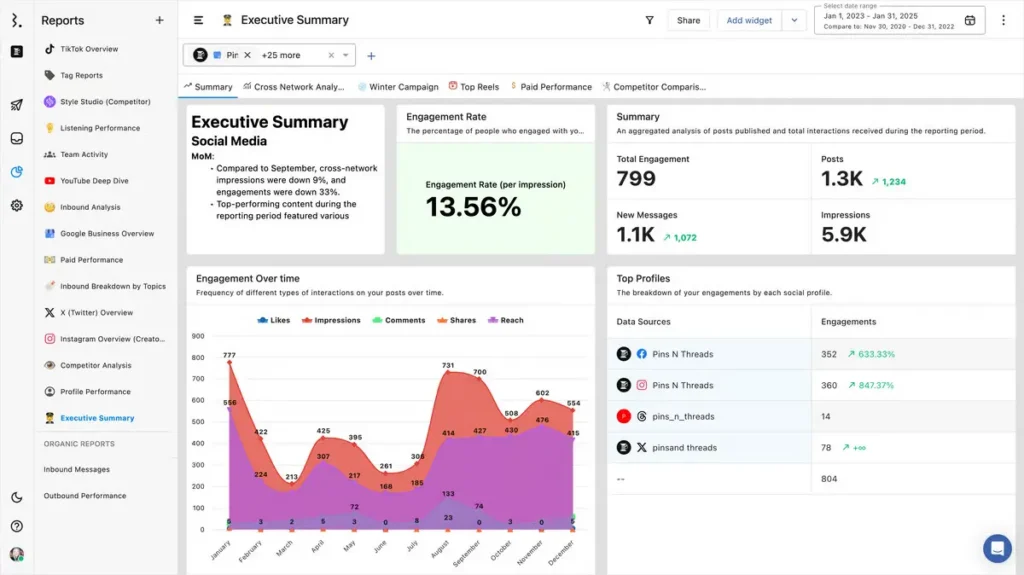
Statusbrew feature overview
Statusbrew handles reporting in a fairly practical way. It pulls performance data from all connected platforms into one place, which makes it easier to see how content is doing overall without bouncing between native dashboards.
You can track post performance, engagement, and profile-level results across platforms, then export that data into branded PDF or CSV reports. For teams that send updates on a schedule, automatic report delivery is a real time-saver.
What I like here is that reporting isn’t separated from publishing. You can move from the content calendar to performance numbers without losing context, which helps when reviewing what actually worked and what didn’t. It’s especially useful for spotting trends over time rather than looking at isolated posts.
Statusbrew also includes basic sentiment and keyword tracking, which adds some color to the numbers. It’s not meant to replace dedicated listening tools, but it helps put engagement into context.
Statusbrew’s key features:
- Plan, schedule, and publish content across Facebook, Instagram, LinkedIn, X (Twitter), TikTok, YouTube, Pinterest, Threads, Bluesky, and WhatsApp using a shared calendar
- Create drafts, customize posts per platform, tag locations, add hashtags, and preview Instagram grids
- Organize content with categories, bulk scheduling, RSS feeds, and campaign tracking
- Boost Facebook and Instagram posts and pause all scheduled content when needed
- Collaborate using roles, permissions, approval workflows, audit trails, and shared calendars
- Manage comments, messages, reviews, and TikTok DMs from a unified inbox with filters, saved replies, automation rules, and sentiment analysis
- Monitor brand keywords and hashtags across X, Instagram, YouTube, Reddit, Threads, blogs, and news sites
- Track performance with cross-network analytics, profile reports, hashtag tracking, paid campaign results, and competitor benchmarking
- Monitor brand mentions with real-time social listening across Instagram, X, and Reddit
- Export branded reports in PDF or CSV, schedule report delivery, and build custom dashboards
- Integrate with tools like Canva, Google Business Profile, Slack, Dropbox, Bitly, Giphy, and Unsplash
- Access enterprise integrations such as HubSpot, Salesforce, Trustpilot, and app store reviews
- Secure accounts with two-step verification, access controls, and team activity logs
- Use mobile apps, training resources, live chat support, and agency billing tools
What I like about Statusbrew
What I like about Statusbrew is the sense of structure it brings once you’re working inside it. Scheduling, engagement, and reporting are closely linked, which makes reviewing performance feel straightforward instead of scattered.
The feedback about ease of use makes sense to me. There is a short ramp-up, but once things click, scheduling across platforms and reviewing results becomes much faster. The reporting dashboards are clear, and the collaboration features genuinely help teams stay aligned without extra back-and-forth.
What users are saying about Statusbrew’s pros:
- “Posting is directly fed into engagement monitoring, and as such, there is no separation between posting and responding.” – Ryan M. D., Founder/CEO, Marketing and Advertising, Small-Business (Source)
- “Ease of use, valuable features, useful stats via dashboard, nice interface.” – Davide Z., President & CEO, Mid-Market (Manufacturing) (Source)
- “Easy integration with LinkedIn and Twitter.” – Tatiana F., Senior Manager, Brand and Communications, Enterprise (Accounting) (Source)
- “The scheduling tool made the normally unmanageable task of scheduling the same post across multiple social media channels incredibly easy. It is intuitive and saves a serious amount of time. The assign tool is excellent for collaboration and saves us from having to send an email to a colleague.” – Andrew B., Director of Strategic Marketing & Product Marketing, Enterprise (Electrical/Electronic Manufacturing) (Source)
- “The easy way to schedule articles on social media. It is very user-friendly.” – John R., Creative Director/Editor, Small-Business (Marketing and Advertising) (Source)
What I dislike about Statusbrew
The learning curve is real, and several reviews reflect that. It takes some time to feel comfortable with all the reporting and workflow options.
I also noticed the same things users point out: occasional performance hiccups, inbox syncing delays, and the lack of a more complete media library. None of these are major issues on their own, but they do add friction if you’re working at scale.
What users are saying about Statusbrew’s cons:
- “Statusbrew could improve some of its features.” – Tatiana F., Senior Manager, Brand and Communications, Enterprise (Accounting) (Source)
- “I would really like to see an extensive media library. The ability to reuse images and videos that have already been uploaded would save a lot of time.” – Andrew B., Director of Strategic Marketing & Product Marketing, Enterprise (Electrical/Electronic Manufacturing) (Source)
- “In some instances, shared inbox responses are second slow to sync relative to native services.” – Ryan M. D., Founder/CEO, Marketing and Advertising, Small-Business (Source)
- “Takes some time to understand how it works, but once you get it, it is easy to use.” – Davide Z., President & CEO, Mid-Market (Manufacturing) (Source)
- “Sometimes the website crashes and uses a lot of RAM when I upload CSVs to the website.” – John R., Creative Director/Editor, Small-Business (Marketing and Advertising) (Source)
Statusbrew pricing
- Offers a 14-day free trial
- Paid plans start at $89
4. HubSpot
Who is HubSpot best for?
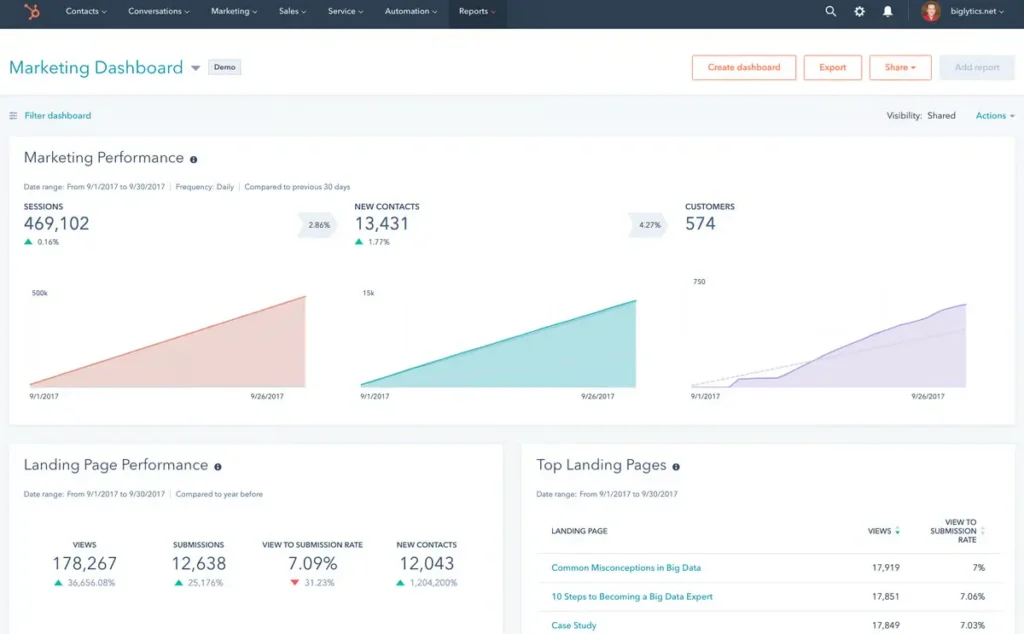
HubSpot works best for teams that want social media analytics to sit inside a much bigger marketing and CRM setup. It’s a good fit when social media is closely tied to lead generation, email marketing, sales pipelines, and reporting across channels, not treated as a standalone activity.
HubSpot feature overview
HubSpot’s social media features are part of its broader marketing platform. Social publishing, engagement, and reporting are designed to connect directly with contacts, campaigns, and revenue data.
You can schedule and publish posts across major social networks, track post performance, and see how social activity contributes to website traffic, conversions, and leads. What makes HubSpot different from most social media analytics tools is how tightly it links social media analytics with web analytics, CRM data, and campaign reporting.
Reporting focuses less on surface-level social metrics and more on outcomes. You can see which social media posts drive visits, form submissions, and customer actions, and then follow that data through the funnel.
Hubspot’s key features
- Built-in dashboards for marketing performance (including social, email, web, and campaign reporting)
- Custom reports for the metrics and KPIs your team actually tracks
- Basic reporting plus report subscriptions, so updates can be sent automatically
- Web analytics and funnel reporting to see how people move from visit to lead to customer
- ROI and revenue analytics to connect marketing work to pipeline and revenue
- Social publishing and scheduling for connected social accounts
- Social analytics for post and campaign performance
- Campaign planning so social posts can be grouped and measured as part of a bigger campaign
- Campaign optimization insights (like spotting trends and better timing)
- Social engagement tools to manage interactions in one place
- Social ads tools for managing and optimizing paid social
- Social listening to monitor what contacts and leads say across platforms
- Workflow automation to move leads through sequences and nurture flows
- Notifications and alerts for campaign performance changes
- Lead scoring (including predictive options) to prioritize follow-up
- Segmentation tools to build targeted audiences and lists
- Bulk data import/export tools for cleaning, updating, and managing records at scale
- User roles, permissions, and access management for teams
- Enterprise scalability and admin controls for larger orgs
- Sandbox/test environments for safer changes and rollouts
- API access and integration tools for connecting other software
- Large partner ecosystem with lots of ready-made app integrations
- CRM + marketing automation connections to keep data in sync across tools
What I like about HubSpot
HubSpot gets a lot of love for one simple reason: it pulls a lot of moving parts into one place. People keep mentioning how easy it is to set up workflows, build campaigns, and track results without needing a huge team or a super technical setup.
The reporting and dashboards also come up often, especially when they’re connected to CRM data and the customer journey. It sounds like for many teams, HubSpot makes everyday marketing feel more organized and less scattered.
What users say about HubSpot’s pros:
- “What I like most about HubSpot Marketing Hub is the ability to automate campaigns and centralize all marketing actions in one place. The creation of workflows, emails, landing pages, and the analysis of results are very intuitive, which makes it easier to optimize strategies and generate leads more efficiently, even without a large team.” – Gabriel G., Quality Manager (Source)
- “What I like most about HubSpot Marketing Hub is how easy it is to use, even if you’re not especially technical. Everything—from setting up email campaigns to tracking performance—is laid out clearly, so it’s simple to see what’s working and what isn’t. I also appreciate how well it integrates with CRM data, which helps keep marketing efforts more targeted, consistent, and organized. Overall, it makes managing day-to-day marketing activities feel much more straightforward.” – Saksh P. Customer Success (Source)
- “HubSpot’s main advantage is its comprehensive all-in-one ecosystem. The marketing automation workflows are highly intuitive, enabling us to nurture leads efficiently without needing to intervene manually all the time. I especially value how smoothly the landing page builder connects with our analytics, providing a clear and real-time perspective on our customer journey. It truly bridges the gap between our marketing efforts and data-driven results.” – Frederick S., Customer success manager (Source)
- “I use HubSpot Marketing Hub for automation, marketing, lead management, and sometimes analytics. It makes everything easier with tools that help capture leads via forms, pop-ups, and landing pages. Their analytics and reporting tools are very well set up, offering comprehensive dashboards to track campaign performance and ROIs. This setup makes measurement very easy and effective. The simple user interface for basic workflows is another thing I like; it is easy to use initially.” – Arbaz K (Source)
What I dislike about HubSpot
Looking through the critical feedback, the same two issues come up repeatedly: pricing and complexity once you go beyond the basics. Costs can climb fast as your contact list grows, and some of the more advanced automation and reporting features sit behind higher tiers.
A few users also mention a learning curve when you want deeper reporting or more customization, and theme or landing page tweaks can get frustrating if you don’t have developer support.
What users say about HubSpot’s cons:
- “What I like least about the HubSpot Marketing Hub is that the cost can increase quickly as the contact base grows. Additionally, some more advanced customizations of automations and reports require higher plans, which can limit more specific strategies for smaller companies.” – Gabriel G., Quality Manager (Source)
- “The biggest drawback is pricing. As contact volume and feature requirements grow, costs can increase significantly, making it less accessible for early-stage startups. Some advanced features are locked behind higher-tier plans, and customization flexibility in certain areas can feel limited compared to specialized tools. Reporting, while powerful, sometimes requires a learning curve for advanced use cases.” – Sumeet S., Senior Product Manager (Source)
- “It’s quite difficult to customize themes without developer skills, and applying themes to landing pages is not very intuitive. The limitation on marketing contacts is restrictive—if you don’t have enough, you can’t send newsletters. It would also be great to have the ability to develop more complex and targeted dashboards to monitor web data effectively.” – Davide C., Web Graphic Designer (Source)
HubSpot pricing
- Offers a free plan
- Paid plans start at $20
5. Social Champ
Who is Social Champ best for?
Social Champ works well for small teams and agencies that need clear reporting without a complicated setup. It’s a good option if your main goal is to track results, send clean reports to clients, and keep costs under control.
Social Champ feature overview
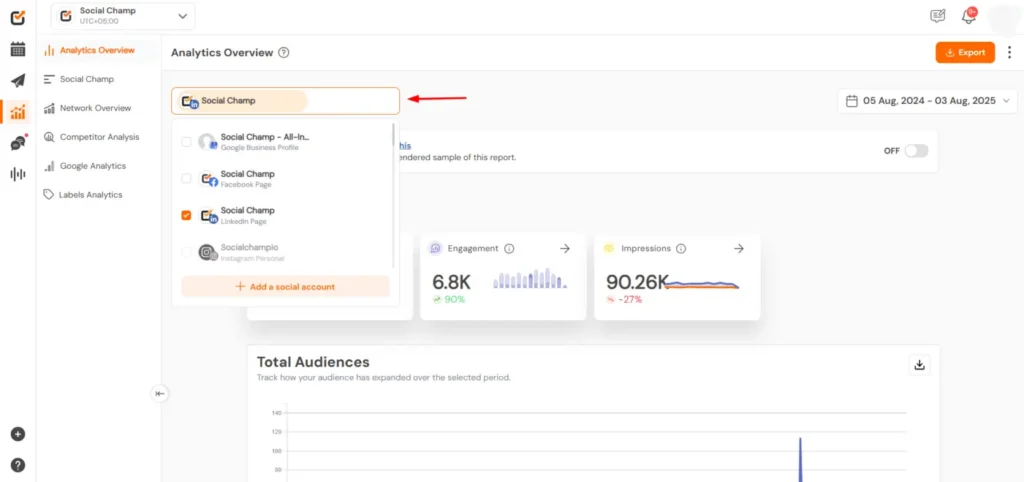
Social Champ keeps reporting practical. It doesn’t try to do everything, and that’s part of the appeal. The analytics focus on things teams actually look at: post performance, engagement metrics, engagement rate, and follower growth across multiple platforms.
All of this lives in one place, so you’re not jumping between native analytics on each platform. You get a clear picture of overall social media performance, which makes it easier to explain results to clients or stakeholders without extra context.
Reports are easy to generate and export, which matters if you’re sending updates regularly. You can pull social media reports in PDF or PPT format and reuse the same structure each time. For many teams, that consistency is more useful than advanced dashboards.
Social Champ doesn’t go deep into areas like competitor analysis or sentiment tracking, and it’s not meant to replace Google Analytics or full web analytics setups. But for day-to-day reporting tied to content and publishing, it’s straightforward and reliable.
Social Champ’s key features:
- Schedule and publish content across Facebook, Instagram, LinkedIn, X (Twitter), TikTok, YouTube, Pinterest, Threads, Mastodon, Bluesky, and Google Business Profile
- Manage unlimited scheduled posts, users, and workspaces on higher-tier plans
- Bulk schedule large volumes of posts and queue them automatically for optimal timing
- Create and schedule threads for X, Mastodon, Threads, and Bluesky
- Add polls, mentions, hashtags, alt text, image tags, and location tags to posts
- Schedule LinkedIn documents, first comments, and custom video thumbnails
- Reuse evergreen content with Smart Queues and Smart Repeating Posts
- Organize hashtags with a Hashtag Manager and edit visuals using the built-in Image Editor
- Draft, save, and collaborate on posts with shareable drafts and internal notes
- Store media files with storage limits ranging from 10GB to unlimited, depending on plan
- Plan content using weekly or monthly calendars with filters, notes, and search
- Curate and publish content via RSS feeds, keyword searches, and royalty-free images
- Create reusable call-to-actions for curated content
- Use AI tools for caption generation, visuals, suggested posting times, and basic sentiment analysis
- Boost Facebook, Instagram, and LinkedIn posts and review ad performance insights
- Track engagement trends, individual post data, and up to two years of analytics history
- Export PDF and PPT reports, create white-labeled client reports, and run basic competitor analysis
- Manage comments, DMs, and reviews from major platforms in a unified social inbox
- Save replies, tag messages, and assign conversations to teammates
- Set up approval workflows, shared calendars, roles, and client workspaces
- Prevent duplicate actions with team collision detection and moderation rules
- Automate publishing through RSS and Atom feed imports
- Integrate with Canva, Dropbox, Google Drive, OneDrive, WordPress, HubSpot, Salesforce, and Zapier
- Access enterprise features like custom APIs, SSO, and dedicated account management
- Build customizable Instagram Link in Bio pages with branded buttons and visuals
- Monitor brand sentiment, hashtags, and conversations with social listening tools
- Track up to 100,000 mentions per month and store listening data for up to three months
- Get live chat support, onboarding training, and roadmap access, with dedicated managers on enterprise plans
What I like about Social Champ
What I appreciate most about Social Champ is how little friction there is once you start using it. You don’t need a long setup phase or hours of tutorials. You can connect your social accounts, schedule posts, and see results pretty quickly.
I also think it does a good job at its price point. Analytics are available even on lower plans, which isn’t a given with a lot of tools. The free tier is genuinely usable, not just a teaser, and that makes it easier to test workflows before committing.
That’s reflected in what users keep saying:
- “It allows us to do what we need to do with a better price than Hootsuite.” – Curtis H., Owner (Source)
- “Love how easy it is to use and how clients can approve proofs without a lot of extra expense or confusion. AI tools are nice. Reliable, friendly support and most importantly, whenever we have made requests or suggestions, the tech team has taken our requests seriously and integrated some great solutions. Really great!! Nice solution for a small to mid-size social media team. So happy with Social Champ!!!” – Ann L., Owner and Executive Director (Source)
- “Social Champ just makes things easy. Its free plan lets you connect three social accounts. You can create one post to go on all three platforms and then tweak them individually for each channel. It’s easy to add and edit photos within the platform. You get a good preview. You can schedule things, and it’s easy to reschedule posts as needed. It’s honestly better than a lot of more expensive platforms I’ve used! … I would recommend Social Champ to anyone with a small budget who wants to get started with social media automation.” – Bethany D., Marketing Manager (Source)
- “I love how simple and easy-to-use Social Champ is. Scheduling posts is super convenient, and the multi-platform support makes it effortless to manage all my social media accounts in one place. The analytics feature is a nice bonus, helping me track performance and make better content decisions.” – Abdul G., Administrative Clerk (Source)
- “I used to use Buffer, but I found the free tier too limited. Then I discovered Social Champ, which is way more generous in its free tier and has other interesting features that make it easier to share content regularly.” – Paolo C. (Source)
What I dislike about Social Champ
Most of the downsides show up once you start relying on it heavily. Scheduled posts can occasionally run late, and the mobile app feels more limited compared to the desktop version. If you’re managing high volumes or need tighter reliability, those moments stand out.
It’s also clear that Social Champ isn’t trying to compete head-on with higher-priced platforms in terms of polish or depth. That’s not necessarily a dealbreaker, but it’s something to be aware of as your needs grow.
Users describe it pretty clearly:
- “Very rarely have we encountered a tech issue, but support has always resolved it really quickly. So that’s a plus. No complaints here.” – Ann L., Owner and Executive Director (Source)
- “You can see a preview of your posts when you’re creating them. However, I wish it were easier to see a preview AFTER you’ve scheduled them. Sometimes I just want to be able to quickly look at what I already have scheduled for a certain day.” – Bethany D., Marketing Manager (Source)
- “Sometimes, scheduled posts get delayed, which can be a bit frustrating. The free plan is quite limited, so you might need to upgrade to unlock more features. Also, the mobile app could use some improvements, especially in terms of speed and navigation.” – Abdul G., Administrative Clerk (Source)
- “It is not as fully baked as Hootsuite, but it is getting there.” – Curtis H., Owner (Source)
Social Champ pricing
- Offers a 7-day free trial
- Paid plans start at $9
6. Vista Social
Who is Vista Social best for?
Vista Social is best for agencies, brands, and social media managers who need powerful AI automation, unified inbox management, and cross-platform analytics in one dashboard — especially if they manage high engagement volume across multiple profiles.
Vista Social feature overview
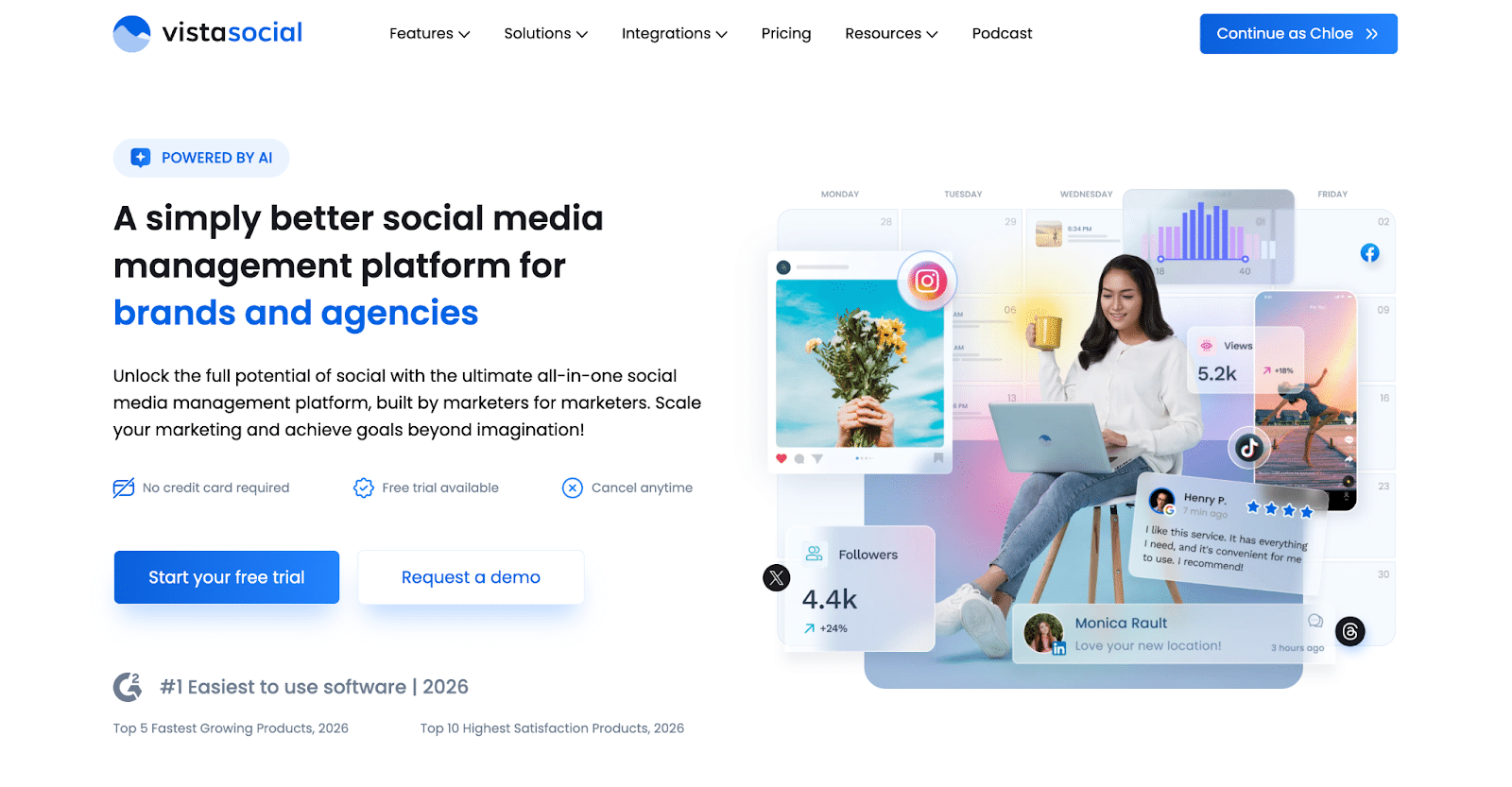
What makes Vista Social stand out in an analytics context is that AI doesn’t stop at reporting — it supports the whole loop, from drafting content and interpreting conversations to surfacing cross-platform performance insights and next-step recommendations.
Its cross-platform analytics go beyond surface-level metrics, using AI analysis in reports to help teams spot trends and take action rather than just export numbers. It also pairs those insights with a unified inbox (comments + DMs), sentiment analysis for prioritization, and automation workflows that route conversations efficiently.
Vista Social also includes smart scheduling, multi-level approval workflows, and white-label reporting for client-ready deliverables, which makes it a strong fit for agencies that want publishing and analytics under one roof.
Vista Social’s key features:
- AI-powered content generation for captions, hashtags, brand voice, ideas, and comments
- Cross-platform analytics with AI analysis and performance recommendations
- Unified social inbox with sentiment analysis, DM automation, and lead capture (via DM automation flows)
- Smart scheduling with optimal posting time recommendations
- Multi-level approval workflows for teams and agencies
- White-label reporting for client management
- ChatGPT integration for instant content creation
- Support for Facebook, Instagram, X (Twitter), LinkedIn, TikTok, YouTube, Pinterest, Google Business Profile, Bluesky, Threads, and Reddit
What I like about Vista Social
What I appreciate most about Vista Social is how much it keeps in one place without making analytics feel like an afterthought. The reporting covers all connected platforms, surfaces AI-backed recommendations alongside the numbers, and stays accessible without needing a dedicated analyst to interpret it.
For teams running multiple client accounts, the white-label reporting and approval flows genuinely reduce the back-and-forth.
Here’s what other people say:
- “The social listening feature surprised me the most. I wasn’t expecting it at this price point — usually that’s locked for much more expensive tools. Their report feature is a hero for me — it’s super clean and easy to customize your reports, and it also gives you recommendations which I love!” — Anuja P., Social Media Consultant, Luxury Goods & Jewelry (Source)
- “The interface for scheduling and calendar management gives a premium feel and is very easy to use! I also love that I can see and respond to messages and comments in real time, and set up DM automations in case I’m offline. Such a game-changer for me!” — Hannah Liza T., Digital Creator (Source)
- “Having the ability to see messages and mentions in real-time across Facebook, Instagram, TikTok, Threads, and LinkedIn within one inbox is a total game-changer. I’ve also started using the DM Automation to handle initial responses, which saves me a massive amount of time.” — Adrian P., Director of Marketing (Source)
What I dislike about Vista Social
If your strategy relies heavily on built-in listening or employee advocacy, those are available as add-ons rather than out of the box on lower-tier plans. The pricing is also easier to justify when you use the broader suite (inbox + automation + analytics); if you only need analytics basics, it may feel like more than you need.
A few users also flag a learning curve when getting started — the platform’s depth means there’s more to navigate upfront, and some integrations can occasionally need a bit of extra attention.
Here’s what others point out:
- “There is a lot going on and it isn’t the most user-friendly software I have used — it took me a minute to figure a few things out. There is also no chat widget for customer service.” — Verified User, Small-Business (Source)
- “The only thing I disliked was that the images in the calendar appeared so small that I could not see, at a glance, which image was scheduled to go out.” — Verified User, Small-Business (Source)
- “After I connected my social accounts to Vista Social, they didn’t appear in my dashboard, and I had to select them manually after a few attempts to solve the problem.” — Verified User, Small-Business (Source)
- “I think the new integrations, especially with Threads, need more refining. Sometimes the triggers don’t work.” — Virinder S., Marketing Specialist, Enterprise (Source)
Vista Social pricing
- Offers a 14-day free trial (no credit card required)
- A free plan is available for up to 8 social profiles and 1 user
- Paid plans start at $39/month (Standard); the Professional plan is $79/month ($63/month billed annually
7. Social Status
Who is Social Status best for?
Social Status is a good fit for agencies that spend a lot of time on reporting. If your work involves sending monthly performance reports to clients, comparing results across accounts, or pulling competitor benchmarks, this tool makes that part much easier.
Social Status feature overview
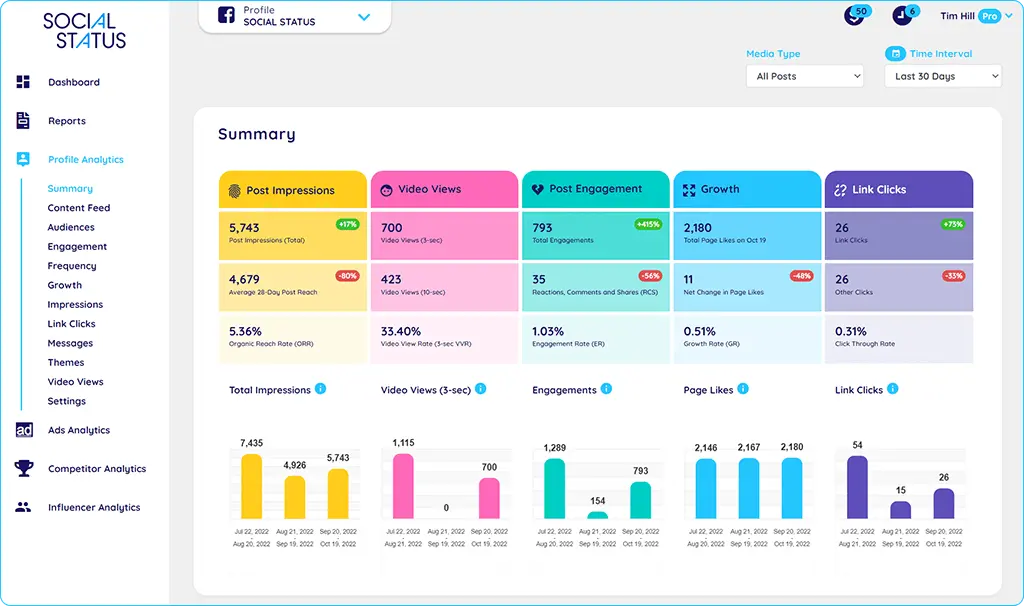
Social Status is a reporting-first tool. It’s built for situations where publishing and engagement already happen elsewhere, and what’s missing is a clean, reliable way to understand performance across accounts.
Instead of trying to cover every part of social media management, Social Status focuses on analytics, attribution, and reporting. You connect your social media accounts, and the platform pulls in performance data across channels so you can review results in one place. For agencies, this usually means fewer spreadsheets, less manual data work, and reports that are easier to send to clients.
The strength of Social Status is in how clearly it presents data. Dashboards are straightforward, reports are customizable, and exporting or white-labeling results is built into the workflow. It’s designed to support regular reporting, comparisons, and performance reviews without adding unnecessary complexity.
Social Status key features
- Customizable reports with flexible views and filters
- Export reports in PDF, CSV, or XLS formats
- White-label reporting for agencies and consultants
- Scalable setup for tracking multiple social media accounts
- Post performance tracking (engagement, reach, clicks, etc.)
- Follower analysis, including audience demographics and growth trends
- Competitor analysis and benchmarking
- Paid campaign tracking across social platforms
- Attribution linking social activity to leads, conversions, and sales
- Hashtag analytics to identify top-performing and trending hashtags
- Sentiment analysis to understand how content and brands are perceived
- Automated processing of large volumes of social data
- Cross-platform data integration
- Adaptive insights based on performance patterns
- Proactive suggestions to highlight changes or trends
- Decision support based on aggregated analytics
What I like about Social Status
From what I see online and in reviews, people don’t come to Social Status looking for “everything.” They come because they want clarity. A lot of users mention how refreshing it feels to open the tool and immediately see the numbers that actually matter to them, without digging through features they’ll never use.
There’s a recurring theme of relief here: analytics finally feeling accessible, readable, and even motivating, especially for creators, small teams, and agencies who care more about understanding performance than managing posts.
Here’s what other people say:
- “I absolutely love Social Status. It’s hands down the most user-friendly analytics platform I’ve ever used as a creator. It makes building a truly sustainable brand feel so much lighter because it does all of the heaviest lifting for you. As a creator, it’s a tool that I wish I had found years and years ago because it would have helped me see that my content really did have depth and my community really was engaged, even when the numbers didn’t feel like it on the outside.” – Brejon, Brand Strategist (Source)
- “It’s very easy to navigate the platform, self-explained and user friendly. The onboarding is very smooth and the platform is being demonstrated very well. The function is exactly what our team needs – from social profile tracking to competitor analysis. The metrics are holistic and the charts are easy to read and able to be toggled. The data are accurate so far and the customer support is timely.” – Chris X, Senior Insights Manager (Source)
- “While looking for a social media analytics platform, I wanted a tool that would specifically provide numbers and analysis for how our content was performing. Whether it was the high cost or extra features like reporting and listening that we didn’t require, there were plenty of options that didn’t fit our needs, but then was able to find Social Status which saved the day. They provided extremely flexible plans that included all the data we were looking for on all the core platforms.” – Austin S., Small Business Owner (Source)
- “It is built specifically for analytics without other features that I am not interested in. It’s easy to see the metrics I care about most right away.”- Sadie M., Small-Business Owner (Source)
What I dislike about Social Status
On the flip side, most of the criticism I’ve come across isn’t about missing core analytics, but about polish and depth in specific areas.
Some users want more advanced benchmarking, smoother report handling, or fewer small bugs when working with filters and exports. It’s less about what the tool does, and more about how smoothly everything works once you’re deep into reporting workflows.
Here’s what others point out:
- “It would be better if the tool could provide estimated reach/impression for competitor analysis so the engagement rate can’t only be follower base. Looking forward to the competitor ER benchmark by industry – which would be very helpful for our clients.” – Chris X, Senior Insights Manager (Source)
- “Filters on Content Themes don’t seem to always work for me and it’s a bit buggy.” – Sadie M., Small-Business Owner (Source)
- “The process of creating a report can be time-consuming at times.” – Tarek D, Marketing (Source)
- “The reports are a little clunky on saving.” – Helen R., Digital Marketing Manager (Source)
Social Status pricing
- Offers a free plan
- Paid plans start at $29/month
8. Keyhole
Who is Keyhole best for?
Keyhole is best for agencies and brands that care more about tracking conversations, hashtags, and brand mentions than scheduling posts. It’s a strong pick if your work revolves around social listening, influencer analytics, and turning social data into clear client reports.
Keyhole feature overview
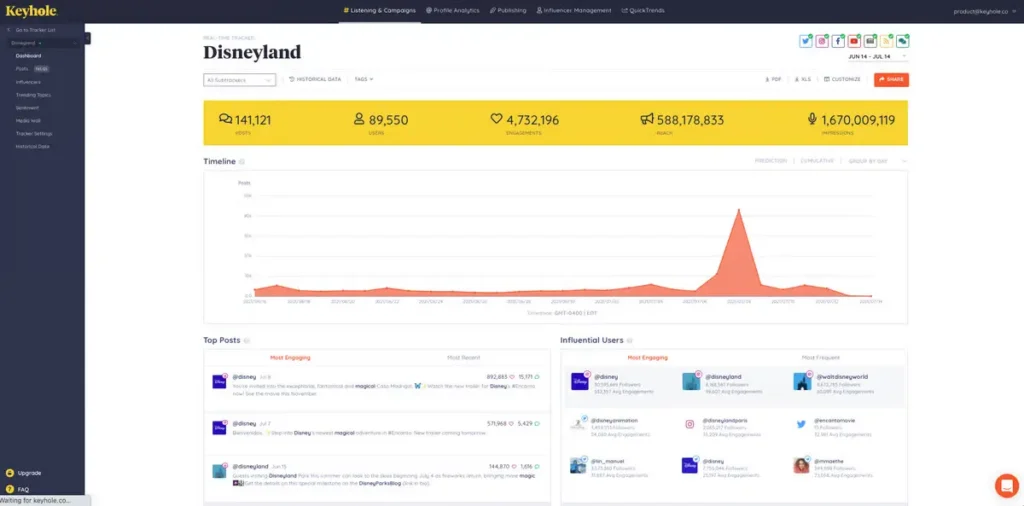
Keyhole sits at the intersection of social media analytics, social listening, and influencer marketing. From what I see online, it’s often picked by teams that care deeply about what people are saying, who is saying it, and how conversations spread, rather than just post scheduling or content workflows.
It’s especially strong when hashtags, brand mentions, influencer impact, and campaign-level insights matter more than day-to-day publishing. The platform feels built for tracking momentum, visibility, and influence across social channels, then turning that data into reports you can actually share with clients or stakeholders.
Keyhole’s key features:
- Export reports in CSV, XLS, or PDF formats
- Scale reporting across multiple social media accounts
- Create white-labeled reports for clients or internal teams
- Track post performance (engagement, likes, comments, shares, reach)
- Analyze follower growth and audience demographics
- Run competitor analysis to benchmark performance
- Measure paid campaign performance
- Monitor hashtag performance and trending hashtags
- Use sentiment analysis to understand tone around your brand
- Measure conversation volume and share of voice
- Track brand mentions across platforms
- Monitor keywords, topics, and hashtags at scale
- Identify trending topics and emerging audience interests
- Analyze competitor conversations and visibility
- Build custom social media reports and dashboards
- Set up alerts and notifications for spikes, trends, or issues
- Use advanced filtering to drill into specific data points
- Discover and recruit influencers through search and scoring
- Analyze influencer analytics for audiences (demographics, interests, affinities)
- Segment influencers by campaign or initiative
- Manage influencer collaborations and approvals
- Track influencer-driven campaign performance and ROI
- Manage and publish user-generated content (UGC)
- Whitelist influencers to run ads through their social accounts
- Import and export influencer data and contact details
What I like about Keyhole
What stands out to me about Keyhole is how focused it is. From what I’ve seen, people don’t use it for everything, they use it because they really care about tracking conversations, hashtags, and campaign momentum.
The hashtag analytics come up again and again, especially for teams running time-bound campaigns or trying to understand how a topic spreads beyond their own posts.
Ease of use is another recurring theme. A lot of users mention how quickly they were able to get reports out and how little training was needed to get value from the data. It feels like a tool that respects your time.
Here’s what other people say:
- “Keyhole’s social media analytics – especially hashtags – were the reason we switched to this platform. All features were VERY easy to use and train your staff on.” – Victoria B., Office Manager (Source)
- “I like how easy it is to generate my analytics report for my social media channels. The hashtag tracker is particularly useful and the insights have proven to be of great use for our campaign.” – Tasmy G., Online Communications Officer (Source)
- “I’ve been using Keyhole almost since the beginning and what I love best is the flexibility in the data that can be tracked and captured. It has made evaluating ROI of different campaigns and tactics much easier.” – Annelise L. Digital Strategist, Marketing Consultant & Game Master (Source)
- “The hashtag tracking feature is very helpful. I really appreciated the ease of use.”– Verified User in Non-Profit Organization Management (Source)
What I dislike about Keyhole
Most of the criticism I see isn’t about the analytics themselves, but about limits and friction once campaigns grow. Pricing tied to data usage comes up often, especially when a campaign performs well and suddenly burns through tracking limits faster than expected.
Scheduling and UX also feel like weak spots. Several users mention that publishing tools didn’t meet expectations and that support was slow when things broke. For a tool that’s strongest in analytics, anything outside that core seems to feel less polished.
Here’s what others point out:
- “It can get expensive very quickly if you are lucky enough to have a successful campaign that really takes off. In the early days you had unlimited tracking now it can quickly gobble up the data and either stop tracking or rack up the cost in a prohibitive way. It’s why I only use it for limited campaigns now instead of on an ongoing basis.” – Annelise L. Digital Strategist, Marketing Consultant & Game Master (Source)
- “We stopped using Keyhole because social media scheduling posts would failed almost 1-2 times a week or the full week and their support was very hard to get a hold of. When they did respond, they were not helpful and we had to manually post each day on the platforms themselves.” – Victoria B., Office Manager (Source)
- “The website is a bit difficult to navigate; it wouldn’t let me sign up on my own, had to have a consultation first. I just needed to get it done.” – Verified User in Non-Profit Organization Management (Source)
- “I dislike the scheduling content part, I thought it was going to be easier, more user-friendly and allow me to upload carousels and other social media needs, sadly I have not been able to use it because the UX is a bit uncomfortable, but I hope this can be fixed in the future. I also dislike that in the dashboards, where the dedicated individual graphics are when you export them as PDF they miss the necesary info on each section, therefore I cannot send that PDF reports to my stakeholders, therefore I have to take screenshots of these and still miss some of the info.” – Tasmy G., Online Communications Officer (Source)
Keyhole pricing
- Starts at $3/month
9. Oktopost
Who is Oktopost best for?
Oktopost is built for teams that take reporting seriously, especially in B2B environments where social performance needs to tie back to pipeline, leads, and revenue.
Oktopost feature overview
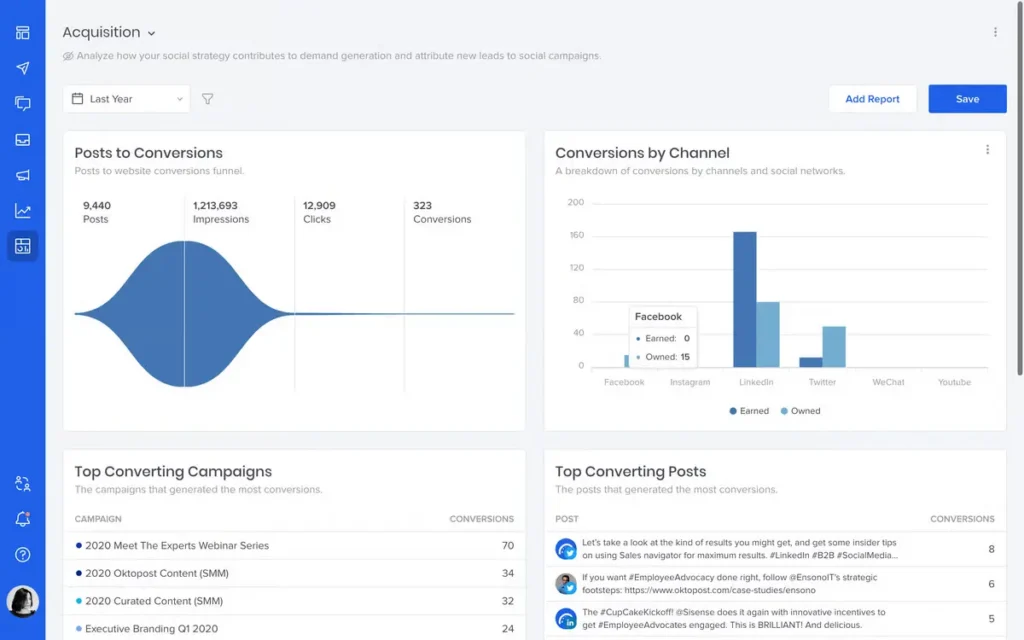
Oktopost is built as a social media reporting tool for teams that need clarity across their entire social media operation. It’s not a lightweight scheduler. It’s a social media management tool where publishing, engagement, analytics, and social listening all live in one platform, so teams don’t have to piece together reports from many tools or rely on manual reporting.
Content is planned and scheduled through a shared calendar, with posts grouped into social media campaigns. That campaign-based structure makes it easier to monitor performance over a specific period and see results tied to real initiatives, not just individual posts. It also improves the reporting process, since performance data rolls up cleanly at campaign level instead of feeling fragmented.
On the analytics side, Oktopost goes beyond surface-level metrics. Teams can track social media performance using engagement rate, reach, impressions, clicks, video views, follower trends, hashtag performance, and influencer analytics from one dashboard.
Access to historical data allows for trend tracking over time, helping teams understand what drives customer experience, customer retention, and real business impact. Instead of raw numbers, the platform turns social media data into actionable insights that support social media strategy and content strategy.
Reporting is one of Oktopost’s strongest areas. Users can create custom reports and customizable reports using pre built report templates or fully tailored views.
Reports can be exported for internal teams, clients, or the executive team, reducing manual work and saving time. Integrations with Google Analytics, CRM systems, and other marketing tools help connect social media metrics to traffic sources, conversion rate, new customers, and revenue generation.
Listening and engagement are built in as well. Oktopost supports social listening across social channels, tracking brand mentions, keywords, sentiment, and competitor benchmarking. Engagement happens through a unified inbox, with workflows designed for multiple accounts, approvals, and collaboration across regions.
It takes more setup than basic analytics tools, but that structure is what allows teams to scale reporting and monitoring without switching tools later.
Oktopost’s key features:
- Social media analytics tools covering LinkedIn, Facebook, X (Twitter), Instagram, YouTube, and other major social media networks
- Centralized social media analytics software for managing social media data across all social profiles and social channels
- Campaign-based publishing and reporting for specific social media campaigns across platforms
- Shared content calendar to manage posting schedules, posting frequency, and content strategy across teams
- Track post performance using engagement rate, reach, impressions, clicks, video views, and follower growth
- Monitor performance metrics such as audience growth, engagement trends, and performing posts over time
- Access historical data to compare results across a specific period and support long-term trend tracking
- One dashboard view combining social media metrics, performance data, and traffic sources
- Attribution tools to connect social activity to conversion rate, website visits, new customers, and revenue generation
- Influencer analytics to support influencer marketing and influencer campaigns
- Competitor benchmarking to analyze competitor behavior and compare results against industry standards
- Social listening for brand mentions, keywords, sentiment, hot topics, and share of voice
- Unified inbox to manage comments, messages, and reviews across platforms
- Support for multiple accounts, regions, and teams without increasing manual work
- Custom reports, customizable reports, and automated social media reports using report templates
- Integrations with Google Analytics, ads manager, CRM systems, and other tools
- Alerts and real time notifications for shifts in engagement, ad performance, and social media performance
- Built to support scalable media reporting and long-term social media management
What I like about Oktopost
From what I see online and across reviews, people really value how much visibility and control Oktopost gives them.
A lot of users mention being able to clearly see what’s being published, how campaigns are performing, and how social activity connects to wider business goals.
The reporting depth comes up often, as does the employee advocacy side, especially for teams that care about tracking results and ROI, not just posting content.
What other users say about Oktopost’s pros:
- “For enterprise companies who care about trackable growth, real and actionable insights from social data, engaged employees and value for ROI – Oktopost is the best tool. Their social BI tool for tracking and measuring success from social media campaigns is fully customizable. Add in active employee advocacy program – with leaderboard, and trackable ROI – and this is hands-down the best marketing tool in your stack.” – Zoe B, CEO (Source)
- “Super intuitive on every front, from publishing and moderating and even in building out reporting. Very robust platform for brands to easily manage all accounts and activate employees. Customer support is incredible at every point along the way.” – Sean M, Senior Social Media Manager (Source)
- “The ease of scheduling content, plus the way I can see what’s going out at a glance due to the color coding of campaigns. Also, the employee advocacy program is FANTASTIC!” – Verified User in Computer & Network Security (Source)
- “Within our team we like to use Oktopost to draft, review and schedule posts on our different brand channels. This product allows our teams to work together with the social function to draft posts from their campaigns and submit to head of social for review before posts to ensure it is on brand.” – Verified User in Computer Software (Source)
- “It’s very easy for creating and programming content: upload photos and templates and share them on social media platforms. I love the calendar content scheduler feature available in it, it helps you to schedule and publish your posts automatically. It helps you with great social media analytics. The reseller portal available in it is so well organised, and very useful for helpful for small and large businesses. The tool is very user f-iendly and easily trains your colleagues and team members to use it.” – Mayank S., Mechanical design Engineer (Source)
What I dislike about Oktopost
Looking through feedback, most of the downsides seem to come from how much the platform can do. Several users mention that reporting and Social BI take time to get used to, and that some workflows could be smoother.
Things like comparing data across longer time frames or managing older posts and messages come up more than once, which suggests a learning curve that’s worth factoring in.
What others say about Oktopost’s cons:
- “The Social BI functionality can be a little confusing at first, so there may be a slight learning curve. I also wish integration with Instagram was a little more simple and did not require a Facebook sign-in.” – Verified user in Computer Software (Source)
- “I would love to see the ability to compare data from different time frames. As it stands, the data you can see in any given visualization are from one single time frame, but I often like to look at data year over year, for example, to report out how we’ve improved.” – Verified User in Information Technology and Services (Source)
- “It’s sometimes difficult to delete the posts you uploaded on social media platforms. I wish there had been a tool that automatically deletes the post that you no longer want to show on your dashboard.” – Mayank S., Mechanical design Engineer (Source)
- “I don’t see a way to archive or delete messages that are obsolete” – Verified User in Information Technology and Services (Source)
Oktopost pricing
- Estimated price is $16k – $30k per year
10. Iconosquare
Who is Iconosquare best for?
Iconosquare is a strong fit for teams and creators who care deeply about performance on visual-first platforms. It’s especially popular with brands, agencies, and social media managers who want clear analytics, competitor benchmarks, and solid reporting without the weight of an all-in-one marketing suite.
Iconosquare feature overview
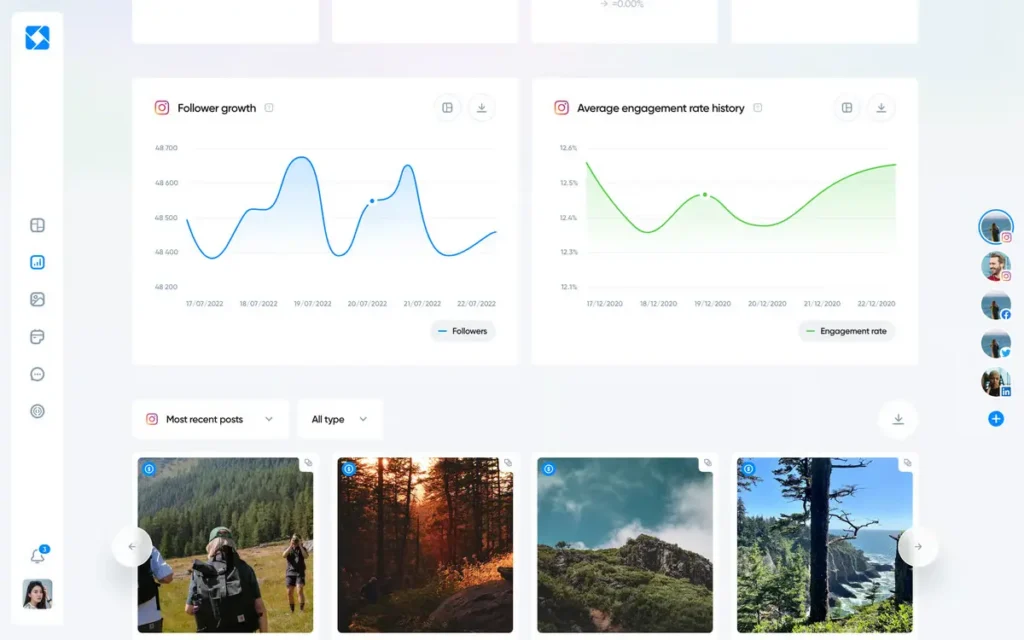
Iconosquare is very much an analytics-first tool. While it includes publishing and engagement features, the main focus is on helping teams understand how their social media content performs over time, how audiences change, and how results compare across competitors and platforms.
The analytics cover post performance, follower growth, audience demographics, hashtag performance, and paid campaign results. It’s easy to see which posts drive the most engagement, which formats work best, and how profiles evolve month over month. Built-in competitor analytics make it simple to benchmark performance, spot content gaps, and understand how your social media presence stacks up against others in the same space.
Reporting is one of Iconosquare’s stronger points. Dashboards are customizable, data can be filtered in detail, and teams can create custom reports tailored to specific goals, whether that’s tracking key performance indicators, post engagement, or social media ROI. Reports can be exported in multiple formats or automated for recurring updates. For agencies, white-label reporting is a big plus, since reports can be shared without Iconosquare branding.
Beyond analytics, Iconosquare includes tools for managing content and collaboration. A visual content calendar helps teams plan and schedule posts, approval workflows support client and team reviews, and role-based permissions keep access structured as accounts scale.
Monitoring features add context by tracking mentions, keywords, and hashtags, helping teams understand not just performance, but what’s being said around the brand.
Iconosquare’s key features:
- Social media analytics tools for tracking performance across major social media networks, including Instagram, Facebook, LinkedIn, X (Twitter), and TikTok
- Advanced social media analytics software built to analyze social media data across platforms, not just a single network
- Post performance tracking for organic posts, paid ads, and specific social media campaigns across multiple platforms
- Follower growth analysis across networks to track followers, audience growth, and follower engagement trends over time
- Audience insights for different audiences on each platform, including demographics, behavior, and content preferences
- Hashtag and keyword analytics using relevant industry keywords to identify top performing content and content competing in the same space
- End-to-end social media tracking for reach, impressions, website visits, click through rate, and other key metrics
- Paid and organic performance analysis through ads manager integrations across platforms
- Competitor analytics to monitor competitor behavior across social media networks and benchmark performance in the same location or market
- Competitive benchmarking against social analytics tools such as Sprout Social and similar platforms
- Custom dashboards and customizable dashboards for a consolidated dashboard view of all your data in one place
- Advanced analytics features, including predictive analytics and machine learning signals for spotting upcoming trends
- Custom metrics and custom tags for deeper analysis beyond standard performance metrics
- Reporting tools to create reports specifically for internal teams, clients, and the executive team
- Automated reports with flexible options to customize reports by platform, campaign, or timeframe
- Visual content calendar to schedule posts, manage posting frequency, and ensure social media content aligns with your social strategy
- Campaign grouping to analyze influencer campaigns, organic posts, and paid and organic performance together
- Unified inbox to manage comments and messages across social media platforms and monitor mentions
- Listening and monitoring tools for brand mentions, consumer research, emotional tone, and trend analysis
- UTM tracking and UTM parameters to connect social media activity to website visits, revenue generation, and social ROI
- Data-driven storytelling tools that turn analytics into valuable insights without needing a data science degree
- Premium analytics built as a future investment for teams that rely on advanced tools rather than basic analytics
What I like about Iconosquare
From what I’ve seen, people really like Iconosquare for how practical it is in everyday work. It’s often mentioned as a tool that makes managing multiple accounts easier, especially when approvals, scheduling, and reporting are part of the same flow. The analytics also come up a lot. Not just that they’re detailed, but that they’re easy to use and actually helpful when it’s time to pull together monthly reports.
Here’s what other people say:
- “Iconosquare allows for a single platform that brings together several of my clients in the same space where I can have the text and visuals approved by my clients. I also like the fact that I can write a post on Instagram and schedule it on Facebook and LinkedIn as well, for example, because my clients’ accounts are set up.” – Roxane L., Social Media Manager (Source)
- “The detailed insights available made monthly reporting a breeze at our agency. The format of everything was super intuitive and it not only saved our team time but gave deeper insights than most platforms allow.” – Karli W., Social Media Director (Source)
- “Easily allows scheduling posts on my company’s social media with just one click, especially thanks to their very practical CrossPost feature! The customer service is also very responsive, which is a big plus!” – Baptiste M., Consultant (Source)
- “I love how detailed the analytics are. It makes it so easy to find all of the information we need to keep track of how our page is performing.” – Dalton G, Media Coordinator (Source)
What I dislike about Iconosquare
Most of the downsides people mention aren’t deal-breakers, but they do show up once you’re deep into daily use. Things like account connections, limitations around posting formats, or wanting more control over exported metrics come up in reviews. Support responsiveness is another point some users raise, especially when issues take longer than expected to resolve.
Here’s what other people say:
- “The small downside is the fact that we cannot directly mention “non-professional” accounts via the platform. I also find it unfortunate that if we upload a document on LinkedIn, the client cannot swipe through the pages during validation, so I have to convert each page of the carousel into PNG, then once approved by my client, I integrate it into a PDF and then schedule the post.” – Roxane L., Social Media Manager (Source)
- “Support is not very responsive. Email support responds once daily at 2-4AM my time, and doesn’t do enough to respond to/resolve the issue, so I end up having what should be a 5 minute conversation that takes 5 days. Chat support is non-existent though the feature seems to exist, or just doesn’t keep US business hours. One of our accounts keeps getting disconnected for some unknown reason. Have had other accounts become disconnected only for specific Iconnosquare users and support had no idea why.” – Jamie O., Digital Director (Source)
- “Adding new accounts was a consistent issue for me. Despite having “full admin access” on many accounts, I would run into limitations on which Facebook and Instagram pages could be filtered into the program.” – Karli W., Social Media Director (Source)
- “I wish I could more easily select which metrics I want included in my analysis CSV. There’s a lot of detail I don’t need. It’s not a big deal though. I also want to be able to post stories with links and reels with text overlay.” – Verified User in Individual & Family Services (Source)
Iconosquare pricing
- Offers a free plan
- Paid plans start at €33
Frequently asked questions
What is the best social media analytics tool?
The best social media analytics tool is usually the one that fits into your daily workflow without friction. That’s why SocialBee works well for a lot of teams. Analytics live next to content planning and publishing, so checking social media performance feels natural, not like a separate reporting task.
There are other analytics tools that go deeper in specific areas, but for most teams, clarity and consistency matter more than complexity.
What social media metrics should I be tracking?
Track the metrics that help you make better decisions, not the ones that just look impressive in a slide.
In practice, social media metrics to track usually means:
- Post performance and engagement metrics
- Engagement rate (context matters more than raw numbers)
- Follower growth over time
- Reach and impressions across platforms
- Basic audience insights, like platform and location trends
- Media monitoring (i.e. mentions of the brand in social media)
These metrics give you enough clarity to adjust your content strategy and social strategy without drowning in data.
How do you track ROI from social media?
Start simple. First, decide what success actually means for you: sales, leads, website traffic, sign-ups, or engagement.
Then:
- Track performance inside your social media analytics tool
- Use Google Analytics or other web analytics to see what social traffic does on your site
- Assign value to outcomes (for example, a lead or purchase)
- Compare that value to the time, ad spend, and tools you’re investing
Clear, repeatable reports make this much easier, especially when you need to explain results to clients or stakeholders.
Time to choose the best social media analytics tool for you!
At the end of the day, a good social media analytics tool should help you understand what’s working, not bury you in numbers. Clear social media stats, meaningful audience engagement insights, and solid reporting capabilities matter most when they actually support your social media strategy, not when they just look good in a dashboard.
Every tool approaches analytics differently. Some go deep on reporting and comparisons, others focus more on everyday insights that help you make better content decisions as you go. The right choice depends on how you work and how closely you want analytics tied to planning and publishing.
If you’re looking for a social media analytics tool where reporting lives next to content creation, SocialBee is worth trying. You can start your 14-day free SocialBee trial and see how much easier analytics feel when they’re part of your normal workflow, not a separate task.