
If you’re searching for Planoly alternatives, you’re probably in the same spot I see a lot of social media managers hit eventually: Planoly is great for a clean Instagram workflow, but it can start to feel limiting the moment your work expands into multiple social media platforms, deeper reporting, or managing multiple brands and multiple clients.
Planoly is primarily focused on visual planning and publishing, which is perfect when your goal is “post consistently on Instagram and keep the grid looking good.” But a complete social media strategy usually demands more.
In this guide, I’ll walk you through the best Planoly alternatives in 2026 and how they compare as a social media management tool. We’ll look at key features like direct publishing, bulk scheduling, a visual calendar, social media reporting, a unified inbox, and social media comments management.
Each social media tool on this list was closely examined through firsthand use, in-depth research, and expert reviews to assess real-world performance.
Why should you consider Planoly alternatives?
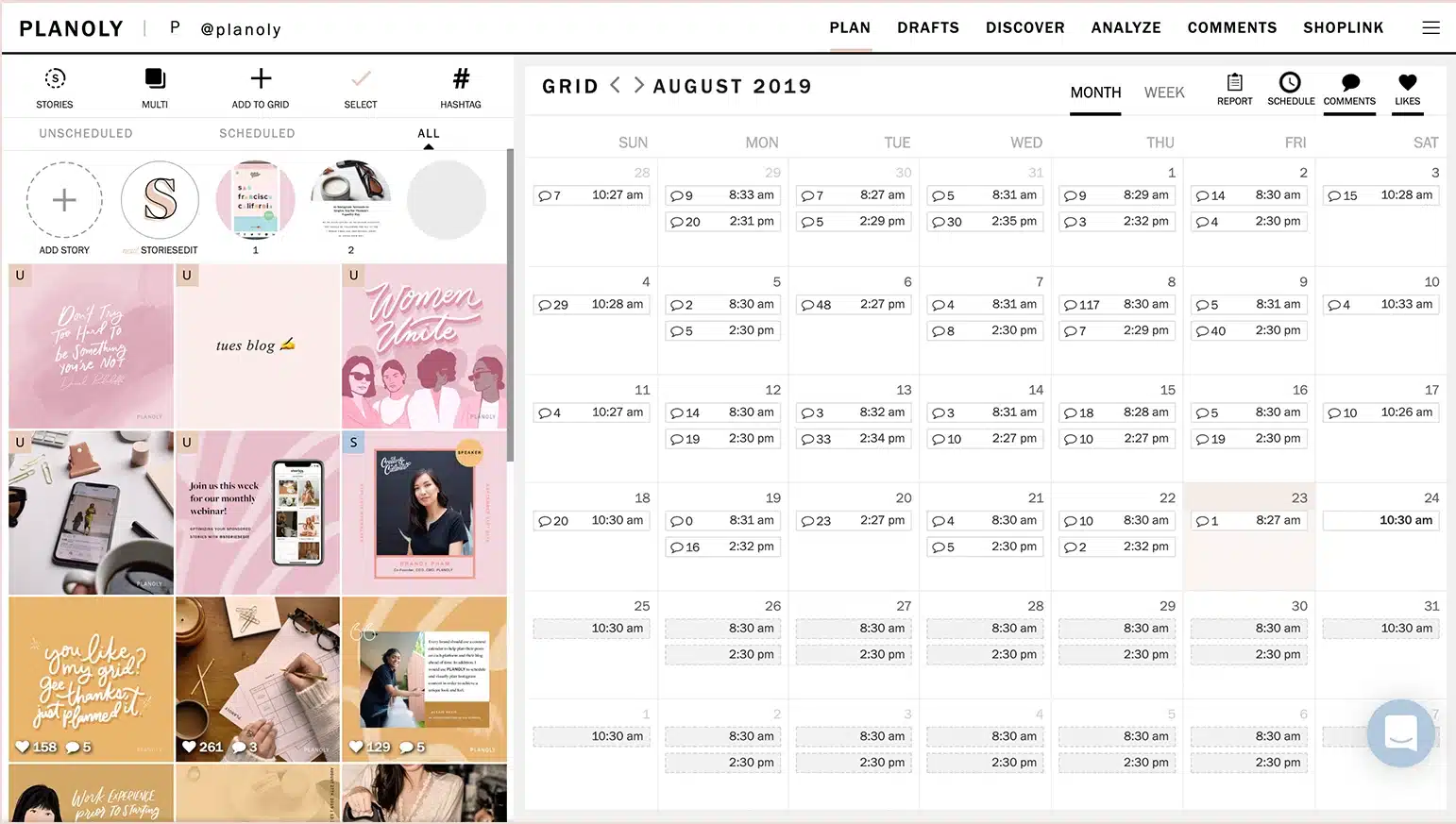
Planoly is a solid social media scheduling tool, especially if your workflow is primarily focused on Instagram and visual planning. It helps you organize posts in a clean visual planner, schedule content ahead of time, and maintain a consistent look across your feed. For creators and small teams managing one or two social media accounts, that simplicity is often enough.
The problem starts when your social media management needs grow.
From what I’ve seen, Planoly begins to feel restrictive as soon as you move beyond a single platform or a single brand. It supports only a limited set of social media platforms, offers mostly basic analytics, and lacks advanced tools for community management, like a unified inbox for handling direct messages, comments, and brand mentions in one place.
If your goal is to manage multiple social media accounts, publish content across several social media channels, and scale your efforts without adding more tools, exploring Planoly alternatives makes sense.
Pros of using Planoly
- Visually plans social media posts in one place with a clean, intuitive layout.
- Auto-posting makes it easy to schedule content weeks or months in advance.
- Simple post scheduling with clear visibility into dates, times, and connected accounts.
- Easy-to-use interface that helps users stay organized without a learning curve.
- Supports direct publishing to Instagram and Facebook with captions and images included.
- Helpful for batch scheduling content, especially when planning ahead or going on vacation.
What users are saying about Planoly’s pros:
- “Planoly helps to visually plan all your social media content in place. The auto post features allow you to plan the content for the whole month and leave it on autopilot.” – Namrata A., Director, Health, Wellness and Fitness (Source)
- “How easy it is to schedule posts and see what accounts they are going to post to, as well as what time and date they will be posted. I use it daily to schedule multiple posts for multiple things.” – Kaitlyn A., Sales Associate (Source)
- “The feature makes it easy to post content to Instagram and Facebook. You include your picture and captain and can schedule the posting when you want it to go live!” – Elizabeth S., Admin Assistant (Source)
- “I like the ease of use the most. The website’s layout makes it easy to schedule your post and stay organized.” – Shawniece E., Owner (Source)
- “Very easy to use interface. You can pre-plan and schedule batches of content, something especially nice for when you’re on vacation.” – Michelle D., CEO and Founder (Source)
Cons of using Planoly
- Adding and reconnecting social media accounts can be confusing.
- Social media accounts may disconnect and require manual re-attachment.
- Free plan has become more limited over time.
- Limited support for newer content formats and advanced publishing options.
What users are saying about Planoly’s cons:
- “Adding accounts to account is a little confusing and getting them re added when passwords change can be hard.” – Kaitlyn A., Sales Associate (Source)
- “Sometimes the social media accounts get disconnected but this is easy to re-attach.” – Elizabeth S., Admin Assistant (Source)
- “There are a few features that were previously included with the free plan that is no longer included or limited.” – Shawniece E., Owner (Source)
5 Best Planoly Alternatives in 2026
When looking for Planoly alternatives, the “best” option depends on how far your social media workflow has evolved beyond visual planning. Some teams need stronger multi-platform scheduling, others want better social media analytics, and many are looking for an all-in-one social media management tool.
Based on my experience testing social media management platforms and reviewing how social media managers actually use these tools day to day, here are the 5 best Planoly alternatives for 2026:
- SocialBee
- Later
- Plann
- Buffer
- Planable
#1 Planoly Alternative: SocialBee – Best all-in-one for AI content, analytics, and a unified inbox
Why is SocialBee the best Planoly alternative?
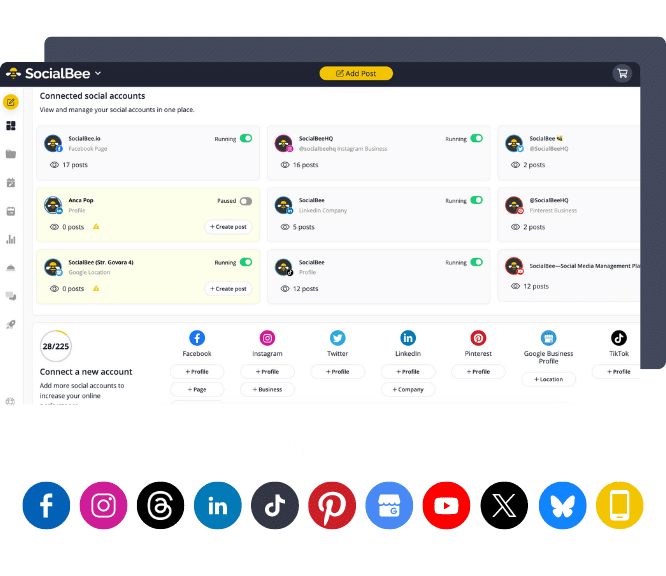
SocialBee is the best Planoly alternative because its features cover everything from planning to analyzing performance. While Planoly is built mainly to help you plan and publish posts visually, SocialBee works as a complete social media management tool, also covering content creation, engagement, analytics, and team collaboration across multiple social media platforms.
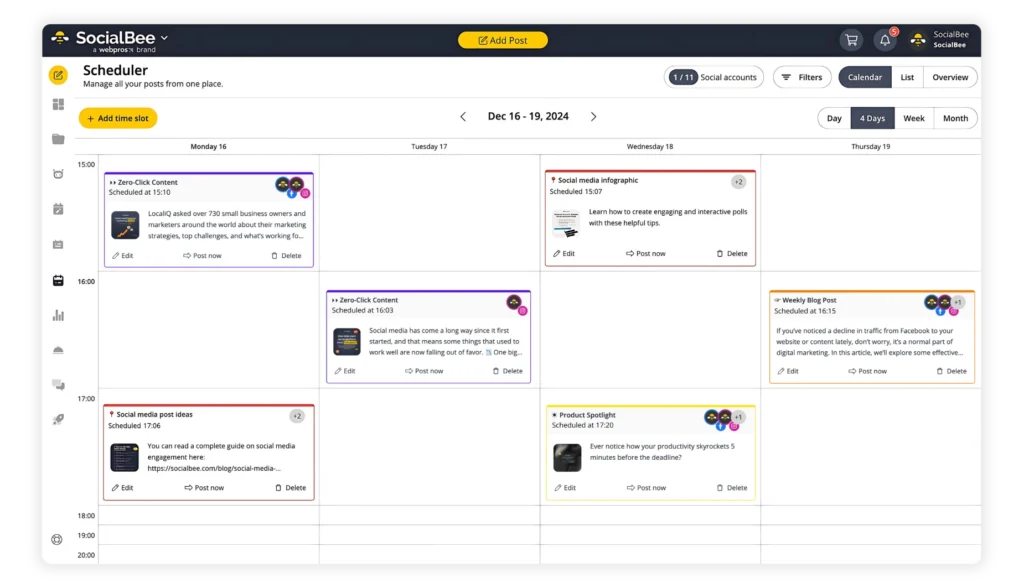
It supports publishing and managing content across all major social media platforms, including Instagram, Facebook, LinkedIn, X (Twitter), TikTok, Pinterest, YouTube, and Threads, as well as platforms Planoly doesn’t support, such as Bluesky and Google Business Profile. You can schedule and customize posts per platform and manage multiple social media accounts from one dashboard.
Unlike Planoly, SocialBee’s AI tools can also do more than just caption generation. They help with content ideas, captions, hashtags, images, and even a complete posting strategy with the help of Copilot. You can create multiple versions of the same post for different channels, making it easier to post consistently across platforms without duplicating work.
Scheduling is more flexible, too. Planoly’s grid-based planner works well for Instagram but doesn’t scale. SocialBee combines a visual calendar with content categories, which act like folders for your different post types and allow you to bulk schedule, which is especially useful for social media managers, agencies, and teams handling multiple brands or clients.
SocialBee also includes a unified social inbox, which Planoly doesn’t have, for managing comments, mentions, and direct messages in one place, plus in-depth social media analytics and exportable PDF reports. Planoly, by comparison, offers only basic performance data.
Finally, SocialBee is built for collaboration. It supports unlimited users, role-based permissions, post approvals, and separate workspaces for multiple brands. Planoly also has some collaboration features, but you can add a limited number of collaborators to your workspace, and you can’t assign roles.
Who is SocialBee best for?
My conclusion is that SocialBee is ideal for small businesses, freelancers, agencies, and social media managers who want an all-in-one social media management platform that is cost-efficient without cutting corners on features.
SocialBee feature overview
SocialBee is a complete social media management tool designed to support content creation, scheduling, collaboration, and analytics across multiple social media platforms.
At the center of the platform is Copilot, SocialBee’s AI assistant. I use Copilot to build a clear social media strategy faster, from choosing the right platforms and posting frequency to generating topic ideas, captions, and even images. Instead of guessing what to post next, you get a structured plan you can actually act on.
SocialBee also supports publishing on all the platforms you need with Universal Posting, which allows you to share content to channels many tools don’t support, like Facebook Groups, Reddit, or WhatsApp.
When you pair that with content categories for organizing posts by theme, Canva and Unsplash integrations, and a unified social inbox, it becomes much easier to maintain a balanced content calendar and stay consistent across channels.
Here are SocialBee’s key features:
- Schedule, publish, and manage posts across Facebook, Instagram, LinkedIn, X (Twitter), Pinterest, TikTok, YouTube, Threads, Bluesky, and Google Business Profile.
- Create captions, hashtags, and visuals using AI-powered tools whenever you need fresh content ideas.
- Customize posts for each platform manually or let AI adjust tone, length, and format automatically.
- Produce multiple versions of the same post to keep your feeds varied without starting from scratch.
- Fine-tune posts by editing captions, resizing images, updating hashtags, tagging profiles, adding first comments, and setting custom locations.
- Save and reuse hashtag collections to stay consistent across campaigns.
- Edit images inside the platform, add alt text for accessibility, and choose custom thumbnails for videos.
- Tag or mention relevant accounts and apply location tags to improve post visibility.
- Receive posting time recommendations based on your past content performance.
- Automatically recycle evergreen posts and set expiration dates for time-sensitive content.
- Build custom posting schedules for each connected social media profile.
- Plan faster with a bulk editor that lets you update and schedule multiple posts at once.
- Store unfinished drafts and return to them later when you’re ready to publish.
- Import and manage visuals easily using built-in integrations with Canva, Unsplash, and GIPHY.
- Collaborate with teammates through comments, approvals, and content reviews before posts go live.
- Keep multiple clients or brands separate using dedicated workspaces for cleaner workflows.
- Track performance with in-depth analytics and export ready-to-share PDF reports.
- Respond to comments, messages, and mentions from one centralized social inbox.
- Automatically import new blog posts and schedule them with pre-filled captions, images, and links.
- Shorten and monitor links using support for more than ten integrated URL shorteners.
SocialBee pros
Based on what users consistently share, SocialBee stands out for its strong organization, flexible scheduling, and ability to manage multiple brands and social media accounts from a single platform. Many marketers highlight its content categories, approval workflows, AI-powered features, and especially its responsive, hands-on customer support.
What users are saying about SocialBee’s pros:
- “Even though I’m mostly working solo, it’s great to have a structured system where drafts, approvals, and final versions are clearly separated. It helps keep everything organized when handling multiple companies.” – Elissa V., Content Marketeer (Source)
- “Automatization of scheduling, AI features.” – Marina P., Owner / Interior Design Consultant (Source)
- “SocialBee has been a game-changer for managing our multi-brand social presence. The interface is clean, intuitive, and built for efficiency. It allows us to customize content by platform while maintaining a consistent brand voice.” – Tom, Director of Sales and Marketing (Source)
- “Easy to create and organize social media content by content category and schedule by category too. SocialBee has also been amazing in terms of customer service. They are super responsive.” – Carey K., Co-founder (Source)
- “I like that I can post across multiple social media platforms at once, and customize each. It is simple enough for someone like me who isn’t a super tech wiz to use and figure out without having to watch tons of training videos. It was very easy to implement and immediately start using. I also love that you can upgrade to Concierge Bee or other options if you want to hire someone to help (which I did for several months, and would go back to again!).” – Dr. Jennifer Y., Adjunct Faculty (Source)
SocialBee cons
The most common drawbacks mentioned are a short learning curve due to the platform’s depth, occasional performance slowdowns, and limited control over editing posts after they’re published on native platforms.
What users are saying about SocialBee’s cons:
- “Because SocialBee offers so many advanced features, it took me a little time to get familiar with everything.” – Elissa V., Content Marketeer (Source)
- “Having greater control over posts once they’re live on their respective platforms would be a great addition in the future.” – Tom ., Director of Sales and Marketing (Source)
- “None except the odd glitch, which they help with right away.” – Carey K., Co-founder (Source)
- “There is a learning curve, and because the platform is so powerful, it might seem more difficult than it is… but SocialBee support is pretty amazing.” – John C., Social Media Manager (Source)
SocialBee pricing
- Offers a 14-day free trial
- Paid plans start at $29
Planoly vs SocialBee: Which should you choose?
Planoly is a good fit if your work is primarily Instagram-focused and centered on visual planning. It offers a clean grid planner, simple scheduling, and basic AI captions, which work well for creators and small businesses managing one or two accounts. However, it’s limited when it comes to multi-platform scheduling, engagement management, and analytics.
SocialBee is better suited for users who need a full social media management tool. It supports multiple platforms, advanced scheduling, a unified inbox, AI-powered content creation, and detailed analytics. I recommend SocialBee for freelancers, marketing agencies, and teams managing multiple clients or brands who need scalable workflows and deeper insights.
#2 Planoly Alternative: Later – Best for visual scheduling and content workflows
Who is Later best for?
Based on its features, pricing structure, and user feedback, Later is best suited for creators, small businesses, and marketing teams that are heavily focused on visual platforms, especially Instagram, Pinterest, and TikTok. It works well for users who prioritize visual planning, post previews, and maintaining a consistent brand aesthetic over deep analytics or advanced automation.
Later feature overview
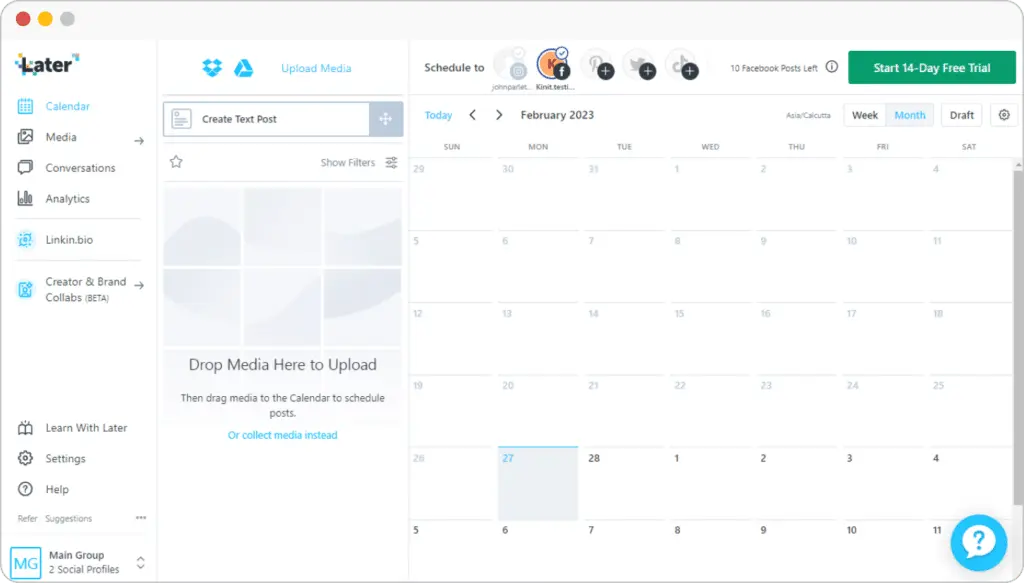
Later is a visually driven social media management tool designed for teams and creators who want to easily stay organized. It shines in content planning, offering a clean visual calendar, reliable auto-publishing, and strong support for platforms like Instagram, Pinterest, TikTok, and LinkedIn. Features like Link in Bio customization, media organization, and basic AI tools make it especially appealing for brand-focused workflows.
That said, Later’s analytics are fairly surface-level on lower plans, and video handling and tagging can feel limiting at times. Pricing scales quickly as needs grow, but for visually focused teams prioritizing ease of use and consistent publishing, Later offers a polished, approachable solution.
Here are Later’s key social media features:
- Schedule and auto-publish posts across Instagram, Facebook, Threads, Pinterest, TikTok, LinkedIn, YouTube, and Snapchat.
- Manage 1 to 6 Social Sets (up to 48 social profiles total), depending on plan.
- Publish between 30 posts per profile per month on Starter plans and unlimited posts on Scale.
- Use a visual content planner with multi-profile scheduling, saved captions, drafts, and post previews.
- Get best time to post recommendations for Instagram on all plans and TikTok on higher tiers.
- Create content faster with AI tools for captions and ideas, with monthly AI credit limits by plan.
- Add Instagram-specific features like first comments, user and location tagging, and product tagging on Growth and Scale plans.
- Store unlimited media and create content using built-in editing tools, Canva exports, and a Chrome extension.
- Collect and organize user-generated content by profile, hashtag, tags, and mentions on higher plans.
- Track performance with platform-specific analytics for Instagram, TikTok, Facebook, Threads, and Pinterest, with up to two years of historical data on Scale.
- Access custom analytics, competitive benchmarking, and future insights on the Scale plan.
- Monitor Link in Bio performance with analytics, location-based page views, and Google Analytics integration.
- Build fully customizable Link in Bio pages with buttons, featured media, banners, affiliate links, email capture, and Mailchimp integration, all without Later branding.
- Collaborate with teams using shared calendars, calendar notes, post comments, activity logs, and approval workflows on Growth and Scale plans.
- Manage conversations from Instagram, Facebook, and TikTok through a built-in social inbox on paid plans.
- Secure accounts with two-factor authentication (2FA) and Single Sign-On (SSO).
- Use Later’s mobile apps for iOS and Android to plan, schedule, and manage content on the go.
Later pros
Looking at how users describe their experience, Later is most often praised for its visual scheduling, ease of setup, and social media platforms supported. Users also highlight post previews, media organization, and customizable Link in Bio pages.
What users are saying about Later’s pros:
- “I use Later Social to manage social accounts for multiple businesses. I find the content search option great and appreciate the ability to share posts externally for review.” – Ginny G. (Source)
- “Later Social is robust in visual scheduling, where it coordinates with the calendar and plan or schedule for the day for content sharing, through posts.” – Sonalina C., Digital Marketing Manager (Source)
- “I particularly enjoy the ability to select media by labels and upload multiple pictures simultaneously, which streamlines my content organization and posting process.” – K. E. (Source)
- “Later Social is a magnificent visual content planner or calendar, that guides companies on visualizing posts.” – Graziana C., IT Manager (Source)
- “I appreciate Later Social because the team continually innovates, constantly bringing fresh ideas and improvements that enhance the user experience.” – José H. (Source)
Later cons
The most common drawbacks mentioned by users relate to the lack of advanced analytics, video formatting issues, publishing limitations, and occasional account reconnections.
What users are saying about Later’s cons:
- “It would be great to be able to see follower analytics that break down by country for my reporting.” – Ginny G. (Source)
- “Later Social faces some shallow analytics criticism, which fails to capture the social media insights from this app.” – Sonalina C., Digital Marketing Manager (Source)
- “Later Social has issues with video compression, and this hurts the quality of the video.” – Graziana C., IT Manager (Source)
- “Sometimes I need to reconnect my account for verification, which can be annoying for both myself and my clients.” – José H. (Source)
Later pricing
- Offers a 14-day free trial
- Paid plans start at $25
Planoly vs Later: Which should you choose?
Planoly is best suited for creators and small businesses that are primarily focused on Instagram aesthetics. Its grid-based planner, simple scheduling, and lightweight AI captions make it a good choice for users who want to plan visually and keep content consistent without managing many platforms or stakeholders.
Later is the better option if your workflow includes multiple other platforms apart from Instagram because it offers stronger visual scheduling across channels, and includes extras like Link in Bio tools, a media library, and more advanced collaboration features.
#3 Planoly Alternative: Loomly – Best for content planning with built-in approval workflows
Who is Loomly best for?
According to what I’ve gathered from user reviews, Loomly works best for small to mid-sized teams that need structure, visibility, and collaboration without the overhead of enterprise platforms. It’s especially well suited for marketing teams and agencies managing multiple social media accounts or business units that rely on shared calendars, approvals, and clearly defined workflows.
Loomly feature overview
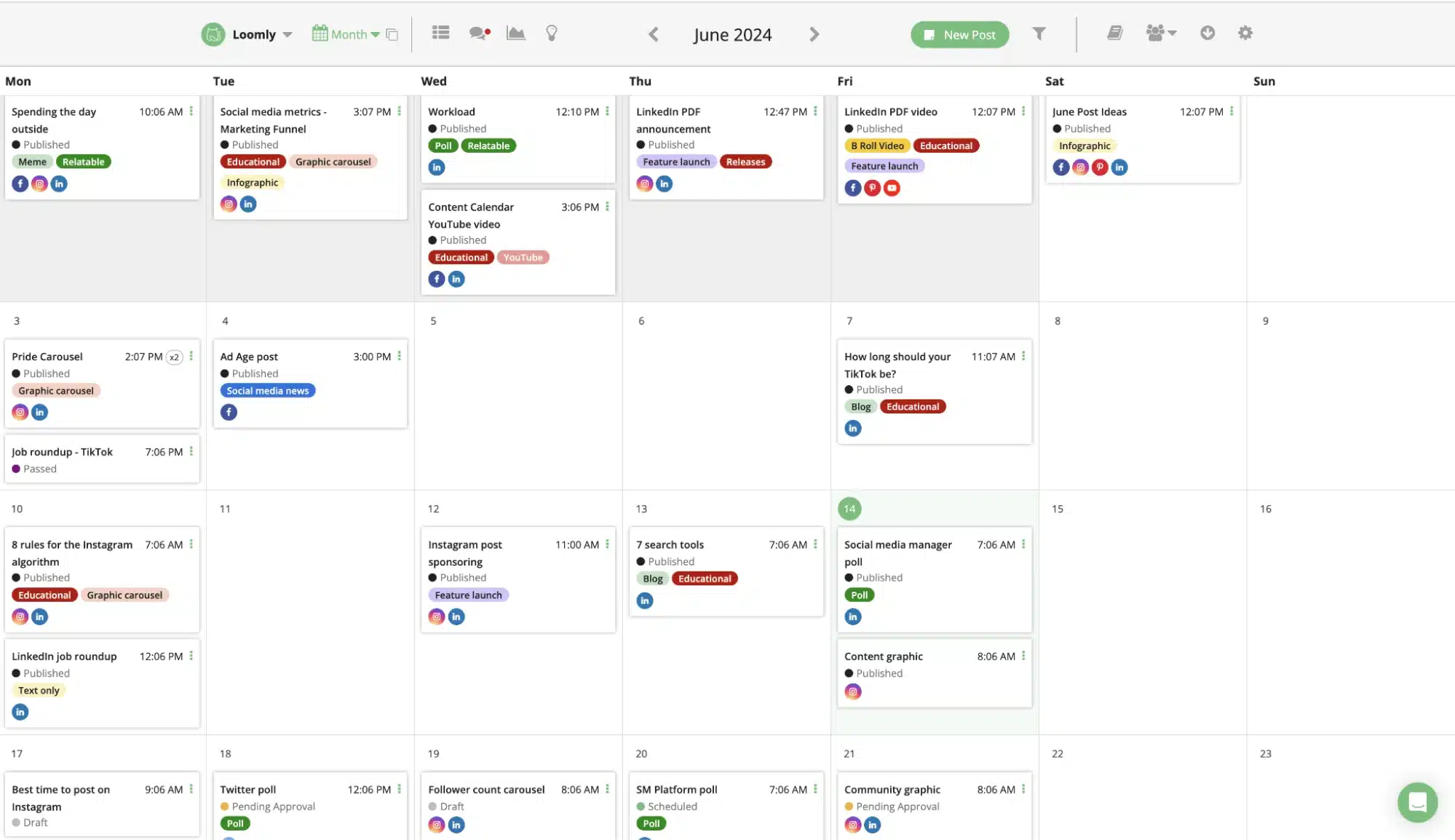
Loomly feels like a tool built for teams that want order without overengineering their social media workflow. It focuses heavily on planning and collaboration, making it easy to map out content visually, coordinate approvals, and keep multiple brands or business units organized in one place. I appreciate how quickly I can get started and how clear the content calendar makes weekly and monthly planning.
That said, Loomly isn’t trying to be the most advanced platform on the market. For small teams that value structure, approvals, and dependable scheduling, Loomly strikes a practical balance.
Here are Loomly’s key features:
- Publish and schedule unlimited posts across Instagram, Facebook, TikTok, Threads, Bluesky, YouTube, LinkedIn, Pinterest, Google Business Profile, and Snapchat.
- Manage up to 12 or 60 social accounts depending on plan, with support for 3 to unlimited users and unlimited content calendars.
- Schedule content with direct publishing, recurring posts, bulk posting, media storage, link shorteners, and best time to post recommendations.
- Collaborate with teams using approval workflows, user roles, custom roles and workflows, plus integrations with Slack and Microsoft Teams.
- Create content using AI-powered caption generation, post previews, a built-in media editor, slideshow creator, post inspiration tools, and an ideas board.
- Import and manage media through integrations with Google Drive, Unsplash, GIPHY, and Canva.
- Engage with audiences by replying to interactions, assigning conversations to team members, and using saved replies.
- Track performance with post analytics dashboards, advanced analytics, link shortener analytics, scheduled reports, and exportable reports.
- View and manage content through list, calendar, and post views for flexible planning and review.
- Apply custom branding with branded subdomains, custom logos, and favicons.
- Access Loomly on iOS and Android, and connect workflows through Zapier.
Loomly pros
From what users share, Loomly is often praised for its affordability, ease of scheduling, and ability to manage multiple social media accounts in one place. Reviewers frequently highlight its content calendar, collaboration tools, and smooth onboarding experience for small teams.
What users are saying about Loomly’s pros:
- “Loomly is an affordable social media management solution for smart businesses. It supports all major social networks to schedule and monitor content, collaborate with team members, and engage with followers.” – Manoj V., Writer and Founder (Source)
- “…Using the collaboration tools has been a great experience for us as well. The elimination of the interaction that used to be in the form of messages, by the introduction of features such as commenting, approval requests, and task assignment within individual posts, has been our main advantage.” – Haris K., Writing and Editing (Source)
- “We selected Loomly because we can set up different business units on it but still segregate posts. It is easy to schedule and customize by platform.” – Karen B., Director of Marketing (Source)
- “Loomly always seem to be ahead of the game when it comes to changes and improved UX.” – Steve M., Marketing Manager (Source)
- “The user experience is fantastic, and it’s really easy to use, even for newbies.” – Ajay S., Communications Manager (Source)
Loomly cons
Users mention some drawbacks, including analytics limitations, occasional glitches or slowdowns, and pricing concerns for businesses managing many platforms.
What users are saying about Loomly’s cons:
- “The interface is a little bit confusing.” – Manoj V., Writer and Founder (Source)
- “The analytics dashboard is nice but could provide more detailed insights or allow more customizable reports.” – Haris K., Writing and Editing (Source)
- “The analytics don’t always agree with the actual platform’s analytics.” – Karen B., Director of Marketing (Source)
- “For one business with multiple platforms Loomly can be expensive.” – Steve M., Marketing Manager (Source)
- “There are glitches, so sometimes I cannot rely on it when I have important announcements scheduled.” – Ajay S., Communications Manager (Source)
Loomly pricing
- Offers a 15-day free trial
- Paid plans start at $65/month
Planoly vs Loomly: Which should you choose?
Planoly is best if your work is centered on Instagram visuals and simple scheduling. It’s designed for creators and small businesses that want to plan content visually, maintain a consistent feed, and publish without managing complex workflows or multiple teams.
Loomly is the better choice when collaboration becomes part of the equation. It supports more social media platforms, offers built-in approval workflows, and makes it easier to manage multiple brands or business units from one calendar. If you’re working with a team and need structure around planning, reviews, and publishing, I’d choose Loomly.
#4 Planoly Alternative: Buffer – Best for simple, reliable scheduling across multiple platforms
Who is Buffer best for?
From what I’ve seen, Buffer is best for solo creators, freelancers, and small businesses that want a simple way to stay consistent on social media. It’s a good fit if you manage multiple accounts, care more about easy scheduling and a clean interface than deep analytics, and want an affordable tool that’s quick to set up and easy to maintain.
Buffer feature overview
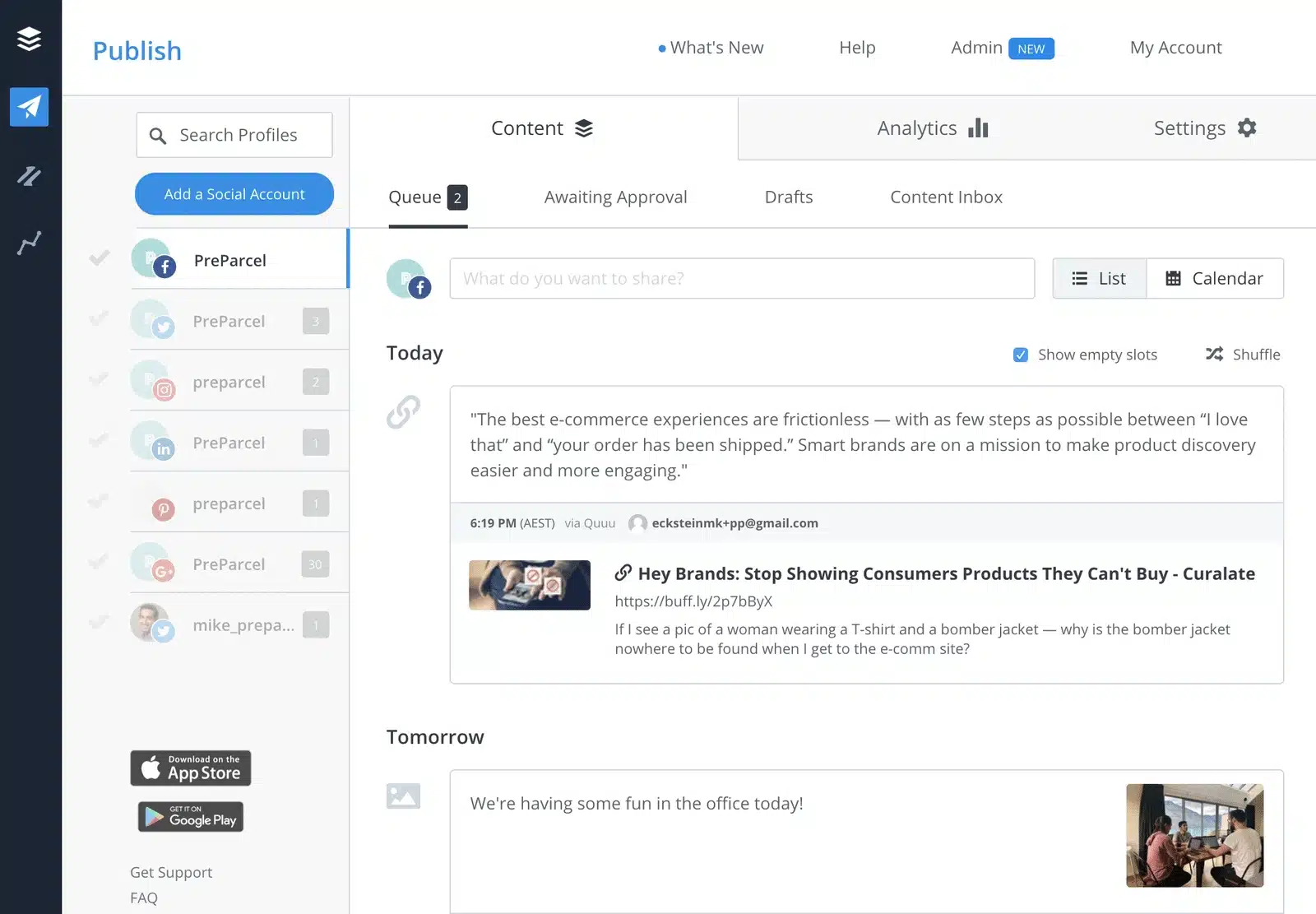
Buffer is a straightforward social media management tool built for people who want to publish consistently. It focuses on clean design, easy onboarding, and reliable scheduling across multiple platforms. The visual calendar and flexible post customization help simplify day-to-day publishing, while built-in AI tools and drafts support ongoing content creation.
That said, Buffer isn’t designed to be a deep analytics or engagement platform. Reporting and community features are fairly lightweight, but for users who value simplicity, speed, and ease of use over depth, I’d say Buffer remains a dependable choice.
Here are Buffer’s key features:
- Create and organize content ideas using an ideas board, drafts, templates, tags, and a kanban-style board view, with unlimited drafts and AI-assisted content refinement on all plans.
- Use Buffer’s AI Assistant with unlimited credits to refine, repurpose content, and generate replies that learn and adapt to your brand voice.
- Publish and schedule posts across multiple platforms using queues, threaded posts (for X, Bluesky, Threads, and Mastodon), duplicate posts, and a visual content calendar.
- Manage posting workflows with scheduled post limits on lower plans and unlimited scheduling, channel groups, and hashtag management on higher tiers.
- Schedule first comments for Instagram and LinkedIn, set custom video covers, and shorten links automatically, with advanced options unlocked on paid plans.
- Stay consistent with reminder notifications for Instagram, TikTok, and YouTube when native posting is required.
- Engage with your audience by replying to comments across LinkedIn, X, Threads, Instagram, Facebook, and Bluesky from one place.
- Use AI-powered replies, saved replies, comment insights, and turn comment threads into new post ideas.
- Track performance with post-level analytics, engagement history, performance overviews, custom analytics, audience demographics, and best-time-to-post suggestions on paid plans.
- Export reports as spreadsheets, PDFs, or images, with branded reports available on higher-tier plans.
- Collaborate with teams using internal notes, approval workflows, custom permissions, and support for 1 to unlimited users, depending on plan.
- Secure accounts with two-factor authentication across all plans.
- Build a simple Start Page (link-in-bio style landing page) that counts as a channel in your plan.
- Integrate seamlessly with Canva, Unsplash, Dropbox, Google Drive, OneDrive, WordPress, Feedly, Pocket, Bitly, Zapier, and IFTTT.
- Capture content quickly using Buffer’s browser extension and import media directly into your publishing queue.
Buffer pros
Buffer is most often praised for its ease of use, clean interface, and ability to manage multiple social media accounts from one place. Reviewers frequently highlight its visual calendar, cross-platform scheduling, and beginner-friendly setup.
What users are saying about Buffer’s pros:
- “Key highlights include its user-friendly interface, ability to customize posts for different platforms and the content calender used to schedule the Ad-Posts.” – Charanteja N., Digital Marketing Executive (Source)
- “I find the capability to schedule posts across multiple platforms at once extremely beneficial, saving me a lot of time and effort.” – Mahesh D. M., Video Editor (Source)
- “I like that I can save unlimited drafts until I can queue them.” – Melissa S., Content Writer and Strategist (Source)
- “Buffer application is user-friendly, easy to use, and affordable.” – Simon N., Accounting Specialist (Source)
- “I love that it has a clean, intuitive interface that’s easy to pick up even for beginners. Using Buffer it has been a great experience managing all our social media accounts in one place. Buffer enables us to publish and schedule on all our major platforms such us Facebook, X, and Pinterest. Buffer technical support team has to be the best in the market.” – Yoyo W., Content Creator and Specialist (Source)
Buffer cons
After going through several reviews, I can see why some of Buffer’s cons include limitations around analytics depth, engagement tools, posting reliability, and some publishing constraints.
What users are saying about Buffer’s cons:
- “I dislike Buffer mostly regarding its limited analytics, high pricing for advanced features, and occasional performance issues.” – Charanteja N., Digital Marketing Executive (Source)
- “I just think the calendar display could be better.” – Melissa S., Content Writer and Strategist (Source)
- “Using Buffer, it’s impossible to post to our Instagram account.” – Simon N., Accounting Specialist (Source)
- “Posts sometimes fail to send or get stuck, or they have to manually retry.” – Yoyo W., Content Creator and Specialist (Source)
Buffer pricing
- Offers a 14-day free trial and a free plan
- Paid plans start at $6/month
Planoly vs Buffer: Which should you choose?
If your focus is on Instagram aesthetics and visual planning, Planoly is the better fit. It’s designed for creators and small businesses that want to map out their feed, manage captions and hashtags, and publish without dealing with complex workflows or multiple platforms.
Buffer is the stronger choice if you want simple, reliable scheduling across several social networks. It supports more platforms, makes it easy to customize posts per channel, and offers a cleaner workflow for staying consistent over time.
#5 Planoly Alternative: Planable – Best for collaboration and multi-step approvals
Who is Planable best for?
From what I’ve seen, Planable is best suited for marketing agencies, in-house marketing teams, and freelancers who work closely with clients or stakeholders. It’s especially valuable when content needs review, feedback, and approval before publishing.
Planable feature overview
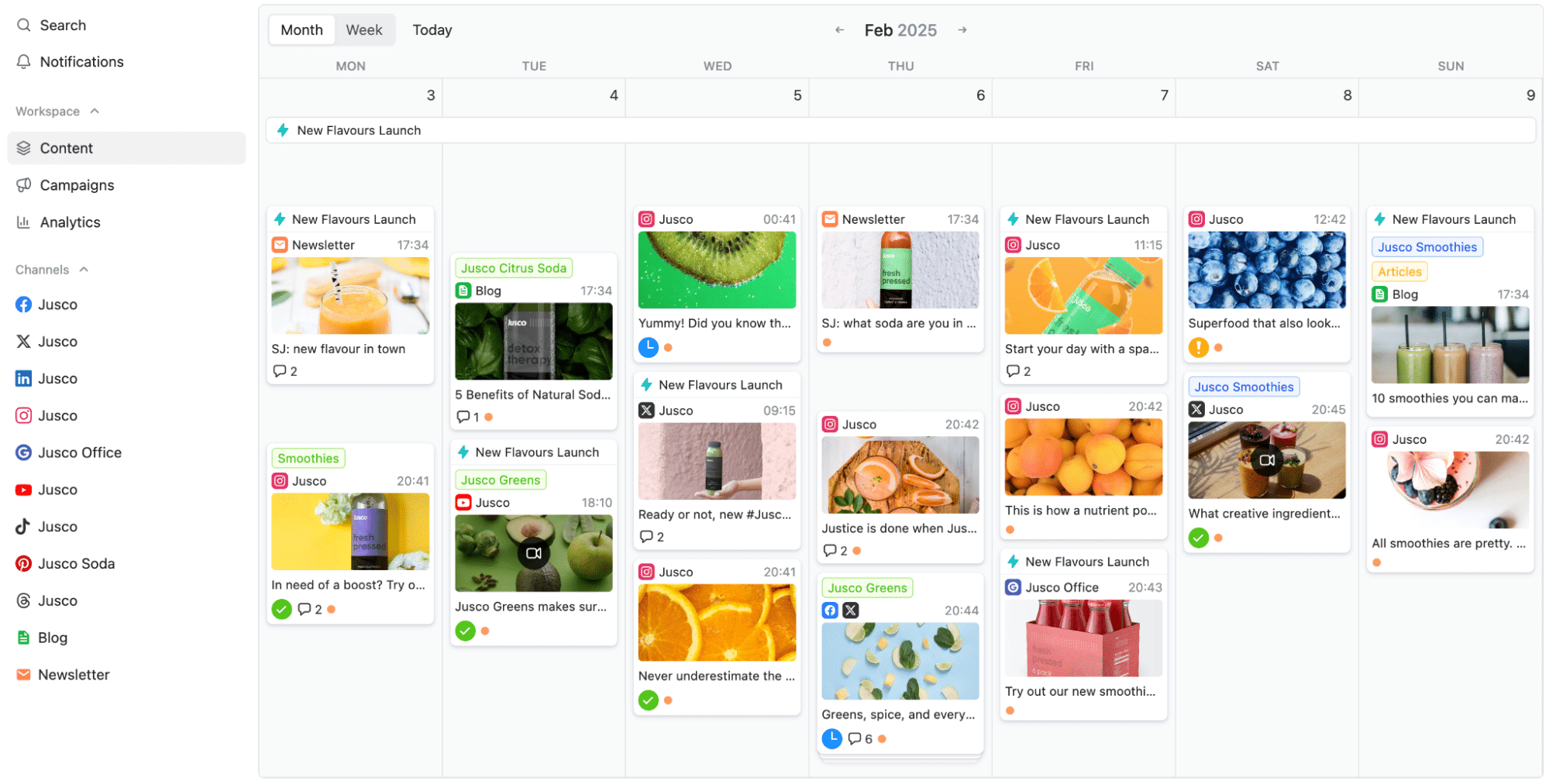
After looking at how teams actually use Planable, it’s clear that this tool is built around one core strength: collaboration. Planable shines when multiple people need to review, comment on, and approve social media content before it goes live. Its visual calendar, campaign structure, and version history make it easy to manage feedback without messy email threads or screenshots.
Planable also covers publishing, engagement, and analytics, but it’s not trying to be the most advanced social media management platform on the market. Instead, it prioritizes clarity, approvals, and client communication. For agencies and in-house teams, that focus often matters more than flashy features.
Here are Planable’s key features:
- Plan, schedule, and publish social media posts with monthly limits ranging from 60 to unlimited posts per workspace, depending on plan.
- Manage between 4 and 50 social media pages per workspace, with unlimited tweet publishing on higher tiers.
- Create content faster with AI-powered post generation and rewriting, first-comment scheduling, recurring posts, and built-in media editing tools.
- Plan content across multiple channels using feed, calendar, grid, and list views, with view options expanding on higher plans.
- Organize work with campaigns, labels, shared content planning, and synced historical content on advanced plans.
- Store media assets with 10GB to custom storage limits, plus access to published and archived post history.
- Collaborate using flexible approval workflows, including optional, required, and multi-level approvals.
- Support team workflows with team-only drafts, internal notes, version history, text annotations, and edit suggestions.
- Approve content efficiently with bulk approvals and bulk approval requests on enterprise plans.
- Manage engagement through a unified comments inbox with AI-generated replies, sentiment sorting, and conversation status tracking (add-on).
- Track performance with cross-channel analytics, page- and post-level metrics, audience insights, and custom reports (add-on).
- Access self-serve resources on all plans, with chat support, priority support, personalized onboarding, and a dedicated account manager on higher tiers.
Planable pros
From what I’ve seen in user feedback, Planable stands out for its visual planning experience and how smoothly it supports client collaboration. Reviewers often mention its clean calendar view, intuitive workflow, and how easy it is to get approvals and feedback without friction.
What users are saying about Planable’s pros:
- “It is just an easy system to use. It’s not over complicated and it does exactly what I need it to do.” – Alec H., Communications (Source)
- “The calendar view is well-designed, and when I need support they are there pretty quick” – Verified User in Retail (Source)
- “Nice layout, ability to move and schedule posts. Good approval for posts with the clients, amazing communication.” – Verified User in Marketing and Advertising (Source)
- “User-friendly for clients and really well thought for team work.” – Emeric U., Manager (Source)
- “Being able to schedule multiple platforms all in one” – Abbie Y., Owner YMA, Web Designer, Social Media Manager (Source)
Planable cons
A few recurring drawbacks show up around pricing on lower plans, media library usability, mobile publishing friction, and a handful of platform-specific limitations.
What users are saying about Planable’s cons:
- “Wish we could have more pages in the starter plan as it might be a bit too expensive for freelancers!” – Sara S., Founder (Source)
- “Could be cheaper and have the ability to do @’s for LinkedIn and easier to do for Meta channels.” – Alec H., Communications (Source)
- “The view of their media library is the absolute worst.” – Verified User in Retail (Source)
- “The mobile app needs improvement” – Verified User in Marketing and Advertising (Source)
- “The price is steep for what we charge social media clients” – Abbie Y., Owner YMA, Web Designer, Social Media Manager (Source)
Planable pricing
- Offers a free plan
- Paid plans start at $39/month
Planoly vs Planable: Which should you choose?
Planoly works well for individuals and small teams who want a lightweight way to plan and schedule content with a strong visual focus. It’s geared toward creators who value simplicity and aesthetics over structured workflows and who don’t need extensive collaboration or approval layers.
Planable, on the other hand, is built for collaboration-heavy environments. It’s a better fit for agencies and in-house teams that manage feedback, approvals, and client input before publishing.
Frequently asked questions
1. What is the best alternative to Planoly for managing multiple social media platforms?
If you need one tool to manage Instagram, Facebook, TikTok, LinkedIn, Twitter, Pinterest, and more, SocialBee is generally the best alternative. It offers scheduling, analytics, AI content creation, a unified inbox, and collaboration tools, features that Planoly doesn’t fully cover.
2. Which Planoly alternative is best for teams and client approvals?
Planable is one of the best Planoly alternatives for teams that need structured collaboration. It offers multi-step approval workflows, internal comments, version history, and easy client sharing without requiring logins. This makes it especially useful for agencies and in-house teams managing feedback from multiple stakeholders before content goes live.
3. What’s the most budget-friendly Planoly alternative for small businesses?
Buffer is often the most affordable Planoly alternative for simple, multi-platform scheduling. It’s lightweight, easy to use, and offers essential features without requiring a large budget.
The best Planoly alternative for your team
After comparing all the options, I’d say Planoly is a solid choice for creators who want a clean, visual way to plan and publish content. But as your social media presence grows, so do the demands around collaboration, analytics, platform coverage, and consistency.
Exploring Planoly alternatives like SocialBee, Later, Buffer, Loomly, and Planable gives you options that better support real-world social media management, whether that means managing multiple platforms, working with clients, or reporting on performance.
If you want an all-in-one solution that combines scheduling, content creation, engagement, analytics, and team collaboration, SocialBee stands out as the most flexible Planoly alternative. Start a 14-day free trial and see how much easier managing your social media can be when everything lives in one place.