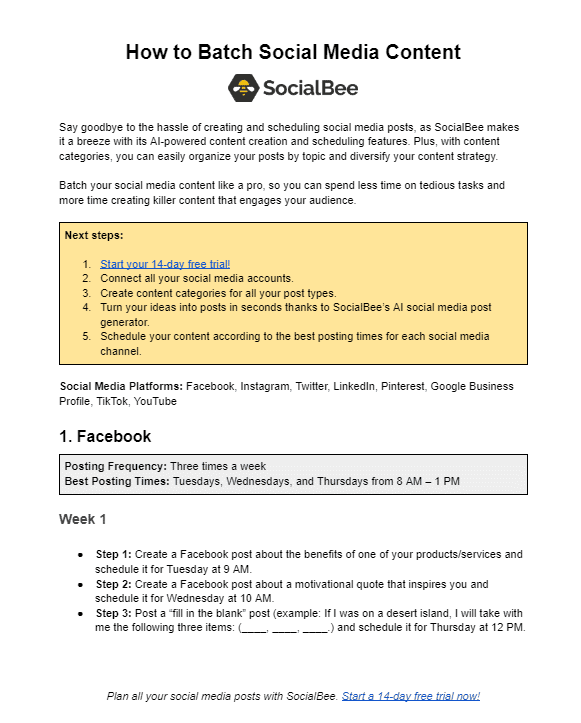
Dosifica tu próximo contenido redes sociales es una forma estupenda de ahorrar tiempo y aumentar la productividad de tu proceso de creación de contenidos.
Incluir esta estrategia en tu enfoque de planificación de contenidos te permitirá crear y programar sin esfuerzo tus publicaciones en las redes sociales en los mejores momentos.
En este artículo, vamos a cubrir los principales beneficios de la dosificación de contenidos y a compartir 10 pasos sobre cómo hacerlo de forma productiva. ¡Comencemos!

Somos SocialBee LABS SRL, parte de WebPros. Utilizamos la información que nos proporcionas para compartir contenido relevante y actualizaciones de productos, como se indica en nuestra Política de privacidad. Puedes darte de baja en cualquier momento.
¿Qué es la agrupación de contenidos?
La dosificación de contenidos es una estrategia de producción de contenidos que consiste en crear publicaciones en las redes sociales en grandes cantidades. Este enfoque permite marcas y creadores para producir contenidos coherentes y ahorrar tiempo y recursos al planificar sus futuras publicaciones.
Para crear contenidos por lotes con éxito, debes hacer una lluvia de ideas de contenidos y una amplia investigación del sector. A partir de ahí, podrás agilizar todo el proceso de creación de contenidos y disfrutar de un mayor alcance.
Las ventajas de publicar por lotes en las redes sociales
Antes de sumergirnos en nuestros consejos para la publicación de contenidos por lotes, es hora de hablar de tres grandes ventajas. Si te falta motivación para publicar de forma constante, aquí tienes algunas razones para empezar.
Éstas son las tres principales ventajas de publicar por lotes en las redes sociales:
- Aumenta la productividad al crear contenidos
- Mantener una estrategia de medios sociales coherente y cohesionada
- Elimina el estrés de la creación semanal de contenidos
A. Aumentar la productividad al crear contenidos
La dosificación de contenidos es una forma estupenda de aumentar tu productividad general y mejorar la calidad de los contenidos para tus perfiles en las redes sociales.
Al producir contenidos por lotes, puedes centrarte exclusivamente en la creación de contenidos durante un tiempo y evitar cualquier distracción, como responder a comentarios o mensajes a lo largo del día.
A cambio, por fin estarás libre de estrés y podrás centrarte en otros aspectos igualmente importantes de dirigir un negocio online.
B. Mantén una estrategia coherente y cohesionada en los medios sociales
Cuando se trata de marketing de contenidos, agrupar contenidos de calidad puede añadir coherencia y cohesión a tu estrategia de estrategia de redes sociales.
En cuanto empieces a crear contenido para redes sociales en masa, podrás mantener fácilmente una presencia activa y armoniosa en tus canales preferidos.
C. Elimina el estrés de la creación semanal de contenidos
La dosificación de contenidos es una estrategia de creación que puede ayudar a reducir el estrés y el caos de la planificación semanal de publicaciones. Debería ser una parte integral de tu proceso creativo.
Implica tomarse unos días para planificar previamente ideas de contenido para varias semanas en lugar de pasar varias horas cada semana creando contenido desde cero.
Si dedicas algo de tiempo a planificar contenido para las redes sociales en bloque, podrás centrarte más en las tareas que más importan y desactivar por fin esas molestas alarmas que te avisan de cuándo es el momento de crear o publicar contenido.
Para conseguir ambas cosas, necesitarás una gran herramienta de gestión de redes sociales todo en uno herramienta de gestión de redes sociales, pero de eso hablaremos más adelante.
Cómo dominar el proceso de agrupación de contenidos
Ha llegado la hora de los esperados 10 pasos que revolucionarán tu estrategia de marketing. Esta técnica de productividad te ayudará a identificar tus pilares de contenido y a hacer un uso óptimo de un calendario de redes sociales.
Aquí tienes los 10 pasos para dominar la dosificación de contenidos:
- Define tus pilares de contenido en redes sociales
- Lluvia de ideas sobre contenidos para cada pilar de contenidos
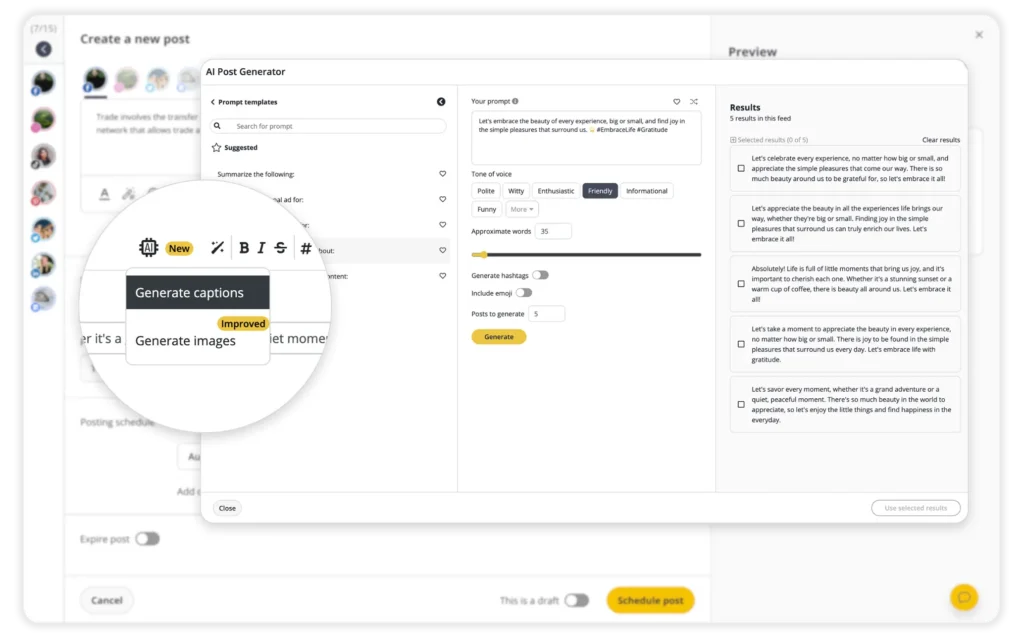
- Crea tu texto para las redes sociales
- Haz múltiples variaciones del mismo post
- Aborda el mismo tema desde distintos ángulos
- Recicla los contenidos generados por los usuarios
- Céntrate en crear posts perennes
- Diseña plantillas visuales para tus entradas y reutilízalas
- Rastrea tus contenidos más eficaces y amplíalos
- Programa tus publicaciones con antelación
1. Define los pilares de tu contenido en las redes sociales
Antes de empezar a crear lotes de contenido, es importante definir tus pilares de contenido, es decir, los temas en los que quieres centrarte al crear contenido. Para identificar tus pilares de contenido, debes echar un vistazo a los temas candentes en torno a tu marca e industria.
He aquí algunos ejemplos de pilares de contenido:
- Contenido del blog
- Contenido entre bastidores
- Noticias de productos
- Contenido educativo
- Testimonios
2. Haz una lluvia de ideas para cada pilar de contenido
¿Cuándo fue la última vez que reservaste un tiempo para llevar a cabo una sesión de lluvia de ideas para tu contenido en las redes sociales?
Aquí tienes algunos consejos sobre cómo encontrar ideas de contenido para cada pilar de contenido:
- Analiza los tipos de contenido que resuenan con tu público objetivo consultando los análisis de publicaciones anteriores
- Investiga a los competidores de tu sector y nicho
- Toma nota de las tendencias actuales y decide los tipos de contenido que deseas seguir (por ejemplo, entradas de blog, contenido de vídeo, carruseles).

Somos SocialBee LABS SRL, parte de WebPros. Utilizamos la información que nos proporcionas para compartir contenido relevante y actualizaciones de productos, como se indica en nuestra Política de privacidad. Puedes darte de baja en cualquier momento.
3. Crea tu texto para las redes sociales
Redes sociales redacción publicitaria consiste en crear un mensaje eficaz que proporcione información muy necesaria sobre tus productos y servicios.
Su finalidad es atraer al público y proporcionarle un contexto muy necesario sobre lo que haces. Recuerda que es importante educar y entretener a tu público.
Lo ideal es crear por lotes el texto y los elementos visuales a la vez. Así te aseguras de que ambos están en consonancia.
Aquí tienes algunos consejos para una creación de contenidos eficaz:
- Asegúrate de que todo tu contenido en las redes sociales se ajusta a la marca y está en sintonía con tu público objetivo
- Utiliza palabras clave y hashtags de forma eficaz
- Ten en cuenta el objetivo final de cada post según tus KPI (por ejemplo, aumentar la notoriedad de la marca)
4. Haz múltiples variaciones del mismo post
Como hemos aprendido anteriormente, crear contenido por lotes para las redes sociales ahorra tiempo y agiliza tus esfuerzos. Sin embargo, es importante hacer múltiples variaciones de la misma publicación para cada canal de las redes sociales.
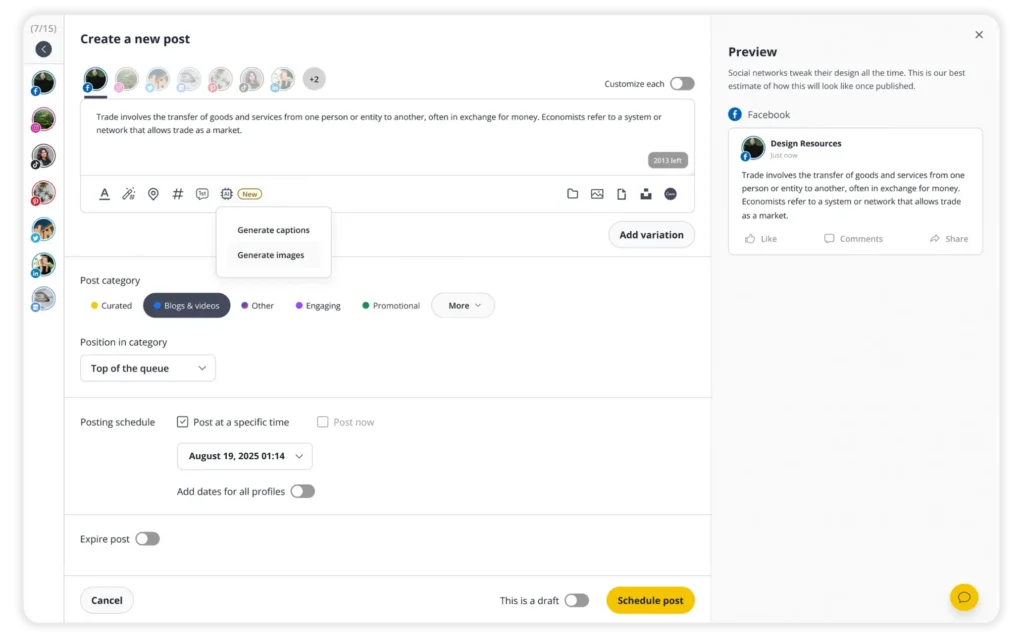
Al personalizar el contenido para cada plataforma, puedes asegurarte de que tus publicaciones tendrán un buen rendimiento en todos tus canales de redes sociales. SocialBee es la herramienta de gestión de redes sociales adecuada para este tipo de tareas. Personaliza cada publicación desde un único lugar añadiendo variaciones a tu publicación.
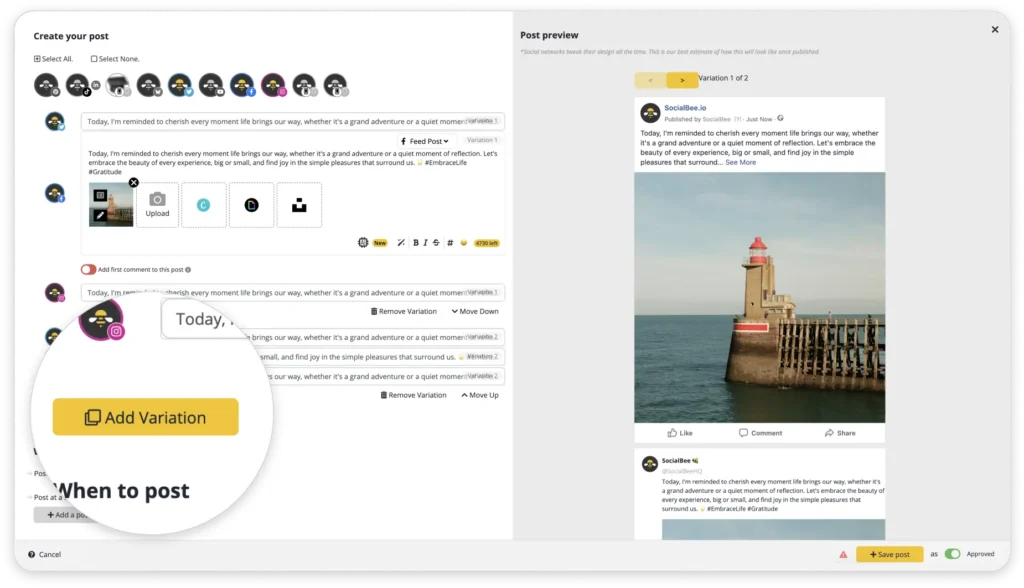
Crea diferentes versiones del mismo post, prueba varios formatos y actualiza tu contenido evergreen con regularidad.
¡Empieza hoy mismo tu prueba gratuita de 14 días en SocialBee!
La razón principal es que las distintas plataformas tienen audiencias y requisitos de contenido diferentes, que se relacionan con el contenido a su manera. A Twitter por ejemplo, debe ser más corto que un post de Facebook o LinkedIn post. Esto se debe a que Twitter no permite publicaciones con más de 280 caracteres.
Del mismo modo, Instagram deben ser principalmente visuales, ya que el texto no es más que un añadido a la foto o el vídeo, mientras que el contenido de LinkedIn puede necesitar un método narrativo más formal para transmitir tu punto de vista.
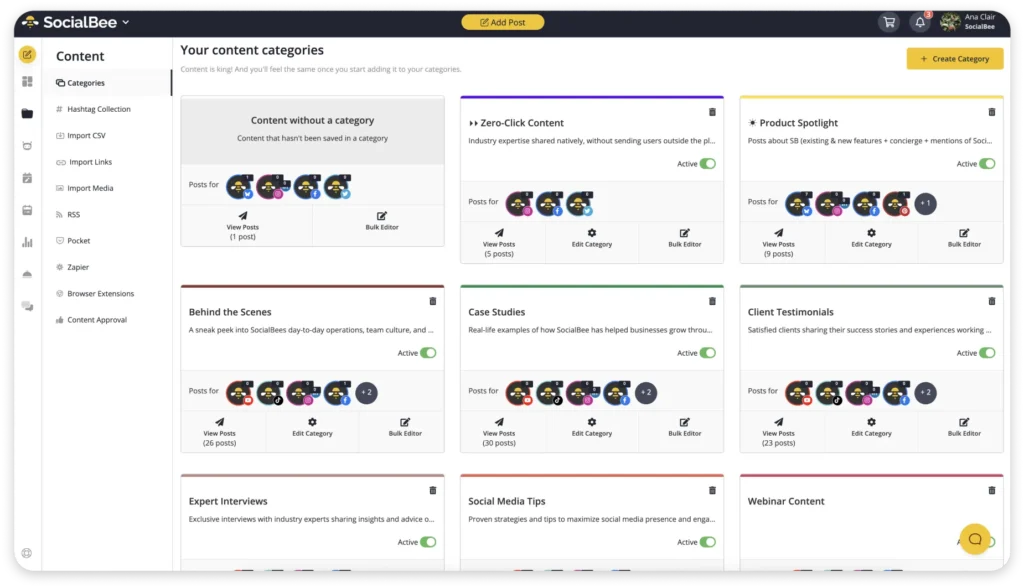
My categories are simple:
- Teaching
- Opinions
- Personal
- Promotion
Each category has a different role. Teaching content helps people learn something useful. Opinion content helps you stand out and gives people something to remember. Personal content builds trust because people follow humans, not content machines. Then promotional content supports the business side without making the feed feel salesy all the time.
Most people treat a content category like one type of post. Educational content becomes endless “tips and tricks” posts. Personal content becomes random life updates. Promotional content becomes repetitive selling.
After a while, everything starts blending together. So I think of them more like topic buckets with different directions inside them.
So one topic can become:
- A practical tip
- A mistake people make
- An opinion
- A breakdown
- A personal story
- A quick behind-the-scenes post
For example, if I’m talking about content planning, I could turn that into:
- 3 ways to plan content faster
- Why most content plans fail
- The biggest mistake people make when batching content
- A quick Reel showing my actual workflow
The core topic stays the same, but the angle changes. Then I think about platform fit.
Once I started thinking this way, content creation became much easier.
Before, I’d sit down and think: “What should I post today?”. Now I think: “Which category needs content?”
That small shift removes a lot of mental clutter.
The second thing I set up is posting frequency.
I don’t manually schedule one post at a time anymore because it gets exhausting fast, especially when creating content for multiple platforms every week.
Inside SocialBee, I set posting frequency per category.
For example:
- Educational posts → 3x/week
- Personal posts → 2x/week
- Promotional posts → 1x/week
Then I simply add content into those categories and let the schedule balance itself.
Without this setup, it’s really easy to accidentally post similar things back-to-back. The feed starts feeling random.
With categories and posting frequency already set up, the content naturally spreads out better throughout the week. Personal stories break up heavier educational posts, opinion content keeps things interesting, and promotional posts don’t feel forced because they aren’t constantly repeated.
This is something I usually set up once, then adjust occasionally when my strategy changes.
Right now, I usually post:
- 4–5 times per week on LinkedIn
- 4–5 times per week on Instagram
- 4–7 short-form videos for TikTok and Reels
Overall, that’s around 12–17 pieces of content every week across different platforms.
That sounds like a lot, but having categories and posting frequency already organized makes the workload feel much lighter before the actual batch creation even starts.
1. Weekly workflow (execution)
Once the setup is done, the actual weekly workflow becomes much simpler. I’m not starting from zero every week or randomly trying to figure out what to post on the spot.
I also don’t try to do everything in one sitting anymore. That used to be the fastest way to get overwhelmed. Writing, designing, recording videos, editing, scheduling, answering messages, switching between platforms all day. It completely breaks your focus.
Now I split the content creation process into different stages across the week. One day is for planning and organizing content ideas. Another is for creating. Another is for reviews, approvals, and scheduling.
The biggest difference is that every task has its own space.
When I’m planning, I’m only planning. When I’m writing, I’m only writing. When I’m recording video content, I batch all of it together instead of constantly switching between tasks.
Day 1 — Planning (1–2h, high focus)
The first day is always planning. I don’t touch Canva yet, I don’t record videos, and I don’t start scheduling content. This is just the thinking part of the process.
Honestly, this is probably the most important part of my entire batching workflow because a good planning session makes the rest of the week much easier. A bad one usually turns into forcing content later.
I usually start by opening my content categories and looking at what’s missing. Then I use SocialBee’s AI features to help me explore different angles for topics I’m already planning to cover.
For example, I might know I want to talk about content strategy but need fresh ways to approach it. Instead of repeating the same message, I can use AI to uncover new hooks, formats, and perspectives that make the topic feel fresh again.
For example, maybe I already know I want to talk about content strategy. The problem usually isn’t the topic itself. The problem is that there are only so many times you can say the exact same thing before your content starts feeling repetitive.
That’s why I spend a lot of time thinking about angles.
A structured opinion usually works well on LinkedIn. A simple step-by-step idea might become an Instagram carousel. A short explanation or quick frustration point can easily turn into a TikTok or Reel.
I’m not trying to completely reinvent the content for every platform. I’m just making sure the format makes sense for where it’s being posted.
I also mix formats on purpose because repetition doesn’t only come from topics. Sometimes it comes from posting the exact same type of content over and over again.
If every post is a text post, people get bored.
If every post is a carousel, same thing.
If everything is video content, eventually it all starts looking identical too.
So during planning, I try to create a natural mix between:
- Text posts
- Carousels
- Short-form videos
- Single-image posts
- Stories
- Polls and interactive posts
One thing I constantly check is whether the posts feel too similar next to each other. If they do, I usually change the format or rewrite the angle before moving on.
That made content batching much easier for me because I stopped feeling like I constantly needed brand new ideas every week.
Most of the time, I don’t need more topics, but better variation.
One mistake I used to make was sitting down every Monday and trying to come up with content from scratch.
Now I collect ideas throughout the week instead.
Whenever I see an interesting discussion, a common question from a client, a trend in my industry, or a post that makes me think «I have a different opinion on this,» I save it somewhere.
Sometimes it’s a screenshot. Sometimes it’s a note in my phone. Sometimes it’s a LinkedIn post I want to respond to later.
By the time I sit down for my planning session, I’m usually not staring at a blank page. I already have a list of potential topics to work with.
I also look at:
- Questions people ask in comments and DMs
- Industry news and trends
- Conversations happening in my niche
- Common client challenges
- High-performing posts I’ve created before
- Competitor content that sparks a different perspective
Another source I use is long-form content.
If I’ve written a blog post, hosted a webinar, recorded a podcast, or created a YouTube video, I rarely use it only once. One piece of long-form content can often turn into multiple social media posts, videos, carousels, and discussion topics.
That means I’m not constantly hunting for new ideas. I’m often repurposing and expanding ideas I already know are valuable.
By the end of Day 1, I usually have somewhere between 10 and 20 rough content ideas, then narrow them down into around 8 to 12 posts that I actually want to create that week.
Day 2-3 — Creation (6–10h, deep work)
Once the planning is done, the next two days are focused on execution. This is where rough ideas become actual content.
One thing that made the biggest difference for me is realizing I don’t need to create every post from scratch. A lot of people think content creation means constantly reinventing the wheel, but most strong social media content follows repeatable patterns.
The goal during these two days isn’t perfection. It’s creating high-quality content efficiently while staying focused and avoiding unnecessary context switching.
1. Create the copy before anything else
I always start with writing because words shape everything else.
For captions, text posts, and video scripts, I rely on simple frameworks that I’ve used hundreds of times before. Sometimes it’s:
- Hook → Explanation → Takeaway
- Problem → Cause → Solution
- Mistake → Why it Happens → How to Fix It
These structures work whether I’m creating LinkedIn posts, Instagram captions, email content, or blog articles.
Instead of trying to make every post completely unique, I focus on communicating the idea clearly. The structure simply helps me get there faster.
2. Build on existing visual assets
Once the copy is ready, I move on to visuals.
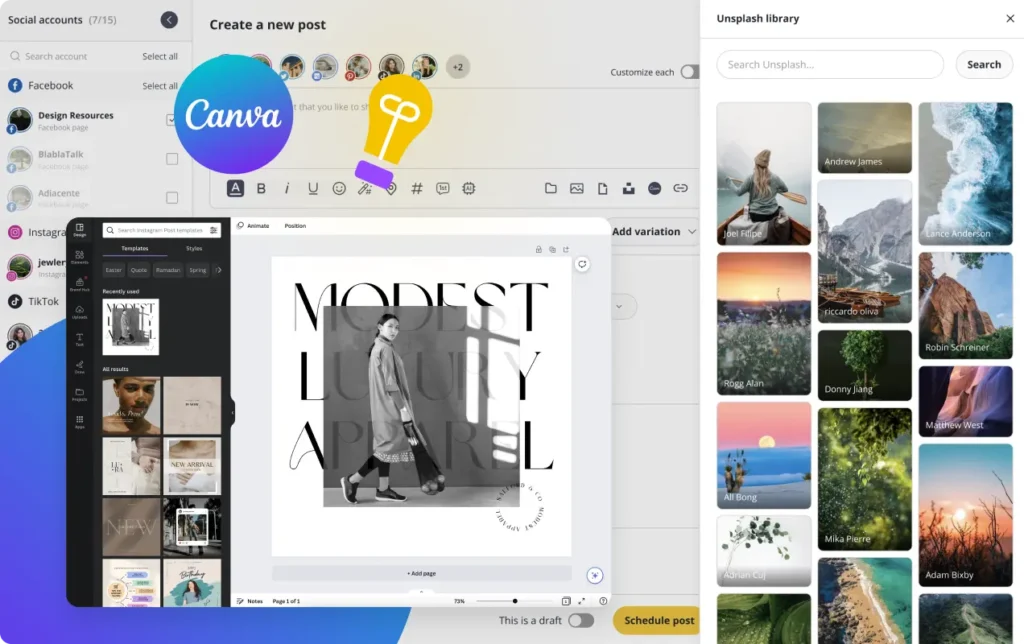
I use Canva templates that already match my brand, so the fonts, colors, layouts, and overall style are already set up before I start creating.
During batch days, I’m mostly duplicating templates, changing text, replacing images, and making small layout adjustments instead of designing everything from scratch.
This saves a huge amount of time.
Because of the Canva integration inside SocialBee, I can also pull designs directly into my posts without constantly downloading files or switching between tools.
3. Batch similar tasks together
Another thing that changed the way I work is batching by task instead of batching by post.
Most people fully complete one post at a time. They write the caption, design the graphic, edit the video, upload it, schedule it, and then move on to the next one.
That workflow completely kills my focus.
Instead, I group similar tasks together:
- Writing session: captions, hooks, text posts, and rough video scripts
- Recording session: Reels, TikToks, voiceovers, and video content
- Design session: carousels, graphics, Pinterest pins, and visuals
- Admin session: organizing drafts and preparing content for scheduling
This keeps my brain in one mode instead of constantly switching between completely different types of work.
4. Adapt content for different platforms
I don’t believe in copy-pasting the exact same post everywhere.
At the same time, I don’t create completely different content for every platform because that would take far too long.
Instead, I make small adjustments so the content feels native to each platform.
Usually that means:
- Adjusting image sizes
- Cleaning up formatting
- Shortening captions
- Tweaking hooks
- Adding or removing hashtags
Inside SocialBee, I usually create one main post first and then customize platform-specific versions from there.
That way, I’m adapting existing content rather than recreating everything from scratch.
5. Separate creative work from administrative work
The last thing that really helped me was separating creative work from administrative work.
Writing, recording videos, brainstorming ideas, and creating content require focus and energy.
Formatting captions, uploading drafts, organizing content, and preparing posts for scheduling don’t.
So I try to do the harder creative work earlier in the day when my brain feels fresh and leave the lighter tasks for later.
That small shift made content batching feel much less draining because I stopped forcing creativity when I was already mentally tired.
By the end of Day 2 and 3, most of my content is created, organized, and sitting in draft form ready for scheduling. Having a week’s worth of content prepared creates a huge amount of breathing room compared to scrambling to create something new every day.
Day 4 — Review, Collaboration & Scheduling (30–60 min)
By Day 4, most of the hard work is already done. The content is written, the visuals are ready, the video content is edited, and everything is sitting in drafts.
Part 1: Final Review & Scheduling
Before anything goes live, I do one final review of the entire week. I’m mostly checking:
- Does the week feel balanced?
- Are the posts too repetitive?
- Is there too much promotional content?
- Are the formats mixed properly?
- Do the captions still sound natural?
Sometimes I move things around a little. Maybe there’s too much video content back-to-back. Maybe two Instagram posts feel too similar. Maybe a personal story fits better later in the week.
Once everything looks right, I schedule the content inside SocialBee. Seeing the full calendar laid out makes it much easier to spot gaps, overlaps, or content that feels out of place.
Part 2: Collaboration & Approvals
If I’m working with clients or team members, scheduling doesn’t mean the content is locked forever. It’s simply easier to review content when the entire week is already organized.
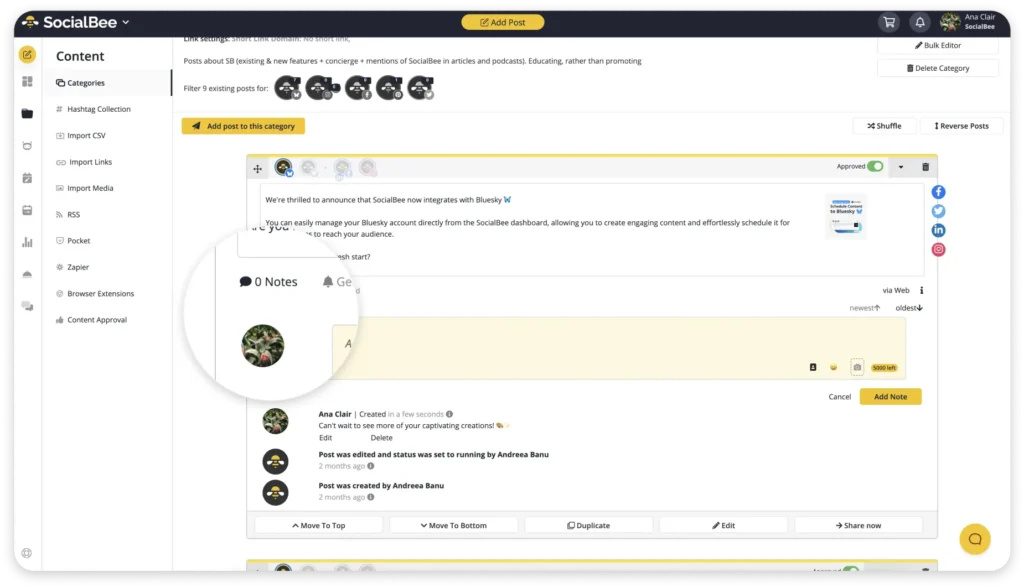
This is where SocialBee’s collaboration features help. Instead of sending drafts back and forth through email, Slack, or multiple Google Docs, stakeholders can review scheduled content, leave comments, request edits, and approve posts directly inside the platform.
I also prefer batching approvals. One review session is much easier than constantly interrupting content creation to discuss individual posts. It keeps feedback organized and helps everyone stay focused on the bigger picture.
That way, even if changes are needed, I’m adjusting a structured content plan instead of scrambling to build one from scratch.
5. Aborda el mismo tema desde distintos ángulos
¿Cómo abordas el mismo tema desde distintos ángulos?
Teniendo en cuenta que cada canal social se dirige a un público diferente, empieza a escribir pies de foto y a editar tu contenido visual basándote en lo que a la gente le gusta ver.
Por ejemplo, publica un vídeo alegre en TikTok vídeo contenido sobre un tema determinado manteniendo la compostura en Facebook y LinkedIn. El tema de las publicaciones puede ser el mismo, pero la ejecución es lo que marca la diferencia.
¿Has notado un aumento de la participación en determinados temas que tratas en las redes sociales? Entonces deberías explorarlos más abordando los mismos temas desde distintos ángulos.
Aquí tienes algunos consejos sobre cómo abordar el mismo tema desde distintos ángulos:
- Alterna el formato – Presenta la misma información de forma atractiva y fresca utilizando imágenes, vídeos, infografías y carruseles.
- Cambia el tono – Adapta el tono de la publicación al tono general de la marca y a la plataforma de las redes sociales. Por ejemplo, prueba con un enfoque más desenfadado en Twitter y más formal y profesional en LinkedIn.
- Céntrate en un beneficio diferente – Habla de un nuevo beneficio del tema cada vez que publiques sobre él. Esto mantiene el contenido fresco y relevante.
- Dirígete a diferentes segmentos de audiencia – Dirígete a diferentes segmentos de audiencia destacando aspectos del tema con los que se relacionan.
- Utiliza diferentes técnicas de narración – Contar historias puede ser una herramienta poderosamente atractiva. Atrae al público utilizando diversas técnicas de narración.
Intenta utilizar estos ángulos para crear varios posts sobre el mismo tema. Deben aportar valor a tu audiencia y mantener tu marca en primer plano.
6. Recicla los contenidos generados por los usuarios
El contenido generado por el usuario (CGU) es el tipo de contenido creado por personas que han utilizado tus productos y servicios en el pasado. El formato del contenido varía, desde vídeos y entradas de blog, hasta imágenes y reseñas.
Este tipo de contenido es tan popular que el 86% de las empresas utilizan el CGU como parte de su estrategia de marketing digital. ¿Sabías que el CGU puede beneficiar a cualquier empresa? Proporciona pruebas sociales, mejora la credibilidad y persuade a los seguidores para que se conviertan.
Reciclar CGU es una forma de atraer a tu audiencia en las redes sociales sin tener que crear constantemente contenido nuevo desde cero. Cuando recicles contenido de tus clientes o seguidores, recuerda configurar tu calendario de publicaciones para reciclar indefinidamente estas publicaciones atemporales.
7. Céntrate en crear posts perennes
Agrupar contenidos es clave para crear publicaciones que resistan el paso del tiempo. El contenido evergreen no quedará obsoleto rápidamente, por lo que es importante centrarse en su creación.
He aquí algunos ejemplos de contenidos perennes:
- Consejos educativos
- Tutoriales
- Hechos históricos
- Testimonios
- Entrevistas industriales
Planificar con antelación y volver a poner en cola las publicaciones perennes te ayudará a evitar tener que volver a crearlas cada vez que quieras compartir algo nuevo en tus canales de redes sociales, y esto te ahorrará tiempo y esfuerzo.
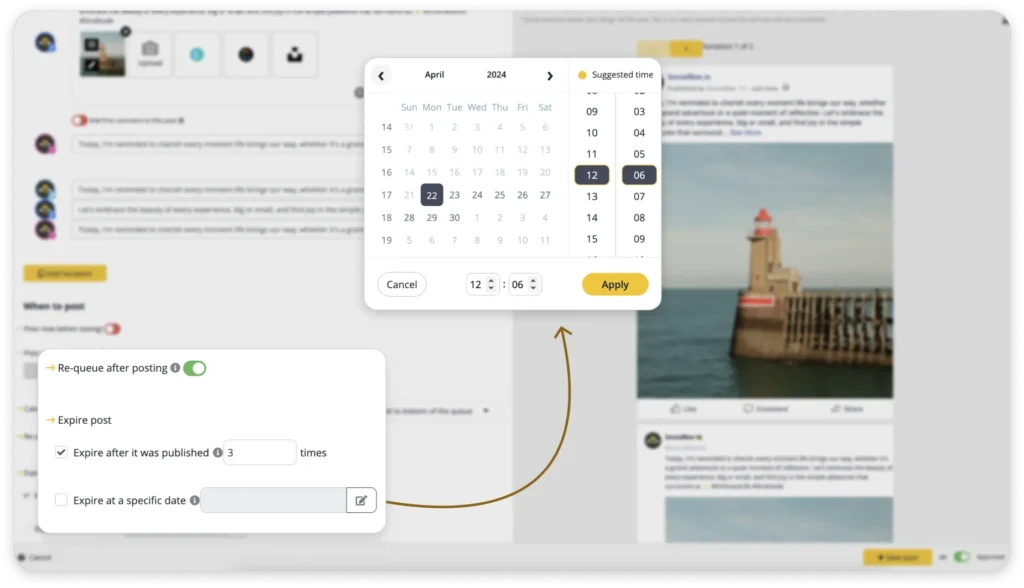
Genera contenidos por lotes de forma eficiente creando categorías de contenidos perennes con SocialBee.
¡Empieza ahora nuestra prueba gratuita de 14 días!
Con SocialBee, puedes crear categorías de contenido perenne que recorran tu contenido. De este modo, ahorrarás mucho tiempo sin tener que crear siempre contenido nuevo para causar una gran impresión en tus redes sociales.
8. Diseña plantillas visuales para tus posts y reutilízalas
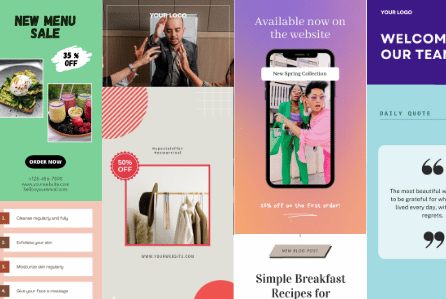
Independientemente del contenido que estés creando, la agrupación de contenidos siempre debe incluir elementos visuales. Los elementos visuales pueden ayudarte a atraer la atención de tu público y a reforzar la identidad de tu marca mediante elementos visuales coherentes (por ejemplo, el logotipo de la empresa, los colores de la marca, los diseños y los tipos de letra, etc.).
Para que la dosificación de contenidos sea breve y eficaz, es importante utilizar plantillas para tus elementos visuales en las redes sociales. Esto también te ayudará a mantener la coherencia en todas las plataformas.
No dudes en diseñar plantillas visuales en Canva o Adobe Spark. Permiten a los usuarios personalizar rápidamente la plantilla con su propio logotipo, branding y estilo.
9. Haz un seguimiento de tus contenidos más eficaces y amplíalos
El seguimiento de los análisis para comprobar el rendimiento de tus contenidos debe ser una de tus prioridades. Al analizar tus análisis en las redes sociales, puedes identificar los tipos de contenido que generan más participación y conversiones, así como identificar los puntos débiles de tu estrategia de contenidos.
Si realizas un seguimiento constante de los análisis, podrás optimizar los futuros lotes de contenido en consecuencia y, como resultado, llegar a tu público objetivo con mayor facilidad.
El panel Insights de SocialBee te permite explorar rápidamente tus publicaciones más exitosas revelando su tasa de participación, así como el número de me gusta, clics, comentarios y compartidos.
Además, revela los mejores momentos para publicar un determinado tipo de post, de modo que puedas maximizar el número de lectores y el alcance. Desde las analíticas de SocialBee, también puedes acceder a un mapa que destaca los días e intervalos de tiempo en los que tu audiencia ha interactuado más con tus contenidos publicados.
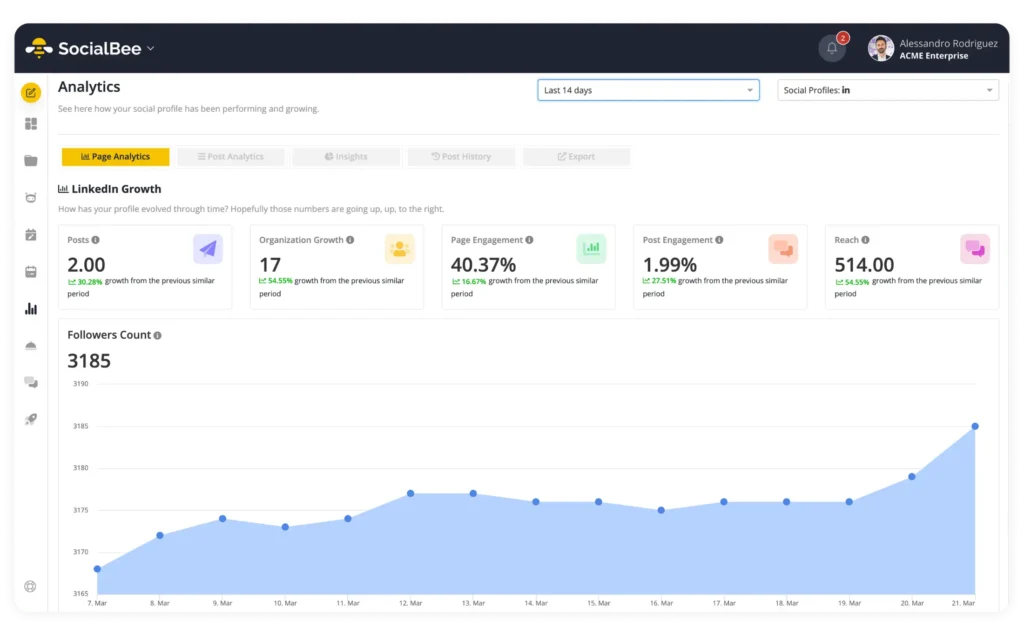
Supervisa el rendimiento de tus contenidos en todos tus canales de redes sociales y genera informes detallados en PDF en cuestión de segundos.
¡Empieza hoy mismo tu prueba gratuita de 14 días en SocialBee!
10. Programa tus publicaciones con antelación
Programar el contenido con antelación es uno de los pasos más importantes a la hora de realizar una tanda de contenidos. Para ello, necesitarás una herramienta de gestión de redes sociales todo en uno como SocialBee.
Al programar el contenido por adelantado con SocialBee, puedes asegurarte de que tu contenido se publicará en la fecha y hora específicas que mejor se adapten a tu público objetivo. Esto también te ayuda a mantenerte organizado y evitar las prisas de última hora para crear contenidos.
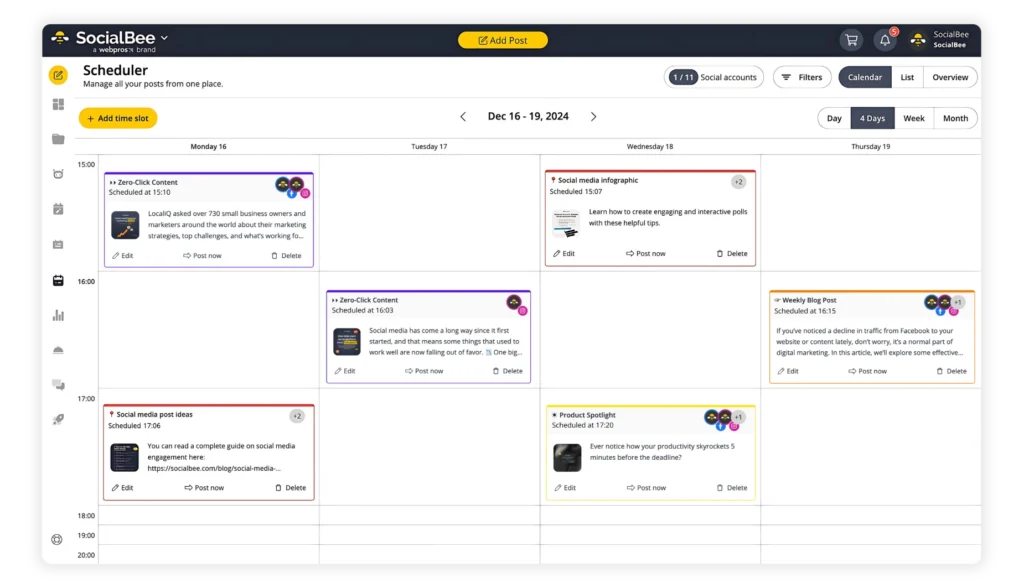
Programa tus contenidos con semanas de antelación y deja que SocialBee haga el resto del trabajo.
Preguntas frecuentes
1. ¿Con qué frecuencia debo crear contenido por lotes?
Todo depende de tu estrategia de contenidos y de tu calendario de contenidos. Una buena regla general es que la dosificación de contenidos debe hacerse cada tres a seis meses, esto te permite planificar con antelación y asegurarte de que el contenido es relevante, actual y atractivo.
2. ¿Qué errores comete la gente al agrupar contenidos?
He aquí algunos errores que la gente comete al agrupar contenidos:
- No reutilizar el contenido – En lugar de crear contenido nuevo constantemente, los creadores de contenido deberían reutilizar algunos contenidos más de una vez, cambiándolos y haciéndolos relevantes para diferentes plataformas. Por ejemplo, una publicación de Instagram puede convertirse en un tuit o viceversa.
- No publicar CGU – Al ser creado por personas, el CGU parece más auténtico y genuino que el contenido generado únicamente por una organización o empresa.
- No aprovechar los datos demográficos – Agrupar contenidos sin tener en cuenta los intereses de tu público objetivo puede llevar a publicar contenidos irrelevantes o innecesarios.
- No mezclar tipos de contenido – Publicar repetidamente el mismo formato de contenido puede provocar una falta de compromiso por parte de tus seguidores.
- No adaptarse a las tendencias – Las marcas pueden parecer desconectadas si acumulan contenidos sin tener en cuenta la actualidad o los temas de moda.
- No medir el éxito – Cuando no se hace un seguimiento del contenido y la estrategia de dosificación no se ajusta en función de los resultados, puede dar lugar a un contenido ineficaz y a la pérdida de oportunidades de crecimiento.
3. ¿Cómo me aseguro de que mi contenido por lotes se mantiene fresco?
Para asegurarte de que tu contenido por lotes se mantiene fresco, tendrás que tener en cuenta algunas cosas importantes.
Aquí tienes algunos consejos para empezar:
- Ten en cuenta los acontecimientos y tendencias actuales para que el contenido siga siendo relevante
- Utiliza la analítica para seguir el rendimiento del contenido y determinar qué tipos de contenido tienen más éxito
- Supervisar las opiniones de los usuarios e incorporar sus sugerencias de mejora
- Publica múltiples tipos de contenido incluyendo diferentes formatos, como vídeos, imágenes e infografías
Contenido por lotes como un profesional
La dosificación de contenidos puede ayudarte a producir contenidos que atraigan a tu público objetivo y aumenten la conciencia de marca.
¿Quieres experimentar la comodidad de hacer batching productivo de tus contenidos? SocialBee ofrece una herramienta de gestión de redes sociales fácil de usar que te permitirá amplificar tu presencia en las redes sociales y hacer batching como un profesional.
Nuestro 14 días de prueba gratuita está a un clic de distancia, así que ¿a qué esperas? ¡Aprovecha y pruébalo hoy mismo!

I’m not looking for one viral post.
Most of the time, viral posts don’t tell you much anyway because sometimes they perform for random reasons. What matters more is consistency. If a certain format, topic, or style performs well multiple times, I treat that as a signal.
One simple rule I follow:
If something works more than once, I batch more of it.
So if opinion-based LinkedIn posts keep performing well, I’ll create more. If short-form video content starts outperforming static Instagram posts, I’ll shift more energy there. If one blog topic brings in strong engagement or potential customers, I’ll expand on it with more content.
I also pay attention to easy wins.
Sometimes, a quick post created in 10 minutes performs better than something I spent hours polishing. Those posts become important because they usually show what feels natural to the audience instead of being overproduced.
This part of the batching process helps me avoid wasting time creating content nobody really cares about.
It also makes planning much faster because I’m no longer staring at a blank page trying to invent completely new content pillars every week.
Most of the time, the answer is already in the analytics:
- Review what worked
- Identify patterns
- Batch similar content
- Repeat
That’s really the long game with content creation.
Not constantly reinventing yourself every week, but learning what connects with your audience and getting better at creating more of it over time.
Common content batching mistakes to avoid
Content batching can make the entire content creation process feel lighter and more organized, but only if the workflow is actually sustainable. A lot of people try batch creating once, overwhelm themselves, then decide it “doesn’t work.”
Most of the time, the problem isn’t content batching itself. It’s the way the process is set up.
Here are the biggest mistakes I see people make when batching social media content:
- Batching too much at once
- Editing while creating
- Making the workflow too strict
- Not leaving buffer time
- Switching between tasks too often
Batching too much at once
A lot of people start batch creating and immediately try to plan an entire month of content in one sitting. It sounds efficient, but it usually leads to burnout or content that already feels outdated two weeks later.
I’ve found that batching one week ahead works much better. It gives you structure without making your content feel too rigid.
Editing while creating
This slows the content creation process down more than people realize.
You start writing one post, then keep rewriting the hook, changing captions, tweaking visuals, fixing formatting, and suddenly one post takes an hour.
When I batch content, I try to separate creating from editing. First, I get the ideas out. Then I clean things up later.
Making the workflow too strict
Content batching should create breathing room, not make your week feel overplanned.
Social media changes fast. New ideas come up. Personal stories happen. Sometimes the best-performing post is something completely unplanned.
A good batching process leaves room for flexibility.
Not leaving buffer time
Every batch week looks easy until something takes longer than expected.
Maybe video content needs revisions. Maybe client work gets delayed. Maybe you simply don’t feel creative that day.
If your schedule is packed too tightly, one delay can throw off the entire workflow.
Switching between tasks too often
This is one of the biggest productivity killers during batch days.
Writing one post, then editing a Reel, then answering emails, then designing Instagram posts completely breaks focus. The content creation process becomes much more time-consuming when your brain constantly switches modes.
That’s why I batch similar tasks together:
- Writing captions together
- Recording video content together
- Designing visuals together
- Organizing and scheduling together
Staying in one mode for longer makes creating content feel much lighter.
Frequently asked questions
How far ahead should I batch content?
One week ahead is usually enough.
That gives you breathing room without making your content feel outdated or too rigid. Social media platforms move fast, and if you batch an entire month ahead, it becomes harder to react to trends, new ideas, or things happening in your business or life. I like having a week’s worth of content ready, plus a few extra posts as backup.
How many posts should I batch at once?
Start with 5–10 posts.
That’s usually enough to make your week easier without turning batch content creation into an exhausting full-day marathon. A lot of people try to create too much at once and burn out halfway through. It’s better to consistently batch a manageable amount of high-quality content than force yourself to create 30 social media posts in one sitting.
How long does content batching actually take?
Usually a few hours spread across the week.
For me, content planning and generating content ideas takes around 1–2 hours, then the actual content creation process depends on the format. Writing social media posts is faster. Video content, blog posts, and long-form content obviously take longer. But even when batching takes half a day, it still saves more time than constantly switching between creating, editing, posting, and scrambling for content every single day.
What if I run out of content ideas during a batching session?
It happens more often than people admit.
When I feel stuck, I stop trying to come up with completely new ideas and look at what’s already around me. Client questions, comments, conversations in my niche, industry updates, and even older posts can all become new content.
One of the easiest ways to create social media content consistently is to stop treating every post like it needs to be a groundbreaking idea. Most topics can be approached from different angles. A tip can become an opinion, a personal story, a how-to post, or even a short video.
The goal isn’t to constantly find new ideas. It’s to find new ways to talk about topics your target audience already cares about.
Do I need different content for every social media platform?
Not necessarily.
Creating multiple pieces of content for every platform from scratch would take far too much time. Instead, I usually start with one piece of content and adapt it for different social media channels.
For example, one blog post might become a LinkedIn post, a carousel for Instagram, a few social media captions, and one or two short videos. The core idea stays the same, but the format changes.
This approach makes batch content creation much more manageable, helps with saving time, and allows you to stay active across multiple social media platforms without turning content creation into a full-time job.
What if content batching feels overwhelming?
Then you’re probably trying to do too much.
A lot of people discover content batching and immediately try to plan a month’s worth of content, record multiple videos, write social posts, design visuals, schedule posts, and tackle email marketing all in the same week.
No wonder it feels exhausting.
Start small. Pick a few content pillars, collect some content ideas, and focus on creating enough content for an entire week. That’s more than enough to see the benefits.
You also don’t need to do everything yourself. Create templates for recurring posts, use a marketing calendar to keep track of what you’re publishing, and use the right tools to handle the repetitive stuff. That leaves more room for the creative process and helps reduce stress when you’re feeling overwhelmed.
I find it helps to batch one type of content at a time. Write your written content first, then work on visual content, then record video content. If you’re creating for a YouTube channel or experimenting with new platforms, the same rule applies. Stay focused on one task instead of jumping between ten different things.
The goal of successful batch content creation isn’t to create all the things at once. It’s to give yourself some breathing room, improve your overall productivity, and make creating quality content feel a little less chaotic.
What if I never seem to have enough content ideas?
Start keeping a running list.
Every time you get a question from a client, spot a trend, or think of something while writing a blog post, save it. Don’t trust yourself to remember later.
When it comes time for a focused session, you’ll already have post ideas waiting for you.
That’s what makes the actual process easier. Instead of trying to come up with everything in one go, you’re simply turning existing ideas into content. One idea can often become a blog post, two videos, or several smaller pieces of content.
It’s a simple habit, but it helps you stay ahead and spend less time staring at a blank page.
Content batching is the smarter way to stay consistent
One of the biggest reasons content batching actually works for me long-term is because of SocialBee.
Instead of jumping between docs, Canva tabs, spreadsheets, scheduling tools, and random notes apps, everything lives in one place. I can organize content categories, batch create posts, customize content for different social media platforms, schedule everything for the week, and review performance later without turning the process into another full-time job.
That structure makes a huge difference when you’re trying to stay consistent.
Content batching isn’t about creating more content. It’s about creating content in a way that feels sustainable.
Instead of waking up every day wondering what to post, you already have a plan. Your ideas, formats, captions, and content calendar are already organized, which makes the entire content creation process feel much less stressful.
That’s why content batching became such a game-changer for me. Not because it made social media easier, but because it gave me breathing room. I stopped scrambling for last-minute ideas and stopped spending my entire week thinking about content.
You don’t need to batch an entire month ahead or build the perfect workflow. You just need a system that helps you stay consistent without burning out.
If you want to simplify your own batching process, you can start your 14-day free trial of SocialBee and manage your content, scheduling, approvals, and analytics in one place.