

If you’ve used Planable, you already know its biggest strength: a clean, visual calendar that makes content approvals fast and painless. It’s a favorite among agencies that juggle multiple clients and need a clear approval process. But what about Planable alternatives?
Here’s the catch: Planable isn’t designed to cover everything. It is built around content creation and collaboration, not monitoring or automation. If you need social listening at scale, a social inbox that covers every channel including X and YouTube, or queue-based automation like smart scheduling and RSS, you’ll likely need a different tool or a stack. As your social media strategy grows, you may start to feel those gaps.
That’s where Planable alternatives come in. Whether you want stronger reporting, broader platform coverage, or AI-driven content creation, there are tools that go further without losing the simplicity you value.
In this guide, we’ll review the top Planable alternatives, complete with pros, cons, and real user feedback, so you can choose a platform that fits your goals today and scales with you tomorrow.
Each social media management tool on this list was closely examined through firsthand use, in-depth research, and expert reviews on popular review sites to assess real-world performance.

Start your 14-day free SocialBee trial!
SocialBee feature overview
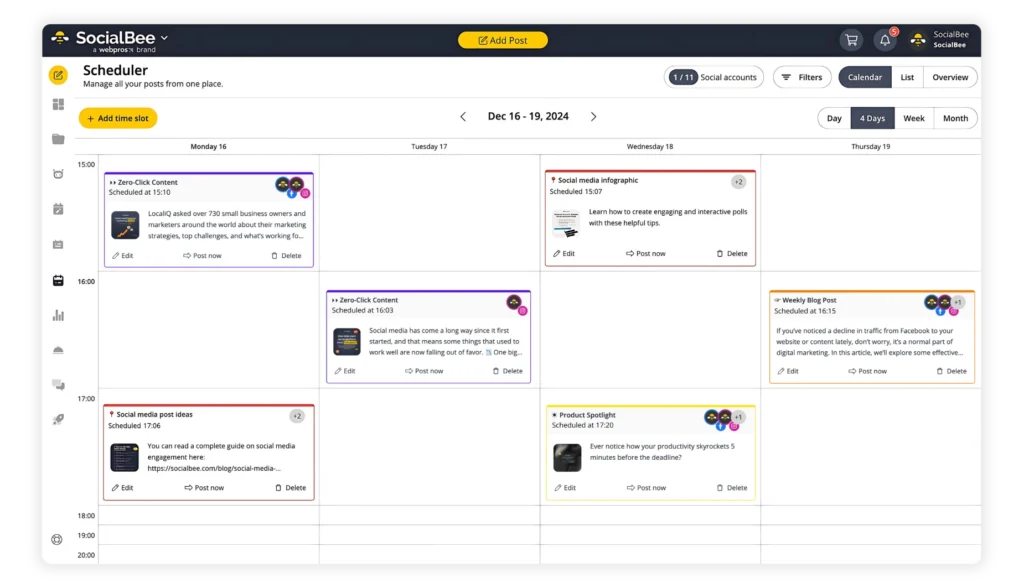
SocialBee stands out as a flexible social media management tool with several unique features that save time and simplify content planning. One of the most popular is Copilot, the built-in assistant that helps you create and organize content.
After you answer a few short questions about your brand, Copilot suggests new post ideas, recommends the best times and platforms to publish, and can even prepare a complete batch of ready-to-use posts. This makes it especially valuable for social media managers who need a steady flow of content without spending hours brainstorming.
Another highlight is Universal Posting. With this feature, you can publish to platforms that don’t normally allow direct scheduling, such as Facebook Groups, Reddit, WhatsApp, Telegram, Mastodon, and Quora. When it’s time to go live, you’ll get a notification from the SocialBee mobile app.
A couple of taps, and your content is published. For anyone managing multiple social media channels, this is a simple way to stay consistent without switching between different tools.
SocialBee also makes it easier to plan your content strategy with categories. You can group posts into themes such as tips, promotions, or behind-the-scenes updates, and assign each group its own schedule.
Here are SocialBee’s key features:
- Schedule and publish posts on Facebook, Instagram, LinkedIn, X (Twitter), Pinterest, TikTok, YouTube, Threads, Bluesky, and Google Business Profile.
- Use AI to generate captions, hashtags, and images when you need fresh ideas.
- Customize content for each social media platform manually or automatically with AI.
- Build multiple variations of posts to keep your feeds fresh without starting from scratch.
- Adjust captions for character limits, resize images, swap hashtags, tag users, add first comments, and more.
- Save hashtag collections to reuse across posts.
- Edit images, add alt text for accessibility, and choose custom video thumbnails.
- Tag or mention accounts in your posts and set a location when relevant.
- SocialBee suggests the best posting time for you based on how your past content performed.
- Automatically reuse evergreen content and have time-sensitive posts expire at a certain date.
- Set unique schedules for each profile on different social channels.
- Edit multiple posts at once with the bulk scheduling editor.
- Save unfinished content as drafts and return to it later.
- Import visuals directly from Canva, Unsplash, and GIPHY without leaving the app.
- Collaborate with your team members by leaving notes, approving posts, and reviewing content before publishing.
- Manage multiple clients or brands with dedicated workspaces to keep content separate.
- Track social media performance with detailed analytics and export reports in PDF format.
- Reply to comments, messages, and mentions across channels in a single social media inbox.
- Import blog articles automatically and schedule them with suggested captions, images, and links.
- Shorten links with more than 10 URL integrations.
SocialBee pros
Users say SocialBee is reliable, flexible, and supported by a customer service team that responds quickly. It’s popular with small businesses, agencies, and social media managers because it makes scheduling and engagement easier while offering helpful training and integrations. Features like content categories, multi-account scheduling, and analytics are highlighted as big time-savers.
What users are saying about SocialBee’s pros:
- “The customer support is quick to respond, and the online webinars with opportunities for Q&As are very helpful. It was easy to set up and add all of my different channels. I use it almost every day to manage comments, review analytics, and to add posts.” – Verified User in Hospital & Health Care, Mid-Market (Source)
- “I’ve been using SocialBee for a little over 3 years now, and it’s been an absolute game-changer. I can easily manage multiple social media accounts for various clients while avoiding content duplication issues. It was easy to implement into my team’s workflow, and customer support is always fast to resolve any issues.” – John B., CEO, Small-Business (Source)
- “Support is outstanding. Julia is always responsive to every question and always shows she is eager to help.” – Marty H., President, Insurance, Small-Business (Source)
- “SocialBee is a great tool for scheduling social media content, and monitoring results. If I ever have any concerns with the service, their customer service is able to jump in very quickly and support me which is greatly appreciated. I check it every day.” – Brian S., Owner, Marketing and Advertising, Small Business (Source)
- “It is simple enough for someone like me who isn’t a super tech wiz to use and figure out without having to watch tons of training videos. It was very easy to implement and immediately start using. I also love that you can upgrade to Concierge Bee or other options if you want to hire someone to help (which I did for several months, and would go back to again!).” – Dr. Jennifer Y., Adjunct Faculty, Small Business (Source)
SocialBee cons
Most users are satisfied with SocialBee, but some point to areas that could be improved. Comments mention small dashboard glitches, limited media library storage, and the need for additional platform integrations.
What users are saying about SocialBee’s cons:
- “If there were one thing I would like to see added to SocialBee it would be more storage for storing media and the ability to organize that media into folders so I can easily access that media when writing posts.” – John B., CEO, Small-Business (Source)
- “Minor (issues) in the app, but they are working on the one main request.” – Marty H., President, Insurance, Small-Business (Source)
SocialBee pricing
- Offers a 14-day free trial
- Paid plans start at $29
Planable vs SocialBee: Which should you choose
Choose Planable if your top priority is collaboration and client approvals. Its visual social media calendar and customizable approval workflows make it a strong fit for agencies that need clear feedback loops. However, analytics are limited, and publishing support for some platforms is missing.
Choose SocialBee if you want a more complete social media management tool. It covers more social media platforms, includes a unified inbox, detailed analytics with PDF reports, and flexible features like content categories and Universal Posting. While setup can take some time, SocialBee is better suited for freelancers, small businesses, and agencies managing multiple clients.
#2 Planable Alternative: Statusbrew – Best for enterprise-grade engagement, governance, and reporting
Who is Statusbrew best for?
Statusbrew is best suited to agencies and mid-to-large teams.
Statusbrew feature overview
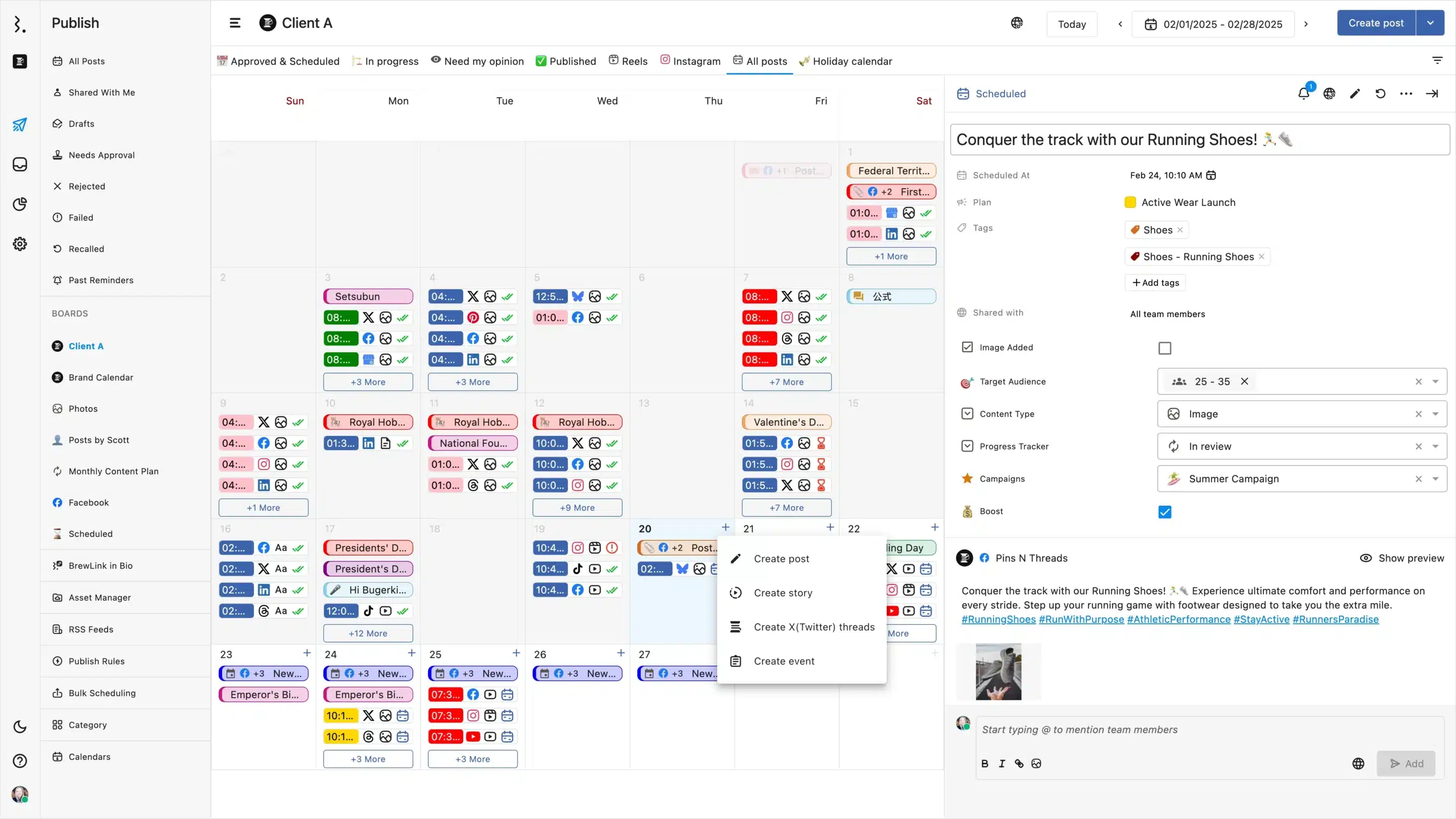
Statusbrew is a social media management tool built for teams that need structure and scale. Its shared calendar makes it simple to plan and schedule social media posts across multiple networks, while collaboration tools like approvals, permissions, and task assignments help keep workflows organized.
The unified inbox brings together comments, messages, and reviews, cutting down the time teams spend jumping between platforms. Users often highlight its intuitive design and reliable scheduling, though some note a learning curve and the lack of a fuller media library.
Here are Statusbrew’s key features:
- Plan, schedule, and publish content across Facebook, Instagram, LinkedIn, X (Twitter), TikTok, YouTube, Pinterest, Threads, Bluesky, and WhatsApp using a shared calendar.
- Create drafts, edit posts for each network, tag locations, add hashtags, and preview Instagram grids before publishing.
- Organize posts with categories, bulk scheduling, RSS feeds, and smart campaign tracking to keep your calendar full.
- Boost Facebook and Instagram content directly and pause all scheduled posts when needed.
- Collaborate with team members using roles, permissions, approval workflows, audit trails, and shareable calendars.
- Manage comments, messages, reviews, and TikTok DMs from a unified inbox with filters, saved replies, automation rules, and sentiment analysis.
- Monitor brand keywords and hashtags across X, Instagram, YouTube, Reddit, Threads, blogs, and news sites.
- Track performance with cross-network analytics, profile reports, hashtag reporting, paid campaign results, and competitor benchmarking.
- Monitor your brand mentions with real-time social listening across Instagram, Twitter, and Reddit
- Export branded reports in PDF or CSV, schedule automatic deliveries, and build custom dashboards for clients.
- Connect with tools like Canva, Google Business Profile, Slack, Dropbox, Bitly, Giphy, and Unsplash. Enterprise plans add HubSpot, Salesforce, Trustpilot, and app store reviews.
- Protect accounts with two-step verification, access restrictions, team activity logs, and enterprise-grade security.
- Stay supported with mobile apps, training videos, live chat, client billing for agencies, BrewLink in bio, and enterprise onboarding services.
Statusbrew pros
Users value Statusbrew for its ease of use, scheduling capabilities, and collaboration tools. It helps simplify social media scheduling across multiple social media pages, saving time for both individuals and teams. The interface is often described as intuitive, and the ability to assign tasks supports better teamwork.
What users are saying about Statusbrew’s pros:
- “Easy integration with LinkedIn and Twitter.” – Tatiana F., Senior Manager, Brand and Communications, Enterprise (Accounting) (Source)
- “Ease of use, valuable features, useful stats via dashboard, nice interface.” – Davide Z., President & CEO, Mid-Market (Manufacturing) (Source)
- “The easy way to schedule articles on social media. It is very user-friendly.” – John R., Creative Director/Editor, Small-Business (Marketing and Advertising) (Source)
- “The scheduling tool made the normally unmanageable task of scheduling the same post across multiple social media channels incredibly easy. It is intuitive and saves a serious amount of time. The assign tool is excellent for collaboration and saves us from having to send an email to a colleague.” – Andrew B., Director of Strategic Marketing & Product Marketing, Enterprise (Electrical/Electronic Manufacturing) (Source)
- “Posting is directly fed into engagement monitoring, and as such, there is no separation between posting and responding.” – Ryan M. D., Founder/CEO, Marketing and Advertising, Small-Business (Source)
Statusbrew cons
While most reviews are positive, users point out a few areas for improvement. Some mention minor glitches, a learning curve for new users, or missing features such as a more complete media library.
What users are saying about Statusbrew’s cons:
- “Statusbrew could improve some of its features.” – Tatiana F., Senior Manager, Brand and Communications, Enterprise (Accounting) (Source)
- “Takes some time to understand how it works, but once you get it, it is easy to use.” – Davide Z., President & CEO, Mid-Market (Manufacturing) (Source)
- “Sometimes the website crashes and uses a lot of RAM when I upload CSVs to the website.” – John R., Creative Director/Editor, Small-Business (Marketing and Advertising) (Source)
- “I would really like to see an extensive media library. The ability to reuse images and videos that have already been uploaded would save a lot of time.” – Andrew B., Director of Strategic Marketing & Product Marketing, Enterprise (Electrical/Electronic Manufacturing) (Source)
- “In some instances, shared inbox responses are second slow to sync relative to native services.” – Ryan M. D., Founder/CEO, Marketing and Advertising, Small-Business (Source)
Statusbrew pricing
- Offers a 14-day free trial
- Paid plans start at $89
Planable vs Statusbrew: Which should you choose
Choose Planable if your priority is collaboration and client approvals. Its visual social media calendar and customizable approval workflows make it a strong fit for agencies that need to review and approve content quickly. However, it offers only basic analytics and limited engagement tools.
Where Planable shines as a lightweight approval and collaboration tool, Statusbrew leans into full-scale social media management. It offers a unified inbox, detailed reporting, ad comment moderation, and comprehensive role-based workflows that larger teams often require.
For marketing teams running campaigns across multiple platforms with layered approval processes and deeper analytics needs, Statusbrew is often the more suitable choice.
#3 Planable Alternative: Planoly – Best for visual planning on Instagram & Pinterest
Who is Planoly best for?
Planoly is best for creators, influencers, and small businesses that focus heavily on visual content.
Planoly feature overview
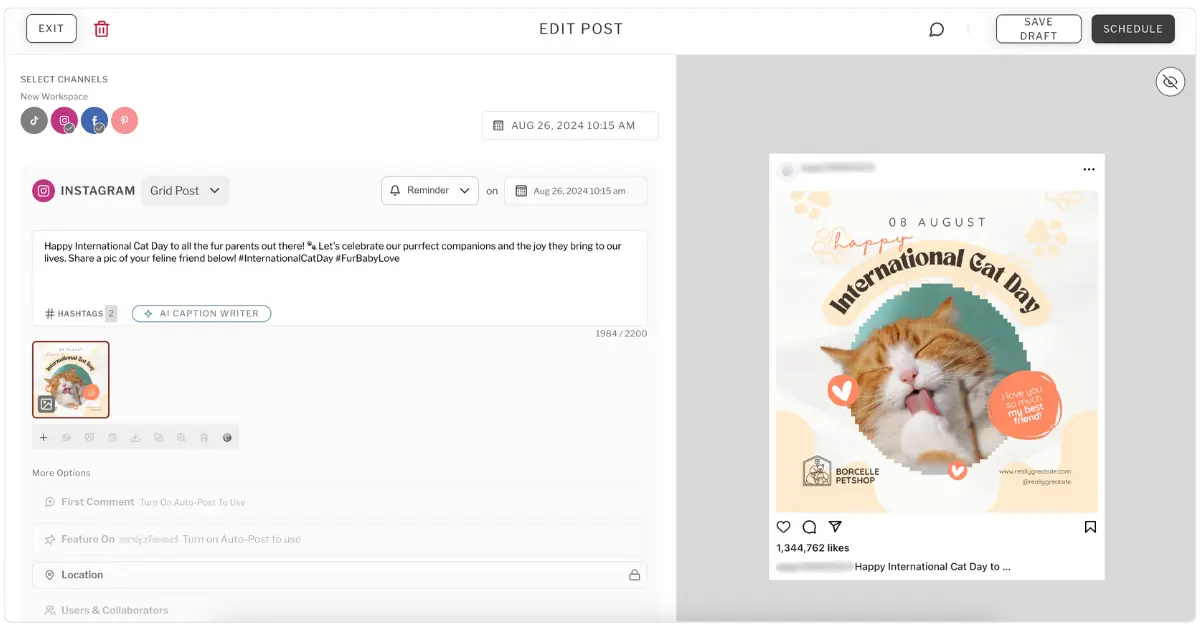
Planoly is a tool for managing multiple social media networks designed for creators and small businesses that value visual planning. Its drag-and-drop social media calendar makes it easy to organize posts, track seasonal trends, and preview content by channel.
Features like Instagram grid planning, hashtag management, and auto-posting help simplify social media scheduling, while built-in editing and stock image access reduce time spent on design. Users highlight its intuitive user interface and reliability for consistent posting.
Here are Planoly’s key features:
- Manage up to two social sets with support for 1 to 6 users, depending on your plan. Uploads are capped at 60 per month on the starter tier, while higher plans allow unlimited uploads.
- Use a social media calendar with built-in holiday and weekly trend suggestions, plus notes and placeholders to organize upcoming content.
- Plan your Instagram grid visually and preview posts by channel before publishing.
- Edit images and videos directly in the platform, access stock photos through Dupe, and save time with a built-in AI caption writer.
- Tag products and locations on Instagram, manage hashtags with a dedicated tool, and schedule auto-posts or reminders across all your social channels.
Planoly pros
Users appreciate Planoly for its ease of use, visual planning tools, and scheduling flexibility. It helps small businesses and creators organize their content and keep their posting consistent. Features like Instagram grid previews, hashtag grouping, and automatic publishing make it especially useful for visually focused brands.
What users are saying about Planoly’s pros:
- “The feature makes it easy to post content to Instagram and Facebook. You include your picture and caption and can schedule the posting when you want it to go live!” – Elizabeth S., Admin Assistant, Small-Business (Source)
- “Very easy to use interface. It gives you the optimal times to post based on your audience and date. You can pre-plan and schedule batches of content, something especially nice for when you’re on vacation.” – Michelle D., CEO and Founder, Small-Business (Source)
- “Planoly helps to visually plan all your social media content in place. The auto post features allow you to plan the content for the whole month and leave it on autopilot.” – Namrata A., Director, Small-Business (Source)
- “I like the ease of use the most. The website’s layout makes it easy to schedule your post and stay organized.” – Shawniece E., Owner, Small-Business (Source)
- “The drag and drop feature that allows you to visually plan your feed.” – Julia H., Registrar, Small-Business (Source)
Planoly cons
Some users mention drawbacks such as account disconnections, missing features, or pricing concerns. The loss of certain free plan features and limited support for Reels are common points of feedback.
What users are saying about Planoly’s cons:
- “Sometimes the social media accounts get disconnected but this is easy to re-attach.” – Elizabeth S., Admin Assistant, Small-Business (Source)
- “I would like it if they could add the emojis to their texting windows… I know they are starting to include Reels now, but I still don’t see that option.” – Michelle D., CEO and Founder, Small-Business (Source)
- “The paid plan is a little high end. It might be outside budget for small businesses.” – Namrata A., Director, Small-Business (Source)
- “There are a few features that were previously included with the free plan that are no longer included or limited.” – Shawniece E., Owner, Small-Business (Source)
- “The billing cycle/system is sort of confusing. When I put two Instagram accounts on my Planoly account I had to call them to fix the billing.” – Julia H., Registrar, Small-Business (Source)
Planoly pricing
- Offers a 14-day free trial
- Paid plans start at $16
Planable vs Planoly: Which should you choose
Choose Planable if you need streamlined collaboration and client approvals. Its visual social media calendar and approval workflows make it a good fit for agencies or teams that create and review content together. The trade-off is limited analytics and fewer publishing tools outside of core scheduling.
Planoly, on the other hand, is tailored for creators and small businesses focused on their social media presence on visual platforms like Instagram and Pinterest. With grid previews, hashtag management, and auto-posting, it simplifies planning and social media scheduling. It’s affordable and user-friendly, but less suited for teams that need multi-platform support or detailed performance reporting.
#4 Planable Alternative: Vista Social – Best for AI-powered automation, inbox management, and full platform coverage
Who is Vista Social best for?
Vista Social is best for agencies, brands, and social media managers who need powerful AI automation, cross-platform publishing, and a unified inbox to manage high volumes of engagement from a single dashboard.
Vista Social feature overview
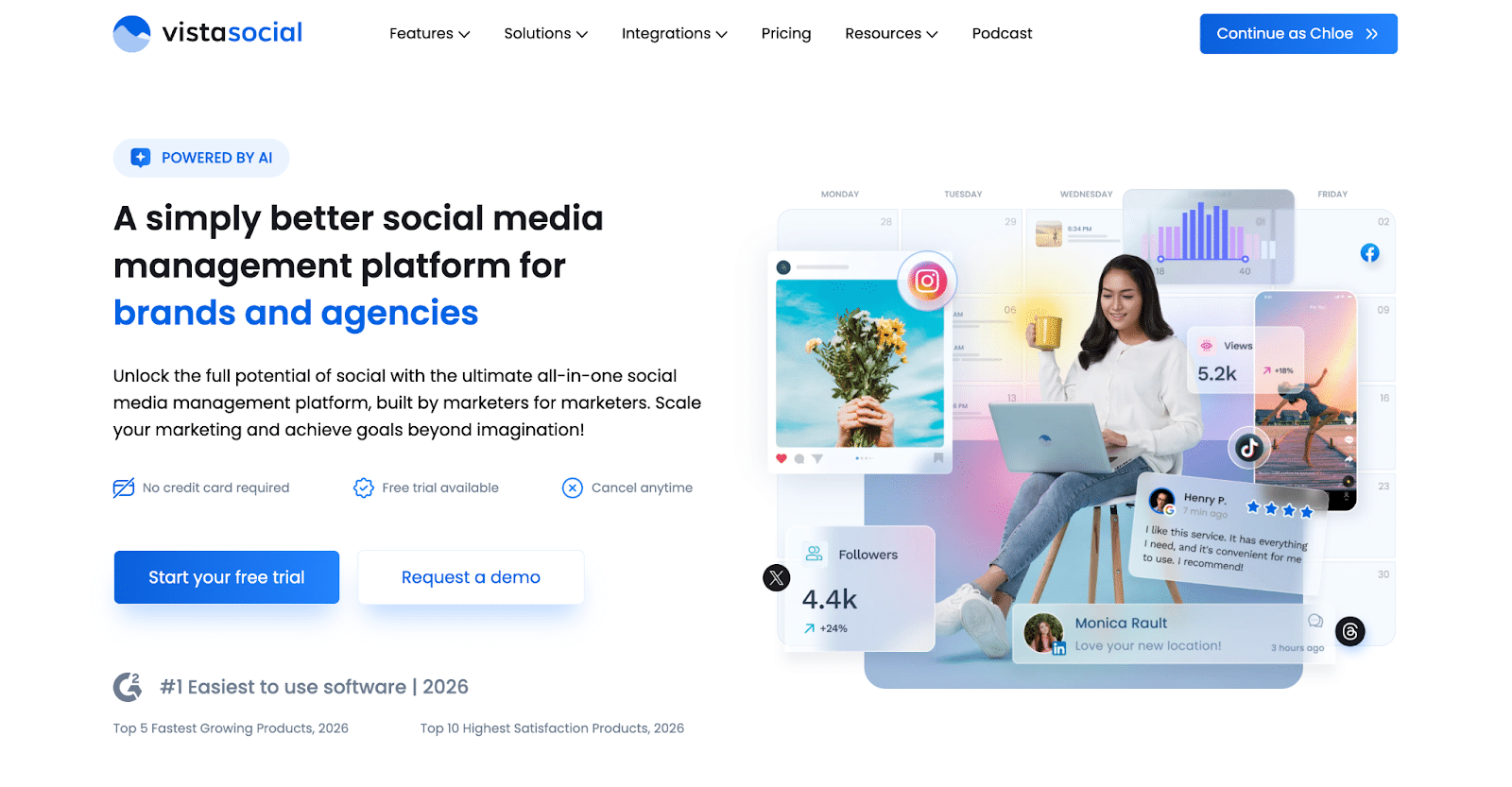
Vista Social is an all-in-one social media management platform that goes beyond content scheduling. Where Planable focuses on approvals and collaboration, Vista Social covers the entire social media management stack — including publishing, engagement, analytics, DM automation, and social listening — from one centralized hub.
Its built-in AI assistant and ChatGPT integration help teams generate captions, hashtags, and post ideas in seconds. The smart scheduling feature automatically recommends optimal posting times for each platform, while the visual drag-and-drop content calendar makes planning across multiple profiles effortless.
Vista Social’s unified social inbox consolidates all comments and DMs from every connected platform in one place, with AI-powered sentiment analysis to prioritize urgent messages and automated workflows that route conversations to the right team member. Multi-level approval workflows and white-label reporting make it especially well-suited for agencies managing multiple clients and brands.
Here are Vista Social’s key features:
- AI-powered content generation for captions, hashtags, brand voice, ideas, and comments
- Unified social inbox with sentiment analysis, DM automation, and lead capture
- Smart scheduling with optimal posting time recommendations
- Multi-level approval workflows for teams and agencies
- Cross-platform analytics and performance reporting
- ChatGPT integration for instant content creation
- Support for Facebook, Instagram, X (Twitter), LinkedIn, TikTok, YouTube, Pinterest, Google Business Profile, Bluesky, Threads, Reddit, and Snapchat
Vista Social pros
Users highlight Vista Social’s modern interface, depth of AI features, and the ability to manage both content publishing and engagement from a single platform. The inbox automation and sentiment analysis tools are frequently praised by teams managing high volumes of messages across multiple channels.
What users are saying about Vista Social’s pros:
- “I use Vista Social to manage all my social media accounts on one platform, providing a general overview and organized dashboard. It saves time, offers real-time engagement, automated replies, and unique listening features, allowing me to see my brand’s perception across channels.” – John Paulo S., Marketing Content Creator (Source: G2)
- “I like the ability to integrate with other marketing tools and CRMs. The interface is user-friendly, and customer support is easy to reach when I need help. The content calendars are also straightforward and easy to use. It is easier to implement the strategies using the vista social and built in listening and engagement tools make it the go to option for SMM. i have used this platform quite a few times to overview my social media analytical reports” – Fiza H., Digital Marketing Manager (Source: G2)
- “Love that we can schedule trial reels for ourselves and clients! This has made things so much easier. ALSO, the new DM automations? Amazing. I don’t think there would be enough space here to explain how much we love Vista Social.” – Danielle W., CEO Small-Business (Source: G2)
Vista Social cons
Social listening and employee advocacy are add-ons rather than built-in features, and plans may be more expensive for solo creators and solopreneurs. Some users also note an initial learning curve given the platform’s breadth of features.
What users are saying about Vista Social’s cons:
- “I didn’t love the prices, but I think it’s fair for everything it has available. It’s very much needed for any company to have a good structure and organization for things to happen correctly.” – Juliette M., Communications Director, Non-Profit Organization Management (Source: Capterra)
- “I think Vista Social could improve its task feature and turn it into a full project management tool. As a social media manager who handles many different clients, this improvement could help us streamline our work. But overall, Vista Social is highly recommended for people who need effective social media marketing campaigns.” – Gem Roy F., Social Media Specialist (Source: Capterra)
- “There is a learning curve at the beginning because the platform offers a lot of features. Some areas could benefit from more in-app guidance when setting things up the first time.” – Wajeeh Armaghan A. (Source: Capterra)
Vista Social pricing
- Offers a 14-day free trial
- Paid plans start at $64/month (billed annually)
Planable vs Vista Social: Which should you choose?
Choose Planable if your top priority is clean content collaboration and client approvals. Its visual calendar and customizable approval workflows make it a strong fit for agencies that need structured feedback loops. However, analytics are a paid add-on with selective platform coverage, and its inbox only supports comments across Facebook, LinkedIn, Instagram, and TikTok, with no DM automation or lead capture capabilities.
Choose Vista Social if you need a complete social media management platform. It covers more networks, includes a powerful unified inbox with full DM automation and lead capture, offers robust cross-platform analytics built into every plan, and supports AI-powered sentiment analysis and automated workflows. For agencies and teams that have outgrown Planable’s collaboration-only focus, Vista Social is the stronger all-in-one upgrade.
#5 Planable Alternative: Later – Best for Instagram/TikTok scheduling with a strong Link in Bio
Who is Later best for?
Later is best suited for creators, influencers, and small businesses that want a simple way to plan and schedule social media posts on visual platforms like Pinterest, Instagram, and TikTok.
Later feature overview
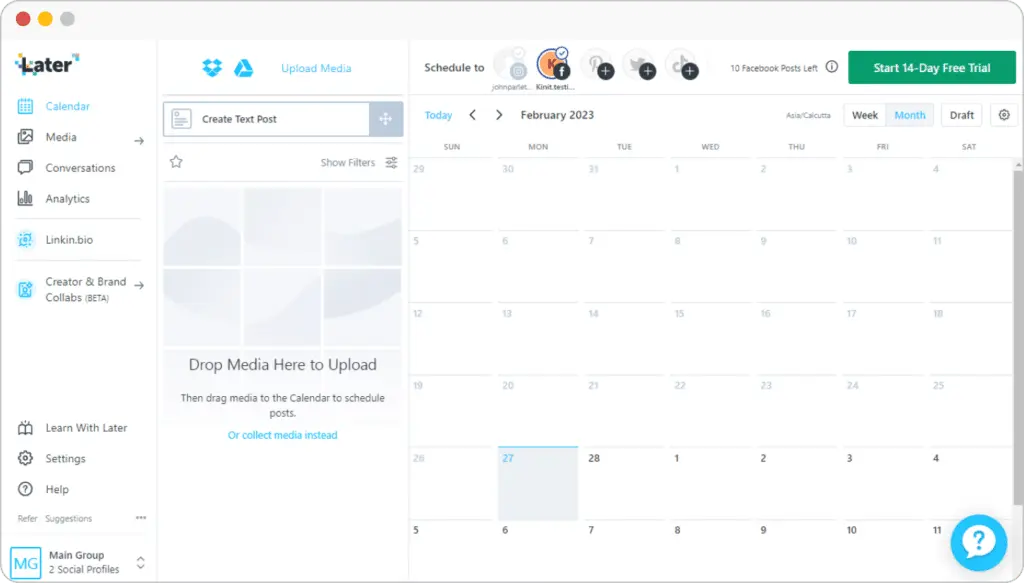
Later is a social media management platform built for creators and small businesses that want a visual, straightforward way to organize content. Its drag-and-drop social media calendar makes scheduling easy across Instagram, TikTok, Facebook, and more, while Canva integration and unlimited media storage simplify content prep.
Premium plans unlock longer reporting windows and competitor benchmarking, giving growing teams more insight into social media performance. Users praise its user-friendly design and flexibility across desktop and mobile, but note recurring issues like account disconnections, posting limits, and clunky story or TikTok publishing.
Here are Later’s key features:
- Schedule and auto-publish across Instagram, Facebook, TikTok, Pinterest, LinkedIn, YouTube, Threads, and Snapchat with a visual calendar and drag-and-drop planner.
- Use AI tools like Caption Writer and Ideas, plus auto hashtag suggestions, saved captions, and best-time-to-post insights.
- Edit media, store unlimited assets, and integrate directly with Canva; collect user content via tags, hashtags, or mentions.
- Access analytics for Instagram, TikTok, Facebook, Pinterest, Threads, and Link in Bio, with reporting windows of up to two years on premium plans.
- Collaborate with your social media team members using access groups, calendar sharing, notes, comments, activity logs, and approval workflows.
- Manage Instagram, Facebook, and TikTok conversations from a unified inbox and monitor competitors with benchmarking and insights on Scale plans.
- Build customizable Link in Bio pages with buttons, banners, featured media, affiliate links, Mailchimp integration, and Google Analytics tracking.
Later pros
Later gets strong feedback for its visual calendar, drag-and-drop planning, and easy social scheduling across multiple platforms. Users appreciate its beginner-friendly design, Canva integration, and flexibility to work from desktop or mobile. It’s seen as a convenient option for creators and small businesses who want to keep their feeds organized.
What users are saying about Later’s pros:
- “Ability to schedule posts and they go out on time. Connects with multiple platforms, huge plus! I love the option to drag and drop posts on the calendar. It’s a simple, visual way to see what’s going live and when. Super helpful if you love keeping your feed on point.” – Nyesha D., Community Assistant, Small-Business (Source)
- “I really enjoy the integration with Canva app. Makes it easy to send my content assets over to Later without having to download the assets.” – Kurrent C., Marketing Director, Small-Business (Source)
- “I love the visual calendar of Later that lets me see what I’ve scheduled so far.” – Verified User in Entertainment, Small-Business (Source)
- “It is very convenient. I can use my phone or laptop. I can upload and schedule out for multiple social sets.” – Natalie S., Owner/Operator, Mid-Market (Source)
- “When I had an issue with a new feature, they promptly responded to my emails and gave me the option to turn it off — it was a life saver.” – Verified User in Education Management, Small-Business (Source)
Later cons
Some users mention bugs, account disconnections, and posting limits as drawbacks. Others note issues with story layouts, asset resizing, or platform-specific publishing like TikTok uploads. While helpful overall, these limitations can be frustrating for teams managing large volumes of content.
What users are saying about Later’s cons:
- “It’s ideal for a small team, and definitely has a few bugs at least once a month. It’s odd the accounts get disconnected and you have to manually log into each account to connect them back. Sometimes posts aren’t posted and there isn’t a pop-up notification.” – Nyesha D., Community Assistant, Small-Business (Source)
- “I have had some issues with my Story layouts when published. Ex. I use Canva to design the IG Stories and the resizing to fit the Story frame can be off for me at times. I wish there was a post preview part for stories to make sure the post won’t be oversized.” – Kurrent C., Marketing Director, Small-Business (Source)
- “I dislike the limitations that don’t allow me to schedule over a certain number of posts per month.” – Verified User in Entertainment, Small-Business (Source)
- “I wish TikTok uploads would be a little smoother.” – Natalie S., Owner/Operator, Mid-Market (Source)
- “Sometimes when I click a post to add to stories, it doesn’t copy my caption to my clipboard even though it says it does.” – Verified User in Education Management, Small-Business (Source)
Later pricing
- Offers a 14-day free trial
- Paid plans start at $25
Planable vs Later: Which should you choose
Planable is built for teams that need smooth collaboration. Its visual social media calendar makes it easy to review, comment, and approve content, which is especially useful for agencies working with multiple clients. However, it doesn’t go far on analytics or engagement, so insights are limited once posts go live.
Later, on the other hand, shines for creators and small businesses focused on Instagram, TikTok, and Pinterest. With drag-and-drop scheduling, hashtag suggestions, and Link in Bio pages, it helps keep feeds consistent and on-brand. Affordable and beginner-friendly, Later is less equipped for agency workflows.
| If you’re looking for a Later alternative, SocialBee is a stronger all-in-one option starting at $29 a month. Unlike Later, which focuses on visual scheduling for Instagram and TikTok, SocialBee supports a wider range of platforms, including Pinterest, Google Business Profile, Threads, and Bluesky. You also get advanced features like content categories, Universal Posting to platforms such as Reddit and WhatsApp, and a more complete social inbox for managing comments and mentions across multiple channels. You can read the full comparison here. |
#6 Planable Alternative: ContentStudio – Best for content discovery, curation & automation
Who is ContentStudio best for?
ContentStudio is best for marketing teams, agencies, and small businesses that want automation, content curation, and scheduling in a single social media management tool.
ContentStudio feature overview
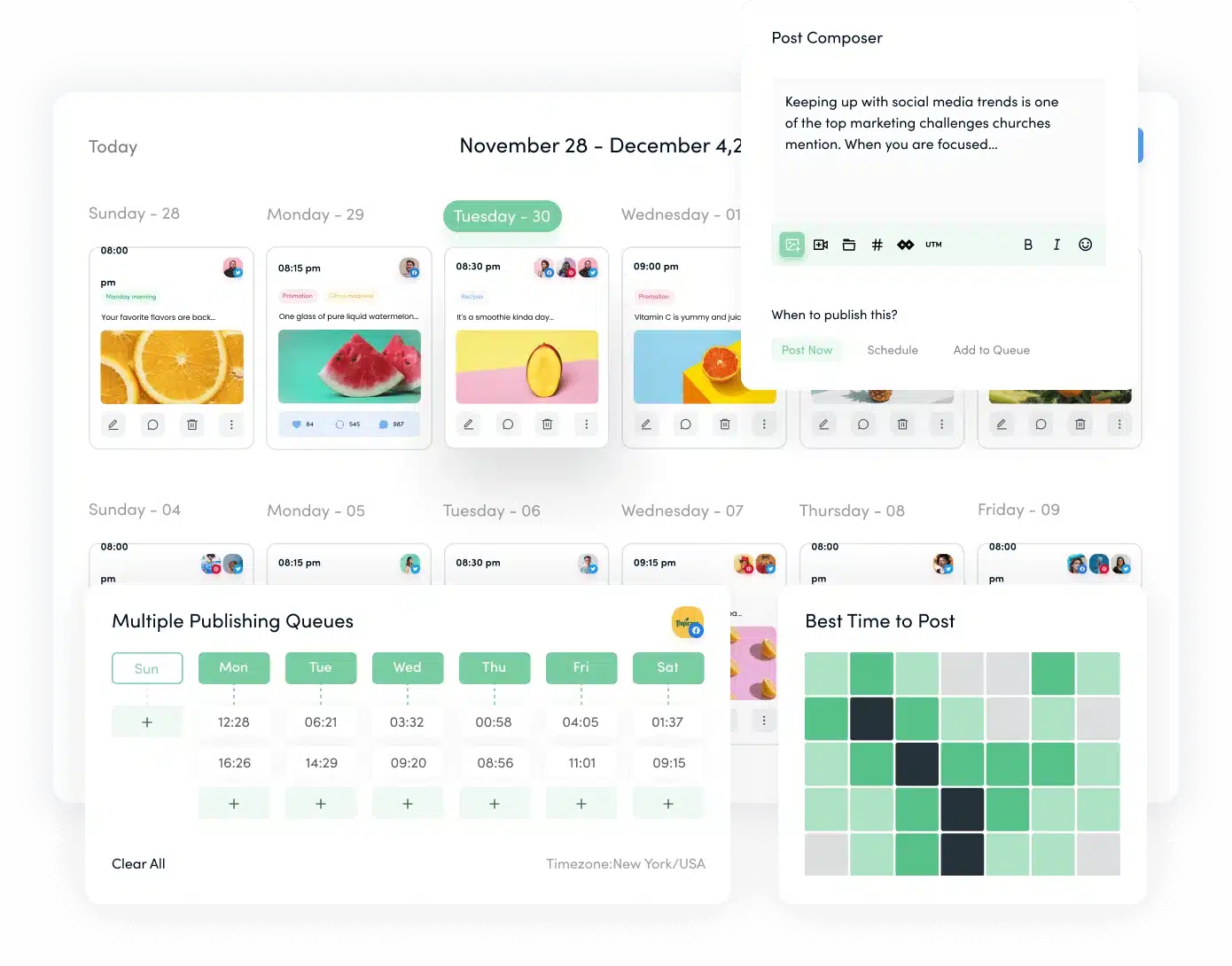
ContentStudio combines publishing, content discovery, and analytics into one platform, making it more versatile than a basic scheduler. Its visual content calendar helps teams plan ahead, while Canva and RSS integrations keep the content pipeline flowing without constant manual effort.
Users appreciate its bulk scheduling, competitor analysis, and ability to manage unlimited users and posts. While the platform can feel complex at first, it scales well for teams that want a central hub for their social media marketing efforts.
Here are ContentStudio’s key features:
- Manage up to 25 social accounts across multiple workspaces with unlimited posts and users.
- Plan and publish with a visual content calendar, list view, feed view, and Instagram/TikTok grid previews.
- Customize each post with auto first comment, advanced scheduling rules, and custom video thumbnails.
- Speed up content creation with AI-powered captions, hashtags, and images (up to 125,000 words and 125 images).
- Use evergreen campaigns, hashtag suggestions, and best-time-to-post insights to maximize reach.
- Organize posts with labels, categories, and a content library, or bulk schedule with CSV uploads and RSS feeds.
- Collaborate with team members using approval workflows, client dashboards, shareable links, saved replies, internal notes, and tagging.
- Design visuals in Canva or VistaCreate, and access free stock from Unsplash, Pexels, GIPHY, and Flickr.
- Track social media performance with analytics by platform, demographics insights, competitor benchmarks, and exportable PDF or email reports with white-label options.
- Maximize engagement through a unified social inbox with replies, task assignments, and mobile support.
- Integrate with tools like Bitly, Pocket, Replug, WordPress, Feedly, and Google Calendar.
- Stay productive with iOS and Android apps, a Chrome extension, on-demand training, and full onboarding support.
ContentStudio pros
Users highlight its ease of use, Canva integration, scheduling flexibility, and strong competitor analytics. Many say it saves time by combining content discovery, publishing, and reporting in one place.
What users are saying about ContentStudio’s pros:
- “Everything is easy to find in Content Studio. The integration of Canva is streamlined. It’s easy to categorize things, as well as view detailed analytical data on post types. As a social media manager, I’ve used many other platforms, this one has by far been my favorite.” – Patrick S., Owner, Small-Business (Source)
- “ContentStudio’s ability to schedule and plan content (with previews) is second to none. I love the additional features as well such as the ability to create the first comment on an Instagram post, carousel posts and Facebook posts with the coloured backgrounds.” – Jason B., Marketing Systems Manager, Small-Business (Source)
- “Ease of use, integrations, gives more tools to manage & schedule content. The competitive insights are excellent and I really like the ability to pull RSS feeds to keep up to date with the latest news within each niche.” – Alex B., Digital Marketer, Small-Business (Source)
- “I love the way all of the social/content marketing modules are tightly integrated.” – Dennis L., Advisor, Marketing and Advertising, Small-Business (Source)
- “It feels like a very mature platform with excellent UI and unique elements that make it stand out from similar schedulers.” – Lawrence G., Marketing Coordinator, Small-Business (Source)
ContentStudio cons
Feedback points to missing customization options, occasional UI quirks, limited influencer management tools, and a need for more robust dashboard controls or expanded content sources.
What users are saying about ContentStudio’s cons:
- “I wish that I could customize my dashboard. I also wish it wouldn’t continue to give me internal messages about unread messages on my accounts.” – Patrick S., Owner, Small-Business (Source)
- “I do wish that the Curated Topics had a few more sources to pull from, but having said that, my niche is a fairly unique one.” – Jason B., Marketing Systems Manager, Small-Business (Source)
- “Influencers tab needs some work for niche audiences and [should] have the ability to DM or manage a campaign or work with them.” – Alex B., Digital Marketer, Small-Business (Source)
- “There are still a few rough edges as far as UI/UX, but the tool is SO much better than other more widely recognized tools.” – Dennis L., Advisor, Marketing and Advertising, Small-Business (Source)
- “Upgrades and new features aren’t always included — many are locked behind paywalls and upsells.” – Lawrence G., Marketing Coordinator, Small-Business (Source)
ContentStudio pricing
- Offers a 14-day free trial
- Paid plans start at $29
Planable vs ContentStudio: Which should you choose
Planable is best for teams that prioritize collaboration and client approvals. Its clean social media calendar and approval workflows make it easy to review, comment, and approve posts, which works well for agencies managing feedback-heavy processes. The trade-off is limited social media analytics and fewer tools for content discovery.
ContentStudio, on the other hand, is built for automation and scale. With features like bulk scheduling, content curation, competitor analysis, and an AI assistant for captions and hashtags, it helps marketing teams publish efficiently across multiple accounts. It’s better suited for social media managers and agencies running multi-channel campaigns.
Frequently asked questions