

One personal Facebook account can manage multiple Facebook Pages, so you usually don’t need a separate personal profile for every business or brand.
This guide covers how to manage Pages directly on Facebook, what Meta Business Suite adds when you have several Pages or people involved, how Page access works, and when a social media management tool like SocialBee makes things easier.
The profile-versus-Page confusion trips up more people than the actual management work does, so that is worth settling before getting into the how-to. Once the basics are clear, it also helps to schedule Facebook posts in advance instead of publishing to each Page manually.

We’re SocialBee LABS SRL, part of WebPros. We use the information you provide to share relevant content & updates, as outlined in our Privacy Policy. You can opt out anytime.
Short summary
- One personal Facebook account can manage multiple Facebook Pages.
- Facebook also allows up to four additional profiles, which are meant for separate interests or communities rather than replacing a business Page.
- Employees, freelancers, and agencies can get Page access without sharing the account password.
- Meta Business Suite adds scheduling, a shared inbox, analytics, and team access across Facebook and Instagram.
- If you manage multiple brands, clients, or social channels, SocialBee lets you keep each business separate, schedule content, collaborate with your team, manage engagement, and track performance from one place.
Can you have multiple Facebook Pages?
Yes, one Facebook account can manage multiple Pages, so you don’t need a separate personal profile for every business or brand.
Facebook also lets you create up to four additional profiles under your account. These are mainly for separating different interests or communities and aren’t meant to replace a Facebook Page for a business.
A personal profile represents a person, while a Page represents a business, brand, organization, or public figure. A Business Portfolio can group Pages and other business assets together so several people can manage them without sharing login details.
Can one account manage multiple Pages?
Yes, one account can manage multiple Facebook Pages, and you can give employees, freelancers, or agencies access to specific Pages without sharing your password.
1. Manage multiple Facebook Pages natively
Switching between Pages from one personal account works well for a creator or small business managing a few Pages.
1.1 Create and add Facebook Pages
Create a new Page from the “Pages” section, then add its name, category, and business details. For an existing Page, you can request access from the person who already manages it. Once you have access, you can also connect the Page to a Business Portfolio for shared management.
1.2 Switch between Facebook Pages
Tap your profile picture and choose the Page you want to switch into. Facebook then switches the feed, notifications, and posting identity to that Page.
It’s worth checking which Page you’re using before you publish, especially if you manage several brands.
1.3 What native Page management covers
You can publish and schedule posts, create events, manage comments, reply through Messenger, view Page Insights, and switch between Pages without opening Meta Business Suite.
Native management starts to feel more limited once you’re handling several Pages, several people, or Facebook and Instagram together.
2. Use Meta Business Suite when several Pages or people are involved
Meta Business Suite becomes more useful when you manage several Pages, work with other people, or manage Facebook and Instagram together. A Business Portfolio can group Pages, Instagram accounts, and the people who have access to them.
2.1 See what Meta Business Suite handles
You can manage several Pages, schedule content, use a content calendar, handle messages and comments from one inbox, give people access, check notifications, and view Insights and reports.
2.2 Understand how Facebook Page access works
Facebook Page access is split into Facebook access and task access. People with Facebook access can switch into the Page and manage it directly, while people with task access work through tools such as Meta Business Suite.
- Facebook access with full control includes Page management plus settings and access permissions. Someone with full control can add or remove other people, remove another full-control user, or delete the Page.
- Facebook access with partial control covers day-to-day work such as content, messages, comments, ads, Insights, and events, without access to the Page’s settings or access permissions.
- Task access lets someone handle specific jobs such as content, messages, ads, or Insights through Meta Business Suite and other management tools, without being able to switch into the Page on Facebook.
This makes it easier to give employees, freelancers, or agencies the access they need without sharing your Facebook password. Meta also lets someone with full control add, edit, or remove Page access at any time.
2.3 Know where Meta Business Suite falls short
Meta Business Suite becomes more limiting when you manage many brands or clients, publish beyond Facebook and Instagram, need a proper review-and-approval process, want better content organization, or need reporting across several social networks.
The best way to manage Facebook Pages
The right setup depends on how many Pages you have, whether one person or a team runs them, and whether you need to publish outside Facebook and Instagram.
What matters | Meta Business Suite | SocialBee | |
Organize | Switch between individual Pages | View connected Facebook Pages and Instagram accounts in one dashboard. | Separate brands or clients into workspaces and manage Facebook alongside your other social profiles. |
Schedule | Publish directly from each Page | Schedule Facebook and Instagram content. | Schedule across multiple Facebook accounts and other social media profiles, bulk-manage posts, use a visual calendar, and get best posting time suggestions. |
Collaborate | Give people Facebook access or Task Access | Give people access to Meta business assets. | Invite team members or clients, assign roles, tag people in notes, and approve content before it goes live. |
Inbox | Manage interactions from each Page | Manage Facebook and Instagram conversations. | Handle Facebook comments, mentions, and DMs alongside conversations from other supported networks. |
Analytics | View Page Insights | Review Facebook and Instagram performance. | Check your Facebook content and Page performance and export PDF reports in seconds. |
Organize multiple Facebook Pages
Managing several Pages gets confusing fast, especially when they belong to different brands or clients.
SocialBee lets you keep each brand or client in a separate workspace, with its own Facebook Pages, other social accounts, content, and users. This makes it much easier to avoid posting from the wrong account or mixing one client’s content with another’s.
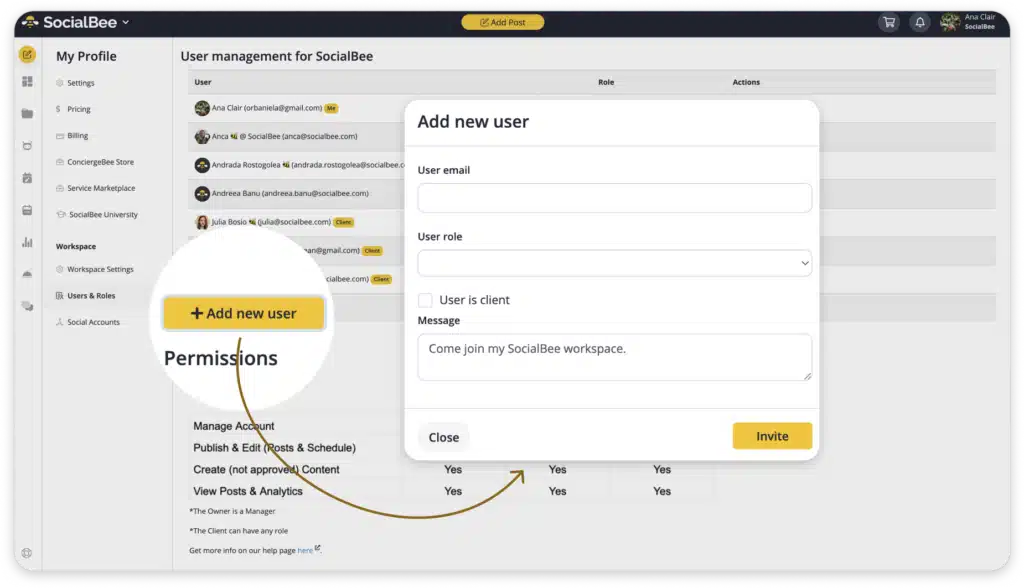
And unlike Meta Business Suite, you’re not limited to Facebook and Instagram. You can manage Facebook alongside your other supported social channels from the same place.
Create, schedule, and publish Facebook content
Meta Business Suite works well if you mainly use Facebook and Instagram. SocialBee is more useful if you manage several Pages and other social networks too.
With SocialBee, you can schedule Facebook posts, Stories, and Reels from the same calendar as your other social accounts. You can also bulk-manage posts, filter the calendar by platform, and get suggestions for the best times to post.
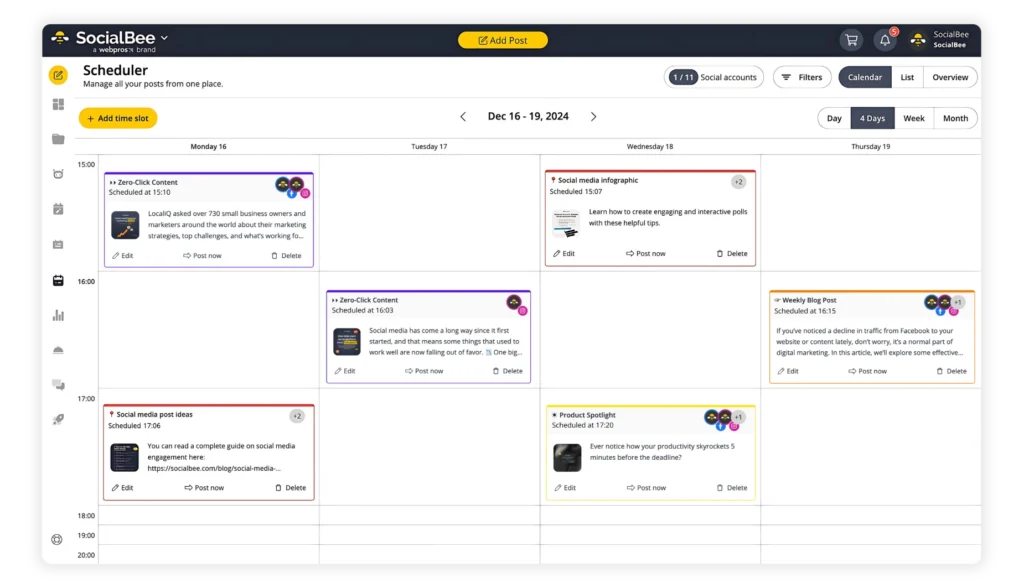
Before publishing, you can tailor each post for Facebook by adding alt text, tagging other accounts, resizing images, and scheduling a first comment. This helps you save time without making every post look copied from another platform.
Work with teammates and clients
Giving someone access to a Facebook account is useful, but it doesn’t cover everything you may need when several people are involved.
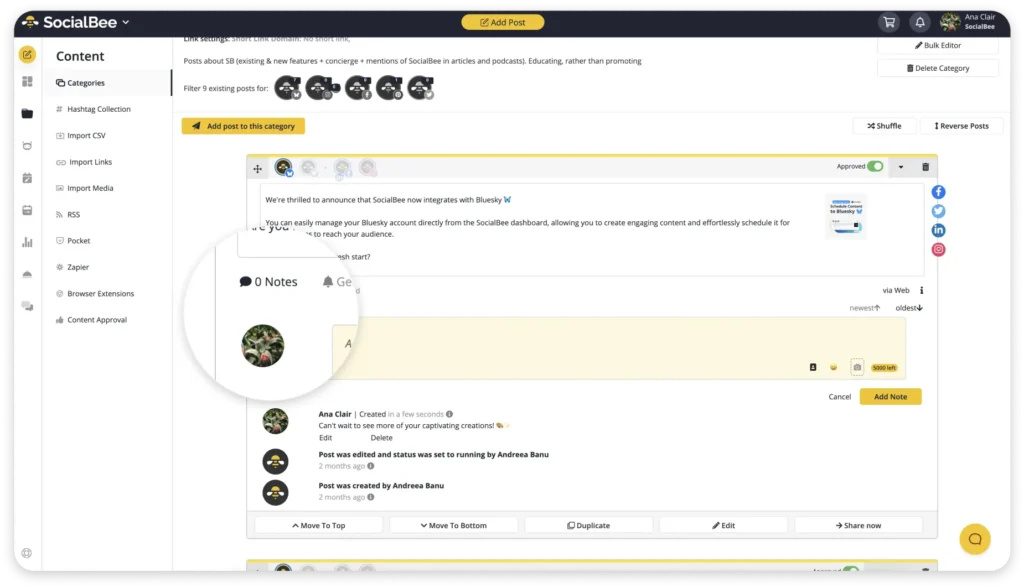
With SocialBee’s collaboration features, you can invite team members, clients, or freelancers into a workspace and give each person the right level of access. You can also leave notes on posts, tag teammates when you need their input, and keep content in draft until it’s approved.
Manage comments, messages, and mentions
When you manage several Pages, it’s easy for comments, mentions, or messages to get missed, especially if you’re also active on other social networks.
SocialBee’s social inbox brings supported Facebook interactions together with conversations from your other connected accounts.
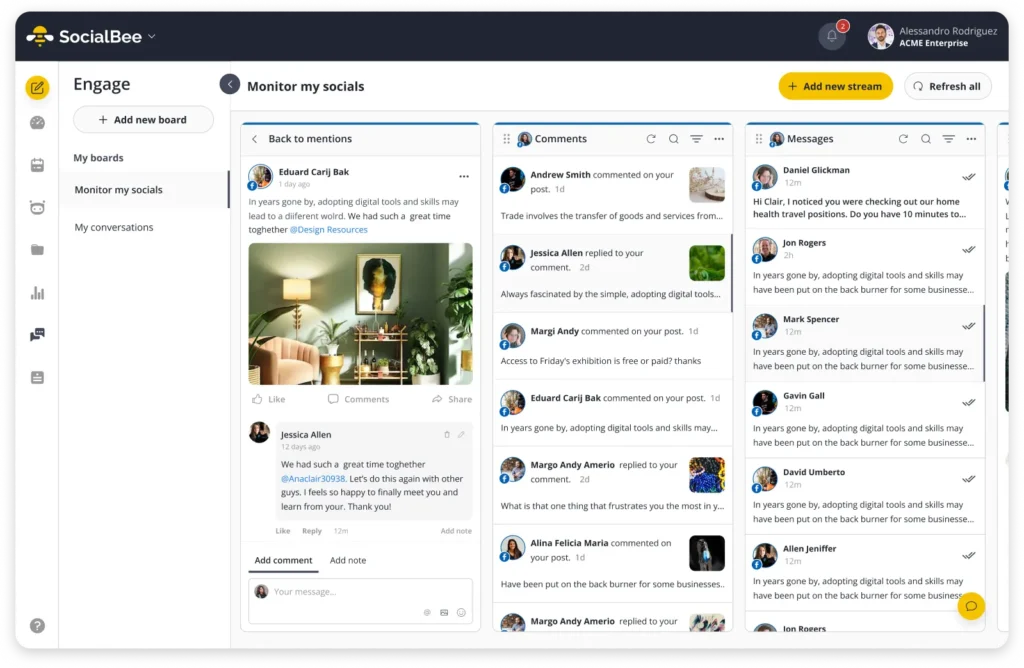
You can check and reply from one inbox, which makes it easier to stay on top of conversations without jumping between platforms.
Track Facebook Page performance
Facebook Insights gives you the data, but reviewing it and turning it into a report can still take extra work.
With SocialBee’s analytics, you can check Page and post performance, then export the results as a PDF when you need to share them.
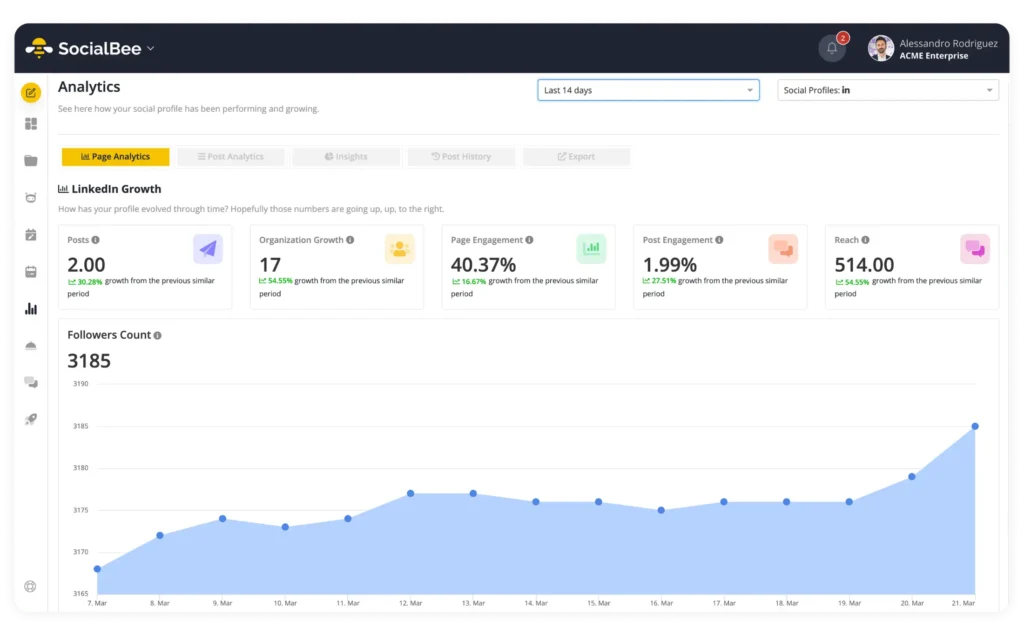
This makes it easier to go from checking performance to sending a clear report without rebuilding everything manually.
Frequently asked questions
What is the difference between a Facebook profile and a Page?
A profile represents one person and is meant for personal use. A Page represents a business, brand, or public figure, can be managed by several people at once, and is the correct tool for running anything commercial.
How many Facebook Pages can be managed at once?
Facebook lets you manage multiple Pages from the same account and doesn’t currently state a maximum number in its Help Center. So, if you run several businesses or brands, you can manage their Pages from one personal account rather than creating a separate profile for each one.
Can multiple people manage one Facebook Page?
Yes, a Page can have several people with Full Control, Partial Access, or Task Access at the same time, each scoped to whatever level of access the job actually needs.
If your team also creates and reviews content together, SocialBee gives you more control over that process. You can invite team members, assign roles, tag people in notes, and keep posts as drafts until they’re approved.
Can posts be scheduled to multiple Facebook Pages?
Yes, you can schedule content for multiple Facebook Pages in a few ways:
- On Facebook: You can publish directly from each Page, but scheduling is handled through Meta Business Suite rather than from the Page itself.
- In Meta Business Suite: You can schedule Facebook Page content and manage connected Facebook and Instagram accounts from the same place.
- With SocialBee: You can schedule content for multiple Facebook Pages alongside your other social networks. SocialBee supports direct publishing for Facebook Feed posts, Stories, and Reels. You can also connect personal Facebook profiles, which publish through mobile reminders, while Facebook Groups use Universal Posting reminders.
How do you give an agency access to a Page without sharing a password?
Businesses can give an agency Facebook access or task access through Page settings or Meta Business Suite, so the agency can manage the Page without needing the owner’s personal login.
Agencies also often manage client content through platforms like SocialBee, where clients and agency team members can be invited to the same workspace and given the right permissions for creating, reviewing, or publishing content.
Manage multiple Facebook Pages more efficiently
The more Facebook Pages you manage, the more important it becomes to reduce unnecessary switching and keep content, approvals, and reporting easy to handle.
That’s where SocialBee can help. You can manage multiple Facebook Pages, work with teammates and clients on content, keep up with comments and messages in the Social Inbox, and check Page and post performance without jumping between different tools.
And if Facebook is only one part of your social media presence, you can manage your other channels in SocialBee too.