

A social media workflow is much easier to manage when your planning, creation, content approvals, publishing, engagement, and reporting aren’t scattered across six different tools and twice as many message threads.
The problem is sometimes that every task takes five extra steps. A social media manager writes a caption in one tool, sends it somewhere else for feedback, downloads the final visual from another platform, schedules the post separately, then copies performance metrics into a spreadsheet at the end of the month.
Bringing more of your social media work into one place makes things much easier. This guide shows you how to cut down on extra steps and keep everything simpler.

We’re SocialBee LABS SRL, part of WebPros. We use the information you provide to share relevant content & updates, as outlined in our Privacy Policy. You can opt out anytime.
Short summary
- A social media workflow is simply how your team gets a post from an idea to something that’s published, managed, and reviewed.
- Bringing more of your social media work into one place means less jumping between tools, repeating tasks, and wondering who needs to do what next.
- Before changing anything, map out how your team currently works. Look for the steps that regularly slow you down or create extra work.
- Keep your content calendar, drafts, creative assets, feedback, approvals, and results in as few places as possible so everyone knows where to look.
- Automate the predictable stuff, like scheduling posts, but leave strategy, final checks, sensitive replies, and creative decisions to your team.
- Don’t let analytics sit in a monthly report. Use what you learn to decide which topics, formats, and ideas are worth trying again.
- SocialBee helps you manage more of this process in one place, from planning and creating posts to scheduling, approvals, engagement, and tracking results.’
What is a social media workflow?
A social media workflow is the series of steps your team follows to take social media content from an idea to a published post and then review how it performed.
Think about what happens when someone says, “We should post about this.”
- Who creates the post?
- Who checks it?
- Who approves it?
- Where does it get scheduled?
- Once it’s live, who’s keeping an eye on comments and results?
Your workflow connects all of those steps into a repeatable system.
For a small business, it might look like this:
Idea → create post → review → schedule → publish → respond → analyze
For a marketing team or agency, there may be a few more people involved:
Content idea → brief → copy → visual assets → internal review → client approval → scheduling → publishing → community management → reporting → next content ideas
Your exact process will depend on your team. What matters is that everyone knows where to find the content, what needs to happen next, and who’s taking care of it.
Otherwise, a simple post can quickly turn into a trail of Slack messages, email approvals, missing files, and “Is this ready to publish?” questions.
Why should you consolidate your social media workflow?
You should consolidate your social media workflow because too many tools create extra work. You have to move files, copy information, check several places for updates, and make sure nothing gets missed.
Think about what happens when your content calendar is in a spreadsheet, creative assets are in cloud storage, feedback arrives through Slack and email, publishing happens separately inside various social media platforms, and reporting lives somewhere else again.
None of those tools is necessarily the problem. The problem is the number of handoffs between them.
A more consolidated social media management workflow can help you:
- Spend less time switching between tools. Social media managers can move from planning to publishing without constantly changing tabs and copying information.
- Reduce duplicate work. You don’t need to repeatedly upload the same visual, copy the same caption, or enter the same campaign information in multiple places.
- Keep content and feedback together. Team members can see the latest draft and relevant feedback without hunting through message threads.
- Make ownership clearer. Everyone knows who creates, reviews, approves, publishes, and responds.
- Stay consistent across multiple channels. A central process makes it easier to follow brand guidelines and maintain a recognizable brand voice.
- Use performance data more effectively. Instead of collecting analytics simply to fill a monthly report, you can use them to decide what to create next.
How to consolidate your social media workflow in 7 steps
Use these seven steps to make your social media process easier to manage:
- See how social media work gets done
- Find where work slows down or gets passed around too much
- Make roles and approvals clear
- Keep your content plans and files in one place
- Manage scheduling and publishing together
- Cut down on repeated tasks
- Use your results to plan future content
1. See how social media work gets done
Before changing anything, write down every step your social media content currently goes through.
Start with a single content idea and follow it until you review the results. Record the tools, people, files, approvals, and communication channels involved along the way.
For example:
Idea in Slack → brief in Google Docs → copy in Docs → design in Canva → feedback in Slack → approval by email → scheduling tool → native social platform for comments → analytics spreadsheet
Seeing the entire process in one line can reveal problems that aren’t obvious when you’re doing the work every day.
For each stage, ask:
- Who owns this task?
- Which tool do they use?
- What information do they need?
- Who receives the work next?
- Does anything have to be copied or uploaded again?
- Where does feedback happen?
- What happens if someone is unavailable?
You can turn this into a simple social media workflow template and use it to write down each recurring process your team follows.
Don’t optimize yet. First, look at what’s actually happening, and figure out which parts are messy.
2. Find where work slows down or gets passed around too much
Once your current media workflow is visible, look for steps that create work without adding much value.
The easiest place to start is with repetition.
Maybe your community manager has to check five social platforms separately every morning. Perhaps a social media manager copies performance metrics from multiple dashboards into the same spreadsheet every month.
Look for:
- Entering or copying the same information more than once
- Constantly jumping between tools and social media platforms
- Downloading a file just to upload it somewhere else
- Searching for the latest version of an image or video
- Waiting too long for someone to review or approve a post
- Not knowing who’s responsible for the next step
- Publishing posts manually when they could be scheduled
- Putting together the same reports by hand every week or month
- Chasing feedback across emails, Slack messages, and other channels
Here’s a useful test: If removing a step wouldn’t reduce quality, control, or useful information, why is that step there?
Some handoffs are necessary. A legal review for a regulated business, for example, has an important purpose. Copying an approved caption from one spreadsheet into three separate tools doesn’t.
3. Make roles and approvals clear
A solid workflow answers one simple question at every stage: Who has the ball now?
Define who is responsible for creating content, reviewing it, approving it, publishing it, managing audience engagement, and analyzing results.
For a small social media team, one person may own several of these responsibilities. Larger marketing teams may need more specific roles.
For example:
Stage | Owner | Next step |
Content idea | Social media manager | Create brief |
Copy and creative | Content team | Submit for review |
Brand review | Marketing lead | Approve or request edits |
Final approval | Client/stakeholder | Approve |
Publishing | Social media manager | Schedule posts |
Engagement | Community manager | Respond/escalate |
Reporting | Social media manager | Extract key insights |
Keep the content approval workflow as short as your organization allows. Every extra reviewer creates another possible delay.
It’s also worth defining what doesn’t need approval. If every routine social media post requires four people to sign off, the approval process itself may be your biggest bottleneck.
4. Keep your content plans and files in one place
Next, give your team one main place to find the content and information they need.
Your content calendar is a good place to start. Anyone involved in creating content should be able to open it and quickly see what’s coming up, what’s still being worked on, what needs approval, and what’s ready to publish.
The same goes for your creative assets. Nobody should have to ask, “Which logo are we using?” or dig through six folders to find the final version of an Instagram graphic.
Try to keep these things together:
- Your content calendar
- Drafts and finished social media posts
- Content ideas
- Images, videos, and other creative assets
- Brand guidelines
- Content folders
- Feedback and approvals
- Campaign details
- Previously published posts
- Social media results
You don’t necessarily need all of this in one tool. The goal is to give everything an obvious home so your team doesn’t waste time looking for it.
The same rule applies to feedback. If possible, keep comments and edits with the post they’re about instead of having one person leave feedback in Slack, another send changes by email, and someone else add notes to a document.
5. Manage scheduling and publishing together
If you manage several social media accounts, posting separately on every platform can eat up a surprising amount of time.
Instead, try to handle as much of your scheduling and publishing from one place as you can.
Say you’ve just published a new guide. You can start with the same main idea, then tweak the caption, image, hashtags, or format for LinkedIn, Instagram, Facebook, and any other channels you’re using. You still give each platform the attention it needs, without starting from scratch every time.
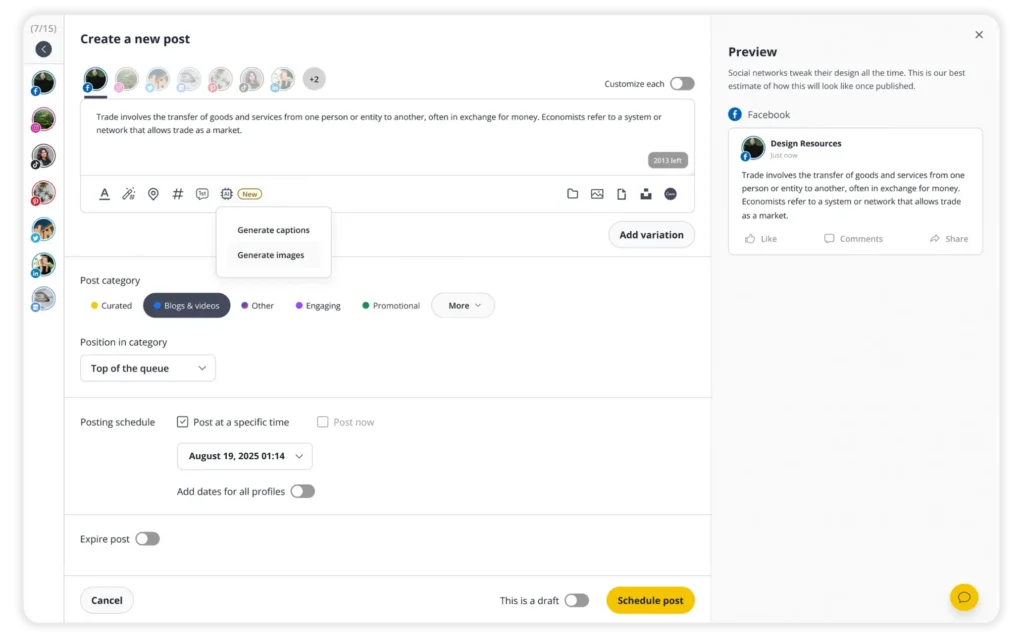
A social media management tool makes this much easier. With SocialBee, for example, you can create and schedule posts for Facebook, Instagram, LinkedIn, X, Pinterest, TikTok, YouTube, Threads, Bluesky, and Google Business Profile from one place. You can also adjust each version of the post for the platform you’re publishing it on.
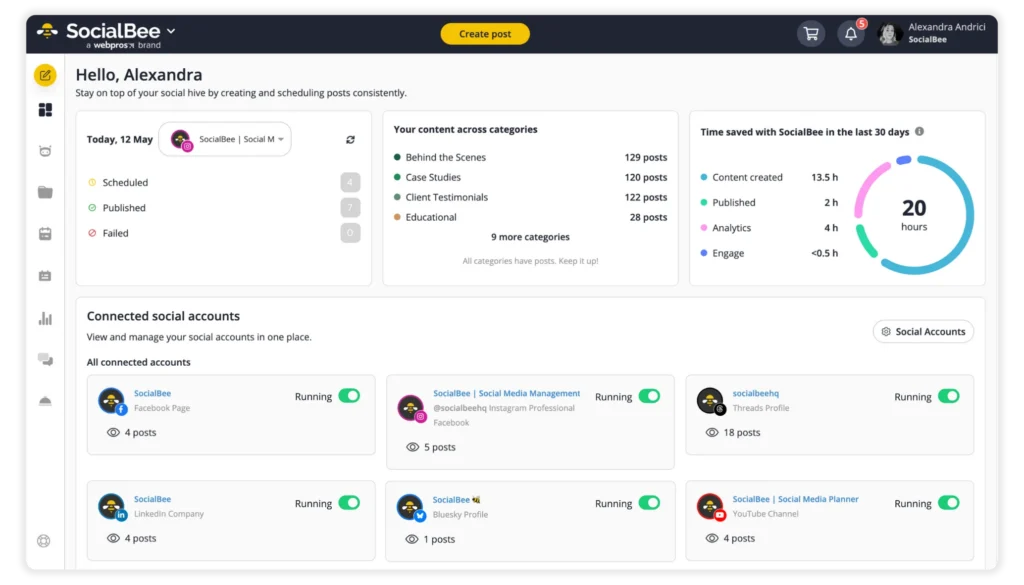
So, bringing publishing into one place doesn’t mean copying and pasting the same post everywhere. You can still tailor your content to each platform. You’re simply doing it without bouncing between multiple apps and accounts.
6. Cut down on repeated tasks
Automation is most useful for the tasks your team does the same way over and over again.
Scheduling is an easy example. Once a post is approved and you know when it should go live, there’s no reason for someone to stop what they’re doing at 2 p.m. just to open Instagram and hit Publish.
You can also automate or speed up tasks like:
- Scheduling approved posts
- Publishing recurring content
- Creating a first draft or a few caption variations
- Tweaking copy for different social platforms
- Sending reminders and notifications
- Putting together regular reports
- Moving routine tasks from one tool to another
Just be careful not to automate the parts that benefit from human creativity and crosschecking. AI can help you get a caption started, for example, but someone should still make sure it sounds like your brand, makes sense for your audience, and fits what’s happening right now.
A useful rule to follow: automate the repetition, not the responsibility.
7. Use your results to plan future content
Analytics shouldn’t be the final stop in your social media workflow. Performance data should influence the next round of platform-optimized content you plan.
Instead of reporting that a Reel received 20,000 views and moving on, ask why.
Was the topic unusually relevant? Did the hook work? Was the format different? Did people share it? Did it drive clicks or another action tied to your business objectives?
Track the key metrics and key performance indicators that actually connect to your goals. These might include reach, engagement, clicks, leads, conversions, follower growth, or other performance metrics.
Then turn those numbers into decisions:
Performance → insight → action
For example:
Educational carousels receive more saves → audience values practical reference content → create two more around related topics next month.
That’s far more useful than data collection for its own sake.
What should you centralize, automate, and keep manual?
Consolidating your workflow doesn’t mean automating everything. The goal is to take repetitive work off your team’s plate while keeping people in charge of the decisions that actually need their input.
A simple way to divide the work is this:
Centralize | Automate | Keep human-led |
Content calendar | Routine scheduling | Final content review |
Social profiles | Recurring publishing | Brand-sensitive replies |
Content drafts | Repetitive publishing tasks | Social media strategy |
Creative assets | Routine notifications | Crisis communication |
Approvals and feedback | Basic content generation | Creative judgment |
Analytics | Initial content variations | Community building |
Brand guidelines | Routine reporting where practical | Sensitive customer conversations |
The middle column should change as your team gets more comfortable with automation.
For example, AI tools could help you turn one idea into several draft captions. But deciding whether those captions are accurate, relevant, and appropriate for your audience still belongs to a person.
The same applies to community management. A unified inbox can make audience engagement easier to manage, but a customer who’s angry about a serious issue probably shouldn’t receive a generic automated reply.
Efficiency matters. So does knowing where not to automate.
How can SocialBee consolidate your social media workflow?
SocialBee can bring more of your social media content workflow into a unified platform, so you’re not constantly moving content, creative assets, feedback, and performance data between different tools.
Here’s how SocialBee can help at each stage of your social media management workflow.
1. Plan and organize your social media content
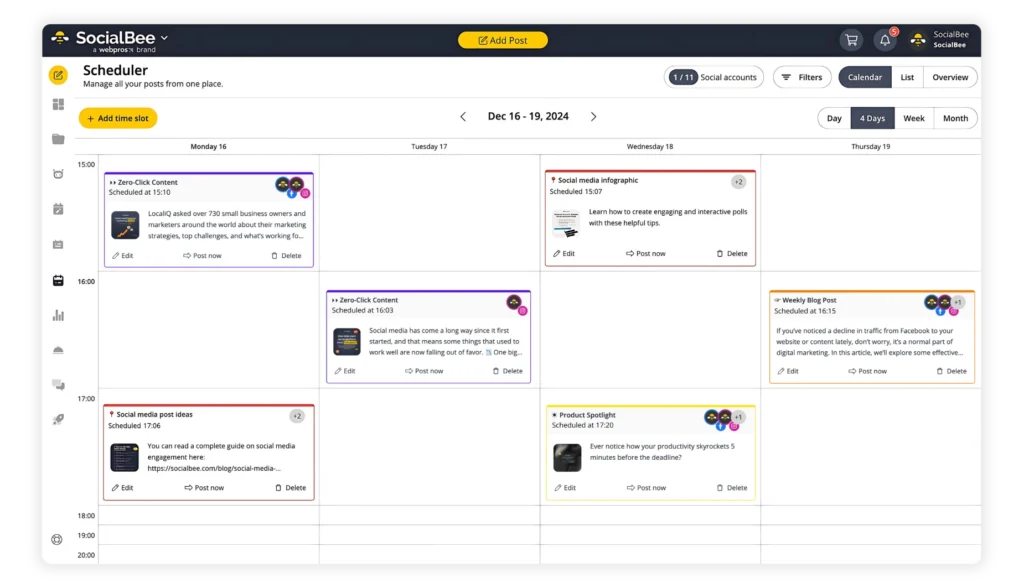
SocialBee’s Content Calendar gives you a visual overview of your upcoming social media posts, so you can quickly see what’s planned, what’s already scheduled, and when everything is going live.
You can also use Content Categories to organize your posts around the main content themes in your strategy. For example, you might create separate categories for educational content (e.g. sharing blog content), promotions (e.g. a product launch post), customer stories, and engaging content (polls, questions, shareable short videos, etc).
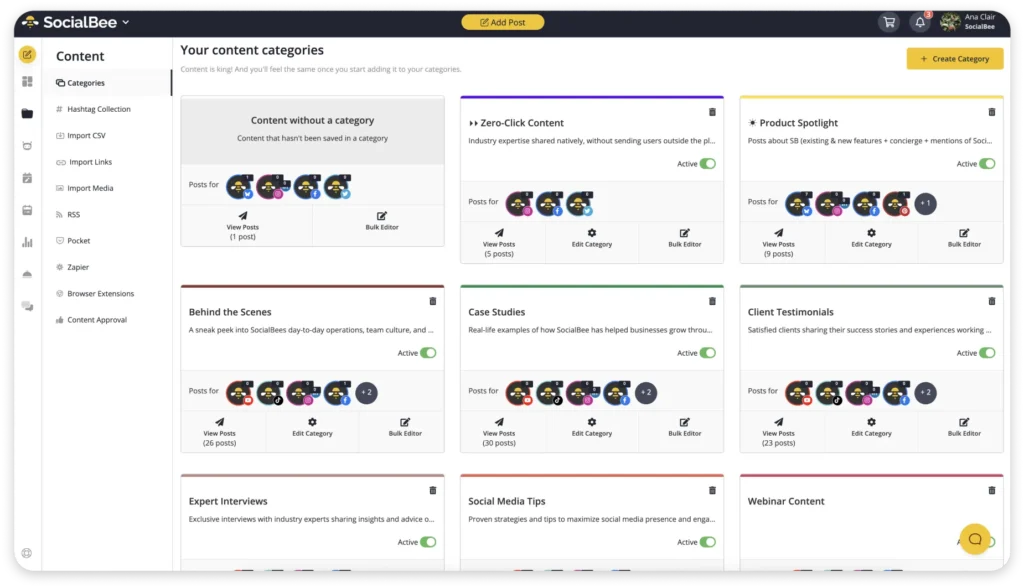
Having everything organized this way makes it easier to spot gaps in your calendar and maintain a consistent social media presence across multiple channels.
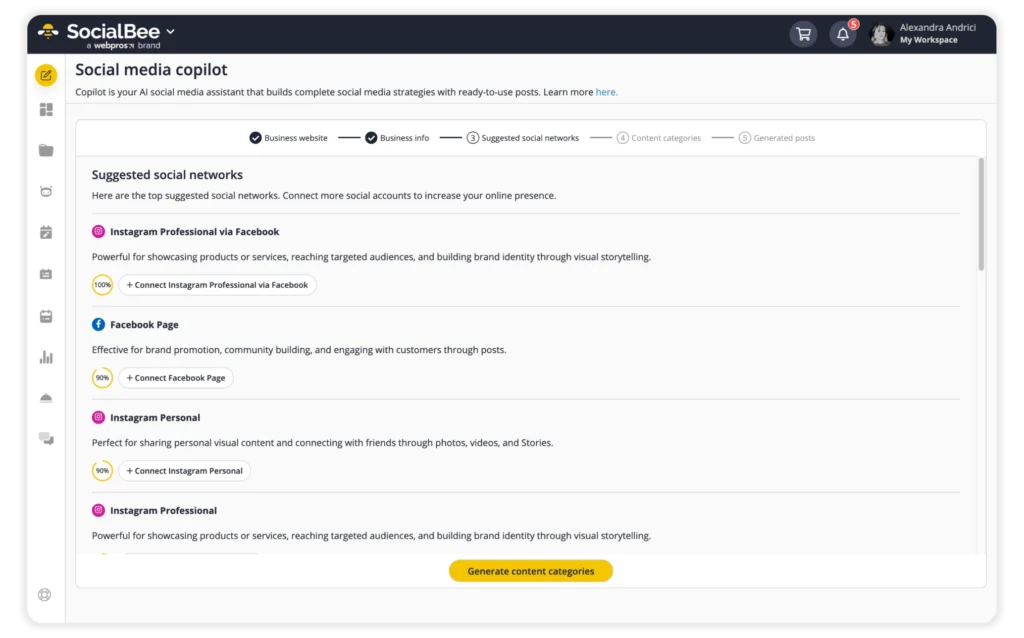
SocialBee’s Copilot can help with the planning side of content creation, too. It can suggest content topics, social media platforms, posting frequency, and schedules based on your business, giving you a starting point for deciding what and when to post.
2. Create and repurpose content
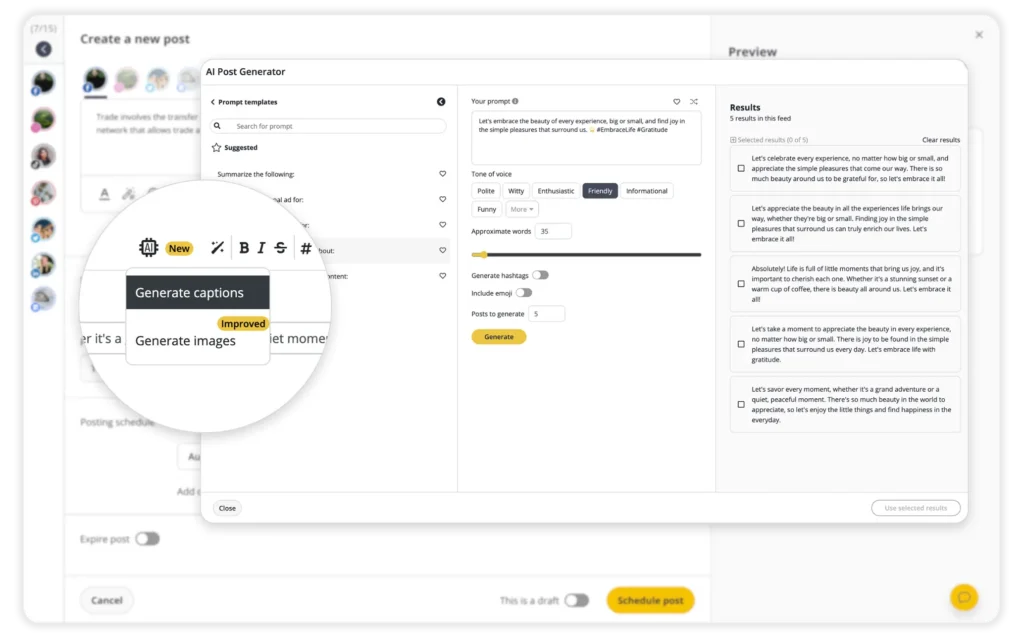
You can create posts directly in SocialBee and use the AI Post Generator to help with captions and visuals. If you’re publishing across various social media platforms, you can also create different versions of a post instead of starting from scratch for every channel.
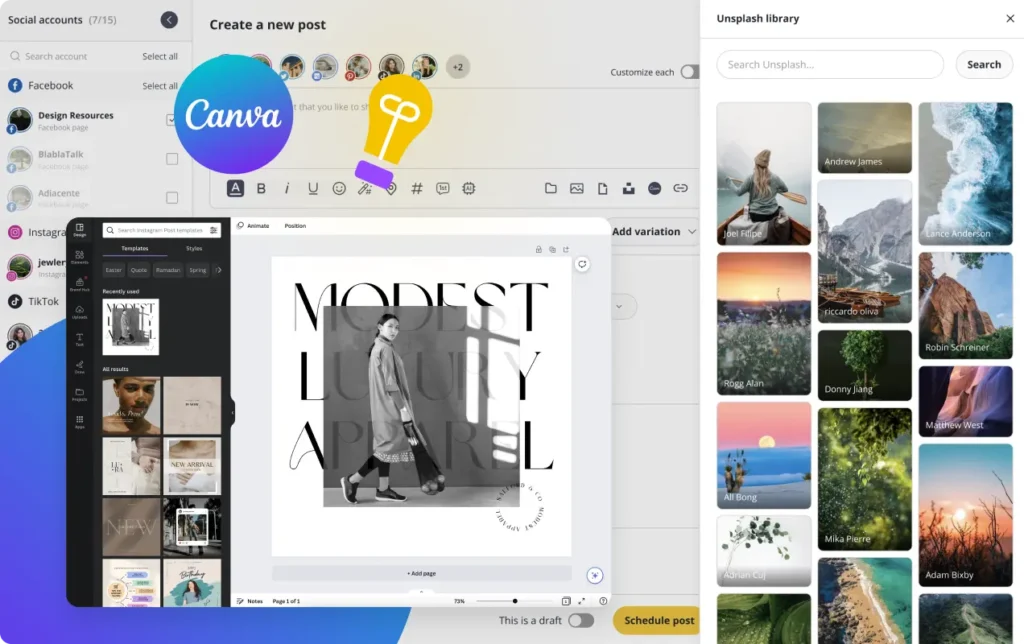
SocialBee also integrates with Canva, so you can add visual assets to your posts without repeatedly downloading and uploading files. It’s one less manual step in your content production process.
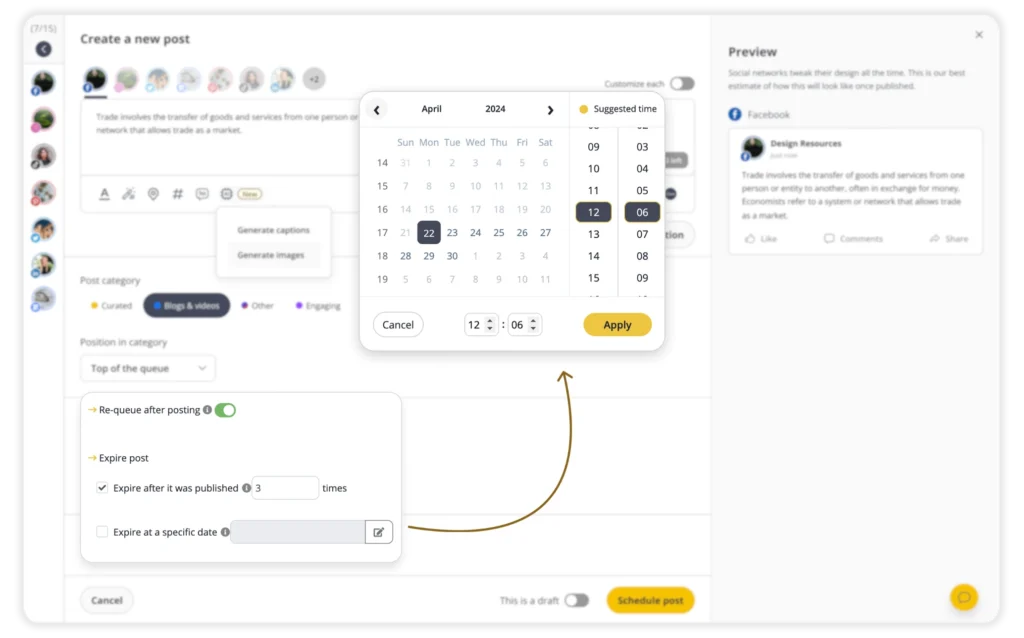
For evergreen content that’s still useful to your audience, SocialBee also lets you recycle posts so they can be shared again at a later date. This gives your best-performing or always-relevant content another chance to reach your audience without scheduling it again manually.
3. Schedule content across your social media accounts
Once your posts are ready, you don’t need to open every native platform separately whenever something needs to go live.
SocialBee lets you create and schedule posts for Facebook, Instagram, LinkedIn, X, Pinterest, TikTok, YouTube, Threads, Bluesky, and Google Business Profile from one place.
4. Review content and collaborate with your team
When several team members, clients, or other stakeholders are involved, the approval process can quickly become one of the slowest parts of your workflow.
SocialBee lets teams collaborate on content, leave feedback, manage role-based permissions, and approve posts. It lets you use separate workspaces to keep different brands and clients organized.
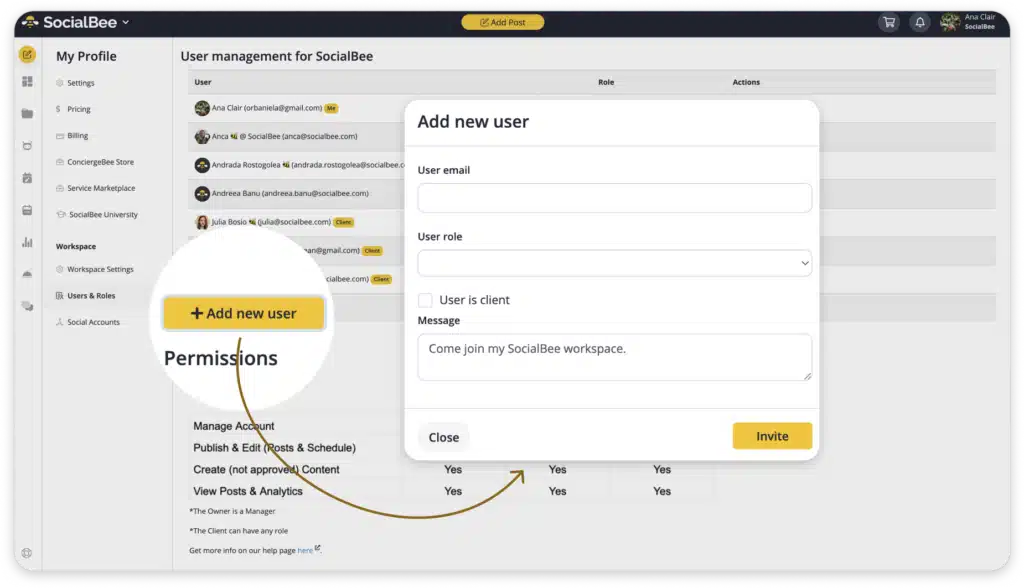
Collecting feedback and approvals closer to the content means less back-and-forth. It also gives everyone a clearer idea of what still needs attention and who needs to take care of it.
5. Manage social media conversations
Your social media workflow doesn’t stop once you start publishing content. Someone also needs to keep up with the conversations those posts create.
SocialBee’s Social Inbox brings supported comments, mentions, and messages into one place, making community management easier when you’re responsible for several social media accounts.
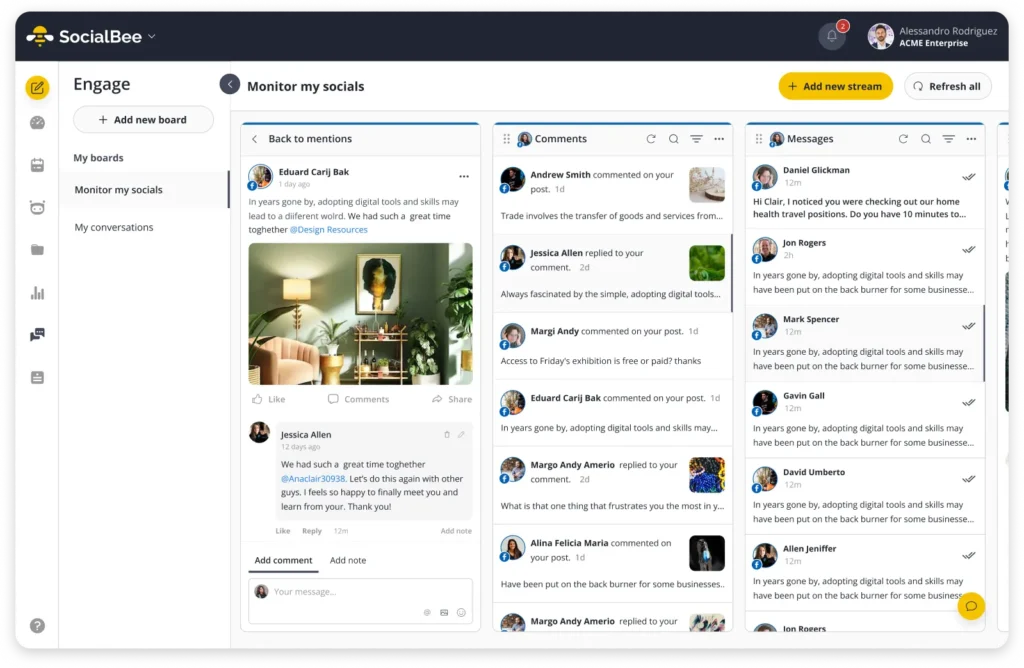
Instead of checking each social platform individually, your community manager or support team has one place to keep track of conversations and audience engagement.
6. Analyze performance from the same platform
Once your content is live, SocialBee’s analytics can help you understand how your social media efforts are performing without moving the reporting process into another tool.
You can track key metrics such as engagement and reach, review audience data, and compare social media posts to see which topics and formats perform best. SocialBee also lets you export PDF reports to share results with clients or keep stakeholders informed.
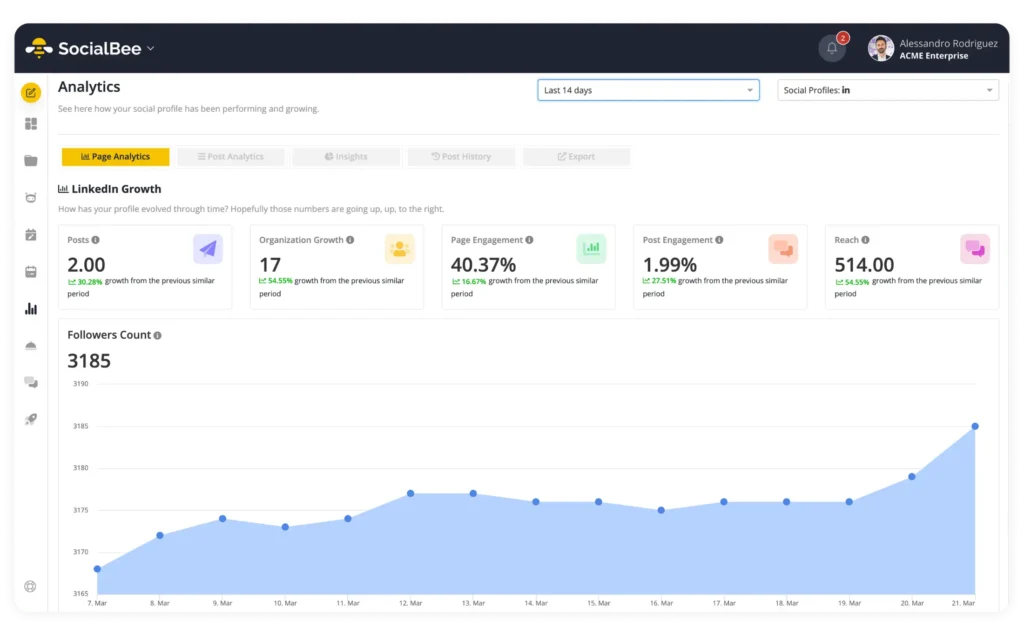
More importantly, that performance data can help shape what you create next. If a particular topic consistently gets stronger audience engagement, for example, you can turn that insight into new content ideas or adjust your content strategy accordingly.
Social media workflow consolidation checklist
Use this checklist when reviewing your current setup:
- Every recurring task has an owner.
- The team has one primary content calendar.
- Drafts and final creative assets have a clear source of truth.
- Approval paths are documented.
- Team members know when content does and doesn’t require approval.
- Social media accounts are managed centrally where practical.
- Repetitive publishing tasks are automated.
- Engagement has a defined owner and escalation process.
- Reporting follows the same KPI framework.
- Performance insights feed back into content planning.
- Every tool in your stack has a distinct purpose.
- Manual steps are kept because they add value, not simply because “that’s how we’ve always done it.”
If you can’t explain what a tool or handoff contributes to the process, that’s a good place to investigate first.
Frequently asked questions
1. What is an example of a social media workflow?
A simple social media workflow could be: plan content → create copy and visuals → review → approve → schedule → publish → manage engagement → analyze performance. Larger marketing teams may add separate owners, client approvals, or quality control stages.
2. What are the main stages of a social media workflow?
Most social workflows include planning, content creation, review and approval, scheduling, publishing, community management, analytics, and strategy refinement. The exact stages depend on your team size, social media strategy, and approval requirements.
3. How can I simplify my social media workflow?
Start by mapping your existing process and finding duplicate work, unnecessary handoffs, and frequent tool switching. Then centralize shared information, clarify ownership, reduce unnecessary approvals, and automate repetitive tasks that don’t require human judgment.
4. What parts of a social media workflow can be automated?
Scheduling, recurring publishing, notifications, basic AI-assisted content creation, content variations, and some reporting tasks can often be automated. Strategy, sensitive replies, crisis communication, creative decisions, and final quality checks should generally keep human oversight.
5. How can I manage multiple social media accounts in one workflow?
Use a social media management platform that connects the networks you actively use. This lets you plan, create, customize, schedule, and monitor content for multiple accounts without rebuilding the same process inside every native platform.
6. How often should you review your social media workflow?
Review it every few months and whenever something important changes, such as adding a channel, adopting a new tool, changing team responsibilities, or increasing content production. Recurring delays and confusion are also signs that the process needs another look.
A consolidated workflow gives your team more time for social media that matters
A good social media workflow shouldn’t create more work than the content itself.
The fewer unnecessary handoffs your team has to manage, the more time you have for the parts that actually need people, like understanding your audience or improving your social media strategy.
If much of your social media management is currently spread across separate planning, publishing, engagement, and reporting tools, SocialBee can help bring those tasks into one place.
Start your 14-day SocialBee trial and build a social media workflow that’s easier to keep up with.