

Social media management software should make your existing process easier, not force your business into a completely new one.
That sounds obvious, but it’s easy to get distracted by long feature lists, AI tools, analytics dashboards, and low starting prices. A platform can look impressive in a demo and still be a poor fit once you connect eight social accounts, invite your team, and discover that the feature you actually need sits behind another pricing tier.
The better approach is to start with how you manage social media today. Map the work you want to simplify, decide which features are non-negotiable, and then test a shortlist against a real week of content. This guide will show you exactly what to look for.

We’re SocialBee LABS SRL, part of WebPros. We use the information you provide to share relevant content & updates, as outlined in our Privacy Policy. You can opt out anytime.
Short summary
- Choose social media management software based on the problems you need to solve, not the platform with the longest list of features.
- Check support at the content-format level. A tool supporting Instagram doesn’t automatically mean it can publish every Instagram format your business uses.
- Compare scheduling, content creation, engagement, social media analytics, collaboration, and integrations against your actual work.
- Calculate the cost for your real number of social accounts, users, brands, and required features instead of comparing advertised starting prices.
- Different businesses need different things. A solopreneur may prioritize simple scheduling and affordability, while agencies managing multiple clients need workspaces, client approvals, reporting, and stronger account management.
- Test social media software using the same real content process before buying. Take posts from creation through approval, publishing, engagement, and reporting.
- SocialBee brings content creation, scheduling, engagement, analytics, and team collaboration into one social media management platform, making it a great pick for small businesses, social media managers, and agencies.
What is social media management software?
Social media management software helps you handle your social media from one place. Depending on the platform, you can create content, schedule posts across multiple accounts, respond to comments and messages, check your results, and collaborate with your team.
It brings together tasks that would otherwise have you jumping between social networks, spreadsheets, content calendars, analytics tools, and team chats. This makes it easier to stay organized and manage your social media without piecing everything together across different tools.
The exact features vary between social media management tools, but most bring the core parts of managing social media under one roof. You can typically:
- Map out what you’re posting and when with a content calendar.
- Create posts and use AI to brainstorm ideas, write captions, or adapt content for different platforms.
- Keep your images, videos, and other creative assets organized in a media library.
- Schedule and publish posts across your social channels without opening each app individually.
- Get posts reviewed and approved before they go live, with clear permissions for everyone involved.
- Reply to comments, mentions, and direct messages without checking every social network separately.
- See how your content is performing and turn those numbers into reports you can actually use.
When does your business need social media management software?
Your business may need social media management software when you’re spending too much time switching between platforms, posting content manually, chasing approvals, checking comments and messages, or pulling numbers together for reports. The more accounts, people, and content you manage, the harder it becomes to keep everything organized without a dedicated tool.
If you only have one or two social accounts and post occasionally, you may be perfectly fine using the platforms themselves. Meta Business Suite, for example, can cover many of the basic publishing and engagement tasks for Facebook and Instagram.
But managing multiple platforms isn’t unusual for businesses anymore. DataReportal found that the typical online adult uses 6.75 social platforms per month. Your business doesn’t need to be active on all of them, but you may need several platforms to reach different parts of your audience.
Think about a local business using Instagram, Facebook, TikTok, LinkedIn, and Google Business Profile. Posting four times a week already means creating content for different formats, keeping track of what goes out where, and checking several places for customer questions. Add reporting or another person reviewing posts, and those small tasks start adding up quickly.
There isn’t a magic number of accounts or posts that means it’s time to buy software. A better sign is how much time you’re losing to repetitive work and how often things get missed because your social media is spread across too many places.
How to choose the right social media management software
The best social media management software for your business is the one that removes the most friction from the work you already do at a cost you can justify.
Here’s how to find it:
- Define what you need the software to solve
- Check the supported social media platforms
- Compare planning and scheduling capabilities
- Evaluate content creation and AI features
- Look at engagement management
- Decide how much analytics and reporting you need
- Match collaboration features to your team workflow
- Check integrations and automation options
- Calculate the total cost for your business
- Consider usability, support, and scalability
- Test your shortlist with a real social media workflow
1. Define what you need the software to solve
Start with problems, not features.
Write down the parts of social media management that currently consume the most time or cause the most mistakes. Maybe publishing across five social media platforms takes too long. Perhaps client approvals live in email threads.
Once you know what’s slowing you down, turn each problem into something the tool needs to help you do. Keep these requirements simple and specific so they’re easy to check when you compare your options.
For example:
- Problem: We spend too much time publishing the same campaign across six accounts.
Requirement: Schedule posts across multiple platforms and customize them for each one. - Problem: Clients approve posts over email, so feedback gets buried or missed.
Requirement: Let clients review, comment on, and approve posts in one place.
This exercise gives you a filter for every social media tool you check. Not every tool needs every feature. It needs the key features that solve your problems.
2. Check the supported social media platforms
A platform logo doesn’t tell you enough.
Check exactly which account types and content formats the software supports. If LinkedIn matters, can you connect both personal profiles and LinkedIn Company Pages? If Instagram drives most of your business, can you publish Reels, Stories, and carousels? Can local businesses connect each Google Business Profile they manage?
Don’t stop at the list of supported platforms. Check which types of posts you can actually create and publish through the tool.
That matters because some formats perform better than others. In 2025, 77% of North American marketers said short-form vertical video performed better than their campaign baselines. If Reels, TikToks, Shorts, carousels, Stories, or other high-performing formats are part of your strategy, make sure the tool supports them.
Do this for every social channel you use now, as well as any you realistically plan to add.
3. Compare planning and scheduling capabilities
Good social media scheduling should remove repetitive publishing work while giving you enough control to adjust content for each platform.
Look beyond whether you can simply pick a date and time. The right scheduling features should make planning and publishing easier, especially when you’re managing a lot of content.
Depending on your needs, look for:
- Visual content calendar: See everything you have planned in one place, spot gaps, and move posts around when plans change.
- Bulk scheduling: Schedule weeks of content at once to save time and stay consistent.
- Recommended posting times: Find good times to publish based on when your audience is most likely to engage.
- Content queues or category-based schedules: Set recurring time slots for different types of content so you don’t have to schedule every post from scratch.
- Platform-specific post variations: Adjust captions, hashtags, images, and other details for each social network instead of publishing the exact same post everywhere.
- Drafts and approvals: Prepare posts ahead of time and get feedback or approval before anything goes live.
- Calendar views for multiple accounts: See what’s scheduled across your social media accounts without opening each one separately.
- Unlimited scheduled posts: Plan as far ahead as you need without hitting a limit on how many posts you can have in your queue.
Think in terms of steps saved.
If you currently create one campaign and manually adapt it for four platforms, for example, look for software that lets you customize each version within the same step instead of creating four separate posts.
4. Evaluate content creation and AI features
AI can save you time, but it’s only one part of creating a social media post. Look at what the tool lets you do from the first idea to the final version you’re ready to publish.
For example, SocialBee’s Post Editor brings many of those tasks together. You can use AI to write or improve your caption, generate hashtags, and create different versions of a post for each social network. You can also resize images, add alt text, tag accounts and locations, and add a first comment without leaving the editor.
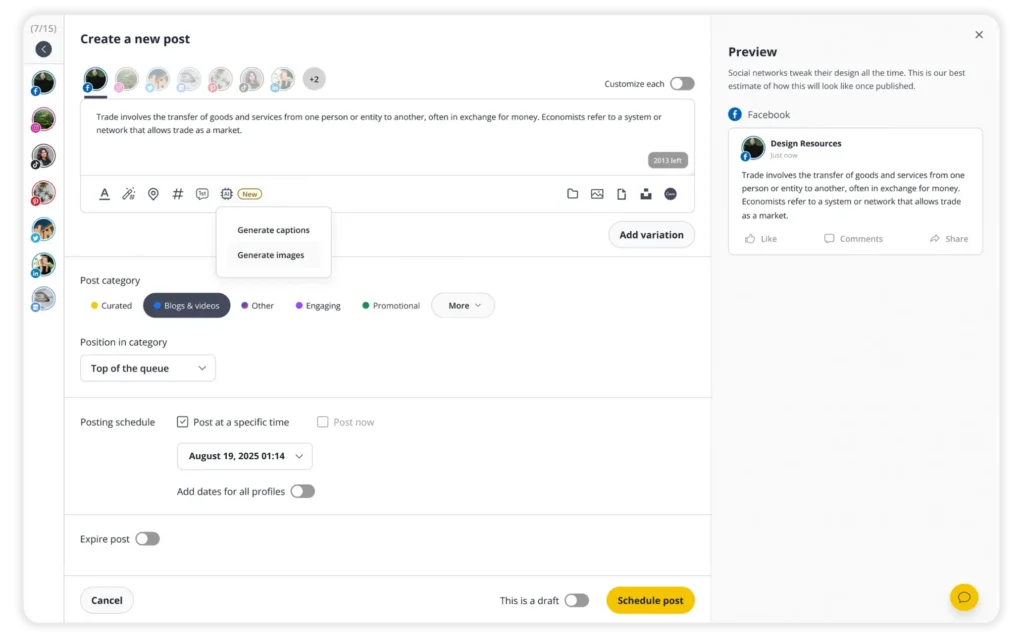
SocialBee’s Post Editor
No social media management tool can offer every content creation option available inside each social network. What matters is whether it covers the ones you use regularly. If you still have to open the native app to finish most of your posts, the tool isn’t saving you as much time as it could.
When comparing AI features, test them with something you actually plan to publish. Use SocialBee’s AI Post Generator, for example, to create a caption you need next week and see how much editing it takes. Getting a usable first draft in a few clicks saves time. Rewriting most of it yourself doesn’t.
5. Look at engagement management
If people regularly contact your business on social media, you also need a simple way to keep up with those conversations. A social inbox brings comments, mentions, and direct messages from supported platforms into one place, so you can reply without checking every account separately.
SocialBee makes this easier with its Social Inbox, where you can view and respond to comments, mentions, and messages from supported networks. You can also mark conversations as done once they’ve been handled, making it easier to see what still needs your attention.
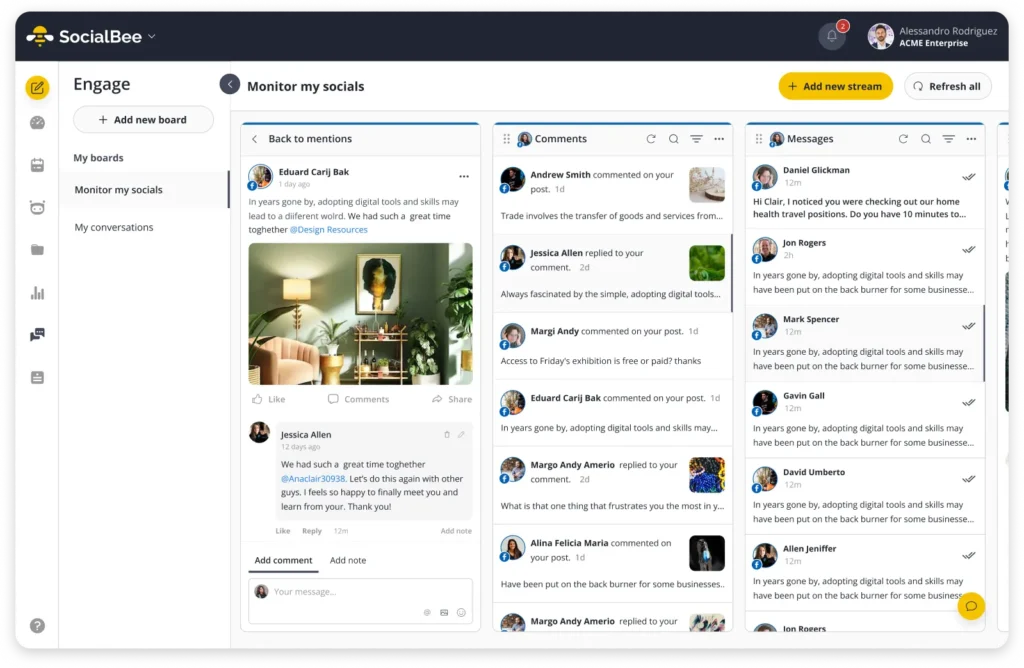
SocialBee’s Social Inbox
If several people manage your accounts, check what team features are available too. Look for ways to assign conversations, leave notes for colleagues, and avoid having two people respond to the same customer. Most importantly, check that the inbox supports the platforms where your customers actually contact you.
Social listening is worth checking separately. If you need to track conversations about your brand beyond the messages and mentions that reach your accounts directly, look at which sources the tool monitors, whether you can track specific keywords or brand names, and what insights you get from those conversations.
6. Decide how much analytics and reporting you need
You don’t need the most advanced analytics package just because it exists. You need enough data to understand what’s working, what isn’t, and what you should do next.
For a small business, that might mean checking reach, engagement, follower growth, and your best-performing posts. If you report to a manager or client, you may need more: comparisons across platforms, historical data, custom reports, PDF exports, and reports you can send without spending an hour cleaning them up first.
SocialBee makes this easier by bringing analytics from your connected accounts into one place. You can compare performance, see which posts get the best results, learn more about your audience, and export PDF reports when you need to share your results.
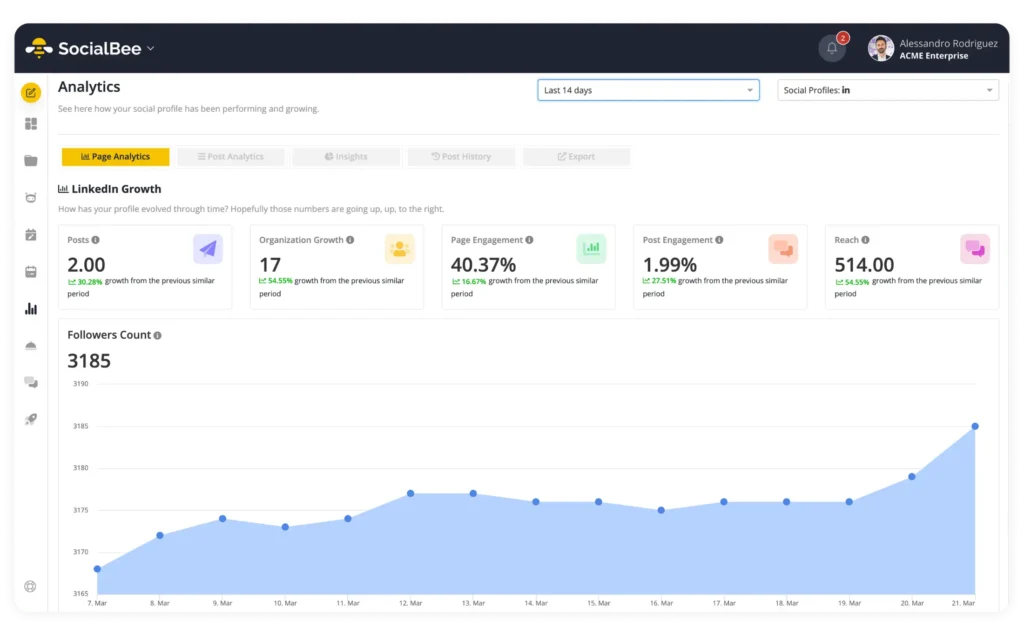
SocialBee’s Analytics Dashboard
Start with the questions you actually need your analytics to answer. Which posts should you create more of? Is your audience growing? Which platforms are getting results? If simple analytics give you those answers, you may not need anything more. If you manage several brands or report results to clients, look for more detailed analytics and reporting options.
7. Match collaboration features to your team workflow
The more people involved in your social media, the more important it becomes to know who can create, review, approve, and publish content.
If you handle everything yourself, you probably don’t need many team features. But once writers, designers, social media managers, clients, or compliance teams get involved, email threads and scattered feedback can quickly slow things down.
Look for features that make it easier to work together:
- Roles and permissions: Control who can create, edit, approve, or publish content.
- Internal feedback: Keep comments and changes with the post instead of spreading them across email or chat.
- Approval processes: Send posts for review and make sure nothing gets published before it’s ready.
- Client approvals: Give clients a simple way to review and approve content without giving them access to everything else.
- Separate workspaces: Keep accounts, content, and team members organized by brand or client.
- Notifications: Let people know when a post needs their attention instead of relying on someone to follow up manually.
For teams and agencies, SocialBee also lets you set up separate workspaces, invite users, control permissions, and send posts for approval. This keeps feedback and approvals closer to the content, which is especially useful when you’re managing multiple brands or client accounts.
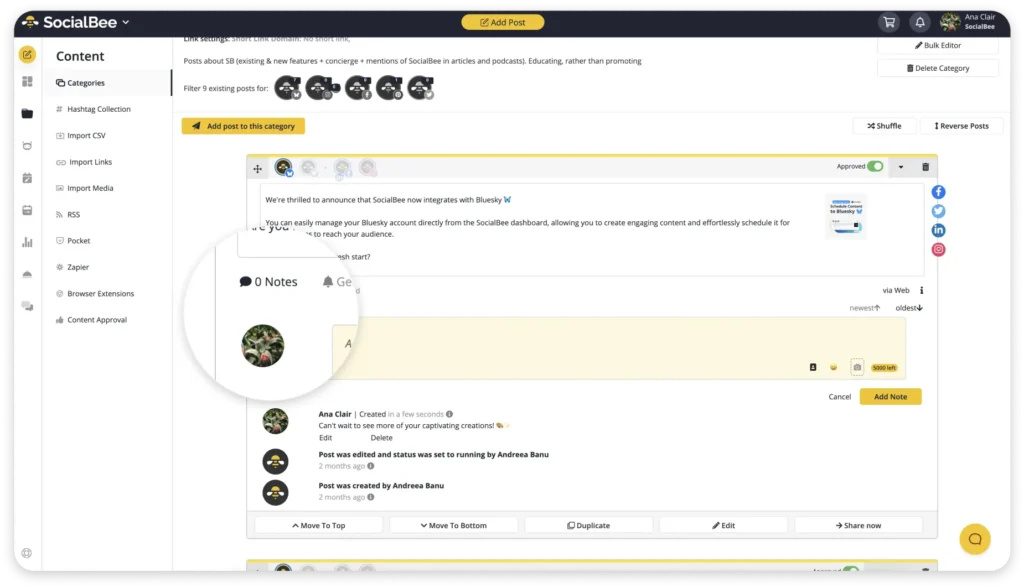
SocialBee’s Internal Notes
Check how these features affect the price, too. Some tools charge for each additional user or only include approvals and other collaboration features on more expensive plans. Don’t pay for unlimited users if only three people need access.
Finally, have the people who’ll use the software test it. If your social media manager publishes 50 posts a week, ask them to create, review, and approve a few real posts during the trial. You’ll quickly find out whether the social media approval process saves time or adds extra steps.
8. Check integrations and automation options
The best integrations are the ones that save you from moving content or information between tools yourself.
Start with the apps you already use for social media. Maybe you design posts in Canva, store files in the cloud, shorten links before publishing, or use automation tools to connect social media with the rest of your marketing.
Then think about what you actually want those integrations to do. If you create most of your visuals in Canva, for example, being able to access those designs directly from your social media tool can save you from downloading and uploading files every time.
You can do this in SocialBee with its Canva integration, which lets you create or select designs without leaving SocialBee. You can also connect SocialBee with tools such as Zapier to automate repetitive tasks between the apps you already use.

SocialBee’s Canva Integration
Don’t choose a platform because it advertises hundreds of integrations. A handful that save you time every week are far more useful than a long list of connections you’ll never touch.
9. Calculate the total cost for your business
The number on a pricing page means very little until you calculate what your configuration costs.
Pricing models differ substantially. Some tools charge by social channel, others by user, profile allowance, brand, workspace, or feature tier.
So compare the cost of:
accounts + users + required features + add-ons + expected growth
Check annual billing as well, but don’t let a yearly discount push you into buying before you’ve properly tested the platform.
Finally, think ahead to next year. What happens if five social accounts become 12? What if two users become six? What if you add three client accounts?
That number is much more useful than “plans start at $X.”
10. Consider usability, support, and scalability
A powerful platform that your team avoids using is expensive software.
During your trial, pay attention to everyday actions. How quickly can someone create a post, find an asset, change the schedule, respond to a comment, or pull a report?
Then consider what happens as you grow. Can you add multiple social accounts, users, brands, or locations without rebuilding your entire setup?
Support matters for the same reason. When a post fails before a campaign launch, documentation, responsive support, and clear error messages suddenly matter much more than another AI feature.
11. Test your shortlist with a real social media workflow
Once you have two or three platforms, stop comparing feature pages and start doing the work.
Take one real week of content through each platform:
creation → approval → scheduling → publishing → engagement → reporting
Connect the social accounts you genuinely manage. Invite the colleagues who would use the software. Create real posts, make edits, approve posts, schedule them, check the inbox, and generate a report.
Keep a simple scorecard based on time saved, what’s missing, and total cost.
After a week, you’ll know far more than you would after another hour comparing checkmarks on pricing pages.
Why SocialBee is a strong choice for businesses
You can manage Facebook, Instagram, LinkedIn, X, Pinterest, TikTok, YouTube, Threads, Bluesky, and Google Business Profile from SocialBee.
For solopreneurs and small businesses, SocialBee can reduce the amount of manual work behind maintaining a social media presence. You can generate captions and visuals with AI, customize posts for different platforms, plan them in a visual calendar, bulk schedule content, and monitor performance without building a stack of separate tools.
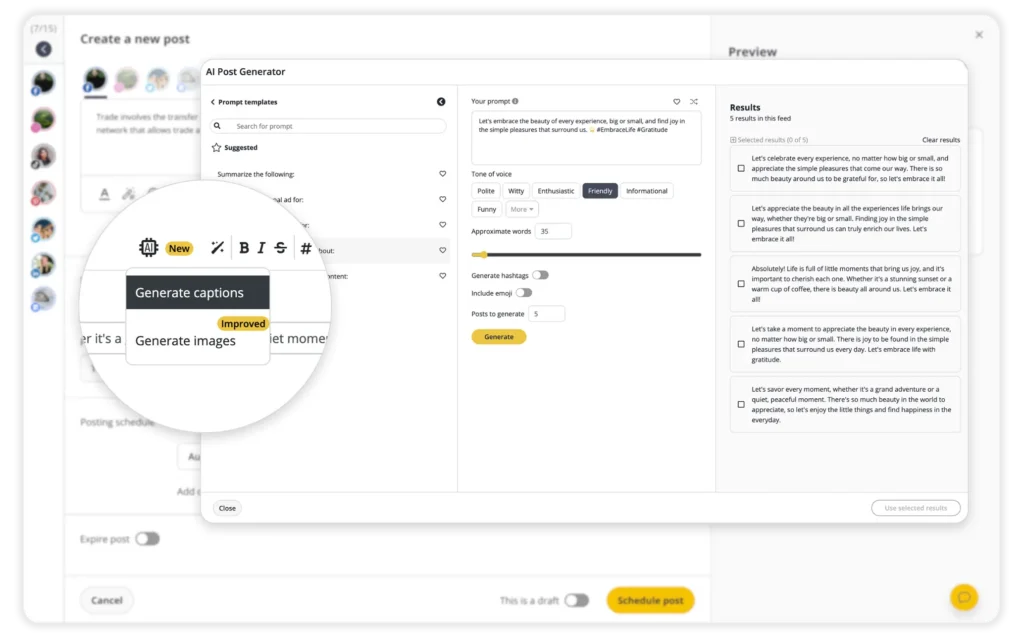
SocialBee’s AI Caption Generator
For social media managers and internal teams, the value shifts toward organization. SocialBee combines scheduling with a unified inbox for supported networks, analytics, feedback, roles, and content approvals. Its analytics include performance and engagement data, while higher plans provide longer data history and PDF reporting.
For agencies and businesses managing multiple brands, workspaces keep social accounts, content, analytics, and inbox activity separated by brand or client. Team members can also receive different roles and permissions rather than everyone having the same level of access.
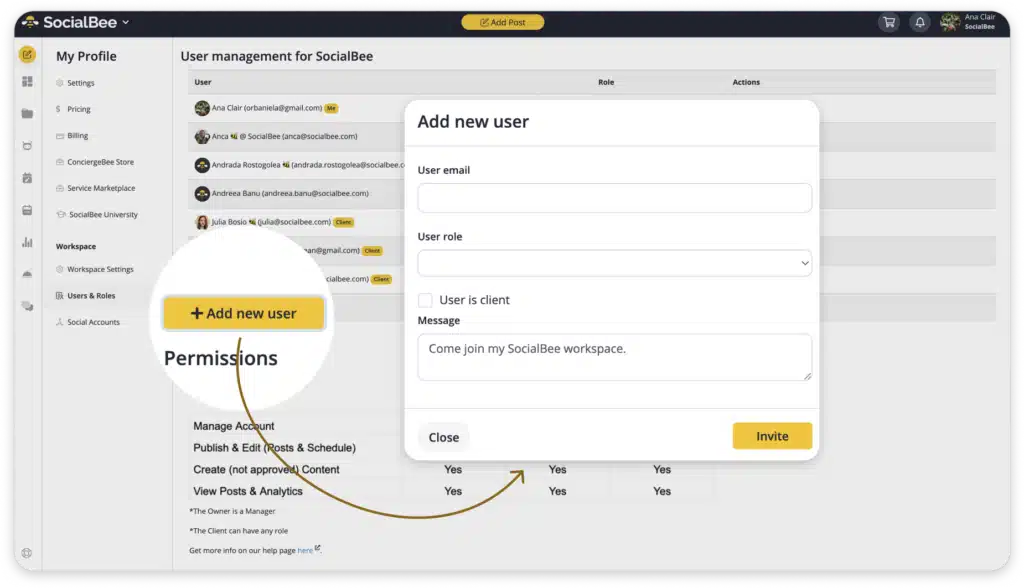
Adding a new user in a SocialBee workspace
Pricing scales with those needs. SocialBee currently starts at $29/month for Bootstrap with five social accounts. Accelerate supports 10 accounts at $49/month, while Pro includes 25 accounts, five workspaces, and three users per workspace for $99/month. Additional users, workspaces, and profiles can also be added without automatically moving to another plan.
If you prefer to pay annually, SocialBee offers a 16% discount on yearly plans, which is the equivalent of getting two months free.
That makes SocialBee worth considering when your main problem isn’t simply “I need to schedule posts.” It’s “I need one place to manage the work surrounding those posts too.”
You can see how SocialBee fits your business with a 14-day free trial, with no credit card required. Start your 14-day SocialBee trial.
How should different businesses evaluate social media management software?
Different operating models create different requirements. The “best” feature set for a freelancer can be completely wrong for a 20-person marketing department.
Small businesses and solopreneurs
Small businesses should prioritize time saved per dollar spent.
You probably don’t need complex account management or enterprise-grade analytics. You’re more likely to benefit from straightforward scheduling, AI-assisted creation, a visual calendar, basic analytics, and a social inbox that reduces how often you switch apps.
Also ask whether one platform can replace several smaller subscriptions. Paying slightly more for one useful social media management platform can be cheaper than maintaining separate scheduling, reporting, and content creation tools.
Marketing teams
Marketing teams should pay closer attention to collaboration and visibility.
Look for permissions, approvals, shared calendars, internal feedback, analytics tools, and a clear view of what’s scheduled across multiple platforms.
If you have a dedicated marketing team, test how smoothly work moves between the people planning campaigns, creating assets, approving content, publishing, and measuring performance.
Social media agencies
Agencies managing multiple clients need separation and scale.
Prioritize:
- Multiple workspaces
- Client management
- Roles and permissions
- Client approvals
- Bulk scheduling
- Detailed analytics
- Shareable reporting
Pricing deserves an even closer look. A plan that works beautifully for five accounts may become uneconomical at 50. Calculate the cost based on your expected number of multiple clients, users, and social accounts rather than your current smallest setup.
Multi-location businesses
Multi-location businesses should prioritize organization, permissions, and repeatability.
You may need to manage multiple accounts for individual stores, franchises, or regions while still maintaining central oversight. Check whether the platform can separate locations cleanly, control who can publish where, and make reporting manageable across multiple stakeholders.
Support for local channels such as Google Business Profile may also be much more important here than it would be for an online-only company.
Frequently asked questions
1. What is the best social media management software?
SocialBee is one of the best social media management software options for small businesses, agencies, and social media teams that want to manage their entire workflow from one place. It combines content creation, multi-platform scheduling, a social inbox, analytics and reporting, approvals, and team collaboration.
The best choice still depends on your specific work, so use a free trial to test SocialBee with your real accounts and content before committing.
2. How much does social media management software cost?
Social media management software can cost anywhere from $0 for a limited free plan to $300+ per month for platforms built for larger teams, agencies, and businesses with more advanced needs.
Don’t compare starting prices alone. Calculate what you’ll pay for your required number of social accounts, users, workspaces or brands, analytics, collaboration features, and add-ons. Also compare monthly and annual billing before committing.
3. What is the difference between social media management software and a social media scheduler?
A social media scheduler primarily helps you plan and publish content in advance. Social media management software usually covers a broader process, potentially including content creation, scheduling, engagement, analytics, social listening, team collaboration, approvals, and reporting.
If publishing is your only bottleneck, a scheduling tool may be enough. If you also need to manage conversations, performance, people, and multiple accounts, a broader platform usually makes more sense.
4. Is there an app to manage all social media?
Yes, SocialBee lets you manage multiple social media accounts from one dashboard, including Facebook, Instagram, LinkedIn, X (Twitter), TikTok, Pinterest, YouTube, Threads, Bluesky, and Google Business Profile.
You can create and schedule posts, plan content in a visual calendar, manage comments, mentions, and messages for supported networks, collaborate with your team, and track social media performance without constantly switching between platforms.
Choose social media management software based on how you actually work
There’s no prize for buying the social media tool with the most features.
What matters is how much unnecessary work disappears once your team starts using it. Begin with the problems in your current process, turn them into requirements, and compare platforms against the same real tasks. That will tell you far more than a feature checklist.
And think one year ahead. The right platform shouldn’t only accommodate the social media presence you have today. It should still make sense when you add another account, hire another person, or take on another client.
If you want to see how an all-in-one software feels in practice, SocialBee lets you create content, schedule posts across multiple platforms, manage engagement, track performance, and collaborate from one place.
Start your 14-day SocialBee trial and test it with a real week of your own content.