
Guest Author
Yesterday, your TikTok pulled 10K views. Today, you’re staring at 23. What happened?
When your views and engagement suddenly drop across multiple videos, it’s easy to assume the algorithm simply isn’t on your side. But if your videos stop appearing on the For You Page, disappear from hashtag searches, or suddenly reach little more than your existing followers, you might be dealing with what creators call a TikTok shadow ban.
Unlike a regular ban, a shadow ban on TikTok doesn’t necessarily stop you from using your account or posting new content. Instead, your visibility may be significantly reduced behind the scenes, leaving you wondering why perfectly normal videos are suddenly getting close to zero views.
TikTok doesn’t officially use the term “shadow ban,” which makes diagnosing one tricky. A sudden drop in reach can have several explanations, from normal fluctuations in performance to flagged content, spammy behavior, copyright violations, or content that goes against TikTok’s Community Guidelines.
So, before you delete half your feed or stop posting altogether, let’s figure out what’s actually happening. In this guide, we’ll break down the common signs of a TikTok shadowban, what can trigger one, how to recover your reach, and what you can do to avoid future shadowbans.

We’re SocialBee LABS SRL, part of WebPros. We use the information you provide to share relevant content & updates, as outlined in our Privacy Policy. You can opt out anytime.
Short summary
- A TikTok shadow ban means your account’s visibility is significantly reduced without a regular ban. Common signs include zero or unusually low video views, a sudden drop in engagement, and videos disappearing from the For You Page, hashtag searches, or search results.
- Common causes include flagged content, copyright violations, banned hashtags, suspicious or spammy behavior, and restricted or inappropriate content involving things like hate speech or dangerous acts.
- To avoid future shadowbans, follow TikTok’s Community Guidelines and familiarize yourself with TikTok’s rules, policies, and platform limits. These apply to all users, including business and commercial accounts.
- If you manage multiple TikTok accounts, avoid artificial engagement, repetitive comments, or repeatedly publishing the same content. Browser profiles can help organize legitimate social media workflows, but shouldn’t be used to bypass restrictions.
- If your engagement suddenly drops, don’t immediately delete posts, stop posting, or create a new account. Check your recent content, follower growth, analytics, and account status first. Users report that a TikTok shadowban can last anywhere from a few days to around two weeks.
- For technical visibility issues, keep the TikTok app on the latest version, clear the cache, or reinstall the app. If you think a restriction was applied incorrectly, contact TikTok support before re-uploading content or starting fresh.
- There’s no instant fix. When you continue posting, prioritize high-quality, original content, learn from flagged videos, and avoid spammy posting behavior to protect your account from future shadowbans.
What is a TikTok shadow ban?
While TikTok doesn’t officially use the term “shadow ban,” it’s commonly used to describe a situation where a TikTok account experiences a sudden and significant drop in visibility. Your videos are still live, and you can continue posting, but they may stop appearing on the For You Page, rank poorly in search results, or reach far fewer users than usual.
This is different from a regular ban. Instead of losing access to your account, your content’s distribution is quietly limited, which can translate into fewer TikTok views, less engagement, and, for business accounts, fewer opportunities to generate leads or conversions.
Some creators report losing 70% to 90% of their overall video views during suspected shadow bans, with For You Page (FYP) traffic sometimes dropping even more dramatically. However, there’s no fixed percentage that confirms you’ve been shadow-banned, so a drop in views alone isn’t enough to diagnose one.
A shadow ban on TikTok is generally temporary. Reports suggest reduced visibility can last anywhere from a few days to around two weeks, particularly when an account has posted restricted content, displayed spammy behavior, or repeatedly gone against TikTok’s Community Guidelines.
That said, not every bad week is a shadow ban. TikTok reach naturally fluctuates, which is why it’s important to look for several warning signs before assuming your account has been penalized.
What causes a TikTok shadow ban?
A TikTok shadow ban can happen for a few different reasons, but most come down to the same thing: TikTok has picked up on content or activity that it considers potentially problematic.
That doesn’t mean every sudden drop in views is a punishment. Sometimes a video just doesn’t perform well. Sometimes several videos don’t. But if your reach drops across the board, there are a few things worth checking.
- Violating community guidelines: This is the most obvious one. Content involving hate speech, dangerous acts, harassment, or other restricted topics can violate TikTok’s Community Guidelines. Depending on the violation, TikTok may remove the content, stop recommending it, or place restrictions on your account. Repeated violations can eventually lead to a regular ban.
- Spammy behavior: Buying followers, using bots, leaving huge numbers of comments, or trying to artificially boost engagement can all make a TikTok account look suspicious. Even without bots, extremely repetitive posting behavior can raise red flags. If you want to avoid a shadow ban on TikTok, avoid spammy behavior and let engagement grow naturally.
- Using banned or irrelevant hashtags: Hashtags help TikTok understand what your video is about, so using banned or restricted hashtags can cause problems. The same goes for stuffing posts with unrelated hashtags just because they’re popular. Before publishing, it’s worth checking your hashtags in TikTok’s search results to make sure they’re still active and relevant.
- Copyright violations: Uploading music, clips, or images you don’t have permission to use can result in content being muted or removed. Repeated copyright violations can cause bigger problems for your account. TikTok has its own copyright policy, and using sounds from TikTok’s licensed library is generally the safer choice.
- Suspicious account activity: Having multiple TikTok accounts isn’t against the rules by itself. The problem starts when the activity across those accounts looks coordinated or automated, such as using multiple accounts to inflate engagement on the same content. In other words, TikTok is more interested in what you’re doing with those accounts than how many you have.
And sometimes, you might do everything right and still see your reach fall off a cliff. TikTok relies heavily on automated moderation and recommendation systems, so a drop in visibility doesn’t necessarily mean you deliberately violated TikTok’s rules.
Before you start deleting videos or starting fresh with a new account, check the bigger picture. If several recent videos stop appearing on the For You Page and in hashtag searches, while your views and engagement suddenly drop at the same time, there’s more reason to investigate.
How to recover your TikTok reach
Think you’ve been shadow-banned? A suspected TikTok shadow ban often resolves on its own within 1 to 2 weeks, and making lots of sudden changes can make it harder to understand what actually caused the drop.
Instead, use the time to figure out what changed and whether you’re dealing with an actual restriction or simply a few underperforming videos.
Here are 4 things you can do to recover from a TikTok shadowban:
- Check your data before doing anything
- Review flagged or problematic posts
- Take a short break from posting
- Come back with stronger, original content
1. Check your data before doing anything
Not every dip in engagement is a shadow ban. TikTok accounts naturally go through good and bad stretches, and one video getting zero views doesn’t necessarily mean the platform limits your entire account.
Instead, look for a pattern across several recent posts. Compare your video views, watch time, engagement, follower growth, and traffic sources with your usual performance.
Pay particular attention to where your views are coming from. If several videos stop appearing on the For You Page or in search results at roughly the same time, that’s a much stronger signal than one post simply flopping.
Historical data helps here. Look at your typical performance over the past few weeks and compare it with what’s happening now. You’re trying to answer one question before you change anything: is my account behaving unusually, or am I looking at normal TikTok volatility?
2. Review flagged or problematic posts
If the numbers suggest something really has changed, look at your recent content next.
Check whether TikTok has flagged any posts or notified you about Community Guidelines violations. Pay particular attention to inappropriate content, misleading information, undisclosed branded content, copyright violations, or anything else that could violate guidelines.
Copyright and audio are worth checking separately. If TikTok has muted a video or restricted its audio, review what happened before uploading anything again. When you do repost, make sure you’re using audio from TikTok’s licensed library or other media you have permission to use.
One thing we wouldn’t recommend is mass-deleting videos because your reach suddenly dropped. Review posts individually and only remove content when there’s a genuine reason to do so.
If you believe TikTok has flagged content incorrectly, use the available appeal option or contact TikTok support rather than trying to guess your way around the restriction.
3. Take a short break from posting
Sometimes, doing less is more useful than frantically trying to post your way out of a TikTok shadowban.
If your reach has dropped significantly, you can try taking a 48–72-hour break. There’s no official guarantee that this will “reset” the TikTok algorithm, but it gives you time to review your account and stops you from piling new content onto an unresolved problem.
You can also use the break for some basic app maintenance. Make sure you’re running the latest version of the TikTok app and clear your cache if you’re experiencing technical issues.
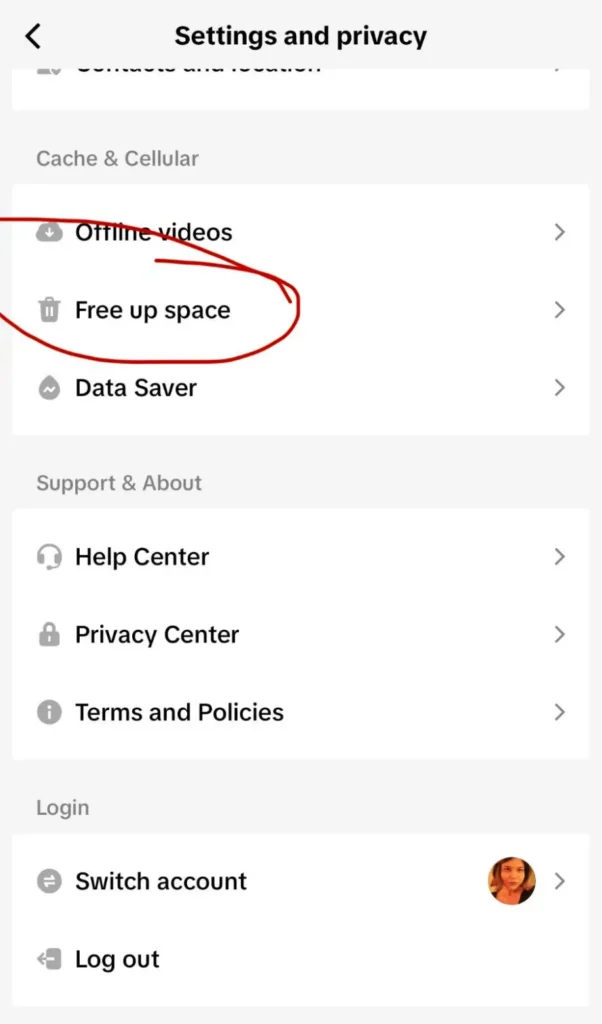
To clear your cache, head to your profile Settings & Privacy > scroll down to Cache & Cellular > then select Free up Space.
If the app itself is behaving strangely, you can also reinstall the app before assuming every technical glitch is evidence of a shadow ban on TikTok.
4. Come back with stronger, original content
Once you’re ready to continue posting, don’t try to compensate for lost reach by flooding your account with content.
Focus on a few strong, platform-native posts instead. Avoid watermarks and recycled-looking videos, follow TikTok’s Community Guidelines, and give people a reason to keep watching beyond the first couple of seconds.
Your hook matters here. Try opening with a question, an unexpected statement, movement, a strong visual, or a reason for viewers to wait for the payoff. You can even publish a test video using a format that has performed well for you before and compare its reach with your usual numbers.

(Image Source: TikTok:@Duolingo)
Duolingo is a great example of a brand that creates content specifically for the platform rather than treating TikTok as another place to dump social media assets.
Its videos regularly use curiosity, visual jokes, familiar characters, and “wait for it” moments to keep people watching. The lesson isn’t to copy Duolingo’s owl. It’s to understand why the format works and translate those principles into original content that makes sense for your own audience.
Most importantly, don’t expect one post to tell you whether your account has recovered. Give yourself a few videos and watch what happens to your views, engagement, search visibility, and For You Page traffic over time.
How to avoid future TikTok shadow bans
The best way to deal with a TikTok shadow ban is to avoid giving TikTok a reason to restrict your content in the first place.
That doesn’t mean playing it overly safe or second-guessing every post. It means understanding TikTok’s policies, keeping an eye on your account health, and avoiding posting behavior that could look spammy or manipulative to the TikTok algorithm.
Here are 7 ways to reduce your chances of future shadowbans:
- Give every post a quick pre-publish check
- Check your account health, not just your views
- Create for TikTok, not just for social media
- Focus on real engagement
- Test new ideas without spamming your audience
- Be careful when managing multiple TikTok accounts
- Learn from flagged content
1. Give every post a quick pre-publish check
You probably don’t need a five-person approval process for every 15-second TikTok. You do, however, want to catch obvious problems before you hit publish.
Check the content itself, caption, hashtags, copyright, and any required commercial disclosures. Using banned hashtags, copyrighted material, or inappropriate content can put an otherwise good post at risk.
For business or commercial accounts, this can be as simple as a short internal checklist. It takes a minute and makes it much easier to follow TikTok’s Community Guidelines consistently.
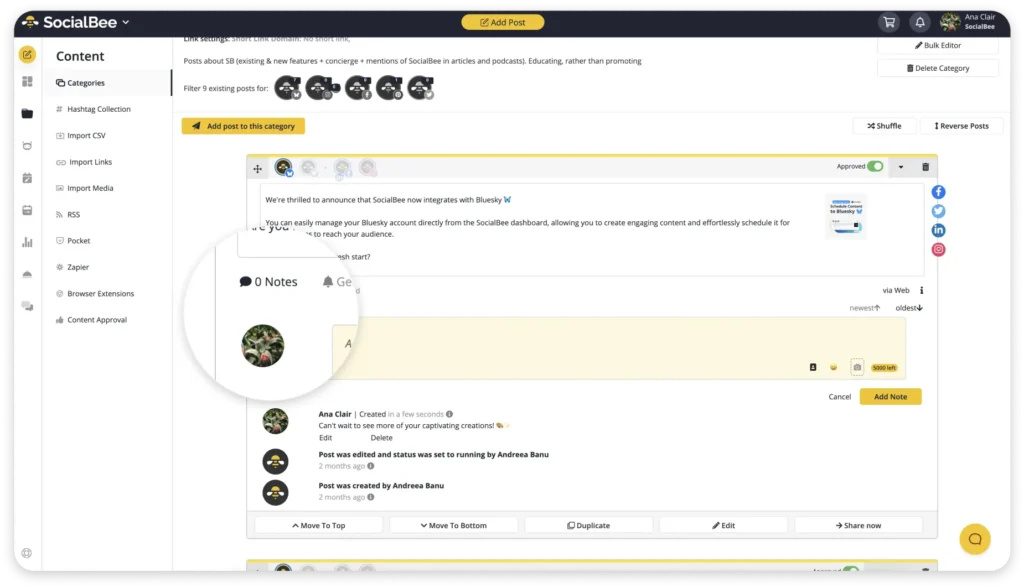
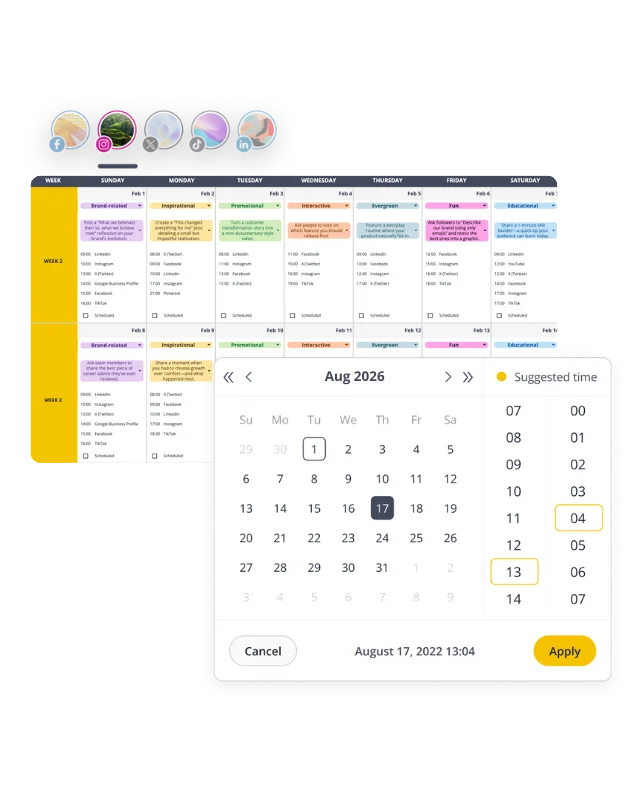
If you work with a team, SocialBee can help keep the approval process simple. Instead of sending drafts back and forth, you can leave internal notes and have posts reviewed and approved before they go live.
This is especially useful if a client or manager needs to check content first. It gives everyone a clear view of what’s ready to publish and helps catch mistakes before they become a problem.
2. Check your account health, not just your views
A video getting 800 views when you expected 8,000 is frustrating, but it isn’t proof of a shadow ban on TikTok.
Look for patterns instead. Have several recent videos experienced the same drop? Has your For You Page traffic fallen significantly? Is your content still appearing in search? Has TikTok actually flagged anything?
It’s also worth checking your account status and notifications regularly. If TikTok tells you that you violate guidelines, that information is far more useful than trying to reverse-engineer the algorithm from a disappointing view count.
And don’t overlook technical issues. Keep the TikTok app updated to the latest version. If videos repeatedly get stuck uploading or processing, try clearing the cache or reinstalling the app before assuming TikTok has restricted your account.
3. Create for TikTok, not just for social media
Copying and pasting the exact same post across every social media platform might save time, but it rarely produces the best content.
The TikTok version might need a stronger opening, different text placement, another caption, or a completely different edit. Even when the idea stays the same, the execution should feel native to the platform.
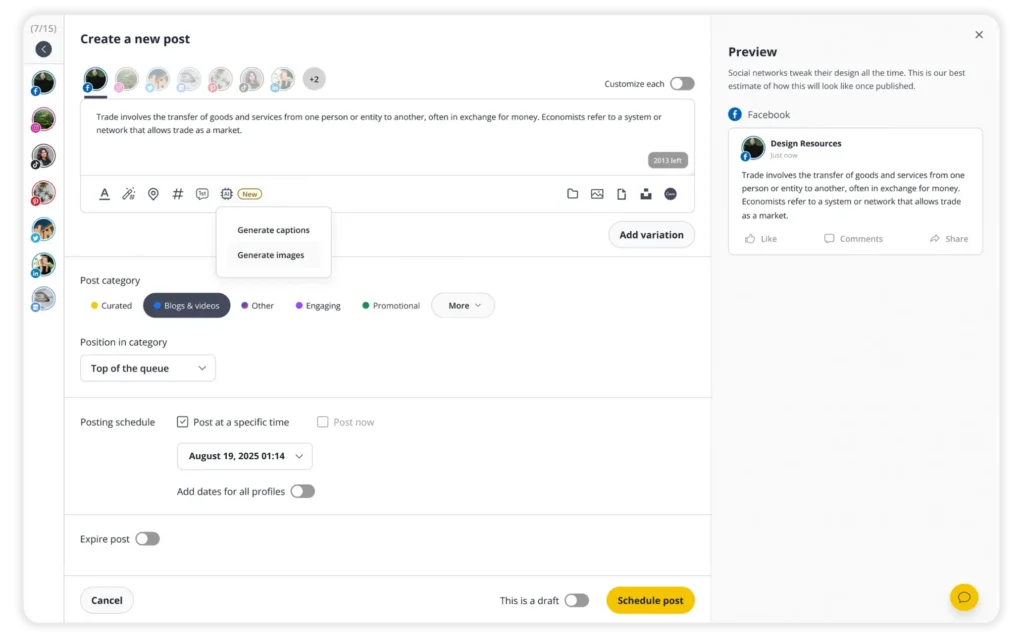
You don’t have to create everything from scratch, either. SocialBee’s Post Editor lets you create a post and customize it for individual social media profiles, so you can repurpose an idea without publishing exactly the same content everywhere.
The goal is to keep repurposing efficient while still giving TikTok original content that feels like it was actually made for TikTok.
4. Focus on real engagement
Buying followers, joining engagement pods, automating comments, or finding other shortcuts to inflate your numbers might make your account look busier, but that isn’t the same as building an audience.
Pay attention to the engagement people give you without being pushed into it. Which videos generate conversations? Which get shared or saved? Which topics keep users watching?
A social media management tool can help you compare posts and content categories over time, making it easier to spot the formats that consistently generate meaningful engagement.
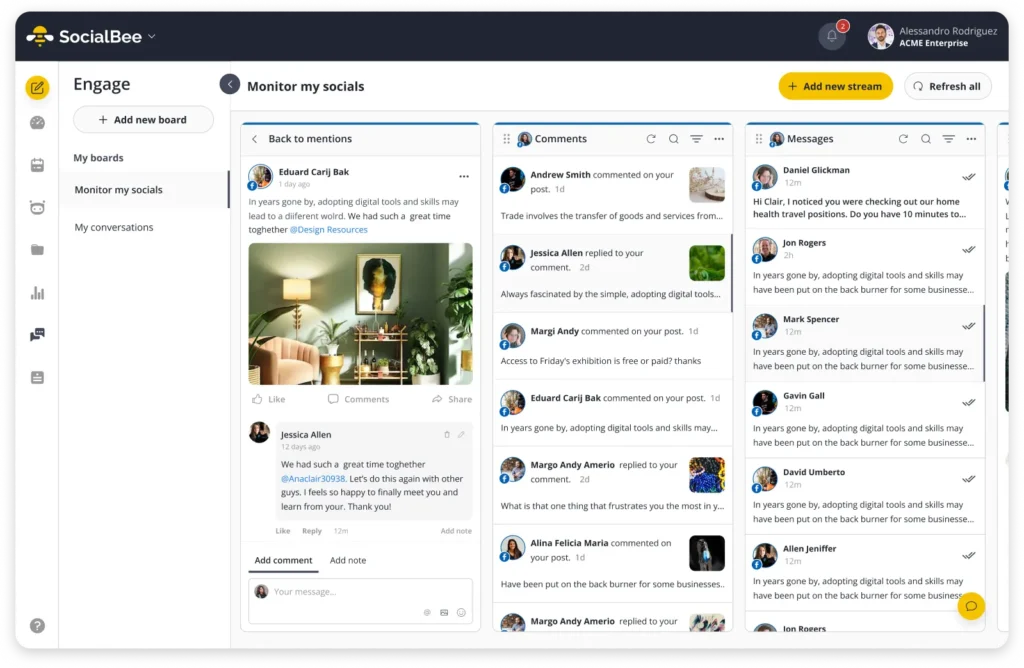
Don’t just measure engagement, respond to it. With SocialBee’s Social Inbox, you can keep track of comments, mentions, and conversations from one place. It makes it easier to spot what your audience actually wants to talk about and turn those interactions into ideas for future content.
5. Test new ideas without spamming your audience
Experimenting is part of TikTok strategies. Uploading ten slightly different versions of the same test video in an hour probably shouldn’t be.
Instead, change one or two things at a time. Try a different hook, opening shot, video length, caption, or format and see what happens. If something works, take what you learned into your next post rather than repeatedly uploading the same content.
You’ll get much more useful information about what your audience responds to without creating posting behavior that could look like spam.
6. Be careful when managing multiple TikTok accounts
There’s nothing inherently wrong with managing multiple accounts, particularly if you work for an agency or manage several brands.
Problems are more likely to arise when those accounts are used to artificially interact with each other or when their activity begins to resemble automation. Avoid using multiple TikTok accounts to repeatedly like, comment on, or otherwise boost the same posts.
The same principle applies to browser profiles and other account-management setups. They’re useful for keeping legitimate workflows organized, not for trying to circumvent platform limits or TikTok’s policies.
7. Learn from flagged content
If TikTok flags a post, don’t just delete it and forget it ever existed.
Find out what triggered the decision. Was it a copyright violation? A problem with your disclosure? Did the content fall outside TikTok’s Community Guidelines?
If you think TikTok made a mistake, use the available appeal process or contact TikTok support. If the content genuinely broke the rules, use that information to improve your publishing process before you continue posting.
You don’t need to become afraid of the TikTok algorithm. You just need to understand where the social media platform draws the line, so you can spend less time worrying about future shadowbans and more time creating content people actually want to watch.
Frequently asked questions
How do I know if my account has been shadow-banned?
TikTok won’t send you a notification saying you’ve been shadow-banned. Instead, you’ll need to look for changes in how your content is performing.
One bad video isn’t enough to tell you much. But if your views and engagement suddenly drop across multiple videos, your content stops appearing on the For You Page or in hashtag searches, or most of your views start coming from existing followers, something may be limiting your reach.
You may also notice videos getting stuck under review or processing for longer than usual. Check your TikTok account status and analytics before assuming a normal performance dip is a shadow ban.
How long does a TikTok shadow ban last?
There’s no official timeline because TikTok doesn’t formally use the term “shadow ban.” Users commonly report reduced reach lasting anywhere from a few days to around two weeks.
How quickly your reach returns can depend on what caused the restriction in the first place. A temporary issue may clear relatively quickly, while flagged content or repeated violations of TikTok’s Community Guidelines could take longer to resolve.
When things return to normal, you should gradually see your video views, engagement, and For You Page traffic pick up again.
How do I get my TikTok shadow ban removed?
Unfortunately, there’s no button you can press to instantly fix a TikTok shadowban. Start by checking whether TikTok has flagged any of your recent content or identified a problem with your account.
If you find flagged content that violates TikTok’s Community Guidelines, remove it and make sure future posts follow TikTok’s rules. Avoid spammy behavior, bots, excessive activity, and anything that could look like an attempt to manipulate engagement.
If you believe your content has been restricted by mistake, you can also contact TikTok support or appeal an eligible moderation decision through the TikTok app. In the meantime, resist the urge to mass-delete videos or immediately start fresh with a new account.
Can a TikTok shadowban affect older videos?
Yes, it can. If you’re dealing with a potential TikTok shadowban, don’t just look at your latest uploads. Check your TikTok analytics to see whether both new posts and past videos have experienced a noticeable visibility drop or are getting fewer views than usual.
Many TikTok users assume there’s a problem after one poorly performing video, but it’s better to look for a trend across multiple posts. Also, check your account’s standing for any warnings or restrictions before assuming you’ve been shadowbanned.
Does a TikTok shadowban go away on its own?
In many cases, yes. While TikTok doesn’t officially use the term shadowban, many creators report that reach gradually returns once the issue is resolved. During that time, avoid spam behavior, don’t rush to remove videos, and keep posting thoughtfully.
Focus on high quality content, post original content, and post consistently rather than trying to game the system. Whether you’re using a personal profile or a business account, monitoring your TikTok analytics and creator tools can help you track your recovery progress. Avoid suspicious behavior, artificial engagement from other users, and risky third party tools if you want to avoid shadowbans in the future. As the restriction lifts, many creators start seeing their content’s reach improve and their videos get more views again.
How do I know if a TikTok shadow ban is affecting my videos?
A single video underperforming doesn’t automatically mean you’re dealing with a TikTok shadow ban. Check your TikTok analytics and look for patterns across multiple posts. If both new videos and older videos are getting significantly fewer views than normal, and your content is no longer appearing in the main feed or search results, your content’s reach may be limited.
Before jumping to conclusions, review your account’s standing and see whether any specific videos have been flagged. You can also upload a test video and compare its performance against recent content. Remember that the TikTok algorithm changes constantly, and many TikTok users experience temporary fluctuations in reach.
Should I delete content if I think I’ve been shadowbanned?
Not necessarily. Many creators panic and immediately remove videos, but that’s usually not the best first step. Start by reviewing your recent posts for anything that could be interpreted as suspicious behavior or violations of TikTok’s guidelines. Check whether past videoscontain copyrighted material, banned hashtags, or other issues.
Most reported TikTok shadowbans resolve over time, especially when creators continue to post consistently and post original content. While third party tools can help you schedule content and monitor performance, they can’t override how the algorithm works. Instead of copying what other creators are doing or trying to boost engagement artificially with other users, focus on creating quality content for the social network and monitoring your analytics for signs of recovery.
Keep your TikTok reach on the right track
A TikTok shadow ban can be frustrating, especially when there’s no notification telling you exactly what went wrong. But a sudden drop in reach doesn’t mean it’s time to abandon your account or start deleting everything you’ve posted.
Start with the data, check for flagged content, and make sure you’re following TikTok’s Community Guidelines. From there, focus on what matters in the long run: original content made for the platform, real conversations with your audience, and a posting strategy built around meaningful engagement rather than shortcuts.
And if you’re managing TikTok alongside several other social media accounts, keeping all of that content, engagement, and performance data organized shouldn’t become another full-time job. With SocialBee, you can plan and customize your content for different platforms, keep track of your performance, and manage conversations from one place.
Ready to make your social media strategy a little easier? Start your SocialBee free trial and spend less time worrying about the algorithm and more time creating content worth watching.
About the author: Rebecca is a content marketer at Solvid who writes about social media marketing and building a powerful digital marketing strategy for your business.