

Looking for Facebook hashtags to use this September? Hashtags such as #reels, #trending, and #viral are commonly used across Facebook, while seasonal hashtags change depending on what people are talking about throughout the month.
But using a popular hashtag doesn’t automatically mean more people will see your post. The hashtag still needs to match what you’re posting and the audience you want to reach.
In this guide, you’ll find Facebook hashtag ideas to check in September 2026, along with practical advice on how many to use, where to put them, and how to choose hashtags that make sense for your content.
Short summary
- Use hashtags that actually describe your Facebook post. A popular hashtag isn’t useful if it has nothing to do with what you’re posting.
- Don’t add more hashtags just for the sake of it. A few relevant ones are easier to read and keep the focus on your post.
- Try hashtags related to your topic, industry, location, campaign, or a timely event when they fit.
- Check a hashtag on Facebook before using it to see what people are posting and make sure your content belongs in that conversation.
- Don’t rely on hashtags alone to get your posts seen. What you post and how people respond to it matter too.
- If you use the same hashtags often, save them in groups so you don’t have to find and type them again every time.
Facebook hashtag ideas for September 2026
There isn’t one set of trending Facebook hashtags that will work for every post. Your best choices depend on what you’re posting about, who you want to reach, and what’s happening at the time.
Here are some Facebook hashtags to check and consider for your September posts:
| Popular hashtags | #trending, #viral, #love |
| Reels | #reels, #fbreels, #facebookreels |
| September and seasonal | #backtoschool, #fall, #fall2026 |
| Entertainment | #funny, #comedy, #memes, #dance, #music |
| Small business | #smallbusiness, #smallbusinessowner, #marketingtips, #socialmediamarketing |
Don’t copy a hashtag from this list just because it’s popular. Search for it on Facebook first and look at the posts using it. If the hashtag matches your topic and the conversation around it, it may be worth adding.
And when you’re creating Facebook posts regularly, you can make this much less repetitive with SocialBee. It can suggest hashtags based on the caption or image you’re already working on, and you can save your go-to groups in Hashtag Collections for the next time you need them.
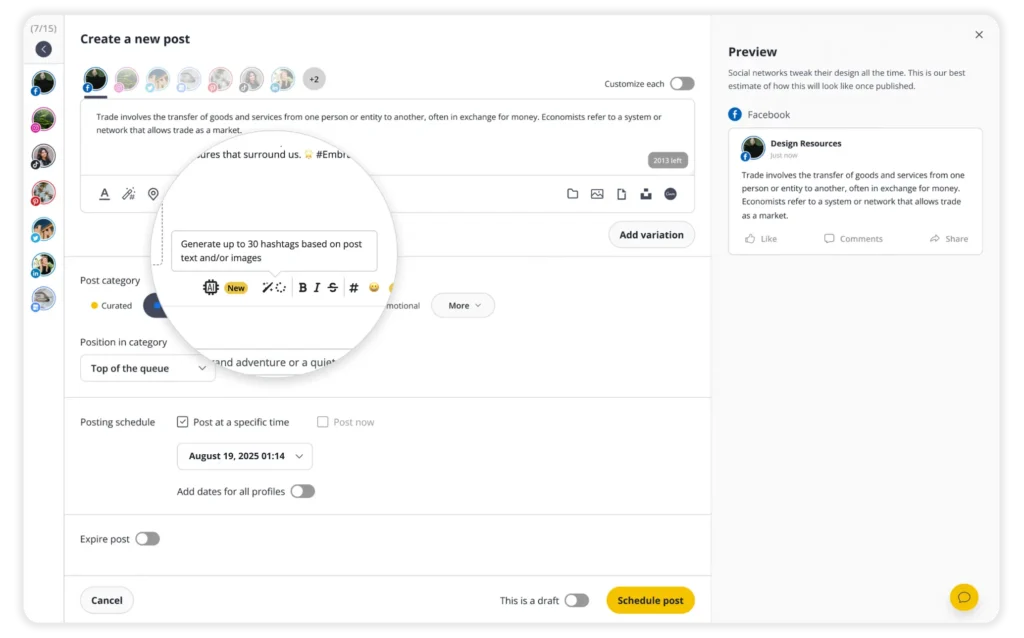
You can also use SocialBee to write and schedule posts, get feedback or approvals from your team, handle comments and messages, and check how your content performs, so you can manage your Facebook presence without jumping between different tools.
Does Facebook limit how many hashtags you can use?
Facebook doesn’t have a specific limit on how many hashtags you can use in a post, and there’s no official recommended number for getting more reach or engagement.
So instead of trying to hit the “right” number, focus on whether each hashtag actually fits the post. For example, a local bakery sharing a Reel about a new sourdough loaf could use hashtags related to sourdough, baking, or its location rather than adding broad hashtags just to make the list longer.
If two hashtags describe your post well, there’s no need to add another eight. Keep your hashtags relevant and focus the rest of your caption on giving people a reason to stop, read, watch, or respond.
Do Facebook hashtags still work in 2026?
Yes, Facebook hashtags still work, but they’re only one way people can find your posts. Hashtags make topics and phrases clickable, so people can use them to find other posts about the same subject.
That doesn’t mean adding hashtags will automatically increase your reach. Facebook also looks at many other signals when deciding what content to show people, including how they interact with posts and the types of content they usually engage with.
Use hashtags to help describe what your post is about, but put more effort into creating something people actually want to watch, read, share, or respond to. Our guide to the Facebook algorithm explains the factors that can affect what people see in their feeds.
How many Facebook hashtags should you actually use?
There’s no ideal number of Facebook hashtags that works for every post. Instead of aiming for a specific number, add only the hashtags that clearly describe what you’re posting about.
Depending on the post, that could include:
- A topic hashtag that describes the main subject, such as #EmailMarketing for a post about email marketing tips.
- A niche hashtag that makes the topic more specific, such as #LocalBakery instead of the broader #SmallBusiness.
- A location hashtag when where you’re posting from matters, such as #ChicagoFood for a local restaurant.
- A branded hashtag when you want to group posts from a specific campaign together.
How to reuse Facebook hashtags without retyping them
Finding hashtags for one Facebook post doesn’t take long. Doing it every time you publish does. If you regularly use similar hashtags for certain topics, products, locations, or campaigns, saving them in groups can save you from searching for and typing the same ones again.
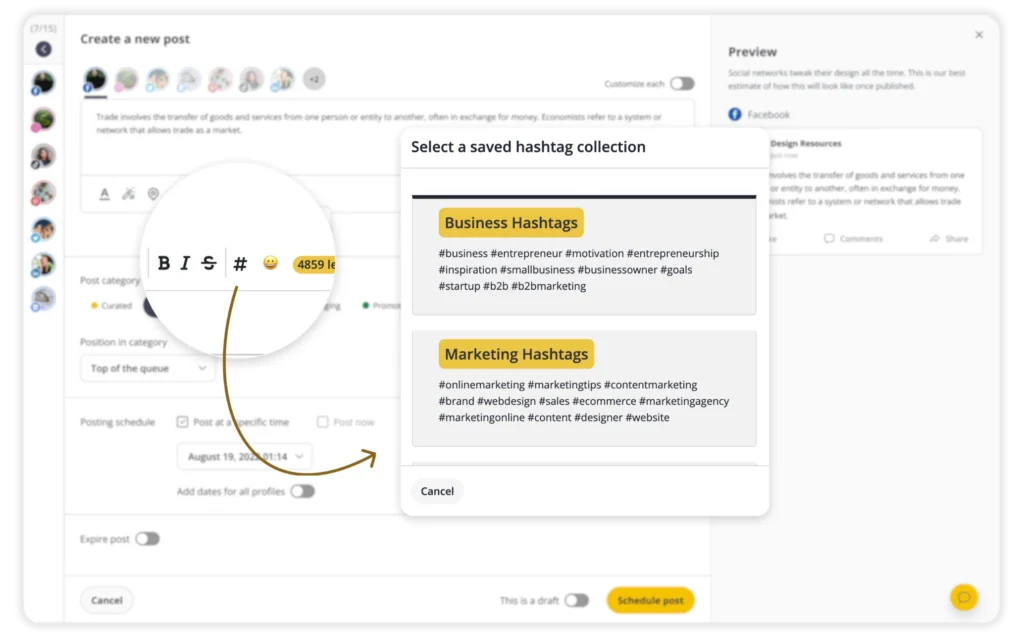
SocialBee can suggest relevant hashtags based on the caption and image you’re working with. You can save hashtags you use regularly as a Hashtag Collection and quickly add them to future posts. For example, a restaurant could keep separate collections for local posts, menu updates, events, and seasonal campaigns.

Frequently asked questions about trending Facebook hashtags
How many hashtags should you use on Facebook in 2026?
Aim for 1–3 relevant hashtags per post. Facebook doesn’t have an official recommended number, but keeping the list short makes it easier to choose hashtags that closely match your post instead of adding broad or unrelated ones.
Do hashtags in the caption work better than hashtags in comments?
They do. Facebook actually indexes what’s in the caption. A tag stuck in a comment barely registers, so it’s not doing much for you there.
Are trending hashtags actually worth using?
Depends on the post. If the content genuinely fits the moment, sure. But don’t use a popular hashtag just because it’s popular. It should still make sense for what you’re posting.
Do hashtags increase reach on Facebook?
Not really. What they do is help a post get sorted for search or the Reels tab. Actual reach comes down to engagement, not tags.
Can you track how a hashtag is performing on Facebook?
Kind of, through Meta Business Suite, but it’s limited. Facebook never built out real hashtag analytics, so most brands end up reaching for a third-party tool if they want anything beyond a manual search.
What should replace over-tagging as a strategy?
A caption written the way someone would actually search for it, paired with one to five hashtags that describe the post to someone who’s never seen the Page before.
Getting Your Facebook Hashtags Right
A trending list worth trusting stays short on purpose. The big, generic tags trend because everyone’s already using them, and that’s exactly why they won’t carry a smaller post anywhere.
With no cap to work around, hashtag strategy on Facebook comes down to restraint rather than selection. Pick one to five that describe a post honestly, then put the rest of the effort into the caption and the line people actually read first.
If you regularly use similar hashtags, SocialBee lets you save them in Hashtag Collections and add them to future posts without typing them again. You can also create, schedule, and track your Facebook content from the same place.
Start your 14-day SocialBee trial and make your Facebook posting process easier from planning to publishing.