


LinkedIn SEO helps you make your profile and content easier to find when potential clients, recruiters, or industry professionals search for expertise like yours.
Think about someone searching for a “B2B content strategist” on LinkedIn. If your headline simply says “Marketing Professional,” they might overlook your profile. But if your headline, About section, and experience clearly describe your specialization, it’s easier for them to recognize that you’re the person they’re looking for.
And LinkedIn SEO goes beyond your profile. The topics you post about, the keywords you use, and the conversations you participate in can help relevant audiences discover your content. Your public profile and articles may also appear in Google search results, giving you another opportunity to reach people outside LinkedIn.
In this guide, we’ll show you how to optimize your LinkedIn profile for search, create content that reaches the right audience, and track whether your efforts are improving your visibility.

Why do we keep on posting on personal LinkedIn profiles?
People use LinkedIn to connect with other people, not just companies. That’s why posting from your personal profile can be such a valuable part of your social media strategy.
Think about it. A company page might announce a new product, but a founder can share the story behind it, the challenges the team faced, and what they learned along the way. Both posts have a purpose, but the personal story gives people something to relate to and talk about.
The same goes for sharing industry insights, lessons from your work, or your perspective on a trending topic. Over time, these posts help people understand what you know, what you care about, and why they might want to work with you.
So it comes as no surprise that CEOs who post frequently see an average 39% increase in followers.
And you don’t have to be a CEO or an industry expert to make this work. Whether you’re a freelancer, marketer, or small business owner, sharing useful content and joining relevant conversations can help you build connections and reach people who wouldn’t otherwise come across your profile.
The goal is to become someone people recognize for a particular area of expertise.
What is LinkedIn search engine optimization (SEO)?
LinkedIn SEO is the process of making your profile and content easier to find when people search for professionals, skills, services, or topics on LinkedIn.

For example, if you’re a social media manager who works with small businesses, you want your profile to appear when someone searches for terms like “social media manager” or “social media marketing consultant.”
To improve your chances of being found, you can use relevant keywords in your headline, About section, work experience, and skills. You can also create LinkedIn posts and articles about the topics you want to be known for.
But LinkedIn SEO works a little differently from traditional website SEO. There are three ways people might discover you:
- LinkedIn search: Someone searches for a job title, skill, or service and finds your profile in the results.
- LinkedIn content: Someone discovers one of your posts or articles while browsing LinkedIn or searching for a topic.
- Google search: Someone searches for your name or professional expertise on Google and finds your public LinkedIn profile or content.
LinkedIn also personalizes its search results. Two people searching for the same term might see different profiles depending on factors such as their connections and search context.
That’s why LinkedIn SEO isn’t about adding as many keywords as possible, but about clearly describing what you do, using the terms your target audience recognizes, and giving people a reason to click when they find you.
Why does LinkedIn SEO matter?
Think about how you’d find someone to help with a problem at work. You might search LinkedIn for a financial advisor, a real estate agent, or a business consultant.
Now imagine you’re the person offering those services. Would someone searching for what you do be able to find your profile? And if they did, would they know you’re a good fit?
That’s why LinkedIn SEO matters. It helps you describe your work in a way that matches what potential clients, recruiters, and business partners are looking for.
Here’s what you can gain from optimizing your profile:
- Show up in more relevant searches. If you’re a financial advisor specializing in retirement planning, mentioning that specialty in your headline and About section gives LinkedIn more context about your work.
- Help people understand what you offer. Someone visiting your profile shouldn’t have to scroll through your entire work history to figure out what you do or who you help.
- Make it easier for people to reach out. Clear service descriptions, work examples, and recommendations can help potential clients decide whether you’re the right person to contact.
- Get discovered outside LinkedIn. Your public profile can also appear in Google search results, giving people another way to find you.
Profile credibility matters, too. According to LinkedIn’s September 2026 data, verified members received nearly 90% more profile views and 50% more post engagement than unverified members. While verification doesn’t guarantee better search rankings, these figures show how much visibility and engagement can differ between verified and unverified profiles.
For example, compare these two LinkedIn headlines:
Before: Financial Advisor | Helping People Reach Their Goals
After: Financial Advisor | Retirement Planning and Investment Guidance for Small Business Owners
The second headline tells people exactly what kind of financial advice the person offers and who they work with. It also uses terms that are more likely to match a relevant search.
Of course, getting found doesn’t automatically mean getting hired. Someone who lands on your profile still needs to see what you’ve worked on, what you’re good at, and how to get in touch.
The goal is to make it easy for people to find you and just as easy to decide whether they want to work with you.
What are the LinkedIn SEO ranking factors?
LinkedIn doesn’t share exactly how it ranks profiles in search results. But we know that it tries to match people with the professionals, skills, and services they’re searching for.
So, while there’s no guaranteed way to reach the top of LinkedIn search results, there are a few things you can improve.
1. Keywords and search relevance
When you do keyword research, think about what someone would type into LinkedIn to find a professional like you.
If you’re an accountant who helps small businesses with their taxes, someone might search for “small business accountant.” But they could also type something more specific, like “accountant who helps small businesses with tax planning.”
That’s because LinkedIn supports natural-language searches, so people don’t have to know your exact job title to find you.
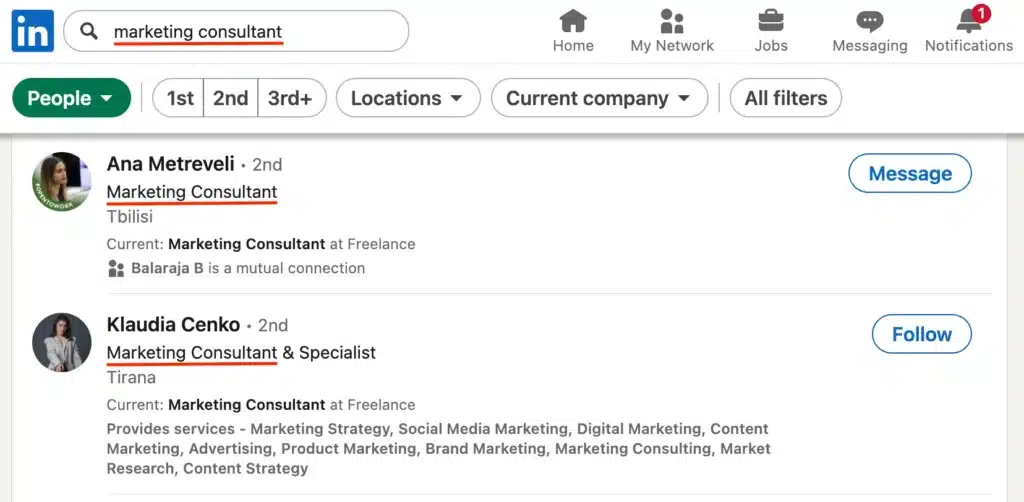
Make sure your headline, About section, and work experience clearly explain what you do, who you help, and what you’re good at.
And don’t try to fit every possible keyword variation into your profile. LinkedIn’s official search guidance warns that keyword stuffing can hurt your visibility.
Instead, describe your work naturally. Someone reading your profile should immediately understand what you offer, without feeling like they’re reading a list of search terms.
2. Profile completeness
Imagine finding a promising profile, only to discover that the person hasn’t explained what they do, where they’ve worked, or what services they offer.
You’d probably keep looking.
Fill out your headline, About section, experience, education, and skills. If you work with clients, add your services and feature examples of past projects.
Completing your profile doesn’t guarantee better search rankings, but it gives people more information to work with when deciding whether to contact you.
3. Your professional network
Who you’re connected to can also make a difference in LinkedIn search.
LinkedIn personalizes results, which means two people searching for the same thing might see different profiles. Their connections are one part of that picture.
For example, if a potential client shares several connections with you, your profile may be more relevant to their search than it would be to someone outside your network.
Focus on connecting with people you know, have worked with, or share professional interests with. There’s no need to send connection requests to everyone in your industry.
4. Skills and experience
Your job titles and skills are another way to show up in searches related to your work.
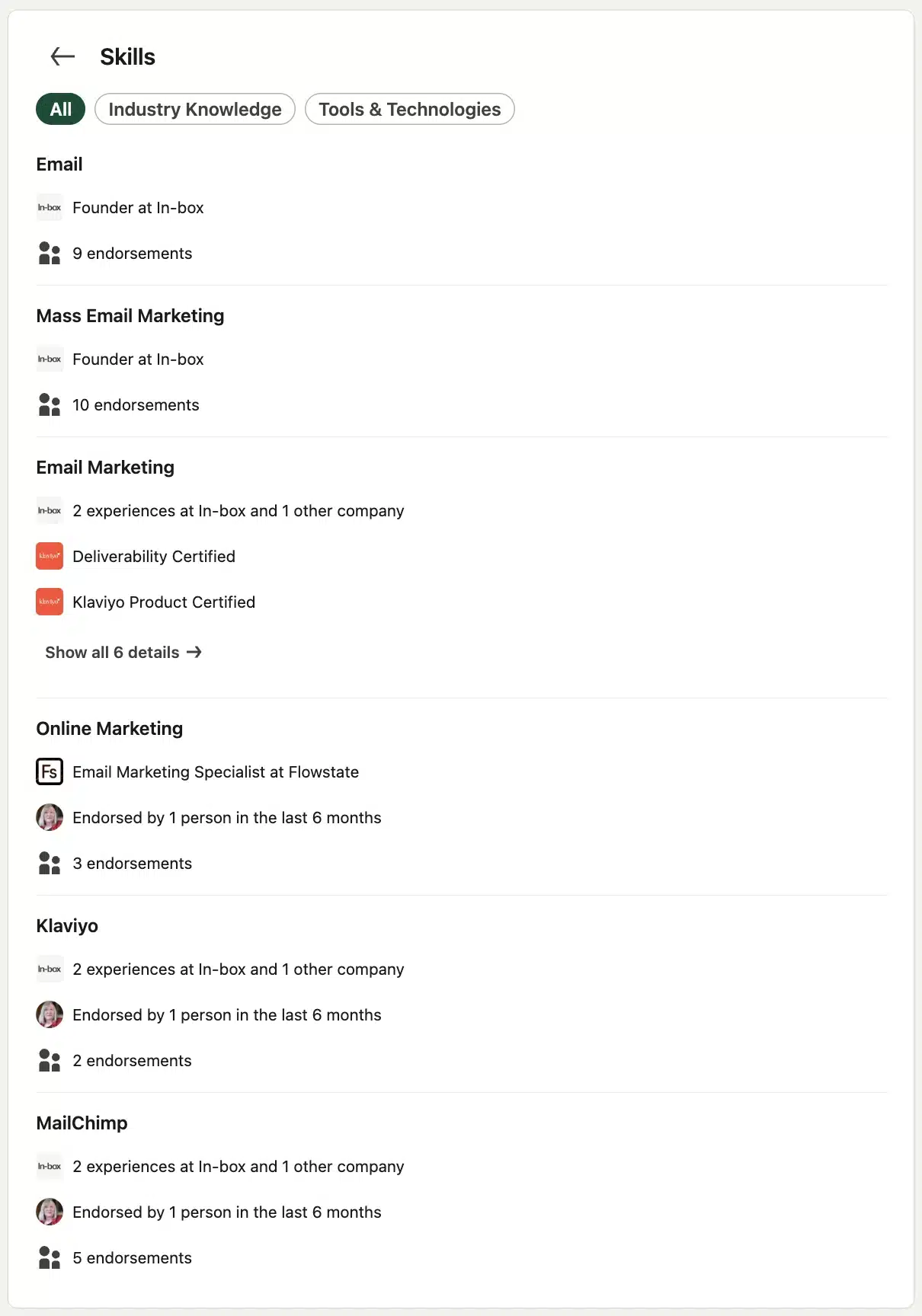
Let’s say you’re a project manager with experience using Scrum and Agile methods. Adding those skills to your profile helps describe your specialization.
Your Experience section should back that up. Rather than writing “Managed multiple projects,” explain what kinds of projects you managed, which methods you used, and what you achieved to match search intent.
And keep your job titles accurate. There’s no point attracting recruiters or clients with a title that doesn’t reflect your actual experience.
5. Content and engagement
Your posts and comments give people more chances to come across your name, even when they aren’t actively searching for your profile.
For example, an interior designer who shares practical advice about renovating small apartments might catch the attention of homeowners planning similar projects.
Someone might see one of those posts, visit the designer’s profile, and eventually ask about their services.
However, getting more views or comments on your posts doesn’t automatically mean your profile will rank higher in LinkedIn search. Posting and engaging can help people discover you, but they’re not a shortcut to better search rankings.
These principles matter beyond LinkedIn search, too. As AI-powered search becomes another way people discover professional expertise, the basics of SEO still have a role to play.
As Davang Shah, VP of Marketing at LinkedIn, explains:
“While the focus on AI search is new, the core principles of traditional SEO, like creating relevant content and using strategic keywords, are still essential for visibility across organic search and AI-search platforms.”
With that in mind, let’s look at how to put these principles into practice on your LinkedIn profile.
How to optimize your LinkedIn profile for SEO
Now that you know what can affect your visibility in LinkedIn search, let’s look at what you can actually change on your profile.
Here are my step-by-step LinkedIn SEO tips:
- Find and use relevant keywords
- Complete all LinkedIn profile sections
- Optimize your profile images
- Post relevant content
- Connect with the right people
- Engage with other accounts
- Get recommendations
- Keep an eye on analytics
1. Find and use relevant keywords
The first step is figuring out which terms people use to describe the work you do. Your official job title isn’t always the same as what a potential client or recruiter would search for.
For example, you might describe yourself as a fitness coach, while your potential clients are searching for a personal trainer who specializes in strength training.
Here’s how to build a list of relevant LinkedIn SEO keywords:
- Search for your job title or service on LinkedIn. Start with a broad term, such as “personal trainer,” and look at the suggested searches.
- Check profiles similar to yours. Look at how other professionals describe their specialties, services, and skills. Note recurring terms that also apply to your work.
- Read relevant job descriptions. These can help you identify the qualifications and skills employers associate with your role.
- Narrow down your list. Choose one main keyword that best describes your work, along with three to five related terms that reflect your specialties.
For example, a personal trainer might end up with:
- Main keyword: Personal trainer
- Related keywords: Strength training, fitness coaching, weight training
- Specialization: Strength training for women over 40
You can also use Google Keyword Planner or Semrush to find related terms and alternative wording. Just remember that their search volume estimates reflect Google searches, not LinkedIn searches.
Once you’ve chosen your keywords, keep the list handy. You’ll use it in the next step when updating the different sections of your profile.
2. Complete all LinkedIn profile sections
Once you’ve chosen your keywords, it’s time to put them to work.
Your LinkedIn profile should answer three questions within seconds: What do you do? Who do you help? And why should someone trust you?
You don’t need to turn every section into a sales pitch. Instead, use each one for a different purpose. Your headline introduces your expertise, your About section explains it, and your work history shows how you’ve put it into practice.
A. Headline
Your LinkedIn headline appears directly below your name and is one of the first things people see in LinkedIn search results, connection requests, and comments.
You have up to 220 characters, so there’s room to say more than just “Founder” or “Consultant.”
A useful headline combines your role, your specialty, and, when relevant, the people you work with.
For example:
Before: Financial Advisor | Helping People Reach Their Goals
After: Financial Advisor | Retirement Planning for Small Business Owners
The second version tells potential clients much more about the services offered without making the headline unnecessarily long.
Take Sophie Miller’s profile as another example. Her headline highlights her role at Pretty Little Marketer alongside her work as a speaker, strategist, and creator. Someone visiting her profile can quickly see the different areas she’s known for.
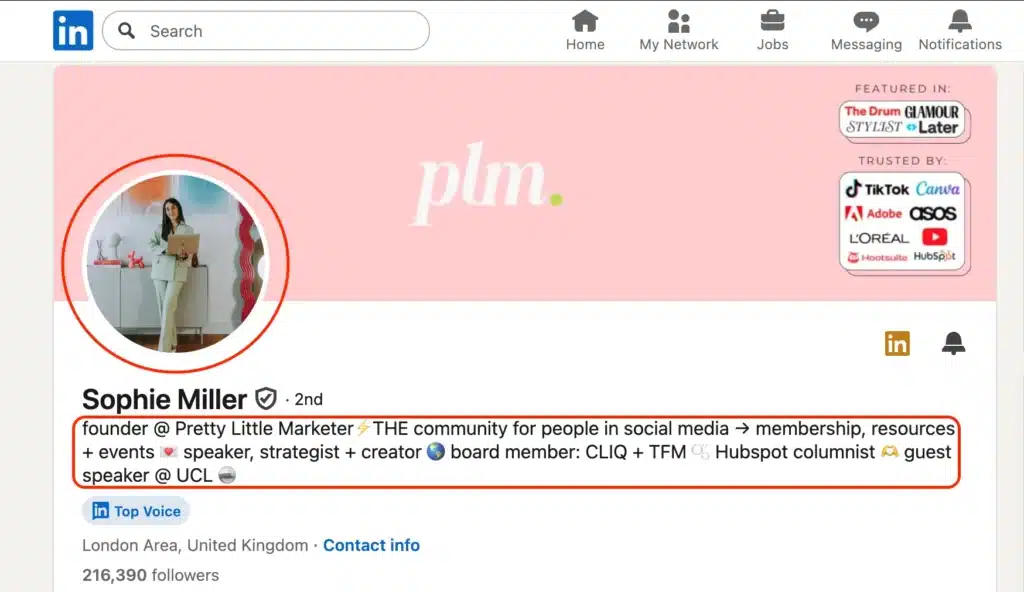
When updating your headline, put your main specialization near the beginning. People shouldn’t have to read the entire line to figure out what you do.
B. About
Your About section is where you can go beyond your job title and explain what working with you actually looks like.
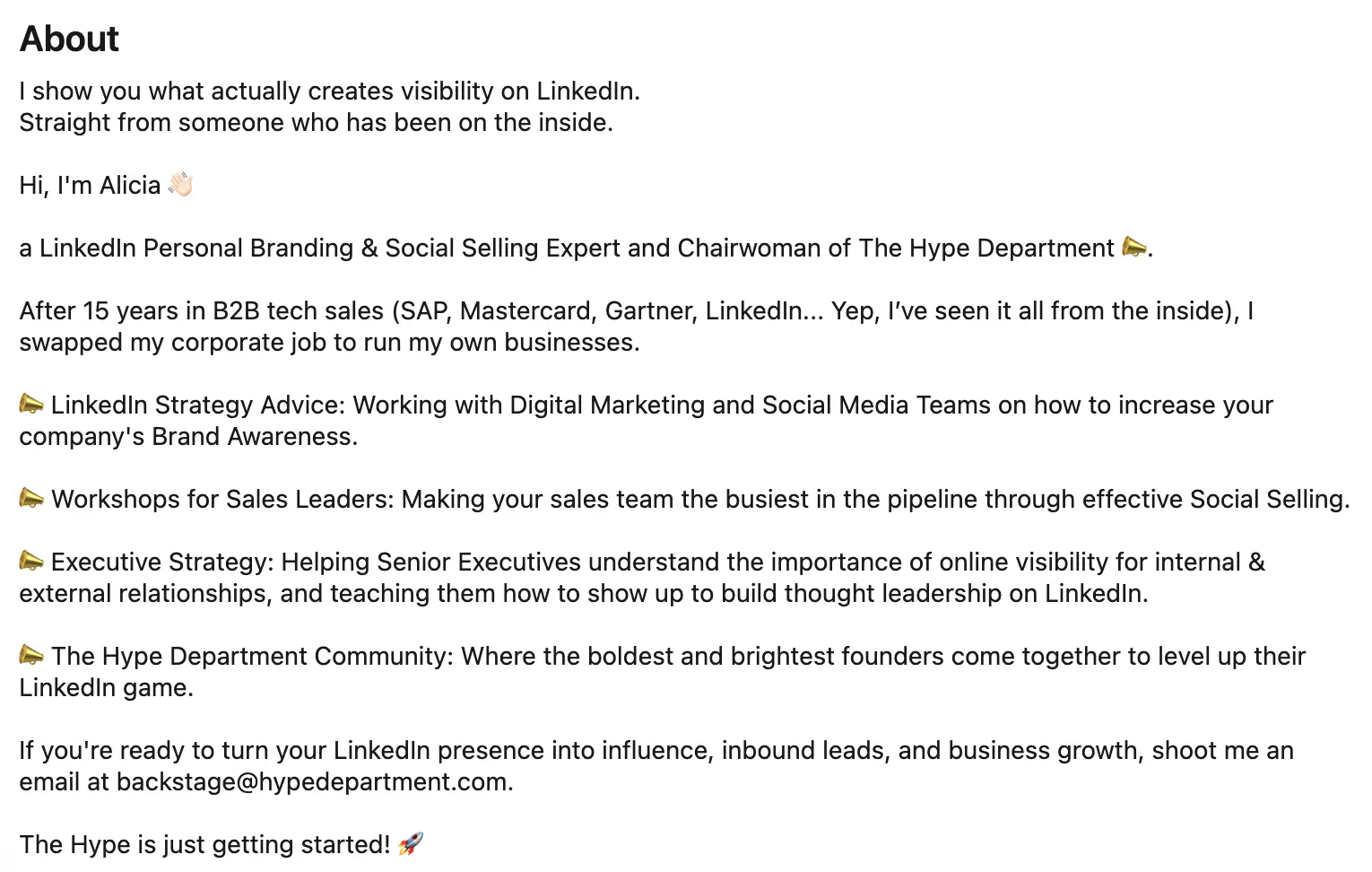
You have up to 2,600 characters, but that doesn’t mean you need to use every one of them.
A good About section covers three things:
- Who you help and what you do: Make this clear in the first few lines.
- Your experience and results: Mention relevant projects, achievements, or specialties that support what you’re saying.
- What someone should do next: Invite them to get in touch, visit your website, or explore your work.
For example, instead of opening with:
I’m a dedicated professional with a passion for helping businesses succeed.
Try:
I help independent restaurant owners manage their finances, from monthly bookkeeping to tax preparation and cash flow planning.
The second version gives visitors something useful immediately. They know who the person works with and which problems they can help solve.
From there, the accountant could mention their experience working with hospitality businesses, explain the services they provide, and finish with an invitation to book a consultation.
Keep paragraphs short so the section is easy to read, especially on mobile. And write the way you’d explain your work to a potential client, not the way you’d describe yourself in a formal résumé.
C. Website link
Your LinkedIn profile can do more than introduce you to potential clients or employers. It can also direct them to your website, portfolio, or booking page.
Choose a link based on what you want visitors to do next. For example, a photographer might link to their portfolio, while a consultant might send people directly to a page where they can book a discovery call.
There are two ways to add a website to your LinkedIn profile:
- Contact info: Add your website here so people viewing your contact details can find it.
- Custom button: Eligible LinkedIn Premium subscribers can display a more prominent link on their profile, with a call to action such as “Visit my website.”
Keep in mind that the custom button isn’t available to every LinkedIn user. Depending on your account and profile setup, it may also affect how your Services section appears.
Tip: Link to the page that’s most useful to someone discovering you for the first time. A specific portfolio or services page may be more helpful than sending everyone to your homepage.
D. Custom profile URL
LinkedIn automatically gives you a profile URL, but it isn’t always easy to remember or share.
For example, instead of:
linkedin.com/in/jane-smith-83729b4
You could use:
linkedin.com/in/janesmith
A custom LinkedIn URL looks cleaner on your résumé, email signature, business card, or website. It also makes it easier for someone to recognize your profile when you share the link.
To customize your URL:
- Open your LinkedIn profile.
- Click Edit Contact info and tap your URL.
- Find Edit your custom URL and click the pencil icon.
- Enter your preferred URL and save your changes.
Want people to find your LinkedIn profile on Google, too?
On the same Edit public profile & URL page, check your public profile visibility settings. These control whether your profile and certain details can be seen by people who aren’t signed in to LinkedIn.
If your public profile is hidden, it may not be available for Google and other search engines to index.
Keep in mind that changing these settings won’t update Google search results immediately. It can take weeks or even months for changes to appear, and Google ultimately decides which pages to index.
E. Featured
Your Featured section is where you can show people what you’re capable of instead of just telling them.
You can add LinkedIn posts, articles, links, and other media to highlight your best work. Think of it as a small portfolio that visitors can explore without leaving your profile.
Sophie uses her Featured section to direct visitors to her newsletter and membership community. It’s a good example of choosing content that gives people a clear next step after visiting your profile.

Tip: Don’t fill this section with everything you’ve ever published. Choose two or three items that are most relevant to the people you want to reach, and update them when your priorities change.
F. Services
If you offer freelance work, consulting, or other professional services, LinkedIn’s Services section gives potential clients a quick way to see what they can hire you for.
Start by selecting the available service categories that best match your work. Then use your description to explain what you specialize in.
For example, an accountant might select a relevant accounting or tax service category and explain:
I help independent restaurant owners with monthly bookkeeping, cash flow management, and tax preparation.
That’s much more useful than simply saying “I offer accounting services.”
You can also include details about the types of clients you work with, the problems you typically solve, and what someone can expect when they contact you.
Tip: Be specific about your services, but don’t promise things you don’t offer just to appear in more searches. The goal is to attract clients who are actually looking for your expertise.
G. Experience
Your Experience section shouldn’t read like a list of job titles. It’s your chance to show what you’ve actually worked on and what you achieved.
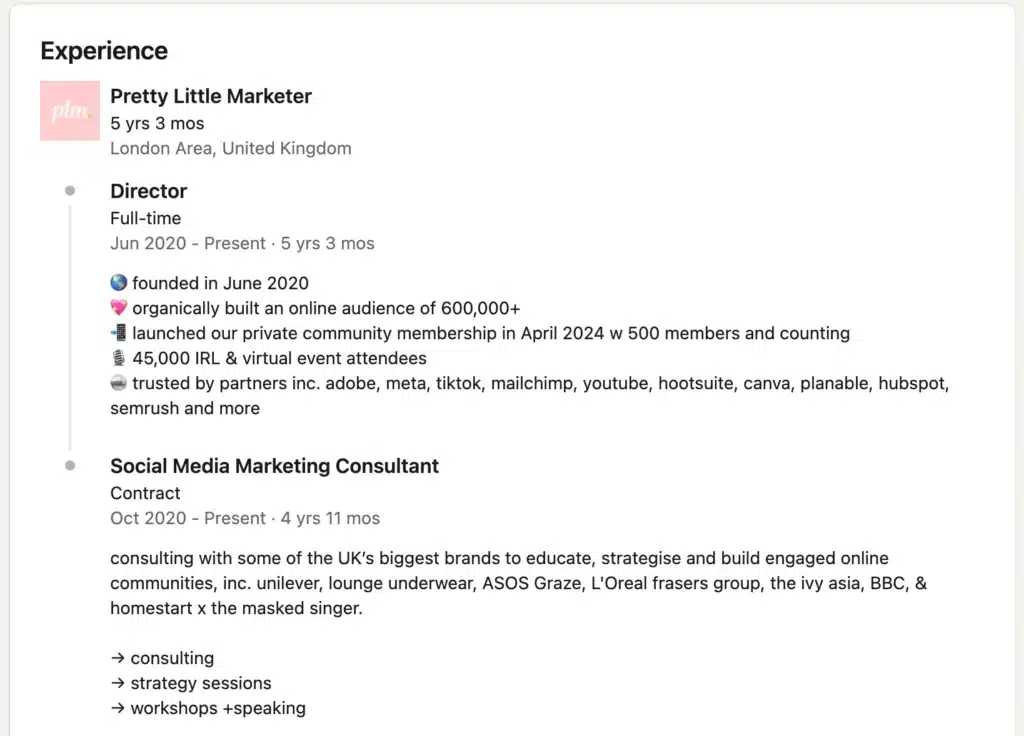
For each role, include a short description of your responsibilities, the skills you used, and the results of your work.
For example, instead of writing:
Managed daily operations and supervised employees.
Try:
Managed daily operations for a 40-room hotel, including staff scheduling, guest services, and inventory management. Supervised a team of 12 employees and introduced a new check-in process to reduce guest waiting times.
The second version tells recruiters and potential employers much more about the person’s experience. It also naturally includes terms related to hotel operations and team management.
When updating this section, focus on three things:
- Keep your job titles accurate. Don’t change your official title just to include a popular keyword.
- Describe your actual responsibilities. Mention the tools, methods, or areas of expertise that are relevant to your role.
- Include results when possible. Team sizes, project outcomes, and measurable improvements help people understand the scale of your work.
Give the most detail to roles that are relevant to the opportunities you’re looking for now.
H. Education
Add your schools, degrees, and relevant qualifications to your Education section.
This information can be particularly useful if you’re applying for jobs where a specific degree or educational background matters. Recruiters can also use education-related filters when searching for candidates.
If you’re early in your career, you can include relevant coursework, projects, or academic achievements. Otherwise, your school and degree information will usually be enough.
I. Licenses & certifications
Certifications can help show that you have the training or qualifications needed for a particular role.
For example, a project manager might include a PMP certification, while an accountant could list their CPA qualification.
Add the issuing organization, credential details, and expiration date where applicable. If LinkedIn allows you to link directly to the credential, include that too.
Focus on certifications that are relevant to your work rather than adding every course you’ve ever completed.
One more thing: Check your Skills section. Make sure it reflects the abilities you’ve developed through your work, education, and certifications. Prioritize the skills most relevant to your current specialization, and remove outdated ones that no longer represent what you do.
3. Optimize your profile images
Your profile photo and banner are two of the first things people notice when they visit your LinkedIn profile. Before they even read your experience, these images can give them an idea of who you are and what you do.
For your profile photo, choose a recent, high-quality picture where your face is clearly visible. You don’t need a professional photoshoot, but a few details can make a difference:
- Use a well-lit photo with a simple background.
- Make sure your face is easy to recognize, even when the photo appears as a small circle.
- Wear something you’d feel comfortable wearing to meet a client or colleague.
- Avoid heavily filtered photos, distracting backgrounds, or cropped group pictures.
Your banner image gives you more room to show what you do.
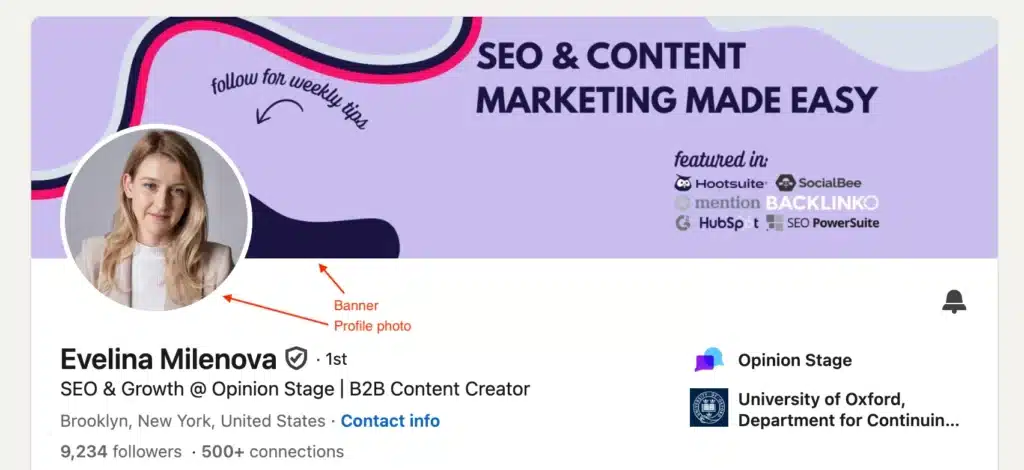
For example, a real estate agent could use a professional photo of the neighborhood they specialize in, while a fitness coach might show their training studio or a short description of their services.
You can also include your website or a simple call to action, as long as the design doesn’t feel crowded.
Here are the recommended LinkedIn image dimensions:
Image | Recommended size |
Profile photo | 400 × 400 px |
Background banner | 1584 × 396 px |
Tip: Check how your banner looks on both desktop and mobile. Your profile photo can cover part of the banner, and LinkedIn may crop the image differently depending on the screen size. Keep important text away from the edges and the area behind your profile photo.
4. Post relevant content
Optimizing your LinkedIn profile helps people find you through search. But your posts give you another way to reach people who haven’t heard of you yet.
And you don’t need to post every day or share something groundbreaking to make an impression. You can share a lesson from a recent project, answer a question you hear from clients, or explain something you’ve learned through your work.
LinkedIn’s April 2026 data shows that professionals are increasingly sharing their knowledge on the platform. Original posts increased by 14% year over year, while knowledge-oriented comments grew by 11%. This doesn’t mean posting more will automatically improve your reach, but it shows that sharing expertise and joining conversations remain important parts of how people use LinkedIn.
For example, a real estate agent could explain what first-time buyers should check before making an offer. A financial advisor might break down a common retirement planning mistake. Both are sharing knowledge that their potential clients can put to use.
The important thing is to make the topic clear from the beginning. A post that opens with “Three things to check before buying your first home” immediately tells readers what they’ll learn. A vague opening like “Here’s something I’ve been thinking about lately” makes them work harder to understand the point.
You can also use relevant keywords in your posts when they fit naturally. Just remember that getting more views in the feed doesn’t automatically improve your profile’s position in LinkedIn search results.
There are several LinkedIn post types to choose from:
- Text posts
- Single-image posts
- Carousels
- Native videos
- Newsletters
- Polls
Each format works a little differently, so let’s look at when to use them and how to make the most of each one.
A. Text posts
Text posts are a simple way to share your experience, start conversations, or explain something your audience wants to know. You don’t need visuals or complicated formatting, just a clear idea that’s worth sharing.
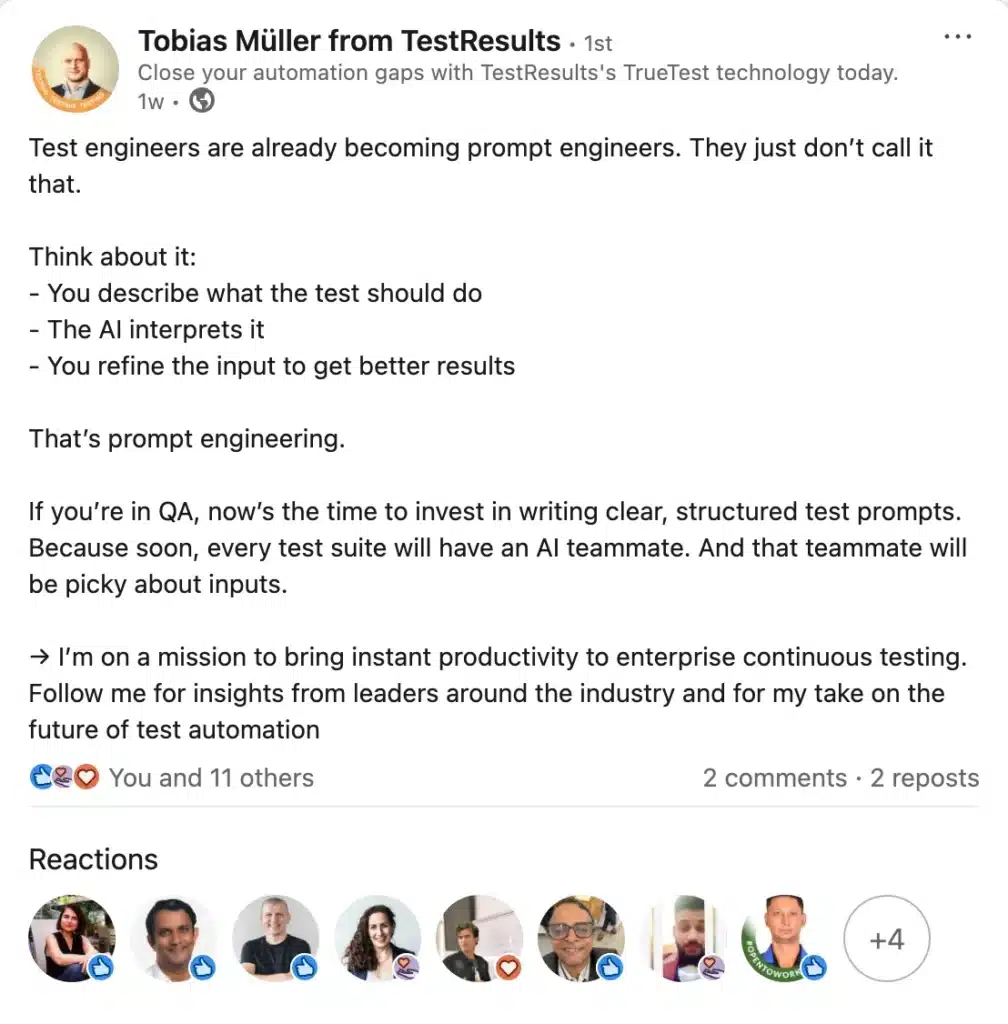
Take Tobias Müller’s post about AI and prompt engineering. He uses short paragraphs and a list to make his points easy to follow. He also ends by telling readers what kind of insights they can expect from him, giving interested people a reason to follow his profile.
When writing text posts, focus on making your message easy to understand:
- Get to the point early. Tell people what the post is about in the first few lines, before they need to click “see more.”
- Use specific language. Instead of “Here’s what I learned about buying property,” try “Three mistakes first-time homebuyers make when choosing a mortgage.”
- Make it easy to read. Break up long paragraphs and use lists when they help explain your point.
- Give readers something useful to take away. Share a practical tip, an example, or a lesson they can apply. You don’t need to end every post with a question.
For LinkedIn SEO, the biggest opportunity is to make the subject of your post clear. Relevant terms help describe what you’re discussing, while the examples and advice give people a reason to keep reading.
Tip: Before publishing, read your opening lines on their own. If someone can’t tell what the post is about without reading the rest, make the introduction more specific.
B. Single-image posts
A good image can explain something faster than a paragraph of text. It can also give people a reason to stop scrolling and look more closely at your post.
For example, you could share a before-and-after renovation photo, a chart showing changes in local property prices, or a screenshot of customer feedback.
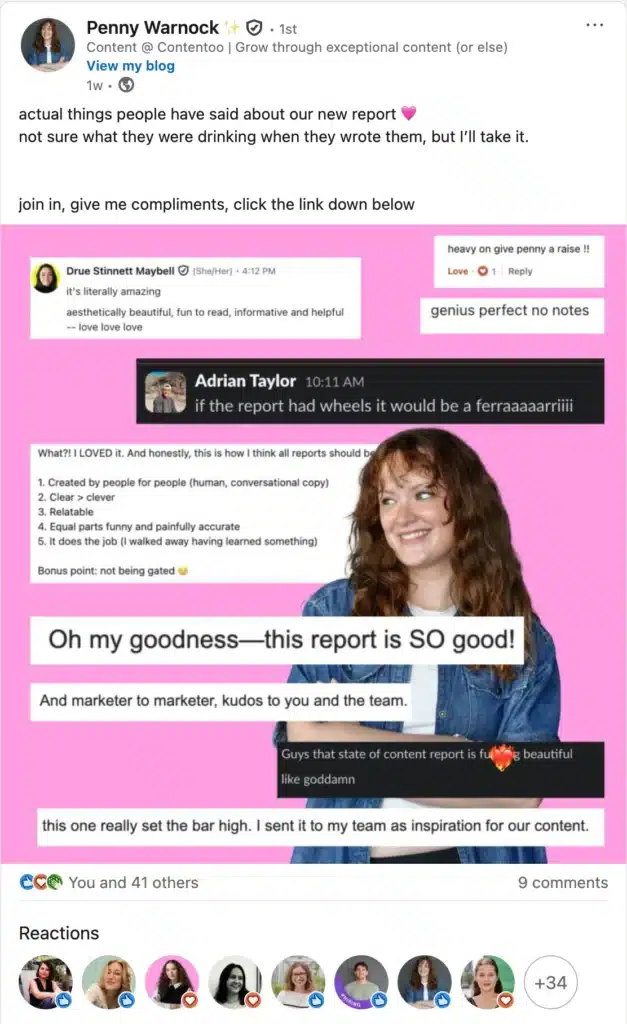
Penny Warnock’s post is a good example. She uses real quotes and reactions to her report rather than a generic graphic. The image gives readers a quick look at how people responded to her work, while the caption provides context.
When sharing an image, make sure it adds something to the post rather than simply repeating the caption.
You can also add descriptive alt text so people using screen readers can understand what’s shown. For a chart, for instance, describe the main finding instead of writing something generic like “bar chart.”
Tip: Don’t rely on the image to explain everything. Use your caption to introduce the topic and explain why the visual matters. That way, readers can understand your point even if they don’t open the image.
C. Carousels
LinkedIn carousels are useful when you have more to explain than a single post can comfortably cover. They’re particularly good for step-by-step guides, checklists, and topics that benefit from examples.
These are typically PDF document posts that readers can click through one page at a time.
For example, the “7 Tips to Win at Local SEO” carousel breaks a larger topic into seven manageable pieces. The first slide introduces the subject, the following slides explain each tip, and the final slide gives readers a next step.
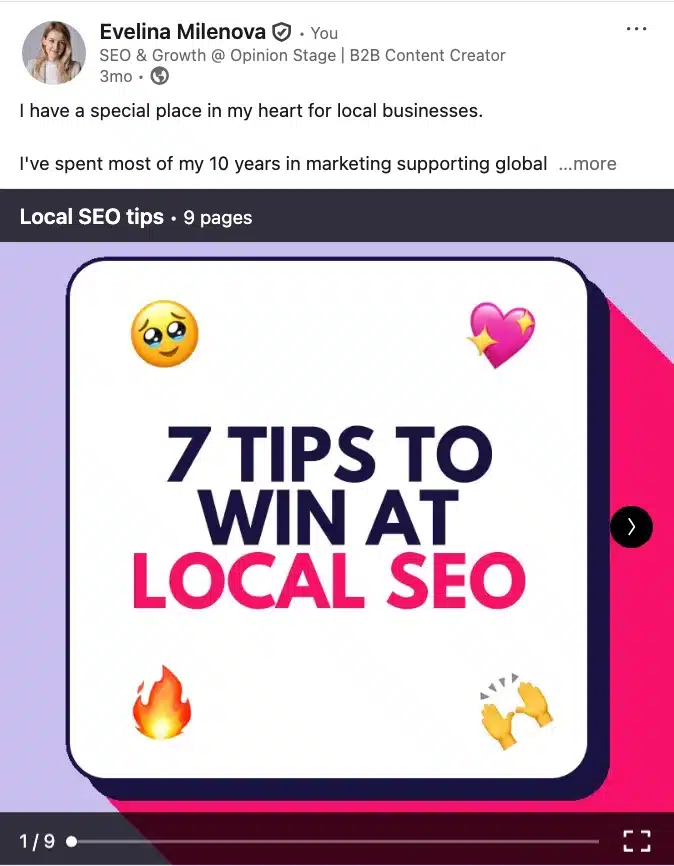
That’s what makes a carousel useful: people can work through the information at their own pace without facing a wall of text.
When creating LinkedIn carousels:
- Give the document a clear title. “First-Time Homebuyer Checklist” tells readers more than “Things You Should Know.”
- Make each slide useful on its own. Focus on one idea at a time, with enough context for someone to understand it.
- Keep the text readable on mobile. Avoid squeezing entire paragraphs onto a single slide.
- Explain the topic in your caption. Include a short introduction that tells people what they’ll learn from the document.
A carousel isn’t automatically going to rank higher because of its format. Its value comes from making detailed information easier to follow and share.
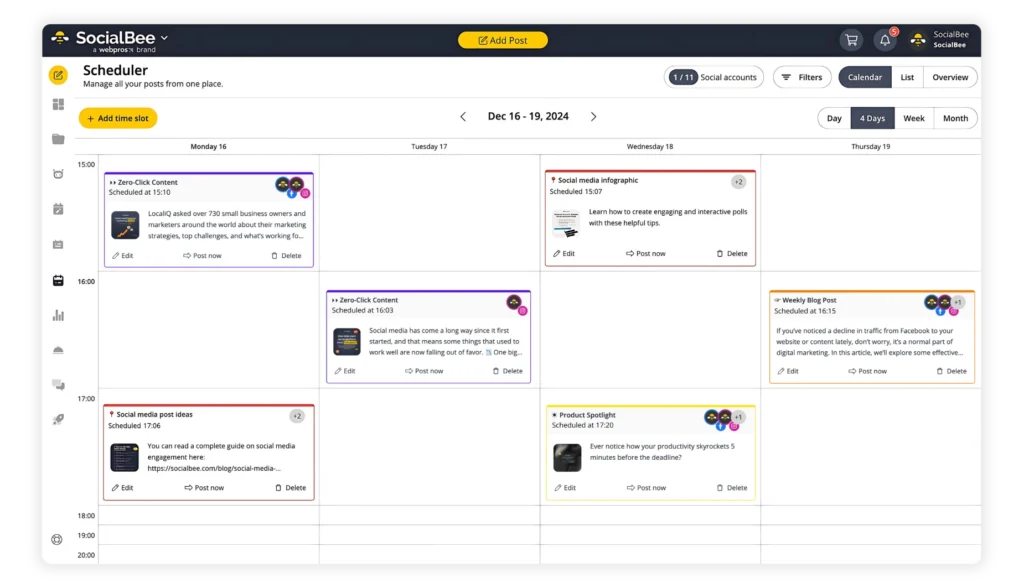
If you publish LinkedIn carousels regularly, SocialBee lets you schedule document posts in advance alongside your other LinkedIn content, so you don’t have to upload each one manually.
D. Native videos
Videos are a good choice when showing something is easier than explaining it in writing.
A fitness instructor could demonstrate a common exercise mistake, for example, while a real estate agent could walk viewers through the features of a property.
You can also take a useful moment from a longer webinar, interview, or presentation and turn it into a standalone video.
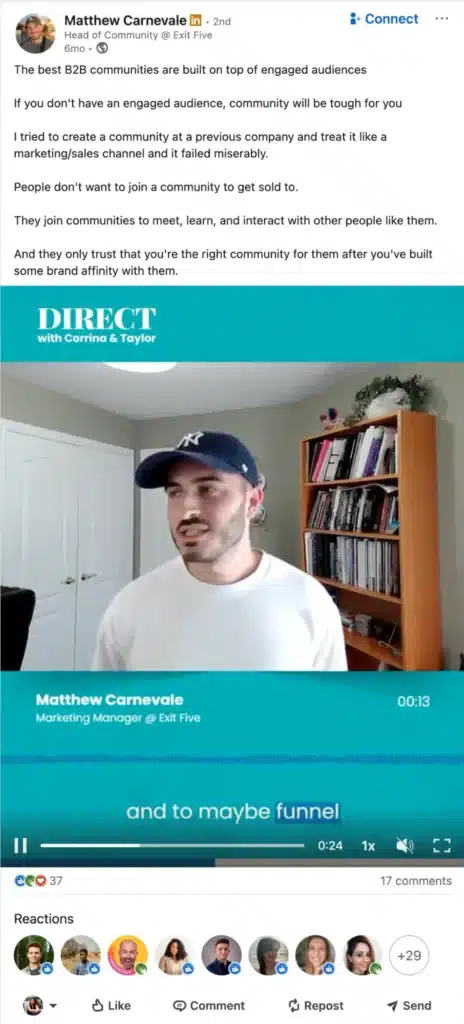
Matthew Carnevale does this with a clip about community building. Rather than sharing an entire webinar, he focuses on one discussion that viewers can understand without watching the full recording.
To make your videos easier to discover and follow, write captions that explain what viewers will learn.
For example:
Too vague: A few thoughts from today’s workshop.
More useful: Three ways to improve communication between remote team members.
The second caption gives people a reason to watch and makes the topic clear.
Add video captions or subtitles for accessibility, too. They help people follow along when they’re watching without sound.
The goal isn’t necessarily to make every video short. It’s to choose a topic you can explain well and remove anything that doesn’t help viewers understand it.
E. Newsletters
LinkedIn newsletters are useful when you have enough to say about a topic that people would benefit from hearing from you regularly.
Unlike regular posts, newsletters let people subscribe. When you publish a new edition, subscribers can receive a notification or email, giving them a reason to return to your work.
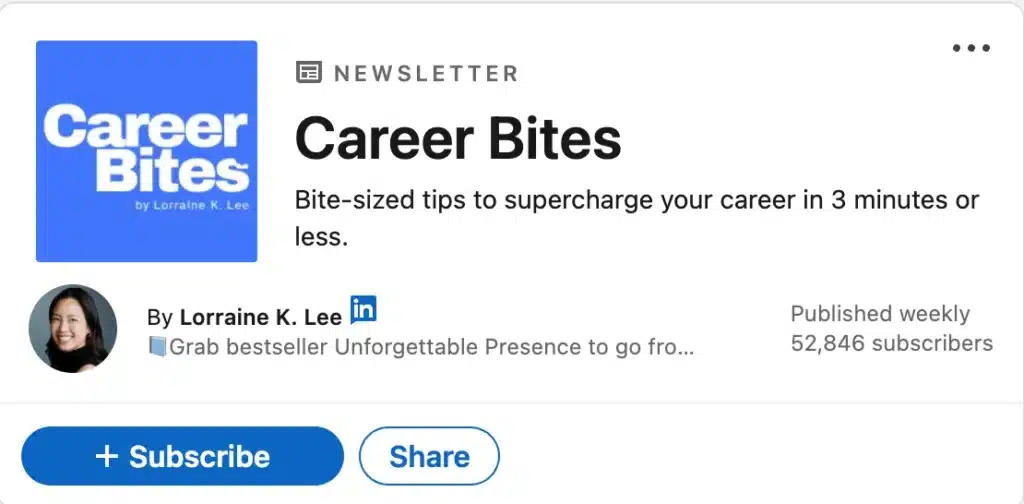
Take Lorraine K. Lee’s Career Bites newsletter. Its promise is simple: career advice people can read in three minutes or less. Readers know what they’re signing up for before they subscribe.
Newsletters also offer an SEO opportunity that regular LinkedIn posts don’t: you can customize how individual editions appear in Google search results.
Here’s how:
- Open the LinkedIn article editor and create a newsletter edition.
- Click Manage, then Settings.
- Add an SEO title that clearly describes the topic, ideally within 60 characters.
- Write an SEO description of around 140–160 characters, explaining what readers will learn.
- Review your article URL and publish when everything is ready.
For example, if you’re a financial advisor writing about retirement planning, an SEO title like “Retirement Planning Tips for Small Business Owners” is much clearer than “My Weekly Financial Update.”
Tip: You can also use these SEO settings for standalone LinkedIn articles. If a topic deserves a detailed explanation but doesn’t need a recurring newsletter, an article may be the better choice.
F. Polls
Polls are a quick way to find out what people think about a topic and get a conversation going.
The best ones ask questions your audience can answer easily but might have different opinions about.
For example, a restaurant owner could ask other hospitality professionals:
What’s the biggest challenge when hiring restaurant staff?
The answer options might include finding qualified candidates, retaining employees, managing labor costs, or training new hires.
The results could lead to a useful discussion in the comments, where people explain their experiences and share advice.
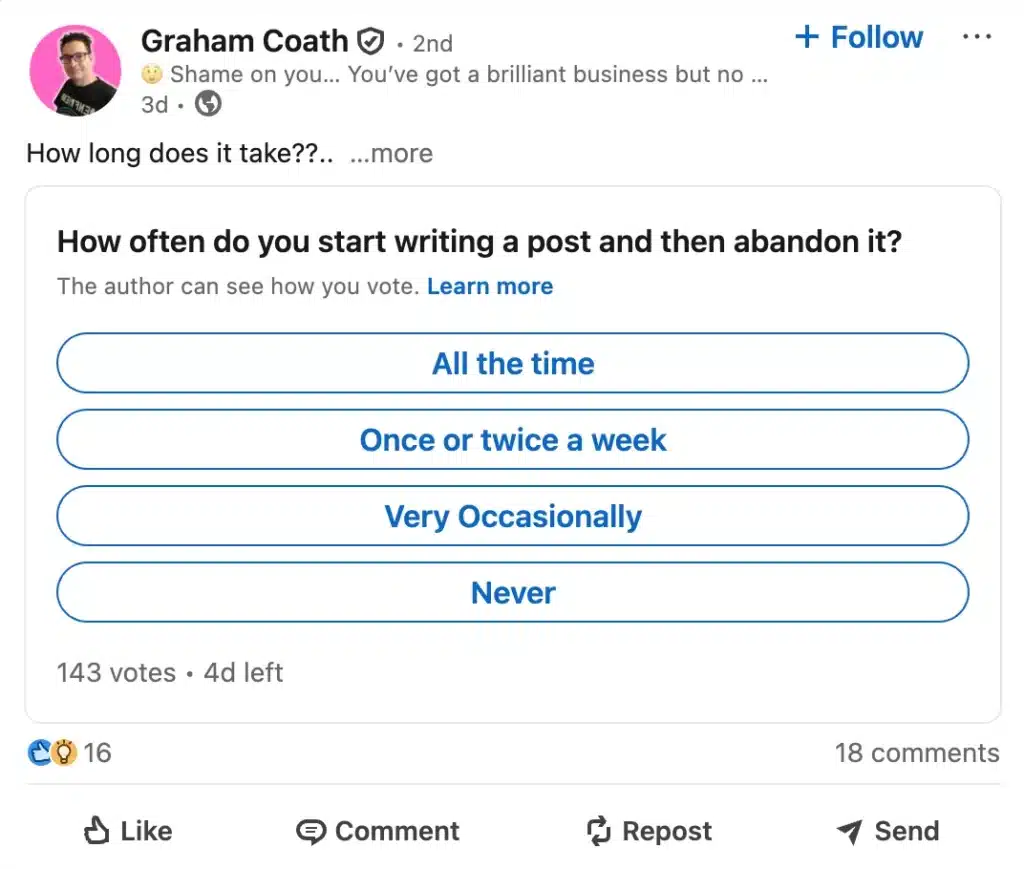
Graham Coath’s poll works in a similar way. It asks a relatable question with straightforward answers, making it easy for people to participate and add their perspective.
Tip: Don’t stop at collecting votes. Share what you learned from the results, especially if the responses challenge your assumptions or reveal a problem worth exploring.
5. Connect with the right people
Your LinkedIn network can influence who discovers your profile, so it makes sense to connect with people who are relevant to your work.
That doesn’t mean sending hundreds of connection requests to strangers. Think about the people you’d actually benefit from knowing: potential clients, former colleagues, industry experts, and professionals working in related fields.

For example, if you’re an interior designer specializing in commercial spaces, you could connect with architects, property developers, office managers, and business owners in your area.
These connections can introduce you to new opportunities, even when the people you connect with don’t need your services themselves.
Here’s how to build a more useful LinkedIn network:
- Start with people you already know. Connect with former colleagues, clients, classmates, and people you’ve met at professional events.
- Look for professionals in related industries. Think about who works with the same types of clients or faces similar challenges.
- Personalize connection requests when it makes sense. Mention a shared interest, recent conversation, or specific reason you’d like to connect.
- Keep the conversation natural. If someone accepts your request, don’t immediately send them a sales pitch. Get to know their work and look for opportunities to exchange ideas.
For example, a personalized connection request could look like this:
Hi Sarah, I enjoyed your recent post about sustainable office design. I work with businesses on commercial interiors, so I’d love to connect and follow your work.
You don’t have to interact with someone’s posts for days before sending a request. A genuine reason to connect is usually a better starting point than following a rigid outreach routine.
Note: If you use LinkedIn for lead generation, you know that not every connection will be relevant or ready to convert. To save time and optimize your outreach process, it’s smart to verify the leads you collect.
6. Engage with other accounts
You don’t have to publish your own posts to take part in useful conversations on LinkedIn.
Commenting on other people’s posts gives you a chance to share your experience, ask questions, and meet professionals who might not otherwise come across your profile. A good place to do this is in relevant LinkedIn groups.
The key is to contribute something meaningful instead of commenting just to get noticed.
For example, imagine an architect shares a post about the challenges of renovating older buildings.
A comment like “Great insights!” doesn’t add much.
But an interior designer could write:
We’ve run into similar issues when renovating older office spaces. One thing that’s helped is involving the lighting designer earlier in the planning process, before the electrical layout is finalized.
That comment adds something to the discussion and gives other readers a reason to pay attention.
To make your LinkedIn engagement more useful:
- Follow people who discuss topics relevant to your work. This makes it easier to find conversations where you have something to contribute.
- Share examples from your own experience. A practical observation is often more interesting than a generic compliment.
- Ask questions when you’re genuinely curious. You might learn something useful while getting to know other professionals.
- Reply when people comment on your posts. If someone takes the time to share an opinion or ask a question, keep the conversation going.
There’s no magic number of comments or likes you need to leave each day. Five thoughtful comments on relevant discussions can be more useful than dozens of generic reactions.
And don’t limit yourself to posts that are already popular. Smaller conversations can be just as valuable, especially when they’re closely related to your industry.
Tip: Set aside a little time during your week to catch up with people in your network. Focus on conversations you actually want to participate in, rather than treating engagement like another task to check off.
7. Get recommendations
A LinkedIn recommendation gives visitors another person’s perspective on what it’s like to work with you, much like a solid testimonial.
That can be particularly helpful when someone is considering hiring you but hasn’t met you yet.

For example, a recommendation for a wedding photographer might mention how they handled a last-minute schedule change, made guests feel comfortable, and delivered the photos on time.
Those details tell a potential client much more than a generic statement like “Great photographer, highly recommended.”
Recommendations aren’t a confirmed LinkedIn search ranking factor. Their main value is helping people feel more confident about your experience after they’ve found your profile.
You can request recommendations directly through LinkedIn:
- Open your profile and scroll to the Recommendations section.
- Click the + icon and select Ask for a recommendation.
- Choose the person you’d like to ask and indicate how you’ve worked together.
- Write a short, personalized request.
Here’s a message you can adapt:
Hi [Name],
I really enjoyed working with you on [Project Name]. Would you be comfortable writing a short LinkedIn recommendation about our experience working together?
If possible, it would be helpful to mention [specific project, skill, or result], since that’s an area I’m focusing on professionally.
Thanks so much for considering it!
Tip: Ask for recommendations while a successful project is still fresh in everyone’s mind. People are more likely to remember specific details, which makes their feedback more useful to future clients or employers.
8. Keep an eye on analytics
Once you’ve updated your profile and started putting more effort into LinkedIn, how can you tell whether it’s making a difference?
Start by checking your LinkedIn analytics. You don’t need to track every available number, but a few metrics can help you understand whether more people are finding your profile and showing interest in your work.
Here are the main metrics to watch:
Metric | What it tells you |
Search appearances | How often your profile appeared in LinkedIn search results during the reported period |
Profile views | How many people visited your profile |
Post impressions | How often your posts were displayed |
Post engagement | How people interacted with your content through reactions, comments, reposts, and other available actions |
Follower growth | Whether more people are choosing to follow your updates |
Inquiries and opportunities | Whether LinkedIn activity is leading to relevant messages, meetings, or business opportunities |
For LinkedIn SEO specifically, search appearances and profile views are particularly useful.
You can find Search Appearances in LinkedIn’s native analytics. Depending on the information available to your account, LinkedIn may also show details about the people finding you, such as their job titles or companies.
Keep in mind that search appearances don’t necessarily mean someone clicked your profile. That’s why it’s worth looking at profile views alongside them.
How to measure whether your LinkedIn SEO changes are working
Rather than checking your numbers every day, compare your results over a longer period.
For example:
- Record your starting point. Note your current search appearances, profile views, and any relevant inquiries.
- Update your profile. Make the changes covered in this guide, particularly to the sections that best explain your work.
- Check again after 30 days. Compare the available metrics with your starting point.
- Look at who’s finding you. Are you attracting people from the industries, companies, or roles you want to reach?
- Make adjustments based on what you find. If your profile is getting views but few relevant inquiries, review whether your services, work examples, and contact details give visitors enough information to take the next step.
A single month’s results won’t prove that one specific change caused an increase. However, tracking the same metrics over time can help you spot patterns.
For example, if you’re a business consultant and your search appearances increase, that’s encouraging. But if most of your profile visitors are students looking for career advice rather than business owners looking for consulting services, you may need to rethink how you’re presenting your expertise.