


















FREE Instagram hashtag generator

To use our free hashtag generator, enter a few words about your Instagram post and instantly receive hashtag suggestions matched to your content and audience.

Important: This tool may show inaccurate or offensive content that doesn’t reflect SocialBee’s views. You’re solely responsible for how you use it and for complying with laws and third-party rights.

Why use an Instagram hashtag generator?

An Instagram hashtag generator gives you relevant hashtags faster than searching manually. Hashtags help Instagram categorize your content and match it with people interested in that topic. Using a generator ensures the hashtags you choose are specific to your content, instead of relying on generic or overused hashtags.

How the Instagram hashtag generator works

Start by entering relevant keywords or short phrases that best describe your content. Our free tool will analyze your input and create hashtags that are commonly used with similar content.

The more specific you are, the better the results. For example, typing “easy vegan pasta dinner” is more useful than just “dinner recipe.” Instead of broad, generic hashtags, you’ll see options like #veganpasta or #easydinnerideas that are more relevant to your post and audience.

From there, choose a mix of hashtags that fit both your content and your goals. Broader tags can increase visibility, while niche hashtags connect you with people who are actively looking for that topic.

Whether you need hashtags for Instagram Reels or your regular feed posts, our AI hashtag generator tool helps you find better options faster.

How many hashtags should you use on Instagram?

When using hashtags on Instagram, focus on relevance instead of adding as many as possible.

Posts overloaded with hashtags can look spammy, while using too few limits discoverability. A good range is three to five hashtags per post.

This is enough to give Instagram context about your content without overwhelming your caption. Focus on choosing hashtags that are directly relevant to your post and your audience rather than aiming for (just) volume. 

From hashtags to full Instagram management

Hashtags help categorize your posts, but they’re only a small part of running a successful Instagram account. To grow consistently, you need a way to create content, publish it on time, respond to your audience, and measure performance.

With SocialBee, hashtags become part of a complete process that helps you stay consistent and improve results without juggling multiple tools.

SocialBee allows you to handle all your social media tasks from one platform:

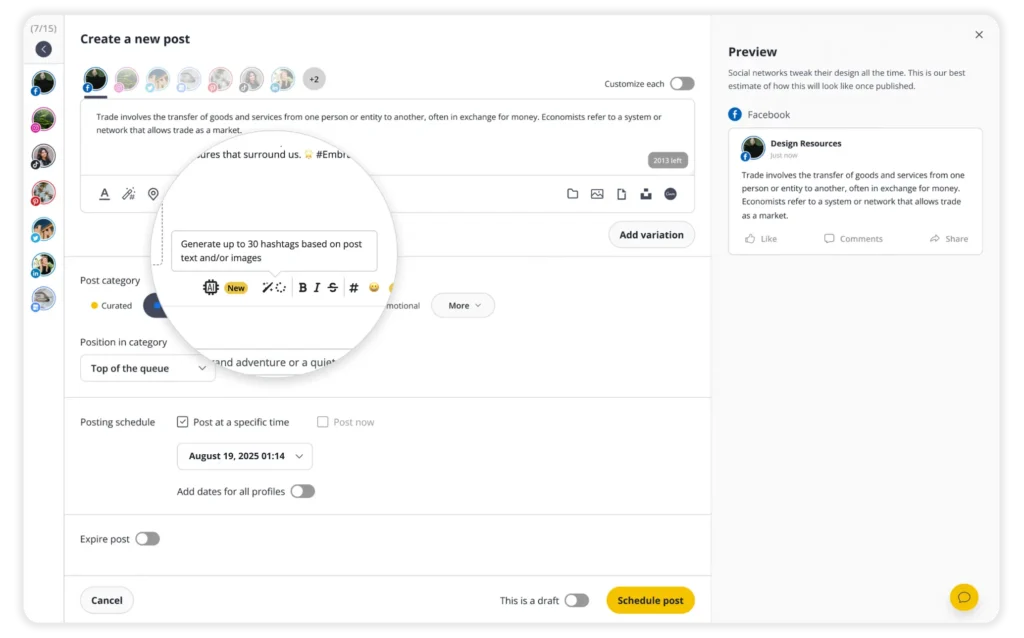
  • Generate hashtags with AI and save them into collections for future use.
  • Plan and schedule your Instagram feed content, Stories, Reels, collab posts, and carousels.
  • Manage comments, mentions, and messages from a single social inbox.
  • Collaborate with teammates or clients through shared workspaces and approval flows.
  • Use AI to write captions, design images, and generate Instagram hashtags. 
  • Track engagement, reach, and follower growth with built-in analytics.
  • Monitor the performance of your social media posts and share reports with your team and clients.

Start your 14-day free trial today and simplify the way you manage Instagram along multiple other social media platforms!

Tips to improve your hashtag marketing

Your hashtag strategy should be intentional. Here are proven ways to use them effectively on Instagram:

  • Match hashtags to the content, not just the topic. If your post is about “quick vegan lunch ideas,” use hashtags like #veganlunch or #quickmeals instead of broad ones like #food.
  • Research hashtag ideas before using them by checking the top posts to see what resonates in that community.
  • Pair hashtags with location tags for better chances of discovery.
  • Test seasonal, event, or trending hashtags for short bursts of extra engagement.
  • Add hashtags at the end of your caption for a clean look, or weave them into sentences if it feels natural (for example, “This #veganpasta is one of my favorite #quickmeals”).

Frequently asked questions

Can you use hashtags in Instagram Stories?

Yes, you can use hashtags in Instagram Stories. You can add them as normal text or use the hashtag sticker.

However, hashtags in Stories are usually less important for discovery than hashtags in posts or Reels because Stories mostly reach existing followers and disappear after 24 hours. They can add context to your Story, but they usually won’t bring in a lot of new viewers on their own.

How to do hashtag research on Instagram?

Start with a simple keyword related to your post. For example, if your content is about meal prep, search terms like meal prep, healthy lunch, or easy recipes in Instagram’s search bar. Then, check the hashtag results.

The best hashtags are the ones that clearly describe your content. For example, #MealPrepIdeas or #HealthyLunchIdeas is usually more useful than a general hashtag like #food because it tells Instagram and users exactly what your post is about.

You can also check similar creators or brands in your niche. Look at their posts and write down the hashtags they use again and again. This can help you find targeted hashtags that match your audience, topic, and content style.

To save time, use an Instagram tag generator for relevant hashtag suggestions, then clean up the list manually. Don’t just copy every tag it gives you. Pick the ones that actually fit your post, your niche, and the people you want to reach.

Can hashtags improve your Instagram performance?

Yes, but only when they are relevant. Hashtags can help Instagram understand your content and place it in front of people interested in that topic.

However, the best Instagram hashtags are not always the biggest or most popular ones. A mix of clear, specific, and targeted hashtags usually works better than only using broad popular hashtags like #love, #business, or #fitness.

Hashtags work best when the content itself is already strong. For example, a good hook, strong visuals, helpful information, and a clear topic will usually matter more than the hashtags alone.

Hashtags can support your post by improving context and discoverability, but they are not a shortcut to better performance on their own.

What is the difference between a hashtag generator and a hashtag finder?

A hashtag generator creates hashtag ideas based on the words, caption, or topic you enter. 

A hashtag finder is usually more focused on helping you discover and compare existing hashtags. You might use it to check hashtag ideas, find related tags, or see which hashtags are more relevant to your niche.

In practice, the two tools often overlap. The best hashtag generator works like a hashtag finder too: it gives you relevant suggestions, helps you avoid random broad tags, and makes it easier to choose hashtags that actually match your Instagram post.

Manage your social media with SocialBee: publishing, AI assistance, Canva magic, analytics, unified inbox, and more.
SocialBee supported social channel logos
14-day free trial, no credit card required

Here's what our customers have to say about us

Jobs in football
cosmopolitan logo
harper's bazaar logo
Expatica
Washington university
Lehigh university
Slow cooker club
elle logo
mark cuban companies
esquire logo
Beaufort hotel
Dublin Bus
Charles university
D-Link gray logo
Compass logo

Improve your social media content strategy

SocialBee helps you plan posts in advance, engage with your audience, collaborate seamlessly with your team, and track performance with ease.

14-day free trial, no credit card required

Level up your social media marketing with exclusive resources delivered straight to your inbox

We’re SocialBee LABS SRL, part of WebPros. We use the information you provide to share relevant content and product updates, as outlined in our Privacy Policy. You can opt out anytime.

Fill in the form and get our calendar delivered to your inbox

We’re SocialBee LABS SRL, part of WebPros. We use the information you provide to share relevant content and product updates, as outlined in our Privacy Policy. You can opt out anytime.
Grab our 2026 social media calendar and unlock 500+ content ideas and ready-to-use Canva templates!