


















Free Instagram collage maker

Combine multiple photos into one clean Instagram-ready collage. Choose a layout, add your images, and download instantly.

How to use our Instagram collage maker

Choose a layout, add your images from your camera roll, and download instantly with our easy-to-use photo editor.

Design clean Instagram collages for travel photos, product shots, mood boards, or photo dumps with just a few clicks.

Here’s how to create and download your collage:

  1. Select a template from the dropdown menu.
  2. Choose the Instagram aspect ratio you need.
  3. Pick a layout based on the number of photos.
  4. Upload your PNG, JPG, or WEBP images into each slot.
  5. Adjust the border color and width.
  6. Download your finished collage as a PNG, JPG, or WEBP file.

Whether you want simple grid collages, bold creative designs, or clean branded visuals, the editor makes it easy to build content with strong visual appeal. 

Schedule Instagram collages with SocialBee

Creating a photo collage is only part of the process. Once your design is ready, you still need to write captions, publish at the right time, and reply to comments and messages after the post goes live.

That’s where SocialBee can help.

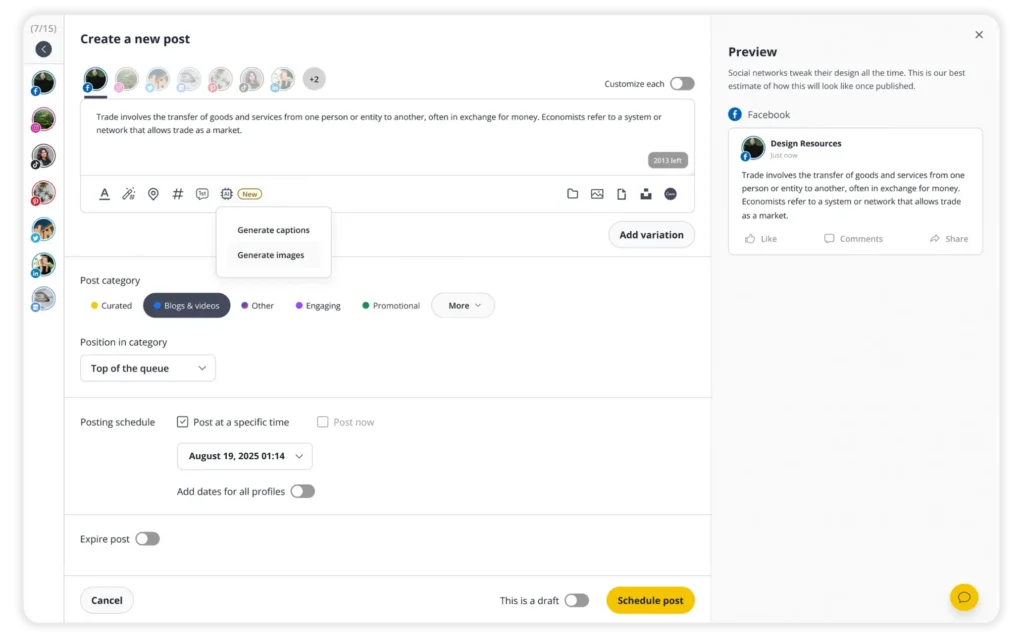
SocialBee lets you schedule Instagram posts while also helping you manage comments, mentions, and DMs from one place. You can leave notes for team members, approve posts before publishing, and track how your content performs with analytics and reports.

The platform also includes tools that make Instagram publishing faster and easier, such as:

  • Create stunning photo collages with Canva and import them directly into SocialBee.
  • Schedule Instagram feed content, carousel posts, Stories, and Reels.
  • Add up to five collaborators to a post.
  • Generate captions with AI.
  • Get hashtag suggestions based on your content.
  • Schedule a first comment automatically.
  • Add Instagram locations and profile mentions.
  • Organize posts into categories.
  • Get posting time suggestions based on past Instagram performance.

Start your 14-day free SocialBee trial and see how it fits into your process. No upfront payment and no credit card required.

Instagram collage Ideas for brands

Instagram collages are one of the easiest ways to combine multiple photos into one image that feels more engaging.

Brands often use them to showcase products, highlight campaigns, share customer content, and create more visually dynamic designs for Instagram Stories and feed posts.

1. Product launches and collections

Collages are perfect for showcasing multiple products in one post. Fashion, beauty, and ecommerce brands often use simple grid collages to present new collections, product variations, or bundle offers in a cleaner and more visually balanced way.

2. Customer reviews and testimonials

Instead of sharing one review at a time, many brands combine customer photos and testimonials into a single collage. This helps create stronger social proof while keeping the content more engaging for mobile viewers.

3. User-generated content

Customer photos naturally work well in collage format. Grouping several tagged posts together can make the content feel more dynamic while also encouraging more people to share and tag your brand.

4. Tutorials and educational posts

Collages also work well for step-by-step content. Brands often use them to explain product features, share quick tutorials, compare results, or break down a process into easy-to-follow visuals.

5. Event recaps and behind-the-scenes content

Events, launches, office moments, and team photos are usually more interesting when combined into a single recap collage. Mixing close-up shots with wider images can make the post feel more natural and less repetitive.

6. Seasonal campaigns and promotions

Holiday campaigns and seasonal promotions often include multiple visuals, products, and graphics. A collage helps organize everything into one cohesive post without making the design feel too crowded.

7. Portfolio and project showcases

Creators, agencies, and service-based businesses often use collages to showcase multiple projects at once. Consistent layouts and spacing can make the work look more polished and easier to browse.

Frequently asked questions

How do I create a collage for Instagram?

You can create collages using Instagram’s built-in Layout feature, a design app like Canva, or a dedicated photo editor and collage maker.

Many users also create an Instagram Story collage by combining photos, photo stickers, and custom layouts directly inside Instagram stories.

What is the difference between a photo grid and a collage?

A photo grid uses a structured layout where images are arranged evenly in rows or columns. A collage is more flexible and creative, allowing overlapping photos, varied image sizes, custom instagram layouts, and more dynamic designs.

How many photos can you put in an Instagram collage?

The number depends on the tool you use. Instagram’s native Layout feature typically supports up to 6 photos in a single collage, while third-party apps can support dozens of images in one design.

Manage your social media with SocialBee: publishing, AI assistance, Canva magic, analytics, unified inbox, and more.
SocialBee supported social channel logos
14-day free trial, no credit card required

Here's what our customers have to say about us

Jobs in football
cosmopolitan logo
harper's bazaar logo
Expatica
Washington university
Lehigh university
Slow cooker club
elle logo
mark cuban companies
esquire logo
Beaufort hotel
Dublin Bus
Charles university
D-Link gray logo
Compass logo

Improve your social media content strategy

SocialBee helps you plan posts in advance, engage with your audience, collaborate seamlessly with your team, and track performance with ease.

14-day free trial, no credit card required

Level up your social media marketing with exclusive resources delivered straight to your inbox

We’re SocialBee LABS SRL, part of WebPros. We use the information you provide to share relevant content and product updates, as outlined in our Privacy Policy. You can opt out anytime.

Fill in the form and get our calendar delivered to your inbox

We’re SocialBee LABS SRL, part of WebPros. We use the information you provide to share relevant content and product updates, as outlined in our Privacy Policy. You can opt out anytime.
Grab our 2026 social media calendar and unlock 500+ content ideas and ready-to-use Canva templates!