Person creating an Instagram post on a phone beside hashtag symbols and a megaphone icon.

Trending Instagram hashtags (September 2026)

Wondering which Instagram hashtags are worth using this September? Broad hashtags like #love and #instagood remain among Instagram’s most widely used hashtags, while seasonal topics give you more timely options to work with.

But with Instagram now limiting posts and Reels to five hashtags, you have to be more selective. Instead of chasing the biggest tags, focus on five that actually describe your content and are relevant to the audience you want to reach.

SocialBee logo featuring a stylized yellow bee icon on a dark hexagonal background.
SocialBee – Social media management tool
Social media management tool
Get your free Instagram strategy template!
We’re SocialBee LABS SRL, part of WebPros. We use the information you provide to share relevant content & updates, as outlined in our Privacy Policy. You can opt out anytime.
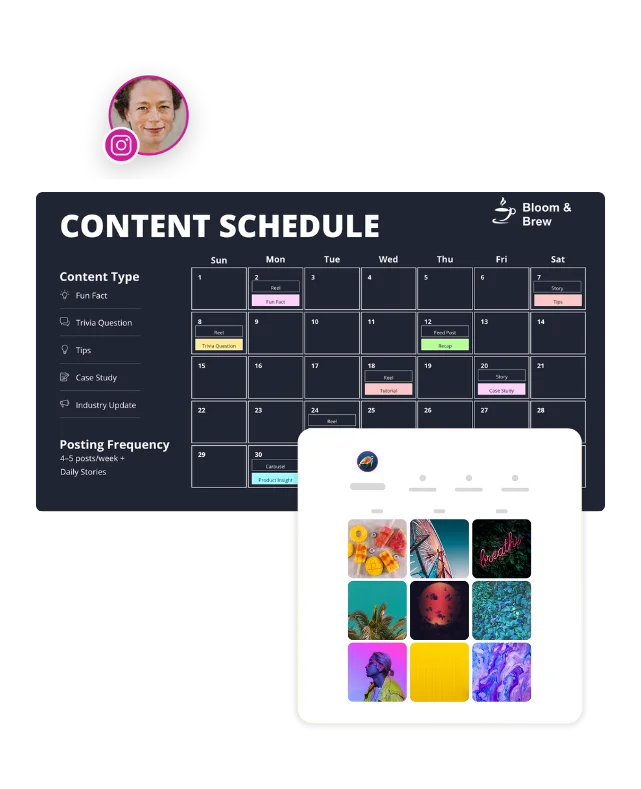
Monthly content schedule with color-coded post types and an Instagram grid preview showing how planned posts appear on a profile.

Short summary

  • Instagram now limits posts and Reels to five hashtags, so prioritize tags that are closely related to your content and audience.
  • Adding hashtags to the first comment doesn’t give you five extra slots. The limit applies across the caption and first comment.
  • Broad hashtags with millions or billions of posts come with a lot of competition, so balance them with more specific hashtags relevant to your niche.
  • Hashtags can help Instagram understand what your content is about, but they aren’t a reliable way to increase reach on their own.
  • Use relevant keywords naturally in your captions as well, since Instagram search considers the text in captions when matching content to searches.

Trending Instagram Hashtags in September 2026

Here are Instagram hashtags to consider this month, grouped by topic. Keep in mind that a hashtag’s post volume tells you how widely it’s used, not how much reach it will give your post.

CategoryTags
Broad and evergreen#love, #instagood, #photooftheday, #instagram, #beautiful
Reels and discovery#reels, #reelsinstagram, #explorepage, #viralvideo
September seasonal#september, #helloseptember, #fall, #autumn, #backtoschool
Motivation and growth#motivation, #inspiration, #personalgrowth, #selfimprovement
Small business#smallbusiness, #smallbusinessowner, #marketingtips, #socialmediamarketing

The broad hashtags may have huge post volumes, but that also means your content is competing with a large number of posts. More specific seasonal and niche hashtags can help you describe your content and reach a more relevant audience.

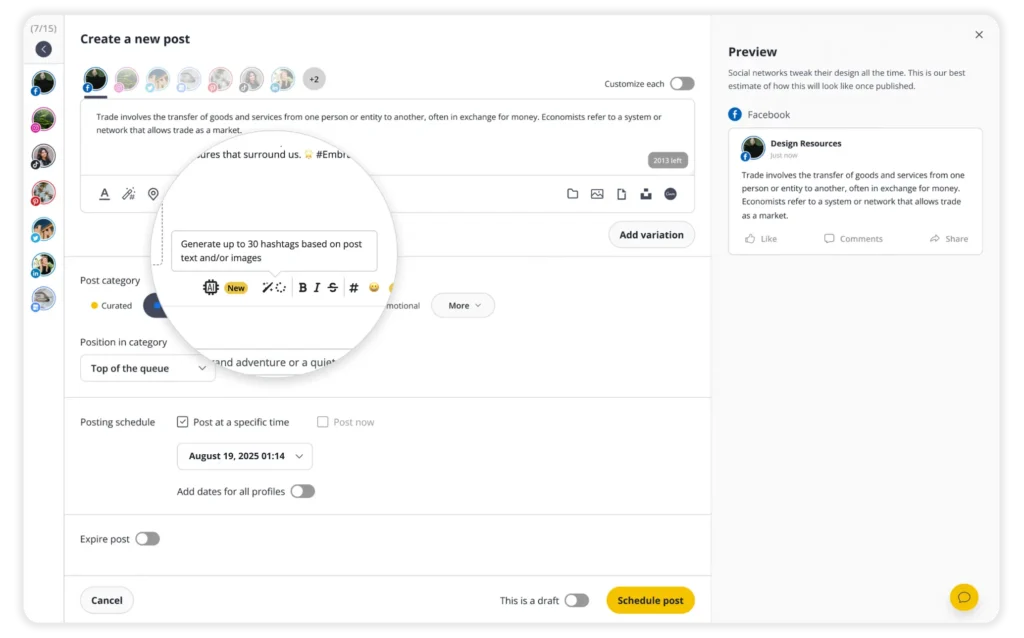
With only five hashtags to work with, it’s worth being selective. If you’re not sure which ones fit your post, SocialBee’s hashtag generator can give you relevant ideas based on your content.

When you find hashtags that work for your content, you can group them into Hashtag Collections and reuse them in future posts. For example, you could keep separate sets for different topics, products, or campaigns and add them to your posts whenever you need them.

SocialBee can help with the rest of your Instagram content too. You can use AI to write or improve captions, plan your posts in a calendar, schedule them ahead of time, reply to comments and messages, and see how your content is performing. You can also manage your other social media accounts from the same place, so you don’t have to jump between different tools.

SocialBee: Your AI-powered Instagram management tool
Create posts, publish, analyze, engage and collaborate, all from SocialBee.

Instagram now caps you at five hashtags

Instagram introduced a five-hashtag limit for posts and Reels in December 2025, replacing the previous limit of 30 hashtags.

The limit applies across your caption and first comment, so moving hashtags into the comments doesn’t give you extra space. Social Media Today covered the rollout when Instagram announced the change.

Instagram also recommended using fewer, more targeted hashtags instead of filling posts with generic ones. With only five available, each hashtag should have a clear connection to your content.
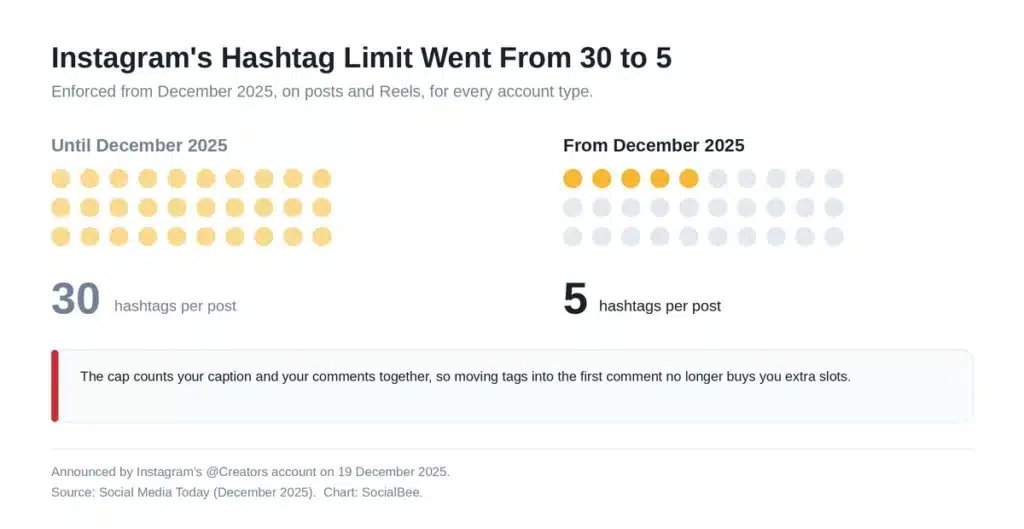
Chart showing Instagram's hashtag limit changing from 30 hashtags to 5 hashtags per post in December 2025.

The change came about a year after Instagram removed the option to follow hashtags in December 2024. Instagram removed the option to follow a hashtag, which further reduced the role hashtags play in content discovery.

Do Instagram hashtags still work in 2026?

Hashtags still have a role on Instagram, but increasing reach isn’t their main purpose. Instagram head Adam Mosseri has said that hashtags don’t improve visibility, but they can help people understand what a post is about and connect related posts.

Mosseri has also said that watch time, likes, and sends are the three most important signals for Instagram ranking, with likes being slightly more important for connected content and sends more important for reaching people who don’t already follow you.

Use hashtags to give people more context about your content, then focus on the factors that have a bigger impact on performance. Our guide to the Instagram algorithm explains the ranking signals you should pay attention to.

How to spend your five Instagram hashtags

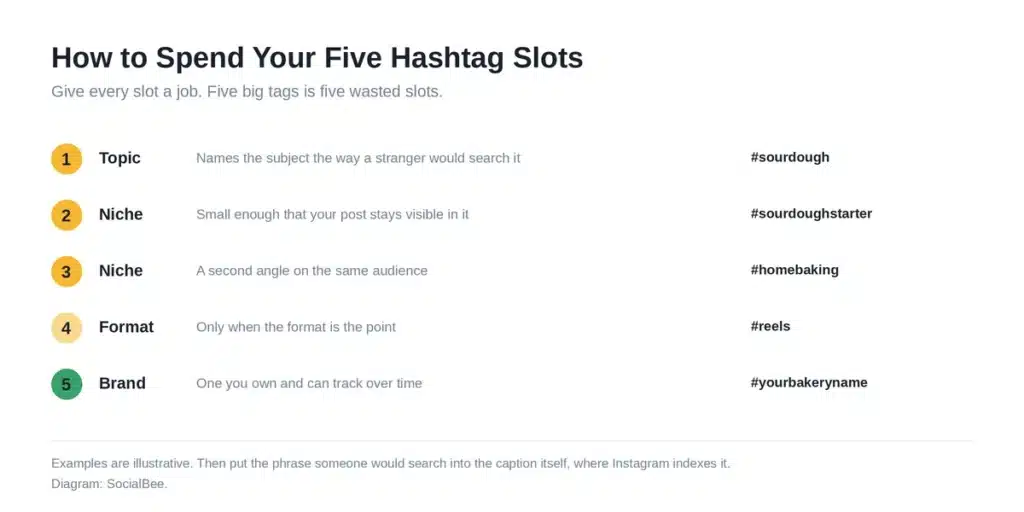
Five slots. Choose each hashtag based on how well it describes your post and the audience you want to reach. A useful mix can include:

  1. One topic tag that names the subject the way a stranger would search it.
  2. Two niche tags that are more specific to your content, industry, or target audience.
  3. One format tag, but only when the format is genuinely relevant, like #reels on a Reel rather than on a carousel.
  4. One brand or campaign tag you own.

Diagram showing five Instagram hashtag slots for topic, niche, format, and brand hashtags with examples.

This gives you a simple starting point, but you can adjust the mix depending on the post. The important part is that every hashtag is relevant to the content rather than chosen just because it’s popular.

Then put the real work into the caption. Use relevant keywords naturally in your caption to give Instagram more context about your content and help it appear in relevant searches. 

How to reuse hashtag sets without retyping them

That sounds manageable until you’re creating posts about several different topics and using different hashtags for each one.

SocialBee can suggest relevant hashtags based on your content, then lets you save the ones you use regularly in Collections.
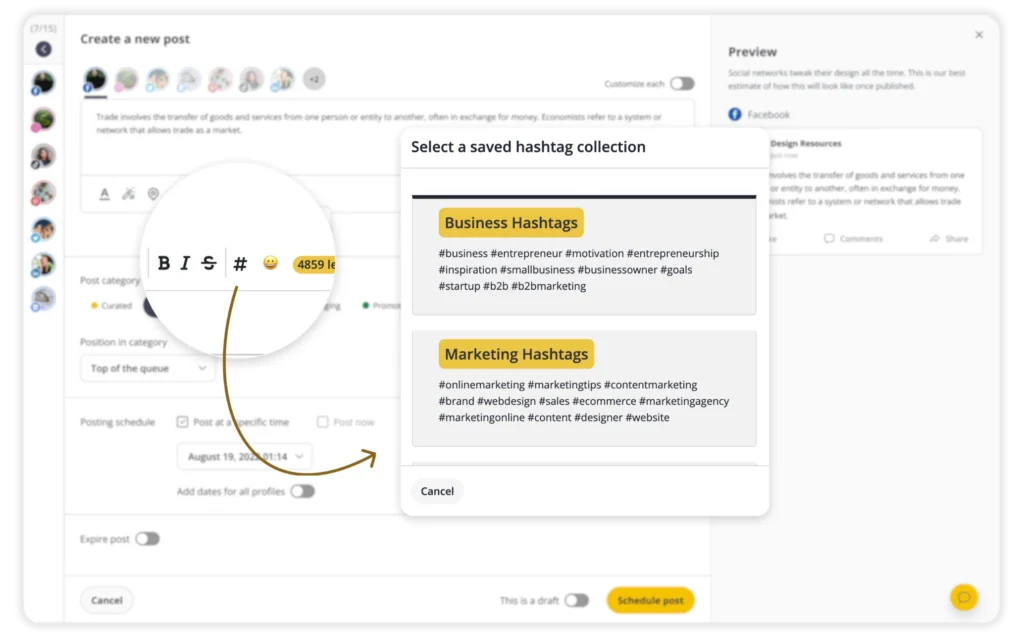

Create separate collections for different topics, products, audiences, or campaigns, and add them to future posts without searching for the same hashtags every time.

Want to make creating and scheduling your Instagram content easier? Start your 14-day SocialBee trial and keep your hashtags, content, and publishing in one place.

SocialBee: Your AI-powered Instagram management tool
Create posts, publish, analyze, engage and collaborate, all from SocialBee.

Frequently asked questions about trending Instagram hashtags

How many hashtags can you use on Instagram in 2026?

Instagram began rolling out a limit of five hashtags per post or Reel in December 2025, replacing the previous maximum of 30. Instagram recommends using a small number of relevant, targeted hashtags rather than generic ones.

Do hashtags in the first comment help your Instagram post?

No, adding hashtags in the first comment doesn’t help your post with reach or discovery. If you want Instagram to use your hashtags as context for the post, include relevant ones in the caption instead.

Are trending hashtags worth using?

They can be, as long as the trend is relevant to your post. Don’t add a popular or seasonal hashtag simply because it’s getting attention. Choose hashtags that accurately describe your content and make sense for the audience you want to reach.

Do hashtags increase reach on Instagram?

Instagram head Adam Mosseri has said that hashtags don’t increase reach on their own. They can still provide context about what your content is about, but factors such as watch time, likes, and sends play a bigger role in Instagram ranking.

Can you still follow hashtags on Instagram?

No, Instagram removed the option to follow hashtags in December 2024, so users can no longer follow a hashtag to see related posts in their feeds.

What should I use alongside hashtags?

Use relevant keywords naturally in your captions so Instagram has more context about your post. More importantly, focus on creating content that encourages people to watch, like, and share it, since these behaviors are important Instagram ranking signals.

Getting your Instagram hashtags right

The best Instagram hashtags aren’t necessarily the ones with the most posts behind them. They’re the ones that accurately describe your content and make sense for the audience you want to reach.

With five slots, hashtag strategy stops being a numbers game and becomes more about relevance. Choose hashtags that fit the topic, niche, format, or campaign, then focus most of your effort on creating content people actually want to watch, like, and share.

And when it comes to managing that content, SocialBee can help you handle more of the process in one place, from creating posts with AI and scheduling them to managing engagement and tracking performance. You can also save your go-to hashtags in Collections so they’re ready when you need them.

Start your 14-day SocialBee trial and make managing your Instagram content easier!

Summarize this post
SocialBee logo featuring a stylized yellow bee icon on a dark hexagonal background.
SocialBee – Social Media Management Tool
Works with 10+ social media platforms

Related articles

Level up your social media marketing with exclusive resources delivered straight to your inbox

We’re SocialBee LABS SRL, part of WebPros. We use the information you provide to share relevant content and product updates, as outlined in our Privacy Policy. You can opt out anytime.

Something special for you!

Get 20% off your SocialBee plan for 3 months. Just enter your email below and we’ll send you the discount code.

Email us at success@socialbee.com if you need any help.