Scheduling a first comment lets you keep your main caption short while automatically publishing a link, credit, source, or extra context in the comments. You don’t have to wait for the post to go live and then come back to add the comment manually.
This piece covers why you might want to use a first comment, which platforms support first-comment scheduling, how to automate it, and a few formats worth testing.
First-comment scheduling isn’t available on every social network, and support also depends on the scheduling tool you use. If first comments are part of your content strategy, it’s much easier to manage them alongside the posts you already schedule in advance rather than adding them manually after publishing.
We’re SocialBee LABS SRL, part of WebPros. We use the information you provide to share relevant content & updates, as outlined in our Privacy Policy. You can opt out anytime.
Short summary
- A first comment lets you keep the main caption focused while moving links, hashtags, credits, or extra context into the comments.
- First-comment scheduling isn’t available on every social network, and the platforms and account types supported depend on the scheduling tool you use.
- Scheduling the comment together with the post means you don’t have to wait for the post to publish and then add the comment manually.
- Your first comment should add something useful, such as a resource, extra context, or a question that encourages people to respond.
- SocialBee lets you schedule a post and its first comment together for Facebook Pages, Instagram Business and Creator profiles, LinkedIn personal profiles and Company Pages, and YouTube channels.
Why add a first comment
A first comment keeps a caption readable while giving extra detail somewhere that does not clutter the main message.
- A shorter, punchier caption up top.
- Links and resources moved below the fold.
- Sources, credits, or disclaimers that do not need to compete for attention.
- A question or prompt that opens the door to a reply.
Can a first comment be scheduled?
It depends on the platform and the scheduling tool you use. For example, SocialBee can schedule a first comment to publish with your post on supported Facebook, Instagram, LinkedIn, and YouTube accounts. On other networks, you may need to add the comment manually after the post goes live.
Platform | Can you schedule a first comment natively? | Can you schedule a first comment from SocialBee? |
No native option | Yes, for Facebook Pages | |
No native option | Yes, for Business and Creator profiles | |
X (Twitter) | No native option | No |
No native option | Yes, for personal profiles and Company Pages | |
TikTok | No native option | No |
YouTube | No native option | Yes, for YouTube channels |
No native option | No | |
Bluesky | No native option | No |
How to schedule a first comment from SocialBee
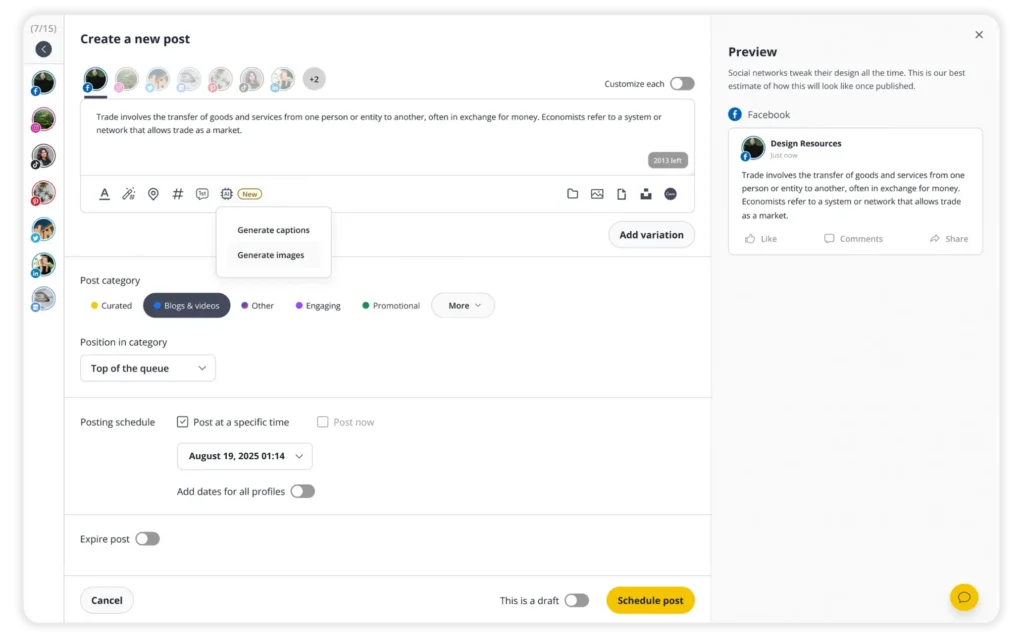
SocialBee lets you schedule your post and first comment together, so you don’t have to come back and add the comment manually after publishing.
Here’s how to do it:
- Click “Create post” at the top of any SocialBee screen.
- Select all the social media profiles you want to schedule the post for.
- Activate the “Customize each” toggle.
- Click on the first comment icon below the text editor.
- Write or paste the comment you want to publish.
- Save the post.
If you’re publishing to several supported profiles, you can customize the first comment for each one instead of using the same copy everywhere.
Get more out of a first comment
1. Start a conversation
The strongest first comments invite a reply rather than just filling space. Formats worth trying: a direct question, a two-option poll, a finish-the-sentence prompt, a guessing game, a quick trivia fact, an emoji-only reaction request, or a small contest for the best caption.
A simple framework: pick one specific detail from the post, turn it into a question a reader can answer in one line, and drop it in the comments instead of the caption. Posting the comment is only the start of it, since replying while the post is still active is what keeps a conversation going.
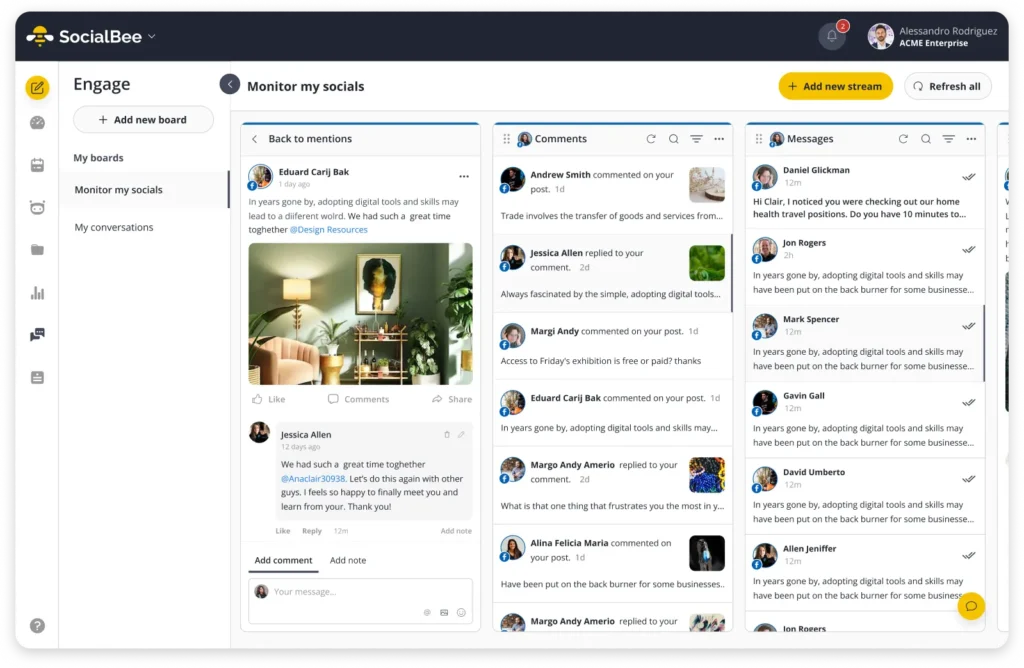
SocialBee’s Social Inbox brings comments, mentions, and messages from all your social media accounts into one place, making it easier to find and respond to interactions without checking each platform separately.
2. Publish the comment immediately
A comment that lands the moment a post goes live gives early engagement a head start, which matters on platforms that weigh how a post performs in its first hour or so.
3. Keep essential information in the post
The post itself should carry the main message, the value, and the call to action. Bonus resources, extra links, product details, credits, or an FAQ answer belong in the comment instead.
4. Don’t waste the comment on hashtags
Hashtags placed in a first comment show no proven reach benefit on most platforms in 2026. That space is better spent on something that earns a reply or points to a resource.
5. Test different comment formats
Formats worth rotating: a conversation starter, a bonus tip, a resource link, a product pick, an event reminder, an FAQ answer, a testimonial, or a behind-the-scenes note. Track comments, replies, clicks, and saves against each format over a few weeks rather than judging one post on its own.
Frequently asked questions
Should hashtags go in the caption or the first comment?
Either works, since Instagram and most other platforms treat both locations the same for discovery. What matters more is picking one location and staying consistent, so the caption does not end up cluttered either way.
Do first comments help with the algorithm?
Not directly. What helps is the extra engagement a good first comment invites, since replies and interaction are what most ranking systems actually reward.
What should you put in a first comment?
Whatever does not need to be in the caption: a link, a credit, extra context, a source, or a question meant to start a conversation.
Can you schedule a first comment on Instagram without a third-party tool?
Instagram doesn’t currently provide a native option for scheduling a first comment. You can use a third-party scheduler that supports the feature instead. SocialBee, for example, can schedule a first comment alongside a post for Instagram Business and Creator profiles.
Does the first comment need to come from the same account as the post?
With SocialBee, the first comment is published from the same social media profile as the scheduled post. If you want another account to comment on the post, that would need to be handled separately.
Make first comments part of your strategy
First comments are easy to forget when you’re juggling several posts and accounts. Scheduling them in advance means they’re ready to go with the post, without adding another task to your day.
If you want to make posting on social media easier, start your 14-day SocialBee trial and schedule your posts and first comments in one place. No credit card required.