

The Threads algorithm decides what appears in the For You feed, including recommended posts from accounts someone doesn’t follow.
This piece covers the Following and For You feeds, the signals that shape what people see in For You, and the practical planning that follows from understanding both.
Threads has also added Dear Algo and Your Algo, two features that let people tell Threads which topics they want to see more or less of. That is worth understanding before deciding how to plan Threads content in advance around it.

We’re SocialBee LABS SRL, part of WebPros. We use the information you provide to share relevant content & updates, as outlined in our Privacy Policy. You can opt out anytime.
Short summary
- Threads runs a chronological Following feed and a personalized For You feed, alongside custom feeds and Communities.
- The For You feed mixes posts from accounts you follow with recommended posts from accounts you don’t follow.
- Adding a relevant topic to a post can help with discovery. Meta says posts with tagged topics generally get more views than posts without them.
- Eligible Threads posts can also be recommended to people on Instagram and Facebook, giving your content another way to reach people outside Threads.
- Dear Algo and Your Algo let people tell Threads which topics they want to see more or less of.
How the Threads feeds differ
The Following feed shows posts in the order they were made, and the For You feed is personalized to each person. Following stays simple: everyone an account follows, newest first, no ranking involved. For You mixes posts from accounts someone follows with recommended content from accounts they don’t follow, making it an important place for reaching new audiences.
These aren’t the only ways people can discover content on Threads. Users can also create and follow custom feeds around specific accounts or topics, while Communities bring together conversations around shared interests.
How the For You feed ranks posts
Threads personalizes the For You feed using several signals rather than a single engagement score. According to Threads Product Marketing Manager Etienne Blanc, these include the profiles and posts someone has interacted with on Threads and Instagram, how recently a post was published, and how many interactions it has received.
This means the same post may not be equally relevant to everyone. Threads uses these signals to decide which content is most relevant to each person’s For You feed. You can read more about these ranking factors in our interview with Etienne Blanc.
Which signals matter most
Replies matter for visibility on Threads: Meta says replies account for almost half of views on the platform, and posts that drive conversations are more likely to be recommended. Reposts also matter, and a repost extends a post directly into someone else’s audience.
Likes, quotes, and other interactions also give Threads information about how people are responding to a post. Recency matters too, although Meta hasn’t specified a particular engagement window that determines whether a post gets pushed further.
Why engagement bait gets suppressed
A post that explicitly asks people to comment, share an opinion, or tag a friend purely to farm replies may not create the kind of conversation Threads is looking for. Meta recommends creating posts that invite feedback and says posts that drive conversations are more likely to be recommended.
A post that naturally invites a genuine reply is therefore more aligned with Meta’s own guidance for reaching more people on Threads.
What Dear Algo changes
Dear Algo lets a person tell Threads directly, in plain language, what they want to see more or less of in their feed, with each request affecting recommendations for three days. That adds a layer of explicit signal on top of the passive behavior the algorithm already tracks, which means a For You feed is not shaped purely by what someone happened to click on in the past.
Threads has also introduced Your Algo, which lets people privately choose topics they want to see more or less of for one, three, or seven days.
Planning content around the Threads algorithm
Since posts that drive conversations are more likely to be recommended, a caption that poses a real question or takes a specific stance gives people more reason to respond than one written to be safely agreeable. Posting when your audience is active also gives people a better chance to see and engage with your content while it’s still fresh. And since Meta says posts with tagged topics generally receive more views than posts without them, tagging a post’s actual subject can help it reach people interested in that topic.
SocialBee makes it easier to plan around both topics and timing. When creating a Threads post, you can type one hashtag, such as #Cooking, and SocialBee will use it as the post’s Topic. Once published, the hashtag disappears from the caption and shows in the Topic field instead.
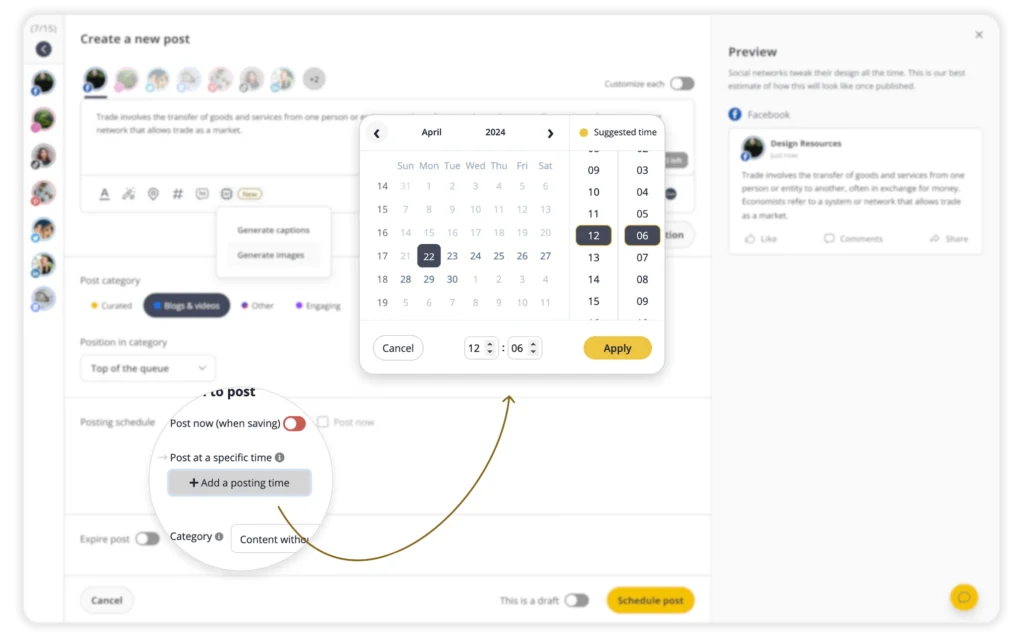
You can also schedule the post ahead of time and use posting time suggestions based on your past performance to help decide when it should go live. Once replies start coming in, the Social Inbox brings Threads comments and mentions into the same place as your other supported accounts, so you can reply without constantly checking Threads.
Frequently asked questions
What’s the difference between the Following and For You feeds on Threads?
Following shows posts from followed accounts in the order they were made, with no ranking. For You is personalized and mixes posts from accounts you follow with recommended content from accounts you don’t follow.
Do likes matter on Threads?
Yes. Likes are one way people interact with Threads posts, but Meta hasn’t said that likes carry less weight than replies or reposts. Meta does say that posts that drive conversations are more likely to be recommended.
What is Dear Algo?
Dear Algo lets you tell Threads directly what you want to see more or less of in your feed. Each Dear Algo request adjusts your feed for three days. Threads also has Your Algo, which lets you privately choose topics you want to see more or less of for one, three, or seven days.
Does asking people to comment help a post’s reach?
Not if it reads as an obvious engagement-bait prompt. Threads has gotten better at spotting those and suppresses them rather than rewarding them.
Can Threads posts be scheduled in advance?
Yes, Threads supports native post scheduling, and you can also use a social media management tool like SocialBee if you want to plan Threads alongside your other social accounts.
Get more from the Threads algorithm
Understanding the gap between the Following and For You feeds, and what gets people talking, gives you a much better foundation for growing your reach on Threads. Focus on creating posts that start real conversations, use relevant Topics, and publish when your audience is likely to be around.
SocialBee can help you manage the whole process in one place. You can create Threads posts with AI, add Topics, schedule text, images, videos, and carousels, organize your content into categories, and use posting time suggestions based on your past performance. You can also manage replies and mentions, collaborate on drafts and approvals, and track your account and post performance with Threads analytics.
Ready to spend less time managing Threads and more time growing your audience? Start your 14-day free SocialBee trial! No credit card required.