
Managing one brand’s social media is already a lot of work. Now imagine doing it for five, ten, or more brands, each with its own audience, personality, posting schedule, and people who need to review the content.
One minute, you’re writing LinkedIn posts for a B2B company. The next, you’re reviewing Instagram content for a fashion brand, answering another client’s feedback, or trying to remember which account has a campaign launching tomorrow.
When you’re managing multiple social media accounts, creating content is only part of the job. You also need to keep track of deadlines, remember what each client expects, and make sure the right posts go to the right accounts.
The good news is that you don’t need to manage every brand completely differently. Many of the tasks involved are similar, even when the brands themselves have little in common.
In this guide, we’ll cover how to manage social media content across multiple brands, from setting up new accounts and planning posts to handling feedback, scheduling content, and reviewing results.
Short summary
- Manage your accounts with SocialBee. Connect your brands to SocialBee, where you can plan posts, manage schedules, and check results without constantly logging into different networks.
- Collect brand information before getting started. Keep logos, colors, writing guidelines, audience details, and client contacts somewhere your team can find them.
- Plan around recurring post types. Give educational posts, promotions, customer stories, and product announcements regular spots in the calendar.
- Create several posts in one sitting. Work on one client at a time, prepare content in batches, and use AI tools to help with first drafts and variations.
- Keep feedback close to the content. Make it clear which posts need changes, who needs to review them, and what’s ready to publish.
- Review each brand’s results. Check which topics and formats bring clicks, comments, or other actions, then use those findings when planning future posts.
How to manage social media for multiple brands
Working with several brands gets complicated when every client has different expectations, tools, and ways of communicating.
You might receive content requests through email, get feedback on Slack, store visuals in Google Drive, and schedule posts in three different places. Multiply that by five clients, and even a small change to a caption can take longer than it should.
A few habits can make the workload much more manageable. Start with these 10 steps:
- Use the same onboarding checklist for every new brand
- Manage your brands with one social media management tool
- Plan each brand’s calendar around recurring post types
- Create content in batches for each client
- Keep feedback and reviews connected to the posts
- Schedule approved posts in bulk
- Set aside time to answer comments and messages
- Leave space for unexpected content requests
- Prepare a separate monthly report for each brand
- Use previous results to plan your next posts
1. Use the same onboarding checklist for every new brand
Before you write your first caption for a new client, collect the information you’ll need to do the job.
It’s tempting to jump straight into content creation, especially when a client already has ideas for their first few posts. But if you don’t know their preferred writing style, who needs to review the content, or where to find their product images, you’ll end up asking questions later.
Create a checklist that covers:
- Account access: Links to the brand’s social profiles, login arrangements, and access to any tools you’ll be using.
- Visual guidelines: Logos, brand colors, fonts, existing templates, and examples of designs the client likes.
- Writing style: How the brand speaks to its customers, words it prefers or avoids, and examples of previous posts that sound right.
- Audience: Who the brand wants to reach, what those people care about, and whether different networks serve different groups.
- Regular topics: Products, educational posts, customer stories, recurring campaigns, and subjects the brand doesn’t want to cover.
- Important dates: Launches, promotions, events, holidays, and deadlines.
- Content reviews: Who needs to see a post before publication, how they prefer to give feedback, and how much notice they need.
- Monthly results: Which numbers the client cares about and how often they want to receive a report.
Keep everything in a folder with the client’s name. Include the original files, not just links to old email attachments that might become difficult to find.
You can collect these details through a Google Form or Typeform and use the answers to prepare the client’s folder and first content calendar.
Don’t assume that a returning client needs no onboarding, either. Their products, team members, or priorities may have changed since you last worked together.
A good onboarding checklist should prevent the same questions from coming up every month.
2. Manage your brands with one social media management tool
Opening Instagram to schedule a post, switching to LinkedIn to check another account, and then logging into Facebook to find last week’s results can take up a surprising amount of time.
A social media management tool gives you a way to handle these tasks without visiting every network individually.
When choosing software, check whether you can:
- Group accounts by client: See which Facebook, Instagram, LinkedIn, and other profiles belong to each brand.
- Control who can access accounts: Let teammates work on the brands they’re responsible for without giving everyone access to every profile.
- View upcoming posts: Check what’s scheduled for the week and spot missing posts before their publishing dates.
- Reuse content: Save posts that can be published again, such as evergreen tips or frequently asked questions.
- Check results: See how posts are doing without manually collecting numbers from every network.
SocialBee lets you group social accounts into separate workspaces. You can plan posts, create different versions for each network, organize content into categories, and review results.
Say you manage three clients: a local restaurant, a software company, and a clothing brand. You can keep their accounts in separate workspaces, with different calendars and posting times, while using the same tool to prepare their content.
SocialBee also supports recurring content queues, so you don’t need to choose a new publishing date every time you add an evergreen post.
The fewer places you need to check throughout the day, the less likely you are to overlook a scheduled post or lose track of which account you’re working on.
3. Plan each brand’s calendar around recurring post types
Creating a new content calendar every month can feel like starting from zero, especially when you’re responsible for several clients.
But most brands don’t need entirely new ideas every week. They have products to promote, questions to answer, customer stories to share, and topics they return to regularly.
Start by grouping their posts into a few familiar types:
- Educational posts: Tutorials, practical tips, guides, and answers to common questions.
- Promotions: Discounts, special offers, campaigns, and product recommendations.
- Customer stories: Reviews, testimonials, case studies, and content shared by customers.
- Product news: Launches, new features, improvements, and announcements.
- Community posts: Behind-the-scenes photos, team introductions, polls, and questions for followers.
Then decide how often each type should appear.
A B2B software company might share educational posts on Mondays and Wednesdays, a customer story every Thursday, and a product announcement when there’s something new to share.
A restaurant might need a completely different calendar, with weekly specials, weekend reminders, and photos from recent events.
With SocialBee’s content categories, you can create a category for each post type and give it regular publishing slots.
Let’s say you create three categories:
- Educational tips, published every Monday and Wednesday
- Customer stories, published every Friday
- Promotions, published whenever a new offer is available
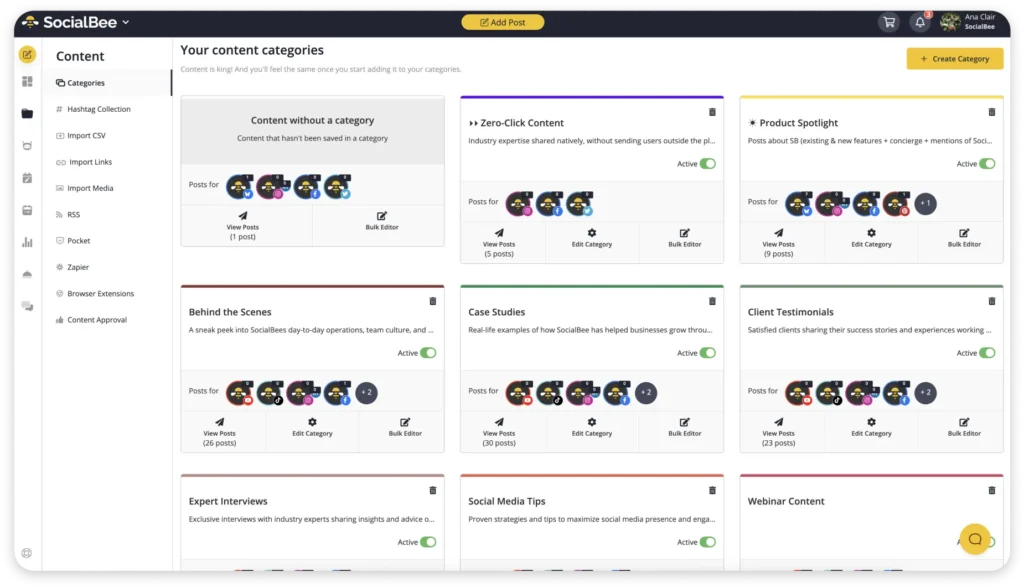
When you add posts to these categories, SocialBee can place them into their assigned slots.
You can also choose to re-queue evergreen posts, such as tutorials or frequently asked questions, so they appear again later. That doesn’t mean reposting the same caption every week. Review older posts, update any outdated information, and decide whether they’re still worth sharing.
Once the recurring posts are planned, you’ll have a clearer idea of how much room is left for campaigns, events, and new ideas.
4. Create content in batches for each client
Writing one post for a skincare brand, switching to a financial services client, and then returning to skincare an hour later isn’t always the best use of your attention.
Every switch means getting familiar with a different product, audience, and writing style.
Try batching your content creation by client.
You could spend Monday morning preparing a week’s worth of posts for one brand, Monday afternoon working on another, and Tuesday creating content for the remaining accounts.
During each session:
- Check what’s coming up. Look at the client’s calendar, upcoming campaigns, and any posts that still need to be written.
- Gather your materials. Open the relevant product information, photos, previous posts, and design templates before you begin.
- Write several captions. Prepare posts for the next week or two while the brand’s writing style is fresh in your mind.
- Make versions for different networks. A detailed LinkedIn post might need a shorter Instagram caption or a more conversational Facebook version.
- Prepare the posts for review. Attach visuals, check links, and make sure the client can see exactly what you’re proposing.
You don’t have to create everything manually.
SocialBee’s AI post generator can help you brainstorm topics, write initial captions, and create variations for different networks.
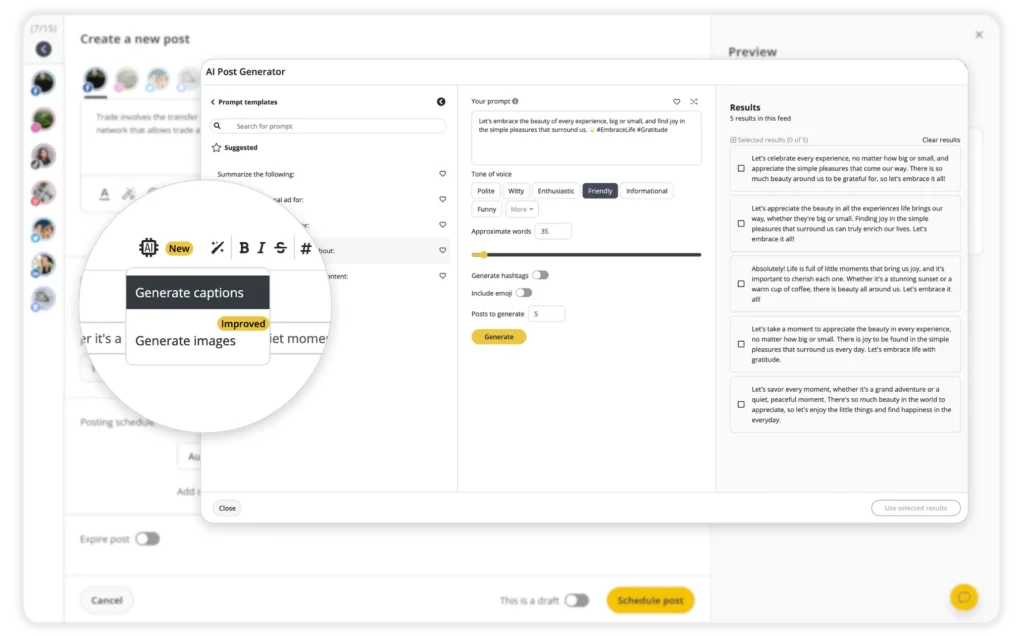
It’s particularly handy when you already have the information but need help turning it into several posts. You could provide a product description and ask for a LinkedIn announcement, a short Instagram caption, and a Facebook post.
Read through the drafts before using them. AI-generated captions can sound generic, miss product details, or use language that doesn’t suit the client.
For visuals, reusable Canva templates can also cut down the time spent recreating layouts. Keep each client’s colors, fonts, and logos in their own folders so you don’t accidentally use the wrong design elements.
Batching works best when you have enough information to complete several posts without stopping every few minutes to ask the client another question.
5. Keep feedback and reviews connected to the posts
Sometimes getting a post approved takes longer than writing it.
You send a draft by email. The client replies with two changes. Someone else adds feedback in a Google Doc, and a third person messages you on Slack saying the original caption was fine.
Now you’re left figuring out which version you’re supposed to publish.
Agree on how content reviews will work before the first batch of posts goes out.
Make sure everyone knows:
- Where to find drafts: Give reviewers access to the content they’re expected to check.
- How to leave feedback: Ask them to comment on the relevant post rather than sending unrelated messages.
- Who needs to review what: Some clients only need their marketing manager’s sign-off, while others need input from legal or compliance teams.
- When feedback is due: Set a deadline that leaves enough time to make changes before publication.
- What happens after approval: Make it clear who schedules the post and whether further changes are allowed.
For a small business, this might be as simple as sharing a document every Thursday and asking for feedback by Friday afternoon.
Larger teams may need a project management tool with review statuses, comments, and notifications.
SocialBee’s team collaboration features let teammates work together on content within their workspaces. If your client has more complicated review procedures, you can use a separate project management tool alongside SocialBee.
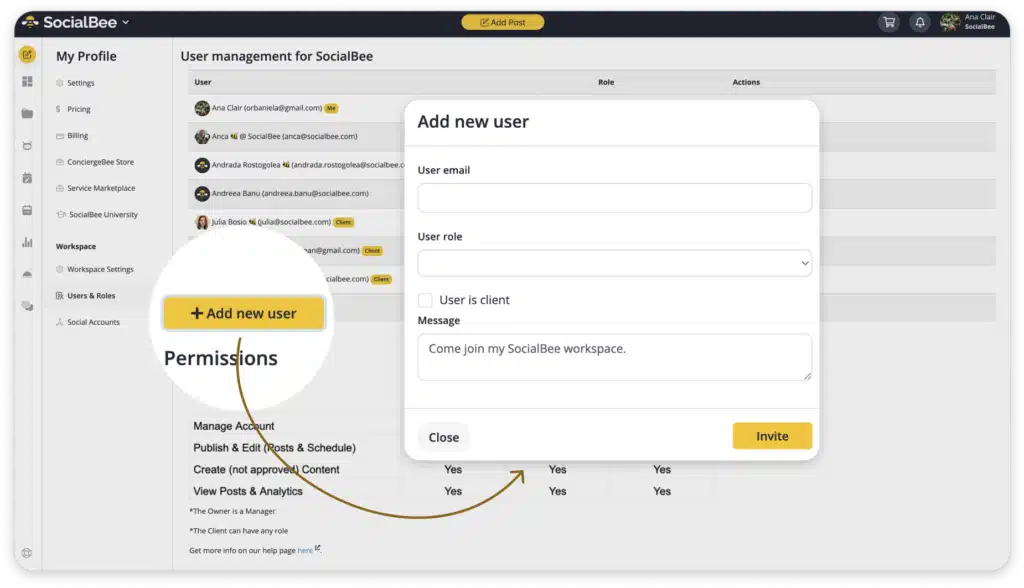
Reminders can be helpful when someone hasn’t responded by the agreed deadline. Just make sure notifications don’t become another source of unnecessary messages.
And don’t treat silence as approval unless you’ve explicitly agreed on that arrangement with the client.
6. Schedule approved posts in bulk
Imagine you’re managing five brands, each publishing four posts per week across three networks.
That’s potentially 60 posts to prepare and publish every week.
Even if each post only takes a few minutes to upload, select the correct account, add the caption, and choose a publishing time, those minutes add up.
Once your content is ready, schedule several days or weeks at once.
A social media scheduling tool should let you:
- Prepare posts ahead of time: Choose publishing dates without needing to be online when every post goes live.
- Schedule across different networks: Prepare content for Facebook, Instagram, LinkedIn, TikTok, and other supported channels.
- Edit each network’s version: Change captions, hashtags, visuals, and formatting before publishing.
- Reuse evergreen posts: Keep useful older content in rotation where appropriate.
- Review the calendar: Check for missing posts, overlapping campaigns, and incorrect dates.
With SocialBee, you can upload posts using CSV files or add several posts in batches. You can then organize them into categories and schedule them for your connected accounts.
This is particularly helpful for campaigns with lots of content.
A product launch might involve a teaser, an announcement, a feature explanation, a customer testimonial, and a reminder. Preparing the posts together lets you check whether they make sense as a series.
You can also create different versions of the same announcement. A LinkedIn post might explain the product in detail, while an Instagram caption focuses on its most interesting feature.
Before scheduling a large batch, double-check the selected profiles. Publishing a client’s post on another client’s account is exactly the kind of mistake you want to avoid.
It’s worth reviewing the upcoming calendar at the beginning of each week, even when everything has already been scheduled.
7. Set aside time to answer comments and messages
Your work doesn’t end when a post goes live.
Followers ask questions, leave comments, mention the brand, and sometimes expect a quick answer.
If you’re managing several accounts, checking notifications throughout the day can interrupt whatever else you’re working on.
Start by deciding when you’ll review incoming messages.
You might check them once in the morning, after lunch, and again before finishing work. Brands with high message volumes or customer service responsibilities may need more frequent checks.
Depending on the tools you’re using, you may be able to:
- Filter comments and messages by account
- Assign customer questions to the right teammate
- Save answers to frequently asked questions
- Mark conversations that still need a response
- Group messages by topic or urgency
A retail brand might receive questions about product sizes and deliveries, while a software company gets requests for technical support.
Even if the same person manages both accounts, the replies will be different.
Saved answers can help with common questions, but don’t send them without checking whether they actually address what someone asked.
Some social media tools also offer features for monitoring brand mentions and conversations outside your own posts. These can be useful when customers are talking about a product without tagging the company’s account.
Not every tool supports the same inbox features or message types, so check what’s available for the networks you manage.
And if a brand regularly receives urgent customer service requests, make sure there’s a clear way to pass those messages to the people who can resolve them.
8. Leave space for unexpected content requests
A content calendar is helpful until a client announces a last-minute promotion, an important industry story breaks, or a customer question gives you an idea for a post.
Not everything can be planned a month in advance.
Keep some room in the calendar for:
- Trending topics: Conversations or popular formats that make sense for the brand.
- Industry news: Announcements or developments that customers should know about.
- Customer questions: Topics that come up repeatedly in comments, messages, or support conversations.
- Company announcements: New products, partnerships, events, or changes customers need to know about.
- Last-minute requests: Promotions or updates that weren’t included in the original plan.
You could prepare around 80% of your content in advance and leave the rest of the calendar open. This isn’t a fixed rule. Some brands rarely need unscheduled posts, while others regularly respond to news or live events.
It’s also worth agreeing on how urgent requests should be handled.
If a client needs something published today, what information should they send? Who checks the final caption? Does it replace an existing post, or should the calendar be rearranged?
Having answers to these questions prevents a single request from disrupting several days of planned content.
With SocialBee, you can move scheduled posts, add new content, and pause categories when necessary.
This is particularly useful when a planned promotional post no longer makes sense because of a recent announcement or event.
A calendar should give you a plan for the week, not make it difficult to respond when something changes.
9. Prepare a separate monthly report for each brand
If you’re managing several clients, you probably don’t want to spend the last few days of every month copying numbers from Facebook, Instagram, and LinkedIn into spreadsheets.
Start with a report template you can reuse.
Include the information clients are most likely to ask about:
- Follower growth: How many followers the account gained or lost during the month.
- Engagement: Comments, shares, saves, reactions, and engagement rates.
- Posts: Which topics and formats attracted the most attention.
- Reach and impressions: How many people saw the content and how often it appeared.
- Changes from last month: Whether the numbers increased or decreased.
- Next steps: What you’ll continue, change, or test during the following month.
You don’t need to give every client the same set of numbers.
A B2B software company might be interested in LinkedIn clicks and website visits, while a clothing brand may care more about Instagram saves, product inquiries, and traffic to its online store.
The important part is explaining what the numbers mean.
Say a client’s Instagram reach increased by 40%, but website clicks stayed almost the same. That’s worth mentioning. The posts reached more people, but the additional exposure didn’t lead to a similar increase in visits.
Or suppose a brand published fewer posts than the previous month but received more comments. Look at which posts prompted conversations and whether those interactions came from the people the brand wants to reach.
A report doesn’t need several pages of commentary. A short explanation of the main changes and two or three recommendations can be enough.
Clients should finish reading it knowing what happened during the month and what you’re planning to do next.
10. Use previous results to plan your next posts
Once you’ve prepared your monthly reports, use them when planning the next batch of content.
Look at the results for each account and ask:
- Which topics received the most comments, shares, or clicks?
- Did videos attract more attention than images or carousels?
- Which networks brought people to the website?
- Were there days or times when posts received more engagement?
- Did any posts lead to product inquiries, signups, or sales?
- Which posts received little attention, despite covering important topics?
SocialBee’s analytics tools let you review results for your connected accounts without collecting everything manually.
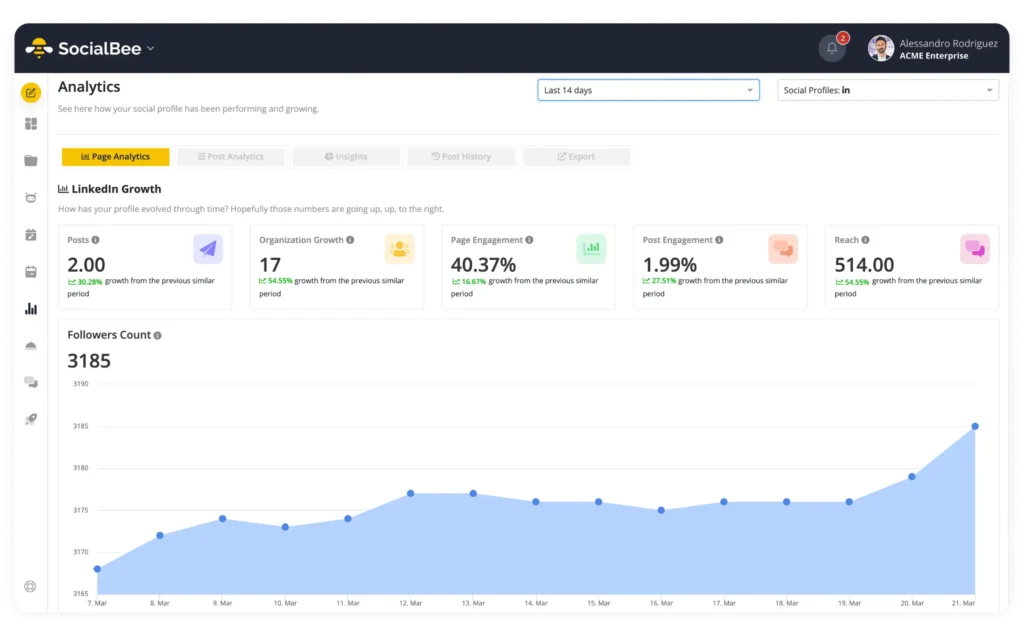
You can use the analytics dashboard to:
- Find posts worth revisiting: See which posts received the most engagement and decide whether the topic deserves another post.
- Compare post types: Check how educational posts, promotions, and other categories have done.
- Review formats: Look at the results for images, videos, carousels, and other supported formats.
- Check posting times: Use previous engagement and posting-time recommendations when choosing when to publish.
- Monitor account growth: Follow changes in followers, reach, and engagement.
- Reuse older posts: Find previously published content that can be updated or shared again.
You can also export PDF analytics reports for individual social profiles on supported plans.
Suppose a software company’s LinkedIn carousels explaining common industry problems regularly receive more saves and clicks than its product announcements.
That gives you a reason to test more educational carousels next month.
You could turn a popular carousel into a longer article, make a follow-up post answering questions from the comments, or test the same topic as a short video.
But don’t assume one popular post proves that an entire format will always do well. Look at several posts over time, especially when the account has a small audience.
The same applies when a post receives fewer likes than expected. If it brought qualified visitors to the website or generated product inquiries, it may still have been worth publishing.
For more ideas, read our guide on how to use social media analytics to improve your strategy.
Frequently asked questions
What is the best way to organize social media content for multiple brands?
Start by creating a folder for each brand with its logos, writing guidelines, visual templates, account details, and upcoming campaigns.
Then prepare a content calendar that shows what’s planned for every account. You should be able to check upcoming posts without opening several different documents.
A tool like SocialBee lets you group accounts into workspaces, organize posts by category, and schedule content for different networks.
Give your files clear names, too. A folder called “Client A – Instagram – November” is much easier to recognize than one called “Final content v3.”
What tools can you use to manage multiple social media accounts?
SocialBee is a social media management tool that lets you plan, create, schedule, and review content for multiple accounts.
You can group profiles into workspaces, create recurring post categories, prepare content for different networks, and check results.
Other tools can support specific parts of the job. Canva is useful for creating graphics, Google Drive can store client files, and Notion can help with content briefs and campaign planning.
For more guidance, read our article on how to manage multiple social media accounts.
What social media tasks can you automate when managing multiple brands?
Several tasks can run with less manual input once you’ve set them up:
- Scheduling: Prepare posts in advance and have them published at the selected times.
- Caption drafting: Use AI tools to generate first drafts and variations for different networks.
- Bulk uploads: Add several posts together rather than entering them individually.
- Evergreen posts: Re-queue content that remains accurate and useful.
- Review reminders: Notify teammates or clients when content is waiting for feedback.
- Message sorting: Use supported inbox tools to filter or assign incoming conversations.
- Monthly reports: Collect available account metrics without copying every number manually.
You’ll still need to check the content, respond to people, and decide what to publish. Scheduling tools are there to handle the predictable tasks, not replace those decisions.
What are the biggest challenges of managing social media for multiple brands?
The biggest challenges usually involve keeping track of deadlines, switching between clients, collecting feedback, and making sure content goes to the correct account.
Different brands may also have very different expectations. One client might send everything a month in advance, while another asks for new posts every few days.
A shared calendar, clear review deadlines, and a reliable way to store client information can prevent a lot of confusion.
It also helps to agree on how last-minute requests will be handled before they become a regular problem.
How can you maintain brand consistency when managing multiple social media accounts?
Give every brand a simple style guide that explains how it should look and sound.
Include its colors, fonts, logo files, preferred writing style, words to avoid, and examples of posts that represent the brand well.
Use these guidelines when preparing captions and visuals, particularly if several teammates are creating content.
You should also adapt posts to the network they’re published on. A brand can sound professional on LinkedIn and more conversational on Instagram without losing its personality.
Before publishing, check that the post uses the correct visuals, addresses the intended audience, and matches the client’s usual communication style.
How can you manage multiple social media accounts from one dashboard?
The easiest way to manage multiple social media accounts is to use social media management software that brings your content planning, scheduling, and analytics into one place.
Instead of switching between multiple social media platforms, you can use a social media management platform like SocialBee to organize multiple social accounts into separate workspaces.
From one dashboard, you can create social media posts, automatically schedule content, and track performance across different platforms.
This is particularly useful for marketing agencies and social media teams managing multiple clients. A unified dashboard gives everyone a clear view of upcoming posts, publishing schedules, and campaign results without juggling multiple tools.
You can also maintain a content library with reusable posts, organize your editorial calendar, and reduce repetitive tasks.
Should you publish the same content across multiple social media platforms?
You can repurpose the same content across multiple social media platforms, but publishing the exact same post everywhere isn’t always the best approach.
Each social media platform attracts different audiences and supports different content formats. A long video might work well on YouTube, while shorter clips are better suited to Instagram Reels or YouTube Shorts.
Start with one piece of content, such as a blog post, and adapt it for different platforms. You could turn the main points into a LinkedIn carousel, create an Instagram Reel explaining one tip, and share a shorter version on Facebook.
Content repurposing helps you save time, maintain a consistent brand voice, and maximize reach across multiple social networks.
The important thing is to adapt your post formats, captions, and messaging to each target audience rather than copying everything unchanged.
How do marketing agencies manage social media accounts for multiple clients?
A marketing agency managing multiple social media accounts needs a clear workflow for content creation, client approvals, publishing, and reporting.
Start by developing a separate social media strategy for each client. Document their business goals, target audience, brand values, preferred social platforms, and content strategy.
Then establish an approval workflow so everyone knows who reviews social posts before publication. Role-based permissions can help marketing teams control access to different social media accounts, where their chosen tools support them.
Use a social management tool like SocialBee to keep multiple clients organized in separate workspaces. This makes it easier to plan campaigns, schedule posts, and measure performance across accounts.
For account security, enable two-factor authentication wherever available and avoid sharing passwords unnecessarily.
Finally, prepare individual reports showing engagement, website traffic, and other results relevant to each client’s marketing efforts. This helps you fine-tune each brand strategy without treating every account the same way.
How can small businesses manage multiple social media accounts without getting overwhelmed?
For many businesses, managing multiple social media accounts becomes time-consuming when they’re juggling multiple accounts, switching between social media platforms, and trying to maintain a consistent social media presence.
The best way to stay organized is to use social media management tools that bring your social media profiles, content planning, and scheduling into one place.
Start by creating a social media strategy for each target audience. Then use a single calendar to plan posts in advance across multiple platforms, whether you’re publishing on Instagram, Facebook, LinkedIn, or TikTok.
A social media management platform like SocialBee lets you manage multiple social media accounts from one dashboard, with each brand in its own workspace. You can schedule posts, use an AI assistant to help draft content, and track performance without constantly switching between accounts.
You should also establish approval workflows for anyone who needs to sign off on content and set aside time for inbox management. A dedicated social inbox or social listening tool can help you monitor conversations and respond to customers, depending on the features available.
How can you improve engagement when managing multiple social media accounts?
To boost engagement across multiple social media accounts, focus on what each audience responds to rather than simply publishing more posts.
Use your social media analytics to identify the best times to publish, which content formats perform well, and which topics encourage comments, shares, and clicks.
You should also:
Respond to direct messages and comments: Set a regular response time for each account to protect the brand’s reputation and keep conversations moving.
Experiment with post content: Test educational posts, curated content, videos, questions, and other formats to see what works.
Review performance regularly: Use analytics to measure engagement, brand recognition, and website traffic across multiple networks.
Keep your brand voice consistent: Make sure every post reflects the brand’s values, even when different people or local teams manage the accounts.
Adjust your publishing schedule: Use previous results to identify the best times to reach your audience on each network.
SocialBee lets you view analytics for your connected social accounts, compare content performance, and use those insights to improve future posts.
The goal isn’t to publish the most content across the most channels. It’s to make sure your social media marketing efforts support your business goals and reach the right people.
Manage multiple brands without multiplying your workload
Managing social media for several brands doesn’t have to mean spending your day switching between tabs, searching for old client messages, or rebuilding content calendars every month.
A lot of the work becomes more manageable once you have a few reliable habits. Collect the right information when a client joins, prepare posts in batches, agree on review deadlines, and schedule content ahead of time.
You’ll still need to make decisions for each brand. A campaign that works for one client won’t necessarily work for another, and no scheduling tool can tell you exactly what every audience wants to see.
But you shouldn’t have to spend hours on tasks that can be prepared in advance.
SocialBee helps you manage multiple brands with workspaces, content categories, AI-assisted content creation, scheduling, and analytics. You can prepare posts for different accounts, reuse evergreen content, and review upcoming campaigns without opening every social network separately.
Start your 14-day free SocialBee trial and spend less time managing your posting calendar.