
Social media workflow automation can save you hours of repetitive work, from coming up with post ideas and writing captions to scheduling content and checking what’s been published on multiple social media accounts. Instead of handling every step manually, you can use social media automation tools to take care of predictable tasks while you focus on creating better content and connecting with your audience.
You don’t have to automate everything to get some of that time back. In this guide, we’ll show you which parts of your social media workflow are worth automating, how to set them up, and where it’s better to keep a human in charge.

We’re SocialBee LABS SRL, part of WebPros. We use the information you provide to share relevant content & updates, as outlined in our Privacy Policy. You can opt out anytime.
Short summary
- Start with the tasks you repeat most often. Copying content between tools, adjusting captions, and scheduling posts manually are good places to start saving time.
- Use AI to speed up content creation. Generate post ideas, draft captions, and adapt content for different social media channels, but review everything before publishing.
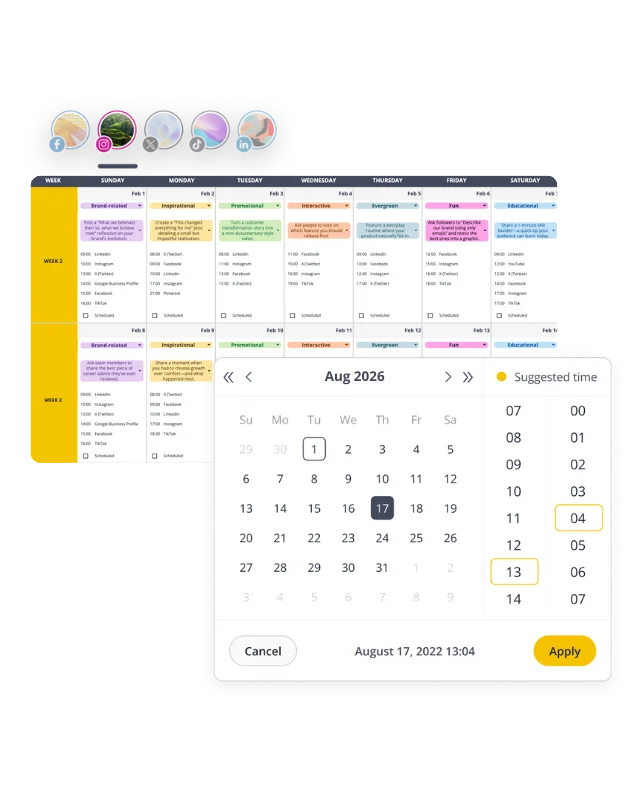
- Plan your content in one calendar. Keep all your upcoming posts in one place so you can quickly see what’s planned, what’s missing, and whether you’ve scheduled too much for the same day.
- Set up a posting schedule you can reuse. Choose when you want different types of posts to go out, so you don’t have to pick a date and time from scratch every week.
- Keep feedback and approvals in one place. Give reviewers access to the actual posts, so your team doesn’t have to chase decisions through emails and messages.
- Let your scheduling tool handle the posting. Once your posts are approved, schedule them to go live automatically. Turn on notifications so you’ll know if a post fails to publish
- See what’s working and what isn’t. Check your analytics regularly to find out which posts perform best, when your audience is most active, and what you could change to get better results.
What does automating your social media workflow mean?
Automating your social media workflow means using tools to handle repetitive tasks involved in planning, creating, approving, publishing, and tracking social media content.
For example, instead of logging into Instagram, LinkedIn, and Facebook separately to publish a post, you can prepare your content in a social media scheduling tool and have it published automatically at the times you’ve chosen.
Automation can also help you:
- Generate caption drafts
- Organize content into recurring schedules
- Notify teammates when posts need approval
- Collect performance data without manually checking every platform
Once you’ve scheduled your posts, your scheduling tool can publish them automatically at the times you’ve chosen, so you don’t have to post them manually.
Other tasks, like creating content and replying to comments, can be partly automated. For example, AI can help you write captions and suggest replies, but you’ll still need to review them to make sure they sound like your brand and make sense for your audience.
The idea is simple: spend less time on repetitive tasks and more time creating content your audience actually wants to see.
How to automate your social media workflow
You can automate most of the repetitive work involved in social media management, but the best place to start depends on what’s slowing you down.
Here’s how to make each stage of the process easier:
- Find the social media tasks that are taking up your time
- Use AI to come up with content ideas faster
- Create drafts and adapt them for each platform
- Add your content to one central calendar
- Set up recurring schedules for content you post regularly
- Make content approvals easier for your team
- Schedule posts to publish automatically
- Keep an eye on failed posts and anything that needs attention
- Manage social media conversations from one inbox
- Check what’s working and adjust your automations
1. Find the social media tasks that are taking up your time
Before investing in more automation tools, take a look at how you’re currently managing social media.
Write down everything that happens between having an idea and publishing the finished post.
A typical process looks something like this:
Idea → Caption → Visual → Review → Approval → Scheduling → Publishing
Now think about which steps take longer than they should.
Are you copying captions from Google Sheets into your social media management tool? Rewriting nearly identical posts for multiple channels? Logging into different accounts to publish finished content?
These are the tasks worth tackling first.
Here’s a simple way to identify automation opportunities: If you can explain exactly when a task needs to happen and what should happen next, there’s a good chance you can automate it.
For example, if every approved post needs to be added to your publishing calendar, you can use a tool that connects your apps layer to move content between connected tools instead of doing it manually.
Start with the task that causes the most unnecessary work. Fix that first, then move on to the next one.
2. Use AI to come up with content ideas faster
AI is useful when you know what you want to talk about but need fresh angles.
Let’s say you’re managing social media for a fitness studio. You already know your audience struggles with finding time to exercise, staying motivated, and feeling comfortable at the gym.
Instead of asking AI for generic fitness content ideas, try a more specific prompt:
Suggest 10 Instagram post ideas for a fitness studio targeting beginners aged 25–40. Focus on common workout mistakes, first-class anxiety, and building consistent exercise habits. Avoid weight-loss claims.
Now you have ideas based on problems your audience actually faces.
You can also use AI generation to explore different angles for social media campaigns, turn a blog post into several content ideas, or find follow-up topics for posts that performed well.
If you need help planning beyond individual posts, SocialBee’s Copilot can suggest which different social media platforms to prioritize, what topics to cover, how often to post, and how to organize your schedule based on your business.
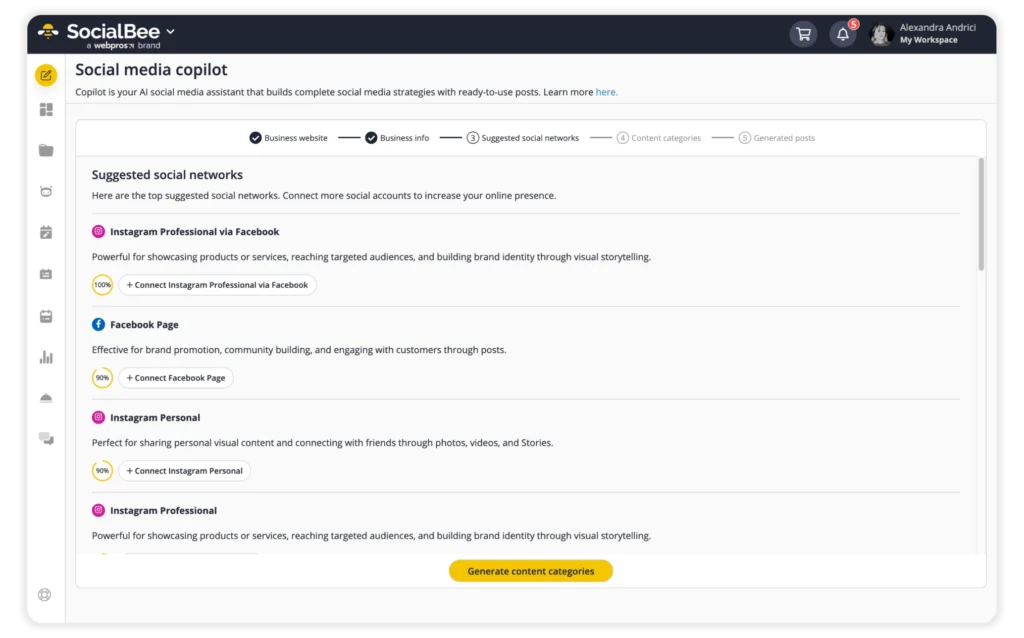
Of course, AI doesn’t know your customers as well as you do. Use its suggestions to get started, then choose the ideas that fit your social strategy and current priorities.
3. Create first drafts and adapt them for each platform
Writing one caption is manageable, but writing five different versions of it every time you publish something gets overwhelming.
AI can take care of the first draft and help you adjust it for different platforms.
Imagine you’re announcing a new product. You could turn the same announcement into a LinkedIn post explaining the problem it solves, an Instagram carousel highlighting its benefits, and a short X post linking to the product page.
You’re sharing the same news, but giving each audience a reason to care.
With SocialBee, you can generate captions and visuals using AI, then create platform-specific variations. You can adjust each version yourself or use AI to generate alternatives.
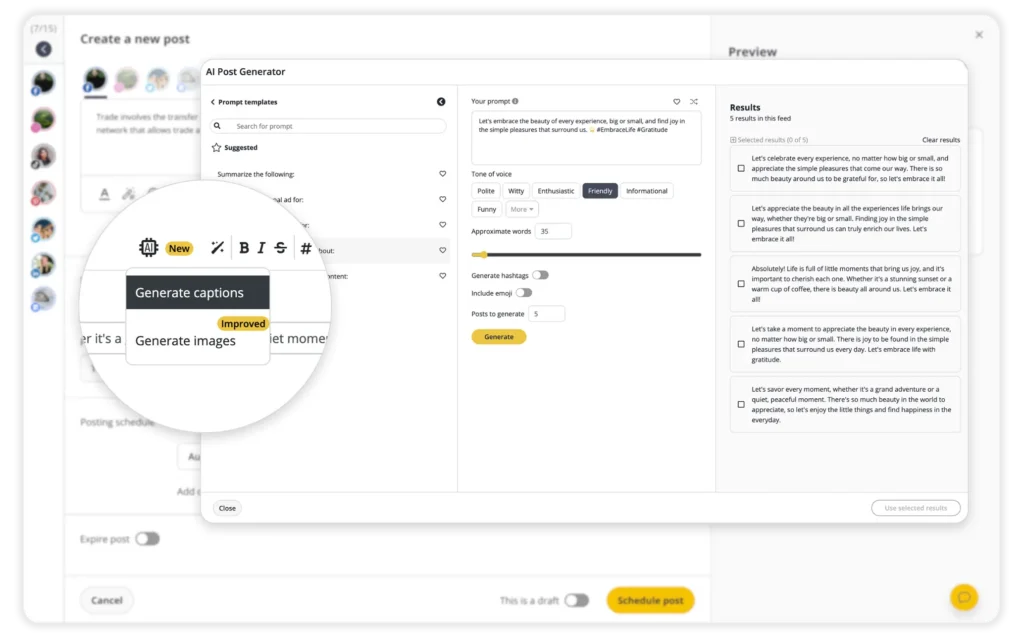
Before publishing, check that every version sounds like your brand. Pay particular attention to product claims, calls to action, hashtags, and formatting.
AI can get you to a workable draft faster, but you’ll still need to make sure the finished post is accurate and worth sharing.
4. Add your content to one central calendar
When all your social media posts live in one calendar, it’s much easier to see what’s coming up and what needs attention.
You might notice that you’ve scheduled three promotional posts in a row, forgotten to prepare content for an upcoming event, or left LinkedIn empty for an entire week. Those problems are harder to catch when your content is spread across spreadsheets, documents, and separate scheduling tools.
Use your content calendar to plan recurring posts alongside campaigns and time-sensitive announcements.
If you’re launching a new service, you should be able to see the teaser, launch announcement, demonstration, and follow-up posts together. That way, you can check whether the campaign makes sense before anything goes live.
SocialBee’s visual calendar lets you view upcoming content by week or month, preview social posts, and move scheduled content around when your plans change.
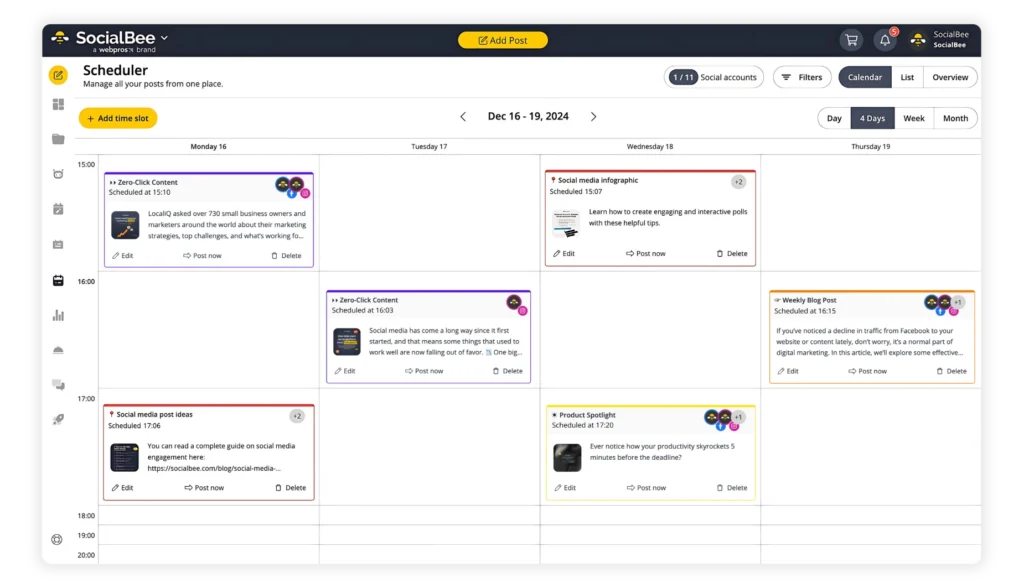
You can still leave room for spontaneous posts. Having a calendar doesn’t mean you need to plan every conversation weeks in advance.
5. Set up recurring schedules for content you post regularly
If you publish educational tips every Tuesday and product updates every Thursday, why choose those publishing times again every week?
A recurring schedule lets you decide when different types of content should go out, then add posts to the appropriate categories.
For example:
Day | Content type |
Tuesday, 10 AM | Educational tip |
Thursday, 2 PM | Product or service post |
Friday, 11 AM | Community content |
Instead of scheduling each post individually, you prepare content and let your social media scheduling tool fill the available slots.
SocialBee lets you organize content into categories and create separate schedules for them. It also recommends posting times based on past performance data, so you can adjust your schedule using actual results.
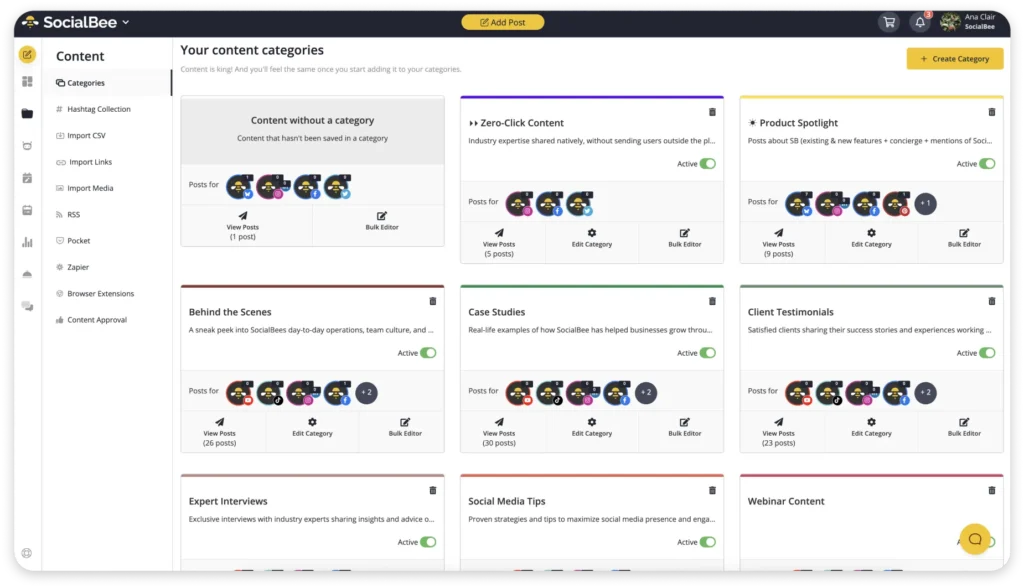
Keep fixed dates for launches, events, and announcements that need to go live at a particular time.
And don’t feel obligated to fill every available slot. Three useful posts are better than seven rushed ones.
6. Make content approvals easier for your team
Start by deciding who actually needs to approve your content. A routine educational post might only need a quick review from your social media manager. A major campaign announcement might need approval from marketing, legal, or a client.
Then keep the review process as close to the content as possible.
Reviewers should be able to see the finished caption and creative, leave feedback, and approve the post without searching through several conversations.
SocialBee includes collaboration tools that let team members leave notes, manage permissions, and approve content before it’s scheduled.
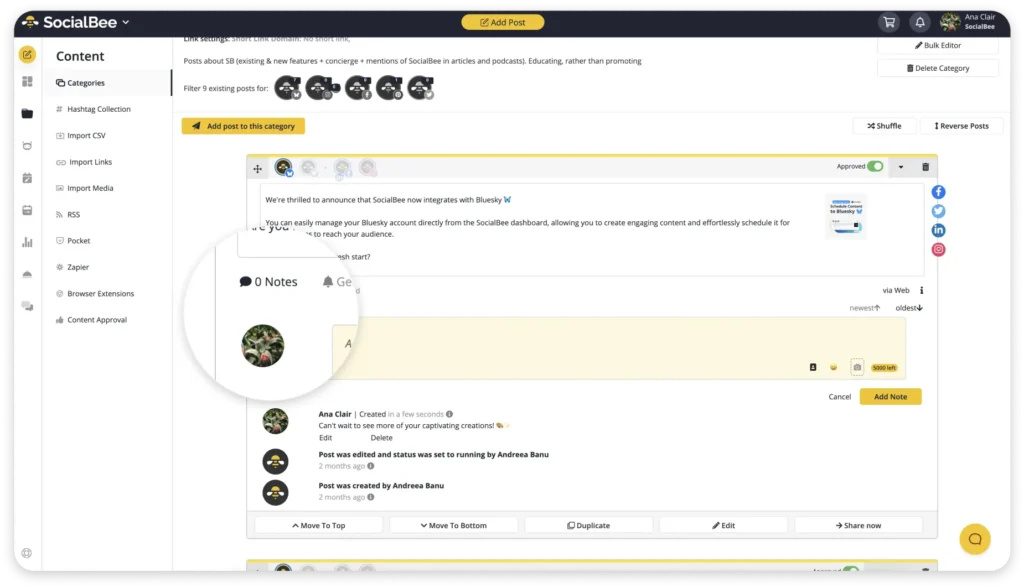
You can set up automatic reminders when a post needs reviewing, but the person in charge should still have the final say.
This is especially useful for agencies, where waiting too long for a client’s approval can throw off the entire week’s posting schedule.
7. Schedule posts to publish automatically
Once a post is finished and approved, you shouldn’t have to be online at exactly 10 AM to publish it.
You can prepare and schedule your posts in advance, so they go live at the right time without you having to publish them manually.
This makes a real difference when you manage social media accounts across multiple social channels or work with clients in different time zones.
With SocialBee, you can schedule posts for Facebook, Instagram, LinkedIn, X, Pinterest, TikTok, YouTube, Threads, Bluesky, and Google Business Profile from one dashboard, without needing to log in to each account and constantly switch tabs.
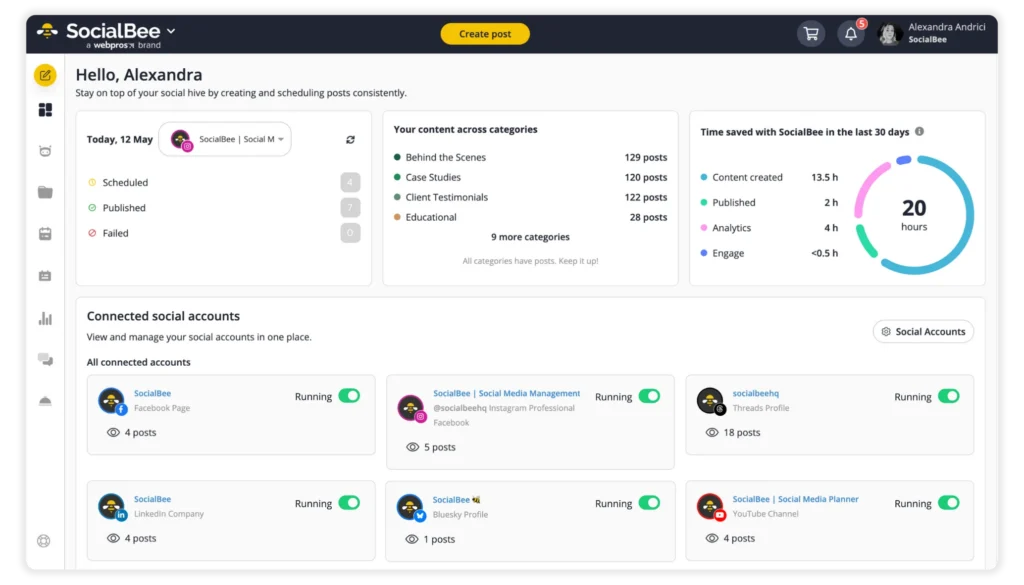
Before scheduling, double-check the selected social media platform, caption, media, links, tags, and publishing time.
8. Keep an eye on failed posts and anything that needs attention
Scheduling a post doesn’t guarantee it’ll go live. An account connection might expire, a video could have the wrong dimensions, or a platform might reject a post because it doesn’t meet its requirements.
You don’t need to keep refreshing your publishing calendar to catch these problems.
Instead, set up notifications for failed posts and make sure someone on your team knows who’s responsible for fixing them.
SocialBee sends notifications for events such as failed posts, comments, messages, mentions, and team notes.
9. Manage social media conversations from one inbox
Publishing content is only half the job. You also need to keep up with the people responding to it.
A social inbox brings supported conversations together so you can see what needs a reply.
When you manage multiple social media accounts or work with a team that shares responsibility for customer conversations, you’ll see the value in this.
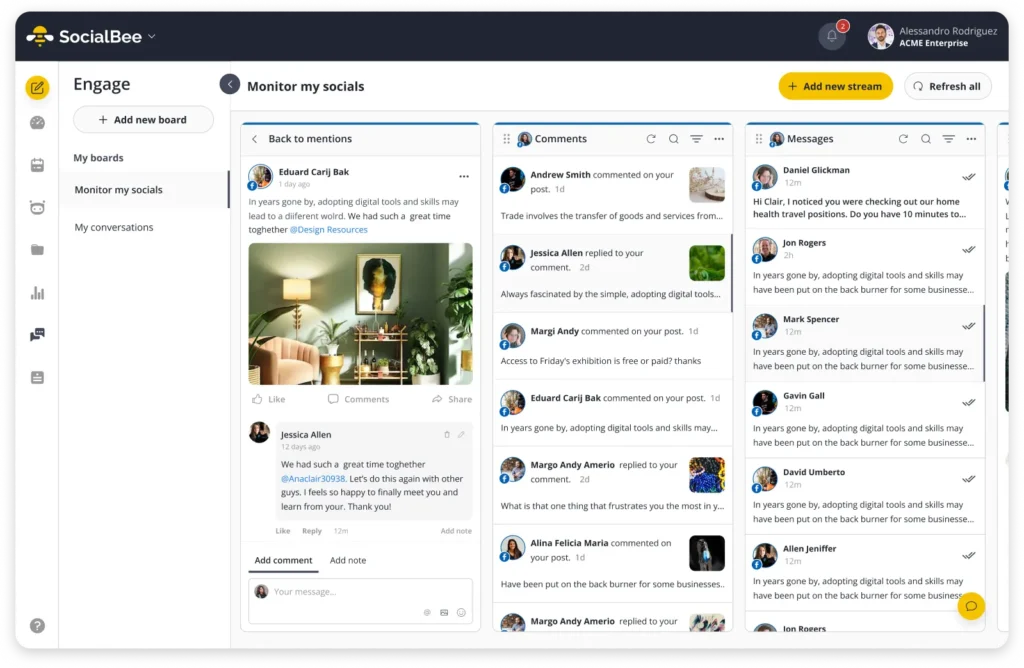
SocialBee’s Engage module lets you manage:
- Facebook Pages: Comments, mentions, and DMs.
- Instagram Business and Creator profiles: Comments, mentions, and DMs.
- Threads: Comments and mentions.
- LinkedIn Company Pages: Comments and mentions.
- X (formerly Twitter): Comments and mentions.
- YouTube: Comments.
For questions about opening hours or whether something is in stock, saved replies can save you time. But when a customer has a complaint or shares personal information, it’s better to respond personally.
If you also need to track conversations happening outside your own profiles, consider social listening tools. Social media listening and brand monitoring can help you find relevant brand mentions, customer feedback, and discussions that might otherwise go unnoticed.
10. Check what’s working and adjust your automations
Once your processes are running, check whether you’re actually spending less time on the tasks you wanted to simplify.
Also look at how your social media presence is performing.
Social media analytics can show you which posts receive the most engagement, which content formats your audience prefers, and whether your posting times need adjusting.
Suppose your educational Instagram carousels consistently receive more saves than your promotional images. That’s a useful reason to make more educational content, not simply publish more often.
SocialBee lets you track engagement metrics and account performance across supported platforms. You can also use its social media reporting features to share results with clients or teammates, with PDF exports available on eligible plans.
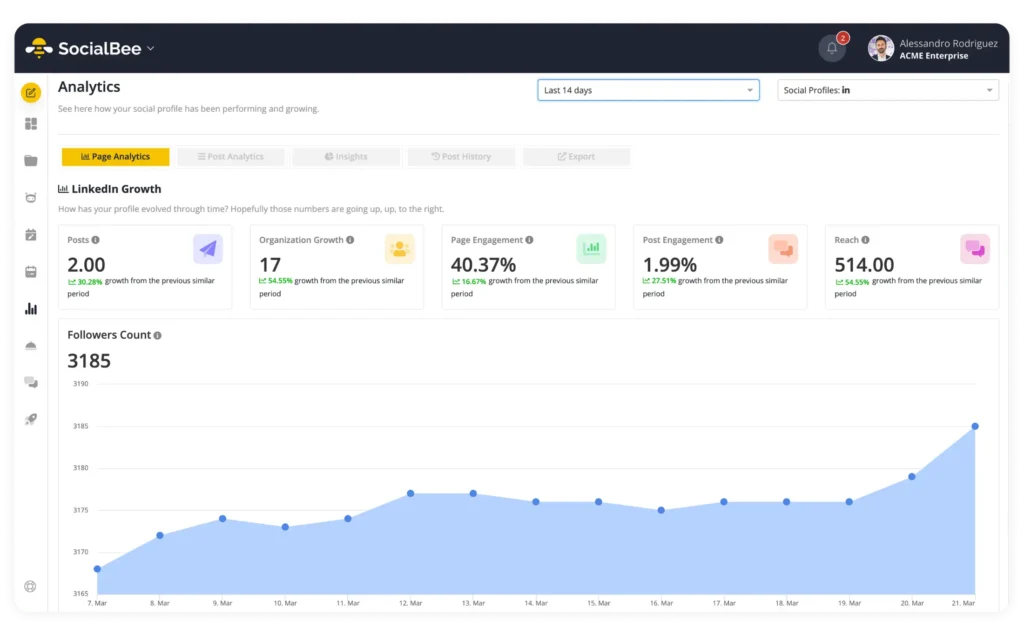
Automated reporting saves time gathering numbers. Deciding what those numbers mean is still your job.
Review your setup once a month. Check whether your recurring content is becoming repetitive, whether approvals are slowing things down, and whether your schedule still fits your goals.
If a particular part of your workflow no longer helps, change it or remove it.
What social media tasks should you automate?
Some social media tasks are easy to automate because they follow the same steps every time, while others need more judgment, especially when you’re making creative decisions or speaking directly with customers.
Here’s where automation makes sense and where you should stay involved:
Social media task | Automation level | What stays human |
Content ideas | Partial | Choosing relevant topics |
Caption drafts | Partial | Editing and fact-checking |
Platform variations | Mostly | Reviewing platform-specific posts |
Content approvals | Partial | Reviewing and approving posts |
Scheduling | Mostly | Setting posting priorities |
Publishing | Mostly | Handling time-sensitive posts |
Replying to incoming messages | Partial | Personalizing replies and handling complex questions |
Managing comments | Partial | Responding to feedback and complaints |
Monitoring brand mentions | Mostly | Deciding which conversations need a response |
Performance tracking | Mostly | Understanding results and deciding what to improve |
Social media reporting | Mostly | Explaining results and recommending next steps |
The right setup also depends on the size of your team and all the tools you’re already using.
If you’re a small business owner managing two social accounts, you may only need a few features, such as AI-assisted content creation, scheduling, and basic analytics.
If you’re running an agency, you’ll probably need more advanced features, including separate client workspaces, automated workflows for approvals, collaboration tools, and automated reporting.
Frequently asked questions
1. Can social media automation hurt engagement?
Automation doesn’t automatically make your engagement go down. However, publishing repetitive content or ignoring comments can make your social media presence feel impersonal. Keep reviewing your posts and answering your audience’s questions and concerns.
2. How much of social media management can realistically be automated?
You can save time by letting tools handle scheduling, publishing, reporting, and other repetitive tasks. But you should still be the one deciding what to post, reviewing creative ideas, handling sensitive conversations, and giving final approvals.
3. Can you automate social media without using AI?
Yes. You can use regular social media tools to schedule posts, organize content queues, send notifications, and generate reports. AI is optional and mainly helps with content ideas, caption drafts, and other creative tasks.
4. How do you keep automated social media content from becoming repetitive?
Plan different content themes, switch up your formats, and review your calendar regularly. Use engagement data to see which topics are working, and avoid scheduling similar posts too close together.
5. Can agencies automate social media management for multiple clients?
Yes. Agencies can automate scheduling, publishing, notifications, and parts of reporting across multiple client accounts. Separate workspaces, approval workflows, and clear permissions help keep each client’s content organized.
Automate the repetitive work, not your entire social media presence
The best social media automation platform is one that gives social media marketers more time to create useful content and respond to the people engaging with your brand.
You don’t need to create a process for your entire social media workflow at once. Start with the task that takes up the most time, see whether changing it helps, and gradually improve the rest of your process.
If you’re looking to manage more of your social media work from one place, SocialBee can help you generate content, plan your calendar, schedule posts, collaborate with your team, and track performance without switching between several tools.
Start your 14-day SocialBee trial and see how much of your weekly social media work you can take off your plate.