A close-up of a computer screen displaying an AI assistant interface with the heading “What can I help with?” and buttons for “Create image,” “Summarize text,” “Brainstorm,” “Code,” and “More.” The screen is framed by a white border against a dark blue background featuring computer code and keyboard keys, with a pencil icon in the bottom-right corner.

How to use AI to create social media posts at scale

Creating more social media content has never been easier.

Give an AI tool a topic and, within seconds, you can have 20 hooks, five LinkedIn posts, three Instagram captions, a video script, and enough ideas to fill next month’s calendar. Add image and video generation, editing tools, and workflow automation, and even small marketing teams can scale content production without scaling their workload at the same rate.

And adoption is moving fast. The global AI-powered content creation market was valued at $2.15 billion in 2024 and is projected to reach $10.59 billion by 2033. McKinsey also estimates that generative AI could create productivity gains worth 5% to 15% of total marketing spend, including through more efficient content creation. 

But producing more isn’t really the difficult part anymore. The challenge is creating more social media posts that are actually worth publishing.

AI content creation can take repetitive work out of the creative process, from idea generation and rough drafts to content repurposing and optimization. The goal isn’t to replace your team or flood your calendar with AI-generated content. It’s to use artificial intelligence to get more from your existing ideas, save time, and give people more room for the parts that still need human creativity, judgment, and a strong brand voice.

In this guide, we’ll look at how to use AI for social media creation across the entire workflow, without losing what made the content worth creating in the first place.

Short summary

  • AI can help with much more than writing captions, from research and planning to visuals, repurposing, and performance tracking.
  • Give AI your target audience, brand voice, guidelines, and product details first. The better the context, the more useful the output.
  • AI can help you create more, but it shouldn’t decide what your brand has to say. Human judgment still matters.
  • Reuse what you already have. A blog, webinar, report, or newsletter can become several useful social posts instead of sitting in your archive.
  • Use performance data to decide what to create next. Look at the topics, hooks, formats, and audience engagement that are actually working.

The impact of AI on social media content creation in 2026

A few years ago, using AI for social media often meant asking a chatbot to write a caption. In 2026, it can be involved in almost every step between having an idea and publishing the post.

Today, social media teams can use AI to:

  • research what their target audience is searching for;
  • summarize reports and research;
  • find trending topics and analyze competitor content;
  • brainstorm content ideas and angles;
  • write rough drafts, hooks, captions, LinkedIn posts, carousel copy, and video scripts;
  • repurpose existing content for different channels;
  • generate visual concepts from prompts or mood boards;
  • remove backgrounds, resize assets, and make other quick edits;
  • generate B-roll, clean up audio, and add captions;
  • turn longer footage into short-form videos;
  • analyze performance data and spot patterns.

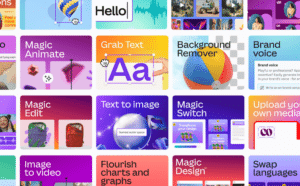
Visual production is one area where that change is particularly easy to see. Tasks that previously required several tools (or someone with much more design experience) are becoming accessible from the same platforms teams already use. Canva’s Magic Studio, for example, has been used more than 16 billion times since its 2023 launch.

A colorful grid of graphic design and AI-powered editing tools, including Magic Animate, Grab Text, Background Remover, Brand Voice, Magic Edit, Text to Image, Magic Switch, Image to Video, Flourish Charts and Graphs, Magic Design, and Swap Languages. Each tile features bold typography, vibrant gradients, and illustrative previews of the tool’s functionality.

Source

But the bigger shift isn’t simply that AI can do more things. It’s that these features are becoming part of the tools marketers already use. Instead of opening one tool to brainstorm, another to write, and another to edit, AI assistants and AI agents are increasingly built directly into social media and marketing platforms. Nearly 60% of marketers now use AI multiple times per week, according to McKinsey. Yet fewer than 10% have started capturing value from AI across end-to-end marketing processes.

That gap matters. Adding more AI tools doesn’t automatically create a better content strategy. Having 20 ways to generate a caption isn’t particularly useful if the caption isn’t worth publishing. The better use of AI is to take some of the repetitive work out of creating content while leaving the actual decisions (what to say, what deserves to be published, and what sounds like your brand) to the people behind it.

There is already a measurable impact. McKinsey reports that some organizations using AI for creative work are seeing two to five times higher creative productivity and 10% to 30% lower creative costs.

For social teams, that’s the real opportunity in 2026. AI doesn’t become more useful just because it can generate 50 ideas in a few minutes. The value is in what happens to the good ideas: getting them researched, written, adapted, designed, and ready to publish with less unnecessary work in between.

How to scale your social media content with AI

Scaling content with AI isn’t about asking for 100 posts and filling your calendar with whatever comes back. It works better when you use AI for the parts that take the most time, while keeping your ideas, brand voice, and knowledge of your audience involved.

Here’s the process we’ll follow:

  1. Give AI the context it needs to understand your brand. Add your target audience, products, goals, positioning, brand guidelines, and examples of posts that already sound like you.
  2. Use AI to find ideas your audience will actually care about. Turn customer questions, search data, reviews, competitor posts, and existing materials into useful topics and new angles.
  3. Generate a realistic social media plan. Decide what to publish, where, when, and in which format based on your actual resources and upcoming campaigns.
  4. Create text, images, and videos faster with AI. Use AI for rough drafts, hooks, scripts, visual concepts, editing, captions, and other repetitive production tasks.
  5. Improve and customize each post for the platform. Adapt one idea for multiple channels, strengthen hooks and CTAs, and make sure each version fits where you’re publishing it.
  6. Repurpose your best work. Turn blogs, newsletters, reports, webinars, and successful social posts into new formats instead of constantly starting from a blank page.
  7. Let performance data guide what you create next. Find patterns in your best-performing topics, hooks, and formats, then use those insights to decide what to create, improve, or repurpose next.

1. Give AI the context it needs to create content for your brand

If you ask an AI tool to “write an Instagram post about our new feature,” it has to fill in a lot of blanks. Who are you talking to? Why should they care? What does your brand usually sound like? What words would you never use?

That’s usually how you end up with generic AI output that technically makes sense but doesn’t sound much like your brand.

Before using AI for content creation, give it some of the same context you’d give a new person joining your marketing team:

  • Your audience: Who are you creating content for? Include their roles, problems, level of knowledge, and what they’re trying to achieve.
  • Your products: Explain what you sell, your key features, product details, use cases, and what makes you different.
  • Your goals and content pillars: Tell AI whether you’re trying to build awareness, educate your audience, generate leads, increase audience engagement, or support a launch. Add the topics your regular content covers.
  • Your positioning and key messages: Explain how you describe the brand and which messages should consistently come through.
  • Your brand voice: Include tone of voice, preferred terminology, style rules, and things to avoid. “Conversational” isn’t very specific. “Short sentences, practical examples, no corporate buzzwords, no emojis” gives AI much more to work with.
  • Real examples: Add a few social media posts that already sound right. Tell AI what you like about them so it can identify patterns rather than simply copy them.

You don’t need to squeeze all of this into every prompt. Keep your main brand information somewhere you can refer back to, then give AI the details that are relevant to the task at hand.

For example, if you’re looking for ideas, keep the prompt focused on that:

“Give me three LinkedIn post ideas about [topic] for [target audience]. Focus on [specific problem]. Our tone is [2–3 characteristics]. Avoid [words or phrases].”

Then take it one step at a time. Pick the idea you like before asking AI to develop the hook, write the post, or create variations. It’s much easier to steer the result when you’re asking for one thing at a time.

Tip: Save your brand brief, brand guidelines, useful prompt ideas, and examples somewhere your team can easily access them. Update them when your positioning, products, or brand voice changes.

2. Use AI to find content ideas your audience will actually care about

Getting AI to generate 50 content ideas takes about a minute. Finding five that are actually worth posting is a different story.

Start with what you already know about your audience. Look at the questions and conversations you already have. 

You can give AI:

  • Sales call notes to find questions prospects keep asking.
  • Support tickets to spot recurring problems or confusion.
  • Reviews and survey answers to see how customers actually talk about your product.
  • Comments and Reddit threads to find topics people are already discussing.
  • Search terms to see what people want to know when they find your website.

You might notice that customers keep misunderstanding one feature, comparing you to the same alternative, or asking something you’ve somehow never answered on social media.

You can also use AI when you already have the idea, but it isn’t quite a post yet.

Say you sell coffee and notice customers asking why the same beans taste different at home. That’s already much more useful than asking AI for “coffee content ideas.” 

From that one question, you could create:

  • a V60 vs. French press comparison;
  • a video about grind size;
  • a carousel on common brewing mistakes;
  • a series where you change one brewing variable at a time.

Your existing posts are another good place to look. Give AI your recent post titles and ask it to find what you’ve talked about too much, what you’ve barely covered, and what questions someone might still have.

You can do the same with competitor posts. Not to copy them, but to see what everyone in your industry keeps talking about, and what they aren’t talking about yet.

The main thing is to give AI something real to work with. Actual questions, conversations, searches, reviews, and existing posts will usually get you much further than “give me 50 ideas.” Then you decide which ones are actually worth publishing.

PRO TIP

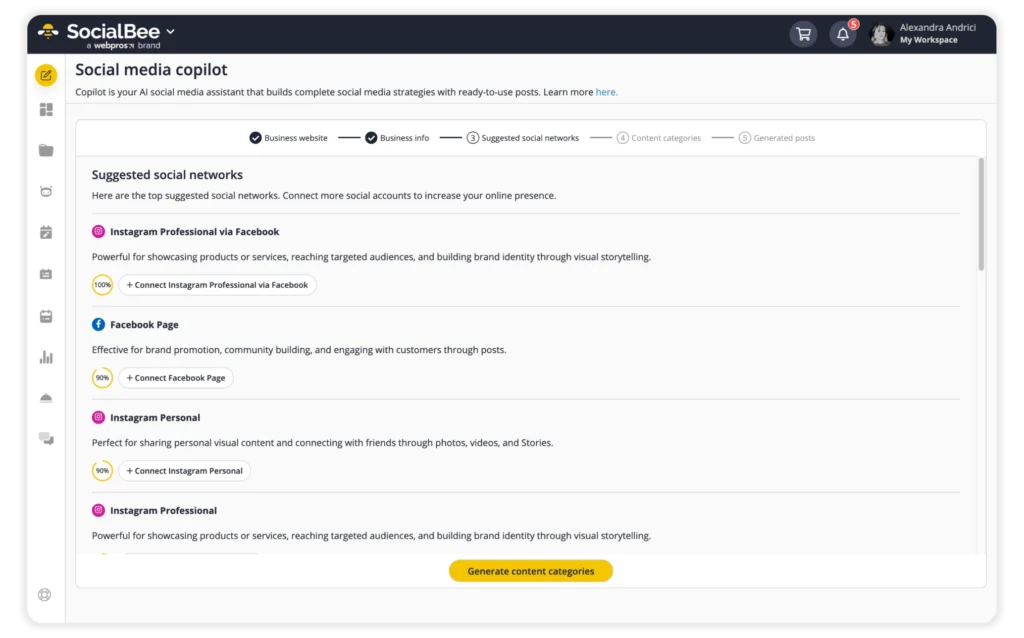
If you don’t want to do all the initial planning yourself, SocialBee‘s Copilot can help. Add your website or tell Copilot about your business, and it can suggest content categories, recommend social networks, and generate posts based on your target audience and goals. You can edit its suggestions instead of starting from a blank page.

3. Generate a realistic social media content plan

Once you have a long list of ideas, AI can help you figure out what to actually do with them.

Start with your real constraints. Tell AI where you post, how often you can publish, what formats you can actually produce, what’s coming up, and how much time your team has.

Someone creating everything alone probably shouldn’t end up with a plan that requires four videos, three carousels, and a photoshoot every week.

For example, you could start with:

“We post four times a week on LinkedIn and three times on Instagram. We can produce one video and one carousel per week. Using the approved ideas below, create a four-week content plan.”

Then refine it. Add your launch dates, events, campaigns, or other priorities and ask AI to adjust the plan around them.

This is where it can help you decide which ideas make sense when and where. 

For example:

  • a product launch might need teasers before the announcement and follow-up posts afterwards;
  • a detailed educational topic might work better as a carousel;
  • a customer question could become a quick video;
  • a seasonal post probably has one obvious publishing date.

AI can also give you a quick sense check before you commit to the plan. If you’ve somehow ended up with 12 product posts and two educational ones, ask it to flag the imbalance. You can do the same for formats, topics, audiences, or stages of the customer journey.

It’s particularly useful when several things are happening at once. Add your product launches, events, email campaigns, landing pages, and seasonal moments so your social posts support what the rest of the marketing team is already doing.

Just keep the word realistic in mind. AI doesn’t know that your designer is on holiday, your founder hates filming videos, or your team needs three days to approve a LinkedIn post unless you tell it. A plan you can actually produce is much more useful than a perfect-looking calendar you abandon after a week.

4. Create text, images, and videos faster with AI

You don’t need AI to make the whole post. It’s often more useful for the annoying little tasks that take longer than they should.

For text, you can turn notes into a first draft, come up with a few hooks, shorten a caption, write a video script, or turn a longer idea into a carousel. If you’ve already written something, ask AI for a few alternatives rather than starting again.

For images, you can test concepts, generate backgrounds, try a few visual variations, or resize and edit something you already have. This is especially handy when you need a quick visual but don’t have a designer available.

For video, AI can add captions, clean up audio, suggest B-roll, find useful moments in a longer recording, and cut them into shorter clips. A 30-minute webinar could easily give you three or four videos without someone watching the entire thing several times.

Use AI for the parts that save you time. Your ideas, expertise, footage, and creative direction should still come from you.

PRO TIP

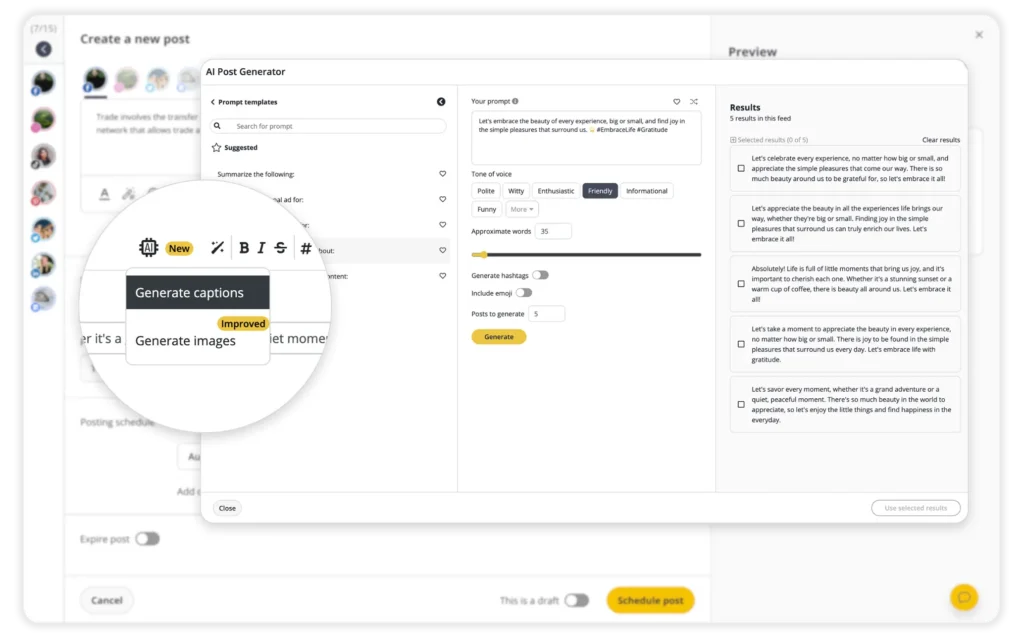
You can do the content generation part directly in SocialBee. The AI Post Generator includes 1,000+ prompt templates and can generate captions and images while you’re building your post. You can create a few versions, choose the one closest to what you want, edit it to match your brand voice, and schedule it without moving everything between different AI tools.

5. Improve and customize your content for every platform

Posting on multiple channels doesn’t mean copying the same caption five times.

Start with one piece of content and ask AI to adapt it to how you actually use each platform. A longer piece of LinkedIn content could become a shorter Instagram caption, a carousel, a 30-second video script, or several short social posts. Give the AI your style rules and brand voice so the versions still sound like they came from the same company.

AI is also useful as an extra editor. Before publishing, give it your draft and ask specific questions:

  • Is the main point clear in the first two lines?
  • Give me five stronger hooks without changing the rest of the post.
  • Where does this caption become repetitive?
  • Is the CTA actually connected to the post?
  • What would you remove to make this LinkedIn post 30% shorter?
  • How could this carousel work as a 20-second video?
  • Which slide has too much text?

You can do the same with visual content and videos. Ask AI editing tools to suggest cuts, identify slow sections, create captions, resize assets, or adapt the same creative for different formats.

The useful part isn’t accepting every AI output. It’s using AI assistants to give you another perspective, then applying human review before anything goes live. Optimizing content should make a good idea clearer or better suited to the platform, not remove everything that made it sound like you in the first place. 

6. Repurpose your best content

Before coming up with something new, look at what you already have.

Take a blog post that performed well and give it to AI with a specific job: “Pull out five points that could work as standalone LinkedIn posts. Don’t summarize the article. Each post should make sense without reading the original.”

You can do the same with pretty much anything you’ve already published:

  • Turn a newsletter into three social posts with different angles.
  • Pull the strongest stats from a report and turn them into carousel slides.
  • Give AI a webinar transcript and ask it to find five moments worth turning into short clips.
  • Turn a customer interview into quotes, FAQs, and posts around the problems they mentioned.
  • Take a good LinkedIn post and adapt the idea into an Instagram carousel or short video.
  • Give AI your five best-performing posts from the last six months and ask which ones could be updated rather than replaced.

The useful part of content repurposing isn’t publishing the same thing everywhere. It’s finding another way to use an idea that already worked.

Good content distribution is especially helpful for marketing teams working across multiple channels. One report doesn’t have to be one report. It can give you a few weeks of social content without adding a few weeks of content production.

PRO TIP

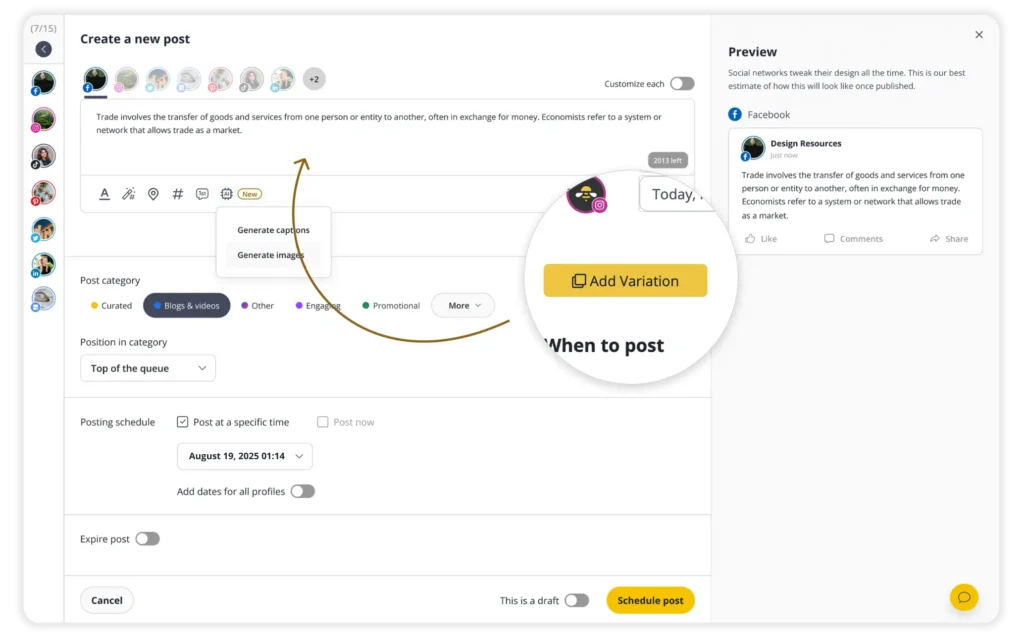
Repurposing gets much faster when you don’t have to rewrite every caption yourself. SocialBee‘s AI customization feature can take one post and create separate captions for the social networks you’ve selected. You can review each version, make your own edits, and keep all the platform-specific variations connected to the original post.

7. Let performance data guide your content strategy

Your performance data is also a pretty good source of content ideas. Instead of checking which post got the most likes and moving on, use AI to look for patterns across a larger batch of social posts.

Export your performance data from the last month or quarter and ask your AI tool specific questions, such as:

  • Which LinkedIn posts with numbers in the first line got the most clicks?
  • Do behind-the-scenes videos get more comments than product videos?
  • Which carousel topics get the most saves?
  • Do posts featuring employees perform better than designed graphics?
  • Which topics consistently bring people to our website?
  • Which hooks are associated with higher video watch time?
  • Are there posts with high saves but low reach that we should repurpose?
  • Which topics have performed well more than once, rather than relying on one unusually successful post?

You can then use those patterns to plan your next batch of content. A carousel with high saves but low reach could become a short video. A LinkedIn post that drove a lot of clicks six months ago could be updated with new data. If three posts about the same product feature performed well, you could turn that topic into a recurring series rather than moving on to something completely different.

Used this way, AI connects performance tracking with your content strategy. It helps you see what drives audience engagement, what deserves content repurposing, and what probably isn’t worth more production time.

How SocialBee helps you create more social media content with AI

A lot of what we’ve covered so far can happen directly inside SocialBee. You don’t need to brainstorm in one tool, write captions in another, and then copy everything into your social media management platform.

SocialBee brings AI into the same place where you’re already planning and creating your posts. You can use it for three main things: deciding what to post, creating it, and adapting it for different platforms.

Start with a strategy using Copilot

If you’re not sure what you should be posting in the first place, SocialBee’s Copilot can build a social media strategy around your business.

Give it your website, and it can pull information about your business, services, target audience, tone of voice, and language. You get a chance to review that information before anything is created, which is important. AI is much more useful when it knows what you actually sell and who you’re talking to.

From there, Copilot can recommend which social networks to focus on, suggest content categories, and create posts for those categories. If you don’t have a website, you can provide the same information through a short conversation with Copilot.

For a small business starting its social presence, for example, this means you don’t have to begin with an empty content calendar and “okay, what do we post?” You already have a first structure to work from, which you can then adjust based on what you know about your audience.

Generate captions and images while you’re creating the post

When you already know what you want to talk about, SocialBee’s AI Post Generator can help turn that idea into a post.

You can write your own prompt or choose from more than 1,000 prompt templates. From there, you can adjust the tone, length, hashtags, and emojis. If the first result is almost there, generate a few alternatives and see whether another hook or angle works better.

You can also create images without leaving SocialBee. Describe what you need, generate a few options, choose one, and add it to your post.

So, say you’re promoting a webinar next week. You could use AI to come up with a few caption options, choose your favourite, generate an image to go with it, make your edits, and schedule the finished post, all in the same place.

Turn one post into platform-specific versions

Repurposing a post shouldn’t mean copying the exact same caption five times.

With SocialBee’s AI customization feature, you can create one post and generate different captions for each social network you’ve selected.

That means you can keep more detail for LinkedIn, make the Instagram version shorter and more visual, and adjust the copy for the way people actually use each platform. You don’t have to squeeze the original caption into every channel.

You can review and edit every version before publishing, while keeping them connected to the same original post. If you’re managing several social channels, it saves you from rewriting the same idea over and over without taking the final decision out of your hands.

That’s where AI is most useful in SocialBee. You still decide what’s worth saying and how you want to say it. AI just makes it easier to turn that idea into posts that work across different platforms.

What to keep in mind when using AI for social media

AI can save time, but it also makes it very easy to create and publish something before anyone has properly looked at it. 

A few basic rules can prevent most problems when using AI on social media:

  • Always review and fact-check AI output. Check names, numbers, links, product details, and any claims before publishing. AI can confidently make things up.
  • Be careful with the information you share. Don’t paste customer data, internal documents, passwords, unreleased product information, or other confidential material into AI tools without knowing how that data is handled.
  • Check each platform’s AI rules. Social media platforms have different requirements around AI-generated content, altered images, synthetic media, and disclosure, and these rules continue to change.
  • Keep a person responsible for the final post. AI can create rough drafts and suggest improvements, but human review should cover accuracy, brand voice, context, and final approval.
  • Don’t post more just because you can. Going from three useful posts a week to three mediocre posts a day isn’t scaling. Use AI to make creating good content easier, not as an excuse to post more for the sake of it.

The simplest rule is to treat AI as part of your existing workflow, not the person responsible for it.

Frequently asked questions

What are the best AI tools for social media content creation?

It depends on what you need AI to do. Some social media management tools have AI built in, so you can come up with ideas, write and adapt posts, plan your content, and publish without jumping between platforms. AI assistants are useful for research, brainstorming, outlines, and first drafts, while design and editing tools make more sense for images and video.

Before adding another AI tool, check what the tools you’re already paying for can do. If the features are already there, there’s little reason to add another tab to your day.

What are the biggest mistakes people make when using AI for content?

The biggest one is copying whatever AI gives you and calling it done. A first draft can save you time, but it can also be generic, get facts wrong, or sound nothing like your brand. It still needs someone to read it, question it, and make it better.

Another mistake is assuming more content is automatically better. AI makes it very easy to turn 10 posts into 50, but there’s not much point if nobody wants to read the other 40. You still need a reason to create something, a clear idea of who it’s for, and someone making the final call before it goes live.

What are the best AI prompts for social media content creation?

The best prompts give AI enough context to make useful decisions. Instead of asking “Write me a LinkedIn post,” include your target audience, goal, topic, brand voice, key message, platform, format, and any style rules.

For example:

“Turn this blog post into three LinkedIn posts for marketing managers at small businesses. Each post should focus on a different takeaway. Keep the tone conversational and practical, avoid buzzwords, and finish with a question that encourages discussion.”

You can also give AI examples of successful content and explain what you like about them. The more useful context you provide, the less editing the AI output usually needs.

What parts of content creation should I use AI for?

Use AI for the things that take time but don’t necessarily need your full attention. Think brainstorming content ideas, researching your audience or competitors, getting a first draft down, repurposing existing content, creating a few variations of the same post, editing, translating, making visuals, or digging through performance data.

That doesn’t mean AI needs to be involved in everything you create. The important decisions should still be yours: what you want to say, which ideas are actually worth pursuing, whether something sounds like your brand, and whether what you’re publishing is accurate.

Think of AI as the extra pair of hands, not the person deciding what gets made. 

What should you look for when choosing an AI social media post generator?

Choosing an AI social media post generator isn’t just about finding a tool that can write captions. You need something that fits the way you work, supports the platforms you use, and helps you produce content that sounds like your business. Before committing to a tool, think about which parts of your current social media management process take the most time and which features would genuinely make a difference.

Start with platform compatibility. If you manage several accounts, check whether the tool supports the major social media platforms you use, such as Instagram, Facebook, LinkedIn, and X. Some tools focus primarily on writing, while others offer additional features for creating visuals, planning content calendars, and scheduling posts. Having these functions together can make managing multiple accounts easier, but only if they match your needs.

It’s also worth testing how well the tool handles your brand voice. Can you provide examples of your existing content? Can you adjust the tone, rewrite a caption, or generate different versions of the same idea? These details matter because the first draft rarely gets everything right. You want to be able to edit the output and make it your own, rather than spending more time correcting generic content than you would have spent writing it yourself.

Finally, compare the free plan, available paid plans, and any usage restrictions. Check how many posts you can generate, whether you can connect your social accounts, and which scheduling or collaboration features are included. Some tools let you create publish-ready posts with just a few clicks, while others require you to move between several applications. Try a free version or trial, if available, before making a decision. The right tool should fit your existing workflow, save you time, and give you enough control to create content you’re happy to publish.

Can AI help a small business stay consistent on social media with limited time?

Yes. For a small business, maintaining an active social media presence can be difficult when content creation competes with customer service, sales, and everyday operations. AI can help reduce the time spent planning and drafting posts, making it easier to keep your accounts active without having to come up with a new idea every day.

A practical approach is to plan content in batches. Set aside time at the beginning of the week or month to choose your content topics, identify upcoming events, and decide what you want to communicate.

You can then use an AI assistant to generate ideas, draft captions, and adapt selected topics for different social platforms. For example, a customer success story could become a LinkedIn post, while a quick tip from the same story could work as an Instagram caption.

You can also prepare several drafts at once and organize them in a content calendar. Once you’ve reviewed the wording, checked the details, and added any necessary visuals, schedule posts for suitable posting times. This gives you a steady stream of content to work with and leaves more room in your day to respond to comments, answer questions, and interact with customers.

However, consistency doesn’t mean posting for the sake of it. Pay attention to what your audience responds to, and make adjustments when certain topics or formats perform better than others.

Keep your brand voice recognizable and make sure your posts reflect what is actually happening in your business. AI can take care of some repetitive tasks, but your experience, opinions, and relationships with customers are what make your social media presence distinctive.

Even a simple workflow can help a small team stay active and build stronger connections with its audience.

How can you create social media posts for multiple platforms without spending hours on content creation?

Creating content for several social platforms can quickly become time-consuming, particularly when you’re managing a business account alongside other responsibilities. You need fresh ideas, suitable visuals, captions that fit each platform, and a consistent posting schedule. An AI social media post generator can help you manage these tasks without starting from scratch every time you publish.

Start by planning a few core content topics for the week or month. These could include product updates, customer questions, industry insights, behind-the-scenes content, and practical tips. If you’re experiencing writer’s block, use AI to generate ideas based on your audience, business goals, and previous posts. You can then choose the topics that make sense for your brand and turn them into engaging social media posts.

Once you’ve selected your topics, adapt each idea to the relevant platform. For example, you might use a professional tone for LinkedIn posts, create a more visual Instagram post, or write a short discussion starter for another social media channel. Rather than copying the same caption across every account, adjust the opening, length, format, and call to action to suit the audience on each platform.

Many AI tools make it possible to generate social media posts, suggest social media captions, and create visual content with just a few clicks. Depending on the tool, you may also be able to schedule posts and organize your content calendar in one place. These features can make your social media workflow easier to manage, especially when you’re publishing across multiple platforms.

Still, automation shouldn’t mean publishing everything without checking it. Review each draft for accuracy, make sure it reflects your brand voice, and add details that only you know about your business or customers. With a little planning and a clear review process, you can create social media content more efficiently while keeping your posts relevant, personal, and consistent.

How can you keep your brand voice consistent across different social media platforms?

Keeping your brand voice consistent across social media platforms can be challenging, especially when you’re posting on several channels at once. A LinkedIn post might need a more professional tone, while an Instagram caption can be more casual and conversational. The goal isn’t to publish the same message everywhere, but to make sure every post still sounds like it comes from your brand.

Start by defining a few basic guidelines for your communication style. Think about the words you commonly use, how formal or informal you want to sound, the topics you cover, and the way you address your audience. You can use these guidelines when writing briefs, creating templates, or working with an AI social media post generator. Include examples of previous posts that reflect your brand voice so the tool has a clearer idea of what you’re looking for.

Before publishing, read each post as if you were speaking directly to a customer. Replace generic phrases, remove claims that don’t sound like your business, and make sure the message fits the social media channel. A consistent voice helps people recognize your content over time, even when the format and subject change.

How can you turn existing content into social media posts without repeating yourself?

You don’t need to come up with completely new ideas every time you want to publish something. Your existing content can be a useful source of inspiration, whether it’s a blog article, a customer question, a webinar, a case study, or a product update. The trick is to find different angles rather than simply shortening the original text.

For example, a single blog post can become a LinkedIn post sharing one key takeaway, an Instagram carousel explaining a process, or a series of short posts answering questions raised in the article. You could also pull out a statistic, share a practical tip, or ask your audience for their opinion on the topic. Each format gives you a reason to revisit the subject without making your social media feed feel repetitive.

When you use AI to help with this process, provide the original material and explain what you want each post to achieve. Ask for different angles, audiences, and formats instead of requesting several versions of the same caption. Review the results against the original source, check any facts, and add examples or opinions that reflect your experience. This makes it easier to create social media content from work you’ve already done while giving your audience something useful in each post.

What should you include in a prompt to generate better social media posts?

The quality of a generated post often depends on how much useful context you provide. A short instruction such as “write an Instagram post about our new product” leaves too many decisions open. The result may be grammatically correct, but it can also sound generic or miss the point of your campaign.

A more useful prompt explains who the post is for, what you’re promoting, what you want people to take away from it, and what action you’d like them to take. You should also mention the social media platform, the preferred tone, any important details that must be included, and any phrases or claims to avoid. If you have a character limit or a particular format in mind, include that too.

For example, instead of asking for a caption about a new product, explain that you need an Instagram caption for small business owners, highlighting one practical benefit in a friendly, straightforward tone. Ask for a clear call to action and a few relevant hashtags, and provide the product details the post must use. You can then fine-tune the draft by asking for a shorter opening, a more natural tone, or a stronger closing line.

Treat the first result as a draft, not a finished post. Read it carefully, check that the details are accurate, and make changes wherever the wording doesn’t sound like something your business would actually say. A few specific instructions can save editing time and give you a much stronger starting point.

How can you fit AI tools into your social media workflow without losing the personal touch?

AI can help with several parts of social media management, but it doesn’t have to take over the entire content creation process. For most businesses, the best place to start is with tasks that take up time but still follow a fairly clear process, such as generating content ideas, drafting captions, adapting posts for different channels, or preparing variations for a campaign.

Begin by looking at how you currently plan and publish content. Identify the steps that slow you down, then decide where AI could make a practical difference. You might use it to brainstorm topics for your content calendar, turn a long article into several post ideas, or prepare a first draft that you can edit. Keep the steps that require your knowledge of the business, your customers, and your industry firmly in your hands.

It’s also worth establishing a simple review process before anything goes live. Check facts, links, product information, tone, and whether the post gives people a real reason to engage. For sensitive topics, customer complaints, or conversations that need empathy, a personal response is often more appropriate than automated wording. AI-generated posts should never replace your judgment about what your audience needs to hear.

Finally, review the results rather than assuming that faster content creation will automatically improve performance. Look at comments, shares, clicks, and other relevant metrics to see which posts are working. Use those insights to adjust your approach, improve future prompts, and decide which tasks are worth automating. With a clear workflow and a human review at the right stages, AI can reduce repetitive work while leaving the creative decisions and relationships with your audience to you

AI can scale your output, but it shouldn’t replace your input

AI can help you create more content, but that doesn’t mean you should hand over the entire creative process.

Use it for the parts that usually eat up your time: research, planning, first drafts, editing, repurposing, creating visuals, or automating repetitive tasks. Give it a brand kit and clear guidelines, and it can also help you keep your content consistent across different platforms and formats.

The same goes for visuals. Generative AI, design tools, and features like Magic Design can make it much easier to turn an idea into something you can actually post, especially if you don’t have a designer sitting next to you. But generating a mood board in 30 seconds doesn’t mean you suddenly have a campaign. You still need the idea first.

That’s probably the best way to think about AI in the creator economy. It can help you get from idea to published content faster, but it can’t decide what you actually have to say.

Your audience, expertise, opinions, taste, brand voice, and creativity still have to come from somewhere. AI can help you make more from them, but they remain the input.

If you want to use AI for your social media content without adding five more tools to your stack, start your 14-day free SocialBee trial and put these ideas into practice.
SocialBee: Your AI-powered social media management tool
Create posts, publish, analyze, engage and collaborate, all from SocialBee.
Summarize this post

SocialBee

Social media management made simple

Join thousands of brands growing with SocialBee

Read the latest articles

Level up your social media marketing with exclusive resources delivered straight to your inbox

We’re SocialBee LABS SRL, part of WebPros. We use the information you provide to share relevant content and product updates, as outlined in our Privacy Policy. You can opt out anytime.

Something special for you!

Get 20% off your SocialBee plan for 3 months. Just enter your email below and we’ll send you the discount code.

Email us at [email protected] if you need any help.