
How long can a Facebook Reel be? Short answer: There isn’t a fixed maximum anymore. Meta announced in June 2025 that it was removing length and format restrictions from Facebook Reels as it began turning all new Facebook videos into Reels. That means Reels can now be short or long once the change has reached your account.


What’s the maximum length of a Facebook Reel in 2026?
Facebook Reels don’t have a fixed maximum length in 2026. This means you can publish longer videos as Reels without having to cut them down to Facebook’s old 90-second limit.
How Facebook Reel length limits changed
Facebook Reels haven’t always allowed longer videos. In March 2023, Facebook increased the maximum Reel length from 60 to 90 seconds.
That 90-second limit changed in June 2025. As Meta moved all new Facebook videos to the Reels format, it announced that Reels would no longer have length or format restrictions. The change rolled out gradually to profiles and Pages worldwide, which is why you may still come across older information that lists 90 seconds as the maximum.
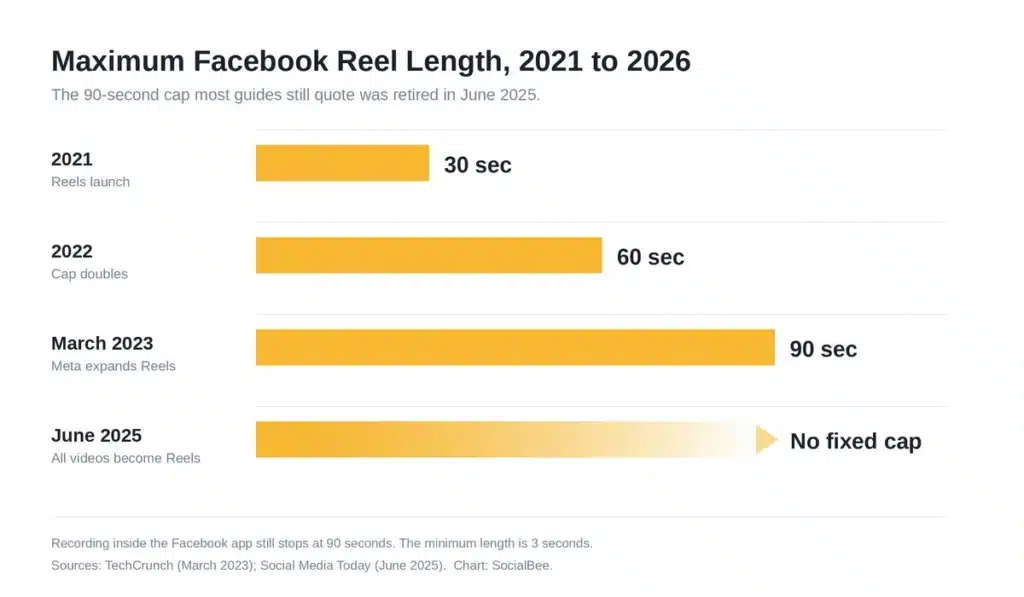
[Sources: TechCrunch (March 2023); Social Media Today (June 2025). Chart: SocialBee.]
How long can a Facebook Reel recorded in the app be?
Facebook doesn’t set a fixed maximum length for Reels created in the app. You can create a quick 30-second Reel, a three-minute video, or even a video that runs for more than 20 minutes. In other words, the old 90-second limit no longer applies.
What’s the minimum length for a Facebook Reel?
Meta doesn’t specify a minimum length for publishing a Facebook Reel. However, if you want to monetize your content, your Reel needs to be at least 10 to 15 seconds long, depending on the monetization format.
How long should a Facebook Reel be?
Just because Facebook lets you post longer Reels doesn’t mean every video needs to be long. Meta recommends using different Reel lengths depending on what you want your content to do.
According to Meta, shorter Reels between 10 and 30 seconds can help you reach and engage more people, while longer Reels from 30 seconds to three minutes, or even over three minutes, can drive deeper engagement and help you build a community.
So, choose your Facebook Reel length based on what you want the video to achieve:
- 10 to 30 seconds: Use shorter Reels for quick tips, hooks, product highlights, and other ideas you can get across quickly.
- 30 seconds to 3 minutes: Give yourself more time for tutorials, product demos, explainers, and stories that need context.
- 3+ minutes: Go longer when the topic genuinely needs it, such as an in-depth tutorial, interview, or detailed explanation.
The key is not to stretch a Reel just to make it longer. If you can make your point in 20 seconds, don’t turn it into a minute-long video.
Does Reel length affect reach on Facebook?
Not directly. Facebook doesn’t rank Reels by how long they are.
It watches completion.
Twenty-five seconds that people finish beats ninety that lose half the room in the first five. Shorter Reels win because short videos are easier to finish, which is a different thing from the algorithm preferring them. Our breakdown of the Facebook algorithm covers what else gets weighted.
Then check your own numbers, because none of this beats your own data: sort your Reels analytics by average watch time, find where the drop-offs cluster, and cut to just before that point.
Facebook Reel specs to check before you post
Facebook gives you a lot more freedom with Reels now. Your video can be any length or orientation, but there are still a few technical specs worth checking before you post.
Here are the current Facebook Reel specs for iOS and Android:
| Facebook Reel specs | Facebook Reel requirements and recommendations |
| Length | Any length |
| Orientation | Any orientation |
| Video format | MP4 recommended |
| Resolution | 1080p recommended |
| HDR | Recommended, but some creative effects don’t support it yet |
| Video codec | H.264 or H.265 recommended; VP9 and AV1 also supported |
| Frame rate | 24–60 FPS recommended |
| GOP | Closed GOP of 2–5 seconds recommended |
| Chroma subsampling | 4:2:0 |
| Pixels | Square pixels |
| Scan type | Progressive scan |
| Audio channels | Stereo |
| Audio codec | AAC Low Complexity |
| Audio sample rate | 44.1 kHz or 48 kHz |
| Audio bitrate | 128 kbps or higher |
You probably won’t need to think about settings like chroma subsampling or GOP for every Reel. Most phones and video editing tools will handle them for you. The main things to check are your resolution, format, frame rate, and audio quality.
And while Facebook accepts videos in any orientation, 9:16 is still the better fit when you’re creating a Reel specifically for a vertical, full-screen viewing experience.
How to schedule Facebook Reels with SocialBee
Once your Reel is ready and meets Facebook’s requirements, the next step is getting it published. Instead of opening Facebook every time you have a Reel to share, you can use SocialBee to prepare it ahead of time and schedule it to go live automatically on your Facebook Page.