


¿Estás buscando las mejores alternativas a Sprout Social?
Sprout Social se ha establecido como líder en la gestión de redes sociales que atienden tanto a empresas como a vendedores individuales. Sin embargo, hay varias herramientas que ofrecen mejores prestaciones, ¡por un precio más conveniente!
En este artículo, exploraremos diez de las mejores alternativas a Sprout Social para este año. Compararemos todo, desde funciones, opciones de precios, atención al cliente y mucho más, para ayudarte a descubrir la que más te convenga. Comencemos


Breve resumen
- Hay muchas alternativas a Sprout Social que ofrecen características y funcionalidades similares para la gestión de redes sociales.
- Los principales aspectos a tener en cuenta al elegir una alternativa son el precio, la facilidad de uso, la atención al cliente y las integraciones disponibles.
- Las principales alternativas a Sprout Social en 2024 son SocialBee, Emplifi, Planable, Hootsuite, Khoros, Loomly, MavSocial, MeetEdgar, NapoleonCat y Zoho.
¿Qué deben buscar los gestores de redes sociales en las herramientas de gestión de redes sociales?
Encontrar la plataforma de gestión de redes sociales adecuada que cubra tus necesidades no es negociable. Así que, si estás buscando la herramienta de gestión de redes sociales definitiva, ¡te cubrimos las espaldas!
Aquí tienes ocho características imprescindibles que debes buscar en una alternativa a Sprout Social:
- Múltiples plataformas de medios sociales
- Características de la IA
- Precios justos
- Gran atención al cliente
- Calendario intuitivo de redes sociales
- Categorización de contenidos para publicaciones en redes sociales
- Repetición de mensajes
- Múltiples espacios de trabajo para clientes
1. Múltiples plataformas de medios sociales
Sprout Social es compatible con muchas redes sociales populares, como Facebook, Twitter, Instagram, LinkedIn y Pinterest. Sin embargo, hay muchas otras opciones además de Sprout Social que te permitirán publicar contenido cómodamente en las principales plataformas sociales.
2. Características de la IA
Aunque Sprout Social se está subiendo poco a poco al carro de la IA, hay muchas otras herramientas más asequibles que han implementado capacidades de IA en su plataforma. Por ejemplo, hay varias generadores de publicaciones basados en IA que pueden ahorrar tiempo y esfuerzo a los gestores de redes sociales creando contenidos atractivos de forma eficaz.
Estas herramientas pueden producir contenidos de alta calidad que conecten con el público y mantengan la coherencia de la marca. Esto puede ayudar a los usuarios a agilizar su proceso de creación de contenidos, mejorar enormemente su impacto en las redes sociales y lograr una mayor participación y mejores resultados.
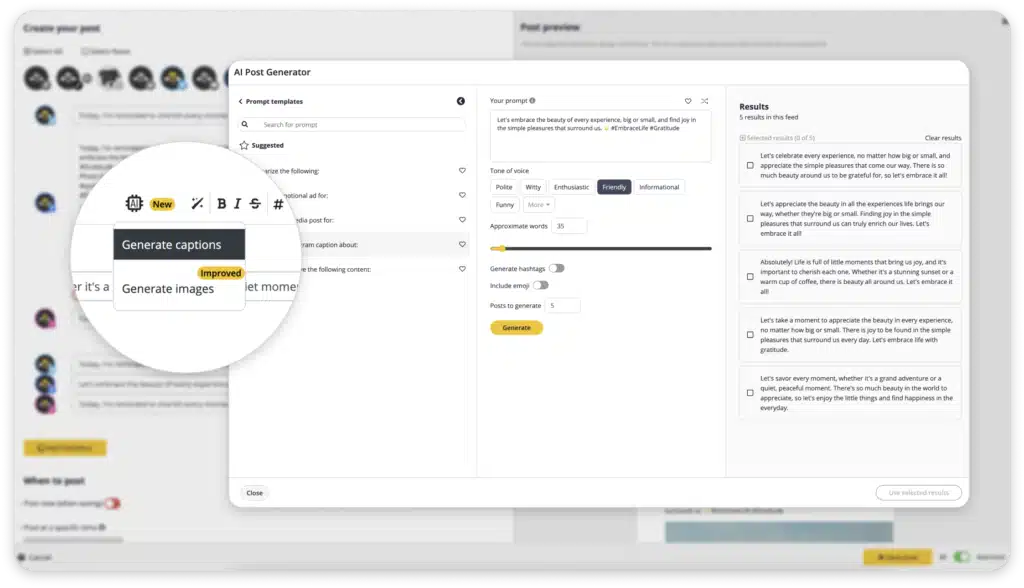
CONSEJO PROFESIONAL: Prueba gratis el generador de publicaciones basado en IA de SocialBee. ¿Te ha impresionado? Considera la posibilidad de crear una cuenta en SocialBee para programar publicaciones y crear elementos visuales que reflejen tu mensaje único.
|
3. Precios justos
Sprout Social es bastante caro, a partir de 249 $ al mes y 199 $ adicionales por cada usuario extra, lo que puede representar un obstáculo importante para la colaboración en equipo. Esto significa que las pequeñas empresas no pueden disfrutar plenamente de todas las ventajas sin tener que gastarse una fortuna.
Dado que las herramientas de gestión de redes sociales son inversiones a largo plazo, tienes que encontrar opciones que cumplan todos los requisitos posibles por un precio justo.
4. Gran atención al cliente
Últimamente, Sprout se ha enfrentado a reacciones negativas por la lentitud de su servicio de atención al cliente. Los usuarios se han quejado de tener que esperar días, o incluso semanas, para obtener una respuesta a sus tickets de soporte. Esto puede ser una gran desventaja, especialmente para los gestores de redes sociales que necesitan asistencia rápida.
Para solucionar este problema, Sprout debería considerar la posibilidad de ofrecer la opción de reservar una llamada con su equipo de expertos y proporcionar asistencia técnica siempre que sea necesario.
5. Calendario de redes sociales personalizable
Si te gusta tener un horario único para cada día, puede que el calendario de Sprout Social no sea tu mejor opción. Sólo te permite establecer horarios para los días laborables y los fines de semana, sin la flexibilidad de personalizarlos para cada día.
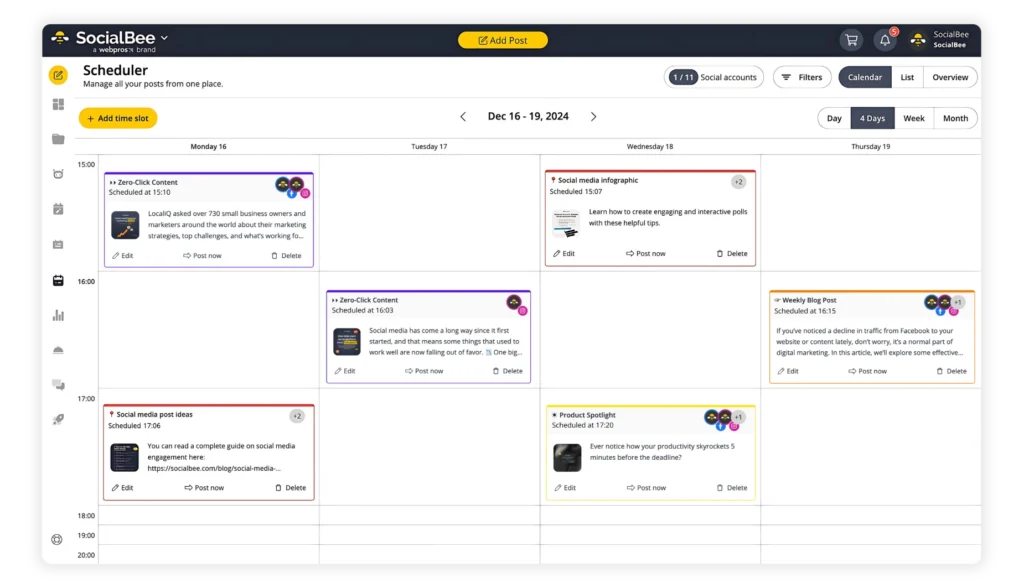
Si buscas una herramienta de programación de redes sociales que te permita planificar estratégicamente tus próximas publicaciones, hay otras opciones disponibles. Intenta encontrar una herramienta que sea visualmente atractiva y fácil de usar, para que puedas publicar fácilmente en varias cuentas de redes sociales.
Una característica clave que debes buscar es la posibilidad de programar publicaciones en los momentos óptimos en que tu audiencia está más activa en las redes sociales. Puedes determinar estas horas comprobando tus analíticas.
6. Categorización de contenidos para publicaciones en redes sociales
La categorización de contenidos es un aspecto esencial para muchas empresas, ya que requiere una planificación y una estrategia cuidadosas para gestionar eficazmente las publicaciones.
Cuando consideres una alternativa, da prioridad a una solución que ofrezca un alto nivel de personalización. Esto te permitirá crear una mezcla de contenidos diversa y atractiva, mejorando en última instancia tus campañas en las redes sociales.
7. Reutilización de contenidos
Contenido perenne se refiere al contenido atemporal que sigue siendo relevante y valioso durante un periodo prolongado.
Para los profesionales del marketing en redes sociales, que siempre están en movimiento, estos contenidos tienen un valor incalculable. Es crucial disponer de una herramienta de gestión de redes sociales que pueda volver a poner en cola y compartir automáticamente estas publicaciones intemporales.
Aunque Sprout Social no ofrece esta función en particular, herramientas como SocialBee proporcionan esta capacidad, mejorando el valor y el alcance a largo plazo de tu contenido.
8. Múltiples espacios de trabajo de cliente
Tener espacios de trabajo dedicados a cada cliente te permite agilizar tu proceso de gestión de las redes sociales y mejorar la colaboración. Además, te permite dejar comentarios rápidamente y comunicarte con los miembros de tu equipo siempre que lo necesites.
Aunque Sprout Social ofrece funciones avanzadas para la colaboración en equipo, sólo están incluidas en sus planes más caros. En consecuencia, si eres un gestor de redes sociales o formas parte de una agencia, puede que tengas que plantearte subir de categoría para acceder a estas ventajas.
10+ Mejores Alternativas a Sprout Social en 2024
Cuando estés a la caza de la mejor alternativa a Sprout Social, ¿cómo sabrás cuándo encuentras la mejor? Estás en el lugar adecuado, porque lo más probable es que, cuando termines de leer este artículo, sepas cuál es tu mejor opción.
Aquí tienes las mejores alternativas a Sprout Social en 2024:
- SocialBee
- NapoleonCat
- Statusbrew
- Planable
- Hootsuite
- Khoros
- Loomly
- MavSocial
- MeetEdgar
- Emplifi
- Zoho
1. La mejor alternativa a Sprout Social: SocialBee
SocialBee es la herramienta de gestión de redes sociales perfecta para autónomos, empresas y agencias que quieren potenciar su presencia en las redes sociales sin tener que dedicar todo su tiempo a crear contenidos y gestionar campañas.
Prueba SocialBee, una herramienta de programación de redes sociales todo en uno impulsada por IA, y la alternativa ideal a Sprout Social.
¡Empieza hoy tu prueba gratuita de 14 días!
SocialBee utiliza la inteligencia artificial para agilizar los esfuerzos de sus usuarios en las redes sociales, automatizar tareas repetitivas y ayudar a las empresas a prosperar. Inicia tu viaje inscribiéndote en el 14 días de prueba gratuitaen la que tendrás acceso a todas las increíbles funciones y ventajas que conlleva el uso de SocialBee.
Éstas son las funciones más populares de SocialBee:
- Plataformas compatibles: SocialBee permite publicar en múltiples plataformas: Facebook, Instagram, Threads, X (Twitter), LinkedIn, Pinterest, Bluesky, Google Business Profile, TikTok y YouTube.
- Calendario visual de contenidos: Programa fácilmente publicaciones para todas tus cuentas sociales y obtén una visión clara de tus próximos contenidos con el calendario visual de contenidos de SocialBee.
- Integraciones de creación de contenidos: SocialBee se integra con Unsplash, lo que te permite diseñar tus publicaciones directamente dentro de la plataforma. También ofrece integraciones con Canva y GIPHY para más opciones creativas.
- Generación de IA: El AI Post Generator de SocialBee te ayuda a crear pies de foto e imágenes para redes sociales desde cero. Con más de 1.000 sugerencias de IAesta herramienta genera publicaciones de alta calidad que resuenan entre tu audiencia y mantienen la coherencia de la marca.
- Categorías de contenido: SocialBee ofrece amplias categorías de contenido para diversificar tu estrategia de contenidos y mantener las cosas organizadas.
- Canales RSS: SocialBee te permite importar automáticamente contenidos de cualquier fuente RSS, mientras que Hootsuite sólo ofrece la función de autoeditor RSS.
- Precio justo (y asequible): SocialBee ofrece una solución más asequible en comparación con Sprout Social, a partir de 29 $/mes con la opción de planes anuales. ¿Aún no estás convencido? Regístrate en 14 días de prueba gratuita¡!
- Espacios de trabajo para varios clientes: Para las agencias que gestionan varios clientes, SocialBee ofrece espacios de trabajo separados para una gestión fluida de las redes sociales.
- Colecciones Hashtag: SocialBee te permite guardar y reutilizar colecciones de hashtags para futuras publicaciones.
- Servicios de migración: SocialBee proporciona asistencia experta para migrar fácilmente tus publicaciones desde tu anterior herramienta de gestión de redes sociales.
- Acortadores de URL: Haz un seguimiento del rendimiento de los enlaces con los múltiples acortadores de URL disponibles en SocialBee.
- Analítica robusta: SocialBee ofrece escucha social para tus contenidos, lo que te permite conocer mejor las preferencias de tu audiencia y agilizar tus esfuerzos de marketing en las redes sociales.
- Servicios de conserjería: Con SocialBee ConciergeBeepuedes contratar a un experto en redes sociales o a un redactor para que se encargue de tu estrategia de creación de contenidos o de tu blog.
Pros:
|
Contras:
|
Precios:
|
SocialBee vs Sprout Social: Comparación de características
Aquí tienes una comparación entre SocialBee y Sprout Social:
Características | SocialBee | Sprout Social |
Plataformas compatibles | Facebook, Perfil de empresa de Google, Instagram, Threads, LinkedIn, Pinterest, TikTok, Twitter, YouTube, Bluesky | Facebook, Instagram, LinkedIn, Pinterest, TikTok, Twitter, YouTube, Google My Business, WhatsApp |
| Creación de contenidos con IA | ✅ | ✅ |
Categorías de contenido | ✅ | ❌ |
Programación de contenidos | ✅ | ✅ |
Programación masiva | ✅ | ✅ |
Publicación permanente | ✅ | ❌ |
| Herramienta de calendario de redes sociales | ✅ | ✅ |
| Importación de canales RSS | ✅ | ✅ |
| Generador de Hashtags | ✅ | ❌ |
| Integraciones visuales (por ejemplo, Canva, Unsplash, GIPHY) | ✅ | ✅ |
Múltiples acortadores de URL | ✅ | ✅ |
Análisis de redes sociales | ✅ | ✅ |
| Informes PDF | ✅ | ✅ |
Funciones de colaboración en equipo | ✅ | ✅ |
| Múltiples espacios de trabajo | ✅ | ❌ |
| Bandeja de entrada social | ✅ | ✅ |
Prueba gratuita | 14 días de prueba gratuita | 30 días de prueba gratuita |
| Precio inicial | 29 $/mes | 249 $/mes |
Comprueba cómo fuentes independientes comparan y analizan SocialBee y Sprout Social.

2. NapoleonCat
NapoleonCat is a fantastic tool that’s perfectly suited for small businesses, e-commerce entrepreneurs, agencies, marketers, and digital influencers. It not only boasts a visually appealing design but also provides a seamless user experience that you’ll love.
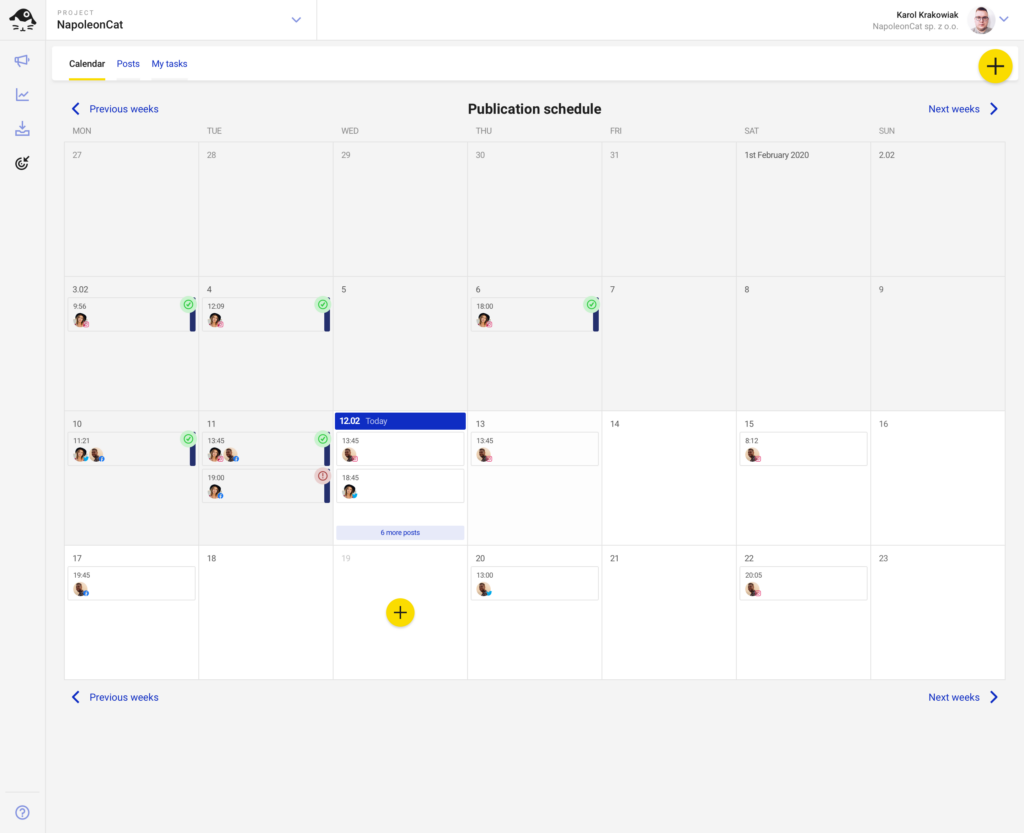
Using NapoleonCat feels like working with a tool you can rely on day in and day out, making it an ideal choice for full-time use.
Pros:
|
Cons:
|
Pricing:
|
NapoleonCat vs Sprout Social: A Feature Comparison
Here’s a side-by-side feature comparison of NapoleonCat and Sprout Social:
Features | NapoleonCat | SproutSocial |
Supported Platforms | Facebook, Messenger, Twitter, TikTok, Instagram, LinkedIn, YouTube, and Google My Business | Facebook, Instagram, LinkedIn, Pinterest, TikTok, Twitter, YouTube, Google My Business, WhatsApp |
| AI-Powered Content Creation | ❌ | ✅ |
| Content Categories | ✅ | ❌ |
Content Scheduling | ✅ | ✅ |
| Bulk Scheduling | ✅ | ✅ |
Evergreen Posting | ❌ | ❌ |
| Social Media Calendar | ✅ | ✅ |
RSS Feed Import | ✅ | ✅ |
| Hashtag Generator | ❌ | ❌ |
Visual Integrations (e.g., Canva, Unsplash, GIPHY) | ❌ | ✅ |
Multiple URL shorteners | ✅ | ✅ |
| Social Media Analytics | ✅ | ✅ |
PDF Reports | ✅ | ✅ |
| Team Collaboration Features | ✅ | ✅ |
| Multiple Workspaces | ✅ | ❌ |
| Social Inbox | ✅ | ✅ |
Free Trial | 14-day free trial | 30-day free trial |
| Starting Price | $31/month | $249/month |
3. Statusbrew
Statusbrew has 1:1 feature parity in terms of full-fledged social media with Sprout Social at a fair investment.
You can plan and schedule posts, engage with your audience, collaborate, and track performance—all from a single, centralized platform just like Sprout Social.
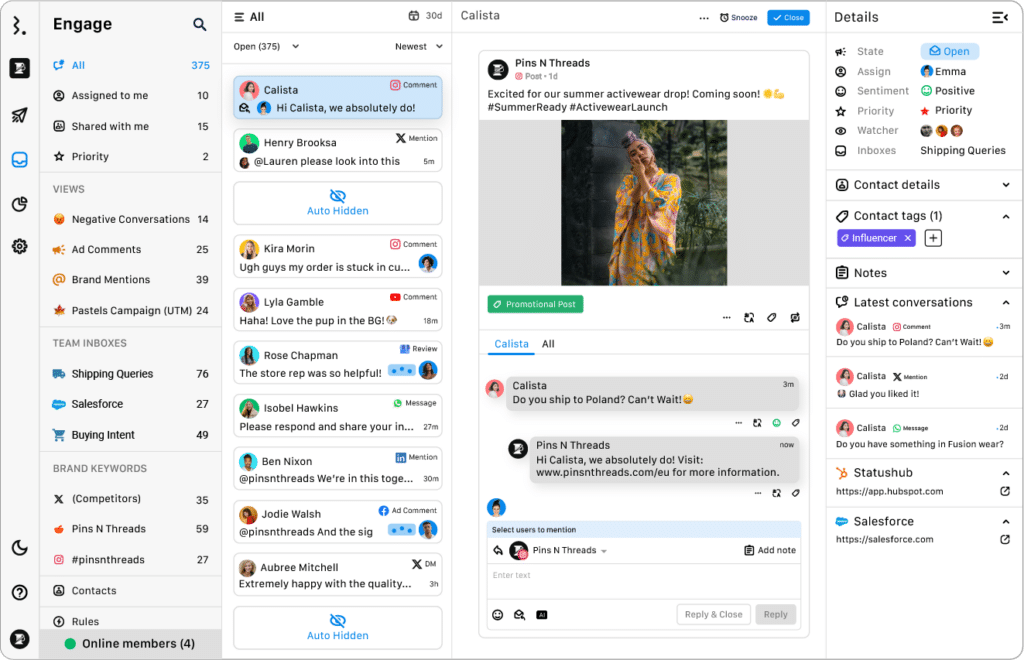
Statusbrew simplifies social media management and provides actionable insights through advanced analytics. Its AI-powered sentiment analysis helps you understand what content resonates with your audience, enabling data-driven decisions to enhance engagement and outcomes.
Pros:
|
Cons:
|
Pricing:
|
Statusbrew vs Sprout Social: A Feature Comparison
| Features | Statusbrew | Sprout Social |
| Supported Platforms | Facebook, Instagram, LinkedIn, Pinterest, TikTok, X(Twitter), YouTube, Google My Business, WhatsApp | Facebook, Instagram, LinkedIn, Pinterest, TikTok, Twitter, YouTube, Google My Business, WhatsApp |
| AI-Powered Content Creation | ✅ | ✅ |
| Content Categories | ✅ | ❌ |
| Content Scheduling | ✅ | ✅ |
| Bulk Scheduling | ✅ | ✅ |
| Evergreen Posting | ✅ | ❌ |
| Social Media Calendar | ✅ | ✅ |
| RSS Feed Import | ✅ | ✅ |
| Hashtag Generator | ❌ | ❌ |
| Visual Integrations (e.g., Canva, Unsplash, GIPHY) | ✅ | ✅ |
| Multiple URL shorteners | ❌ (Bitly only) | ✅ |
| Social Media Analytics | ✅ | ✅ |
| PDF Reports | ✅ | ✅ |
| Team Collaboration Features | ✅ | ✅ |
| Multiple Workspaces | ✅ | ❌ |
| Social Inbox | ✅ | ✅ |
| Free Trial | 14-day free trial | 30-day free trial |
| Starting Price | $129/month | $249/month |
4. Planable
Planable is a platform dedicated to making content collaboration processes smoother for teams and brands..

Planable empowers you to plan, collaborate on, and approve a wide range of content, including blogs, newsletters, social media posts, emails, and campaigns. A standout feature of Planable is its user-friendly interface, which provides a seamless experience and supports various content types through its Universal Content feature.
Pros:
|
Cons:
|
Pricing:
|
Planable vs Sprout Social: A Feature Comparison
Here’s a comparison table to help you choose between Planable and Sprout Social:
Features | Planable | Sprout Social |
| Supported Platforms | Facebook, Twitter, LinkedIn, Instagram, YouTube, Google My Business, Pinterest, TikTok, long-form content | Facebook, Instagram, LinkedIn, Pinterest, TikTok, Twitter, YouTube, Google My Business, WhatsApp |
AI-Powered Content Creation | ✅ | ✅ |
| Content Categories | ✅ | ❌ |
Content Scheduling | ✅ | ✅ |
| Bulk Scheduling | ❌ | ✅ |
Evergreen Posting | ✅ | ❌ |
| Social Media Calendar | ✅ | ✅ |
RSS Feed Import | ❌ | ✅ |
| Hashtag Generator | ❌ | ❌ |
Visual Integrations (e.g., Canva, Unsplash, GIPHY) | ✅ | ✅ |
| Multiple URL shorteners | ✅ | ✅ |
Social Media Analytics | ✅ | ✅ |
| PDF Reports | ❌ | ✅ |
Team Collaboration Features | ✅ | ✅ |
| Multiple Workspaces | ✅ | ❌ |
Social Inbox | ❌ | ✅ |
| Free Trial | Free plan for 50 posts | 30-day free trial |
Starting Price | $13/month/user | $249/month |
5. Hootsuite
Hootsuite was made for organizations looking to improve their customers’ social media experiences.
With its wide array of features, this platform allows businesses to effectively manage all of their social media channels: create, plan, and schedule posts. Plus, it’s convenient, as everything can be done from one centralized management console.
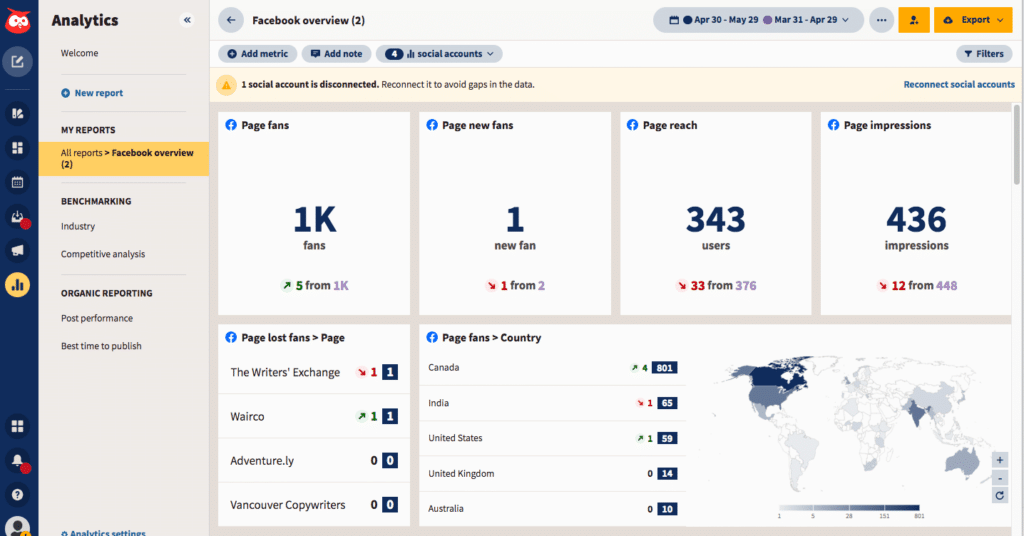
But it’s not just about convenience: Hootsuite is also great for optimizing your social media efforts. With real-time insights and reports, you can get a better understanding of what content and ads are resonating with your audience and make data-driven decisions to improve engagement and outcomes.
Pros:
|
Cons:
|
Pricing:
|
Hootsuite vs Sprout Social: A Feature Comparison
Here’s what Hootsuite can offer compared to Sprout Social:
Features | Hootsuite | Sprout Social |
| Supported Platforms | Twitter, Facebook, LinkedIn, Instagram, Pinterest, YouTube, TikTok | Facebook, Instagram, LinkedIn, Pinterest, TikTok, Twitter, YouTube, Google My Business, WhatsApp |
AI-Powered Content Creation | ✅ | ✅ |
| Content Categories | ❌ | ❌ |
Content Scheduling | ✅ | ✅ |
| Bulk Scheduling | ✅ | ✅ |
Evergreen Posting | ❌ | ❌ |
| Social Media Calendar | ✅ | ✅ |
RSS Feed Import | ✅ | ✅ |
| Hashtag Generator | ✅ | ❌ |
Visual Integrations (e.g., Canva, Unsplash, GIPHY) | ✅ | ✅ |
| Multiple URL shorteners | ❌ | ✅ |
Social Media Analytics | ✅ | ✅ |
| PDF Reports | ✅ | ✅ |
Team Collaboration Features | ✅ | ✅ |
| Multiple Workspaces | ✅ | ❌ |
Social Inbox | ✅ | ✅ |
Free Trial | 30-day free trial | 30-day free trial |
| Starting Price | $99/month | $249/month |
6. Khoros Marketing
Khoros Marketing is great for businesses looking to boost their social media marketing efforts. It not only helps companies stay organized but also provides valuable insights through detailed analytics.
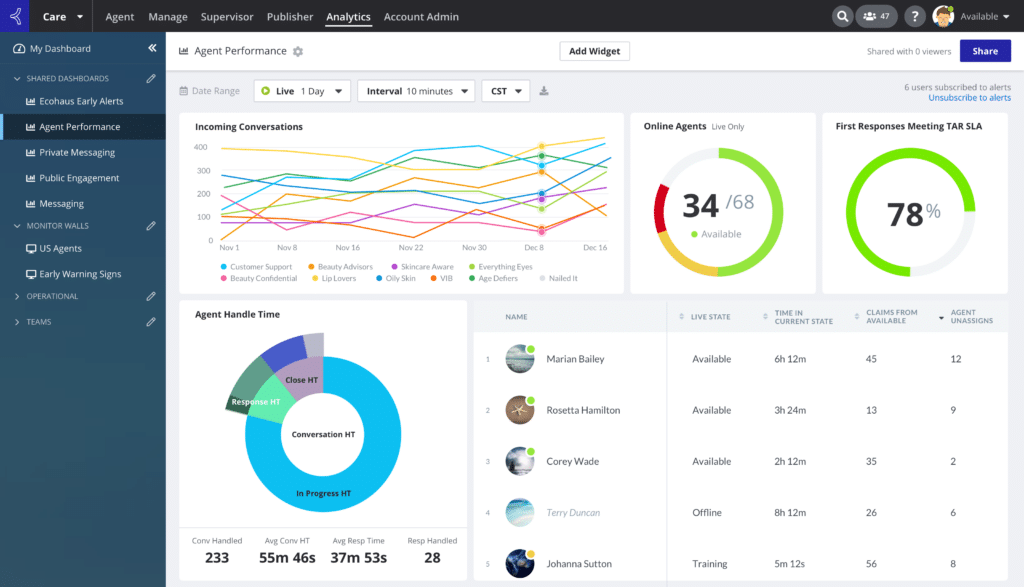
With features like scheduling, collaboration tools, risk management, calendar integration, content labeling, real-time alerts and notifications, and robust access control, Khoros Marketing is a comprehensive solution for maximizing the success of sales campaigns.
Pros:
|
Cons:
|
Pricing:
|
Khoros Marketing vs Sprout Social: A Feature Comparison
Here are the differences between Khoros Marketing and Sprout Social:
Features | Khoros | Sprout Social |
| Supported Platforms | Facebook, Instagram, LinkedIn, TikTok, Twitter, WhatsApp, Google Business Profile | Facebook, Instagram, LinkedIn, Pinterest, TikTok, Twitter, YouTube, Google My Business, WhatsApp |
AI-Powered Content Creation | ❌ | ✅ |
| Content Categories | ✅ | ❌ |
Content Scheduling | ✅ | ✅ |
| Bulk Scheduling | ✅ | ✅ |
Evergreen Posting | ❌ | ❌ |
| Social Media Calendar | ✅ | ✅ |
RSS Feed Import | ❌ | ✅ |
| Hashtag Generator | ❌ | ❌ |
Visual Integrations (e.g., Canva, Unsplash, GIPHY) | ❌ | ✅ |
| Multiple URL shorteners | ✅ | ✅ |
Social Media Analytics | ✅ | ✅ |
| PDF Reports | ✅ | ✅ |
Team Collaboration Features | ✅ | ✅ |
| Multiple Workspaces | ✅ | ❌ |
Social Inbox | ✅ | ✅ |
| Free Trial | ❌ | 30-day free trial |
Starting Price | Custom | $249/month |
7. Loomly
Loomly is a user-friendly tool that offers a wide range of features to help you effectively manage every aspect of your social media marketing strategy.
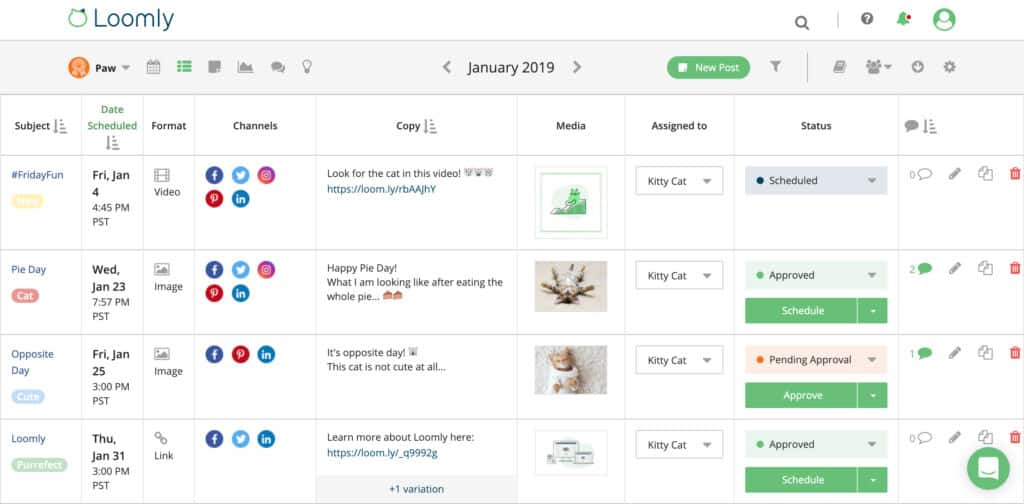
Their Library feature allows you to easily organize and access all your brand assets, making it a breeze to manage your visual content. Plus, Loomly offers native scheduling, post targeting, and sponsoring capabilities to help you reach and engage with your target audience to the fullest.
Pros:
|
Cons:
|
Pricing:
SocialBee is a more affordable alternative to Loomly. It starts at just $29/month, supports posting on more platforms (including Bluesky), and includes more advanced AI tools for content creation and planning. Check out the full comparison here. |
Loomly vs Sprout Social: A Feature Comparison
Here’s a comparison between the features of these two social media management platforms – Loomly and Sprout Social:
Features | Loomly | Sprout Social |
| Supported Platforms | Facebook, Google Business Profile, Instagram, LinkedIn, Pinterest, Snapchat, TikTok, Twitter, YouTube | Facebook, Instagram, LinkedIn, Pinterest, TikTok, Twitter, YouTube, Google My Business, WhatsApp |
AI-Powered Content Creation | ✅ | ✅ |
| Content Categories | ❌ | ❌ |
Content Scheduling | ✅ | ✅ |
| Bulk Scheduling | ❌ | ✅ |
Evergreen Posting | ❌ | ❌ |
| Social Media Calendar | ✅ | ✅ |
RSS Feed Import | ✅ | ✅ |
| Hashtag Generator | ✅ | ❌ |
Visual Integrations (e.g., Canva, Unsplash, GIPHY) | ✅ | ✅ |
| Multiple URL shorteners | ✅ | ✅ |
Social Media Analytics | ✅ | ✅ |
| PDF Reports | ✅ | ✅ |
Team Collaboration Features | ✅ | ✅ |
| Multiple Workspaces | ❌ | ❌ |
Social Inbox | ✅ | ✅ |
| Free Trial | 14-day free trial | 30-day free trial |
Starting Price | $65/month | $249/month |
8. MavSocial
MavSocial is a handy tool designed for businesses that have multiple locations and profiles on social media. With MavSocial, you can efficiently handle all your publishing, advertising, engagement, reviews, and reporting tasks from a single platform.
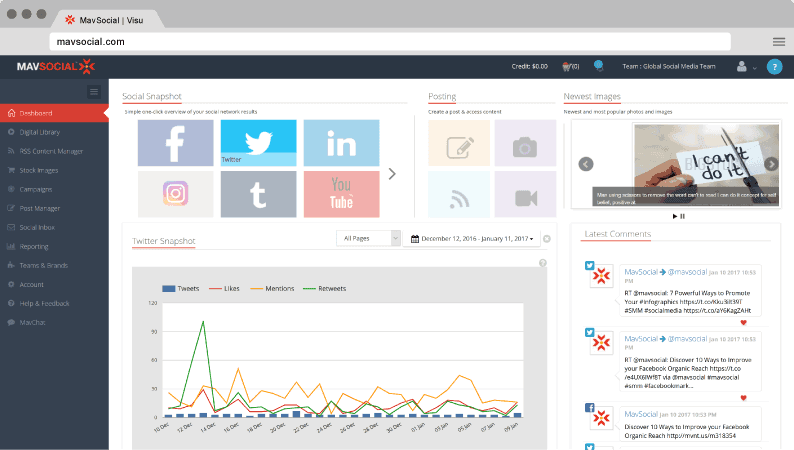
One of its standout features is the ability for businesses with various locations to effortlessly create Facebook ads that are geo-targeted.
Pros:
|
Cons:
|
Pricing:
|
MavSocial vs Sprout Social: A Feature Comparison
Here are the main feature differences between MavSocial and Sprout Social:
Features | MavSocial | Sprout Social |
| Supported Platforms | Facebook, Instagram, Twitter, YouTube, LinkedIn, Google Business Profiles, and Tumblr | Facebook, Instagram, LinkedIn, Pinterest, TikTok, Twitter, YouTube, Google My Business, WhatsApp |
AI-Powered Content Creation | ❌ | ✅ |
| Content Categories | ✅ | ❌ |
Content Scheduling | ✅ | ✅ |
| Bulk Scheduling | ✅ | ✅ |
Evergreen Posting | ✅ | ❌ |
| Social Media Calendar | ✅ | ✅ |
RSS Feed Import | ✅ | ✅ |
| Hashtag Generator | ❌ | ❌ |
Visual Integrations (e.g., Canva, Unsplash, GIPHY) | ✅ | ✅ |
| Multiple URL shorteners | ✅ | ✅ |
Social Media Analytics | ✅ | ✅ |
| PDF Reports | ✅ | ✅ |
Team Collaboration Features | ✅ | ✅ |
| Multiple Workspaces | ✅ | ❌ |
Social Inbox | ✅ | ✅ |
| Free Trial | 14-day free trial | 30-day free trial |
Starting Price | $78/month | $249/month |
9. MeetEdgar
MeetEdgar caters specifically to small businesses and entrepreneurs, making it perfect for your future social media campaigns.

With its array of features for scheduling and organizing social media posts, MeetEdgar makes automating the publishing process across different platforms a breeze.
Pros:
|
Cons:
|
Pricing:
|
MeetEdgar vs Sprout Social: A Feature Comparison
Let’s help you get an idea of the similarities and differences between MeetEdgar and Sprout Social:
Features | MeetEdgar | SproutSocial |
| Supported Platforms | Facebook, Google Business Profile, Instagram, LinkedIn, Pinterest, TikTok, Twitter | Facebook, Instagram, LinkedIn, Pinterest, TikTok, Twitter, YouTube, Google My Business, WhatsApp |
AI-Powered Content Creation | ❌ | ✅ |
| Content Categories | ✅ | ❌ |
Content Scheduling | ✅ | ✅ |
| Bulk Scheduling | ❌ | ✅ |
Evergreen Posting | ✅ | ❌ |
| Social Media Calendar | ✅ | ✅ |
RSS Feed Import | ✅ | ✅ |
| Hashtag Generator | ❌ | ❌ |
Visual Integrations (e.g., Canva, Unsplash, GIPHY) | ✅ | ✅ |
| Multiple URL shorteners | ✅ | ✅ |
Social Media Analytics | ✅ | ✅ |
| PDF Reports | ❌ | ✅ |
Team Collaboration Features | ❌ | ✅ |
| Multiple Workspaces | ❌ | ❌ |
Social Inbox | ✅ | ✅ |
| Free Trial | 7-day free trial | 30-day free trial |
Starting Price | $29/month | $249/month |
10. Emplifi
Emplifi is a great Social Marketing Cloud designed for modern businesses. It empowers brands to create and manage effective social media strategies, analyze trends, and boost performance, all in one place.

Emplifi simplifies the process of transforming scattered social media data into actionable insights. This will guide you in creating content that resonates with your audience, leading to more engaging and empathetic social experiences that truly stand out. This way, you can launch powerful social media campaigns that make a lasting impact.
Pros:
|
Cons:
|
Pricing:
|
Emplifi vs Sprout Social: A Feature Comparison
Here is a side-by-side comparison between Emplifi and Sprout Social:
| Features | Emplifi | Sprout Social |
| Supported Platforms | Facebook, Google Business Profile, Instagram, LinkedIn, Pinterest, TikTok, Twitter, YouTube | Facebook, Instagram, LinkedIn, Pinterest, TikTok, Twitter, YouTube, Google My Business, WhatsApp |
AI-Powered Content Creation | ✅ | ✅ |
| Content Categories | ✅ | ❌ |
| Content Scheduling | ✅ | ✅ |
Bulk Scheduling | ✅ | ✅ |
| Evergreen Posting | ❌ | ❌ |
Social Media Calendar | ✅ | ✅ |
RSS Feed Import | ✅ | ✅ |
Hashtag Generator | ✅ | ❌ |
Visual Integrations (e.g., Canva, Unsplash, GIPHY) | ❌ | ✅ |
| Multiple URL shorteners | ✅ | ✅ |
| Social Media Analytics | ✅ | ✅ |
PDF Reports | ✅ | ✅ |
Team Collaboration Features | ✅ | ✅ |
| Multiple Workspaces | ✅ | ❌ |
| Social Inbox | ✅ | ✅ |
Free Trial | Free trial | 30-day free trial |
| Starting Price | $200/year | $249/month |
11. Zoho Social
Zoho Social is a fantastic social media management platform that offers a wide range of features such as post scheduling, mention monitoring, and the ability to create personalized dashboards.

With Zoho Social, you have everything you need to successfully manage your social media presence, especially if you work for an agency.
Pros:
|
Cons:
|
Pricing:
|
Zoho Social vs Sprout Social: A Feature Comparison
Check out the feature comparison between Zoho Social and Sprout Social:
Features | Zoho | Sprout Social |
| Supported Platforms | Facebook, Google Business Profile, Instagram, LinkedIn, Pinterest, TikTok, Twitter, YouTube | Facebook, Instagram, LinkedIn, Pinterest, TikTok, Twitter, YouTube, Google My Business, WhatsApp |
AI-Powered Content Creation | ✅ | ✅ |
| Content Categories | ❌ | ❌ |
Content Scheduling | ✅ | ✅ |
| Bulk Scheduling | ✅ | ✅ |
Evergreen Posting | ❌ | ❌ |
| Social Media Calendar | ✅ | ✅ |
RSS Feed Import | ✅ | ✅ |
| Hashtag Generator | ❌ | ❌ |
Visual Integrations (e.g., Canva, Unsplash, GIPHY) | ✅ | ✅ |
Multiple URL shorteners | ✅ | ✅ |
| Social Media Analytics | ✅ | ✅ |
PDF Reports | ✅ | ✅ |
| Team Collaboration Features | ✅ | ✅ |
Multiple Workspaces | ✅ | ❌ |
| Social Inbox | ✅ | ✅ |
Free Trial | 15-day free trial | 30-day free trial |
| Starting Price | €10/month | $249/month |
Frequently Asked Questions