

A social media management tool should make your job easier as your business grows. But what happens when the software that once saved you time starts creating more work?
Maybe you’re managing more client accounts, your team is growing, or you’re spending hours on tasks that should take minutes. You can still get things done, but you’re relying on spreadsheets and manual fixes to keep everything running.
Let’s look at eight signs you’ve outgrown your social media management tool and how to decide whether to upgrade or switch.

We’re SocialBee LABS SRL, part of WebPros. We use the information you provide to share relevant content & updates, as outlined in our Privacy Policy. You can opt out anytime.
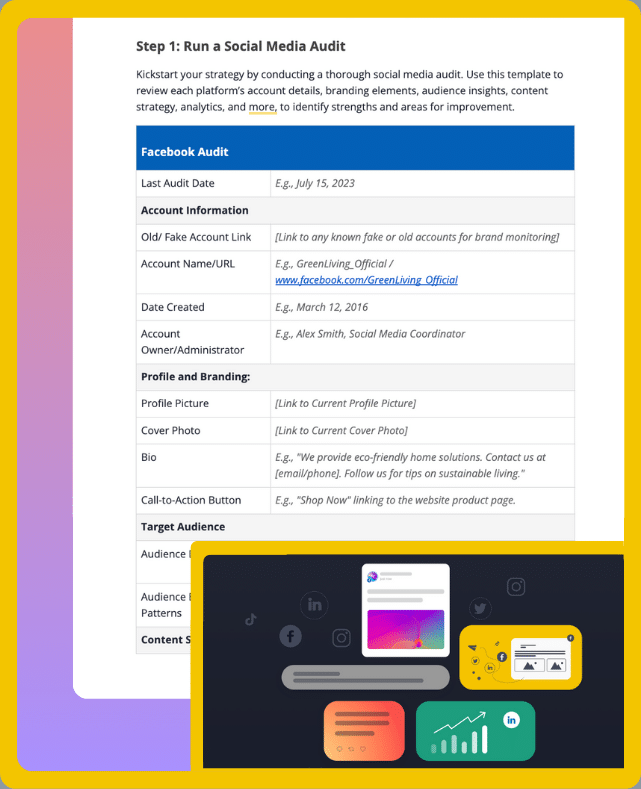
Short summary
- Managing multiple accounts shouldn’t feel complicated. Look for separate workspaces and organized calendars that keep each brand’s content in the right place.
- Scheduling should reduce manual publishing. Check whether your tool can automatically publish the formats you use, including Instagram Stories, Reels, and TikTok videos.
- Creating content for different platforms shouldn’t mean starting over. Post customization, scheduling multiple posts at once, and content recycling can save hours of repetitive work.
- Your team should be able to collaborate in one place. Permissions to review and approve posts and leave feedback help avoid mistakes.
- Engagement and reporting shouldn’t take hours. Having all of your comments, mentions, and messages in one place, as well as your analytics from every platform, makes understanding your results and the conversations around your brand easier.
- Your software should remain affordable as you grow. Compare subscription costs, add-ons, and time spent on manual tasks.
- You don’t always need to switch. Upgrade when a higher plan solves your problem. Switch when limitations are built into the platform.
1. You struggle to keep multiple brand and client accounts organized
Managing multiple social media accounts gets complicated when your tool doesn’t give you a clear way to separate them.
Imagine you’re managing five clients, each with Facebook, Instagram, and LinkedIn accounts. That’s 15 profiles with different content calendars, brand guidelines, and posting schedules.
If everything sits in the same dashboard without a clear structure, you waste time finding posts and checking which account you’re publishing to.
The more accounts you add, the greater the risk of mistakes. Accidentally publishing one client’s promotional post to another brand’s Facebook page is something nobody wants to explain.
A good multi-account management tool should let you:
- Keep each brand’s accounts and content separate.
- See upcoming posts without switching between dashboards.
- Organize content and assets by client.
- Control which accounts team members can access.
SocialBee helps with this through Workspaces. You can create separate workspaces for different brands or clients, keeping their accounts and content organized under one subscription.
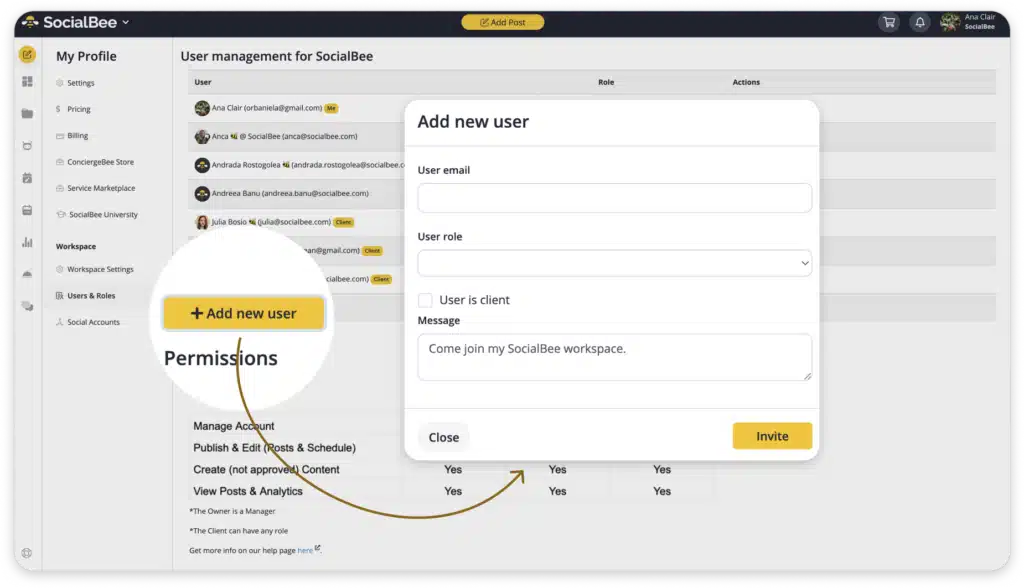
For agencies, this makes onboarding new clients much easier. You can add another workspace without disrupting how you manage existing accounts.
2. You still have to manually publish certain types of content
If you’re paying for a scheduling tool but still have to publish posts manually every day, it’s worth checking what your software actually supports.
Some tools let you schedule regular image posts but need you to take over manually for other formats.
For example, you might prepare an Instagram Story in advance, only to receive a notification reminding you to open Instagram and publish it yourself.
That’s manageable when you’re posting twice a week. But when you’re scheduling content for several brands, those notifications quickly become overwhelming.
Before choosing a new tool, check which formats it can publish automatically, not just which social media platforms it supports.
For example, SocialBee supports direct publishing for the following social media content types:
- Instagram (Business and Creator profiles): Images, videos, carousels, Reels, and Stories. Collaborative posts are also supported for Business profiles.
- Facebook Pages: Text posts, images, GIFs, videos, links, Reels, and Stories.
- TikTok (Personal and Business profiles): Images and single-video posts.
- LinkedIn (Personal profiles and Company Pages): Text posts, images, GIFs, videos, links, and document carousels.
- X (formerly Twitter): Text posts, images, GIFs, videos, and links.
- Pinterest: Images, carousels, and videos.
- YouTube: Videos and Shorts.
- Threads: Text posts, images, videos, carousels, and links.
- Bluesky: Images and link posts.
- Google Business Profile: Text updates, images, and links.
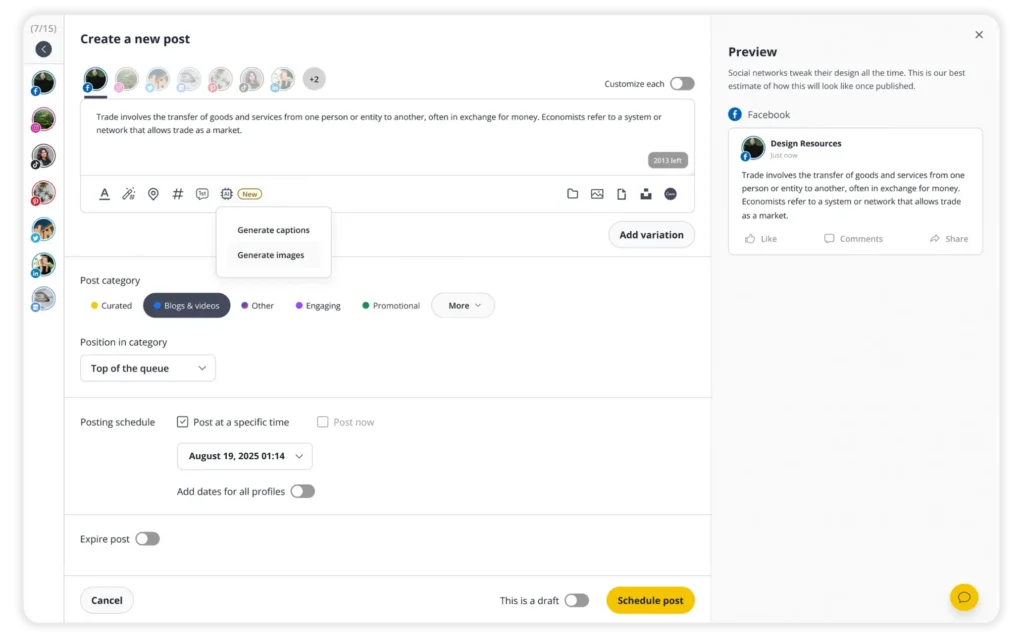
The goal is to make sure the content you share most often can go live without you having to be online.
3. Creating and reusing content across platforms takes too much work
Creating one social media post is pretty straightforward. Creating five versions of it for different platforms can take considerably longer.
Let’s say you’ve published a new article on your blog and want to promote it across your social media channels. You need a professional caption for LinkedIn, a shorter version for X, a more conversational one for Instagram, and different image sizes.
If your tool doesn’t support post customization, you’re stuck copying content between accounts, resizing images elsewhere, and adjusting everything manually.
Then there’s the content you’ve already created.
Your best-performing posts, useful tips, and evergreen articles could be shared again. But if finding and reusing them takes almost as much time as creating something new, they’ll probably stay forgotten.
Look for a tool that lets you create content once and adapt it for different platforms.
For example, SocialBee lets you customize captions and visuals for each platform while creating a single post. You can use AI to generate caption variations, resize images, and schedule everything together.
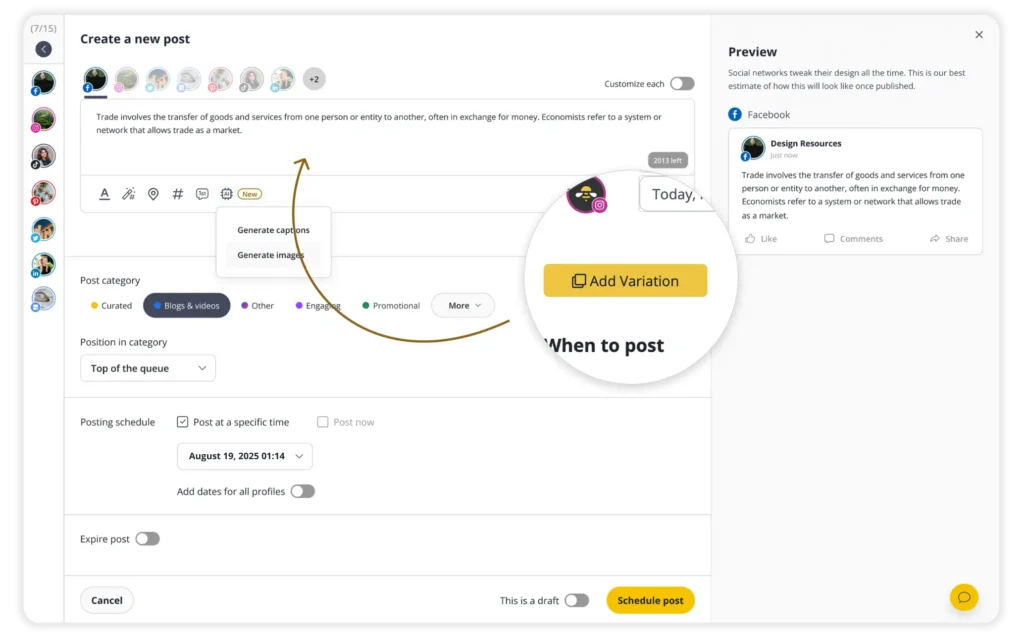
That means less time repeating the same tasks and more time creating content worth sharing.
4. Your team can’t manage social media together in one place
Once several people are involved in creating and approving content, a tool designed for one person can become frustrating.
Your social media manager creates a post, copies the caption into Google Docs, and sends it to a client for approval. The client leaves feedback by email, the designer updates the visual, and someone confirms the final version in Slack.
Meanwhile, the original post is still sitting in the scheduler, waiting to be updated.
Now imagine doing that for 30 posts every month.
It’s easy to lose track of which version is final, what’s been approved, and who’s responsible for the next step. Your social media management software should let people review content, leave feedback, and approve posts directly.
Permissions matter, too. A freelancer creating captions might not need publishing access, while a client may only need to review posts.
SocialBee supports team collaboration with role-based permissions, feedback, and content approvals. You can invite team members or clients and give them access based on their responsibilities.
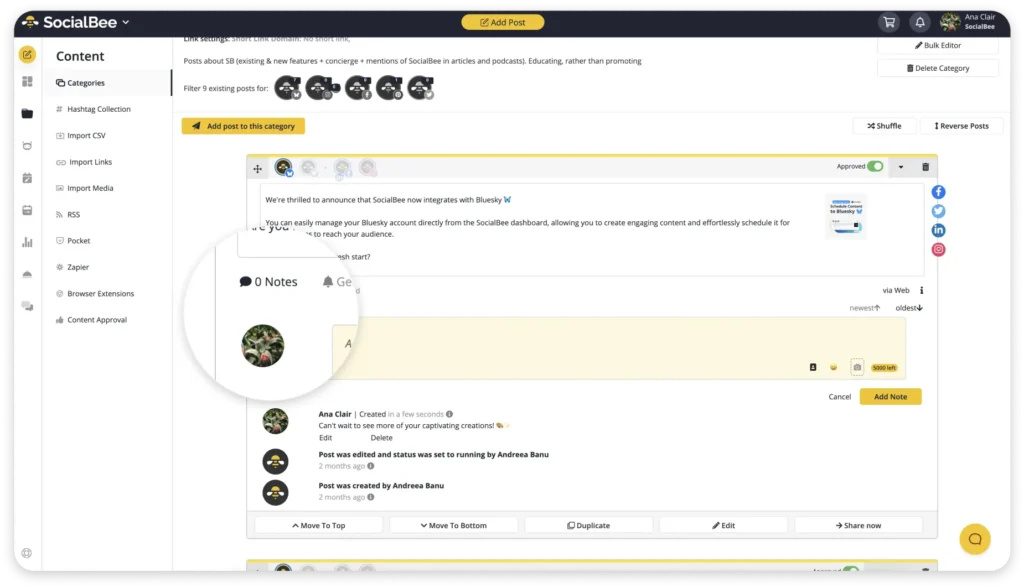
This keeps feedback connected to the actual post and makes it easier to see what’s ready to publish.
5. Managing comments and messages requires checking every platform separately
Publishing content is only part of the job. You also need to answer questions, respond to feedback, and keep conversations going. You might start your morning checking Instagram DMs, move to Facebook comments, visit LinkedIn, and then check Twitter mentions.
And you repeat the process later in the day.
The bigger problem is that important conversations can get missed. A potential customer might ask about pricing in an Instagram comment, but nobody notices until the next day.
A unified social inbox makes this easier by bringing comments, mentions, and messages into one dashboard.
SocialBee’s Engage Module lets you manage comments, messages, and mentions from connected social media channels without constantly switching between apps.
Here’s what you can manage from one dashboard:
- Facebook Pages: Comments, mentions, and DMs.
- Instagram Business and Creator profiles: Comments, mentions, and DMs.
- Threads: Comments and mentions.
- LinkedIn Company Pages: Comments and mentions.
- X (formerly Twitter): Comments and mentions.
- YouTube: Comments.
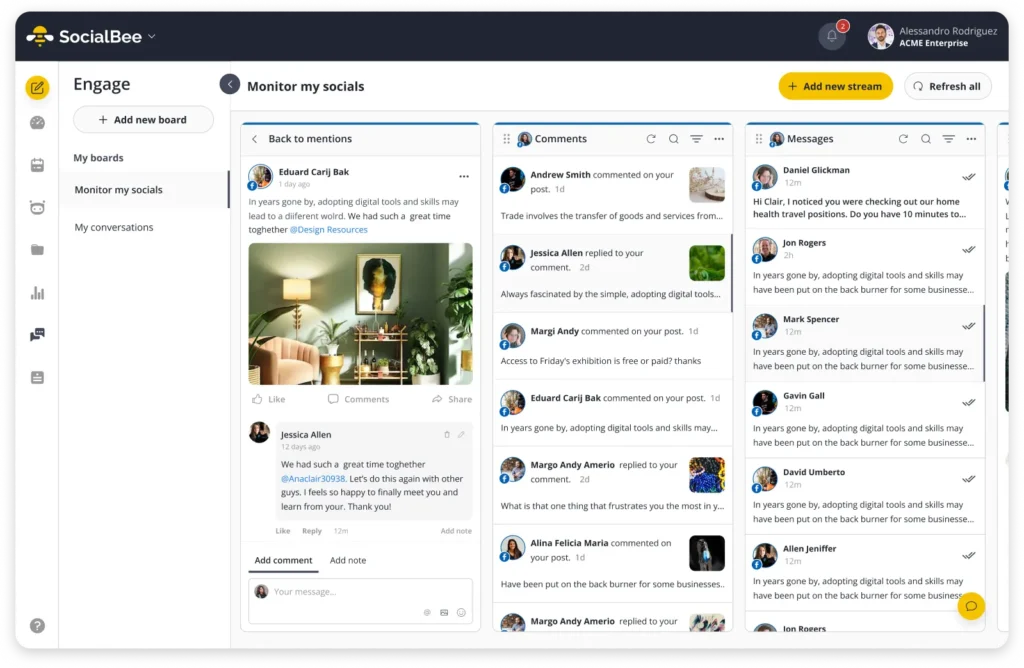
Before switching tools, check which networks and interaction types each inbox supports. Make sure it covers the channels where people actually contact your business.
6. Understanding and reporting on performance has become too manual
If preparing a monthly social media report takes longer than analyzing the results, your current tool may be holding you back.
A good social media management platform should give you access to cross-platform analytics, so you can track performance and prepare reports without collecting data manually.
Look for these essential social media analytics features:
- Engagement metrics: Track likes, comments, shares, and social engagement rates to understand how people interact with your content.
- Reach and impressions: See how many people your content reaches and how often it’s displayed.
- Audience growth: Monitor follower changes across accounts to see which channels are growing.
- Post-level analytics: Identify your best-performing posts and content formats so you know what to create more of.
- Cross-platform comparisons: Compare performance across social media channels to understand where your content works best.
- Shareable reports: Generate reports you can easily send to clients, managers, or team members without manually creating presentations or spreadsheets.
If LinkedIn posts consistently receive more engagement than Facebook posts, you should be able to spot that quickly and investigate why. Maybe your audience prefers educational content on LinkedIn, while Facebook works better for community updates.
SocialBee provides analytics for connected accounts, including post performance, audience growth, and engagement metrics. You can review results in one dashboard and export PDF reports on supported plans.
This gives you more time to understand what’s working and decide what to improve next.
Just remember that social networks don’t always calculate metrics the same way. Use equivalent metrics and date ranges when comparing results.
7. Your social media management platform becomes too expensive as you grow
Many platforms charge based on the number of social media accounts you connect, users who need access, or features included in your plan. Keep in mind that the cheapest starting plan isn’t always the most affordable option as you grow.
Consider the full monthly cost:
- Your main subscription and any additional account fees.
- Extra charges for team members or advanced features.
- Separate tools for reporting, approval workflows, or content creation.
- Hours spent doing tasks manually.
If your platform costs $80 per month, plus $30 for reporting software, it might not seem like a lot. But then you realize your team spends three hours preparing reports at an internal cost of $25 per hour, so you’re effectively spending $185 monthly.
SocialBee’s Bootstrap plan starts at $29 per month and supports five social accounts. Higher-tier plans offer more accounts and additional features for growing teams.
Because SocialBee combines social media scheduling, content creation, collaboration, audience engagement, and analytics, you may also be able to reduce the number of separate subscriptions you need.
Of course, switching isn’t automatically cheaper. Compare what each plan includes against the key features you actually use.
8. You rely on too many workarounds to get things done
Every social media team has a few workarounds. That’s normal.
Maybe you use a spreadsheet to track campaign ideas or a shared document to collect feedback.
But when workarounds become part of almost every daily task, there’s a problem.
You start hearing things like:
- “I’ll just publish that manually.”
- “Send me the final version on Slack.”
- “We track approvals in a spreadsheet.”
- “You’ll need to ask Sarah how to do that.”
It’s especially noticeable when someone new joins your team.
Instead of learning one platform, they need to figure out which tasks happen in which tools, where files are stored, and who knows how to fix things.
Here’s a useful test: Write down every step involved in publishing one post from your social media campaigns, from creating the content to reporting on its performance.
How many tools do you open? How much information do you copy between them? How many steps could be handled automatically?
If the list is getting long, your current setup probably needs attention.
You may still need specialized tools for certain tasks, and that’s fine. The goal is to remove unnecessary steps, especially the repetitive ones your team deals with every day.
How to decide whether to upgrade your current tool or switch platforms
Not every frustrating limitation means you need a new social media management tool.
Sometimes upgrading your current plan is the easiest option. Other times, switching makes more sense because the problems aren’t going away.
Upgrade when your current platform can solve the bottleneck
Upgrading makes sense when you’re happy with your current tool and only need access to more accounts or additional features.
If your existing platform meets most of your needs, moving to a higher plan could be easier and more affordable than switching. You won’t have to transfer your content, reconnect accounts, or spend time training your team on new software. That time has a cost, too.
Before committing to a higher plan, ask yourself:
- Does it solve your current problems? Make sure the features you need are actually included.
- Is the price increase worth it? Compare the additional cost with the time and effort you’ll save.
- Will it support future growth? Check whether you’ll have enough room to add more accounts, team members, or clients without upgrading again anytime soon.
Switch when the limitation is built into the platform
Switching makes more sense when the problems are part of how the software works.
Upgrading won’t help if your platform doesn’t support the publishing formats you need or forces you to use several other tools for everyday tasks.
It’s also worth considering a switch when multiple problems appear at once.
Maybe account organization is difficult, reporting takes hours, and subscription costs keep increasing. Fixing one issue won’t solve everything.
Here’s a quick comparison:
Upgrade when… | Switch when… |
You need more supported accounts. | Accounts are difficult to organize. |
A higher plan has the missing feature. | Important features aren’t supported. |
Your team likes the platform. | Your team relies on workarounds. |
The additional cost makes sense. | Costs keep rising without enough value. |
Your current setup works well. | Everyday tasks require too many tools. |
If you’re considering a switch, test your best options with real tasks, not just feature lists.
Use a free plan or trial to create a post, customize it for different platforms, get it approved, and schedule it. Check how easy it is to find content, manage accounts, and read analytics.
You don’t have to move everything immediately. Start with one brand or a few accounts, test the new platform, and move the rest once you’re comfortable.
Frequently asked questions
1. How long does it take to switch social media management tools?
Switching can take a few hours to several days, depending on how many accounts you manage and how much content you need to transfer. Agencies with multiple clients will usually need more time than small businesses managing a few profiles. If you’re switching to SocialBee, you can also take advantage of its Migration Service to get help moving your content from your previous tool.
2. Will I lose my scheduled posts when switching social media management tools?
Scheduled posts generally don’t transfer automatically between tools. You’ll need to export or copy your content and schedule it again in the new platform. Keep your old tool active until you’ve confirmed that all upcoming posts are accounted for.
3. Can I use two social media management apps during a transition?
Yes. Using both tools temporarily can make switching easier. Just avoid scheduling the same posts in both platforms, as this could result in duplicate content.
4. What should I export before leaving my current social media management tool?
Save your scheduled posts, captions, images, videos, content library, and available analytics reports from your multiple social networks. Also keep a copy of your posting schedule and any approval notes your team may need.
5. How can I switch social media management tools without disrupting my posting schedule?
Connect your accounts to the new platform, test publishing with a few posts, and recreate your upcoming schedule. Keep your old subscription active during the transition so you can check that nothing gets missed.
Choose a social media tool that gives you room to grow
Your social media management needs will change as you add more accounts, bring new people onto your team, and take on bigger projects.
If you find yourself spending more and more time on tasks that should be quick to handle, it’s worth looking at what could be easier.
You might only need to upgrade your current plan. But if several of these problems sound familiar, exploring another platform could save you time and money.
SocialBee helps you keep accounts organized, create and schedule content, collaborate with your team, manage conversations, and track performance from one place. Start your 14-day SocialBee trial and try it with your own accounts to see whether it’s a better fit for your business.