Illustration of online messaging, showing colorful chat bubbles over a blurred laptop keyboard and a chat icon.

Instagram DM automation: what it is & how it works

Instagram has become much more than a place to share photos. For many businesses, it’s where potential customers ask questions, compare products, request pricing, and decide whether they want to buy.

The challenge is that people don’t always message during business hours. They expect quick answers, even when your team is offline. With over 2 billion monthly active users on Instagram and 500 million people using Instagram Stories every day, conversations can quickly pile up, especially for growing brands. 

That’s where Instagram DM automation comes in. It helps you respond instantly to common questions, guide people to the right resources, and keep conversations moving until someone from your team can jump in.

In this guide, you’ll learn what Instagram DM automation is, how it works, when you should use it, and three different ways to set it up for your business.

SocialBee logo featuring a stylized yellow bee icon on a dark hexagonal background.
SocialBee – Social media management tool
Social media management tool
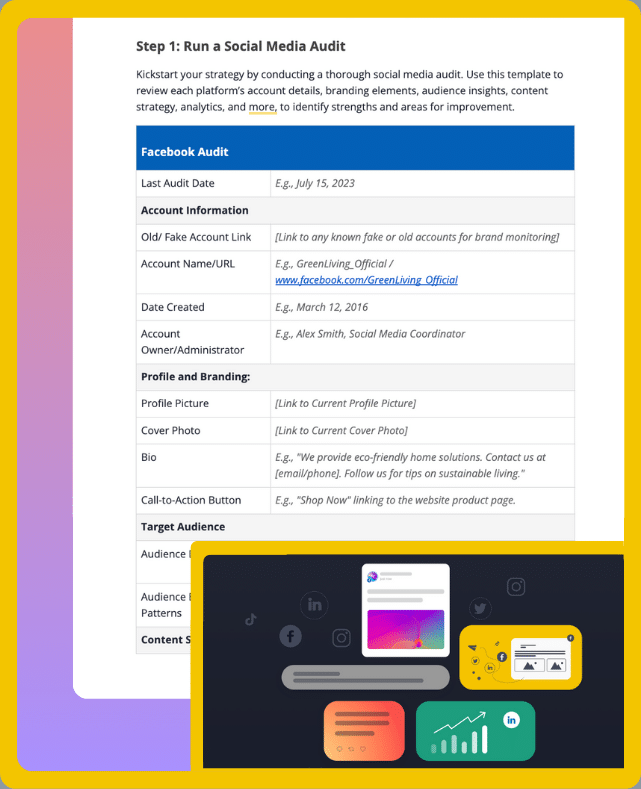
Get your free social media strategy template!

We’re SocialBee LABS SRL, part of WebPros. We use the information you provide to share relevant content & updates, as outlined in our Privacy Policy. You can opt out anytime.

Short summary

  • Use Instagram DM automation to handle repetitive direct messages, send an auto reply, and answer common questions without relying on manual replies.
  • Start with Meta Business Suite if you only need simple Instagram auto replies, away messages, and FAQs. It’s a good free option for smaller businesses.
  • Use comment triggers to turn post comments into private conversations. Sending the right link through DMs is often more effective than asking people to visit your bio.
  • Create personalized messages for different actions, such as Story replies, Story mentions, comments, or keyword triggers, instead of sending the same response to every user.
  • Automation works best for FAQs, lead magnets, and booking requests. Leave complaints, refund requests, and sensitive account issues to a real person.
  • Review your workflows regularly to make sure your links, keywords, and automated replies still work as expected whenever Instagram rolls out new features.
  • If you’re using tools like ManyChat for advanced workflows, combine them with SocialBee to manage your comments, mentions, and direct messages from Instagram and other platforms in one place.
  • As your audience grows, staying organized becomes just as important as automation. A shared inbox helps you respond to a high volume of conversations while building stronger relationships with loyal customers.

What is Instagram DM automation?

Instagram DM automation is the process of automatically sending Instagram direct messages when someone performs a specific action. Instead of manually replying to every message, businesses use automation tools to send an auto-reply, answer common questions, share links, or start conversations based on predefined rules.

Depending on the tool, DM automation can be triggered by Instagram comments, Story replies, a keyword trigger, or a new message. The goal isn’t to replace real conversations, but to reduce manual effort, provide instant answers, and keep your Instagram inbox organized.

Some businesses use simple Instagram auto replies, while others build multi-step workflows that capture leads, send follow-up messages, or guide customers toward a purchase.

The most common triggers for DM automation include:

  • Instagram comments: Automatically send a DM after someone comments on an Instagram post (also known as comment to DM automation).
  • Story replies: Reply instantly when someone responds to your Story.
  • Keyword triggers: Send different responses when a user includes specific keywords like “pricing” or “demo” in a message.
  • New messages: Welcome new conversations with an automated reply or helpful resources.

Businesses use Instagram DM automation to answer FAQs, qualify leads, book appointments, share lead magnets, collect emails, and handle a growing DM volume without replying to every message manually.

You’ll find all your direct messages in the middle of your Instagram navigation bar, under the arrow sign:

It is enough to check your Instagram notifications to see any new comments, or go to your latest Instagram post and look at the comments.

Why do brands use Instagram DM automation?

Whether you’re a content creator, local business, or ecommerce brand, chances are you receive the same questions over and over again. Instagram DM automation helps you respond faster, keep conversations organized, and spend less time on repetitive tasks.
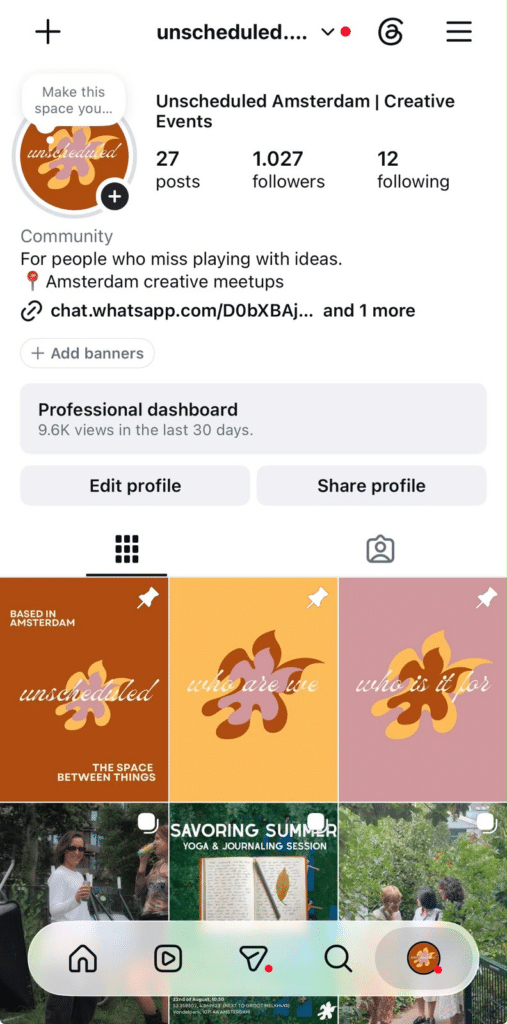
Instagram business profile showing the Professional dashboard, profile information, follower count, and recent posts.

This is why brands choose to use Instagram DM automation:

  1. To answer messages immediately and handle more conversations 
  2. To improve customer support 
  3. To save time on replying to the same questions repeatedly 
  4. To generate leads and increase sales 
  5. To book appointments or registrations

1. To answer messages immediately and handle more conversations

People don’t always message during business hours, and they rarely enjoy waiting for a response.

With Instagram DM automation, you can send an instant reply as soon as someone reaches out. For example, if a customer messages your clothing brand asking, “Do you have this in blue?”, you can automatically let them know you’ve received their message and point them to your size guide or product catalog while your team follows up.

Even a simple “Thanks for reaching out! We’ll be with you shortly 👋” reassures customers that they haven’t been ignored.

2. To improve customer support

Not every question needs a custom response.

Think about the messages you receive most often:

  • What are your opening hours?
  • Do you ship internationally?
  • How can I track my order?
  • Where can I book an appointment?

Instead of answering these questions dozens of times a week, you can create automated replies that provide the information instantly. Customers get the answers they need, and your support team has more time to focus on requests that require a personal touch.

3. To save time on replying to the same questions repeatedly

The more your account grows, the more repetitive your inbox becomes.

Instead of manually sending the same PDF, pricing guide, or booking link dozens of times, you can create one workflow that does it for you. That time can then be spent creating content, talking to qualified leads, or improving your products and services.

4. To generate leads and increase sales

Instagram DMs are a great place to turn curiosity into action.

For example, a nutrition coach could invite followers to comment “Meal Plan” on a Reel. The automation instantly sends the free guide, then follows up with a link to book a consultation. An online store could send a discount code after someone requests more information about a product.

Here’s an example of how it looks in practice:
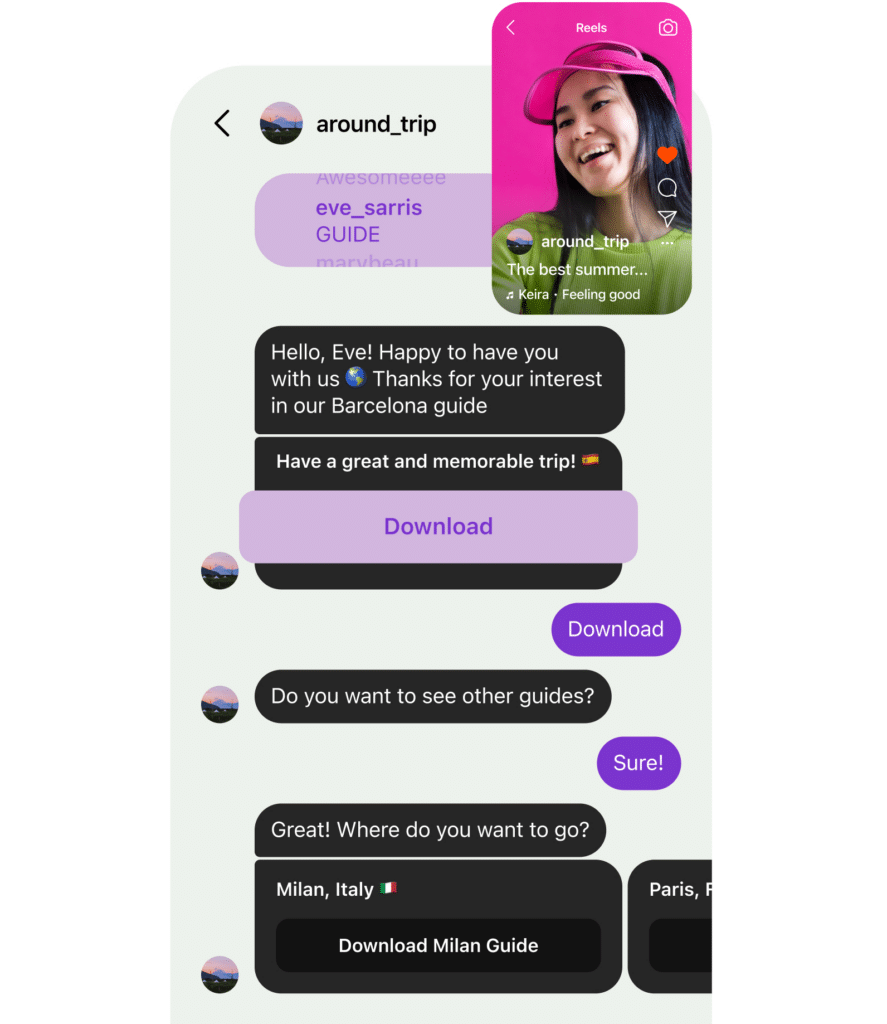
Example of an Instagram DM automation that sends a Barcelona travel guide after a user comments “GUIDE” on a Reel.

Source

These conversations feel helpful instead of pushy, making it easier to capture leads while keeping people engaged.

5. To book appointments or registrations

Automation makes it easy for people to take the next step as soon as they’re interested.

A yoga studio can automatically send class schedules after someone messages “Yoga.” A dentist can share an online booking link after someone asks about availability. An event organizer can deliver tickets or registration details as soon as someone comments “Join.”

By removing unnecessary back-and-forth, you create a smoother experience for your audience and make it easier for them to convert.

The difference between automated DMs and AI chatbots

Although they’re often mentioned together, automated DMs and AI chatbots aren’t the same thing.

Instagram DM automation follows predefined rules. For example, if someone comments “Guide” on your post, the automation sends a specific message with the download link. If someone sends the keyword “Pricing,” they receive information you’ve already prepared. These workflows are predictable and work well for repetitive tasks.

AI chatbots, on the other hand, are designed to understand natural language and generate responses based on the conversation. Instead of relying only on triggers or keywords, they can answer more complex questions, adapt their replies, and continue the conversation without following a fixed script.

Here’s a quick comparison:

Automated DMs

AI chatbots

Triggered by comments, keywords, or new messages

Respond to natural language questions

Follow predefined workflows

Generate responses based on context

Best for FAQs, lead generation, and instant replies

Better for complex customer conversations

Faster and easier to set up

Require more configuration and training

For most businesses, Instagram DM automation is enough to handle common questions, send follow-up messages, and capture leads. If your customers regularly ask detailed or unique questions, an AI chatbot can complement your automation by taking over when conversations become more complex.

How to set up Instagram DM automation

There are several ways to automate Instagram DMs, depending on what you’re trying to achieve. If you only need basic auto replies, Meta Business Suite is a good place to start. 

If you want to send DMs after someone comments on a post, you’ll need a dedicated automation tool. 

And if your goal is to stay on top of conversations across multiple social media platforms, SocialBee can help you manage everything from one place.

Method 1: Set up Instagram DM automation in Meta Business Suite (free)

Meta Business Suite includes a few built-in automation features that are free to use. While they aren’t as advanced as dedicated automation platforms, they’re enough for simple replies and FAQs.

Step 1: Switch to a Professional account

Instagram’s messaging features are only available for Business and Creator accounts. If you’re using a personal account, head to Settings > Account and switch to a Professional account first.

Step 2: Connect Instagram to a Facebook Page

Next, link your Instagram account to a Facebook Page through the Accounts Center or Meta Business Suite. This connection gives you access to your shared inbox and messaging tools.

Step 3: Explore the Inbox automations tab

Open Meta Business Suite, go to Inbox, and look for the Automations section. Here, you’ll find options like Instant Replies and Away Messages.
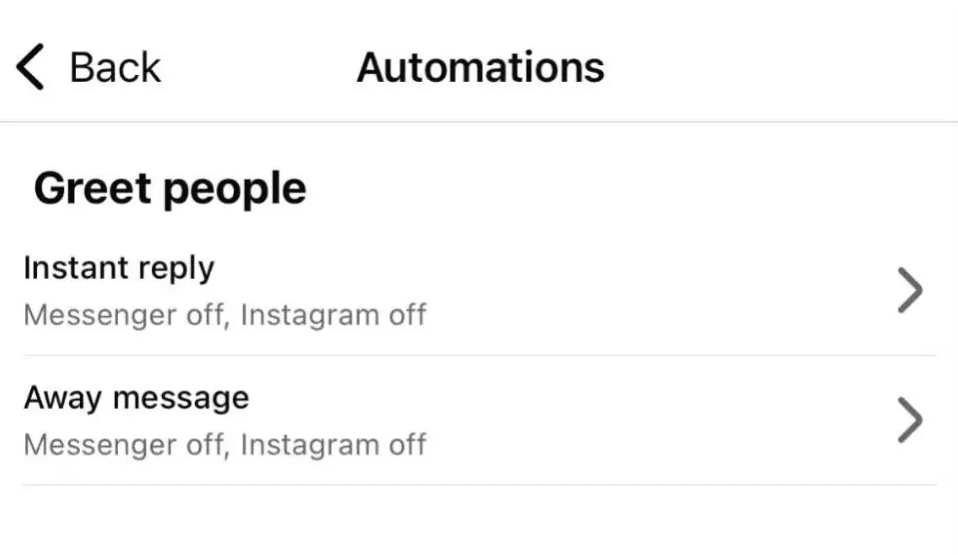
Meta Business Suite Automations menu showing options for Instagram instant replies and away messages.

Step 4: Create an instant reply

Instant replies let people know you’ve received their message.

For example:

Hi! 👋 Thanks for reaching out. We’ve received your message and will get back to you as soon as possible.
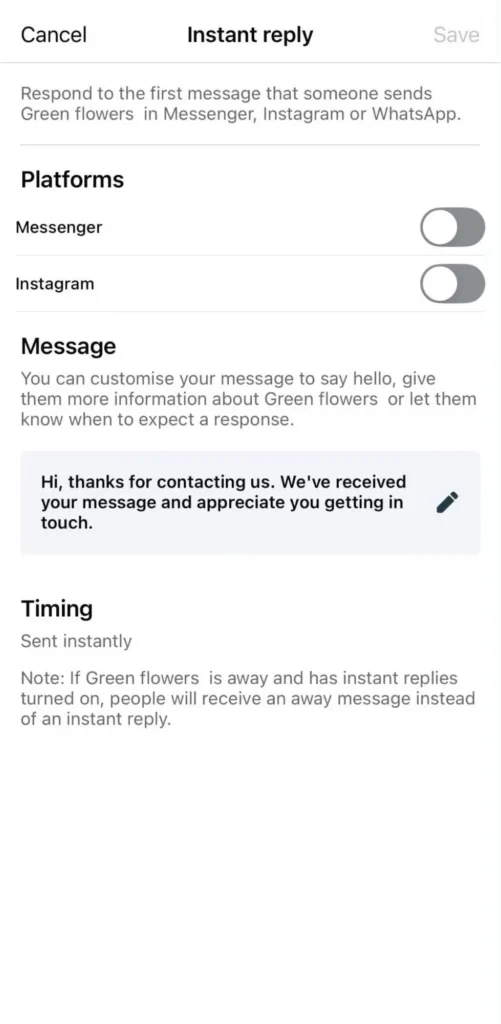
Meta Business Suite instant reply settings for Instagram and Messenger, showing a customizable automatic welcome message.

You can also include a helpful link to your website, pricing page, or booking calendar.

Step 5: Set an away message

If you only answer messages during certain hours, create an away message to set expectations.

For example:

Thanks for your message! We’re currently offline, but we’ll reply tomorrow morning. In the meantime, you can browse our FAQs here.
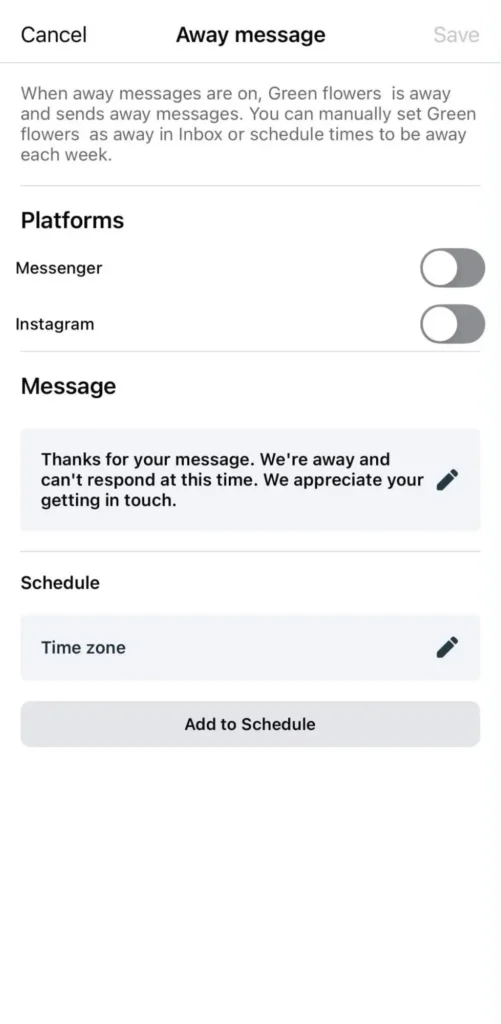
Meta Business Suite away message settings for Messenger and Instagram, showing a customizable automated response and scheduling options.

Step 6: Add FAQ responses

If customers regularly ask about shipping, pricing, returns, or opening hours, save those answers as FAQs. This gives people quick access to the information they’re looking for without waiting for your team.

Step 7: Create keyword automations (if available)

Depending on your account and Meta’s latest features, you may also be able to create simple keyword-based automations. For example, someone who messages “pricing” could automatically receive your pricing page, while “appointment” could trigger your booking link.

Note: Meta occasionally updates its messaging features, so the available automation options may vary by account and region.

Method 2: Set up comment-to-DM automation (ManyChat example)

ManyChat lets you build automated workflows based on how people interact with your Instagram account. Whether someone comments on a post, replies to a Story, sends you a keyword, or mentions your brand, you can automatically continue the conversation in their DMs.

To get started:

  1. Create a ManyChat account and connect your Instagram Business account.
  2. Choose an automation trigger based on the action you want people to take.
  3. Build your workflow by writing your automated messages, adding buttons, or creating follow-up steps.
  4. Test the automation before publishing it to make sure every trigger and link works as expected.

ManyChat supports several Instagram automation triggers, including:

  • Comments on posts or Reels: Automatically send a DM after someone comments on your content. For example, ask people to comment “Guide” to receive a free checklist or “Demo” to get a product walkthrough.
  • Story replies: Continue the conversation when someone replies to your Instagram Story. A travel agency, for example, could automatically send its latest vacation packages after someone responds with “Greece.”
  • Story mentions: Reward customers who mention your brand by automatically thanking them, sharing a discount code, or encouraging them to shop again. This is a simple way to acknowledge user-generated content without replying manually every time.
  • Keyword automation: Trigger different responses based on the words people send in a DM. Someone who messages “Pricing” can receive your pricing page, while “Book” could send them directly to your appointment calendar.
  • Instagram Live: Invite viewers to comment a keyword during a live session to automatically receive a resource, product link, or exclusive offer in their DMs.
  • New messages: Welcome anyone who starts a conversation with your business by introducing your brand, answering common questions, or directing them to the right resource.

A simple workflow might look like this:
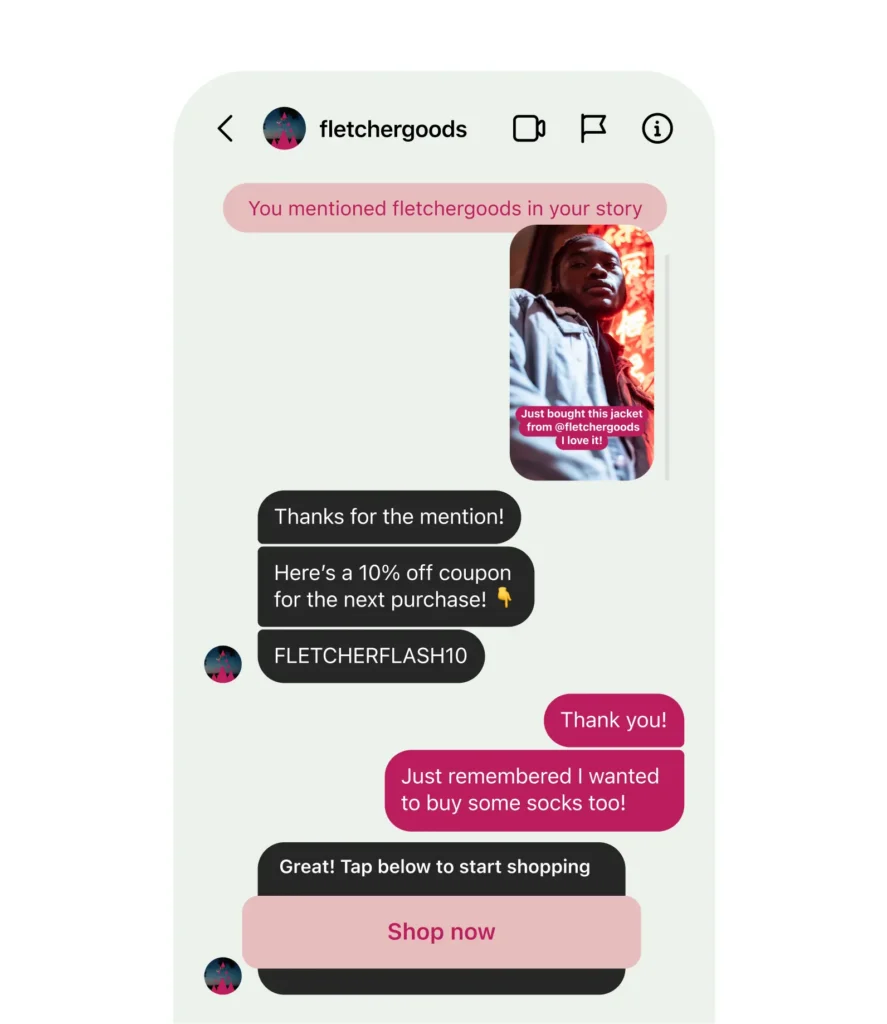
Example of an automated Instagram DM triggered by a Story mention, sending a discount code and shopping link.

Source

The more relevant your automations are, the more natural they feel. Instead of sending the same reply to everyone, tailor each workflow to the type of interaction. Someone replying to a Story may need different information than someone commenting on a product launch or mentioning your brand for the first time.

Method 3: Manage Instagram conversations with SocialBee

Setting up Instagram DM automation is only part of the process. Once people start commenting on your posts, replying to your Stories, and sending you direct messages, you need an efficient way to keep up with those conversations.

SocialBee‘s Engage module helps you manage comments, mentions, and DMs from one place, so you don’t have to jump between Instagram, Facebook, LinkedIn, X, Threads, and YouTube throughout the day.
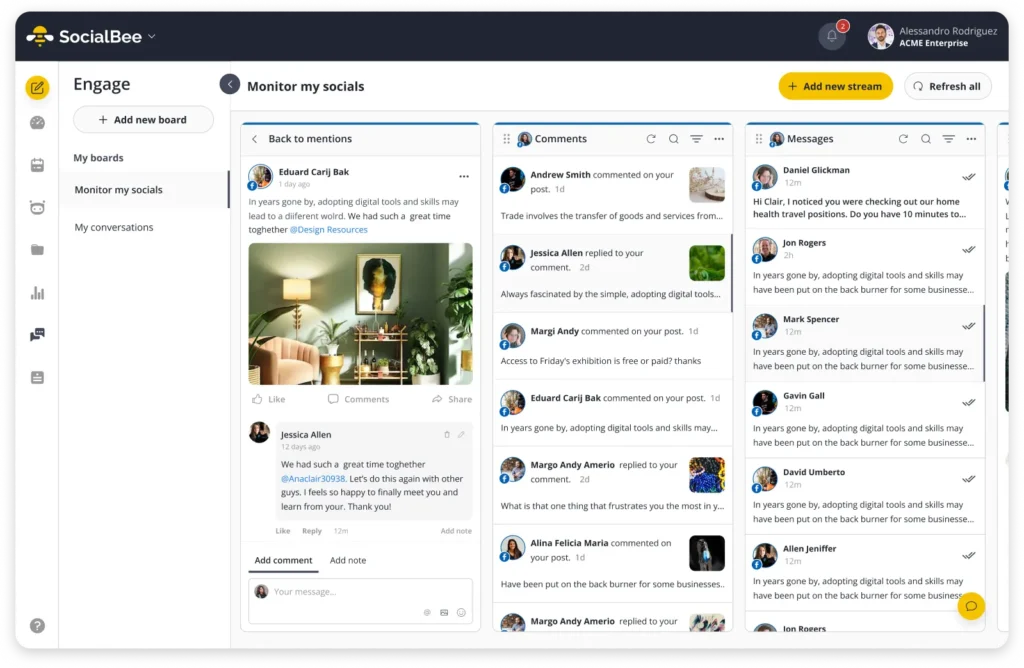

Step 1: Connect your Instagram account

To start using the Engage module, connect your Instagram Business or Creator account to SocialBee. Your Instagram account must also be linked to a Facebook Page, as required by Meta.

Once connected, SocialBee starts collecting your Instagram interactions, including comments, mentions, and direct messages.

If you manage multiple social media accounts, you can connect them all to the same workspace and monitor them from a single dashboard.

Step 2: Create Engage Boards

Boards help you organize your conversations.

Think of them as folders for different brands, clients, or projects.

For example, if you manage social media for three businesses, you could create three separate Boards:

  • SocialBee
  • Bloom Yoga Studio
  • Coffee Corner

This keeps conversations organized from the beginning instead of mixing every notification into one inbox.

Step 3: Add Engage Streams

Once you’ve created a Board, it’s time to add Streams.

Streams determine which conversations appear inside each Board. For Instagram, you can add Streams for supported interaction types, such as:

  • Comments
  • Mentions
  • Direct messages

So, instead of treating Streams as custom folders for different campaigns or topics, think of them as different feeds of Instagram conversations.

For example, during a product launch, you could create a dedicated Board for the campaign and add the relevant Comments, Mentions, and Direct Messages Streams to it.

Your team can then use those Streams to keep an eye on giveaway entries, answer product questions, handle support requests, and respond to DMs without jumping between different parts of Instagram.

This gives you one place to manage the conversations around the campaign, while the Streams themselves stay organised by interaction type.

Step 4: Reply to comments, mentions, and DMs

Once your Streams are set up, you can start engaging with your audience directly from SocialBee.

Open any comment, mention, or message, type your reply, and send it without leaving the platform.

You can also:

  • Like Instagram comments and mentions
  • Return to your Stream after replying to continue working through conversations
  • Receive email notifications when new interactions arrive
  • Manage conversations from Instagram, Facebook, LinkedIn, X, Threads, and YouTube in one place

Imagine your latest Reel goes viral overnight. Instead of checking Instagram every few minutes to reply to comments and DMs, you can open SocialBee and work through everything from a single dashboard.

When SocialBee is the better choice

Meta Business Suite is great for setting up simple auto replies. Tools like ManyChat are ideal when you want to build advanced automation flows, such as comment-to-DM campaigns or lead generation funnels.

SocialBee is a better fit when your biggest challenge is managing conversations, not creating automations.

It’s especially useful if you:

  • Manage several social media platforms.
  • Reply to comments and DMs every day.
  • Work with multiple brands or clients.
  • Want to organize conversations into Boards and Streams.
  • Schedule content and engage with your audience from the same platform.

As your audience grows, your inbox becomes harder to manage. Keeping comments, mentions, and DMs in one place makes it much easier to stay organized, respond faster, and make sure no conversation slips through the cracks.

Where Instagram automation should stop

Automation is excellent for answering repetitive questions and keeping conversations moving. 

However, some interactions are simply better handled by a real person:

  • Complaints: If a customer is frustrated, a generic automated reply can make the situation worse. It’s fine to acknowledge their message, but make sure someone from your team follows up personally as soon as possible.
  • Refund requests: Refunds usually require checking order details, payment information, or your return policy. Instead of trying to automate the entire process, collect the customer’s order number and let your support team take over.
  • Sensitive customer issues: Questions about billing, account access, personal information, or other private matters shouldn’t be resolved through automation. A quick confirmation that you’ve received the message is enough before handing the conversation to a human.
  • Complex product questions: If someone needs help choosing between products or asks detailed technical questions, an automated workflow probably won’t provide the answer they’re looking for. A personalized recommendation creates a much better customer experience.
  • Partnership opportunities: Messages from creators, influencers, affiliates, or potential business partners deserve individual attention. You don’t want to miss a valuable collaboration because everyone receives the same automated response.

The best Instagram DM automation knows when to step aside. Use it to handle repetitive tasks, then let your team take over when empathy, expertise, or a personal touch matters most.

Common mistakes to avoid

Instagram DM automation can save hours every week, but only if it’s used thoughtfully. 

Here are a few mistakes we see businesses make and how to avoid them:

  1. Trying to automate every message 
  2. Writing robotic replies 
  3. Sending walls of text 
  4. Forgetting to test workflows 
  5. Never reviewing conversations afterward 
  6. Making it impossible to reach a real person

1. Trying to automate every message

Automation works best for repetitive questions, not every conversation. If someone asks about your opening hours or shipping policy, an automated reply is perfect. If they’re requesting a refund, reporting an issue with an order, or asking about a custom quote, it’s time for a human to step in.

A good rule of thumb? Automate the first response, then hand over more complex conversations to your team.

2. Writing robotic replies

Nobody enjoys talking to a robot that sounds like… well, a robot.

Instead of:

Your request has been received. Please wait for further assistance.

Try something more natural:

Hey! 👋 Thanks for reaching out. We’ll get back to you as soon as we can. In the meantime, here’s our pricing guide if that’s what you’re looking for.

A conversational tone makes automated messages feel much more personal.

3. Sending walls of text

An Instagram DM isn’t the place for five long paragraphs.

Instead, keep your replies short and actionable. If someone comments “Guide” on your post, send a quick message with the download link instead of explaining everything at once. You can always send additional follow-up messages later if needed.

4. Forgetting to test workflows

Imagine asking people to comment “CHECKLIST” on your latest Reel, only to realize the automation never sends the DM… or worse, it sends the wrong link.

Before launching a workflow, test every trigger yourself. Check that the keywords work, the links open correctly, and the right message is sent every time.

5. Never reviewing conversations afterward

Your audience changes, and so do their questions.

Maybe people keep asking about a new product you launched, or they all want the same sizing guide. Reviewing your conversations regularly helps you spot new automation opportunities and improve existing replies over time.

6. Making it impossible to reach a real person

Automation should make conversations easier, not trap people in endless replies.

If someone needs extra help, give them an easy way to reach your team. Something as simple as “Reply ‘agent’ if you’d like to speak with us directly” can make the experience feel much more helpful.

The best Instagram DM automation doesn’t try to replace human conversations. It takes care of the repetitive tasks, so you have more time for the interactions that actually build relationships.

Frequently asked questions

Is Instagram DM automation allowed?

Yes. Instagram allows businesses to automate certain direct messages through approved tools that use Instagram’s official API. As long as you follow Meta’s policies and avoid spammy behavior, Instagram DM automation is a legitimate way to manage conversations, answer common questions, and support customers.

Is Instagram DM automation free?

It depends on the solution you choose. If you have a creator account or Instagram business account connected to a Facebook Page, you can use Meta Business Suite to set up simple Instagram auto replies and FAQ responses for free. More advanced features, such as comment to DM automation, lead generation workflows, or multi-step automations, are usually available through third-party tools.

Can you automatically reply to Instagram comments?

Yes. Many automation tools let you turn Instagram comments into private conversations with comment-to-DM automation. 

For example, when someone comments on your Instagram post, they can automatically receive a DM containing a discount code, download link, or event registration. Once those conversations start coming in, you can use SocialBee to manage replies, comments, and mentions alongside your other social media interactions.

Can you automate Instagram Story replies?

Yes. Many tools support automating Story replies by using a keyword trigger or other predefined conditions. This allows you to instantly send helpful information, answer common questions, or direct people to the next step without manually replying to every message.

Is Instagram automated messaging worth it for businesses?

Yes, especially if you receive a lot of incoming messages or manage multiple accounts. Automated messaging can handle repetitive questions with quick replies, support lead capture, and make it easier for social media managers to keep conversations organized.

It works best when automation handles the predictable stuff and a human agent takes over more complex conversations. If you use a third-party tool, features such as detailed analytics can also help you understand which conversations generate leads and which workflows need improving.

Can Instagram DM automation help grow followers and drive sales?

Yes. You can turn comments and other casual interactions into direct messages that move Instagram users toward a specific action. For example, you could ask people to comment one of multiple keywords on your next post, then automatically send links to a product, lead magnet, or booking page.

With link tracking, you can also see which automated conversations actually drive traffic and sales. Just don’t automate every comment or make every interaction transactional. The best workflows use automation for the first message, then give people room to reply in their own words when they want a real conversation.

Does Instagram have built-in DM automation?

Yes. Meta Business Suite includes built-in automation features for Instagram and Facebook, including instant replies, away messages, and FAQ responses. These are a great starting point if you only need basic automation. 

As your business grows, you may want to combine those features with specialized automation tools for more advanced workflows, while using SocialBee to manage your day-to-day conversations, comments, mentions, and direct messages from one dashboard.

Keep your DMs moving, even when you’re offline

Instagram DM automation can save you time, but it works best when you use it with intention. Start by automating the conversations you have every day, like answering FAQs, sharing resources, or sending booking links. Then, leave the more personal conversations to your team.

As your Instagram account grows, keeping up with comments, mentions, and DMs becomes just as important as setting up automation. Having everything in one place makes it easier to reply faster, stay organized, and never miss an opportunity to connect with your audience.

With SocialBee, you can manage your Instagram conversations alongside your other social media accounts from one dashboard, making it easier to stay on top of your community every day.

Start your free 14-day SocialBee trial and see how much easier it is to manage your social media conversations.

Manage your Instagram posts & DMs from SocialBee
Create posts, publish, analyze, engage and collaborate, all from SocialBee.
Summarize this post
SocialBee logo featuring a stylized yellow bee icon on a dark hexagonal background.
SocialBee – Social Media Management Tool
Works with 10+ social media platforms

Related articles

Level up your social media marketing with exclusive resources delivered straight to your inbox

We’re SocialBee LABS SRL, part of WebPros. We use the information you provide to share relevant content and product updates, as outlined in our Privacy Policy. You can opt out anytime.

Fill in the form and get our calendar delivered to your inbox

We’re SocialBee LABS SRL, part of WebPros. We use the information you provide to share relevant content and product updates, as outlined in our Privacy Policy. You can opt out anytime.
Grab our 2026 social media calendar and unlock 500+ content ideas and ready-to-use Canva templates!