Laptop displaying a grid of social media posts, illustrating the content creation and publishing activities involved in social media management.

When is it time to invest in social media management software?

Social media management software can be a good investment long before your business has a large following or a marketing team. The question is whether managing social media manually is starting to cost you more than the software would.

Maybe you’re spending hours scheduling posts, checking comments across different apps, or putting together reports. Or perhaps your team has grown, and making sure everyone is up-to-date on content has become a challenge.

In this article, we’ll look at how much social media management costs, six signs that you’re ready to invest in software, and how to choose a tool that is within your budget.

SocialBee logo featuring a stylized yellow bee icon on a dark hexagonal background.
SocialBee – Social media management tool
Social media management tool
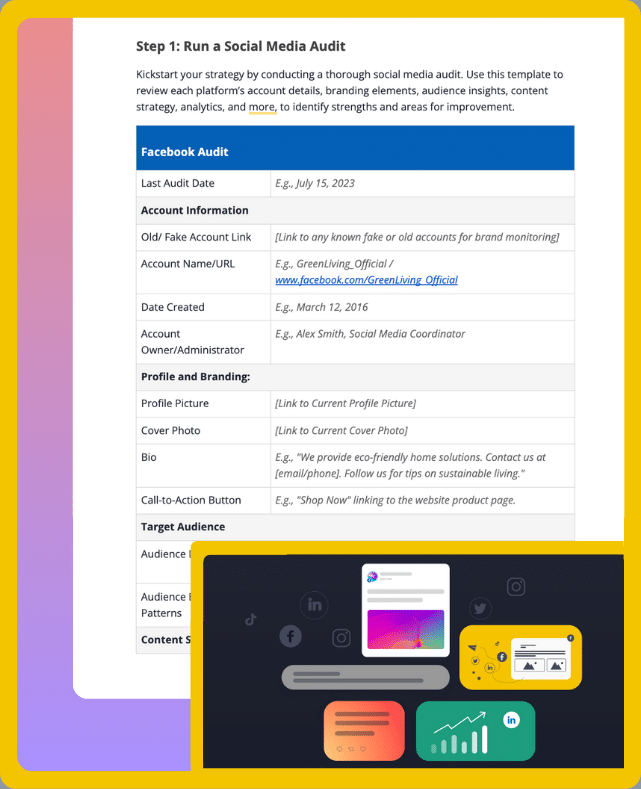
Get your free social media strategy template!

We’re SocialBee LABS SRL, part of WebPros. We use the information you provide to share relevant content & updates, as outlined in our Privacy Policy. You can opt out anytime.

Short summary

  • Social media management software is a good idea when manual tasks take up too much time, important messages go unanswered, or your team struggles to coordinate content.
  • SocialBee starts at $29/month.
  • The biggest savings often come from less manual tasks. Scheduling posts, checking engagement, and preparing reports can take several hours each week.
  • You may be paying for more tools than you need. A platform that combines scheduling, analytics, and community management can make up for several software subscriptions and lower your social media marketing pricing.
  • Choose software based on the tasks you actually perform. Account limits, publishing features, reporting, and team access matter more than a long feature list.
  • Start with a trial and measure the difference. Compare your management time before and after using the software to see whether the subscription makes sense financially.

What does social media management software do?

Social media management software helps businesses handle their social media accounts without having to complete every task separately on each platform.

Depending on the tool, you can plan content, schedule social media posts, respond to customers, and track how your accounts are performing.

Most social media management platforms offer a combination of these features:

  • Custom content creation: Write content, prepare static images or video content, and adapt posts for different social media channels.
  • Scheduling and publishing: Prepare posts in advance and publish them automatically across multiple platforms.
  • Community management: Monitor comments, mentions, and messages so potential customers aren’t left waiting for a response.
  • Analytics and reporting: Track reach, engagement, follower growth, and other metrics without collecting everything manually.
  • Team collaboration: Share drafts, leave feedback, and approve posts before publication.
  • Account grouping: Manage several brands or clients while keeping their content and schedules separate.

Some tools also include AI features that help you draft posts or plan your posting schedule.

How much does social media management cost?

Social media management software typically starts at around 10–30 per month for basic plans, while plans for agencies and bigger teams can cost 300–500 or more per month.

The price depends on the number of social media accounts you manage, the features included, and whether you need access for multiple team members.

Here’s what you can generally expect to pay:

Software plan

Typical monthly cost

Best for

Basic

10-30

Individuals and small businesses managing a few social media accounts

Standard

30-100

Businesses managing multiple platforms that need scheduling, analytics, and engagement tools

Advanced

100-300

Growing teams that need collaboration features, approval processes, and detailed reporting

Agency or enterprise

300-500+

Agencies and larger businesses managing many accounts, clients, and team members

These are an approximate monthly cost-estimate based on the market, not fixed industry averages. Some tools offer free plans with limited features, while enterprise subscriptions can exceed $1,000 per month.

When comparing social media management pricing, look at more than just the advertised monthly fee. Some providers charge additional costs for extra social media accounts, users, analytics features, or access to a unified inbox.

Annual billing can also lower the monthly subscription price, although it requires a longer commitment.

The best option money-wise is the one that covers your real business goals without making you pay for features or account limits you won’t use.

When should you invest in social media management software?

You should consider investing in social media management software when manual work starts taking away time from with other responsibilities, or when mistakes and missed opportunities keep happening.

Here are six signs that a subscription could be worth the cost:

  1. Managing social media takes up too much of your time
  2. You’re juggling too many tools
  3. You’re missing important comments and messages
  4. You’re spending too much time collecting performance data
  5. Your team is having trouble managing content together

1. Managing social media takes up too much of your time

Social media becomes expensive when tasks that should take minutes start consuming hours.

Think about how much time you spend each week writing captions, uploading images, scheduling posts, and checking whether everything published correctly.

For a small business owner, that’s time taken away from managing orders or making sales.

A simple way to figure out the cost is to multiply the hours spent managing social media by how much your time is worth. When you spend six hours per week on social media tasks and value your working time at $30 per hour, that’s approximately $780 per month in management time, based on 4.33 weeks per month.

You won’t eliminate all those hours with software. You’ll still need to create content and review your posts. However, even saving two hours per week would free up approximately $260 each month based on how much your time is worth.

What to look for: A tool that lets you prepare several posts together, customize them for each platform, and schedule them in advance.

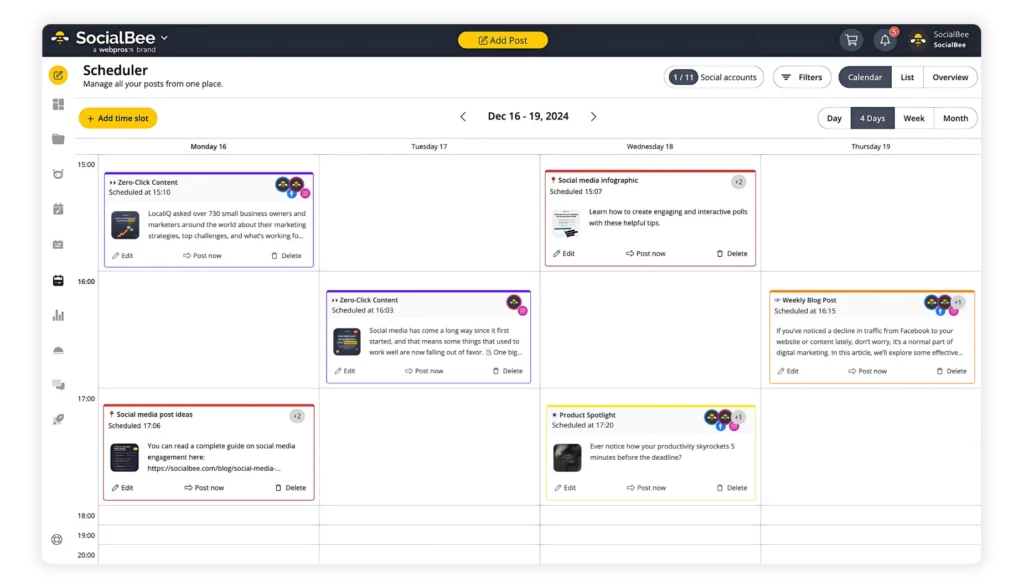
SocialBee is a social media management tool that helps you plan weeks of content in one sitting. You can generate post ideas, captions, and images with AI, customize each post for different social platforms, and organize your content into categories with their own posting schedules. This saves you time on everything from coming up with ideas to deciding what to publish and when.

2. You’re juggling too many tools

Your current collection of tools might include a scheduling app, an AI writing assistant, an analytics platform, and another subscription for managing comments.

Each service may be affordable individually. Together, they can become surprisingly expensive.

Check your last three months of software subscriptions and calculate how much you’re spending on social media.

Then look at which features you use regularly. If your scheduling tool already includes reporting features, paying for a separate reporting service might be unnecessary.

The same applies to tools that help you create content. You might be able to replace a separate caption generator with AI features included in your management platform.

What to look for: A tool that can replace several of the subscriptions you’re currently paying for, whether you use them to create content, schedule posts, track performance, or reply to comments and messages.

You don’t have to give up every tool, though. If you need custom illustrations, professional videos, or more detailed designs for your social media campaigns, it’s worth keeping the design and editing tools that help you create them.

3. You’re missing important comments and messages

A customer asks whether a product is available. Someone else sends a message about booking an appointment. Another person leaves a complaint under a recent post.

Each of these that you miss is an opportunity that passes you by to get a new client or clear the air about some negative misconceptions that surround your brand.

When your answer never arrives, it’s very likely that they’ll end up contacting your competitors. And if their community management is better taken care of, you just sent them revenue that could’ve been yours.

The problem gets bigger as your audience grows or you start managing more accounts.

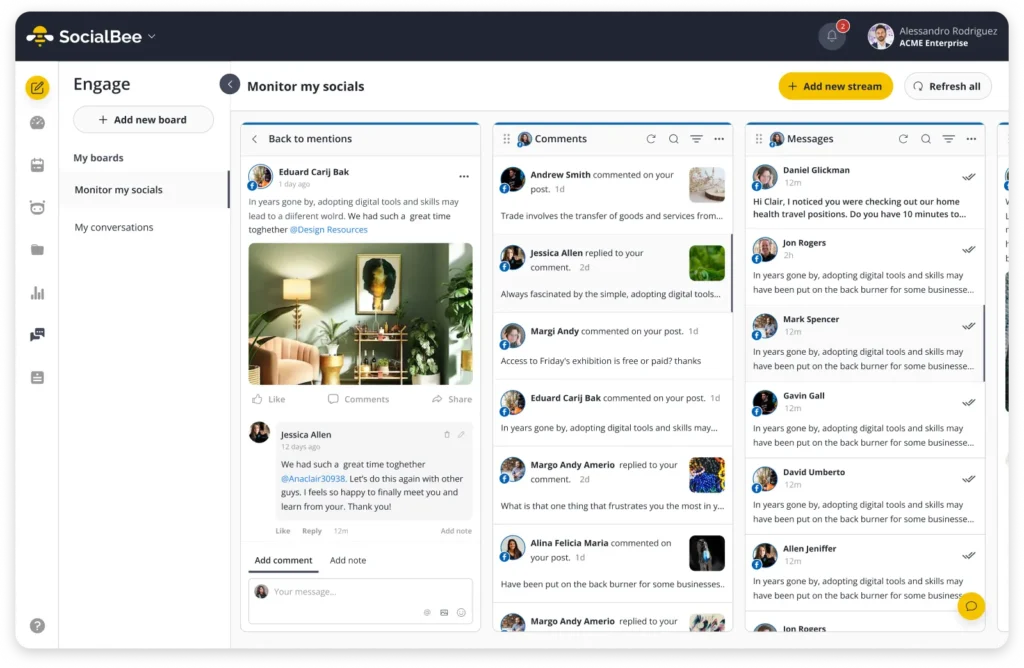
What to look for: A unified inbox that lets you manage comments, mentions, and messages in one place.

With SocialBee’s Engage Module, you can check and reply to comments, mentions, and messages without opening each social media app separately. It’s much easier to stay on top of customer questions, reply while people are still interested, and make sure conversations don’t go unanswered.

4. You’re spending too much time collecting performance data

Social media reporting can become time-consuming when you’re copying numbers from several platforms into spreadsheets.

Software with built-in analytics can make checking out the numbers easier and leave more time for actually analyzing the data about your social media presence.

Suppose your educational posts keep getting more saves than your promotional content. That gives you a reason to play around with more tutorials or practical tips. But if your time is spent moving around those numbers to show them to everyone involved in the social strategy, you have less of it to dedicate to actually making the content that matters.

What to look for: A tool that tracks your social media performance and lets you download ready-made reports.

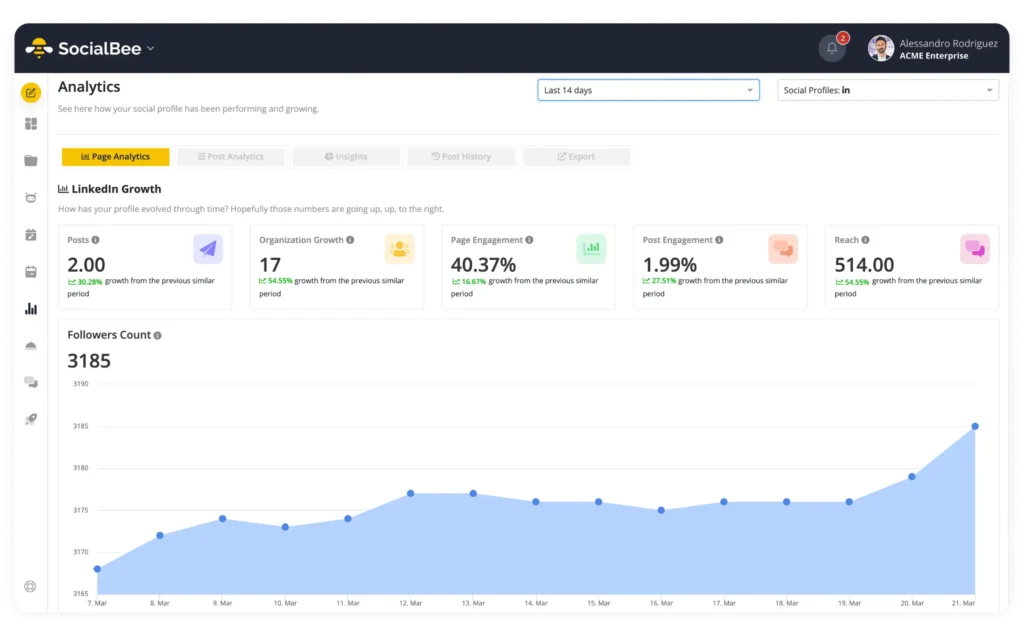
With SocialBee’s Analytics Dashboard, you can check your follower growth, reach, engagement, and best-performing posts across your social media accounts. You can select a date range to see how your results have changed over time and download PDF reports to share with your team or clients, without having to collect data from each platform and put together reports yourself.

5. Your team is having trouble managing content together

Shared spreadsheets and group chats can work when one person handles most of the posting, but problems usually appear when several people start contributing.

A management tool with collaboration features gives your whole team a better way to review upcoming posts.

For instance, the person responsible for social media content creation can prepare a draft, the marketing manager can leave feedback, and the approved version can be scheduled without sending files back and forth.

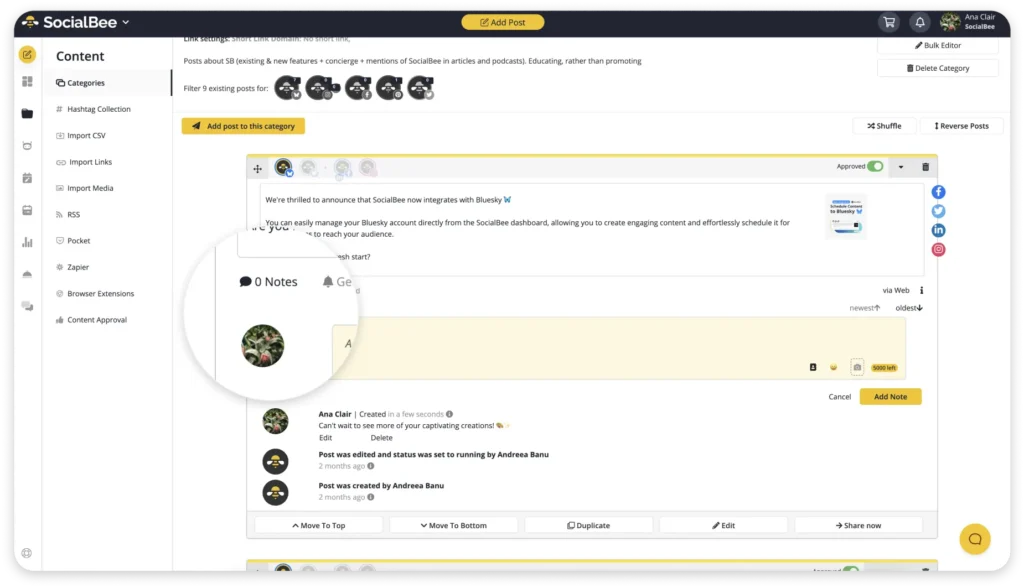
What to look for: Shared content calendars, team permissions, feedback options, and post approvals. Inside SocialBee, internal notes can be left directly on the posts that need a bit of extra attention, making editing and approvals much smoother.

6. You need a better way to keep your clients organized

Social media marketing agencies face a different challenge: every new client adds more accounts, content requests, and things to report on.

Imagine managing social media for a restaurant, a real estate agency, and an online retailer. These businesses are part of different industries, have a different target audience, and need different types of content.

The restaurant will need weekly event promotions, the retailer will focus on product launches, while the real estate business needs property listings and local market updates.

Mixing their schedules or publishing a post to the wrong account can damage client relationships.

As your social media agency grows, you’ll also need to give clients access to their content without exposing other businesses’ information.

What to look for: A tool that lets you manage each client separately, control who has access to their accounts, get content approved, and create individual client reports.

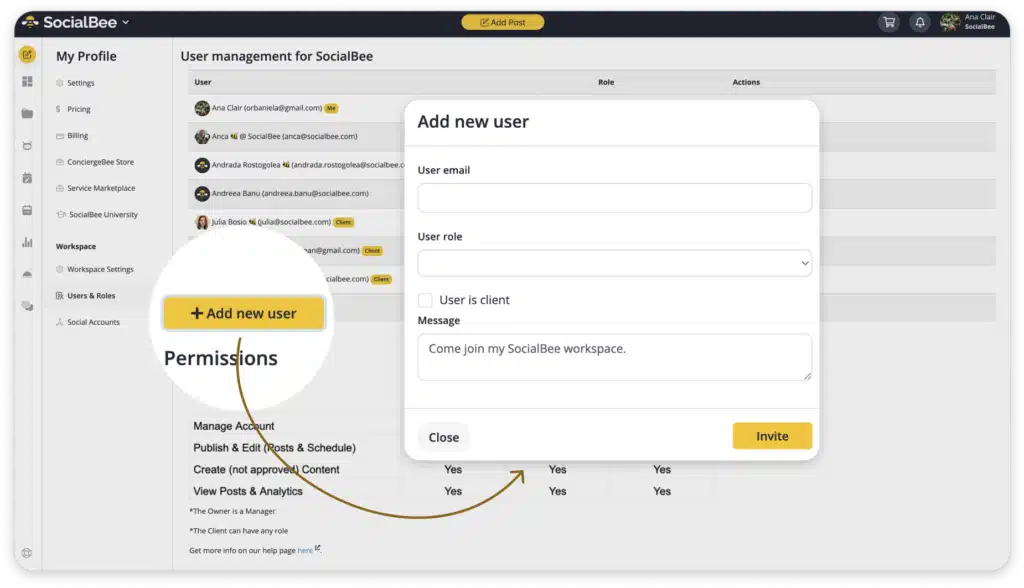
With SocialBee, you can set up a separate workspace for each client, with its own social media accounts, content calendar, and team members. You can give clients and team members access only to the workspaces they need, while any dedicated account manager can switch between clients in a few clicks without leaving SocialBee.

How to decide if a social media management tool is worth paying for

Before paying for social media management software, stick to only two or three tools and test them by doing your everyday tasks.

Here are four things worth checking before you commit:

  1. What’s included in the advertised price? Some tools charge per social media account or user, while others offer plans with fixed limits. Look at the pricing structure and calculate what you’d actually pay for all your accounts and team members, including any paid add-ons.
  2. Which limitations could become a problem? Look closely at scheduling limits, supported post formats, historical analytics data, and the number of users allowed. A cheaper plan may become expensive if you need to upgrade almost immediately.
  3. How much work does the software free up? During a free trial, complete tasks you already do regularly. For example, prepare and schedule a week’s worth of content, then compare the time spent with your current process. Pay attention to any steps you still have to complete manually.
  4. Can you change plans without too many steps? Check whether you can upgrade, downgrade, or cancel easily. Monthly billing may be preferable while you’re still figuring out what you need, even if annual subscriptions offer a discount.

One useful approach is to calculate the cost per account rather than comparing subscription prices alone. A $20 plan supporting two accounts costs $10 per account, while a $29 plan supporting five costs $5.80 per account. Of course, the comparison only makes sense if both plans include the features you need.

You should also check recent customer reviews for any repeated complaints about reliability, customer support, and surprise fees. These problems are difficult to spot on a social media pricing page.

By the end of your free trial, you should know exactly what you’re paying for and whether you’d be comfortable using the software every week.

How SocialBee helps you manage social media for less

SocialBee is a social media management platform for businesses, entrepreneurs, and agencies that want to handle content, scheduling, engagement, and reporting without paying for several separate tools.

SocialBee’s paid plans start at $29/month for five social media accounts, with a 14-day free trial available.
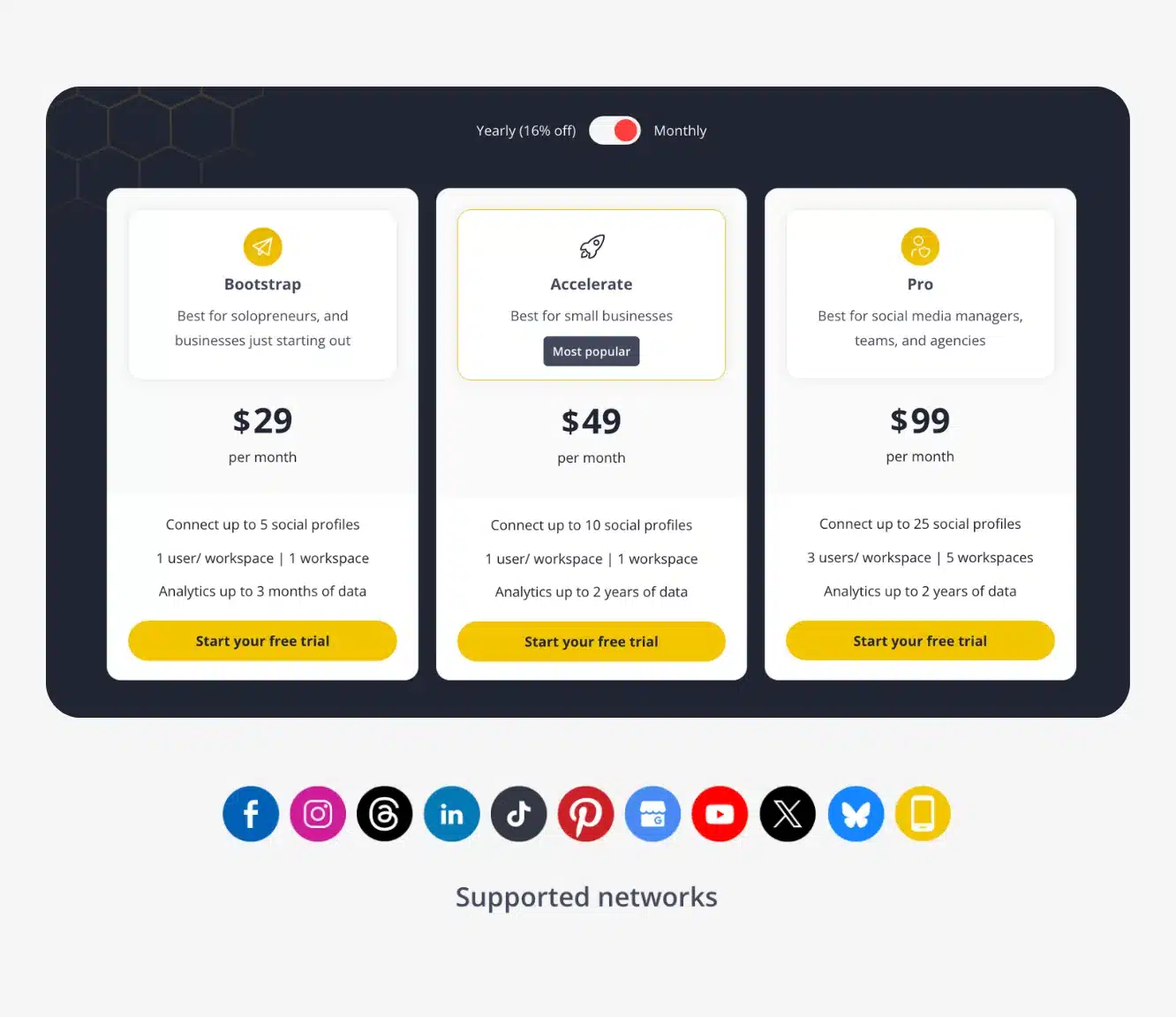
SocialBee’s pricing plans for social media management, comparing subscription costs, features, and account limits.

For businesses handling their own marketing, the platform can help reduce both subscription costs and the time spent on everyday tasks.

Here’s what you can do with SocialBee:

  • Prepare content for several social networks, adjust captions and visuals for each profile, and schedule the versions together.
  • Use AI to generate captions and images. You can also open Canva from the post editor and import your designs.
  • Use the visual calendar to review scheduled social media posts and notice gaps before they become a problem.
  • SocialBee’s unified inbox helps you manage comments, mentions, and messages in one place.
  • Review account and post analytics, then export PDF reports to share with colleagues or clients.
  • Invite colleagues, leave feedback, and approve content before publishing.
  • Agencies can use separate workspaces to manage different businesses and their accounts.

Your advantages when it comes to costs depend on what you’re replacing.

Picture this: you’re currently paying $25/month for scheduling, $20 for a caption-writing tool, and $30 for monthly reporting.

That’s $75 in monthly software costs.

A $29 SocialBee subscription could reduce that expense by $46 per month if its features match your needs.

However, the savings will depend on your current subscriptions and which SocialBee plan you require.

For businesses that already have an in-house team, SocialBee can help employees spend less time preparing posts and collecting reports.

For entrepreneurs managing their own accounts, it may delay the need to hire outside help for basic publishing tasks.

And for agencies, higher-tier plans are made for managing more accounts as the client list grows.

The best way to figure out the value is to test the features you’ll use most frequently and compare the time and money spent before and after.

Frequently asked questions

1. How much does social media management cost per month?

Social media management can cost around 20–100+ per month for software, while professional social media services may cost hundreds or thousands of dollars monthly.

The final price depends on the number of social media platforms managed, posting frequency, content requirements, and whether you’re hiring a freelancer or social media management agency.

2. Is it cheaper to manage social media yourself or hire someone?

Managing social media yourself is usually cheaper, particularly when you’re using affordable software.

However, managing multiple accounts can take a lot of time. Hiring a social media marketing expert or paying for social media management services may be worthwhile when you need professional strategy, original content production, or paid ads management.

Compare the cost of your time with the provider’s hourly rates or monthly retainer before deciding, and see which option also fits into your overall marketing budget.

3. How much should a small business spend on social media management?

A small business should choose a social media budget based on its marketing goals and available time.

Start by calculating your software costs and social media management package if you have one, content production expenses, and any planned ad spend.

For many small businesses, an affordable scheduling and analytics tool is a good first investment. Additional spending on professional social media management or paid advertising needs a clear purpose, such as reaching the right audience, generating inquiries, or increasing sales.

4. Do you need social media management software for one account?

No. If you publish occasionally on one account and can manage comments and analytics directly through the platform, its native tools may be enough.

Software becomes more useful when you publish frequently, need more advanced scheduling options, or want to spend less time managing your account.

5. Can social media management software replace a social media manager?

Social media management software can handle scheduling, reporting, and some routine content tasks, but it cannot fully replace an experienced social media manager.

A professional still brings creativity and knowledge of the business, industry, customers, as well as social media trends.

Software helps put a marketing strategy into practice. A social media manager decides how to use social media marketing to reach potential customers, and can also run your social media advertising campaigns.

Invest in social media management software when it matters

The right time to invest in social media management software depends on how much work you’re doing manually and what that work is costing your business.

For some businesses, native social media tools are enough. Others reach a point where missed messages, slow reporting, and hours spent scheduling posts make a paid subscription worth it.

Before purchasing, calculate your current expenses, identify the tasks taking up the most time, and choose a tool that addresses those problems.

You can start with SocialBee’s 14-day free trial to see whether it helps you manage your accounts more efficiently and at a lower cost.


SocialBee: Your AI-powered social media scheduling tool
Create posts, publish, analyze, engage and collaborate, all from SocialBee.
Summarize this post

SocialBee

Social media management made simple

Join thousands of brands growing with SocialBee

Read the latest articles

Level up your social media marketing with exclusive resources delivered straight to your inbox

We’re SocialBee LABS SRL, part of WebPros. We use the information you provide to share relevant content and product updates, as outlined in our Privacy Policy. You can opt out anytime.

Black Friday sale: Save 70% on monthly plans or 50% on yearly subscriptions  🎉