Close-up of a hand holding a smartphone displaying social media apps, including Instagram, TikTok, LinkedIn, YouTube, and X, with notification badges visible on the screen.

How to manage multiple social media accounts effectively

Managing multiple social media accounts sounds easy… until you’re the one doing it.

You’re jumping between accounts, planning content, replying to direct messages, trying to stay consistent across multiple social media platforms, and still make everything perform.

At some point, it just feels like you’re constantly catching up.

That’s exactly why so many people struggle with how to manage multiple networks and accounts without burning out. Not because they’re bad at social media management, but because they don’t have a system that actually supports them.

In this blog post, I’ll show you how I manage multiple social media accounts day-to-day, from planning and content creation to reporting and client feedback. Nothing overly complicated, just a structure that helps you stay consistent, save time, and make social media feel a lot more manageable.

Social media calendar template

Plan your posts in no time with hundreds of post ideas and Canva templates.

We’re SocialBee LABS SRL, part of WebPros. We use the information you provide to share relevant content and product updates, as outlined in our Privacy Policy. You can opt out anytime.

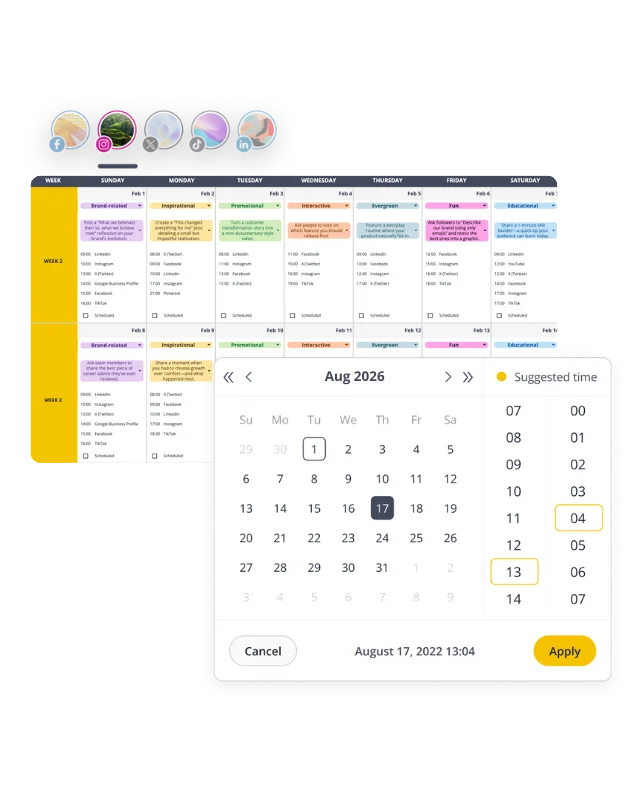
Social media content calendar for February 2026 with category-labeled posts and a scheduling popup showing suggested posting times.

Short summary

  • Run everything through one piece of social media management software, like SocialBee, so you’re not switching between tools or losing time on repetitive tasks.
  • Build one clear social media strategy and reuse it across various social media networks, instead of treating every account like a separate project.
  • Plan your content inside an editorial calendar and keep at least 14 days scheduled, so you’re not posting last minute.
  • Batch your work. Write captions, create visuals, and schedule social media posts in blocks instead of jumping between tasks.
  • Use content pillars, categories, and formats to make decisions faster and keep your social media presence consistent.
  • Reuse what works. Save proven formats and templates so you’re not creating everything from scratch every time.
  • Start with the hook. Strong openings make the biggest difference in how your content performs.
  • Keep feedback structured using approval workflows, so you’re not going back and forth on the same post.
  • Check performance once a week using your social media management tool to track performance, spot patterns, and adjust your content.
  • Match your tasks to your energy, so you can keep creating content without forcing it.
  • Focus on building a system you can repeat. That’s what makes managing multiple accounts sustainable over time.
My core philosophy when it comes to managing multiple social media accounts

I constantly find myself overwhelmed with tasks when I’m managing multiple social media accounts.

There’s always something to do. A post to schedule, comments to reply to, content to brainstorm, performance to check. It never really stops.

At some point, I realized the problem wasn’t the workload itself. It was that everything felt equally important.

So I started doing something very simple.

At the beginning of each week, I force myself to write down the three most important outcomes I want for each client.

Things like:

  • “Increase saves on educational posts”
  • “Drive traffic to the new landing page”
  • “Test a new content angle”

The moment I do that, everything changes.

Instead of jumping between 20 small tasks, I know exactly what actually matters. I stop trying to do everything, and I start focusing on what will move the needle.

Then I take it a step further.

I look at everything on my plate and ask:
What can I delegate, automate, or just not do at all?

Because a lot of the time, the overwhelm comes from holding onto things that don’t really require my attention.

And finally, I reflect.

Every week, I write down three things I learned. Usually from something that didn’t go as planned, feedback from a client, or a post that performed differently than expected.

That part keeps me from overthinking every decision, because I know I’m learning as I go.

This simple reset helps me deal with the three biggest challenges in this role:

  • Doing too much and feeling constantly behind
  • Creating non-stop without direction
  • Second-guessing every piece of content

It brings me back to what actually matters, what can wait, and what I can let go of. That’s the difference between feeling in control… and feeling completely scattered.

How I manage multiple social media accounts at once without burning out

Social media get easier because you get better at posting.

It gets easier when you stop treating every account like a separate task and start working from one system.

What helped me most was simplifying how I approach social media management. Same structure, same flow, applied across multiple social media accounts. That’s what makes managing multiple accounts feel consistent instead of chaotic.

These are the steps I follow every week to manage multiple social media accounts without burning out:

  1. Audit performance before planning new content
  2. Define 3–4 content pillars that guide all social media content
  3. Batch create content instead of working post by post
  4. Build a swipe file of post formats that already perform
  5. Write hooks first, then build the caption around them
  6. Use templates to speed up content creation
  7. Keep at least two weeks of content scheduled
  8. Structure feedback to avoid endless revisions
  9. Review analytics weekly and adjust
  10. Match tasks to your energy instead of forcing creativity

Step 1: Audit performance before planning new content

Before I create anything, I look at what already exists.

Most people skip this and jump straight into posting. That’s how you end up creating content that doesn’t land.

The way you approach this depends on whether you’re working with a new client or already managing the account.

For new clients: Audit the account before proposing any strategy

When I start with a new client, I don’t jump into content. I open their social media accounts and scroll.

I usually go through the last 30–60 posts and look for patterns.

What I check:

  • Which posts actually performed (saves, shares, comments > likes)
  • What formats they repeat (Reels, carousels, static, talking head)
  • What topics come up often
  • What people ask in comments and DMs
  • Whether there’s any consistency in posting

You can tell pretty quickly if there’s a system or if they’re posting randomly.

After 20–30 minutes, patterns start to show: what works, what’s missing and what consistently underperforms.

What I do with that:

  • Double down on 2–3 formats that already work
  • Cut or pause formats that never perform
  • Turn repeated questions into content ideas
  • Spot gaps (e.g. no educational content, no proof, no personality)

For existing clients: Review last month’s performance before planning the next one

When I’m already managing social media for a client, I don’t try to reinvent anything.

I look at last month and see what actually worked and what didn’t, then I make a simple call on what stays, what goes, and what I want to test next.

From there, I make a simple call:

  • 3 formats stay
  • 2 formats go
  • 1 new idea gets tested

The “new idea” usually comes from something that feels incomplete. Sometimes people keep asking about a topic but the content didn’t fully answer it. Other times a post did okay, but I can tell it would work better in a different format. Or there’s just something missing from the mix.

That’s enough direction for the next month.

Most people overcomplicate social media management. They keep adding more instead of cutting what doesn’t work. 

Keeping it this simple makes it easier to stay consistent and actually improve over time.

Step 2: Define 3–4 content pillars that solve audience problems

Most people overcomplicate this.

They pick random pillars like “tips” or “lifestyle” and then wonder why their content feels all over the place.

Keep it simple. Every piece of content should have a clear role.

I usually build content pillars around what the target audience actually needs from the brand and how I want the content to perform.

1. Solve a problem

Your core value content. Think tutorials, step-by-step guides, practical advice.

For a skincare brand, this could be educational posts, such as:

  • How to layer your products
  • Common SPF mistakes
  • Routines for specific skin types

When I need ideas here, I look at comments, FAQs, and things clients repeat over and over. 

2. Build authority

This is where you show you know what you’re doing without sounding forced.

Industry insights, opinions, breaking down trends, calling out misconceptions.

For SaaS, this could be reacting to new features, explaining what most companies get wrong, or sharing lessons from real campaigns.

Most of these ideas come from staying close to the industry: conversations, LinkedIn posts, or things you disagree with.

3. Create connection

The human side of the brand.

Employee advocacy stories, behind-the-scenes, team moments, founder perspective. Day-in-the-life content works well here too.

This is usually the easiest to create because it comes from what’s already happening. You just need to document it instead of overthinking it.

4. Convert attention

Content that ties back to results.

Use cases, testimonials, case studies, before-and-afters.

If you’re stuck, look at client wins, feedback, or even small results. You don’t need a huge success story to make this work.

You can also save UGC formats here.

Things like a customer quote, a testimonial, or a simple photo with a short caption. These are easy to reuse and take almost no time to create.

They also perform well. Around 93% of marketers say UGC outperforms branded content, so it’s a good one to keep in your swipe file.

You don’t need more than this.

Keeping it to 3–4 pillars makes managing multiple social media accounts way easier, because your content calendar stops feeling random. You know what you’re posting and why, across all social media platforms.

Most people write them down, but when it’s time to schedule content, they ignore them and go back to posting whatever feels right in the moment.

That’s why content ends up inconsistent.

What worked for me was operationalizing the pillars in the social media management tools I’ve used.

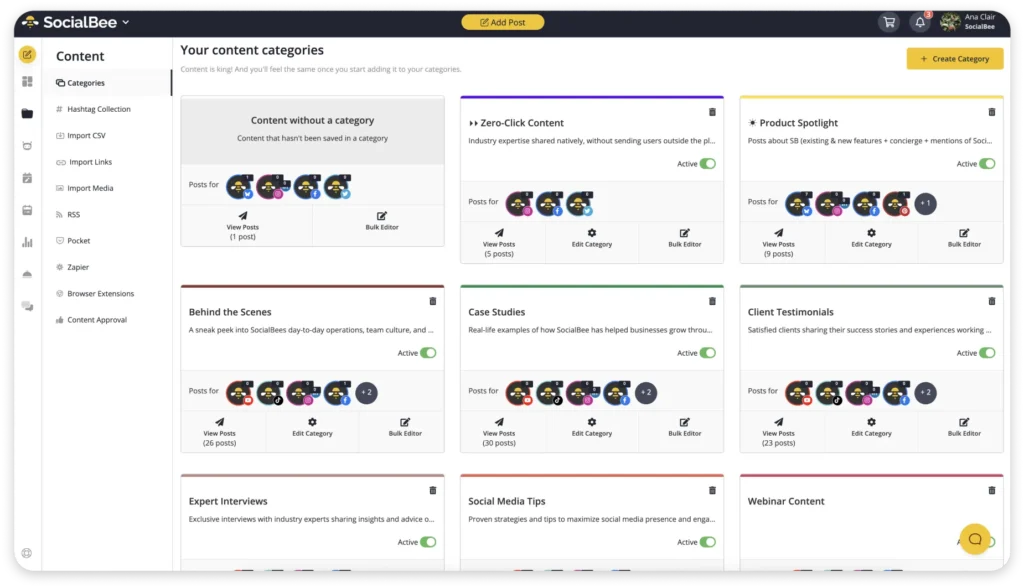
In SocialBee, I set up one category per pillar:

  • Educational
  • Authority
  • Connection
  • Conversion

Each category acts like a content bucket.

I assign posts to a category instead of thinking in terms of individual posts. Then I build a posting schedule based on categories, not specific content.

For example:

  • Monday → educational
  • Wednesday → authority
  • Friday → connection

From there, SocialBee pulls the next post from each category queue and publishes it based on the schedule.

So instead of manually deciding what to post every day, I’m just maintaining the queues:

  • Adding new posts
  • Removing outdated ones
  • Updating based on performance

This solves two things:

  1. You keep a consistent mix of content without thinking about it
  2. You can manage multiple accounts using the same structure

You’re not reinventing the process per client or platform. You’re just plugging different content into the same system.

Step 3: Create content in batches for each client

Early on, I used to work like this: jump between clients, write a caption, open Canva, check notifications, then switch to a different account. But by the end of the day, I had very little to show for it.

What I didn’t realize at the time is that every switch comes with a cost. Each time you move from one task to another, your brain has to reload context. You need to remember the brand voice, the goal of the post, and where you left off. Do that 20–30 times a day, and your output slows down.

The fix is simple…

Work on one client at a time, and group the work by type.

I take one client and go through everything in sequence. I use SocialBee to manage my social media content, where each client has their own workspace. All the content, drafts, and scheduled posts are all together, so I’m not mixing brands or sharing the wrong things.

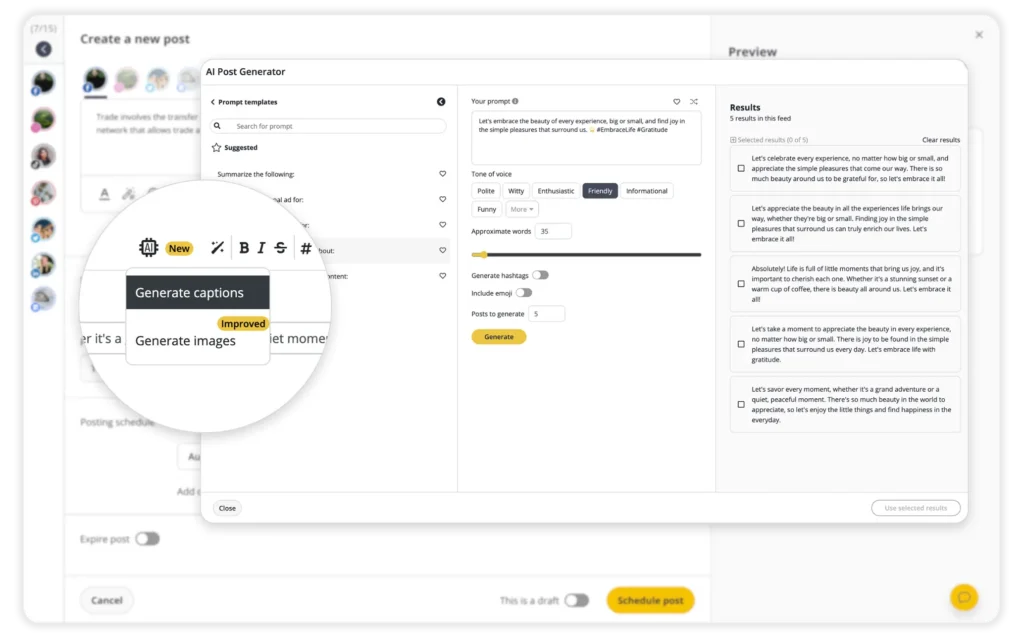
I start with captions and finish them in one sitting. To speed this up, I use SocialBee’s AI to generate rough drafts based on the ideas I have saved.

Then, inside the same post editor, I create platform-specific versions of the post. For example, I shorten the caption for X, remove hashtags for Facebook, and delete any links from the Instagram caption since they’re not clickable. Instead of copying the post into multiple tools, I customize each version in one place and schedule them together.

Then I move to visuals. The direction is already set, so design decisions are faster. 

By the time I finish, I already have at least two weeks of content created and scheduled. I’m not thinking about what to post tomorrow or filling gaps during the week.

Step 4: Build a swipe file of proven content formats

Thinking of new ideas every day sounds great at first, but it quickly becomes exhausting, especially when you’re managing multiple accounts and constantly expected to come up with something new.

At some point, I realized the problem wasn’t that I didn’t have ideas. It was that I was treating every post like it had to be completely different from the last one.

So I changed how I approach content.

Now, whenever something performs well, I don’t just save it and move on. I take a moment to understand how it’s actually put together.

Not the design. Not the exact wording. The structure behind it.

I pay attention to:

  • How the hook is framed and how quickly it pulls you in
  • How the content is broken down and how easy it is to follow
  • What format it uses (steps, list, story, before/after)
  • What action it leads to at the end

After doing this for a while, you start noticing the same patterns repeating.

Certain formats show up again and again, across different accounts and even different industries.

For example, I kept seeing posts that:

  • Open with a very direct callout or a clear problem
  • Walk you through something in a simple, structured way
  • End with a clear next step (save, comment, click)

Or posts that are:

  • Practical and easy to apply, which is why people save them
  • Simple before-and-after comparisons, which work because they’re clear and easy to trust

So instead of saving random posts I’ll never revisit, I started saving formats I can actually reuse.

I write them down in a way that makes sense when I’m creating content later:

  • Mistake-based hook + carousel + save CTA
  • Direct callout + short video + comment CTA
  • Before/after + short explanation

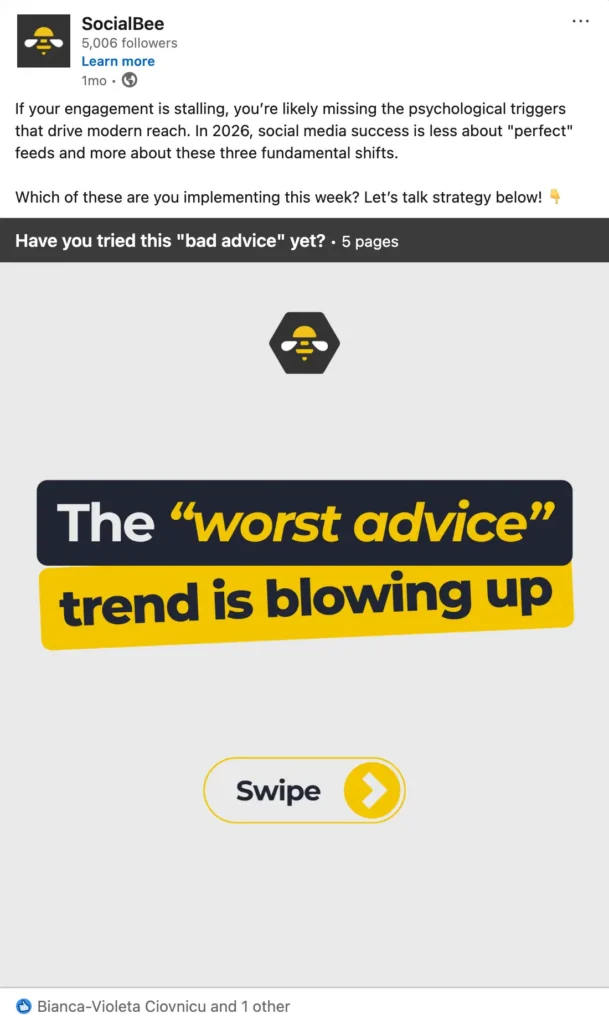
LinkedIn post by SocialBee discussing social media engagement strategies, featuring a carousel slide with the text “The ‘worst advice’ trend is blowing up” and a swipe prompt.

When it’s time to create content, I’m not sitting there trying to come up with something from scratch.

I pick a format I know works, and I plug in a topic that fits the client. That’s the shift.

Because when you’re managing multiple social media accounts, the real challenge isn’t coming up with idea, but making constant decisions about what to post next.

And once you reduce that, the whole process becomes much easier to manage.

Step 5: Write hooks first and captions second

Most posts are decided in the first line.

If the hook doesn’t catch attention, people don’t read the rest, no matter how good the content is.

So I stopped writing captions from top to bottom.

Now I start with the hook and spend more time on it than anything else.

I usually write a few variations first. Not overthinking it, just different angles on the same idea. Then I pick the one that feels the most direct and build everything else around it.

For example, if I want to talk about a common mistake, I might test a few versions:

  • “Most brands get this wrong…”
  • “You’re probably doing this without realizing it”
  • “3 mistakes I see every week as a social media manager”

Same topic, different entry points.

Once the hook is clear, the rest of the caption becomes much easier because you already know what the post is about and how it should flow.

What also helps is not trying to write everything from scratch every time.

Inside SocialBee, I can take a hook and quickly turn it into a first draft using the AI caption generator. It gives me a structured starting point, which I can then adjust based on the client, tone, or platform.

So instead of staring at a blank page, I’m refining something that already exists.

And because it’s part of the same workflow, I can go from hook → draft → edit → schedule without switching tools or losing time.

It sounds simple, but that kind of setup saves a lot of time and keeps the process consistent.

Step 6: Build visual templates so content isn’t designed from scratch every time

Designing every post from scratch slows you down more than you realize. Not just in time, but in how inconsistent everything starts to look.

When you’re managing multiple social media accounts, you don’t have the space to rethink layouts, spacing, and structure every single time you open Canva.

So I stopped doing that.

I rely on templates that are already built properly, so I’m not making design decisions over and over again.

For each brand, I usually keep a small set that covers what I actually post on a weekly basis. A carousel format with a clear text hierarchy, a quote layout that’s easy to update, an educational format that’s built for readability, and a Reel cover that fits nicely into the grid.

The important part is setting these up right from the start.

I spend time upfront making sure the font sizes, spacing, and layout structure are locked in, so when I come back to create content, I’m not adjusting things every time. The headline goes in the same place, supporting text follows the same structure, and the CTA is already built into the layout.

After that, it’s not really “designing” anymore.

It’s just filling in content.

When I sit down to create posts, I open a template, update the text, swap visuals if needed, and move on. I’m not staring at a blank file trying to figure out how it should look.

If I’m creating 10 posts, I’m not designing 10 different layouts. I’m reusing 2–3 formats that already work and applying them across different topics.

That’s how you stay consistent without slowing yourself down.

The other thing that made a big difference is cleaning up the flow between tools.

If you’re designing in Canva and then downloading every file just to upload it again into your scheduler, you’re adding extra steps that don’t need to be there.

So I keep everything connected.

I build and store all templates in Canva, make quick edits there, and then send the design straight into SocialBee. From there, I just assign it to the right category, tweak the caption if needed, and schedule it.
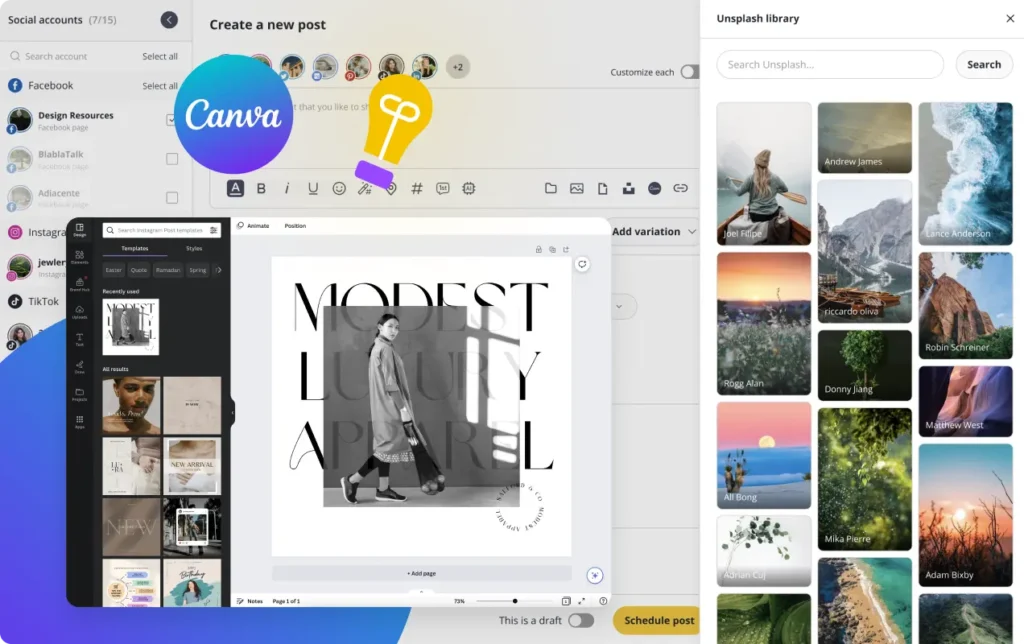
So the process becomes very straightforward: open template → update → send to SocialBee → schedule

It doesn’t sound like much, but when you’re doing this across multiple accounts every week, it saves a lot of time.

And more importantly, it keeps your output consistent without you having to think about it every single time.

Step 7: Schedule content two weeks ahead to create breathing room

Working post to post sounds manageable until you’re actually doing it.

You’re constantly in execution mode, always a bit behind, and every small delay starts to stack. A client sends feedback late, something needs to be changed, a post takes longer than expected, and suddenly you’re trying to fix things the same day they’re supposed to go live.

That’s not a great place to be.

So I don’t work like that anymore.

I make sure there are always at least two weeks of content scheduled ahead for every account I manage.

That buffer gives you control back.

You’re not opening your scheduler wondering what needs to go out today. It’s already planned. Which means your time is spent reviewing what’s coming up, adjusting things where needed, and improving the content instead of rushing to get something out.

It also makes client work easier to manage.

If feedback comes in, you’re not under pressure to implement it immediately. You have space to apply it properly across upcoming posts. If something isn’t performing, you can adjust direction early instead of realizing too late.

And when something unexpected comes up, a trend, a reactive post, a last-minute idea, you can slot it in without breaking the entire schedule.

That’s the real benefit.

You’re not just ahead on content. You’re working in a way that gives you room to think, adjust, and stay consistent without constantly catching up.

Step 8: Organize collaboration and feedback to avoid endless revisions

Feedback gets messy very quickly if you don’t control how it comes in.

At the beginning, I had clients sending comments everywhere. Some would reply in DMs, others would send emails, and then a few days later there would always be “one more small change.” It meant going back to the same post multiple times, which is where a lot of time gets lost.

So I stopped allowing feedback to happen randomly.

Now I send content in batches, usually one to two weeks at a time, and I ask for everything to be reviewed together.

That already solves most of the problem.

Instead of getting scattered comments throughout the week, I get one round of feedback that I can actually work through in one sitting. I open the batch, go through each post, apply the changes, and move on.

The other important part is keeping feedback in one place.

If you’re switching between emails, messages, and documents, you’re wasting time just trying to track what needs to be changed. And that’s usually where mistakes happen too.

So I keep everything tied to the content itself.

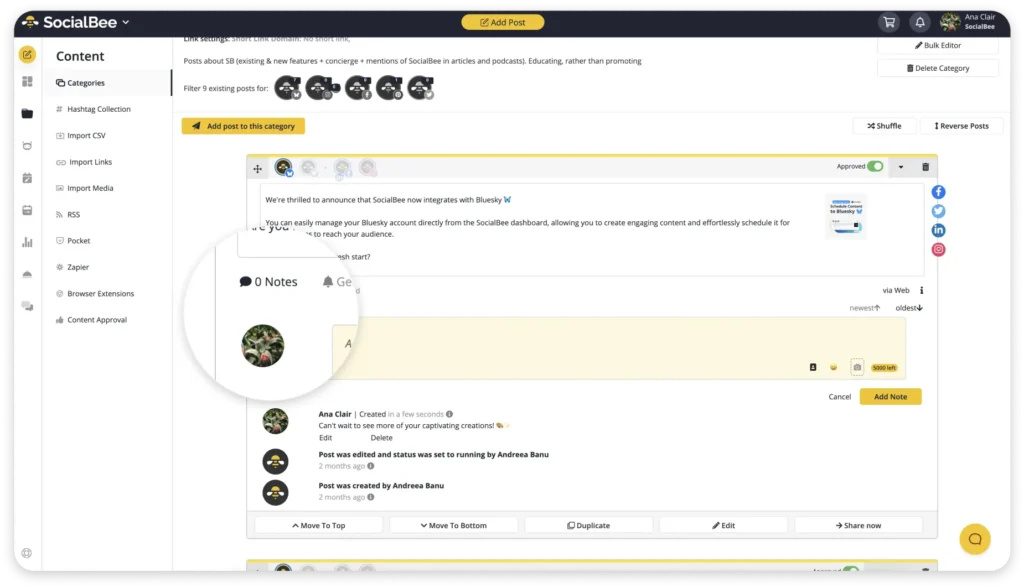
Inside SocialBee, I use the approval flow, which means I can send posts for review and clients or team members can leave comments directly on each post.

Every comment is attached to the exact piece of content, so when I’m editing, I can see everything in context. No guessing, no searching for messages.

Once I’ve applied the feedback and the post is approved, it’s done and ready to go.

Step 9: Generate simple weekly reports instead of complex monthly ones

If you leave reporting for the end of the month, it almost always turns into something you avoid.

It builds up in the background, and by the time you sit down to do it, you’re trying to remember what happened weeks ago. Then it turns into a 2–3 hour task that feels heavier than it should.

So I stopped doing it that way.

I keep it simple and consistent. Once a week, I spend around 10–15 minutes per client, just to stay close to what’s happening.

I open my social media management tool, SocialBee, look at all accounts in one place, and go through a quick check. Nothing deep, just enough to understand where things are going.

I usually look at:

  • Top 3 posts by engagement, to see what people actually interacted with
  • 2 posts with the most saves or shares, because that’s usually where the value is
  • 1 post that had reach but didn’t perform, to understand what didn’t land
  • Follower change, just to see if things are moving in the right direction

That’s already enough to get a clear picture.

From there, I write down three short takeaways. Not long notes, just a few lines that capture what I’m noticing.

It could be something like realizing that carousels are getting saved more than videos, or that shorter captions are easier for people to engage with, or that posts without a clear opening just don’t hold attention.

I keep these notes in a simple doc per client and come back to them when I plan the next batch of content.

So instead of guessing what to post, I’m building on what I’ve already seen working.

The whole point is to keep it light.

You’re not trying to prove anything or build a detailed report. You’re just paying attention and making small adjustments based on that.

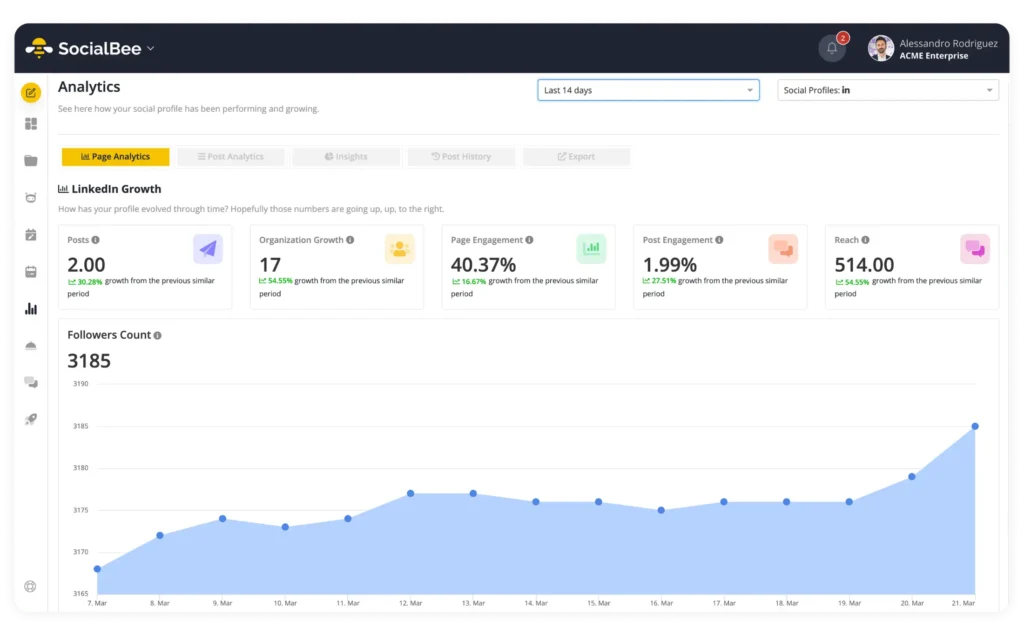
To make it faster, I use the analytics inside SocialBee, so I don’t have to open each platform separately or jump between tabs.

Everything is in one place, so I can quickly scan performance, see what stands out, and move on.

It takes a few minutes, but it keeps you connected to the accounts in a way that actually helps when it’s time to create content again.

Step 10: Match tasks to your energy level throughout the day

Not every day feels the same, so I stopped trying to work the same way every day.

Some days I can focus for a few hours and get a lot done. Other days, even simple things feel slow. Instead of forcing it, I plan my work around that.

When I’m focused, which usually lasts 2–3 hours at most, I use that time for anything that requires thinking.

That’s when I’ll sit down and write multiple captions in one go, come up with new post ideas, or plan content for the next one to two weeks. It’s easier to stay in the same context and move faster instead of switching between tasks.

When that focus drops, I don’t try to push through it.

I switch to tasks that are more operational and don’t require much creative energy.

Things like:

  • Scheduling a batch of posts
  • Uploading visuals and organizing them properly
  • Replying to comments and messages
  • Cleaning up the content calendar

On lower-energy days, I’ll also reuse content.

That usually means taking a few older posts that performed well, updating the angle slightly, and reposting them, or adapting existing content for another platform.

You’re still moving things forward, just in a different way.

The point is not to stop working when you’re low on energy, but to match the type of work to how you feel instead of forcing creativity when it’s not there.

That’s what makes the workload more sustainable, especially when you’re managing multiple social media accounts at the same time.

How I turn this strategy into a working system with SocialBee

Everything above only works if you actually apply it in a way that you can repeat consistently.

For me, that means running everything through one system instead of managing each account separately or jumping between tools throughout the day. That’s what keeps things structured when you’re working across multiple clients or platforms at the same time.

The biggest shift for me was moving away from thinking in terms of individual posts and starting to organize everything around categories and repeatable formats, because that’s what makes the process manageable in the long run.

This is how I actually set it up.

For each client, I create a separate workspace, so their content, social media scheduling, and performance are all coordinated. It sounds simple, but it makes a big difference when you’re switching between accounts and need everything to stay clear and easy to navigate.

Then I set up content categories based on the pillars, which means that instead of deciding what to post every time I open the calendar, I’m simply adding content into the right category, knowing that each one already has a purpose.

Each category is tied to a simple posting schedule, so I already know the kind of content that’s going out during the week without having to manually balance things every time I schedule something new.

When I create content, I don’t approach it post by post.

I usually work in batches and add multiple pieces of content into each category at once, based on formats that I already know perform well, which means I’m not starting from scratch every time I sit down to create.

Once the content is in place, SocialBee handles the publishing and rotation, so I’m not thinking about what should go out next or whether I’m repeating the same type of content too often.

I also make sure that I’m always at least one to two weeks ahead with scheduled content, because that buffer removes the pressure of last-minute posting and gives me space to focus on improving what’s already working.

When it comes to different platforms, I don’t treat them as completely separate workflows.

I start from the same core idea and then adjust the format or caption directly inside SocialBee, depending on where the content is going, so the process stays efficient without making the content feel repetitive.

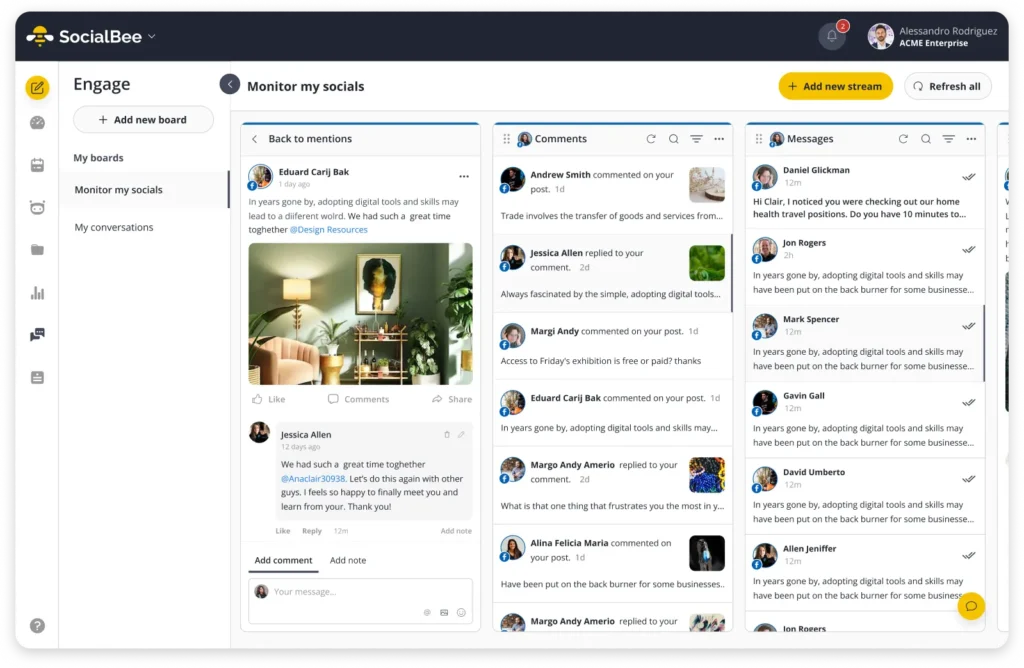
For engagement, I keep everything centralized as well, which means I can manage comments, messages, and replies in one place instead of switching between platforms all day.

Then once a week, I take a step back and look at performance.

I’m not going deep into reports, I’m just paying attention to what people are actually responding to, what gets saved or shared, and what doesn’t seem to land.

Based on that, I update the system by keeping the formats that are working, removing the ones that aren’t, and introducing one small test based on what I’m seeing.

Over time, this turns into a simple loop that I can rely on:

Create → organize → schedule → review → adjust

And that’s what makes it sustainable.

Because when you’re managing multiple social media accounts, the real challenge isn’t coming up with more ideas, it’s being able to run everything in a way that reduces constant decision-making, keeps your content consistent, and allows you to improve over time without starting from zero every week.

Frequently asked questions

How often should you check social media analytics?

Not every day.

Once a week is enough to track performance and see what’s working. Then once a month, zoom out and look at patterns across your social media accounts.

Most social media management or analytics tools already bring everything together, so you’re not checking every social media platform separately. The goal isn’t to overanalyze, it’s to track performance just enough to make better decisions.

What tools help manage multiple social media accounts efficiently?

If you’re handling several accounts, having a proper social media management platform like SocialBee makes a big difference.

Without one, you end up switching between platforms and repeating the same tasks over and over again.

A good tool lets you manage everything from one place, schedule content across platforms, and keep things organized without overcomplicating your workflow.

What is the best way to manage multiple social media accounts for a business?

Stop treating every account like a separate project.

That’s the mistake that makes everything feel time-consuming.

Instead, build one system you can reuse:

  • One strategy
  • One content calendar
  • One way to manage content and engagement

Then adapt it to each platform.

You’re not starting from scratch every time, you’re just adjusting the format.

How do you stay consistent when managing multiple social media platforms?

Consistency usually breaks when everything is scattered.

If you’re juggling multiple social accounts across different social media channels, the easiest way to stay consistent is to bring everything into one platform.

A good social media management tool or social media management platform lets you plan your content in a shared editorial calendar, schedule posts across multiple platforms, and track performance from one dashboard. That alone makes it much easier to stay active without relying on last-minute work.

What also helps is having a clear content strategy.

Instead of creating content randomly, you’re working from defined pillars and posting with a set posting frequency, so your social media presence stays consistent across each social channel.

From there, it’s about keeping the process simple:

  • Plan content ahead
  • Reuse formats instead of starting from scratch
  • Cross-post where it makes sense, adjusting for each specific platform

If you’re a solo marketer or part of a small team, this matters even more. You don’t have time to manage everything manually.

Using one system to plan, schedule, and manage engagement in a timely manner makes the whole process easier to handle and helps you stay aligned with your social media goals.

Final thoughts: you don’t need to work more to manage more accounts

Things start to feel messy when everything is scattered.

Different tools, different platforms, constant switching between accounts, checking messages, trying to keep up with posting… it adds up quickly.

Once everything sits in one place, it becomes much easier to manage.

With SocialBee, you can run everything from a single dashboard. Plan content in a calendar, schedule posts ahead, track performance, and handle comments or messages without jumping between platforms.

It also simplifies the smaller things that usually take up time. Repurposing content, keeping your brand voice consistent, organizing approvals, or working with a team without losing track of feedback.

You don’t need more content or more tools.

You need a system that keeps everything structured, so you can stay consistent and keep things moving without friction.

If you want to simplify your workflow, you can try SocialBee for free for 14 days and see how it fits into the way you already work.

SocialBee blog CTA box visual with the supported platforms
SocialBee: Your AI-powered social media management tool
Create posts, publish, analyze, engage and collaborate, all from SocialBee.
Summarize this post

Manage your social media with SocialBee: publishing, AI assistance, Canva magic, analytics, unified inbox, and more.

SocialBee Supported Social Platforms with Round Logos
14-day free trial, no credit card required

Related articles

Level up your social media marketing with exclusive resources delivered straight to your inbox

We’re SocialBee LABS SRL, part of WebPros. We use the information you provide to share relevant content and product updates, as outlined in our Privacy Policy. You can opt out anytime.

Out of post ideas? Get our FREE social media calendar!

Access 500+ content ideas, post examples, and Canva templates.
We’re SocialBee LABS SRL, part of WebPros. We use the information you provide to share relevant content and product updates, as outlined in our Privacy Policy. You can opt out anytime.

... and turn your ideas in ready-to-share posts in seconds

Use SocialBee’s Free AI Post Generator to create content for your social media profiles.
SocialBee free AI generator